JM210A - Juicer JUICEMAN - Free user manual and instructions
Find the device manual for free JM210A JUICEMAN in PDF.


| Product Type | Juicer (Centrifugal) |
| Brand | Juiceman |
| Model | JM210A (Professional Series 210) |
| Power Consumption | 410 Watts |
| Voltage | 120 V AC |
| Frequency | 60 Hz |
| Horsepower | 0.25 HP |
| Amperage | 4 Amps |
| Weight | 6.9 pounds (3.13 kg) |
| Feed Tube Area | 2.0 square inches (12.9 cm²) |
| Cutter Blade Diameter | 3.0 inches (7.6 cm) |
| Speed Settings | High (hard produce) and Low (soft produce) |
| Speed Control Type | Solid state with closed loop feedback |
| Safety Features | Safety switch (prevents operation unless assembled), thermal safety switch, polarized plug |
| Cord Length | Short (approx. 2-3 ft) - extension cord not recommended |
| Construction Material | Plastic housing, stainless steel blade basket |
| Dishwasher Safe Parts | Juice bowl, juicer cover, blade basket (top rack only, occasional) |
| Warranty | 1 year limited (USA only) |
| Included Accessories | Food pusher, pulp basket (not shown), instruction manual |
| Intended Use | Household juicing of fruits and vegetables |
Frequently Asked Questions - JM210A JUICEMAN
User questions about JM210A JUICEMAN
0 question about this device. Answer the ones you know or ask your own.
Ask a new question about this device
Download the instructions for your Juicer in PDF format for free! Find your manual JM210A - JUICEMAN and take your electronic device back in hand. On this page are published all the documents necessary for the use of your device. JM210A by JUICEMAN.
USER MANUAL JM210A JUICEMAN
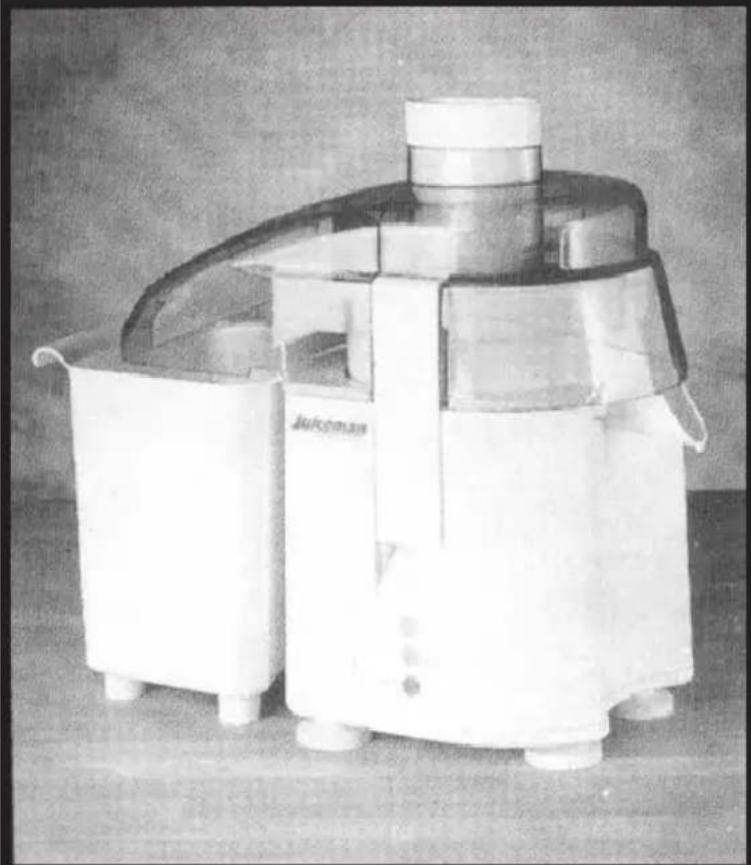
Professional Series 210
natural_image
Black-and-white photo of a white industrial machine with a curved top and side-mounted base, no visible text or symbols.INSTRUCTION MANUAL
IMPORTANT SAFEGUARDS
When using electrical appliances, basic safety precautions should always be followed including the following:
- Read all instructions.
- To protect against risk of electrical shock do not put cord, plugs, or appliance in water or other liquid.
- Close supervision is necessary when any appliance is used by or near children.
- Unplug from outlet when not in use, before putting on or taking off parts, and before cleaning.
- Avoid contacting moving parts.
- Do not operate any appliance with a damaged cord or plug or after the appliance malfunctions, or is dropped or damaged in any manner. Contact Consumer Service for examination, repair or electrical or mechanical adjustment.
- The use of attachments, including canning jars, not recommended by the manufacturer may cause fire, electric shock, or injury.
- Do not use outdoors.
- Do not let cord hang over edge of table or counter.
- Do not let cord contact hot surface, including the stove.
- Always make sure Juicer Cover is clamped securely in place before motor is turned on. Do not unfasten Locking Clamps while Juicer is in operation.
- Press the OFF Button and unplug from electrical outlet after each use of your Juicer. Make sure the Motor is completely stopped before disassembling.
- Do not put your fingers or other objects into the Juicer opening while it is in operation. If food becomes lodged in opening, use Food Pusher or another piece of fruit or vegetable to push it down. When this method is not possible, press the OFF Button, unplug Juicer from electrical outlet, and disassemble Juicer to remove remaining food.
SAVE THESE INSTRUCTIONS
Additional Important Safeguards
- All users of this appliance must read and understand this Instruction Manual before operating or cleaning this appliance.
- The cord to this appliance should be plugged into a 120V AC electrical outlet only.
- Do not leave this appliance unattended during use.
- If this appliance begins to malfunction during use, immediately press the OFF Button and unplug the cord. Do not use or attempt to repair the malfunctioning appliance.
- IF this appliance falls or accidentally becomes immersed in water, unplug it immediately. Do not reach into the water! Do not use this appliance after it has fallen into or becomes immersed in water.
- To reduce the risk of injury to persons or property, never use this appliance in an unstable position.
- Do not use this appliance for other than its intended use.
POLARIZED PLUG
This appliance has a polarized plug (one blade is wider than the other). To reduce the risk of electric shock, this plug is intended to fit into a polarized outlet only one way. If the plug does not fit fully in the outlet, reverse the plug. If it still does not fit, contact a qualified electrician. Do not attempt to modify the plug in any way.
SHORT CORD INSTRUCTIONS
A short power-supply cord is provided to reduce the risk resulting from becoming entangled in or tripping over a longer cord.
Do not use an extension cord with this product.
ELECTRIC POWER
If the electrical circuit is overloaded with other appliances, your appliance may not operate properly. It should be operated on a separate electrical circuit from other appliances.
THERMAL SAFETY SWITCH
Your Juiceman® Professional Series 210 is equipped with a Thermal Safety Switch. In the unlikely event of over-heating, the Juiceman® will shut down immediately. If this should happen, press the OFF Button, unplug the machine and let the Juicer cool down before resuming juicing.
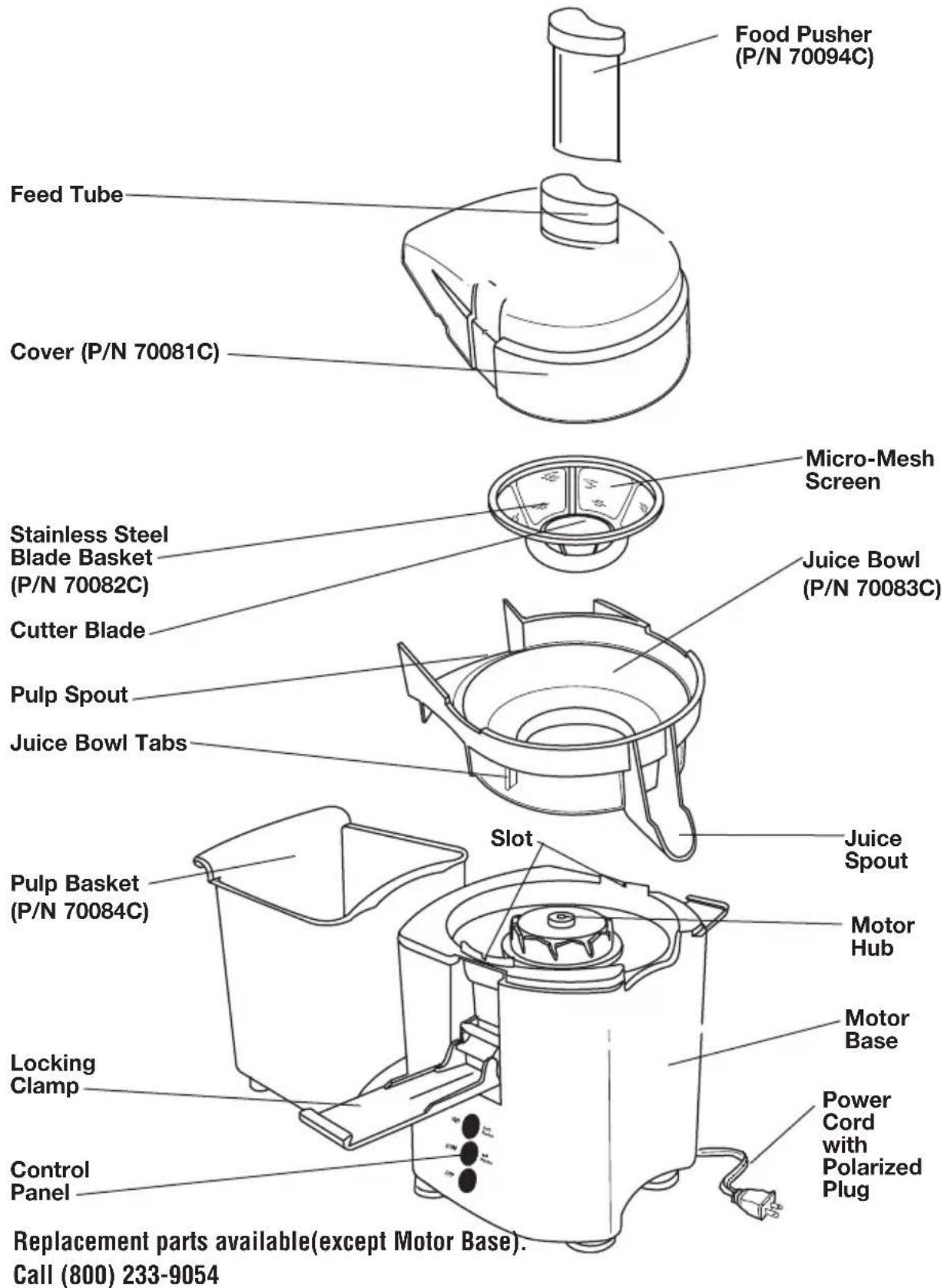
YOUR JUICEMAN® PROFESSIONAL SERIES 210
PRODUCT MAY VARY SLIGHTLY FROM ILLUSTRATIONS
BEFORE FIRST USE
The Juiceman® Jr. comes almost completely assembled in the box. We suggest taking it apart and washing the removable parts in warm water with a biodegradable, non-abrasive liquid detergent before the first use. This will eliminate any traces of dust or residue from manufacturing or shipping.
NOTE: Your Juicer may be shipped with a protective cardboard insert between the Feed Tube and Cutter Blade (on the Blade Basket). Remove this and any other protective packaging before using your Juicer.
CAUTION: Never rinse or immerse the Motor Base in water or any other liquid.
NOTE: Refer to the Fresh Juice Recipes & Menu Planner for juice recipes, pulp recipes, sample menus, and tips on buying, cleaning and storing.
- Make sure the Blade Basket is securely seated and the Pulp Basket is at the rear of the Juicer, ready to catch pulp. To save cleaning time, line the Pulp Basket with a plastic produce bag (the kind you put your produce in at the grocery store).
- Place a glass underneath the Juice Spout.
- Read assembly and disassembly directions. Make sure the Juicer is properly and completely assembled. The Juicer will not turn on unless properly assembled.
PREPARING FRUITS AND VEGETABLES FOR YOUR JUICER
- Clean all produce thoroughly, using a natural bristle brush. If you are not using organic produce, we recommend using a biodegradable cleaner to help remove pesticide residue.
- Remove and discard the outer leaves of non-organic produce and peel any waxed fruit or vegetable.
- Trim away any discolored or bruised sections.
- The skin may be left on all produce (including pineapple and melons) except oranges, grapefruit, and tangerines. The oil found in these skins tastes bitter and is difficult to digest.
- Remove melon seeds when possible, as they may escape through the top of the Feed Tube while juicing. The pits of fruits such as cherries, pears, and peaches should also be removed.
- Cut produce into pieces small enough to fit into the Feed Tube. Use the Food Pusher to gently direct produce through the Tube. NEVER PUSH PRODUCE INTO THE FEED TUBE WITH YOUR FINGERS.
- Leafy greens, parsley, wheat grass, and sprouts should be bunched up into a small, tight ball and pushed through with either a carrot or the Food Pusher.
- Bananas are not suitable for juicing; a clear juice cannot be obtained from them and residue left in the machine can clog the micro-mesh screen. Produce such as apricots, plums, pears, peaches, and tomatoes should be firm for best results when juicing.
CONTROL PANEL
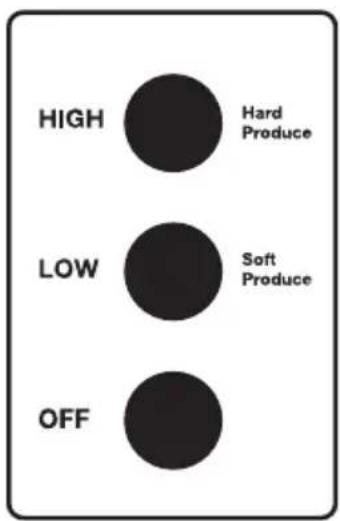
Your Juiceman® Professional Series 210 has a unique control panel, offering two speed options. These two speeds ensure optimal rpm to provide maximum juicing efficiency (efficiency describes the amount of juice extracted from your produce).
HIGH SPEED
Best for harder produce, such as carrots, beets, and pineapple (with rind). Also recommended for leafy or stringy produce such as celery and greens.
LOW SPEED
Best for softer produce such as citrus, apples, grapes (with stems), melons, peaches (remove pit), and tomatoes. Also recommended for ripe produce that has become soft.
OFF
Press this Button to pause or turn your Juiceman® Professional Series 210 OFF.
TO TURN YOUR JUICEMAN® 210 ON:
- Make sure that your Juicer is completely and properly assembled. See ASSEMBLY INSTRUCTIONS.
- Remove the Food Pusher from the Feed Tube.
- Press HIGH Speed Button for harder produce.
- Press LOW Speed Button for softer produce.
- Place produce into the Feed Tube and gently direct through the Feed Tube and Blade Basket with the Food Pusher.
- When juicing a combination of hard and soft produce, such as carrots and apples, you will want to use HIGH speed for the carrots and LOW speed for the apples. You do not have to turn the machine OFF to change speeds. Simply press the appropriate Speed Button for each type of produce being juiced.
Tip: Try alternating types of produce to ensure maximum efficiency.
TO TURN YOUR JUICEMAN® 210 OFF:
- Press the OFF Button. Unplug the Juicer from the outlet when not in use.
DISASSEMBLY INSTRUCTIONS
ALWAYS MAKE SURE JUICER IS UNPLUGGED BEFORE STARTING DISASSEMBLY.
Step One
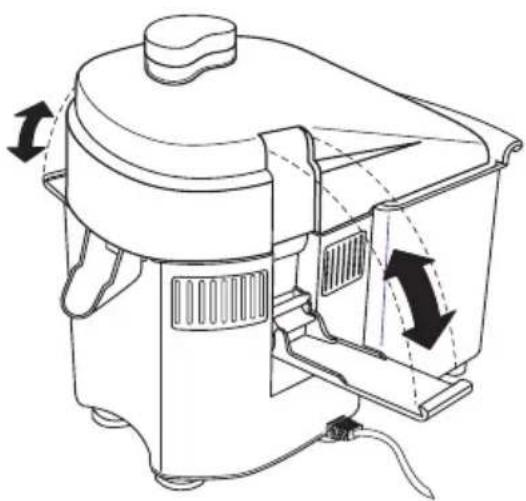
Remove the Clamps by bracing each thumb on the top or middle of each Clamp. Use one or two fingers to pull out the bottom of each Clamp. Let the Clamps hang from the sides by the lower hinges.
natural_image
Technical line drawing of a portable electric shaver with directional arrows indicating motion (no text or symbols)Step Two
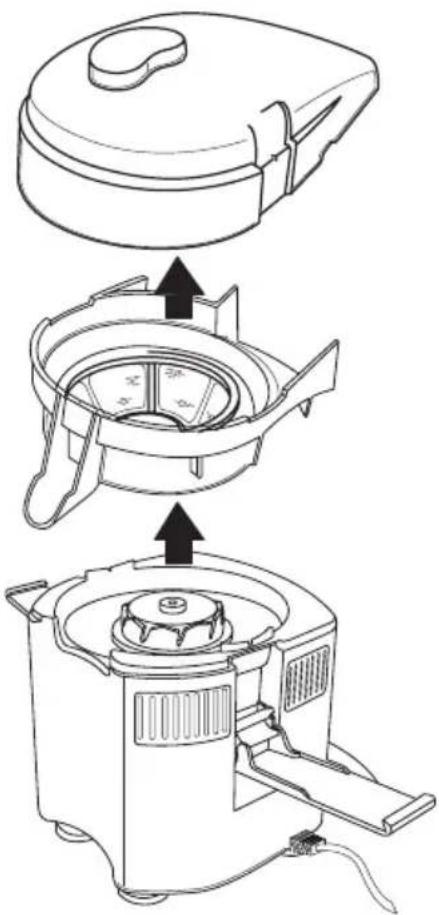
Lift Juicer Cover up and off the Juicer.
Step Three
Lift off the Juice Bowl and Blade Basket as one piece. These two pieces will then easily come apart for easy cleaning. Please follow the procedures outlined in the CLEANING YOUR JUICER section of this Instruction Manual for specific cleaning instructions.
CAUTION: Handle Blade Basket with care due to sharp points.
natural_image
Line drawing of a kitchen appliance with three steps showing internal components (no text or symbols)ASSEMBLY INSTRUCTIONS
ALWAYS MAKE SURE JUICER IS UNPLUGGED BEFORE STARTING ASSEMBLY.
Step One
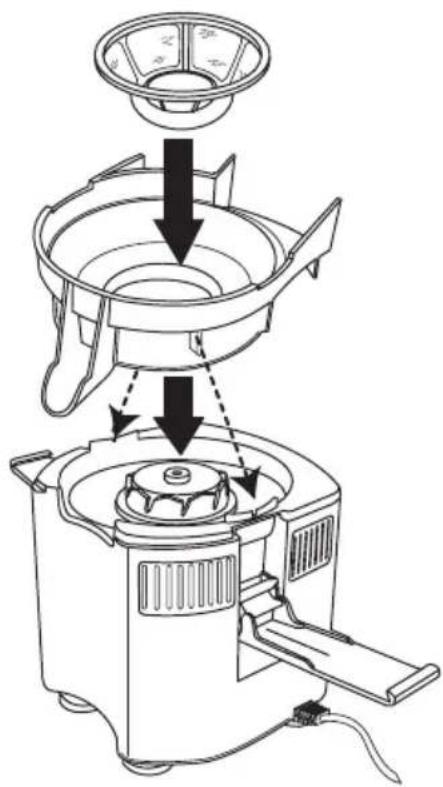
Place Juice Bowl on top of the Motor Base. The Juice Spout fits over the front of the Juicer. Two tabs located on the underside of the Juice Bowl should rest in the two complimentary slots on top of the Motor Base. The tabs and slots are located by each Clamp. See illustration.
Step Two
Set the Blade Basket on the Motor Hub in the center of the Juice Bowl, and press down on the outer rim until it feels snug.
Step Three
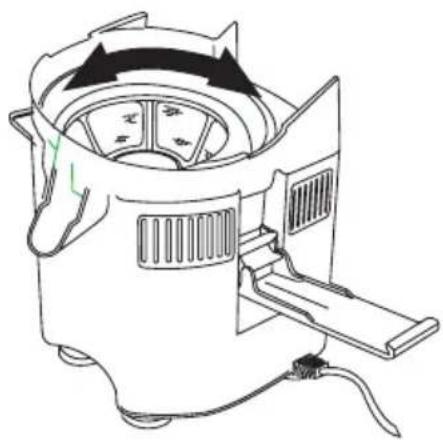
Gently rotate the Blade Basket to ensure that it turns freely. If initially it failed to seat, this should slip it into place. Double check by pressing down and spinning it again.
natural_image
Line drawing of a portable air purifier with control panel and fan (no text or symbols)ASSEMBLY INSTRUCTIONS (Continued)
Step Four
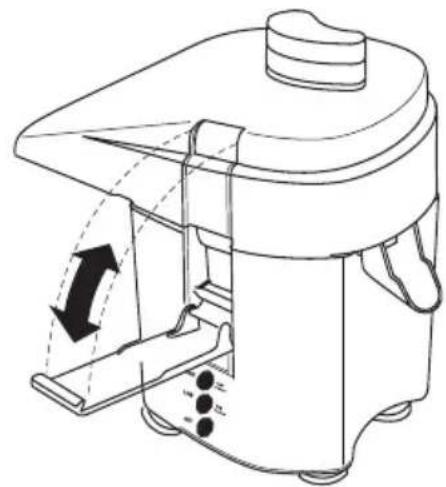
Place the Juicer Cover on over the Juice Bowl with the large pulp ejection opening towards the back of the Juicer. Swing the Clamps upward as shown in the illustration.
Step Five
Place the tops of the Clamps on the respective slots on the Juicer Cover, leaving the Clamp Hinges resting out. Press the bottom of the Clamps in, until they snap snugly into place.
Step Six
Place the Pulp Basket behind the Juicer under the Pulp Spout (located on the back of the Juicer Cover) behind the Juicer.
natural_image
Technical line drawing of a mechanical device with internal components and directional arrows (no text or symbols)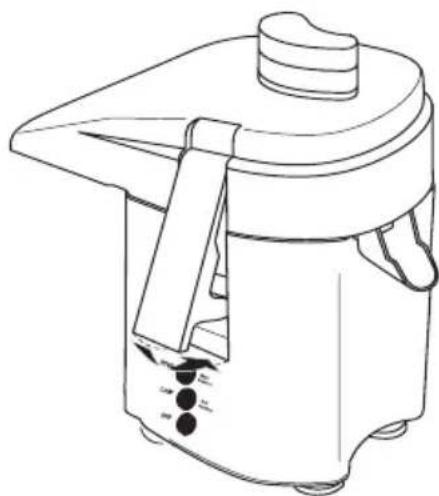
natural_image
Line drawing of a rice cooker with handle and control knob (no text or symbols)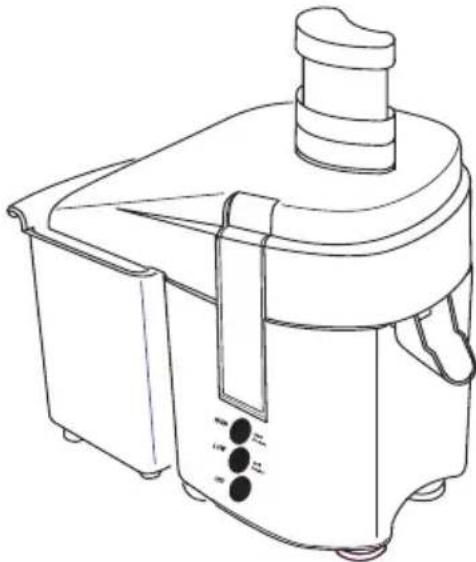
natural_image
Line drawing of a portable juice maker with handle and control panel (no text or symbols)CLEANING YOUR JUICER
- Unplug from outlet before assembling or removing parts and before cleaning.
Do not immerse the Motor Base in water or spray it with water. Clean only by wiping with a damp sponge, cloth, or paper towel. Use any liquid dishwashing detergent but do not use any products containing ammonia or scouring powders. These products will dull, scratch or mar the plastic surface.
- All parts (except the Motor Base) are washable in warm, soapy water. Please follow the procedures outlined in the DISASSEMBLY INSTRUCTIONS section of this Instruction Manual. To clean the Juicer Cover and Juice Bowl, we recommend using a fruit and vegetable brush with natural fibers.
DO NOT USE A METAL BRUSH OR PAD.
- When cleaning the Blade Basket, use the brush to make sure the tiny holes in the Basket are not clogged. This can be accomplished by holding the Blade Basket under a running faucet while brushing the Basket holes from both inside and outside the Blade Basket.
PLEASE NOTE:
- Occasionally, the Juice Bowl, Juicer Cover, and Blade Basket may be washed in a dishwasher, only if they are placed on the top shelf of the dishwasher. However, washing with ordinary warm (not hot) tap water on a daily basis should be sufficient.
- Sponge off the Motor Base and the legs underneath if any juice has spilled under the Juicer. Use a damp toothbrush or cloth to clean juice from inside the Motor Hub on top of the Motor Base.
Juicer should be air-dried only!
Clean Your Juicer Thoroughly Before Retiring For The Day
Due to the powerful staining properties of the carotenoids that are found in many vegetables, especially carrots, we suggest the following cleaning procedures:
- Stained parts may be soaked overnight in any 1 of these 4 cleaning solutions:
(1) biodegradable soap in enough warm water to cover Juicer parts
(2) 1/4 cup bleach to sink full of warm water
(3) 1 part warm water to 1 part cider vinegar
(4) 1/2 small box baking soda in enough warm water to cover parts.
- Never use ammonia or abrasives.
- Lightly scrub with soft bristle brush and liquid detergent after soaking.
- NEVER SUBMERGE THE MOTOR BASE IN WATER OR OTHER LIQUID!
CLEANING YOUR JUICER (Continued)
Any other servicing should be performed by authorized personnel only
After cleaning and reassembly is complete, your new Juicer is ready to go to work! Before starting, make sure the Blade Basket is securely seated and the Pulp Basket is at the rear of the Juicer to receive pulp. The pulp from your Juicer can be used in many different applications such as breads, muffins, cakes, soup stocks, compressed facial packs and garden compost material. Refer to the Fresh Juice Recipes & Menu Planner for juice recipes, pulp recipes, sample menus, and tips on buying, cleaning and storing. Unplug unit and allow to cool. Clean the Juicer following the procedures described in this Instruction Manual.
STORAGE
Unplug unit and clean before storing. Store in its box in a clean, dry place. Never store it while it is hot or still plugged in. Wrap cord around feet to store. Never wrap cord tightly around the appliance. Do not put any stress on the cord where it enters the unit, as it could cause the cord to fray and break.
TROUBLESHOOTING
| Symptom | Possible Correction |
| Pulp builds up excessively in the back of the Juicer Cover. | Try juicing slower, as wet produce is more likely to build up in Cover. To release pulp, lightly tap on the side of the Cover. Empty Pulp Basket if full. |
| Bottom of Feed Tube is damaged. | Blade Basket may not have been seated correctly, causing it to become unseated during use. Should this be the case, check the gear teeth of the Blade Basket and the Motor Base for damage. If any teeth are damaged, call Consumer Service at (800) 233-9054. |
| Blade Basket is difficult to:• insert onto the Hub;• remove from the Hub. | Snug seating is desirable. To insert, try seating the Blade Basket on a different Hub position. To remove, turn Juice Bowl in a clockwise direction. |
| Too much pulp builds up on Blade Basket. | This may be an isolated situation resulting from the varied texture and moisture content of the produce. Stop juicing, scrape off pulp and begin again, alternating types of produce. |
| Excessive noise or vibrations occur after Juicer is turned on. | Pulp may have built up on the Blade Basket. Clean the Blade Basket and try alternating different types of produce while juicing.NOTE: Because of the Juiceman's powerful motor, a small amount of noise and/or vibration is normal when the Juicer is turned on and as it comes to a complete stop. All Juicers sound slightly different. |
| Juice sprays out of the Spout. | Juice the produce as slowly as possible. Keep the Pulp Basket emptied for good air flow through machine. |
| Juice leaks between Juice Bowl and Cover. | Juice slowly so that the Blade Basket does not full up too quickly with juice. Keep Pulp Basket emptied to allow good air flow through the machine. |
| Pulp in juice. | Juice slowly to avoid excessive pulp buildup inside the Cover and Juice Bowl. |
TROUBLESHOOTING (Continued)
| Symptom | Possible Correction |
| Inside rim of Juice Bowl is worn or chipped (inside lower rim or inside upper rim). | Improper fit between the Blade Basket and Hub can cause parts of the Juice Bowl to rub against the Blade Basket. If this is the case, call Consumer Service at (800) 233-9054. |
| Wet pulp. | Juice at LOW Speed Setting. Certain produce (pineapples and overripe produce) may build up on Blade Basket, causing pulp to eject before juice is completely extracted. Fruit tends to produce wetter pulp than vegetables. If problem persists, rinse Blade Basket. |
| Juicer stopped while juicing. | Try a different wall outlet. Also let Juicer sit for about an hour without turning it on; moisture may have collected on the circuit board, causing machine to shut OFF. If situation is not resolved, call Consumer Service at (800) 233-9054. |
| Juicer does not turn ON. | Try a different wall outlet. Also, try using both the HIGH and LOW Speed Buttons. Check the Juicer Cover, Blade Basket, and Juice Bowl to see if they are properly seated, making sure that the column is completely aligned and the safety switch is engaged. |
SPECIFICATIONS
Model JM210
Power Requirements 120V AC, 60Hz
Power Consumption 410 Watts
Horsepower .25
Amps 4
Weight 6.9 pounds
Feed Tube Area 2.0 square inches
Cutter Blade Diameter 3.0 inches
Speed Control Solid State Speed Control with closed loop feedback ensures consistent motor speed and rpm.
Safety Switch Prevents Juicer from being turned on unless one of the two Speed Buttons is depressed after the Juicer is completely and properly assembled.
Thermal Safety Switch Your Juiceman® Professional Series 210 is equipped with a thermal safety switch. In the unlikely event of over-heating, it will shut down immediately. If this should happen, press the OFF Button, unplug the machine and let the Juicer cool down before resuming juicing.
LIMITED ONE YEAR WARRANTY
Warranty: This Juiceman® product is warranted by Salton, Inc. to be free from defects in materials or workmanship for a period of (1) year from the original purchase date. This product warranty covers only the original consumer purchaser of the product.
Warranty Coverage: This warranty is void if the product has been damaged by accident in shipment, unreasonable use, misuse, neglect, improper service, commercial use, repairs by unauthorized personnel, normal wear and tear, improper assembly, installation or maintenance abuse or other causes not arising out of defects in materials or workmanship. This warranty is effective only if the product is purchased and operated in the USA, and does not extend to any units which have been used in violation of written instructions furnished with the product or to units which have been altered or modified or to damage to products or parts thereof which have had the serial number removed, altered, defaced or rendered illegible.
Implied Warranties: ANY IMPLIED WARRANTIES WHICH THE PURCHASER MAY HAVE ARE LIMITED IN DURATION TO ONE (1) YEAR FROM THE DATE OF PURCHASE. Some states do not allow limitations on how long an implied warranty lasts, so the above limitation may not apply to you.
Warranty Performance: During the above one-year warranty period, a product with a defect will be either repaired or replaced with a reconditioned comparable model (at our option) when the product is returned to the Repair Center, or the purchase price refunded. The repaired or replacement product will be in warranty for the balance of the one-year warranty period and an additional one-month period. No charge will be made for such repair or replacement.
Service and Repair: Should the appliance malfunction, you should first call toll-free 1 (800) 233-9054 between the hours of 9:00 am and 5:00 pm Central Standard Time and ask for CONSUMER SERVICE stating that you are a consumer with a problem. Please refer to model number JM210 when you call.
In-Warranty Service (USA): For an appliance covered under the warranty period, no charge is made for service or postage. Call for return authorization 1 (800) 233-9054.
Out-of Warranty Service: A flat rate charge by model is made for out-of-warranty service. Include \$15.00 (U.S.) for return shipping and handling. We will notify you by mail of the amount of the charge for service and require you to pay in advance for the repair or replacement.
For Products Purchased in the USA, but Used in Canada: You may return the product insured, packaged with sufficient protection, and postage and insurance prepaid to the USA address listed below. Please note that all customs duty / brokerage fees, if any, must be paid by you and we will require you to pay the cost of customs duty / brokerage fees to us in advance of our performing any service.
Risk During Shipment: We cannot assume responsibility for loss or damage during incoming shipment. For your protection, carefully package the product for shipment and insure it with the carrier. Be sure to enclose the following items with your appliance: any accessories related to your problem, your full return address and daytime phone number, a note describing the problem you experienced, a copy of your sales receipt or other proof of purchase to determine warranty status. C.O.D. shipments cannot be accepted.
To return the appliance, ship to:
To contact us, please write to, call, or email:
ATTN: Repair Center Salton, Inc.
Salton, Inc. P.O. Box 7366
708 South Missouri Street Columbia, MO 65205-7366
Macon, MO 63552 1-800-233-9054
E-mail: Salton@Saltonusa.com
Limitation of Remedies: No representative or person is authorized to assume for Salton, Inc. any other liability in connection with the sale of our products. There shall be no claims for defects or failure of performance or product failure under any theory of tort, contract or commercial law including, but not limited to negligence, gross negligence, strict liability, breach of warranty and breach of contract. Repair, replacement or refund shall be the sole remedy of the purchaser under this warranty, and in no event shall Salton be liable for any incidental or consequential damages, losses or expenses. Some states do not allow the exclusion or limitation of incidental or consequential damages, so the above limitation or exclusion may not apply to you.
Legal Rights: This warranty gives you specific legal rights, and you may also have other rights which vary from state to state.
For more information on Salton products: visit our website: www.eSalton.com, or email us at: juiceman@saltonusa.com
©2004 Salton, Inc. All rights reserved. P/N 60166
Printed in Korea 04/04 Rev1

- IMPORTANT SAFEGUARDS
- SAVE THESE INSTRUCTIONS
- Additional Important Safeguards
- POLARIZED PLUG
- SHORT CORD INSTRUCTIONS
- ELECTRIC POWER
- THERMAL SAFETY SWITCH
- YOUR JUICEMAN® PROFESSIONAL SERIES 210
- PRODUCT MAY VARY SLIGHTLY FROM ILLUSTRATIONS
- BEFORE FIRST USE
- PREPARING FRUITS AND VEGETABLES FOR YOUR JUICER
- CONTROL PANEL
- HIGH SPEED
- LOW SPEED
- OFF
- TO TURN YOUR JUICEMAN® 210 ON:
- TO TURN YOUR JUICEMAN® 210 OFF:
- DISASSEMBLY INSTRUCTIONS
- ALWAYS MAKE SURE JUICER IS UNPLUGGED BEFORE STARTING DISASSEMBLY.
- Step One
- Step Two
- Step Three
- ASSEMBLY INSTRUCTIONS
- ALWAYS MAKE SURE JUICER IS UNPLUGGED BEFORE STARTING ASSEMBLY.
- ASSEMBLY INSTRUCTIONS (Continued)
- Step Four
- Step Five
- Step Six
- CLEANING YOUR JUICER
- PLEASE NOTE:
- Juicer should be air-dried only!
- Clean Your Juicer Thoroughly Before Retiring For The Day
- CLEANING YOUR JUICER (Continued)
- STORAGE
- TROUBLESHOOTING
- TROUBLESHOOTING (Continued)
- SPECIFICATIONS
- LIMITED ONE YEAR WARRANTY
Brand : JUICEMAN
Model : JM210A
Category : Juicer