EPSON SURECOLOR SC-P9000 - Large format inkjet printer

SURECOLOR SC-P9000 - Large format inkjet printer EPSON - Free user manual and instructions

Find the device manual for free SURECOLOR SC-P9000 EPSON in PDF.
📄 213 pages English EN Download 💬 AI Question
Notice EPSON SURECOLOR SC-P9000 - page 208
View the manual : Français FR English EN
Pick your language and provide your email: we'll send you a specifically translated version.

User questions about SURECOLOR SC-P9000 EPSON

0 question about this device. Answer the ones you know or ask your own.

Ask a new question about this device

The email remains private: it is only used to notify you if someone responds to your question.

No questions yet. Be the first to ask one.

Download the instructions for your Large format inkjet printer in PDF format for free! Find your manual SURECOLOR SC-P9000 - EPSON and take your electronic device back in hand. On this page are published all the documents necessary for the use of your device. SURECOLOR SC-P9000 by EPSON.

USER MANUAL SURECOLOR SC-P9000 EPSON

© 2015 Seiko Epson Corporation. All rights reserved.

Table des matières

Table des matières

Remote Manager....27

(SC-P9000 Series/SC-P8000 Series uniquement) 44

Imprimer (Mac OS X). 52

text_image Technical diagram of a printer with numbered parts for identification and assembly reference.

① Capot avant

text_image Technical diagram of a printer with numbered parts and labeled connection points
text_image 3inch 2inch

1 Levier de format

text_image Ready 12 Custom Paper #12 PG Auto 38.0m C OR Y LC MK PK VM LK GR V VLM Photo Black

1. Messages

text_image 300mm 300mm 300mm 300mm 300mm 300mm
text_image EPSON SC-PXXXX Series Printing Preferences Main Page Layout Utility Select Setting: Current Settings Save/Del... Media Settings Media Type: Premium Luster Photo Paper (260) Custom Settings... Color: Color Photo Black Ink Print Quality: Quality Paper Config... Mode: Automatic Custom EPSON Standard (sRGB) Paper Settings Source: Roll Paper Roll Paper Option... Size: A4 210 x 297 mm User Defined... Borderless Print Preview Layout Manager Ink Levels C OR Y LC MK PK VM LK GR V VLM Reset Defaults Version 6.70 OK Cancel Apply Help
text_image Printer: EPSON SC-PXXXX Series Presets: Default Settings Copies: 1 Pages: All From: 1 to: 1 Paper Size: A4 210 by 297 mm Orientation: Print Settings Basic Advanced Color Settings Page Setup: Roll Paper Media Type: Premium Luster Photo Paper (260) Ink: Photo Black Color: Color 16 bit/Channel Color Settings: EPSON Standard (sRGB) Print Quality: SuperFine - 1440dpi Super MicroWeave High Speed Mirror Image Finest Detail Cancel Print
text_image EPSON SC-PXXXX Series Printing Preferences Main Page Layout Utility Nozzle Check Head Cleaning Print Head Alignment EPSON Status Monitor 3 Monitoring Preferences Print Queue Printer and Option Information Speed and Progress Menu Arrangement Export or Import EPSON LFP Remote Panel 2 Epson Color Calibration Utility Language: English (English) Version 6.70 OK Cancel Apply Help
text_image Epson Printer Utility 4 EPSON SC-PXXXX Series Version 9.50 (9.50) Ready Connected Update EPSON Status Monitor Nozzle Check Head Cleaning Print Head Alignment EPSON LFP Remote Panel 2 Printer List

Installation individuelle

text_image Install Navi Start & Connection Click here to start the setup process, install software, and configure network settings. Information for Manuals and Applications Click here to get the information of manuals, the most-used applications such as printer drivers, and paths of these applications that is on this software disc to let you install them manually. Cancel

Mac OS X

text_image Install Navi Vol. 8 License Agreement System Check Software Select Install Connection Setup Finish Show Online Guide See the PDI/HTML manual. If necessary, copy the manual to a location where you can refer to it easily. Show Select the software to install. HDD Used Space: 272 MB ✓ Epson Driver and Utilities ✓ Epson LFP Remote Panel 2 ✓ Epson Color Calibration Utility ✓ Epson Network Utilities □ Administrator Software □ EpsonNet Config Cancel Back Install

Programs Uninstall a program Get programs

3

text_image Control Panel Home View installed updates Turn Windows features on or off Install a program from the network Uninstall or change a program To uninstall a program, select it from the list and then click Uninstall, Change, or Repair. Organize Uninstall Name Publisher Installed On EPSON SC-40001 Series Printer Uninstall SEKO EPSON Corporation 5/14/2012 Microsoft Network Connections 36.0.48.01 Intel 616.0962 Intel® HD Graphics Drive Intel Corporation 616.0962 Intel® Management Engine Compounds Intel Corporation 616.0962 Intel® Rapid Storage Technology Intel Corporation 616.0962 Microsoft .NET Framework 3.1 Chain Profile Microsoft Corporation 616.0962 Microsoft Office Professional Plus 2007 Microsoft Corporation 616.0962 Microsoft Spotlight Microsoft Corporation 616.0962 Realtek High-Distribution Audio Drive Realtek Semiconductor Corp 616.0962 Synaptic Endpoint Protection Synaptic Corporation 616.0962 Currently installed programs Total size: 941 MB 13 programs installed

4

natural_image Technical line drawing of a mechanical device with a blue roller and directional arrow (no text or symbols)

EPSON SURECOLOR SC-P9000 - Mac OS X - 1

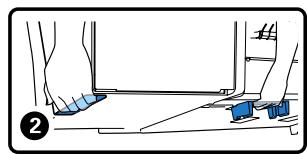
text_image Diagram illustrating mechanical assembly with directional arrows and safety symbols, showing 'OK' and 'No' states

EPSON SURECOLOR SC-P9000 - Mac OS X - 2

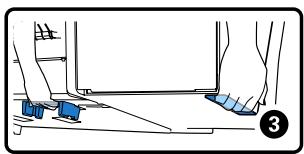
natural_image Technical line drawing of a printer or printer with a blue circular annotation highlighting a component (no text or symbols present)

EPSON SURECOLOR SC-P9000 - Mac OS X - 3

natural_image Technical line drawing of a printer with a blue arrow indicating motion or movement (no text or symbols)

EPSON SURECOLOR SC-P9000 - Mac OS X - 4

natural_image Diagram of a printer with a roller being inserted, showing mechanical components and a blue arrow indicating the motion direction (no text or symbols present)

Opérations de base

natural_image Mechanical gear assembly diagram showing internal components and a blue circular arrow indicating rotational motion (no text or symbols)

EPSON SURECOLOR SC-P9000 - Opérations de base - 1

EPSON SURECOLOR SC-P9000 - Opérations de base - 2

natural_image Technical line drawing of a mechanical gear assembly (no text or symbols)
text_image Diagram illustrating the process of a mechanical device with rotating components and directional arrows indicating rotation direction.
natural_image Diagram of a printer with a roller being processed, showing mechanical components and a magnified view of the device (no text or symbols present)
text_image Technical diagram showing a machine operation with a magnified view of the machine's internal components and a close-up of the component being processed.

Opérations de base

natural_image Diagram of a printer or scanner with a blue roller being inserted, showing rotational arrows (no text or symbols present)
natural_image Diagram of a printer or printer with a magnified inset showing the internal structure (no text or symbols present)
text_image Technical diagram illustrating the process of a mechanical assembly with labeled components and directional arrows.
natural_image Technical line drawing of a printer with paper feed and paper roll, showing internal structure and alignment arrows (no text or symbols)
text_image Technical diagram of a printer with labeled parts and directional arrows indicating assembly or operation
natural_image Diagram of a printer or printer with a blue arrow indicating rotation or movement, no text or symbols present.

Opérations de base

EPSON SURECOLOR SC-P9000 - Opérations de base - 1

text_image Diagram showing printer application process with zoomed-in detail and magnified view of printer attachment

Remarque :

flowchart
graph TD
    A["Menu"] --> B["Black Icon"]
    A --> C["White Circle Icon"]
    A --> D["White Arrow Icon"]
    A --> E["White Circle Arrow Icon"]
    A --> F["White Circle Arrow Icon"]
    A --> G["White Circle Arrow Icon"]
    H["OK"] --> I["Arrow Up/Down"]
    style A fill:#f9f,stroke:#333
    style H fill:#ccf,stroke:#333
natural_image Technical line drawing of a printer with a blue arrow indicating rotation or movement (no text or symbols present)

Opérations de base

3

text_image Diagram of a printer with control panel and directional arrows indicating movement, labeled with 'OK', 'Me', and 'b' symbols.

Remarque :

natural_image Technical line drawing of a mechanical device with a blue arrow indicating direction (no text or symbols)

4

natural_image Technical line drawing of a mechanical device with rollers and a blue arrow indicating motion (no text or symbols)

6

natural_image Diagram of a refrigerated air conditioner unit with blue insulation and scroll wheel (no text or symbols)

Opérations de base

EPSON SURECOLOR SC-P9000 - Opérations de base - 1

text_image Technical diagram illustrating the process of a mechanical device with rotating components and directional arrows indicating rotation direction.
natural_image Diagram of a printer with a blue cover and arrow indicating rotation (no text or symbols)
natural_image Diagram of a printer or printer with a blue cover and arrow indicating rotation (no text or symbols present)
text_image Diagram showing a printer with color palette and a blue arrow pointing to the printer's screen, indicating a process or operation.

Opérations de base

6

natural_image Diagram of a printer with a blue cover and arrow indicating rotation (no text or symbols)

4

text_image Diagram showing a device with a ruler labeled 'MM' and a magnified view of the screen, highlighting a component with an arrow indicating direction.
natural_image Diagram of a printer with a blue arrow indicating compression or disassembly (no text or symbols present)

EPSON SURECOLOR SC-P9000 - 4 - 1

Important :

text_image Information Selected Paper Type: XXXXXXXXXXXXXX ■ Keep Settings Above ■ Change Settings OK Proceed

EPSON SURECOLOR SC-P9000 - Important : - 1

text_image Ready XXXXXXXXXXXXXX PCI Auto 38.0m C OR Y LC MK PK VM LK GR V VLM 10 Photo Black

Écran Informations

text_image Information Selected Paper Type: XXXXXXXXXXXXXXXXXX ■ Keep Settings Above ■ Change Settings OK Proceed
natural_image Technical line drawing of a large industrial paper printer with blue base and control panel (no text or symbols)
natural_image Line drawing of a large paper printer with blue sheeting and control panel (no text or symbols)
natural_image Technical line drawing of a printer with a magnified inset showing the blade structure (no text or symbols)
natural_image Technical line drawing of a printer with a blue fabric underneath and a blue arrow indicating motion (no text or symbols)
text_image Technical diagram of a printer with labeled parts and a magnified inset showing two components with directional arrows.

Opérations de base

4

natural_image Technical illustration of a large air conditioner unit with a close-up inset showing the blade assembly (no text or symbols present)
text_image Diagram illustrating the process of a wind turbine blade assembly, showing before and after states with magnified views.

EPSON SURECOLOR SC-P9000 - 4 - 1

Important :

natural_image Diagram of a printer with a blue circular annotation highlighting a mechanical component (no text or symbols present)

Remarque :

natural_image Line drawing of a printer with a blue cover and arrow indicating compression or disassembly (no text or symbols)
natural_image Illustration of a machine with a blue handle and wheels, showing mechanical components and a magnified view of the motion (no text or symbols)
natural_image Illustration of a textile machine with a blue arrow indicating fabric or material flowing from its side panel (no text or symbols present)
natural_image Technical line drawing of a printer with a magnified inset showing internal structure (no text or symbols)

2

natural_image Technical line drawing of a mechanical device with two circular annotations highlighting features (no text or symbols present)

3

natural_image Technical line drawing of a printer with an inset showing a door mechanism and a magnified view of the printer's side panel (no text or symbols present)

4

text_image Technical diagram of a printer with labeled parts and a magnified inset showing internal structure changes.

Stockage

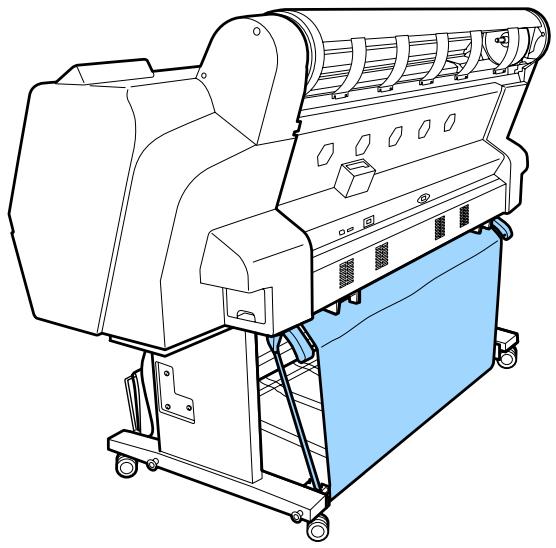
natural_image Line drawing of a large paper printer with blue cover and wheels, no text or symbols present

Arrière
EPSON SURECOLOR SC-P9000 - Stockage - 1

natural_image Line drawing of a textile machine with spools and control panel (no text or symbols)
natural_image Two abstract line drawings of rolled paper or scroll sheets with geometric shapes (no text or symbols)
text_image Technical line drawing of a printer with labeled parts and assembly details
natural_image Diagram of a cylindrical pipe with a blue rectangular component inside, showing internal flow or separation (no text or symbols)

EPSON SURECOLOR SC-P9000 - Stockage - 2

natural_image Technical line drawing of a printer with three labeled parts (①, ②, ③) showing assembly and mounting details (no text or symbols on the diagram itself)
text_image Auto Backward Forward Manual Forward Forward

Opérations de base

text_image Diagram illustrating a mechanical assembly with labeled parts and directional arrows indicating motion or force.

Opérations de base

4

natural_image Illustration of a mechanical device with a blue roller being handled, showing hands interacting with it (no text or symbols present)
text_image File Edit Format View Help New Ctrl+N Open... Ctrl+O Save Ctrl+S Save As... Page Setup... Print... Ctrl+P Exit

3

text_image Print General Select Printer EPSON XX-XXXX Series Microsoft XPS Documen Status: Ready Location: Comment: Print to file Preferences Find Printer... Page Range All Selection Current Page Pages: Number of copies: 1 Oplate 1 1 2 2 3 Print Cancel Apply

Opérations de base

4

text_image EPSON SC-PXXXX Series Printing Preferences Main Page Layout Utility Select Setting: Current Settings Save/Del... Media Settings Media Type: Premium Luster Photo Paper (260) Color: Color Custom Settings... Photo Black Ink Print Quality: Quality Paper Config... Mode: Automatic Custom EPSON Standard (sRGB) Paper Settings Source: Roll Paper Roll Paper Option... Size: A4 210 x 297 mm User Defined... Borderless Print Preview Layout Manager Ink Levels C OR Y LC MK PK VM LK GR V VLM Reset Defaults Version 6.70 OK Cancel Apply Help

5

text_image EPSON SC-PXXXX Series Printing Preferences Main Page Layout Utility Select Setting: Current Settings Save/Del... Media Settings Media Type: Premium Luster Photo Paper (260) Color: Color Custom Settings... Print Quality: Quality Paper Config... Mode: ● Automatic ○ Custom EPSON Standard (sRGB) Paper Settings Source: Roll Paper Roll Paper Option... Size: A4 210 x 297 mm User Defined... Borderless Print Preview Layout Manager Ink Levels C OR Y LC MK PK VM LK GR V VLM Reset Defaults Version 6.70 OK Cancel Apply Help

6

text_image Print General Select Printer Adobe PDF EPSON XX-XXXXX Series Microsoft XPS Documen Fax < Status: Ready Location: Comment: Print to file Preferences Find Printer... Page Range All Selection Current Page Pages: Number of copies: 1 Delete 1 2 3 3 Print Cancel Apply
text_image Settings: Page Attributes Format For: EPSON SC-XXXXX EPSON SC-XXXXX Paper Size: A4 210 by 297 mm Orientation: Scale: 100 % Cancel OK

4

text_image Printer: EPSON SC-PXXXX Series Presets: Default Settings Copies: 1 Pages: All Paper Size: A4 210 by 297 mm Orientation: TextEdit Print header and footer Rewrap contents to fit page Cancel Print

Opérations de base

5

text_image Printer: EPSON SC-PXXXX Series Presets: Default Settings Copies: 1 Pages: All From: 1 to: 1 Paper Size: A4 210 by 297 mm Orientation: Print Settings Page Setup: Roll Paper Media Type: Premium Luster Photo Paper (260) Ink: Photo Black Color: Color 16 bit/Channel Color Settings: EPSON Standard (sRGB) Print Quality: SuperFine - 1440dpi Super MicroWeave High Speed Mirror Image Finest Detail Cancel Print
text_image EPSON XX-XXXXX - 1 Job Pause Settings XXXXX.pdf Printing - Sending data to printer.
text_image C-PXXXX Series Printer Document View Set As Default Printer Printing Preferences... Update Driver Cancel All Documents Sharing... Use Printer Offline Properties Close
natural_image Two unrelated images: a gear icon on a monitor and a printer with a red circular badge labeled '1' (no text or symbols on the devices themselves)

2

text_image EPSON XX-XXXXX - 1 Job Pause Settings The printer is not connected. XXXXX.pdf Printing - Sending data to printer.
text_image EPSON SC-PXXXX Series Printing Preferences Main Page Layout Utility Select Setting: Current Settings Save/Del... Media Settings Media Type: Premium Luster Photo Paper (260) Custom Settings... Color: Color Photo Black Ink Print Quality: Quality Paper Config... Mode: Automatic Custom EPSON Standard (sRGB) Paper Settings Source: Roll Paper Roll Paper Option... Size: A4 210 x 297 mm User Defined... Borderless Print Preview Layout Manager Ink Levels C OR Y LC MK PK VM LK GR V VLM Reset Defaults Version 6.70 OK Cancel Apply Help

Mac OS X
EPSON SURECOLOR SC-P9000 - 2 - 1

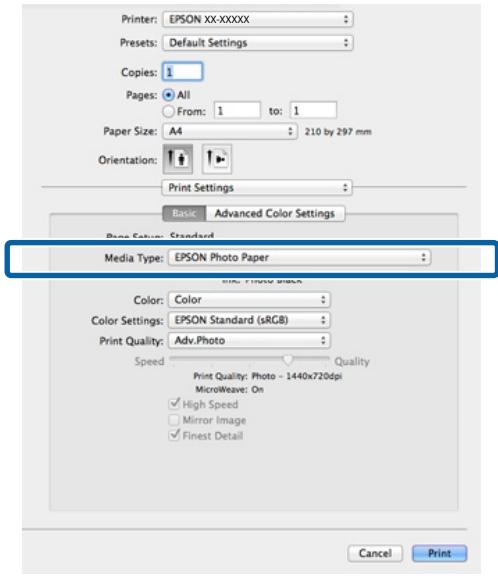
text_image Printer: EPSON XX-XXXXX Presets: Default Settings Copies: 1 Pages: All From: 1 to: 1 Paper Size: A4 210 by 297 mm Orientation: Print Settings Basic Advanced Color Settings Page Setup: Standard Media Type: EPSON Photo Paper Color: Color Color Settings: EPSON Standard (sRGB) Print Quality: Adv.Photo Speed Print Quality: Photo - 1440x720dpi MicroWeave: On ✓ High Speed ✓ Mirror Image ✓ Finest Detail Cancel Print

Remarque :

☐ LFP Print Plug-In for Office
□ EPSON CopyFactory5
☐ Epson Color Calibration Utility

text_image File Save Save As Open Close Info Recent New Print Save & Send Help Options Exit Print Copies: 1 Print Printer EPSON SC-PXXXX Series Ready Printer Properties Settings Print All Pages Print the entire document Pages: Print One Sided Only print on one side of th... Collated 1,2,3 1,2,3 1,2,3
text_image File Save Save As Open Close Info Recent New Print Save & Send Help Options Exit Print Print Copies: 1 Printer EPSON SC-PXXXX Series Ready Printer Properties Settings Print All Pages Print the entire document Pages: Print One Sided Only print on one side of th... Collated 1,2,3 1,2,3 1,2,3
text_image EPSON SC-PXXXX Series Printing Preferences Print Job • Print and Save • Print only • Save only • Print after Transmission Completed OK Cancel Help Output Paper: Same as Page Size Reduce/Enlarge Fit to Page Fit to Roll Paper Width Custom Scale to % Multi-Page N-up Poster Settings... ✓ Hard Disk Unit Settings... ✓ Optimize Enlargement Print Bckg Color Color Settings... Job Settings Details... Reset Defaults Version 6.70 OK Cancel Apply Help Save/Del... Copies: 1 Reverse Order
text_image File New Open... Open Recent Close Save... Duplicate Export As PDF... Revert to Saved Attach Files... Show Properties Page Setup Print...

2

text_image Printer: EPSON SC-PXXXX Series Presets: Default Settings Copies: 1 Pages: All From: 1 to: 1 Paper Size: A4 210 by 297 mm Orientation: HDD Settings Print Mode: Print and Save Print only Save only Print after Transmission Completed Cancel Print

3

text_image Printer: EPSON SC-PXXXX Series Presets: Default Settings Copies: 1 Pages: All From: 1 to: 1 Paper Size: A4 210 by 297 mm Orientation: HDD Settings Print Mode: Print and Save Print only Save only Print after Transmission Completed Cancel Print
text_image See what's printing Set as default printer Printing preferences Printer properties Create shortcut Remove device Troubleshoot Properties
text_image EPSON SC-PXXXX Series Printing Preferences Main Page Layout Utility Select Setting: Current Settings Save/Del... Media Settings Media Type: Premium Luster Photo Paper (260) Custom Settings... Color: Color Photo Black Ink Print Quality: Quality Paper Config... Mode: Automatic Custom EPSON Standard (sRGB) Paper Settings Source: Roll Paper Roll Paper Option... Size: A4 210 x 297 mm User Defined... Borderless Print Preview Layout Manager Ink Levels C OR Y LC MK PK VM LK GR V VLM Reset Defaults Version 6.70 OK Cancel Apply Help
text_image EPSON SC-PXXXX Series Printing Preferences Main Page Layout Utility Select Setting: Current Settings Save/Del... Media Settings Media Type: Premium Luster Photo Paper (260) Custom Settings... Color: Color Photo Black Ink Print Quality: Quality Paper Config... Mode: Automatic Custom EPSON Standard (sRGB) Paper Settings Source: Roll Paper Roll Paper Option... Size: A4 210 x 297 mm User Defined... Borderless Print Preview Layout Manager Ink Levels C OR Y LC MK PK VM LK GR V VLM Reset Defaults Version 6.70 OK Cancel Apply Help Epicn - IN Show Back Forward Name Text Print * Image * Printer Settings Printer Settings On the Printer Settings screen, you can make basic printing settings. You can print according to your needs by simply following the steps below to make print settings. You can check the results of your settings from the paper and the printer's illustrations on the right-hand side of the screen. Note: When making print settings, right-click on an item on the screen and then select help to display an explanation of that item. Check the print settings for Media Settings. When the printer driver starts up, information on the paper currently loaded in the printer is acquired, and the results are displayed in Media Settings. Go to the next step to print with the currently displayed settings. If you do not see your desired settings, change the paper in the printer, and then click the Acquire Info button from Media Settings. The printer information a reacquired, and the printer settings in Media Settings are updated. Note: It is recommended that you load the paper in the printer and then properly
text_image EPSON SC-PXXXX Series Printing Preferences Main Page Layout Utility Select Setting: Current Settings Save/Del... Media Settings Media Type: Premium Luster Photo Paper (260) Color: Color Custom Settings... Photo Black Ink Print Quality: Quality Help Paper Config... Mode: Automatic EPSON Standard (sRGB) Paper Settings Source: Roll Paper Roll Paper Option... Size: A4 210 x 297 mm User Defined... Borderless Print Preview Layout Manager Ink Levels C OR Y LC Mk PK VM LK GR V VLM Reset Defaults Version 6.70 OK Cancel Apply Help Epson - EN Media Type Always match the Media Type setting with the kind of paper or other media you loaded in the printer. When you select Auto Acquire, the media type and width of the roll paper loaded in the printer can be acquired automatically. Note: The availability of special media varies by country.

Remarque :

text_image EPSON SC-PXXXX Series Printing Preferences Main Page Layout Utility Select Setting: Current Settings Save/Del... Media Settings Media Type: Premium Luster Photo Paper (260) Custom Settings... Color: Color Photo Black Ink Print Quality: Quality Paper Config... Mode: Automatic Custom EPSON Standard (sRGB) Paper Settings Source: Roll Paper Roll Paper Option... Size: A4 210 x 297 mm User Defined... Borderless Print Preview Layout Manager Ink Levels C OR Y LC MK PK VM LK GR V VLM Reset Defaults Version 6.70 OK Cancel Apply Help
text_image Saves or Deletes Select Settings List : Photo Poster Others Not Display Name : Print Comment : Time : Save Delete Cancel Export... Import... Help Item Current Settings Registered Set... Media Type Premium Glossy... Color Density 0 Drying Time per ... 0 Paper Feed Adj... 0 Paper Suction 0 Paper Thickness 3 Platen Gap Auto Roll Paper Back ... Auto Select Target Current Settings Print Mode Color/Blk/ Photo Print Quality Level LEVEL 4 (Quality)... Resolution Quality - 720x1... High Speed Off Finest Detail Off Edge Smoothing Off Color Adjustment Business Graphics Gamma 2.2 Setting Default Setting Source Roll Paper - 441... Borderless Off Auto Cut Normal Cut ① ②
text_image EPSON SC-PXXXX Series Printing Preferences Main Page Layout Utility Select Setting: Current Settings Save/Del... Media Settings Media Type: Premium Luster Photo Paper (260) Custom Settings... Color: Color Photo Black Ink Print Quality: Quality Paper Config... Mode: Automatic Custom EPSON Standard (sRGB) Paper Settings Source: Roll Paper Roll Paper Option... Size: A4 210 x 297 mm User Defined... Borderless Print Preview Layout Manager Ink Levels C OR Y LC MK PK VM LK GR V VLM Reset Defaults Version 6.70 OK Cancel Apply Help
text_image Saves or deletes Custom Media List: Name: Custom Paper 1 Comment: Time: Save Delete Cancel Export... Import... Help Item Current Settings Registered Set... Media Type Premium Luster ... Color Density 0 - Drying Time per ... 0 - Paper Feed Adjust... 0 - Paper Suction 0 - Paper Thickness 3 - Platen Gap Auto - Roll Paper Back ... Auto - Color Color - Print Quality Level LEVEL 4 (Quality) - Print Quality SuperFine - 720... High Speed On - Finest Detail Off - Edge Smoothing Off - Color Adjustment Color Controls - Gamma 2.2 - Mode EPSON Standar... Setting Default Setting - ① ②
text_image EPSON SC-PXXXX Series Printing Preferences Main Page Lay Utility 1 Nozzle Check Printer and Option Information Head Cleaning Speed and Progress Print Head Alignment Menu Arrangement 2 EPSON Status Monitor 3 Export or Import Monitoring Preferences EPSON LFP Remote Panel 2 Print Queue Epson Color Calibration Utility Language: English (English) Version 6.70 OK Cancel Apply Help

EPSON SURECOLOR SC-P9000 - Remarque : - 1

text_image Menu Arrangement Edit Item Select Setting Media Type Paper Size List: Photo Fine Art Proofing Poster Others Not Display Add Group... Delete Group Reset Save Cancel Help

EPSON SURECOLOR SC-P9000 - Remarque : - 2

text_image Menu Arrangement Edit Item Select Setting Media Type Paper Size List: Photo Paper Premium Luster Photo Paper (260) Premium Glossy Photo Paper (250) Premium Semigloss Photo Paper (250) Premium Semimatte Photo Paper (260) Premium Glossy Photo Paper (170) Premium Semigloss Photo Paper (170) Premium Glossy Photo Paper Premium Semigloss Photo Paper Premium Luster Photo Paper Photo Paper Gloss 250 Proofing Paper Fine Art Paper Matte Paper Plain Paper Others Not Display Add Group... Delete Group Reset Save Cancel Help
text_image EPSON SC-PXXXX Series Printing Preferences Main Page Layout Utility Nozzle Check Printer and Option Information Head Cleaning Speed and Progress Print Head Alignment Menu Arrangement EPSON Status Monitor 3 Export or Import Monitoring Preferences EPSON LFP Remote Panel 2 Print Queue Epson Color Calibration Utility Language: English (English) Version 6.70 OK Cancel Apply Help
text_image EPSON SC-PXXXX Series Monitoring Preferences Nozzle Check Head Cleaning Print Head Alignment Printer Settings Layout Manager

Printer and Option Information (Informations imprimante et options) (SC-P9000 Series/SC-P7000 Series uniquement)

Epson Color Calibration Utility

text_image Printer: EPSON SC-PXXXX Series Presets: Default Settings Copies: Pages: All From: 1 to 1 Paper Size: A4 210 by 297 mm Orientation: TextEdit Print header and footer Rewrap contents to fit page Hide Details Cancel Print
text_image Printer: EPSON SC-PXXXX Series Presets: Default Settings Copies: 1 Pages: All From: 1 to: 1 Paper Size: A4 210 by 297 mm Orientation: Paper Configuration Color Density: -50 0 (%) +50 Drying Time per Print Head Pass: 0 0 (0.1sec) Paper Feed Adjustment: -70 0 (0.01%) Paper Thickness: 3 (0.1mm) Paper Suction: Standard Platen Gap: Auto Roll Paper Back Tension: Auto Default Cancel Print
text_image Printer: EPSON SC-PXXXX Series Presets ✓ Default Settings Last Used Settings Copies Save Current Settings as Preset... Pages Show Presets... From: 1 to: 1
text_image Printer: EPSON SC-PXXXX Series Presets ✓ Default Settings Last Used Settings Copies Custom Setting1 Pages Save Current Settings as Preset... Show Presets... Paper Size: A4 210 by 297 mm
text_image Presets ✓ Default Settings Last Used Settings Copies Custom Setting1 Pages Save Current Settings as Preset Show Presets...

2

text_image Presets Current Default Settings Last Used Settings Custom Setting1 Setting Value Copies & Pages TextEdit Layout Color Matching Paper Handling Cover Page Print Settings Delete Duplicate Reset Presets Menu to "Default Settings" After Printing Cancel OK
text_image Epson Printer Utility 4 EPSON SC-PXXXX Series Version 9.50 (9.50) Ready Connected Update EPSON Status Monitor Nozzle Check Head Cleaning Print Head Alignment EPSON LFP Remote Panel 2 Printer List

EPSON Status Monitor

text_image Printer: EPSON XXXX Copies: 1 Print Settings... Position Center Image Top: -1275.412 Left: -2538.115 Scaled Print Size Scale to Fit Media Scale: 100% Height: 941.8 Width: 722.4 Print Resolution: 72 PPI Bounding Box Units: mm Color Management Document (Profiles: xRGB IECB096-2.1) Color Headings: Printer Manages Colors management in the print settings dialog box. Printer Profile: EPSON SC-T3000_3000_7000_Series Double... Rendering Intent: Perceptual Black Print Compensation Proof Setup: Working CMYK Simulate Paper Color Simulate Black Ink Cancel Done Print

EPSON SURECOLOR SC-P9000 - EPSON Status Monitor - 1

text_image EPSON SC-PXXXX Series Printing Preferences Main Page Layout Utility Select Setting: Current Settings Save/Del... Media Settings Media Type: Premium Luster Photo Paper (260) Custom Settings... Color: Color Photo Black Ink Print Quality: Quality Paper Config... Mode: Automatic Custom PhotoEnhance Advanced... Paper Settings Source: Roll Paper Roll Paper Option... Size: A4 210 x 297 mm User Defined... Borderless Print Preview Layout Manager Ink Levels C OR Y LC MK PK VM LK GR V VLM Reset Defaults Version 6.70 OK Cancel Apply Help

4

text_image PhotoEnhance Scene Correction: Auto Correct ✓ Sharpen Standard High □ Digital Camera Correction Standard Smooth Skin OK Cancel Help

5

text_image Printer: EPSON XXXX Copies: 1 Print Settings... Position Center Image Top: -125.412 Left: -259.113 Scaled Print Size Scale to Fit Media Scale: 100% Height: 541.8 Width: 722.4 Print Resolution: 72 PPI Boynding Box Units: mm Color Management document (Profiles: iRGB IECB296-2.1) Color Handling: Printer Manages Colors management in the print settings dialog box. Printer Profile: EPSON SC-T3000_3000_7000_Series Double... Rendering Intent: Perceptual Black Print Compensation Proof Setup: Working CMML Simulate Paper Color Simulate Black Ink Cancel Done Print

EPSON SURECOLOR SC-P9000 - 5 - 1

text_image EPSON SC-PXXXX Series Printing Preferences Main Page Layout Utility Select Setting: Current Settings Save/Del... Media Settings Media Type: Premium Luster Photo Paper (260) Custom Settings... Color: Color Photo Black Ink Print Quality: Quality Paper Config... Mode: Automatic Custom Color Controls Advanced... Paper Settings Source: Roll Paper Roll Paper Option... Size: A4 210 x 297 mm User Defined... Borderless Print Preview Layout Manager Ink Levels C OR Y LC MK PK VM LK GR V VLM Reset Defaults Version 6.70 OK Cancel Apply Help

EPSON SURECOLOR SC-P9000 - 5 - 2

text_image Color Controls Printer Color Adjustment Mode: EPSON Standard (sRGB) Gamma: 2.2 Color Adjustment Method ● Color Circle ○ Slide Bar Before After Brightness +0 + Contrast +0 + Saturation +0 + Y G R Horizontal 0 Vertical 0 B C M Cyan +0 + Magenta +0 + Yellow +0 + Default OK Cancel Help

Remarque :

text_image Print Printer: EPSON XXXXX Copies: 1 Print Settings... Send 16-bit Data Position Center Image Top: -125.412 Left: -259.115 Scaled Print Size Scale to Fit Media Scale: 100% Height: 541.8 Width: 722.4 Print Resolution: 71 PPI Bounding Box Units: mm Color Management Document (Profile: sRGB IEC61966-2.1) Color Handling: Printer Manages Colors Remember to enable the printer's color management in the print settings dialog box. Printer Profile: EPSON SC-T3000_5000_7000_Series Double... Rendering Intent: Perceptual Black Point Compensation Proof Setup: Working CMYK Simulate Paper Color Simulate Black Ink Cancel Done Print
text_image Printer: EPSON SC-PXXXX Series Presets: Default Settings Copies: 1 Pages: All From: 1 to: 1 Paper Size: A4 210 by 297 mm Orientation: Color Matching ColorSync EPSON Color Controls Cancel Print

Remarque :

text_image Printer: EPSON SC-PXXXX Series Presets: Default Settings Copies: 1 Pages: All From: 1 to: 1 Paper Size: A4 210 by 297 mm Orientation: Print Settings Basic Advanced Color Settings Page Setup: Roll Paper Media Type: Premium Luster Photo Paper (260) Ink: Photo Black Color Settings ✓ Color Controls Off (No Color Adjustment) Charts and Graphs ✓ EPSON Standard (sRGB) Print Quality ✓ Adobe RGB ✓ High Speed Mirror Image Finest Detail Cancel Print

5

text_image Printer: EPSON SC-PXXXX Series Presets: Default Settings Copies: 1 Pages: All From: 1 to: 1 Paper Size: A4 210 by 297 mm Orientation: Print Settings Basic Advanced Color Settings Gamma: 2.2 Brightness 0 Contrast 0 Saturation 0 Cyan 0 Magenta 0 Yellow 0 Cancel Print

6

text_image Printer: EPSON XXXX Copies: 1 Print Settings... Position Center Image Top: -125.412 Left: -259.113 Scaled Print Size Scale to Fit Media Scale: 100% Height: 541.8 Width: 722.4 Print Resolution: 72 PPI Bounding Box Units: mm Color Management Document (Profiles: sRGB IBC01966-2.1) Color Handleings: Printer Manages Colors management in the print settings dialog box. Printer Profile: EPSON SC-T3000, 3000, 7000 Series Double... Rendering Intent: Perceptual Black Point Compensation Proof Setup: Working CMTK Simulate Paper Color Simulate Mark Ink Cancel Done Print

2

text_image EPSON SC-PXXXX Series Printing Preferences Main Page Layout Utility Select Setting: Current Settings Save/Del... Media Settings Media Type: Premium Luster Photo Paper (260) Custom Settings... Color: Color Print Quality: ✓ Color Advanced B&W Photo Paper Config... Mode: Black Color Controls Advanced... Paper Settings Source: Roll Paper Roll Paper Option... Size: A4 210 x 297 mm User Defined... Borderless Print Preview Layout Manager Ink Levels C OR Y LC MK PK VM LK GR LLK VLM Reset Defaults Version 6.70 OK Cancel Apply Help
text_image EPSON SC-PXXXX Series Printing Preferences Main Page Layout Utility Select Setting: Current Settings Save/Del... Media Settings Media Type: Premium Luster Photo Paper (260) Custom Settings... Color: Advanced B&W Photo Photo Black Ink Print Quality: Quality Paper Config... Mode: Automatic Custom Color Controls Advanced... Paper Settings Source: Roll Paper Roll Paper Option... Size: A4 210 x 297 mm User Defined... Borderless Print Preview Layout Manager Ink Levels C OR Y LC MK PK VM LK GR LLK VLM Reset Defaults Version 6.70 OK Cancel Apply Help
text_image Color Controls Printer Color Adjustment Color Toning: Neutral Tone: Darker Before After Brightness + 0 + Contrast + 0 + Shadow TOnality + 0 + After Y G R Horizontal 0 Vertical 0 C M B Highlight Tonality + 0 + Max Optical Density - 0 + Highlight Point Shift: Off Default OK Cancel Help

6

text_image Print Printer: EPSON XXXXX Copies: 1 Print Settings... Send 16-bit Data Position Center Image Top: -125.412 Left: -259.115 Scaled Print Size Scale to Fit Media Scale: 100% Height: 541.8 Width: 722.4 Print Resolution: 71 PPI Bounding Box Units: mm Color Management Document (Profile: sRGB IEC$1966-2.1) Color Handling: Printer Manages Colors Remember to enable the printer's color management in the print settings dialog box. Printer Profile: EPSON SC-T3000_5000_7000_Series Double... Rendering Intent: Perceptual Black Point Compensation Proof Setup: Working CMYK Simulate Paper Color Simulate Black Ink Cancel Done Print

2

text_image Printer: EPSON SC-PXXXX Series Presets: Default Settings Copies: 1 Pages: All From: 1 to: 1 Paper Size: A4 210 by 297 mm Orientation: Print Settings Basic Advanced Color Settings Page Setup: Roll Paper Media Type: Premium Luster Photo Paper (260) Color: Advanced B&W Photo Color Toning: Neutral Print Quality: SuperFine - 1440dpi Super MicroWeave High Speed Mirror Image Finest Detail Cancel Print
text_image Printer: EPSON SC-PXXXX Series Presets: Default Settings Copies: 1 Pages: All From: 1 to: 1 Paper Size: A4 210 by 297 mm Orientation: Print Settings Basic Advanced Color Settings Page Setup: Roll Paper Media Type: Premium Luster Photo Paper (260) Ink: Photo Black Color: Advanced B&W Photo 16 bit/Channel Color Toning: Neutral Print Quality: SuperFine - 1440dpi Super MicroWeave High Speed Mirror Image Finest Detail Cancel Print

4

text_image Printer: EPSON SC-PXXXX Series Presets: Default Settings Copies: 1 Pages: All From: 1 to: 1 Paper Size: A4 210 by 297 mm Orientation: Print Settings Basic Advanced Color Settings Color Toning: Neutral Tone: Darker Brightness: 0 Contrast: 0 Shadow Tonality: 0 Highlight Tonality: 0 Max Optical Density: 0 Highlight Point Shift: Off Y G R Horizontal C Vertical M 0 B Cancel Print

5

natural_image Three-step illustration showing a vase with two blue flowers, connected by arrows to a dashed box (no text or symbols)
text_image EPSON SC-PXXXX Series Printing Preferences Main Page Layout Utility Select Setting: Current Settings Save/Del... Media Settings Media Type: Premium Luster Photo Paper (260) Color: Color Custom Settings... Photo Black Ink Print Quality: Quality Paper Config... Mode: Automatic Custom EPSON Standard (sRGB) Paper Settings Source: Roll Paper Size: A4 210 x 297 mm Borderless Roll Paper Option... User Defined... Print Preview Layout Manager Ink Levels C OR Y LC MK PK VM LK GR V VLM Reset Defaults Version 6.70 OK Cancel Apply Help
text_image EPSON SC-PXXXX Series Printing Preferences Main Page Layout Utility Select Setting: Current Settings Save/Del... Media Settings Media Type: Premium Luster Photo Paper (260) Custom Settings... Color: Color Photo Black Ink Print Quality: Quality Paper Config... Mode: Automatic Custom EPSON Standard (sRGB) Paper Settings Source: Roll Paper Roll Paper Option... Size: A4 210 x 297 mm -> Super A3 / B 329 x 46 User Defined... ✓ Borderless Expansion... Print Preview Layout Manager Ink Levels C OR Y LC MK PK VM LK GR V VLM Reset Defaults Version 6.70 OK Cancel Apply Help
text_image Expansion Method of Enlargement Auto Expand Retain Size Amount of Enlargement Min Standard Max Moving the slider to Min will reduce the amount of image enlargement. However, margins may appear around the printed image. OK Cancel Help

Remarque :

text_image EPSON SC-PXXXX Series Printing Preferences Main Page Layout Utility Select Setting: Current Settings Save/Del... Media Settings Media Type: Premium Luster Photo Paper (260) Color: Color Custom Settings... Photo Black Ink Print Quality: Quality Paper Config... Mode: Automatic Custom EPSON Standard (sRGB) Paper Settings Source: Roll Paper Roll Paper Option... Size: A4 210 x 297 mm -> Super A3 / B 329 x 46 User Defined... Borderless Expansion... Print Preview Layout Manager Ink Levels C OR Y LC MK PK VM LK GR V VLM Reset Defaults Version 6.70 OK Cancel Apply Help

EPSON SURECOLOR SC-P9000 - Remarque : - 1

EPSON SURECOLOR SC-P9000 - Remarque : - 2

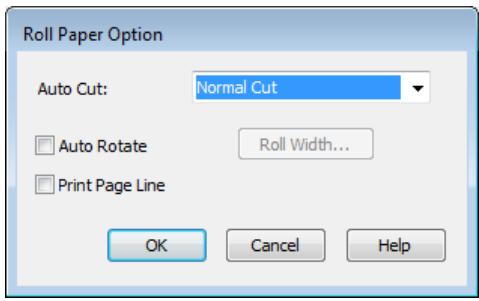
text_image Roll Paper Option Auto Cut: Normal Cut Auto Rotate Roll Width... Print Page Line OK Cancel Help

5

text_image Printer: EPSON SC-PXXXX Series Presets: Default Settings Copies: 1 Pages: All From: 1 to: 1 Paper Size: Super A0 (Roll Paper... 914 by 1,292 mm Orientation: TextEdit Print header and footer Rewrap contents to fit page Cancel Print

Remarque :

text_image Printer: EPSON SC-PXXXX Series Presets: Default Settings Copies: 1 Pages: All From: 1 to: 1 Paper Size: Super A0 (Roll Paper... 914 by 1,292 mm Orientation: Page Layout Settings Roll Paper Option Auto Cut: Single Cut Auto Rotate 44 inch (1118 mm) Print Page Line Save Roll Paper Expansion Min Standard Max Moving the slider to Min will reduce the amount of image enlargement. However, margins may appear around the printed image. Cancel Print

Remarque :

flowchart
graph TD
    B4["Welcome to the Epson Reference Guide"] --> A3["Welcome to the Epson Reference Guide"]
    A3 --> A4["Welcome to the Epson Reference Guide"]
    A4 --> B4
flowchart
graph TD
    A["Input Image"] -->|150%| B["Output Image"]
    A -->|50%| C["Final Output Image"]
text_image EPSON 3C-PXXXX Series Printing Preferences Main Page Layout Utility Select Setting: Current Settings Save/Del... Orientation Portrait Landscape Rotate 180° Mirror Image Copies Copies 1 Collate Reverse Order Page Size: A4 210 x 297 mm Output Paper: Super A3 / B 329 x 483 mm Reduce/Enlarge Multi-Page Fit to Page N-up Fit to Roll Paper Width Poster Custom Scale to 165 % Settings... Hard Disk Unit Optimize Enlargement Settings... Print Backg Color Color Settings... Job Settings Details... Reset Defaults Version 6.70 OK Cancel Apply Help
text_image EPSON SC-PXXXX Series Printing Preferences Main Page Layout Utility Select Setting: Current Settings Save/Del... Orientation Portrait Landscape Rotate 180° Mirror Image Copies Copies 1 Collate Reverse Order Layout Page Size: A4 210 x 297 mm Output Paper: Super A3 / B 329 x 483 mm Reduce/Enlarge Multi-Page Fit to Page N-up Fit to Roll Paper Width Poster Custom Scale to 165 % Settings... Hard Disk Unit Optimize Enlargement Settings... Print Bckg Color Color Settings... Job Settings Details... Reset Defaults Version 6.70 OK Cancel Apply Help

3

text_image Printer: EPSON SC-PXXXX Series Presets: Default Settings Copies: 1 Pages: All From: 1 to: 1 Paper Size: A4 (Sheet) 210 by 297 mm Orientation: Paper Handling Collate pages Pages to Print: All pages Page Order: Scale to fit paper size Destination Paper Size: Suggested Paper: A4 (Sheet) Scale down only Cancel Print

2

text_image Printer: EPSON SC-PXXXX Series Presets: Default Settings Copies: 1 Pages: All From: 1 to: 1 Paper Size: A4 (Sheet) 210 by 297 mm Orientation: Paper Handling Collate pages Pages to Print: All pages Page Order: Automatic Scale to fit paper size Destination Paper Size: Suggested Paper: A4 (Sheet) Scale down only Cancel Print

Remarque :

text_image EPSON SC-PXXXX Series Printing Preferences Main Page Layout Utility Select Setting: Current Settings Save/Del... Orientation Portrait Landscape Rotate 180° Mirror Image Copies Copies 1 Collate Reverse Order Page Size: A4 210 x 297 mm Output Paper: Super A3 / B 329 x 483 mm Reduce/Enlarge Multi-Page Fit to Page N-up Fit to Roll Paper Width Poster Custom Scale to 165 % Settings... Hard Disk Unit Optimize Enlargement Settings... Print Bckg Color Color Settings... Job Settings Details... Reset Defaults Version 6.70 OK Cancel Apply Help
text_image EPSON SC-PXXXX Series Printing Preferences Main Page Layout Utility Select Setting: Current Settings Save/Del... Orientation Portrait Landscape Rotate 180° Mirror Image Copies 123 123 Copies: 1 ✓ Collate Reverse Order Layout Page Size: A4 210 x 297 mm Roll Width: 44 in ✓ Reduce/Enlarge Multi-Page ● Fit to Page N-up ● Fit to Roll Paper Width Poster Custom Scale to 5.35 % Settings... ✓ Hard Disk Unit Optimize Enlargement Settings... Print Bckg Color Color Settings... Job Settings Details... Reset Defaults Version 6.70 OK Cancel Apply Help

5

text_image EPSON SC-PXXXX Series Printing Preferences Main Page Layout Utility Select Setting: Current Settings Save/Del... Orientation Portrait Landscape Rotate 180° Mirror Image Copies Copies: 1 Collate Reverse Order Layout Page Size: A4 210 x 297 mm Roll Width: 44 in Reduce/Enlarge Fit to Page Fit to Roll Paper Width Custom Scale to 535 % Multi-Page N-up Poster Settings... Hard Disk Unit Settings... Optimize Enlargement Print Bckg Color Color Settings... Job Settings Details... Reset Defaults Version 6.70 OK Cancel Apply Help

6

text_image EPSON SC-PXXXX Series Printing Preferences Main Page Layout Utility Select Setting: Current Settings Save/Del... Orientation Portrait Landscape Rotate 180° Mirror Image Copies Copies 1 Collate Reverse Order Layout Page Size: A4 210 x 297 mm Output Paper: US B 11 x 17 in Reduce/Enlarge Multi-Page Fit to Page N-up Fit to Roll Paper Width Poster Custom Scale to 130 % Hard Disk Unit Settings... Optimize Enlargement Print Bckg Color Color Settings... Job Settings Details... Reset Defaults Version 6.70 OK Cancel Apply Help
text_image Printer: EPSON SC-PXXXX Series Presets: Default Settings Copies: 1 Pages: All From: 1 to: 1 Paper Size: A4 210 by 297 mm Orientation: Preview ✓ Auto Rotate Scale: 83 % ○ Scale to Fit: Print Entire Image ○ Fill Entire Paper Copies per page: 1 Cancel Print
text_image Printer: EPSON SC-PXXXX Series Presets: Default Settings Copies: 1 Pages: All From: 1 to: 1 Paper Size: A4 210 by 297 mm Orientation: Preview Auto Rotate Scale: 83 % Scale to Fit: Print Entire Image Fill Entire Paper Copies per page: 1 Cancel Print
text_image Untitled Settings: Page Attributes Format For: Any Printer Paper Size: A4 210 by 297 mm Orientation: Scale: 100 % Cancel OK

Impression multi-pages

text_image Print Layout Number of pages per sheet 2 Pages 4 Pages Page Order 1 2 Left to Right 2 1 Right to Left Top to Bottom False Double-Sided Top Fold Bottom Fold Print page frames OK Cancel Help
text_image Printer: EPSON SC-PXXXX Series Presets: Default Settings Copies: 1 Pages: All From: 1 to: 1 Paper Size: A4 210 by 297 mm Orientation: Layout Pages per Sheet: 4 Layout Direction: Border: None Two-Sided: Off Reverse page orientation Flip horizontally Cancel Print
natural_image Grid of flower images showing yellow and blue petals, with a transformation arrow indicating image transformation (no text or symbols)
text_image Diagram illustrating the transformation of a square to a triangle with labeled vertices A and C, showing structural changes.
text_image 1 LSON-SC-PXXXX Series Printing Preferences Main Page Layout Utility Select Setting: Current Settings Save/Del... Orientation Portrait Landscape Rotate 180° Mirror Image Copies Copies: 1 Collate Reverse Order Layout Page Size: A4 210 x 297 mm Output Paper: Same as Page Size Reduce/Enlarge Fit to Page Fit to Roll Paper Width Custom Scale to % Multi-Page N-up Poster Settings... Hard Disk Unit Options Enlargement Print Bckg Color Color Settings... Job Settings Details... Reset Defaults Version 6.70 OK Cancel Apply Help
text_image Poster Settings Number of panels 2x1 2x2 3x3 4x4 Please select the panels that you don't wish to be printed. (The panels which appear grayed out will not be printed) Borderless Poster Print Print Cutting Guides Overlapping Alignment Marks Trim Lines OK Cancel Help

4

text_image Poster Settings Number of panels 2x1 2x2 3x3 4x4 Please select the panels that you don't wish to be printed. (The panels which appear grayed out will not be printed) ✓ Borderless Poster Print OK Cancel Help

Remarque :

text_image Poster Settings Number of panels 2x1 2x2 3x3 4x4 Please select the panels that you don't wish to be printed. (The panels which appear grayed out will not be printed) Borderless Poster Print Print Cutting Guides Overlapping Alignment Marks Trim Lines OK Cancel Help

Remarque :

Impression poster sans marges

natural_image Pure geometric diagram with a rectangle and an arrow, no text or symbols present

Remarque :

text_image Technical diagram showing a geometric setup with labeled points and a magnified inset view of a section detail.
natural_image Simple geometric diagram with a central triangle and surrounding rectangles (no text or symbols)
text_image Diagram showing a geometric setup with a rectangle, a triangle, and two circular components, including a magnified inset of a rectangle.

7

text_image Diagram showing a large letter 'A' with a speech bubble and alignment markers, likely from a design or layout software interface.

8

text_image Diagram illustrating the step-by-step transformation of a large letter 'A' into a square, with a speech bubble and scissors icon highlighting the process.
text_image Epson Welcome to the Epson Reference Guide

Value/Point Options

Primary Software Settings

Reasoning Software Settings

Epsom/PTLE - Epsom

Epsom/PTLE - Epsom

Epsom/PTLE - Epsom

Epsom/PTLE - Epsom

Epsom/PTLE - Epsom

Epsom/PTLE - Epsom

Epsom/PTLE - Epsom

Epsom/PTLE - Epsom

Epsom/PTLE - Epsom

Epsome/PTLE - Epsome

Epsome/PTLE - Epsome

Epsome/PTLE - Epsome

Epsome/PTLE - Epsome

Epsome/PTLE - Epsome

Epsome/PTLE - Epsome

Epsome/PTLE - Epsome

Epsome/PTLE - Epsome

Epsome/PTLE - Epsome

Epcos/PTLE - Epcos

Epcos/PTLE - Epcos

Epcos/PTLE - Epcos

Epcos/PTLE - Epcos

Epcos/PTLE - Epcos

Epcos/PTLE - Epcos

Epcos/PTLE - Epcos

Epcos/PTLE - Epcos

Epcos/PTLE - Epcos

EPCOS/PTLE - EPCOS

EPCOS/PTLE - EPCOS

EPCOS/PTLE - EPCOS

EPCOS/PTLE - EPCOS

EPCOS/PTLE - EPCOS

EPCOS/PTLE - EPCOS

EPCOS/PTLE - EPCOS

EPCOS/PTLE - EPCOS

EPCOS/PTLE - EPCOS

Epcos/PTLE - Epcos

Epcos/PTLE - Epcos

Epcos/PTLE - Epcos

Epcos/PTLE - Epcos

Epcos/PTLE - Epcos

Epcos/PTLE - Epcos

Epcos/PTLE - Epcos

Epcos/PTLE - Epcos

E pcos/PTLE - E pcos

E pcos/PTLE - E pcos

E pcos/PTLE - E pcos

E pcos/PTLE - E pcos

E pcos/PTLE - E pcos

E pcos/PTLE - E pcos

E pcos/PTLE - E pcos

E pcos/PTLE - E pcos

E pcos/PTLE - E pcos

#Epcos/PTLE -Epcos #Epcos/PTLE -Epcos

EPSON SURECOLOR SC-P9000 - E pcos/PTLE - E pcos - 1

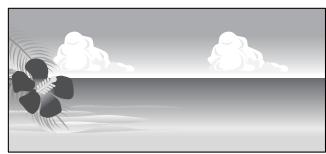
natural_image Stylized grayscale illustration of a flower with leaves and clouds in the background (no text or symbols)
text_image EPSON SC-PXXXX Series Printing Preferences Main Page Layout Utility Select Setting: Current Settings Save/Del... Media Settings Media Type: Premium Luster Photo Paper (260) Color: Color Custom Settings... Photo Black Ink Print Quality: Quality Paper Config... Mode: Automatic Custom EPSON Standard (sRGB) Paper Settings Source: Roll Paper Roll Paper Option... Size: A4 210 x 297 mm User Defined... Borderless Print Preview Layout Manager Ink Levels C OR Y LC MK PK VM LK GR V VLM Reset Defaults Version 6.70 OK Cancel Apply Help
text_image User Defined Paper Size Base Paper Size: User Defined Paper Size: User Defined Paper Size Name: User Defined size 1 Fix Aspect Ratio Not Specify Base: Landscape Portrait Paper Width: 210.0 (89.0 - 1118.0) Paper Height: 297.0 (127.0 - 15000.0) Unit mm inch Save Delete OK Cancel Help

Remarque :

text_image 30 x 40 in Printer 36 x 44 in 40 x 60 cm Presets 60 x 90 cm 8 x 10 in Copies A0 Pages A1 A2 A3 Paper Size ✓ A4 ARCH A 9 x 12 in Orientation ARCH B 12 x 18 in ARCH C 18 x 24 in ARCH D 24 x 36 in ARCH E 36 x 48 in B1 (Landscape) JIS B0 JIS B1 JIS B2 JIS B3 JIS B4 JIS B5 Super A0 Super A1 Super A3 / B Super B0 SuperW A3 US B 11 x 17 in US C 17 x 22 in US D 22 x 34 in US E 34 x 44 in US Letter Manage Custom Sizes...

2

text_image Custom Paper Sizes 2 XXXXXXXXX Paper Size: 209.9 mm 297.04 mm Width Height Non-Printable Area: User Defined 6.35 mm Top 6.35 mm Left 14.46 mm Right Bottom + - Duplicate Cancel OK
text_image Custom Paper Sizes XXXXXXX Paper Size: 209.9 mm 297.04 mm Width Height Non-Printable Area: User Defined 6.35 mm Top 6.35 mm 6.35 mm Left 14.46 mm Right Bottom + - Duplicate Cancel OK ?

Remarque :

natural_image Technical line drawing of a printer with paper spread and paper feed (no text or symbols)
text_image EPSON SC-PXXXX Series Printing Preferences Main Page Layout Utility Select Setting: Current Settings Save/Del... Media Settings Media Type: Premium Luster Photo Paper (260) Color: Color Print Quality: Quality Mode: Automatic Custom EPSON Standard (sRGB) Custom Settings... Photo Black Ink Paper Config... Paper Settings Source: Roll Paper Roll Paper Option... Size: A4 210 x 297 mm User Defined... Borderless Print Preview Layout Manager Ink Levels C OR Y LC MK PK VM LK GR V VLM Reset Defaults Version 6.70 OK Cancel Apply Help
text_image EPSON SC-PXXXX Series Printing Preferences Main Page Layout Utility Select Setting: Current Settings Save/Del... Media Settings Media Type: Premium Luster Photo Paper (260) Custom Settings... Color: Color Photo Black Ink Print Quality: Quality Paper Config... Mode: Automatic Custom EPSON Standard (sRGB) Paper Settings Source: Roll Paper Roll Paper Option... Size: ✓ Roll Paper 46 User Defined... Roll Paper (Banner) Sheet Print Preview Layout Manager C OR Y LC MK PK VM LK GR V VLM Reset Defaults Version 6.70 OK Cancel Apply Help

Remarque :

text_image EPSON SC-PXXXX Series Printing Preferences Main Page Layout Utility Select Setting: Current Settings Save/Del... Orientation Portrait Landscape Rotate 180° Mirror Image Copies Copies: 1 Collate Reverse Order Layout Page Size: A4 210 x 297 mm Output Paper: Same as Page Size Reduce/Enlarge Fit to Page Fit to Roll Paper Width Custom Scale to % Multi-Page N-up Poster Settings... Optimize Enlargement Hard Disk Unit Settings... Print Bckg Color Color Settings... Job Settings Details... Reset Defaults Version 6.70 OK Cancel Apply Help
text_image Printer: EPSON SC-PXXXX Series Presets: Default Settings Copies: 1 Pages: All From: 1 to: 1 Paper Size: Super A3 / B (Roll Pa... 329 by 483 mm Orientation: TextEdit Print header and footer Rewrap contents to fit page Cancel Print
text_image You want to add Teachers, fooders, waterworks, and backgroups sampleA.pdf sampleB.doc sampleC.jpg Epson Style Photo XXXXX - Layout Manager File Edit View Object Arrangement Help Page Page 1 Page 2 Page 3 Paper Size: A$~329 x 483 ms Media Type: Epson Premium Gloss Color: Color Source: Sheet
text_image Epson Stylist Photo XXXXX - Layout Manager File Edit View Object Arrangement Help Page 1 Page 2 Page 3 Page 1 Page 2 Page 3 Epson Stylist Photo XXXXX - Layout Manager Epson Stylist Photo XXXXX - Layout Manager Epson Stylist Photo XXXXX - Layout Manager Epson Stylist Photo XXXXX - Layout Manager Epson Stylist Photo XXXXX - Layout Manager Epson Stylist Photo XXXXX - Layout Manager Epson Stylist Photo XXXXX - Layout Manager Epson Stylist Photo XXXXX - Layout Manager Epson Stylist Photo XXXXX - Layout Manager Epson Stylist Photo XXXXX - Layout Manager
text_image EPSON SC-PXXXX Series Printing Preferences Main Page Layout Utility Select Setting: Current Settings Save/Del... Media Settings Media Type: Premium Luster Photo Paper (260) Custom Settings... Color: Color Photo Black Ink Print Quality: Quality Paper Config... Mode: Automatic Custom EPSON Standard (sRGB) Paper Settings Source: Roll Paper Roll Paper Option... Size: A4 210 x 297 mm User Defined... Borderless Print Preview Layout Manager Ink Levels C OR Y LC MK PK VM LK GR V VLM Reset Defaults Version 6.70 OK Cancel Apply Help
text_image Epson Stylus Photo XXXXX - Layout Manager File Edit View Object Arrangement Help Page 1 Page 2 Page 3 Paper Size: A3= 329 x 483 mi Media Type: Epson Premium Gloss Color: Color Source: Sheet

7

text_image EPSON SC-PXXXX Series - Layout Manager File Edit View Object Arrangement Help Open... Ctrl+O Save Ctrl+S Save As... Preferences... Properties... Print... Ctrl+P Exit

EPSON SURECOLOR SC-P9000 - 7 - 1

EPSON SURECOLOR SC-P9000 - 7 - 2

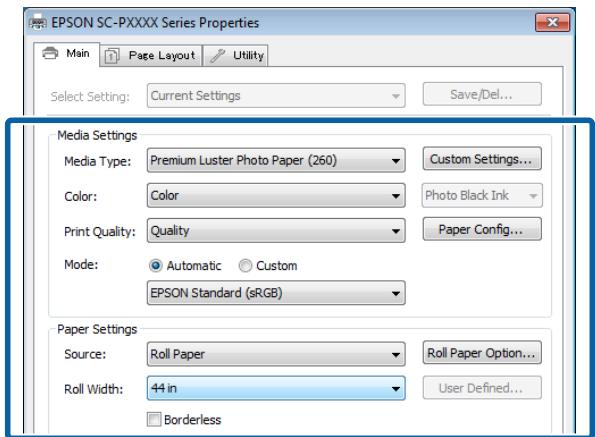
text_image EPSON SC-PXXXX Series Properties Main Page Layout Utility Select Setting: Current Settings Save/Del... Media Settings Media Type: Premium Luster Photo Paper (260) Custom Settings... Color: Color Photo Black Ink Print Quality: Quality Paper Config... Mode: Automatic Custom EPSON Standard (sRGB) Paper Settings Source: Roll Paper Roll Paper Option... Roll Width: 44 in User Defined... Borderless

EPSON SURECOLOR SC-P9000 - 7 - 3

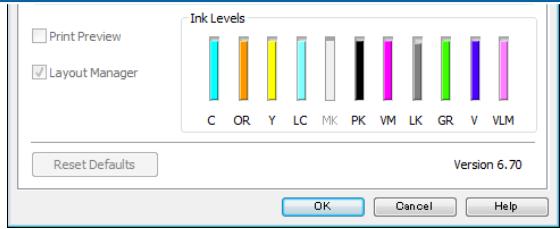
text_image Ink Levels C OR Y LC Mk PK VM LK GR V VLM Reset Defaults Version 6.70 OK Cancel Help
text_image Printer: EPSON XXXX Copies: 1 Print Settings... Position Center Image Top: -125.412 Left: -259.115 Scaled Print Size Scale to Fit Media Scale: 100% Height: 541.8 Width: 722.4 Print Resolution: 71.001 Bounding Box Units: mm Color Management Document (Profiler: xRGB ISO6x196-2.1) Color Hagdings: Photoshop Manages Colors management in the print settings dialog box. Printer Profile: EPSON xRGB Rendering Intent: Perceptual Black Point Compensation Working CMYK. Simulate Paper Color Simulate Black Ink Cancel Done Print
text_image EPSON SC-PXXXX Series Printing Preferences Main Page Layout Utility Select Setting: Current Settings Save/Del... Media Settings Media Type: Premium Luster Photo Paper (260) Custom Settings... Color: Color Photo Black Ink Print Quality: Quality Paper Config... Mode: Automatic Custom Off (No Color Adjustment) Advanced... Paper Settings Source: Roll Paper Roll Paper Option... Size: A4 210 x 297 mm User Defined... Borderless Print Preview Layout Manager Ink Levels C OR Y LC MK PK VM LK GR V VLM Reset Defaults Version 6.70 OK Cancel Apply Help

Remarque :

text_image Printer: EPSON SC-PXXXX Series Presets: Default Settings Copies: 1 Pages: All From: 1 to: 1 Paper Size: A4 210 by 297 mm Orientation: Print Settings Basic Advanced Color Settings Page Setup: Roll Paper Media Type: Premium Luster Photo Paper (260) Ink: Photo Black Color: Color 16 bit/Channel Color Settings: Off (No Color Adjustment) : Print Quality: SuperFine - 1440dpi Super MicroWeave High Speed Mirror Image Finest Detail Cancel Print

2

4

text_image Printer: EPSON XXXX Copies: 1 Print Settings... Position Center Image Top: -125.412 Left: -259.115 Scaled Print Size Scale to Fit Media Scale: 100% Height: 541.8 Width: 722.4 Print Resolution: 72 PPP Bynding Box Units: mm Color Management Document (Profiles: sRGB IECB1966-2.1) Color Helpings: Printer Manages Colors management in the print settings dialog box. Printer Profile: EPSON SC-T3000_3000_7000_Series Double... Rendering Intent: Perceptual Black Print Compensation Proof Setup: Working CMYK Simulate Paper Color Simulate Black Ink Cancel Dong Print
text_image EPSON SC-PXXXX Series Printing Preferences Main Page Layout Utility Select Setting: Current Settings Save/Del... Media Settings Media Type: Premium Luster Photo Paper (260) Custom Settings... Color: Color Photo Black Ink Print Quality: Quality Paper Config... Mode: Automatic Custom ICM Advanced... Paper Settings Source: Roll Paper Roll Paper Option... Size: A4 210 x 297 mm User Defined... Borderless Print Preview Layout Manager Ink Levels C OR Y LC MK PK VM LK GR V VLM Reset Defaults Version 6.70 OK Cancel Apply Help
text_image ICM Printer Color Adjustment ICM Mode: Driver ICM (Basic) Show all profiles Image Input Profile: sRGB IEC61966-2.1 Intent: Perceptual Printer Profile: EPSON Standard Printer Profile Description SC-P9000_P7000_Series_V PremiumLusterPhotoPaper260 Graphics Input Profile: Intent: Printer Profile: Text Input Profile: Intent: Printer Profile: Printer Profile Description Printer Profile Description OK Cancel Help

EPSON SURECOLOR SC-P9000 - 4 - 1

text_image Printer: EPSON SC-PXXXX Series Presets: Default Settings Copies: 1 Pages: All From: 1 to: 1 Paper Size: A4 210 by 297 mm Orientation: Color Matching ColorSync EPSON Color Controls Profile: Automatic Cancel Print

EPSON SURECOLOR SC-P9000 - 4 - 2

text_image Printer: EPSON XXXX Copies: 1 Print Settings... Position Center Image Top: -125.412 Left: -259.113 Scaled Print Size Scale to Fit Media Scale: 100% Height: 541.8 Width: 722.4 Print Resolution: 72 PPI Boyding Box Units: mm Color Management Document (Profiles: sRGB IBO1966-2.1) Color Handleings: Printer Manages Colors management in the print settings dialog box. Printer Profile: EPSON SC-T3000, 5000, 7000, Series Double... Rendering Intent: Perceptual Black Print Compensation Proof Setup: Working CMTK Simulate Paper Color Simulate Mark Ink Cancel Done Print
text_image EPSON SC-PXXXX Series Printing Preferences Main Page Layout Utility Select Setting: Current Settings Save/Del... Media Settings Media Type: Premium Luster Photo Paper (260) Custom Settings... Color: Color Photo Black Ink Print Quality: Quality Paper Config... Mode: Automatic Custom ICM Advanced... Paper Settings Source: Roll Paper Roll Paper Option... Size: A4 210 x 297 mm User Defined... Borderless Print Preview Layout Manager Ink Levels C OR Y LC MK PK VM LK GR V VLM Reset Defaults Version 6.70 OK Cancel Apply Help
text_image ICM Printer Color Adjustment ICM Mode: Driver ICM (Advanced) Image Input Profile: sRGB IEC61966-2.1 Intent: Perceptual Printer Profile: EPSON Standard Printer Profile Description SC-P9000_P7000_Series_V PremiumLusterPhotoPaper260 Graphics Input Profile: Intent: Printer Profile: Text Input Profile: Intent: Printer Profile: Printer Profile Description Printer Profile Description OK Cancel Help
flowchart
graph TD
    A["Ready Paper #12"] --> B["Menu"]
    B --> C["Maintenance"]
    C --> D["Maintenance"]
    D --> E["Nozzle Check"]
    E --> F["Nozzle Check Press OK to print nozzle check pattern."]
    F --> G["*1 OK"]
    G --> H["PAPER LOADING METHOD"]
    H --> I["Switching Black Ink"]
    I --> J["Select Ink Cover Open"]
    J --> K["Paper Source"]
    K --> L["*2 OK"]
    L --> M["Paper Loading Method"]
    M --> N["Roll Paper"]
    M --> O["CUT SHEET(UNDER A3)"]
    M --> P["CUT SHEET(OVER A3)"]
    M --> Q["Poster Board"]
    M --> R["Proceed Back"]
    I --> S["Switch black ink to MK?"]
    S --> T["Yes"]
    S --> U["No"]
    S --> V["OK Done"]
    J --> W["Right Cover"]
    J --> X["Left Cover"]
    J --> Y["Right & Left Covers"]
    J --> Z["OK Done Back"]
    K --> AA["Roll Paper / Cut"]
    K --> AB["Roll Paper / No Cut"]
    K --> AC["Cut Sheet"]
    K --> AD["OK Done Back"]
text_image EPSON SC-PXXXX Series Printing Preferences Main Page Layout Utility Nozzle Check Head Cleaning Print Head Alignment EPSON Status Monitor 3 Monitoring Preferences Print Queue Language: English (English) Printer and Option Information Speed and Progress Menu Arrangement Export or Import EPSON LFP Remote Panel 2 Epson Color Calibration Utility Version 6.70 OK Cancel Apply Help
text_image Nozzle Check Press OK to print nozzle check pattern. OK Proceed Cancel

5

text_image EPSON SC-PXXXX Series Printing Preferences Main Page Layout Utility Nozzle Check Head Cleaning Print Head Alignment EPSON Status Monitor 3 Monitoring Preferences Print Queue Printer and Option Information Speed and Progress Menu Arrangement Export or Import EPSON LFP Remote Panel 2 Epson Color Calibration Utility Language: English (English) Version 6.70 OK Cancel Apply Help

EPSON SURECOLOR SC-P9000 - 5 - 1

text_image EPSON SC-PXXXX Series Printing Preferences Main Page Layout Utility Nozzle Check Print Head Alignment Head Cleaning Printer and Option Information Speed and Progress Menu Arrangement Export or Import EPSON Status Monitor 3 Monitoring Preferences EPSON LFP Remote Panel 2 Print Queue Epson Color Calibration Utility Language: English (English) Version 6.70 OK Cancel Apply Help
natural_image Diagram of a printer interior showing internal compartments and a blue arrow indicating rotation (no text or symbols)

Important :

natural_image Line drawing of a hand inserting a component into a device (no text or symbols)

6

natural_image Diagram of a device interior showing a blue plastic container being inserted into a rack (no text or symbols visible)

EPSON SURECOLOR SC-P9000 - 6 - 1

Important :

text_image Diagram illustrating a device transformation process with labeled components and directional arrows

EPSON SURECOLOR SC-P9000 - Important : - 1

Important :

natural_image Diagram of a device with a blue internal component and directional arrow indicating flow or movement (no text or symbols)

EPSON SURECOLOR SC-P9000 - Important : - 1

Important :

natural_image Diagram of a refrigerator interior with a blue arrow indicating the direction (no text or symbols present)

Entretien

natural_image Diagram of a printer with a blue internal box, showing mechanical components and a blue arrow indicating motion (no text or symbols present)

4

natural_image Diagram of airflow or ventilation inside a blue plastic container with a paper sheet (no text or symbols)

5

natural_image Technical line drawing of a mechanical component with a blue arrow indicating direction (no text or symbols)

Entretien

EPSON SURECOLOR SC-P9000 - Entretien - 1

Important :

natural_image Technical diagram showing a mechanical assembly with a close-up of a component being inserted into a housing (no text or symbols present)

Entretien

8

natural_image Technical line drawing of a mechanical assembly with no visible text or symbols

9

natural_image Mechanical assembly diagram showing a blue mechanical component with a blue arrow indicating motion (no text or symbols present)

10

natural_image Technical diagram showing a mechanical assembly with a blue component and a magnified view of the internal structure (no text or symbols present)

11

natural_image Technical line drawing of a mechanical assembly with no visible text or symbols

EPSON SURECOLOR SC-P9000 - 11 - 1

Important :

natural_image Technical line drawing of a mechanical assembly with a blue arrow indicating direction (no text or symbols)

13

text_image Technical diagram showing a printer's internal structure with labeled parts (a and b) and directional arrows indicating assembly or processing.

EPSON SURECOLOR SC-P9000 - 13 - 1

Important :

natural_image Diagram showing a printer with internal components being placed into a device, and a hand interacting with the interior panel (no text or symbols present)

5

natural_image Illustration of a printer with a magnified inset showing a person's arm and sleeve (no text or symbols)
natural_image Line drawing of a printer with a blue paper roll and arrow indicating motion (no text or symbols)
natural_image Diagram of a printer with a blue arrow indicating airflow or ventilation direction (no text or symbols present)

EPSON SURECOLOR SC-P9000 - 5 - 1

Important :

natural_image Diagram showing a printer's internal structure being processed, with a close-up of the device's internal components being handled (no text or symbols present)
natural_image Technical line drawing of a printer with internal components and a blue plastic cover (no text or symbols)

7
Fermez le capot avant.
8

natural_image Technical line drawing of a printer with a blue arrow indicating the paper folding process (no text or symbols present)

Important :

natural_image Technical illustration of a printer with internal components and a close-up view of the mechanical component being inserted (no text or symbols present)
natural_image Technical line drawing of a printer with paper feed and paper roll, showing internal structure without any text or symbols

SC-P9070/SC-P7070, SC-P8070/SC-P6070

Nom couleurRéférence
700 ml350 ml150 ml
Photo Black (Noir Photo)T7681T7691T7701
CyanT7682T7692T7702
Vivid MagentaT7683T7693T7703
Yellow (Jaune)T7684T7694T7704
Light Cyan (Cyan Clair)T7685T7695T7705
Vivid Light Magenta (Vivid Magen-ta Clair)T7686T7696T7706
Light Black (Gris)T7687T7697T7707
Matte Black (Noir Mat)T7688T7698T7708
Light Light Black (Gris Clair)T7689T7699T7709
Orange*T768AT769AT770A
Green (Vert)*T768BT769BT770B
Violet*T768DT769DT770D

SC-P9080/SC-P7080, SC-P8080/SC-P6080

Nom couleurRéférence
700 ml350 ml150 ml
Photo Black (Noir Photo)T8061T8261T8361
CyanT8062T8262T8362
Vivid MagentaT8063T8263T8363
Yellow (Jaune)T8064T8264T8364
Light Cyan (Cyan Clair)T8065T8265T8365
Vivid Light Magenta (Vivid Magen-ta Clair)T8066T8266T8366
Light Black (Gris)T8067T8267T8367
Matte Black (Noir Mat)T8068T8268T8368
Light Light Black (Gris Clair)T8069T8269T8369

Annexe

Nom couleurRéférence
700 ml350 ml150 ml
Orange*T806AT826AT836A
Green (Vert)*T806BT826BT836B
Violet*T806DT826DT836D

Premium Semigloss Photo Paper (250) (Papier photo semi-glacé Premium (250))

Premium Glossy Photo Paper (170) (Papier photo glacé Premium (170))

Premium Semigloss Photo Paper (170) (Papier photo semi-glacé Premium (170))

EPSON Proofing Paper Commercial

SC-P9000 Series/SC-P7000 SeriesSC-P9000_P7000_Series Standard.icc
SC-P8000 Series/SC-P6000 SeriesSC-P8000_P6000_Series Standard.icc
SC-P9000 Series/SC-P7000 SeriesSC-P9000_P7000_Series Standard.icc
SC-P8000 Series/SC-P6000 SeriesSC-P8000_P6000_Series Standard.icc

UltraSmooth Fine Art Paper

SC-P9000 Series/SC-P7000 SeriesSC-P9000_P7000_Series Standard.icc
SC-P8000 Series/SC-P6000 SeriesSC-P8000_P6000_Series Standard.icc
SC-P9000 Series/SC-P7000 SeriesSC-P9000_P7000_Series Standard.icc
SC-P8000 Series/SC-P6000 SeriesSC-P8000_P6000_Series Standard.icc

Premium Semigloss Photo Paper (Papier photo semi-glacé Premium)

SC-P9000 Series/SC-P7000 SeriesSC-P9000_P7000_Series Standard.icc
SC-P8000 Series/SC-P6000 SeriesSC-P8000_P6000_Series Standard.icc
natural_image Technical line drawing of a printer with internal components and blue circular annotations indicating parts of the device (no text or symbols present)

6

Déplacez l'imprimante.

EPSON SURECOLOR SC-P9000 - 6 - 1

Important :

text_image Diagram showing a hand holding a blue object near a wall, with numbered callouts and directional arrows indicating movement or process.

EPSON SURECOLOR SC-P9000 - Important : - 1

text_image Diagram showing a hand holding a blue object above a door, with a numbered step and directional arrows indicating movement or process.

EPSON SURECOLOR SC-P9000 - Important : - 2

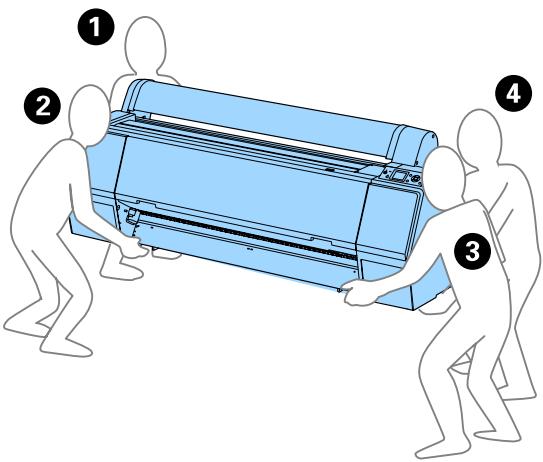
text_image Diagram showing four numbered steps of a person pulling a large blue air conditioner into a larger portion, illustrating the process.

EPSON SURECOLOR SC-P9000 - Important : - 3

natural_image Illustration of two hands using a horizontal bar on a surface, with one hand pressing down and the other holding a blue object (no text or symbols)

EPSON SURECOLOR SC-P9000 - Important : - 4

natural_image Illustration of a person's legs and feet on a seesaw, showing foot positioning and seat alignment (no text or symbols)

EPSON SURECOLOR SC-P9000 - Important : - 5

Important :

http://www.epson.com.au

Centre de services : 80 Truong Dinh Street, District 1, Hochiminh City Vietnam

□ Assistance technique

Centre de services Epson

(http://www.epson.com.my)

(http://www.epson.com.ph)

LICENCE LOGICIELLE OPEN SOURCE

WPA Supplicant 0.7.3

WPA Supplicant 0.7.3

Licence Sun RPC

This printer product includes the open source software programs which apply the Apple Public Source License Version1.2 or its latest version ("Bonjour Programs").

We provide the source code of the Bonjour Programs pursuant to the Apple Public Source License Version1.2 or its latest version until five (5) years after the discontinuation of same model of this printer product. If you desire to receive the source code of the Bonjour Programs, please see the "Contacting Customer Support" in Appendix or Printing Guide of this User's Guide, and contact the customer support of your region.

You can redistribute Bonjour Programs and/or modify it under the terms of the Apple Public Source License Version1.2 or its latest version.

These Bonjour Programs are WITHOUT ANY WARRANTY; without even the implied warranty of MERCHANTABILITY AND FITNESS FOR A PARTICULAR PURPOSE.

The Apple Public Source License Version1.2 is as follows. You also can see the Apple Public Source License Version1.2 at http://www.opensource.apple.com/apsl/.

APPLE PUBLIC SOURCE LICENSE

Version 2.0 - August 6, 2003

  1. General; Definitions. This License applies to any program or other work which Apple Computer, Inc. ("Apple") makes publicly available and which contains a notice placed by Apple identifying such program or work as "Original Code" and stating that it is subject to the terms of this Apple Public Source License version 2.0 ("License"). As used in this License:

1.1 "Applicable Patent Rights" mean: (a) in the case where Apple is the grantor of rights, (i) claims of patents that are now or hereafter acquired, owned by or assigned to Apple and (ii) that cover subject matter contained in the Original Code, but only to the extent necessary to use, reproduce and/or distribute the Original Code without infringement; and (b) in the case where You are the grantor of rights, (i) claims of patents that are now or hereafter acquired, owned by or assigned to You and (ii) that cover subject matter in Your Modifications, taken alone or in combination with Original Code.

1.2 "Contributor" means any person or entity that creates or contributes to the creation of Modifications.

1.3 "Covered Code" means the Original Code, Modifications, the combination of Original Code and any Modifications, and/or any respective portions thereof.

1.4 "Externally Deploy" means: (a) to sublicense, distribute or otherwise make Covered Code available, directly or indirectly, to anyone other than You; and/or (b) to use Covered Code, alone or as part of a Larger Work, in any way to provide a service, including but not limited to delivery of content, through electronic communication with a client other than You.

1.5 "Larger Work" means a work which combines Covered Code or portions thereof with code not governed by the terms of this License.

1.6 "Modifications" mean any addition to, deletion from, and/or change to, the substance and/or structure of the Original Code, any previous Modifications, the combination of Original Code and any previous Modifications, and/or any respective portions thereof. When code is released as a series of files, a Modification is: (a) any addition to or deletion from the contents of a file containing Covered Code; and/or (b) any new file or other representation of computer program statements that contains any part of Covered Code.

1.7 "Original Code" means (a) the Source Code of a program or other work as originally made available by Apple under this License, including the Source Code of any updates or upgrades to such programs or works made available by Apple under this License, and that has been expressly identified by Apple as such in the header file(s) of such work; and (b) the object code compiled from such Source Code and originally made available by Apple under this License

1.8 "Source Code" means the human readable form of a program or other work that is suitable for making modifications to it, including all modules it contains, plus any associated interface definition files, scripts used to control compilation and installation of an executable (object code).

1.9 "You" or "Your" means an individual or a legal entity exercising rights under this License. For legal entities, "You" or "Your" includes any entity which controls, is controlled by, or is under common control with, You, where "control" means (a) the power, direct or indirect, to cause the direction or management of such entity, whether by contract or otherwise, or (b) ownership of fifty percent (50%) or more of the outstanding shares or beneficial ownership of such entity.

  1. Permitted Uses; Conditions & Restrictions. Subject to the terms and conditions of this License, Apple hereby grants You, effective on the date You accept this License and download the Original Code, a world-wide, royalty-free, non-exclusive license, to the extent of Apple's Applicable Patent Rights and copyrights covering the Original Code, to do the following:

2.1 Unmodified Code. You may use, reproduce, display, perform, internally distribute within Your organization, and Externally Deploy verbatim, unmodified copies of the Original Code, for commercial or non-commercial purposes, provided that in each instance:

(a) You must retain and reproduce in all copies of Original Code the copyright and other proprietary notices and disclaimers of Apple as they appear in the Original Code, and keep intact all notices in the Original Code that refer to this License; and
(b) You must include a copy of this License with every copy of Source Code of Covered Code and documentation. You distribute or Externally Deploy, and You may not offer or impose any terms on such Source Code that alter or restrict this License or the recipients' rights hereunder, except as permitted under Section 6.

2.2 Modified Code. You may modify Covered Code and use, reproduce, display, perform, internally distribute within Your organization, and Externally Deploy Your Modifications and Covered Code, for commercial or non-commercial purposes, provided that in each instance You also meet all of these conditions:

(a) You must satisfy all the conditions of Section 2.1 with respect to the Source Code of the Covered Code;
(b) You must duplicate, to the extent it does not already exist, the notice in Exhibit A in each file of the Source Code of all Your Modifications, and cause the modified files to carry prominent notices stating that You changed the files and the date of any change; and
(c) If You Externally Deploy Your Modifications, You must make Source Code of all Your Externally Deployed Modifications either available to those to whom You have Externally Deployed Your Modifications, or publicly available. Source Code of Your Externally Deployed Modifications must be released under the terms set forth in this License, including the license grants set forth in Section 3 below, for as long as you Externally Deploy the Covered Code or twelve (12) months from the date of initial External Deployment, whichever is longer. You should preferably distribute the Source Code of Your Externally Deployed Modifications electronically (e.g. download from a web site).
2.3 Distribution of Executable Versions. In addition, if You Externally Deploy Covered Code (Original Code and/or Modifications) in object code, executable form only, You must include a prominent notice, in the code itself as well as in related documentation, stating that Source Code of the Covered Code is available under the terms of this License with information on how and where to obtain such Source Code.
2.4 Third Party Rights. You expressly acknowledge and agree that although Apple and each Contributor grants the licenses to their respective portions of the Covered Code set forth herein, no assurances are provided by Apple or any Contributor that the Covered Code does not infringe the patent or other intellectual property rights of any other entity. Apple and each Contributor disclaim any liability to You for claims brought by any other entity based on infringement of intellectual property rights or otherwise. As a condition to exercising the rights and licenses granted hereunder, You hereby assume sole responsibility to secure any other intellectual property rights needed, if any. For example, if a third party patent license is required to allow You to distribute the Covered Code, it is Your responsibility to acquire that license before distributing the Covered Code.
3. Your Grants. In consideration of, and as a condition to, the licenses granted to You under this License, You hereby grant to any person or entity receiving or distributing Covered Code under this License a non-exclusive, royalty-free, perpetual, irrevocable license, under Your Applicable Patent Rights and other intellectual property rights (other than patent) owned or controlled by You, to use, reproduce, display, perform, modify, sublicense, distribute and Externally Deploy Your Modifications of the same scope and extent as Apple's licenses under Sections 2.1 and 2.2 above.
4. Larger Works. You may create a Larger Work by combining Covered Code with other code not governed by the terms of this License and distribute the Larger Work as a single product. In each such instance, You must make sure the requirements of this License are fulfilled for the Covered Code or any portion thereof.
5. Limitations on Patent License. Except as expressly stated in Section 2, no other patent rights, express or implied, are granted by Apple herein. Modifications and/or Larger Works may require additional patent licenses from Apple which Apple may grant in its sole discretion.

  1. Additional Terms. You may choose to offer, and to charge a fee for, warranty, support, indemnity or liability obligations and/or other rights consistent with the scope of the license granted herein ("Additional Terms") to one or more recipients of Covered Code. However, You may do so only on Your own behalf and as Your sole responsibility, and not on behalf of Apple or any Contributor. You must obtain the recipient's agreement that any such Additional Terms are offered by You alone, and You hereby agree to indemnify, defend and hold Apple and every Contributor harmless for any liability incurred by or claims asserted against Apple or such Contributor by reason of any such Additional Terms.
  2. Versions of the License. Apple may publish revised and/or new versions of this License from time to time. Each version will be given a distinguishing version number. Once Original Code has been published under a particular version of this License, You may continue to use it under the terms of that version. You may also choose to use such Original Code under the terms of any subsequent version of this License published by Apple. No one other than Apple has the right to modify the terms applicable to Covered Code created under this License.
  3. NO WARRANTY OR SUPPORT. The Covered Code may contain in whole or in part pre-release, untested, or not fully tested works. The Covered Code may contain errors that could cause failures or loss of data, and may be incomplete or contain inaccuracies. You expressly acknowledge and agree that use of the Covered Code, or any portion thereof, is at Your sole and entire risk. THE COVERED CODE IS PROVIDED "AS IS" AND WITHOUT WARRANTY, UPGRADES OR SUPPORT OF ANY KIND AND APPLE AND APPLE'S LICENSOR(S) (COLLECTIVELY REFERRED TO AS "APPLE" FOR THE PURPOSES OF SECTIONS 8 AND 9) AND ALL CONTRIBUTORS EXPRESSLY DISCLAIM ALL WARRANTIES AND/OR CONDITIONS, EXPRESS OR IMPLIED, INCLUDING, BUT NOT LIMITED TO, THE IMPLIED WARRANTIES AND/OR CONDITIONS OF MERCHANTABILITY, OF SATISFACTORY QUALITY, OF FITNESS FOR A PARTICULAR PURPOSE, OF ACCURACY, OF QUIET ENJOYMENT, AND NONINFRINGEMENT OF THIRD PARTY RIGHTS. APPLE AND EACH CONTRIBUTOR DOES NOT WARRANT AGAINST INTERFERENCE WITH YOUR ENJOYMENT OF THE COVERED CODE, THAT THE FUNCTIONS CONTAINED IN THE COVERED CODE WILL MEET YOUR REQUIREMENTS, THAT THE OPERATION OF THE COVERED CODE WILL BE UNINTERRUPTED OR ERROR-FREE, OR THAT DEFECTS IN THE COVERED CODE WILL BE CORRECTED. NO ORAL OR WRITTEN INFORMATION OR ADVICE GIVEN BY APPLE, AN APPLE AUTHORIZED REPRESENTATIVE OR ANY CONTRIBUTOR SHALL CREATE A WARRANTY. You acknowledge that the Covered Code is not intended for use in the operation of nuclear facilities, aircraft navigation, communication systems, or air traffic control machines in which case the failure of the Covered Code could lead to death, personal injury, or severe physical or environmental damage.
  4. LIMITATION OF LIABILITY. TO THE EXTENT NOT PROHIBITED BY LAW, IN NO EVENT SHALL APPLE OR ANY CONTRIBUTOR BE LIABLE FOR ANY INCIDENTAL, SPECIAL, INDIRECT OR CONSEQUENTIAL DAMAGES ARISING OUT OF OR RELATING TO THIS LICENSE OR YOUR USE OR INABILITY TO USE THE COVERED CODE, OR ANY PORTION THEREOF, WHETHER UNDER A THEORY OF CONTRACT, WARRANTY, TORT (INCLUDING NEGLIGENCE), PRODUCTS LIABILITY OR OTHERWISE, EVEN IF APPLE OR SUCH CONTRIBUTOR HAS BEEN ADVISED OF THE POSSIBILITY OF SUCH DAMAGES AND NOTWITHSTANDING THE FAILURE OF ESSENTIAL PURPOSE OF ANY REMEDY. SOME JURISDICTIONS DO NOT ALLOW THE LIMITATION OF LIABILITY OF INCIDENTAL OR CONSEQUENTIAL DAMAGES, SO THIS LIMITATION MAY NOT APPLY TO YOU. In no event shall Apple's total liability to You for all damages (other than as may be required by applicable law) under this License exceed the amount of fifty dollars (\$50.00).
  5. Trademarks. This License does not grant any rights to use the trademarks or trade names "Apple", "Apple Computer", "Mac", "Mac OS", "QuickTime", "QuickTime Streaming Server" or any other trademarks, service marks, logos or trade names belonging to Apple (collectively "Apple Marks") or to any trademark, service mark, logo or trade name belonging to any Contributor. You agree not to use any Apple Marks in or as part of the name of products derived from the Original Code or to endorse or promote products derived from the Original Code other than as expressly permitted by and in strict compliance at all times with Apple's third party trademark usage guidelines which are posted at http://www.apple.com/legal/guidelinesfor3rdparties.html.
  1. Ownership. Subject to the licenses granted under this License, each Contributor retains all rights, title and interest in and to any Modifications made by such Contributor. Apple retains all rights, title and interest in and to the Original Code and any Modifications made by or on behalf of Apple ("Apple Modifications"), and such Apple Modifications will not be automatically subject to this License. Apple may, at its sole discretion, choose to license such Apple Modifications under this License, or on different terms from those contained in this License or may choose not to license them at all.

  2. Termination.

12.1 Termination. This License and the rights granted hereunder will terminate:

(a) automatically without notice from Apple if You fail to comply with any term(s) of this License and fail to cure such breach within 30 days of becoming aware of such breach;

(b) immediately in the event of the circumstances described in Section 13.5(b); or

(c) automatically without notice from Apple if You, at any time during the term of this License, commence an action for patent infringement against Apple; provided that Apple did not first commence an action for patent infringement against You in that instance.

12.2 Effect of Termination. Upon termination, You agree to immediately stop any further use, reproduction, modification, sublicensing and distribution of the Covered Code. All sublicenses to the Covered Code which have been properly granted prior to termination shall survive any termination of this License. Provisions which, by their nature, should remain in effect beyond the termination of this License shall survive, including but not limited to Sections 3, 5, 8, 9, 10, 11, 12.2 and 13. No party will be liable to any other for compensation, indemnity or damages of any sort solely as a result of terminating this License in accordance with its terms, and termination of this License will be without prejudice to any other right or remedy of any party.

  1. Miscellaneous.

13.1 Government End Users. The Covered Code is a "commercial item" as defined in FAR 2.101. Government software and technical data rights in the Covered Code include only those rights customarily provided to the public as defined in this License. This customary commercial license in technical data and software is provided in accordance with FAR 12.211 (Technical Data) and 12.212 (Computer Software) and, for Department of Defense purchases, DFAR 252.227-7015 (Technical Data -- Commercial Items) and 227.7202-3 (Rights in Commercial Computer Software or Computer Software Documentation). Accordingly, all U.S. Government End Users acquire Covered Code with only those rights set forth herein.

13.2 Relationship of Parties. This License will not be construed as creating an agency, partnership, joint venture or any other form of legal association between or among You, Apple or any Contributor, and You will not represent to the contrary, whether expressly, by implication, appearance or otherwise.

13.3 Independent Development. Nothing in this License will impair Apple's right to acquire, license, develop, have others develop for it, market and/or distribute technology or products that perform the same or similar functions as, or otherwise compete with, Modifications, Larger Works, technology or products that You may develop, produce, market or distribute.

13.4 Waiver; Construction. Failure by Apple or any Contributor to enforce any provision of this License will not be deemed a waiver of future enforcement of that or any other provision. Any law or regulation which provides that the language of a contract shall be construed against the drafter will not apply to this License.

13.5 Severability. (a) If for any reason a court of competent jurisdiction finds any provision of this License, or portion thereof, to be unenforceable, that provision of the License will be enforced to the maximum extent permissible so as to effect the economic benefits and intent of the parties, and the remainder of this License will continue in full force and effect. (b) Notwithstanding the foregoing, if applicable law prohibits or restricts You from fully and/or specifically complying with Sections 2 and/or 3 or prevents the enforceability of either of those Sections, this License will immediately terminate and You must immediately discontinue any use of the Covered Code and destroy all copies of it that are in your possession or control.
13.6 Dispute Resolution. Any litigation or other dispute resolution between You and Apple relating to this License shall take place in the Northern District of California, and You and Apple hereby consent to the personal jurisdiction of, and venue in, the state and federal courts within that District with respect to this License. The application of the United Nations Convention on Contracts for the International Sale of Goods is expressly excluded.
13.7 Entire Agreement; Governing Law. This License constitutes the entire agreement between the parties with respect to the subject matter hereof. This License shall be governed by the laws of the United States and the State of California, except that body of California law concerning conflicts of law.

Where You are located in the province of Quebec, Canada, the following clause applies: The parties hereby confirm that they have requested that this License and all related documents be drafted in English.

"Portions Copyright (c) 1999-2003 Apple Computer, Inc. All Rights Reserved."

This file contains Original Code and/or Modifications of Original Code as defined in and that are subject to the Apple Public Source License Version 2.0 (the 'License'). You may not use this file except in compliance with the License. Please obtain a copy of the License at http://www.opensource.apple.com/apsl/ and read it before using this file.

The Original Code and all software distributed under the License are distributed on an 'AS IS' basis, WITHOUT WARRANTY OF ANY KIND, EITHER EXPRESS OR IMPLIED, AND APPLE HEREBY DISCLAIMS ALL SUCH WARRANTIES, INCLUDING WITHOUT LIMITATION, ANY WARRANTIES OF MERCHANTABILITY, FITNESS FOR A PARTICULAR PURPOSE, QUIET ENJOYMENT OR NON-INFRINGEMENT. Please see the License for the specific language governing rights and limitations under the License."

This is version 2007-Mar-4 of the Info-ZIP license. The definitive version of this document should be available at ftp://ftp.info-zip.org/pub/infozip/license.html indefinitely and a copy at http://www.info-zip.org/pub/infozip/license.html.

For the purposes of this copyright and license, “Info-ZIP” is defined as the following set of individuals:

Permission is granted to anyone to use this software for any purpose, including commercial applications, and to alter it and redistribute it freely, subject to the above disclaimer and the following restrictions:

  1. Redistributions of source code (in whole or in part) must retain the above copyright notice, definition, disclaimer, and this list of conditions.
  2. Redistributions in binary form (compiled executables and libraries) must reproduce the above copyright notice, definition, disclaimer, and this list of conditions in documentation and/or other materials provided with the distribution. The sole exception to this condition is redistribution of a standard UnZipSFX binary (including SFXWiz) as part of a self-extracting archive; that is permitted without inclusion of this license, as long as the normal SFX banner has not been removed from the binary or disabled.
  3. Altered versions--including, but not limited to, ports to new operating systems, existing ports with new graphical interfaces, versions with modified or added functionality, and dynamic, shared, or static library versions not from Info-ZIP--must be plainly marked as such and must not be misrepresented as being the original source or, if binaries, compiled from the original source. Such altered versions also must not be misrepresented as being Info-ZIP releases--including, but not limited to, labeling of the altered versions with the names “Info-ZIP” (or any variation thereof, including, but not limited to, different capitalizations), “Pocket UnZip”, “WiZ” or “MacZip” without the explicit permission of Info-ZIP. Such altered versions are further prohibited from misrepresentative use of the Zip-Bugs or Info-ZIP e-mail addresses or the Info-ZIP URL(s), such as to imply Info-ZIP will provide support for the altered versions.
  4. Info-ZIP retains the right to use the names “Info-ZIP”, “Zip”, “UnZip”, “UnZipSFX”, “WiZ”, “Pocket UnZip”, “Pocket Zip”, and “MacZip” for its own source and binary releases.
Manual assistant
Powered by Anthropic
Waiting for your message
Product information

Brand : EPSON

Model : SURECOLOR SC-P9000

Category : Large format inkjet printer