
EL4KAMZ4317 - Television Element - Free user manual and instructions
Find the device manual for free EL4KAMZ4317 Element in PDF.


| Product Type | Television |
| Brand | Element |
| Model | EL4KAMZ4317 |
| Screen Size | 43 inches (diagonal) |
| Resolution | 4K UHD (3840 x 2160 pixels) |
| Refresh Rate | 60 Hz (native) |
| Smart TV Platform | Built-in streaming apps (e.g., Netflix, YouTube) |
| Connectivity | 3x HDMI, 1x USB, 1x Ethernet, 1x Digital Audio Out, 1x Composite Video In |
| Audio | 2 x 8W speakers |
| Power Consumption | 75 W (typical), Standby: <0.5 W |
| Power Supply | AC 120V, 60Hz |
| Dimensions (with stand) | 37.9 x 24.5 x 7.9 inches (W x H x D) |
| Dimensions (without stand) | 37.9 x 22.0 x 3.5 inches |
| Weight (with stand) | 17.6 lbs |
| Weight (without stand) | 16.5 lbs |
| VESA Mount Compatible | Yes, 200 x 200 mm |
| Remote Control | IR remote with dedicated streaming buttons |
| Cleaning Instructions | Wipe with a soft, dry cloth. Do not use liquid or abrasive cleaners. |
| Safety Features | Ventilation slots, anti-tip strap included |
| Spare Parts Availability | Contact Element customer support for replacement parts |
| General Information | Designed for indoor use only. Operating temperature: 32°F to 104°F. |
Frequently Asked Questions - EL4KAMZ4317 Element
User questions about EL4KAMZ4317 Element
0 question about this device. Answer the ones you know or ask your own.
Ask a new question about this device
Download the instructions for your Television in PDF format for free! Find your manual EL4KAMZ4317 - Element and take your electronic device back in hand. On this page are published all the documents necessary for the use of your device. EL4KAMZ4317 by Element.
USER MANUAL EL4KAMZ4317 Element
Important Safety Instructions 2
Safety Information 3
Preparation 4
What's Included 4
Front View 5
Rear View 6
Installing the Stand 7
Remote Control 8
Connecting External Devices 9
Set Up 10
Customizing TV Settings 11
Features 13
Technical Specs 14
Parental Control 15
Troubleshooting 17
FCC 18
IMPORTANT SAFETY INSTRUCTIONS
- Read these instructions – All the safety and operating instructions should be read before this product is operated.
- Keep these instructions – The safety and operating instructions should be retained for future reference.
- Heed all warnings – All warnings on the appliance and in the operating instructions should be adhered to.
- Follow all instructions – All operating and use instructions should be followed.
- Do not use this apparatus near water – The appliance should not be used near water or moisture – for example, in a wet basement or near a swimming pool, and the like.
• Clean only with dry cloth. - Do not block any ventilation openings. Install in accordance with the manufacturer's instructions.
- Do not install near any heat sources such as radiators, heat registers, stoves, or other apparatus (including amplifiers) that produce heat.
- Do not defeat the safety purpose of the polarized or grounding-type plug. A polarized plug has two blades with one wider than the other. A grounding-type plug has two blades and a third grounding prong. The wide blade or the third prong are provided for your safety. If the provided plug does not fit into your outlet, consult an electrician for replacement of the obsolete outlet.
- Protect the power cord from being walked on or pinched particularly at plugs, convenience receptacles, and the point where they exit from the apparatus.
- Only use attachments/accessories specified by the manufacturer.
- Use only with the cart, stand, tripod, bracket, or table specified by the manufacturer, or sold with the apparatus. When a cart is used, use caution when moving the cart/apparatus combination to avoid injury from tip-over.

- Unplug this apparatus during lightning storms or when unused for long periods of time.
- Refer all servicing to qualified service personnel. Servicing is required when the apparatus has been damaged in any way, such as the power-supply cord or plug is damaged, liquid has been spilled or objects have fallen into the apparatus, the apparatus has been exposed to rain or moisture, does not operate normally, or has been dropped.
- Please keep the unit in a well-ventilated environment.
WARNING: To reduce the risk of fire or electric shock, do not expose this apparatus to rain or moisture. The apparatus should not be exposed to dripping or splashing. Objects filled with liquids, such as vases should not be placed on apparatus.
WARNING: The batteries shall not be exposed to excessive heat such as sunshine, fire or the like.
WARNING: The main plug is used as disconnect device, the disconnect device shall remain readily operable.
WARNING: To reduce the risk of electric shock, do not remove cover (or back) of TV as there are no user-serviceable parts inside. Refer servicing to qualified personnel.

This lightning flash with arrowhead symbol within an equilateral triangle is intended to alert the user to the presence of non-insulated "dangerous voltage" within the product's enclosure that may be of sufficient magnitude to constitute a risk of electric shock.
The exclamation point within an equilateral triangle is intended to alert the user to the presence of important operating and maintenance instructions in the literature accompanying the appliance.
This equipment is a Class II or double insulated electrical appliance. It has been designed in such a way that it does not require a safety connection to electrical earth.
This product contains electrical or electronic materials. The presence of these materials may, if not disposed of properly, have potential adverse effects on the environment and human health. Presence of this label on the product means it should not be disposed of as unsorted waste and must be collected separately. As a consumer, you are responsible for ensuring that this product is disposed of properly.
-Minimum 5cm distances around the apparatus for sufficient ventilation;
-The ventilation should not be impeded by covering the ventilation openings with items, such as newspapers, table-cloths, curtains, etc;
-No naked flame sources, such as lighted candles, should be palced on the apparatus;
- Attention should be drawn to the environmental aspects of battery disposal.
SAFETY INFORMATION
To ensure reliable and safe operation of this equipment, please carefully read all the instructions in this user guide, especially the safety information below.
Electrical Safety
- The TV set should only be connected to a main power supply with voltage that matches the label at the rear of the product.
- To prevent overload, do not share the same power supply socket with too many other electronic components.
- Do not place any connecting wires where they may be stepped on or tripped over.
- Do not place heavy items on any connecting wire, which may damage the wire.
- Hold the main plug, not the wires, when removing from a socket.
- When not using the television for long periods, turn off the power.
• During a thunderstorm unplug the television. - Do not allow water or moisture to enter the TV or power adapter. Do not use in wet, moist areas, such as bathrooms, steamy kitchens or near swimming pools.
- Pull the plug out immediately, and seek professional help if the main plug or cable is damaged, liquid is spilled onto the set, if the TV set is accidentally exposed to water or moisture, if anything accidentally penetrates the ventilation slots or if the TV set does not work normally. Do not remove the safety covers. There are no user serviceable parts inside. Trying to service the unit yourself is dangerous and may invalidate the product's warranty. Qualified personnel must only service this apparatus.
- To avoid a battery leak, remove batteries from the remote control when the remote is not in use for a long period, or when the batteries are exhausted.
- Do not break open or throw exhausted batteries into a fire.
Physical Safety
- Do not block ventilation slots in the back cover. You may place the TV in a cabinet, but ensure at least 5cm (2") clearance all around.
- Do not tap or shake the TV screen, or you may damage the internal circuits. Take good care of the remote control.
• To clean the TV use a soft dry cloth. Do not use solvents or petroleum based fluids. - Do not install near any heat sources such as radiators, heat registers, stoves or other apparatus (including amplifiers) that produce heat.
- Do not defeat the safety purpose of the polarized or grounding-type plug. A polarized plug has two blades with one wider than the other. A grounding plug has two blades and a third grounding prong, the wide blade, or the third prong is provided for your safety. If the provided plug does not fit into your outlet, consult an electrician for replacement of the obsolete outlet.
- Protect the power cord from being walked on or pinched particularly at plugs.
• Unplug the apparatus during lightning storms or when unused for long periods. - Refer all servicing to a qualified service personnel. Servicing is required if the apparatus does not operate normally or if the apparatus, including the power supply cord or pulg, has been damaged in any way.
- Servicing is also required if liquid has been spilled, or objects have fallen into the apparatus; when the apparatus has been exposed to rain or moisture; or if the apparatus has been dropped.
• Always connect your television to a power outlet with protective ground connection.
PREPARATION
What's Included

natural_image
Blank whiteboard with a thin border and faint border, no text or symbols visible.© element
• amazon fire TV EDITION

natural_image
Two identical line drawings of a Y-shaped metal bracket or support structure (no text or symbols)stand
User Manual

Quick Start Guide
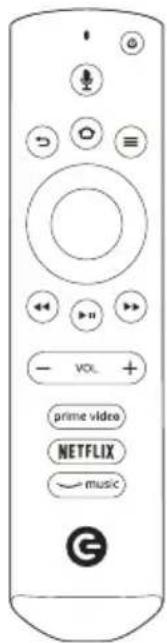
Voice Remote with Amazon Alexa

Screws
screws in kind prevail
AAA Batteries
Front View

1. Power
Switch between On and Standby mode
2. Inputs
Navigates to the Inputs menu
3. Volume up
4. Volume down
5. Menu
Access additional features when you see this icon on screen. For example, when adjusting the volume press the menu key to Mute the TV volume
6. Home
Navigates to the Element Fire TV Edition Home screen
7. Back
Navigates to the previous screen or closes the current window
8. Quick Settings
Access the quick settings menu to adjust TV audio/video settings, set a sleep timer and more
9. Add Compatible Bluetooth Remotes.
Pair a new compatible remote with your TV.
Rear View

- Power Cord
Connect to an AC power outlet
- SD CARD
Add up to 128GB of additional storage for apps and games
- HDMI 1 with ARC (Audio Return Channel) support and HDCP 2.2.
Connect this HDMI port to an Audio Video Receiver or other multimedia device that supports ARC.
- HDMI 2 with HDCP 2.2 support.
Connect this port to a multimedia device.
- HDMI 3 with HDCP 2.2 support
Connect this port to a multimedia device.
- HDMI 4 with HDCP 2.2 support
Connect this port to a multimedia device.
-
USB 2.0 Port
-
USB 3.0 Port
-
LAN Connection
Connect this port to your router with an Ethernet cable.
- RF
Connect to an antenna/cable to receive over the air/cable broadcasts.
- Composite or Component In
Connect to AV devices with composite or component (Y/Pb/Pr) video output sockets. Connect the Audio In (L/R) to the devices AUDIO OUT sockets.
- Headphone Jack
Connect to your headphones
- Optical Output
Connect a digital sound system to this jack.
- Directional Controller
Navigates the TV interface

Installing the Stand

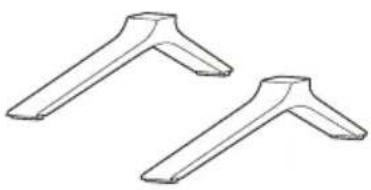
1. Securely attach the stands to your TV
Carefully remove the TV from the box and place it face down on a flat, soft surface to prevent any damage or scratches to the screen. You can also use the packaging material as a cushion between the surface and the screen. Align the stands with the screw holes on the base of the TV. Secure the stands to the TV using the included screws. Turn the TV upright and place it in the desired location.
Note:
If you plan to mount your TV on a wall, do not install the feet. Use the screw holes in the back of the TV to secure the TV to the wall mount per wall mount manufacturer's instructions.
Remote Control
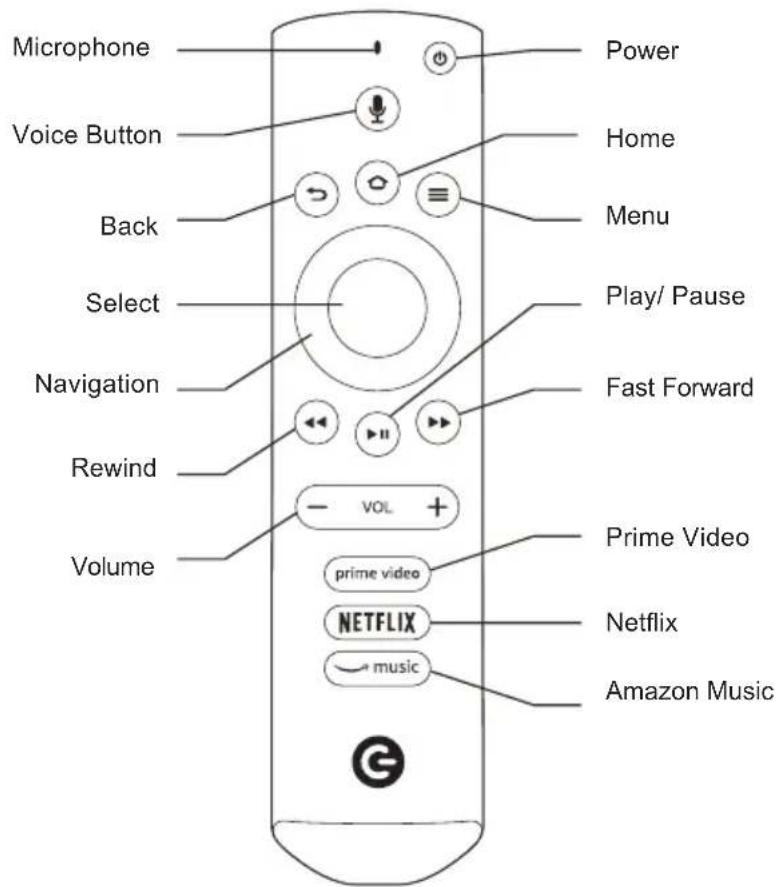
Voice Remote with Amazon Alexa
Tip: For fast access to TV quick settings press and hold Ⓞ for 3 seconds.
CONNECTING EXTERNAL DEVICES
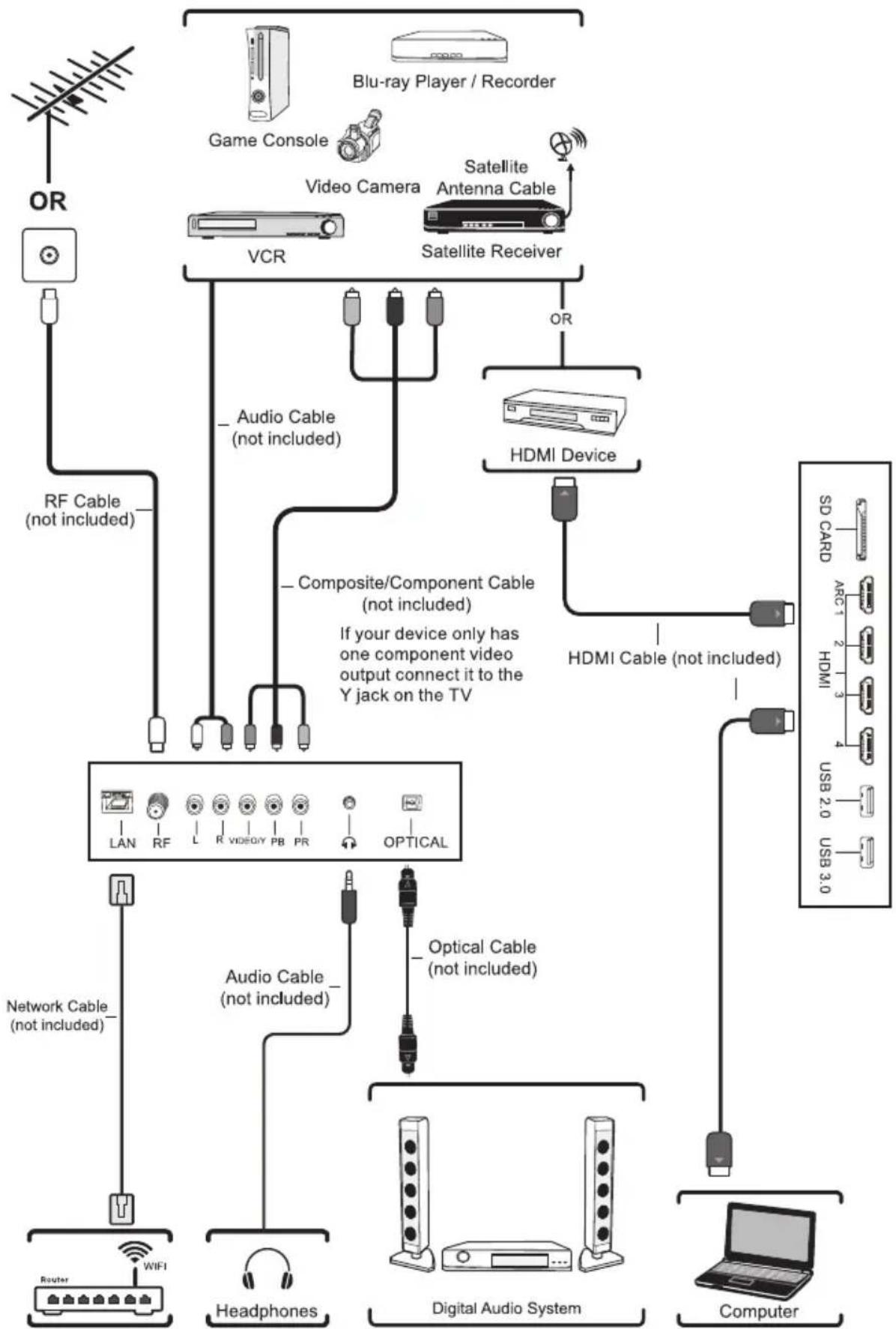
flowchart
graph TD
    A["OR"] --> B["RF Cable (not included)"]
    B --> C["Audio Cable (not included)"]
    C --> D["Composite/Component Cable (not included)"]
    D --> E["If your device only has one component video output connect it to the Y jack on the TV"]
    E --> F["Digital Audio System"]
    F --> G["Computer"]
    H["Blu-ray Player / Recorder"] --> I["Game Console"]
    H --> J["Video Camera"]
    H --> K["Satellite Antenna Cable"]
    H --> L["Satellite Receiver"]
    M["HDMI Device"] --> N["OR"]
    O["LAN RF R VIDEO PB PR OPTICAL"] --> P["Network Cable (not included)"]
    Q["Radio WiFi"] --> R["Headphones"]
    S["Digital Audio System"] --> T["Optical Cable (not included)"]
    U["Computer"] --> V["SD CARD ARC1 2 HDMI 3 USB 2.0 USB 3.0"]
SETUP
Once you've connected your devices to your television and plugged it in, insert the included AAA batteries into the back of the remote and press the “power” button on the remote. Your television will start and after a few seconds you will be prompted to pair your remote with your television. Pairing your remote to your television is necessary because the remote uses Bluetooth to send most button commands and voice commands to your television.
If your television doesn't find your remote, remove and reinsert the batteries in your remote. The remote should automatically pair with your TV. If your remote still doesn't pair with your TV press and hold the button on your remote for 10 seconds while your television is searching for your remote.
Once you've paired your remote, follow the on-screen instructions to set up your TV.
Connect your TV to the Internet and sign in with your Amazon account to use voice commands with your voice remote and to enjoy thousands of movies and TV episodes, songs, apps, and games on your TV.
If you want to add an antenna to receive over-the-air channels, please go to Settings → Inputs.
Your Element Fire TV will periodically update with new features and functionality. For help using the latest features and to see what's available visit www.amazon.com/deviceservices/support
About your Element Voice Remote with Alexa
Simply press and hold the Voice button and speak. Release the button when you are done speaking. You can use your voice to change channels or search for movies, TV shows, actors, directors, apps, games, and more.
Simply say:
- Play The Man in the High Castle
• Search for Transparent - Launch Netflix
• Find comedy movies
To learn more about voice commands you can use with your Element voice remote with Alexa, visit www.amazon.com/deviceservices/support.
Even better with Amazon Prime
Amazon Prime members get unlimited access to thousands of movies and TV episodes with Prime Video, including award-winning originals. Plus, millions of songs with Prime Music and unlimited photo storage with Prime Photos.
- The most common TV settings can be accessed by pressing the ⏻ icon for three seconds. After 3 seconds a menu will appear on the right side of the screen. Use the circular ring on the remote to navigate to the appropriate action.
- You can control your Element Fire TV Edition using the included remote, the Fire TV Remote app, or the directional controller on the back of the TV. Download the Fire TV Remote App to your iOS, Android or Fire OS device by visiting the appropriate app store for your device. The directional navigation controller is on the back of the TV as shown below.
Directional Navigation Location

natural_image
Diagram of a cable connection to an open TV panel with a power outlet, showing no text or symbols.Directional Navigation Key. Press the button to select.

Press and hold Ⓞ for 3 seconds to access:
1. Channel Guide
Access to the channel guide only appears if you've connected an antenna and performed a channel scan. To initiate a channel scan go to Settings → Inputs → Antenna.
2. Inputs
Navigate to the input selection screen.
3. Apps
Navigate to your apps & games library
4. Sleep Timer
Sets a timer to automatically turn off the TV in the selected number of minutes.
5. Picture
Adjust picture settings for the current input, or Fire TV experience and apps
6. Sound
Adjust the sound settings for the selected input, or Fire TV experience and apps
Additional TV Settings can be found by navigating to Settings on the Home Screen.
Add Bluetooth Remotes, Game Controllers, Headphones, Keyboards and Mice You can add compatible bluetooth game controllers, headphones, keyboards and mice in Settings → Controllers & Bluetooth Devices
Software Updates
When your Element Fire TV Edition is connected to the internet via a Wi-Fi or Ethernet connection it will automatically check for and download updates in the background. You will be notified when an update is ready to install when you power off your television. To manually check for updates visit Settings → Device → About → Check for System Update
Additional information about your Element Fire TV Edition can be found
http://www.amazon.com/deviceservices/support
Voice Interaction
Use your voice to search for content and interact with Alexa. For more information, go to www.amazon.com/deviceservices/support
Apps & Games
Get apps and games from the Amazon Appstore.
Music
Access the Amazon Music app and many other third-party music apps and services. You can also purchase music from the Amazon Digital Music Store with Alexa.
Live TV Programming Guide
With a compatible HD Antenna, get free over the air broadcasts. Sign in with your Amazon account to get an advanced programming guide that includes up to 2 weeks worth of program information. The Element Fire TV Edition will even allow you to pause live TV for up to 2 minutes.
Manufactured under license from Dolby Laboratories. Dolby, Dolby Audio, and the double-D symbol are trademarks of Dolby Laboratories.
| Internet Connection | Wired or Wi-Fi networks |
| Included Remote | Voice Remote with Amazon Alexa |
| Video | Panel size: 43/50/55/65 inch diagonalDisplay resolution: 2160PPanel resolution: 3840X2160Refresh Rate: 60Hz |
| Storage Space | 16 GB3 GB memorySD Card slot for external storage option, up to 128 GB. |
| HDMI | 4 ports, Up to 2160PAll ports are HDCP 2.2 compliantHDMI 1 supports ARC |
| Audio Output | HDMI 1 ARC (Audio Return Channel)Optical Audio outHeadphone JackBluetooth Audio |
| Compatible USB Devices | Some Xbox 360 wired gaming controllersSome third-party USB remotes and game controllersKeyboards and computer mouse devices |
| Compatible Bluetooth 4.1 Devices | Some third party Bluetooth game controllersHeadphonesKeyboardsComputer mouse devicesSome third-party remotes |
| VESA Wall Mount interface | VESA Wall Mount interface43, 50, 55 inch: 200*200mm65 inch: 400*200mm |
Wall Mounting Screws
Mount the VESA bracket using M6*12mm*4pcs metric threaded screws (Just supplied with 65 inch models).
WARNING: To prevent injury, this apparatus must be secured in accordance with the installation instructions.
WARNING: Never place a television set in an unstable location. A television set may fall, causing serious personal injury or death. Many injuries, particularly to children, can be avoided by taking simple precautions. Only use cabinets or stands recommended by the manufacturer of the television set. Only use furniture that can safely support the television set. Ensure the television set is not overhanging the edge of the supporting furniture. Do not place the television set on tall furniture (for example, cupboards or bookcases) without anchoring both the furniture and the television set to a suitable support. Do not place the television set on cloth or other materials that may be located between the television set and supporting furniture. Educate children about the dangers of climbing on furniture to reach the television set or its controls. If your existing television set is being retained and relocated, the same considerations as above should be applied.
PARENTAL CONTROL
Parental Controls
Parental controls can be enabled, disabled or adjusted in Settings → Preferences → Parental Controls. For more information about parental controls, please visit www.amazon.com/deviceservices/support
Overview
Parental controls on your TV give you the option to block playback of over-the-air live TV content from certain ratings categories. Parental controls relating to over-the-air live TV content use the Motion Picture Association of America (MPAA) ratings classification system and the TV Guidelines Organization TV Parental Guidelines as the basis for its ratings categories. To view your options, go to Settings > Preferences > Parental Controls on your TV. For more information, visit www.amazon.com/deviceservices/support.
The V-Chip: Options to Restrict What Your Children Watch on TV
www.fcc.gov
The V-chip allows parents or other caregivers to block programming on their TVs that they don't want children to watch. Most programs are assigned a rating based on parental guidelines established by the TV industry. The ratings provide information about the content and age-appropriateness of most TV programs, except news, sports and unedited movies on premium cable channels.
Parents can program the V-chip to block programs based on these ratings, which include two elements: an age-based rating that provides guidance about the age group for which a program is appropriate, and content descriptors indicating that a program may contain suggestive dialogue (D), coarse or crude language (L), sexual situations (S), or violence (V). The ratings are:
• TV Parental Guideline Rating System
| Rating Meaning | ||
| TV-Y All Children | Programs aimed at a very young audience, including children from ages 2-6 | |
| TV-Y7 | Directed to Older Children | Programs most appropriate for children age 7 and up. |
| TV-Y7-FV | Directed to Older Children | Programming with fantasy violence that may be more intense or more combative than other programming in the TV-Y7 category. |
| TV-G General Audience | Programs suitable for all ages; these are not necessarily children's shows. | |
| TV-PG | Parental Guidance Suggested | Parental guidance is recommended; these programs may be unsuitable for younger children. |
| TV-14 | Parents Strongly Cautioned | These shows may be unsuitable for children under 14. |
| TV-MA | Mature Audience Only | These programs are intended to be viewed by mature, adult audiences and may be unsuitable for children under 17 |
Film Ratings, Motion Picture Association of America
www.mpaa.org
The Classification and Rating Administration (“CARA”) issues ratings for motion pictures exhibited and distributed commercially to the public in the United States, with the intent to provide parents information concerning the content of those motion pictures, to aid them in determining the suitability of individual motion pictures for viewing by their children. CARA will rate any motion picture at any time before or after it is exhibited or distributed in the United States.
• Motion Picture Association of America (MPAA) Rating System
| Rating Meaning | ||
| MV-G General Audiences General Audiences. For all ages. | ||
| MV-PG | Parental Guidance Suggested | Parental Guidance Suggested. Some material may not be suitable for children. |
| MV-PG13 | Parents Strongly Cautioned | Parents Strongly Cautioned. Some material may be inappropriate for children under 13. |
| MV-R Restricted | Under 17 requires accompanying parent or adult guardian. | |
| MV-NC-17 | No children under age 17 | Adults only. Not suitable for 17 and under. |
Note: The V-Chip will automatically block certain categories that are "more restrictive." If you block TV-Y category, then all the ratings in the TV Parental Guideline Rating System will be automatically blocked. Similarly, if you block TV-G category, then all the categories in the "young adult" will be blocked (TV-G, TV-PG, TV-14, and TV-MA).
TROUBLESHOOTING
If your TV does not operate normally or cannot be turned on, please check the following troubleshooting questions. Remember also to check any other connected electronic device, such as DVD or Blu-ray player to pinpoint the problem. If the TV still fails to operate normally, please contact Element technical support: www.elementetelectronics.com/support.
The TV does not operate properly
| The TV does not respond when pressing any buttons | · The TV may freeze up during use. Disconnect the power cord from the power socket for a few minutes. Reconnect the power cord and try to operate it again as usual. |
| TV cannot be switched on | · Check that the TV is connected to the power supply.· Make sure all connected AV devices are switched off before switching on your TV. |
| The remote control does not work | · Check to see if there are any objects between the TV and the remote control causing an obstruction. Ensure that you are pointing the remote control directly at the TV.· Install new batteries.· Remove the batteries from your remote and reinsert to reinitiate pairing with your TV.· Hold down the home button on your remote for 10 seconds. Your remote should be rediscovered within 60 seconds.· Ensure that the batteries are installed with the correct polarity (+ to +, - to -). |
| Power is suddenly turned off | · Check the power of the TV. The power supply maybe interrupted.· Check if the sleep timer is set. |
The video function does not work
| No picture & No Sound | Check whether the TV is switched on.Try another channel. The problem may be caused by the broadcaster. |
| Picture appears slowly after switching on | This is normal; the image is muted during the TV startup process. Please contact your service centre if the picture has not appeared after five minutes. |
| No or poor color or poor picture | Adjust the settings in the PICTURE menu.Try another channel. The problem may be caused by the broadcaster.Check if video cables are connected properly. |
| Horizontal/Vertical bar or picture shaking | Check for local interference such as an electrical appliance or power tool. |
| Poor reception on some channels | The station or cable channel may be experiencing problems; tune to another station.Station signal may be weak, reposition the antenna for better reception.Check for sources of possible interference. |
| Lines or streaks in pictures • | Check antenna (change the position of the antenna.) |
| No pictures when connecting HDMI | • Check if the input source is HDMI1/HDMI2/HDMI3/HDMI4. |
| The audio function does not work | |
| Picture OK but no sound | • Press the VOL +/- buttons.• Sound muted? Press the Volume Up button.• Try another channel. The problem may be caused by the broadcaster. |
| No output from one of the speakers | • Adjust the Balance settings in the SOUND menu. |
Maintaining
- Do not use your TV in areas that are too hot or too cold, because the cabinet may warp or the screen may malfunction. Your TV works best in temperatures that are comfortable to you.
- Storage temperatures are 32^ to 122^(0^ to 50^)
- Working temperatures are 32^ to 95^ F(0^ to 35^ C)
- Do not place your TV in direct sunlight or near a heat source
THE FCC

The FCC Wants You to Know
This device complies with Part 15 of the FCC Rules. Operation is subject to the following two conditions: (1) This device may not cause harmful interference, and (2) This device must accept any interference received, including interference that may cause undesired operation. Changes or modifications not expressly approved by the party responsible for compliance could void the user's authority to operate the equipment.
NOTE: This equipment has been tested and found to comply with the limits for a Class B digital device, pursuant to Part 15 of the FCC Rules. These limits are designed to provide reasonable protection against harmful interference in a residential installation.
This equipment generates uses and can radiate radio frequency energy and, if not installed and used in accordance with the instructions, may cause harmful interference to radio communications. However, there is no guarantee that interference will not occur in a particular installation.
If this equipment does cause harmful interference to radio or television reception, which can be determined by turning the equipment off and on, the user is encouraged to try to correct the interference by one or more of the following measures: 1) Reorient or relocate the receiving antenna; 2) Increase the separation between the equipment and receiver; 3) Connect the equipment into an outlet on a circuit different from that to which the receiver is connected; 4) Consult the dealer or an experienced radio/TV technician for help.
FCC Radiation Exposure Statement
This equipment complies with FCC radiation exposure limits set forth for an uncontrolled environment. This equipment should be installed and operated with minimum distance 20cm between the radiator & your body.
Note: For indoor use only.
ÍNDICE
natural_image
Blank whiteboard with a thin border and faint border, no text or symbols visible.© element
• amazon fireTV EDITION
natural_image
Two identical line drawings of a Y-shaped metal bracket (no text or symbols)Soportes

Manual del
usuario
Connect to your headphones
13. Salida óptica
- Play The Man in the High Castle
• Search for Transparent - Launch Netflix
• Find comedy movies
natural_image
Diagram of a TV cable connection with an attached power outlet, showing no text or symbolsPress and hold Ⓤ for 3 seconds to access:
1. Guía de canales
http://www.amazon.com/deviceservices/support
Interacción por Voz
• Motion Picture Association of America (MPAA) Rating System
- IMPORTANT SAFETY INSTRUCTIONS
- SAFETY INFORMATION
- Electrical Safety
- Physical Safety
- PREPARATION
- What's Included
- Front View
- Power
- Inputs
- Volume up
- Volume down
- Menu
- Home
- Back
- Quick Settings
- Add Compatible Bluetooth Remotes.
- Rear View
- Installing the Stand
- Securely attach the stands to your TV
- Note:
- Remote Control
- CONNECTING EXTERNAL DEVICES
- SETUP
- About your Element Voice Remote with Alexa
- Even better with Amazon Prime
- Directional Navigation Location
- Press and hold Ⓞ for 3 seconds to access:
- Channel Guide
- Apps
- Sleep Timer
- Picture
- Sound
- Additional TV Settings can be found by navigating to Settings on the Home Screen.
- Software Updates
- Voice Interaction
- Apps & Games
- Music
- Live TV Programming Guide
- Wall Mounting Screws
- PARENTAL CONTROL
- Parental Controls
- Overview
- The V-Chip: Options to Restrict What Your Children Watch on TV
- Film Ratings, Motion Picture Association of America
- TROUBLESHOOTING
- Maintaining
- THE FCC
- The FCC Wants You to Know
- FCC Radiation Exposure Statement
- ÍNDICE
- Salida óptica
- Press and hold Ⓤ for 3 seconds to access:
- Guía de canales
- Interacción por Voz
Brand : Element
Model : EL4KAMZ4317
Category : Television