Aerolite VBP1400 - Vacuum Cleaner CleanStar - Free user manual and instructions
Find the device manual for free Aerolite VBP1400 CleanStar in PDF.


User questions about Aerolite VBP1400 CleanStar
0 question about this device. Answer the ones you know or ask your own.
Ask a new question about this device
Download the instructions for your Vacuum Cleaner in PDF format for free! Find your manual Aerolite VBP1400 - CleanStar and take your electronic device back in hand. On this page are published all the documents necessary for the use of your device. Aerolite VBP1400 by CleanStar.
USER MANUAL Aerolite VBP1400 CleanStar
text_image
CLEANSTAR™ THE STAR IN FLOOR CAREInstruction Manual
AEROLITE 1400 WATT BACKPACK VACUUM CLEANER

natural_image
Exterior view of a clean vacuum cleaner with black hose and circular base (no text or symbols visible)| Model | VBP1400 |
| Rated Voltage (V) | 220-240 V |
| Rated Frequency (Hz) | 50 Hz |
| Rated Power (W) | 1400 Watts |
- Please read this Instruction Manual carefully before operation and follow all guidelines before using this vacuum cleaner.
- Please keep p this Manual for future reference.
TABLE OF CONTENTS
SAFETY INSTRUCTIONS ....3
MAIN PARTS 4
ACCESSORIES 5
OPERATING INSTRUCTIONS ....5
Attaching the Shoulder Straps ....5
Attaching the Waist Strap....6
On/Off Power Switch....7
Using the Cable Restraint....7
Opening the Lid 7
Replacing the Lid....8
Attaching and Removing the Hose from the Lid....8
Replacing the Dust Bag 8
Cleaning the Reusable Cloth Filter Bag....9
Cleaning the Exhaust Filter....9
Blower Function and Accessory Kit....10
CONDITIONS OF WARRANTY 11
SAFETY INSTRUCTIONS
When using an electrical appliance, basic precautions should always be followed, including the following:
READ ALL INSTRUCTIONS BEFORE USING THIS APPLIANCE
*** WARNING - To reduce the risk of fire, electric shock, or injury:
- Do not leave vacuum cleaner when plugged in. Unplug from outlet when not in use and before servicing.
- To reduce the risk of electric shock, do not use outdoors or on wet surfaces.
- Use only as described in this manual. Use only manufacturers recommended attachments.
- Do not use with damaged cord or plug. If vacuum cleaner is not working as it should, has been dropped, damaged, left outdoors, or dropped into water, take it to a service centre before using.
- Do not pull or carry on cord, use cord as a handle, close door on cord, or pull cord around sharp edges or corners. Keep cord away from heated areas and surfaces.
- Do not unplug by pulling on cord. To unplug, grasp the plug, not the cord.
- Do not handle plug or vacuum cleaner with wet hands.
- Do not put any object into openings. Do not use with any opening blocked. Keep free of dust, lint, hair and anything that may reduce airflow.
- Keep hair, loose clothing, fingers and all parts of body away from openings and moving parts.
- Turn all controls off before unplugging.
- Use extra care when cleaning on stairs.
- Do not use to pick up flammable or combustible liquids, such as gasoline, or use in areas where they may be present.
- Unplug before connecting the hose.
- Do not pick up anything that is burning or smoking, such as cigarettes, matches, or hot ashes.
- Do not use without dust bag and/or filter in place.
- If the supply cord is damaged, it must be replaced by the manufacturer or the importer's approved service agent or a similarly qualified person in order to avoid a hazard.
- This appliance is not intended for use by persons (including children) with reduced physical, sensory or mental capabilities, or lack of experience and knowledge, unless they have been given supervision or instruction concerning use of the appliance by a person responsible for their safety.
- Children should be supervised to ensure that they do not play with the appliance.
- If the supply cord is damaged, it must be replaced by a special cord or assembly available from the manufacturer or its service agent.
MAIN PARTS
- Shoulder Strap
- Back plate
- Carry Handle
- Low Profile Floor Tool
-
Power Cord
-
Exhaust Filter Latch
- Exhaust Filter Cover
- On/Off Switch
- Cable Restraint
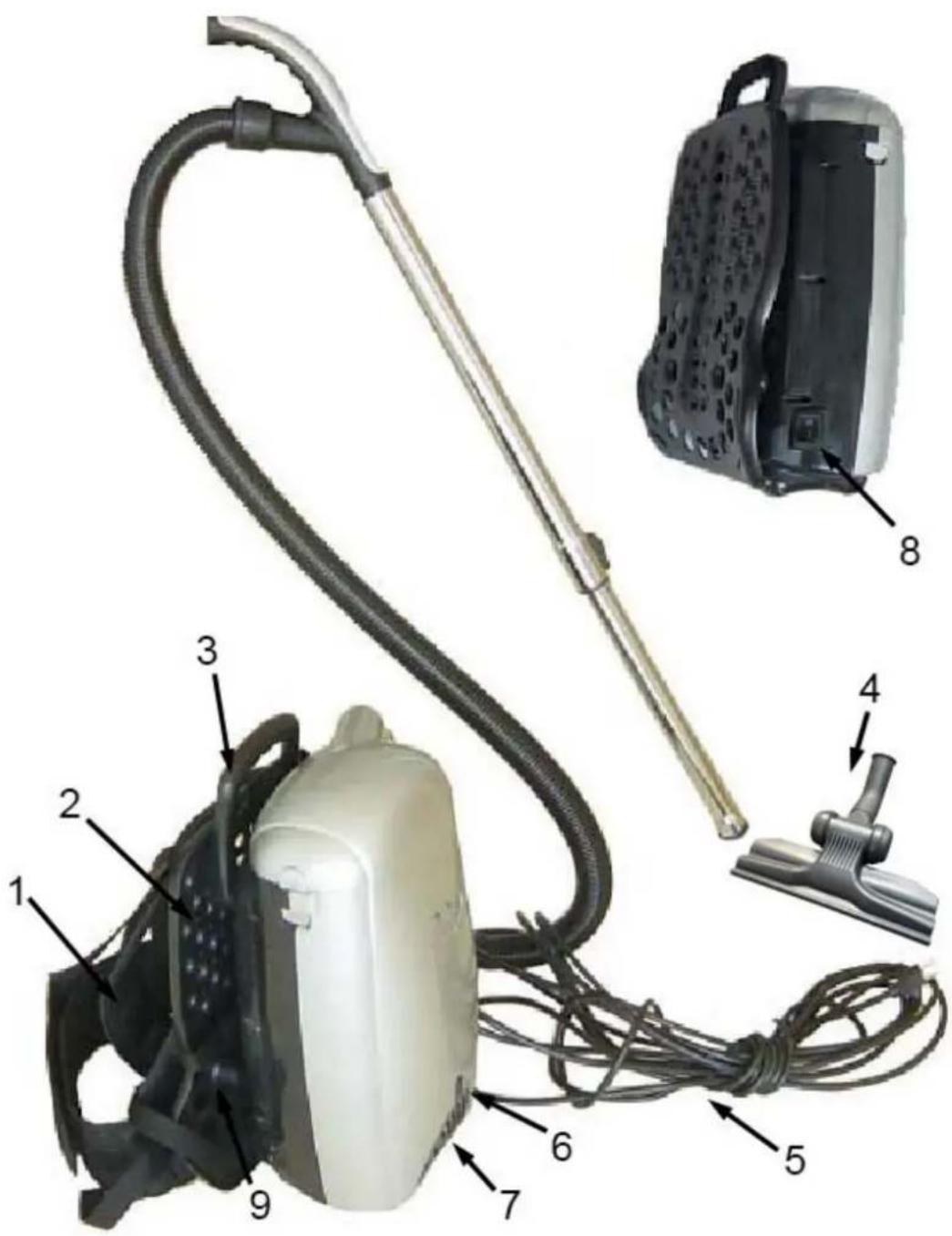
text_image
Labeled diagram of a vacuum cleaner with numbered parts for identificationACCESSORIES
- Vacuum Hose
- Upholstery Tool
- Crevice Tool
- Dusting Brush
-
Low Profile Floor Tool
-
Telescopic Rod
- Cloth Filter Bag
- Paper Dust Bag
- Blower Attachment Cover Plate
- Blower Attachments

natural_image
Six different cleaning and hair accessory items including a cord, brush, and clip (no text or symbols visible)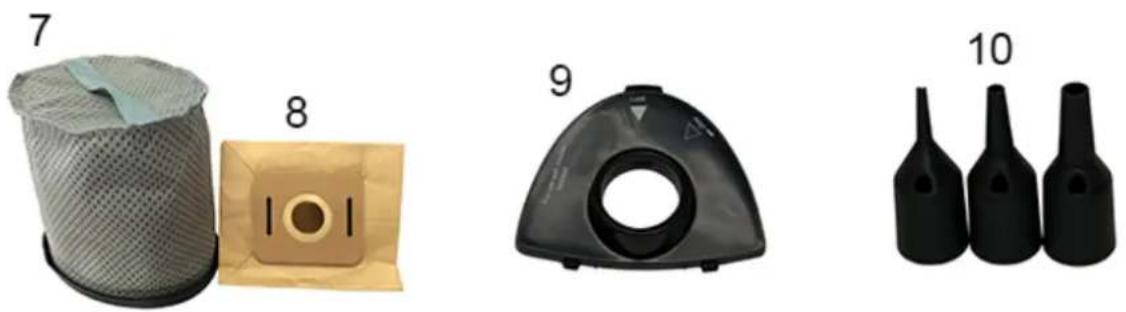
natural_image
Four black plastic bottle designs with numbered labels: filter, cover, diaphragm, and three bottles (no text or symbols on objects)OPERATING INSTRUCTIONS
Attaching the Shoulder Straps
Pass the straps through the two rectangular holes of the CARRY HANDLE then feed the strap through and attach to the buckle of the shoulder strap.
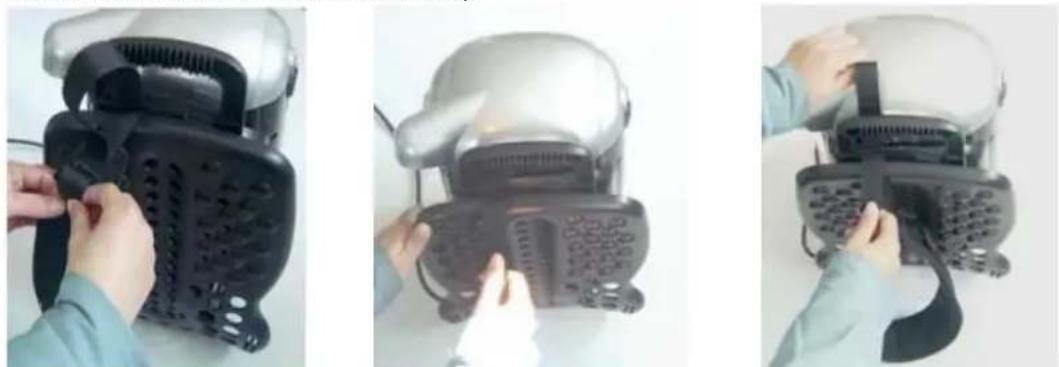
Attaching the Waist Strap
Feed the NO.1 strap through the NO.2 angled slot. Then, secure this strap to the lower shoulder strap buckle.
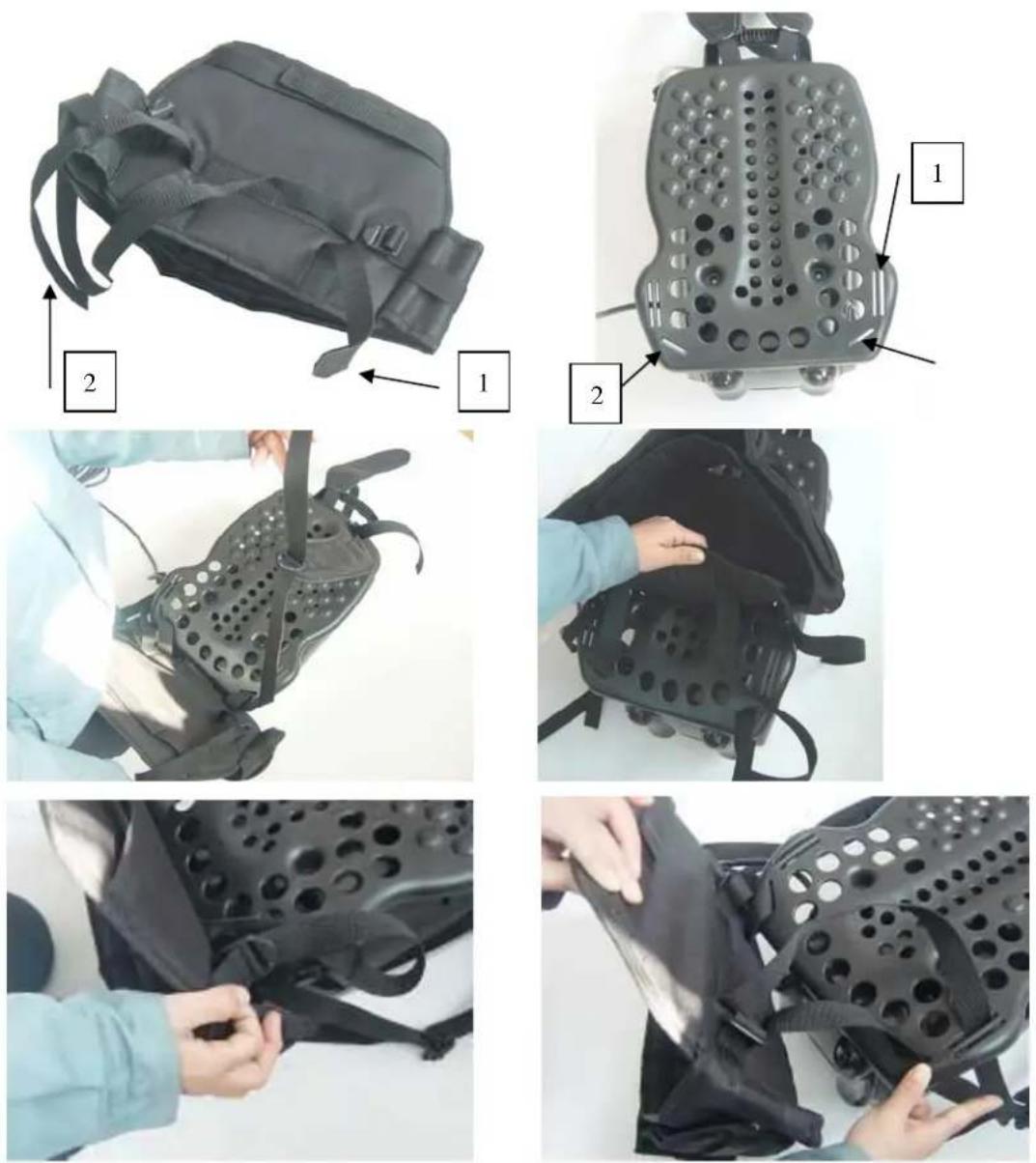
Feed and loop the NO.2 strap through the NO.1 vertical rectangular slots, and secure the strap to the buckle that is attached to the waist harness.

text_image
4 5
natural_image
Person assembling a perforated black circular device with a cable, no visible text or symbolsFinally, separate the Velcro straps (NO.4 strap and the NO. 5 strap), folding them around the back plate, and then sticking them back together as per the illustration.
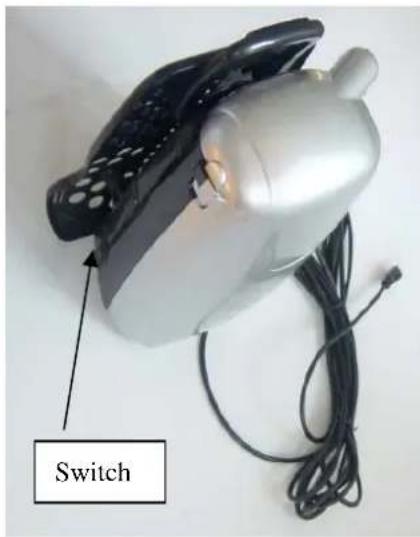
On/Off Power Switch
Switch – located on side of body. Press the On/Off power switch; the machine will turn on.
natural_image
Close-up of a silver electric motor with black buttons and a labeled switch, shown with wires (no text or symbols on the device itself)Using the Cable Restraint
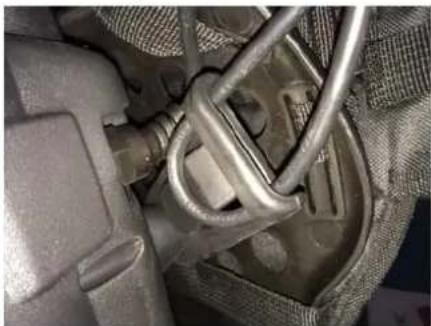
The cable restraint is located on the side of the machine. This device is used to ensure that the power cord is securely fastened and cannot be pulled out of the machine while in use. Create a loop with the power cable and then feed it through the hole in the cable restraint. Next, fit the looped cable over and around the tab and pull the cable tight until secure as shown below.
natural_image
Close-up of a mechanical component with metallic tubing and textured surfaces (no visible text or symbols)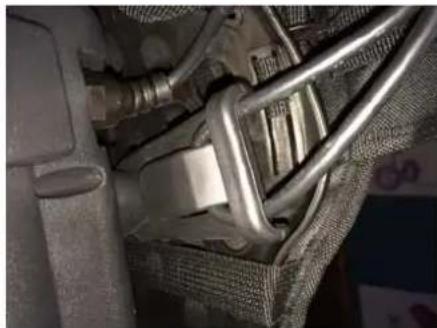
natural_image
Close-up of a car's internal components, including a metallic belt and attached seatbelt (no visible text or symbols)Opening the Lid
To open the lid, simply pull up the latches located on either side of the body of the unit. Make sure that the hose is removed before removing the lid. Also make sure that the appliance is switched off and unplugged.

natural_image
Person holding a silver electric kettle with black handle (no visible text or symbols)
Replacing the Lid
Make sure the lid is sitting properly over the rim. Simply place the latches over the locking points located on the lid and click the latches down into position.

natural_image
Close-up of a silver rice cooker with black handle and side panel, no visible text or symbolsAttaching and Removing the Hose from the Lid
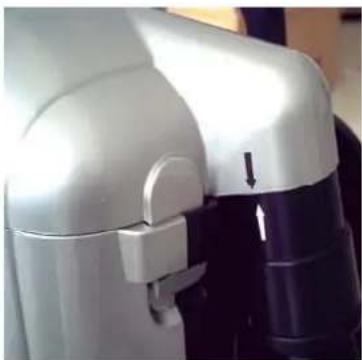
To attach the hose assembly to the vacuum cleaner, insert the hose end into the receiving chamber on the lid and rotate as shown below.
natural_image
Close-up of a white robotic device with black handle and arrow indicator (no visible text or symbols)To remove the hose assembly, do the reverse. Turn the hose end in the opposite direction and remove the hose from the lid.
Replacing the Dust Bag
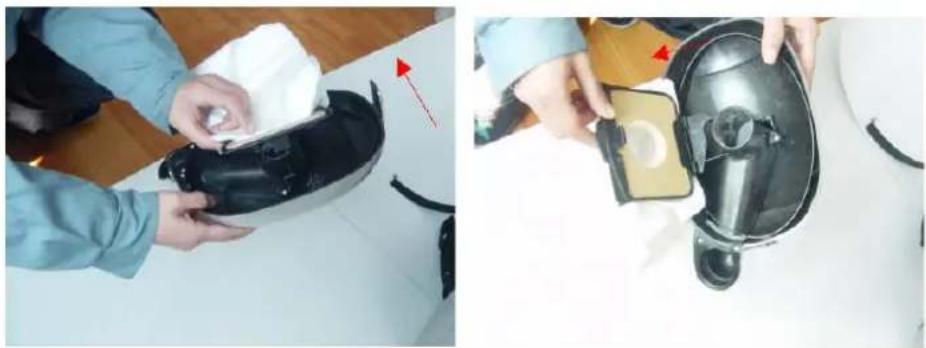
To change the paper bag, you will first need to remove the lid.
natural_image
Two-panel image showing hands assembling a black VR headset and a close-up of its device with a small screen (no visible text or symbols)You will notice that the bag sits in a plastic frame which locks into position over the hole in the lid where the dirt
enters into the Lid. Pull gently on the top side of the frame (on the opposite side of the frame hinges), and the frame will swing open with the bag in it. Then remove the bag from the frame as shown below.
Once the replacement paper bag is correctly inserted back into the frame, close the plastic frame as indicated in the illustrations below.

natural_image
Close-up of hands holding a small beige device with a black handle, no visible text or symbols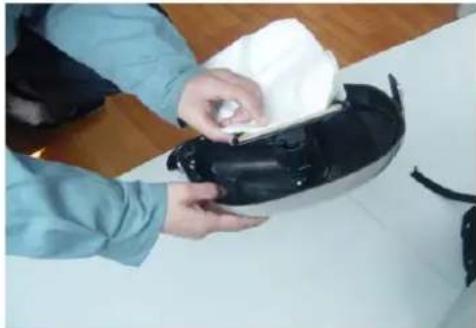
natural_image
Person cleaning a black electronic device with a cloth (no visible text or symbols)Cleaning the Reusable Cloth Filter Bag
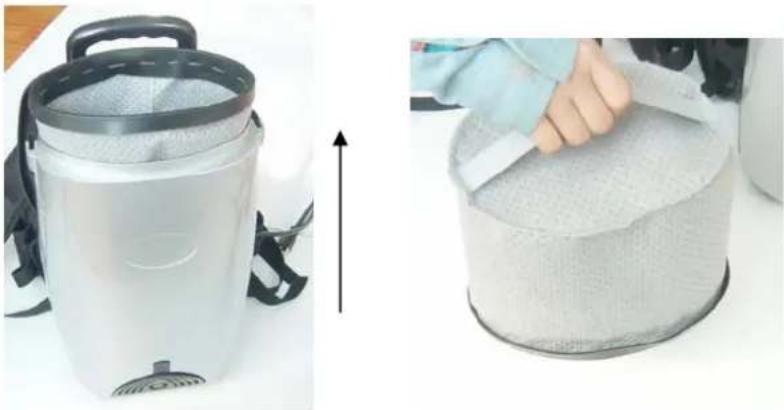
To clean the cloth filter bag, you will first need to remove the lid. Remove the cloth bag, and carefully dispose of the contents into a suitable refuse bin. You can achieve this by turning the bag upside down, and shaking the contents out of the bag by holding the strap on the bottom of the bag.
natural_image
Two-panel image showing a vacuum cleaner and a textured cylindrical container being placed, with no visible text or symbols.Cleaning the Exhaust Filter
Remove the exhaust filter cover and then remove the exhaust filter. It is advisable to clean the filter by blowing compressed air onto it. You can however clean the exhaust filter with clean water by running it under a tap. However it is imperative that you ensure that the filter is dry before replacing it and re-using this appliance to avoid electric shock.

natural_image
Top-down view of a vacuum cleaner with a clear lid and a circular patterned surface on the wall (no text or symbols visible)Blower Function and Accessory Kit
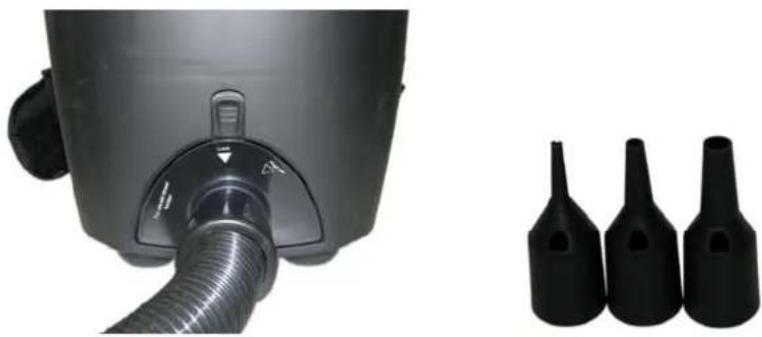
This vacuum cleaner also comes with a bonus accessory tools kit which are used when using the "blower" function. These accessories can be used to blow up airbeds, mattresses, etc.
How to use the Blower Feature
- Simply remove the Exhaust Filter Cover and Exhaust Filter (just as you did to clean/replace the exhaust filter).
- Using the Blower Attachment Cover Plate provided in the blower accessory kit, place this plate where you would use the normal exhaust cover over the exhaust hole.
- Fix the hose to this plate by inserting the hose end and rotating it until it locks into place.
- Finally, attach any of the desired tools from the accessory kit to the handle at the other end of the hose and you are set.

text_image
CLEANSTAR™ THE STAR IN FLOOR CARECleanstar Pty Ltd
ABN: 51 121 002 104 ACN: 121 002 104
59 Radford Road, Reservoir VICTORIA 3073
Phone: (03) 9460 5655 Fax: (03) 9460 5666
Email: sales@cleanstar.com.au Web: www.cleanstar.com.au
CONDITIONS OF WARRANTY
This document outlines the terms and conditions of warranty for your Cleanstar product. This is an important document that should be kept with your proof of purchase documents in a safe place for future reference should you require service for your product.
Thank you for purchasing your new Cleanstar product. We are confident this product will give you trouble-free use and excellent service, provided the operator uses and maintains the product in accordance with the Instruction Manual. Please read the Instruction Manual carefully before using the product for correct operation and maintenance procedures, and store it in a safe place for future reference.
- This is a parts and labour warranty against faulty or defective parts, materials or workmanship in manufacturing, when the product is used and operated in accordance with the Instruction Manual.
- This product carries a 12 month (1 year) warranty period that commences from the original date of purchase by the first user/purchaser, and is not transferable.
- This warranty only applies to products purchased and used in Australia.
- At all times during the warranty period, Cleanstar shall, at its sole discretion, determine whether repair, replacement or refund will apply if the product has a valid warranty claim applicable to it.
- The repair or replacement of the product under this warranty does not extend the original period of warranty.
- Please note that this warranty will be voided in the following cases (which are not exhaustive) and the warranty does not apply to the cost of replacing any parts of the product resulting from:
• Accidental damage;
• Normal wear and tear;
- Neglect, misuse or physical abuse by the operator, including failure to properly maintain or service;
• Any alterations, modifications or tampering with the product without the prior written consent of Cleanstar;
- Incomplete or improper installation;
- Incorrect, improper or inappropriate operation;
- Insect or vermin infestation;
- Power surges, electrical storm damage or incorrect power supply/voltage;
• Excessive use or use for which this product has not been designed;
- Vacuuming up water, liquids, toner, powders, glass, hazardous, flammable or corrosive materials, plaster dust, concrete dust and other similar building or construction materials;
- Failure to comply with the operating instructions contained in the Manual supplied with the product;
- If the product is rented;
- If the product is used outside of Australia;
-
If the product was serviced or repaired by anyone other than Cleanstar, or one of Cleanstar's Authorised Service Agents (ASA). Cleanstar is unable to accept any responsibility under this warranty for any repair work not carried out by an ASA or from the use of non-genuine parts.
-
This warranty does not cover service calls, travelling time or consumable parts such as belts, dust bags, filters, hose or hose parts, rods and wands, floor tools and accessories, motor brushes and other like consumable items, unless defective in manufacture. In order to prolong the life of accessories and consumables, regular care and maintenance is recommended.
-
Please retain your original proof of purchase which will be required before you can make a claim under this warranty. If proof of purchase can not be provided at the time of a warranty claim or service, any work carried out on the cleaner is chargeable.
-
Any transportation and delivery costs involved in the repair of defective parts shall be borne by the claimant. In all instances, unless the product is transported by Cleanstar or a Cleanstar authorised representative, the product is transported at the owner's cost and risk while in transit to and from Cleanstar or its ASA.
Our goods come with guarantees that cannot be excluded under the Australian Consumer Law. You are entitled to a replacement or refund for a major failure and for compensation for any other reasonably foreseeable loss or damage. You are also entitled to have the goods repaired or replaced if the goods fail to be of acceptable quality and the failure does not amount to a major failure. The benefits conferred by this warranty are in addition to other rights and remedies under law in respect of the product to which this warranty relates.
TO INQUIRE ABOUT MAKING A CLAIM UNDER THIS WARRANTY, PLEASE FOLLOW THESE STEPS:
a) carefully check the Instruction Manual and the terms of this warranty;
b) have the name and model number of the appliance available;
c) have the proof of purchase available (ie. invoice, receipt, etc) showing where the appliance was purchased from and date of purchase;
d) call Cleanstar on (03) 9460 5655 to speak to one of our customer service staff.