
ATL01F - Electronic lock Aluratek - Free user manual and instructions
Find the device manual for free ATL01F Aluratek in PDF.


| Product Type | USB-C Multiport Hub |
| Brand | Aluratek |
| Model | ATL01F |
| Dimensions | 10.5 x 5.0 x 1.5 cm |
| Weight | 80 g |
| Input Connector | USB-C Male (integrated cable) |
| Output Ports | 1x HDMI (4K@30Hz), 2x USB-A 3.0, 1x SD, 1x Micro SD |
| Video Resolution | Up to 3840x2160 @ 30Hz |
| Data Transfer Speed | Up to 5 Gbps |
| Power Source | Bus-powered via USB-C |
| Cable Length | 15 cm |
| Material | Aluminum alloy |
| Color | Space Gray |
| Operating Temperature | 0°C to 40°C |
| Storage Temperature | -20°C to 60°C |
| Compatibility | Windows, macOS, Chrome OS, Linux |
| Warranty | 1 year |
| Maintenance | Clean with dry cloth; avoid liquids |
| Safety Certifications | RoHS, CE, FCC |
| Repairability | Not user-serviceable; contact Aluratek support |
Frequently Asked Questions - ATL01F Aluratek
User questions about ATL01F Aluratek
0 question about this device. Answer the ones you know or ask your own.
Ask a new question about this device
Download the instructions for your Electronic lock in PDF format for free! Find your manual ATL01F - Aluratek and take your electronic device back in hand. On this page are published all the documents necessary for the use of your device. ATL01F by Aluratek.
USER MANUAL ATL01F Aluratek
TouchLock™ XL All Weather Keyless Fingerprint Lock
Quick Start Guide


BIO-key
aluratek.com
model ATL01F
TouchLock Unlock Fingerprint Registration
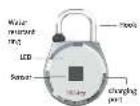
Touch-Lock is a smart padlock. There is no need for keys or combinations. The lock can store up to 20 fingerprints which easily allows you to share your lock with your family and friends. Our Touch-Lock XL also comes with a waterproof rubber ring which allows the locks to be used outdoors.


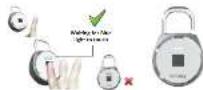
| Press the hock once and wait for the flashing blue light. | Place your registered finger on the touch sensor and hold until you see the said blue light. "If a red light flashes, please place your finger on the sensor and try again. | Touchlock will then unlock once the registry is continued." "Finger recognition may require multiple sensors due to your placement of the finger on the touch sensor. |


Press the hook once, wall for the flashing red and true light;
Put your finger on the
sensor and war for the solid blue light.
He red light flashes.
please put father part of
your finger at the series and by again
Repeat step 2 for three
times until you see a solid
seconds, indicating the
successful treatment of
the fingerprint.
Registration of Additional Fingerprints Erase Fingerprint Records


- Press and hold hook
and you are interested in watching blue light. Use a
previously registered
finger to authentbeats.
After 2000
charge to a serial blue light
for a few seconds. It is red light surveys. It is now
and ray. Immediately
Closing: The second hand (dash, void) is the default
red and blue light.
- Pull your finger on the
sensor and wait for the
a) a red light
please us please want cl
your finger on the sense
and try again.
- Repeat step 2 for three
time until you see a soli:
tous light flashing for 4 seconds, advection the
2013年,中国银行
to the following


| Press the hook for 6 seconds until you see the rapid flashing blue light. | Touch sensor with the precnally enrolled finger until you see the sole blue light. "If a red light flashes please put your finger on the sensor and try again. | Press the button again for 6 seconds when you see the rapid flashing red and blue light, then released the button when you see the sole flashing red light. |

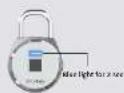
Touch sensor with the
previously rolled finger
again and wait for the
solid blue light flashes far 3 seconds
At the supplied ingredients
are successfully erased.
(五)
∴ m = 3/11
Reset the Lock Using PC Tool
Reset the Lock Using The TouchLock PC Tool (PC only)
- Go to the following URL
https://www.aluratek.com/bio-key-touchlock-tsa-al-Exeter-bio-lock-fingerprint-recognition/
2. Find the Downloads section on the product page and click the link "TouchLock_PC" to include the book
Tool to download the tool
3. Connect the lock to your computer's USB port via the included USB cable
4. Open the Touchless PC Tool 718 faders and slides on the mail
4. Open a full-text format with 21-minute intervals.
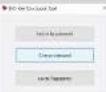
5. Select Unknown to Password buttons shown below:
Note: The default password is "0007"


To erase all enrolled fingerprint records:
-Click on the Davis Fingerpointa
Click "yes" and enter 4 digh password
-Then Dick "Confirm"


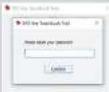
Chance the password:
1. Click on shares
password
2. Enter the current 4 digit
PASIKO
3. Enter and confirm the new
4 digit password
Change or Erase Your Fast-Click Unlock Code
3.1 Repeat the previous step 2.1,2.2 and lap the hook within 3 seconds after the blue light
s activated, then a rapid red blue light will flash. Indicates a new code can be smelted. (The previous registered code will be erased automatically)
3.2 Repeat step 1.2, 1.3 and 1.4 in Code Registration section to input your new
Fast-Click Code
Enase the Fast-Click Code
-When clear all fingerprint record, Fast-Click code record would also be creased, method
please refer to erase fingerprint record section in this manual
FAQ
-In the unlikely want the battery die while locked, Touch risk should be charged using
an external battery to provide quick access to unlock, such as a Power Bank
-Low battery wiring: the red light will flash 3 times when the battery has 30% charge.
-Tips by registering multiple fingers. Smaller profile fingers tend to work best.
Warranty
Aunichak warnanda in a product space, deluzi in molariel or annivership for 1 YEAR
with the case of purchase.
This warranty becomes invalid if the factory supplied serial number or "warranty void" sticker has
The authority does not know.
A) Closseis damnega or damnega che in hobe is Boil
C) Damage due to improper operation or maintenance, composition to improper
or attempted repair by anyone after that Alarick.
D) Products sold ASIS or AITFACILITIES.
IN NO EVENT SHALL ALURATEK'S LIABILITY EXCEED THE PRICE PAID FOR THE PRODUCT
FROM DIRECT INDIRECT, SPECIAL INCIDENTIAL OR CONSULENTIAL DAMAGES
IT'S DOCUMENTATION
Awards make no words or appearance equivalent, indeed or solitary, with respect to the
produce, articles or use of this documentation and all accompanying software, and specifically
classifies its quality performance. In fact, an action is not enough for any purpose of purpose. Also, it reserves the right to revise or update its product software or documentation without obligation to
"only say is that it is really
Fast-Click Unlock Mode
Caution: Please set up your personalized Fast Click Code after first fingerprint
regulator IMMEDIATELY
Fast-Dick allows you to create a custom access code of short and long taps to manually unlock the lock without a computer. The Fast-Dick code is a 6-digit code made up of a string of 6 long and short taps.
Code Bankstaden
1.1 To select the code registration mode
- Too and built the book for 5 seconds and was for a floating blue light continuous
holding until the rod and blue light flashes.
1.2 Equal your line Fax-Dick digit
- A long lap using the hook longer than 1 seconds, red and blue light turns on and
that indicates a successful registration of a long bar
A short tap is less than 1 second, LED change to a rapid flashing blue light,
Indicates a successful registration of a short bar
1.3 The red and blue light will flash rapidly after each successful registration
1.4 Repeat step 2 until all 6 digits are successfully omitted. After a node has been
In fact, the following table is a simple structure of the same system.
Please call your mail to the email address.
Unlock Using Fast-Click Code or Change Your Cells
To Unink:
2.1 Tap and hold the book for 5 seconds and wait for a flashing blue light, continuous
holding until the red and blue light flashes slowly.
2.2 Enter your registered code and wait and the blue light activities, that indicates the
code is sorted correctly. The lock will be unlocked after 3 seconds.
2.3 The code is selected currently, a straight val be adjusted and turns into a slow
fashing red and blue light right after, then you can re-enter your registered
Fest-Click code.
* The lock will set the Fast-Click Unlock Mode after 4 attempts of ordering the wrong
000.
Technical Support
If you need further assistance, please contact the Airrisk support department for
discloseclosing prior to returning the series.
E-mail: support@aluratek.com
Web: www.aluratek.com/helpdesk
Local (Irvine, CA): 714-586-8730
Toll free: 1-866-580-1978
Brand : Aluratek
Model : ATL01F
Category : Electronic lock