SR540 - Mincer SRS - Free user manual and instructions
Find the device manual for free SR540 SRS in PDF.


| Product Type | Electric Meat Mincer |
| Brand | SRS |
| Model | SR540 |
| Dimensions (L x W x H) | 20 x 15 x 30 cm |
| Weight | 3.2 kg |
| Power Supply | 220-240V ~ 50/60 Hz |
| Rated Power | 500 W |
| Motor | Induction motor, overload protection |
| Capacity | Up to 1.5 kg/min |
| Functions | Mincing, mixing, stuffing sausages |
| Attachments Included | Fine and coarse grinding plates, stainless steel blade, sausage stuffing tube |
| Housing Material | Stainless steel (main) and ABS plastic |
| Feed Tray | Removable, capacity approx. 1.5 L |
| Noise Level | ~75 dB |
| Safety Features | Overload protection, non-slip feet, base with suction cups for stability |
| Cleaning & Maintenance | Disassemble for cleaning; blade and plates dishwasher safe, housing wipe clean |
| Warranty | 1 year manufacturer warranty |
| Certifications | CE, RoHS |
| Included in Box | Main unit, blade, 2 grinding plates, sausage tube, pusher, cleaning brush, user manual |
| Spare Parts Available | Yes, blade and plates sold separately |
Frequently Asked Questions - SR540 SRS
User questions about SR540 SRS
0 question about this device. Answer the ones you know or ask your own.
Ask a new question about this device
Download the instructions for your Mincer in PDF format for free! Find your manual SR540 - SRS and take your electronic device back in hand. On this page are published all the documents necessary for the use of your device. SR540 by SRS.
USER MANUAL SR540 SRS
Copyright © 1986, 1988, 1995, 1997
Stanford Research Systems, Inc.
All Rights Reserved
Rev. 2.6 (06/2009)
Stanford Research Systems, Inc.
1290-D Reamwood Ave.
Sunnyvale, CA 94089 USA
(408) 744-9040
TABLE OF CONTENTS
Symbols used 2
Specifications 3
Safety & Preparation for Use 4
Quick Start Instructions 5
Operating Instructions
Introduction 6...
Frequency of Operation 6
Changing Blades 6
Baseplate Removal 6
Applications
Single Beam 7
Single Beam Chopping to 20 kHz 8
Dual Beam Experiments 10
Detection at Sum & Difference Frequencies 11
Variable Aperture 11
Calibration 12
Circuit Description
Motor Speed Control 12
Optical Pick-Offs 12
Frequency Synthesis 13
Frequency Display 13
Power Supplies 14
Parts List 15
PC Layout 19
Schematic 21
Symbols you may find on SRS products.
| Symbol | Description |
 | Alternating current |
 | Caution - risk of electric shock |
 | Frame or chassis terminal |
 | Caution - refer to accompanying documents |
 | Earth (ground) terminal |
 | Battery |
 | Fuse |
| ### | On (supply) |
| ### | Off (supply) |
SPECIFICATIONS
Chop Frequency 4 Hz to 400 Hz with 6 slot blade.
400 Hz to 3.7 kHz with 30 slot blade.
Frequency Stability 250 ppm/°C typical.
Long Term Frequency Drift < 2%, 100 Hz < f < 3700 Hz
Phase Jitter 0.2° rms from 50 Hz to 400 Hz.
0.5° rms from 400 Hz to 3.7 kHz.
Frequency Display 4 digit, 1 Hz resolution, 1 Hz accuracy.
Frequency Control 10 turn pot with 3 ranges:
4 Hz to 40 Hz
40 Hz to 400 Hz
400 Hz to 3.7 kHz
VCO 0 to 10 VDC. Control voltage overrides frequency dial.
Reference Modes
| Switch | Left BNC | Right BNC | |
| up | inner | f | f |
| middle | 5 x f | f | |
| down f + f | inner | f - f_inner |
Dimensions
| Controller | 7.7" x 5.1" x 1.8" |
| Chopper Head | 2.8" x 2.1" x 1.0" |
| Blade Diameter | 4.00" |
Power
| 100 / 120 / 220 / 240 VAC |
| 50 / 60 Hz |
| 12 Watts |
Warranty
| Electronics - One year parts and labor on materials and workmanship. |
| Chopper Motor - Ninety days parts and labor on materials and workmanship. |
SAFETY AND PREPARATION
Figure 1 - Power Entry Module

text_image
Power Entry Module Housing Voltage selector card Indicator pin Fuse block Cover USE ONLY WITH 100V 250V FUSES 120V DISCONNECT POWER 220V BEFORE REPLACING FUSES 240VVoltage Selector Card Orientation
text_image
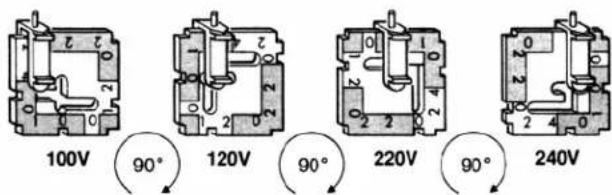
100V 120V 220V 240V 90° 90° 90°Figure 2 - Voltage Selector Card
*************************** CAUTION ***************************
This instrument may be damaged if operated with the LINE VOLTAGE SELECTOR set for the wrong ac input-source voltage or if the wrong fuse is installed.
LINE VOLTAGE SELECTION
The SR540 operates from a 100V, 120V, 220V, or 240V nominal ac power source having a line frequency of 50 or 60 Hz. Before connecting the power cord to a power source, verify that the LINE VOLTAGE SELECTOR card, located in the rear panel fuse holder, is set so that the correct ac input voltage value is visible (figure 1).
To Change Voltage Selected: Open the cover on the power entry module using a small screwdriver; pull the voltage selector card straight out using long-nose pliers; orient selector card so that the desired voltage is readable at the bottom; orient the indicator pin to point up when desired voltage is readable at the bottom (figure 2); insert voltage selector card into housing, printed side facing left, and edge containing desired voltage first; replace cover and verify that the indicator pin shows the desired voltage.
LINE FUSE
Verify that the correct line fuse is installed before connecting the line cord. For 100V and 120V, use a 1/4 Amp fuse and for 220V and 240V, use a 1/8 Amp fuse.
LINE CORD
This instrument has a detachable, three-wire power cord with a three-contact plug for connection to both the power source and protective ground. The protective ground contact connects to the accessible metal parts of the instrument. To prevent electrical shock, always use a power source outlet that has a properly grounded protective-ground contact.
OPERATE ONLY WITH COVERS IN PLACE
To avoid personal injury, do not remove the product covers or panels. Do not operate the product without all covers and panels in place.
KEEP HANDS CLEAR OF CHOPPER BLADE
Quick Start Instructions
- Make sure the correct line voltage is selected, the correct fuse is installed, and the power switch is off.
- Connect the chopper head to the controller with the supplied coiled cord.
- Mount the 30 slot wheel for 400Hz to 3.7kHz or the 6 slot wheel for 4Hz to 400Hz , and set the MAX FREQ/SLOT switch on the front panel for the desired frequency range.
- Set the REFERENCE MODE switch 'up'. In this position the right BNC output is at f , the chop frequency of the outer row of slots; and the left BNC output is at f_inner , the chop frequency of the inner row of slots.
- Connect the lock-in's reference input to the output that corresponds to the row of slots that will be used.
- Turn the power switch on and adjust the 10-turn dial for the desired chop frequency.

text_image
STANFORD RESEARCH SYSTEMS, INC. MODEL SR540 CHOPPER CONTROLLER CONTROL VOLTAGE (0-10 VDC) 1342 CHOPPER FREQUENCY f(Hz) FREQUENCY ADJUST MAX FREQ/SLOTS 4 kHz 30 400 Hz 6 40 Hz 6 REFERENCE MODE f INNER sf f SUM f DIFF
text_image
WARNING: NO USER SERVICEABLE PARTS INSIDE. REFER TO USER MANUAL FOR SAFETY NOTICE. MOTOR CAL (LINE FUSE 100/120 ~ 14A) (SLOW-BLO) 220/240 ~ 14A) CHOPPER HEAD CABLE MADE IN U.S.A.Figure 3 - Chopper Controller Front and Rear Panels
OPERATING INSTRUCTIONS
INTRODUCTION
The Model SR540 Optical Chopper is used to square-wave modulate the intensity of optical signals. The unit can chop light sources at rates from 4 Hz to 3.7 kHz. Versatile, low jitter reference outputs provide the synchronizing signals required for several operating modes: single or dual beam; sum & difference frequency; and synthesized chopping to 20 kHz.
The choice of operating frequency is influenced by several factors:
- Avoid low frequency operation (below 100Hz). In general, phase jitter, background noise and lock-in amplifier noise all degrade at low frequencies.
- Avoid high frequency operation. Motor lifetime will be reduced if the unit is operated for extended periods above 2KHz.
- Avoid known noise frequencies. For example, the line frequency and all its even and odd harmonics should be carefully avoided.
- Avoid using the bottom 10% of the frequency control dial. The phase jitter
of the reference outputs will degrade at the low end of the range, so switch to the next lower MAX FREQ / SLOTS range.
- Always use the correct wheel as indicated by the MAX FREQ / SLOTS switch. Using the wrong wheel will seriously degrade the performance of the synthesized reference outputs (left BNC). For frequencies from 4Hz to 400 Hz use the 6/5 slot blade; from 400Hz to 3.7kHz use the 30/25 slot blade.
CHANGING BLADES
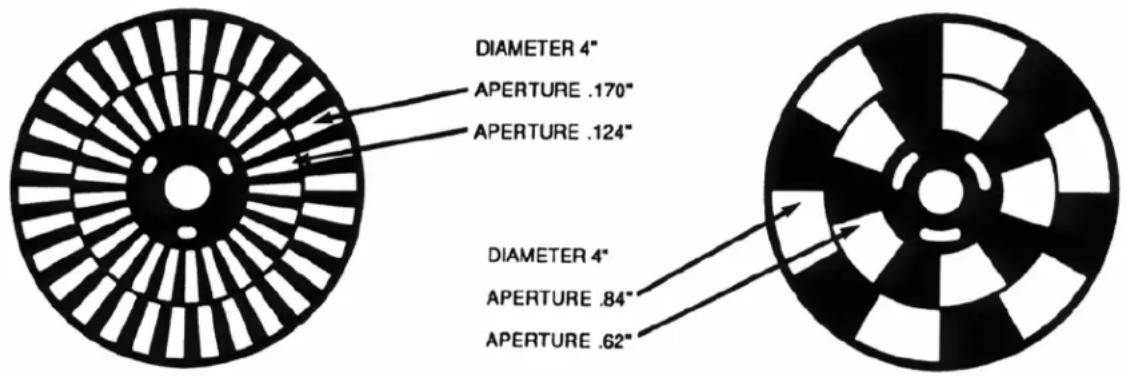
The chopper blade (figure 4) may be replaced by removing the three flat head screws, which hold the outside hub to the wheel. When replacing the blade, be sure to insert the blade between the slotted optical detectors before placing it on the wheel. Secure the blade by sandwiching it between the wheel and outer hub. Install and loosely tighten the three flat head screws, which hold the hub to the wheel. Then firmly tighten all three screws. Handle blades carefully as they are easily bent.
BASEPLATE REMOVAL
The baseplate of the unit may be removed to allow for pole mounting. Use an allen wrench to remove the 6-32 bolt from the bottom of the baseplate.
text_image
DIAMETER 4" APERTURE .170" APERTURE .124" DIAMETER 4" APERTURE .84" APERTURE .62"Figure 4 - 30/25 Slot and 6/5 Slot Chopper Blades
APPLICATIONS
SINGLE BEAM EXPERIMENT
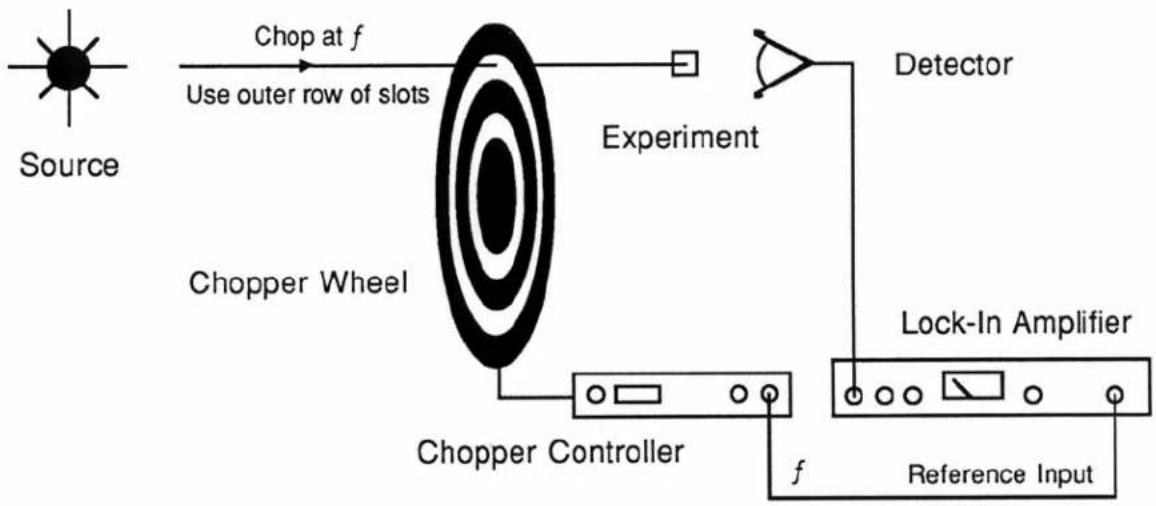
In this application, a single optical beam is chopped by the outer row of slots, and the reference output from the right BNC is used to lock the lock-in amplifier to a chop frequency (figure 5). Note, that the inner row of slots
could be used, in which case the reference from the left BNC would be used. In either case, the REFERENCE MODE switch is in the 'up' position.
flowchart
graph LR
    A["Source"] --> B["Use outer row of slots"]
    B --> C["Chopper Wheel"]
    C --> D["Experiment"]
    D --> E["Detector"]
    E --> F["Lock-In Amplifier"]
    F --> G["Reference Input"]
    C --> H["Chopper Controller"]
    H --> I["f"]
    I --> F
    style A fill:#fff,stroke:#000
    style F fill:#fff,stroke:#000
Figure 5 - Single Beam Experiment
SINGLE BEAM EXPERIMENT WITH EFFECTIVE CHOP FREQUENCIES TO 20 KHZ
In certain situations very high chop frequencies are desirable. For example, you can infer the lifetime of a fluorescent decay by measuring the phase shift between the light which excites the material and the fluorescent decay output.
$$ \tau = \tan \phi / 2 \pi f $$
where is the observed phase shift, f is the chop frequency, and t is the lifetime. Accuracy is improved by using a chop frequency,
$$ f \sim 1 / 2 \pi \tau $$
so that small errors in the phase measurement will not drastically affect the lifetime.
When a small diameter beam is chopped by a blade, the light intensity vs. time is a square wave,
$$ \mathrm{I} (\mathrm{t}) = \mathrm{Io} (\sin \mathrm{wt} + 1 / 3 \sin 3 \mathrm{wt} + 1 / 5 \sin 5 \mathrm{wt} + \dots). $$
Providing that the optical media is not saturated by the light beam, the media will respond linearly to each Fourier component. In this case, we are interested in the response at the 5th harmonic, for which the chopper controller has a reference signal output at 5f.
To use this feature, set the REFERENCE MODE switch to the center position and use the left BNC reference output as the reference input to the lock-in amplifier (figure 6). The lock-in will now detect the response from the experiment at the 5th harmonic of the chop frequency (up to 20kHz). Note that the

flowchart
graph LR
    A["Source"] --> B["Use outer row of slots"]
    B --> C["Chopper Wheel"]
    C --> D["Chopper Controller 5f"]
    D --> E["Lock-In Amplifier"]
    E --> F["Detector"]
    F --> G["Experiment"]
    style A fill:#fff,stroke:#000
    style B fill:#fff,stroke:#000
    style C fill:#999,stroke:#000,color:#fff
    style D fill:#fff,stroke:#000
    style E fill:#fff,stroke:#000,color:#fff
    style F fill:#fff,stroke:#000
    style G fill:#fff,stroke:#000
Figure 6 - Single Beam with Effective Chop Frequencies to 20 kHz

line
| Beam Size b (mm) | Amplitude a5 | | ---------------- | ------------ | | 0.0 | 0.12 | | 0.5 | 0.10 | | 1.0 | 0.07 | | 1.5 | 0.03 | | 2.0 | 0.01 | | 2.5 | 0.02 | | 3.0 | 0.02 |Figure 7 - Amplitude of the 5th Harmonic vs. Beam Size
amplitude of the 5th harmonic term will depend on beam size. For a beam with diameter b, using the 30 slot wheel with a slot aperture L, the amplitude of the nth harmonic is given by,
$$ \begin{array}{l l l} \mathrm {a_ {n}} = & \frac {4}{2} \ \mathrm{n} & ^ 2 \pi^ {2} \end{array} \quad \begin{array}{l l l} \underline {{\mathrm{L}}} & \cos & \underline {{\mathrm{n} \pi}} (1 - \mathrm{b} / \mathrm{L}) \ 2 & \end{array} $$
The amplitude of the 5th harmonic vs. beam size is plotted in figure 7. If your beam is much larger than 0.5mm, you may wish to pass the beam through an aperture or bring it to focus at the chopper blade.
DUAL BEAM EXPERIMENTS
In this arrangement, the output from a single source is split in two and chopped at two different frequencies by the same chopper wheel (figure 8). One of the beams passes through the experiment, while the other beam, a reference beam, passes through a control arm. The beams are recombined and sent to the same detector.
Two lock-in's are used to detect the two signals which are at different frequencies. The signal at f corresponds to the control arm, the signal at
f_inner is the response from the experimental arm. If the detected signal in the experimental arm is ratioed to the detected signal in the control arm, then effects due to changing source intensity and detector efficiency are removed.
Also note that each beam passes through one beam splitter, reflects off one beam splitter, and reflects off one mirror, so that effects due to these components are cancelled in the ratio output.

flowchart
graph LR
    A["Source"] --> B["Chopper Wheel"]
    B --> C["Control Arm"]
    C --> D["Experimental Arm"]
    D --> E["Detector"]
    E --> F["Normalized Signal Out"]
    G["Chopper Controller"] --> B
    H["f_inner"] --> B
    I["f"] --> B
    J["Lock-In Amplifiers"] --> B
    K["Signals at f and f_inner"] --> L["#1"]
    M["Ratio"] --> N["#2"]
Figure 8 - Dual Beam Experiment
DETECTION AT THE SUM & DIFFERENCE FREQUENCIES
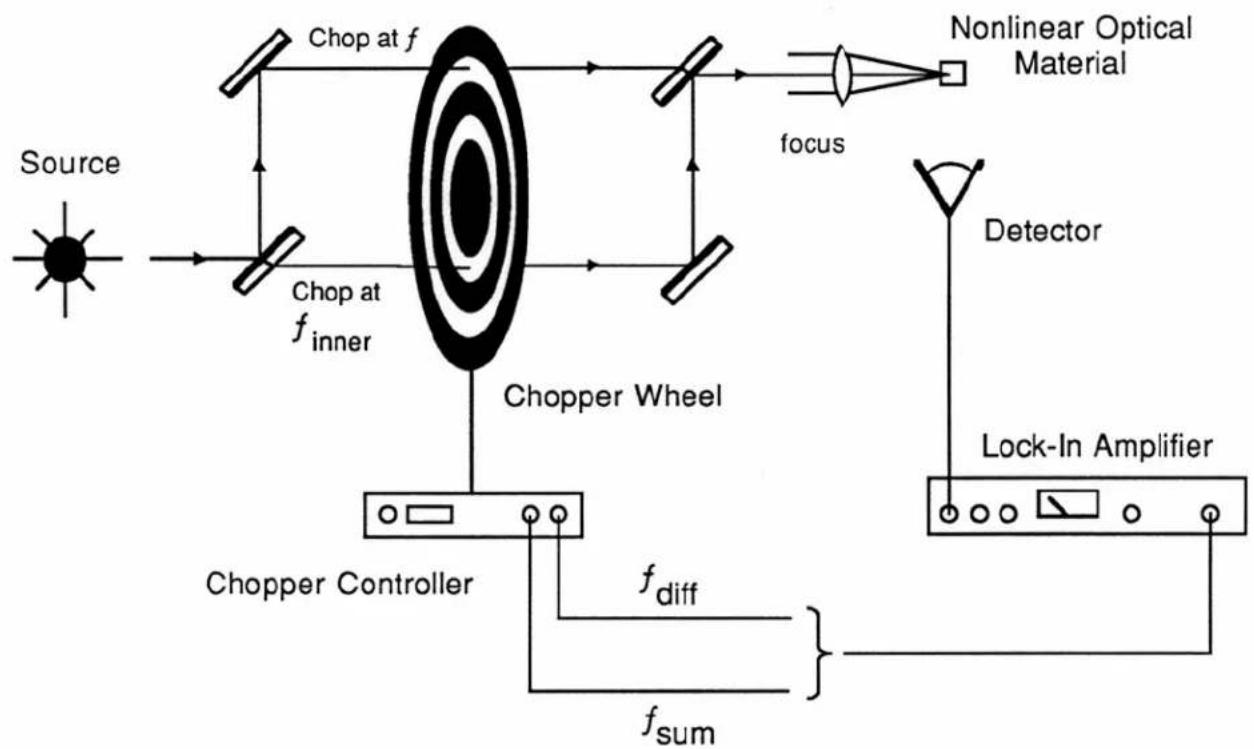
Certain applications require detection at the sum or difference frequency of two chopped beams. In figure 9, a source beam is split into two. One of the beams is chopped by the outer row of slots on the wheel, the other is chopped by the inner row. By placing the REFERENCE MODE switch in the down position, the sum frequency is available at the left reference BNC and the difference frequency is available at the right BNC.
flowchart
graph LR
    A["Source"] --> B["Chopper Wheel"]
    B --> C["Chopper Controller"]
    C --> D["Chopper at f_inner"]
    D --> E["Chopper at f"]
    E --> F["Nonlinear Optical Material"]
    F --> G["Detector"]
    G --> H["Lock-In Amplifier"]
    H --> I["f_sum"]
    I --> J["f_diff"]
    J --> C
    style A fill:#fff,stroke:#000
    style H fill:#fff,stroke:#000
Figure 9 - Sum and Difference Frequency Detection
VARIABLE APERTURE
In some situations one must reduce the duty cycle of a chopped optical beam. This can be done with the SR540 by mounting two identical blades and staggering their position relative to each other.
The minimum slot aperture is about 0.5mm, below which the slotted optical detector will fail to detect the outer row of slots. This corresponds to a 10% duty cycle on the 30 slot blade and a 2% duty cycle on the 6 slot blade. For duty cycles less than 20%, you should select the "pulse mode" reference level on the lock-in. Since the f/6 notch is obscured when two blades are mounted, only the f & 5f reference outputs will work ( f_inner , f_sum , and f_diff will not work). You may observe the duty cycle of the chopped beam on the f output.
CALIBRATION
Only one adjustment is required to calibrate the SR540 Chopper Controller. The adjustment pot located on the rear panel is used to match the controller to the motor. Mount the 30-slot blade, and set the MAX FREQ/SLOT switch to
4 kHz. Set the FREQUENCY ADJUST dial to 7.5, and use a small screwdriver to adjust the MOTOR CAL pot so that the four digit display shows 3000 ± 10 Hz.
CIRCUIT DESCRIPTION
MOTOR SPEED CONTROL
The output of U5, a precision 10.000VDC reference, is attenuated by P2, the ten-turn potentiometer, to control the motor speed. The set voltage can be overridden by a voltage at the CONTROL VOLTAGE input. The speed control voltage is buffered by 2/4 of U3, and attenuated by R8, R9 and R10. U2, a quad analog switch, selects the attenuation factor to provide full-scale voltages of 10.0, 5.0 or 0.5VDC per the setting of the MAX FREQ/SLOTS switch. The 3/4 of U3 is used to amplify this voltage by about x2.6. The MOTOR CAL pot, P1, is used to adjust the gain of this amplifier to compensate for variations between motors. The output of the amplifier is buffered by U1 to drive the motor. R4 senses and limits the motor current to 200mA by turning on Q1. The 1/4 of U3 feeds-back a voltage equal to the voltage applied to the motor minus 4.7 times the voltage across R4. Since the feedback voltage goes down when current is increased, the voltage applied to the motor will go up; hence the output behaves like a negative resistance connected to a voltage source. The negative resistance is about R4 x 4.7, \~ 15Ω. This is just equal to the real resistance of the cable and motor windings. With this arrangement, the speed of the motor will not be affected by load variations, which normally would change the current and so change the voltage that is applied to the motor. This improves frequency stability of the chopper and improves the linearity of the speed vs. control voltage characteristic.
OPTICAL PICK-OFFS
There are two slotted optical switches, which detect slots in the chopper wheel. Each optical switch uses an infrared LED and a phototransistor. If the light passes through a slot to the phototransistor, its collector current will be several milliamps. The collectors of the photo transistors are connected together, summing their currents. The common collector is held at 3.0VDC by 4/4 of U3. The current is sensed by R15, so that the output of 4/4 U3 will swing by 1 volt/mA of collector current. Radiated noise at the chop frequency is greatly reduced, as all lines going to the chopper head are held at constant voltage.
The waveform at pin 14 of U3 looks like this:

text_image
f f/6The current from one of the optical switches is just a square wave at the frequency of the outer row of slots. The outputs from the second photo
transistor places a pulse on top of every sixth pulse, per the chopper wheel design. This second signal provides a signal at f/6, with known phase, which is used to synthesize other reference outputs.
Logic signals at f & f/6 are generated by the dual comparator U6. The 1/2 of U6 compares the photo current signal to a fixed voltage of about 3.6VDC in order to generate f. The 2/2 of U6 compares the photo current signal to the peak value of the photo current signal, less two diode drops. Comparing to the peak voltage compensates for variations in LED & phototransistor sensitivity. Both comparators have about 0.2V of hysteresis to prevent multiple edges on logic transitions.
FREQUENCY SYNTHESIS
The outer row frequency, f, is measured directly by one of the phototransistors. The difference between the outer & inner row frequencies, f/6, is measured by the other phototransistor. The other frequencies are synthesized from these two references by a phase-lock loop circuit.
| Name | Frequency | Description | |
| f | f | outer | |
| 5f 5f 5 x outer row | |||
| f_inner | 5f/6 | inner | row |
| f_sum 11f/6 outer row + inner row | |||
| f_diff f/6 outer row - inner row | |||
The Dual 1:4 Multiplexer, U17, is used to pass f or f/6 to the right hand reference output BNC per the setting of the REFERENCE MODE switch, SW1. U17 also selects f of f/6 as a source to the PLL frequency synthesizer circuit.
To generate 5f/6, the frequency of the inner row of slots, U17 selects f/6 as the input to the phase detector of U12, a CMOS phase-lock loop. The output of the phase detector is filtered by R23, R24, and C3. The quad analog switch, U4, will also switch in C2 or C1 if the 400Hz or 40Hz MAX FREQ/SLOTS ranges are selected at SW2. The filtered output of the phase detector controls the VCO frequency. The maximum
frequency of the VCO is set by R22. U4 increases the maximum frequency by switching in R20 or R21 when the 400 Hz or 4KHz ranges are selected. The output frequency of the VCO is divided by U18, which is programmed to divide by 5 or 11 per the setting of the REFERENCE MODE switch, SW1. To generate 5f/6, U18 loads 10 when the counter reaches 15 to divide by 5. In order for the frequencies at the input of the phase comparator to be equal, the VCO must run at 5xf/6.
The same circuit is used to generate 5f, however, the multiplexer, U17, selects f (not f/6) as the input to the phase detector. To generate 11f/6, the sum frequency, f/6 is selected as the input to the phase detector, and U18 is programmed to divide by 11 by presetting to 4 when the counter reaches 15. In all cases, the output of the VCO is passed to the left reference output BNC. This output is always a square wave.
FREQUENCY DISPLAY
The four-digit frequency display always shows the frequency, f, of the outer row of slots, independent of the reference mode, which has row been selected. The time base for the counter is a 32,768Hz crystal oscillator, which is sustained by U10, a hex inverter. U11, a 14-stage binary counter and the flip-flop 2/2 U14 are used to divide by 215 to generate a 1.000-second gate.
In order to eliminate one-count flicker in the result, the count latch 1/2 U14, is set by a falling edge of the wave form which is to be counted. When the count latch is set, the reset to the time base counters is released, starting the one-second-count period. Also, the reset to U15, the four-decade counter/latch/display driver is released to begin the count. The count accumulates for 1 second, when, the falling edge of the Q output from 2/2 U14 sets 1/2 U13 high. The Q output of 1/2 U13 stays high for about 1/2 clock period (15 s) asserting the Latch Enable input on U15 to transfer the counter contents to the latch for display. Then 1/2 U13 is reset, and 2/2 U13 is clocked high, asserting
the Q-bar output to reset the count latch. The entire count cycle begins with the next falling edge from the opto pick-off comparator. If the wheel stops, so there are no more pulses to count, the reset to U15 will be asserted indefinitely. After a few seconds, R36 will charge C13 to assert the Disp Sel to U15, causing the contents of the counters (which are zero) to be displayed instead of the contents of the latches (which contain the last count). U15 multiplexes the display information to the 4 digit common cathode LED. Each of the digits are selected in sequence by U15 saturating one of the display driver transistors Q2-Q5.
POWER SUPPLIES
The power transformer primary is tapped for operation at 100, 120, 220, or 240VAC. The power entry module does the required switching. Full wave bridge rectifiers are used to rectify the 7.5VAC and 30VAC to 8.5VDC and 40VDC. The unregulated 40VDC is used by U1 the motor driver transistor, and by U8 to provide regulated 30VDC. The 30VDC is the DC supply to U7, a +15VDC regulator. U9 regulates the 8.5VDC to 5.0VDC.
SR540 PARTS LIST
Motor and Motor related Parts List
| C 15 | 5-00102-517 4.7U | Capacitor, Tantalum, 35V, 20%, Rad | |
| J 2 | 1-00030-100 4P4C | Connector, Misc. | |
| M 1 | 7-00055-700 12VDC | Misc. Parts | |
| O 1 | 3-00173-309 MOC70U2 | Optical Switch | |
| O 2 | 3-00173-309 MOC70U2 | Optical Switch | |
| PC1 | 7-00056-701 SR541 | Printed Circuit Board | |
| R 30 | 0-00000-000 UNDECIDED PART | Hardware, Misc. | |
| R 33 | 0-00000-000 UNDECIDED PART | Hardware, Misc. | |
| Z 0 | 0-00146-025 6-32X3/8H | Screw, Allen Head, HEX HEAD | |
| Z 0 | 0-00147-004 1/4-20X1" | Knobs | |
| Z 0 | 0-00150-026 4-40X1/4PF | Screw, Black, All Types | |
| Z 0 | 0-00151-055 DC-44-4C-6 | Wire, Other | |
| Z 0 | 0-00205-058 EPOXY GLUE | Glue | |
| Z 0 | 0-00222-021 6-32X1/4PP | Screw, Panhead Phillips | |
| Z 0 | 7-00057-720 SR540-1 | Fabricated Part | |
| Z 0 | 7-00058-716 SR540-10 | Chemically Etched Part | |
| Z 0 | 7-00059-721 SR540-2 | Machined Part | |
| Z 0 | 7-00060-721 SR540-3 | Machined Part | |
| Z 0 | 7-00061-721 SR540-6 | Machined Part | |
| Z 0 | 7-00062-716 SR540-9 | Chemically Etched Part | |
Main Board and Chassis Assembly Parts List
| BR1 | 3-00062-340 KBP201G/BR-81D Integrated Circuit (Thru-hole Pkg) | ||
| BR2 | 3-00062-340 KBP201G/BR-81D Integrated Circuit (Thru-hole Pkg) | ||
| C 1 | 5-00031-520 220U | Capacitor, Electrolytic, 16V, 20%, Rad | |
| C 2 | 5-00033-520 47U | Capacitor, Electrolytic, 16V, 20%, Rad | |
| C 3 | 5-00192-542 | 22U MIN | Cap, Mini Electrolytic, 50V, 20% Radial |
| C 4 | 5-00100-517 2.2U | Capacitor, Tantalum, 35V, 20%, Rad | |
| C 5 | 5-00127-524 2.2U | Capacitor, Tantalum, 50V, 20%, Rad | |
| C 6 | 5-00128-509 470U | Capacitor, Electrolytic, 50V, 20%, Rad | |
| C 7 | 5-00023-529 | .1U | Cap, Monolythic Ceramic, 50V, 20%, Z5U |
| C 8 | 5-00038-509 10U | Capacitor, Electrolytic, 50V, 20%, Rad | |
| C 9 | 0-00772-000 | 1.5" WIRE | Hardware, Misc. |
| C 10 | 5-00064-513 .0047U | Capacitor, Mylar/Poly, 50V, 5%, Rad | |
| C 11 | 5-00100-517 2.2U | Capacitor, Tantalum, 35V, 20%, Rad | |
| C 12 | 5-00030-520 2200U | Capacitor, Electrolytic, 16V, 20%, Rad | |
| C 13 | 5-00038-509 10U | Capacitor, Electrolytic, 50V, 20%, Rad | |
| C 14 | 5-00100-517 2.2U | Capacitor, Tantalum, 35V, 20%, Rad | |
| C 17 | 5-00023-529 | .1U | Cap, Monolythic Ceramic, 50V, 20%, Z5U |
| C 18 | 5-00100-517 2.2U | Capacitor, Tantalum, 35V, 20%, Rad | |
| C 19 | 5-00192-542 | 22U MIN | Cap, Mini Electrolytic, 50V, 20% Radial |
| C 20 | 5-00064-513 .0047U | Capacitor, Mylar/Poly, 50V, 5%, Rad | |
| CX1 | 5-00003-501 | 10P | Capacitor, Ceramic Disc, 50V, 10%, SL |
| CX2 | 5-00017-501 | 47P | Capacitor, Ceramic Disc, 50V, 10%, SL |
| D 1 | 3-00004-301 1N4148 | Diode | |
| D 2 | 3-00004-301 1N4148 | Diode | |
SR540 PARTS LIST
| D 3 | 3-00001-301 1N4001 | Diode | |
| D 4 | 3-00001-301 1N4001 | Diode | |
| DX100 | 3-00203-301 1N5711 | Diode | |
| F 1 | 6-00002-611 .25A 3AG | Fuse | |
| J 1 | 1-00030-100 4P4C | Connector, Misc. | |
| J 3 | 1-00031-133 16 PIN SRA | Connector, Male, Right Angle | |
| P 1 | 4-00271-445 2.0K | Pot, Multi-Turn, Side Adjust | |
| P 2 | 4-00019-443 20K | Pot, 10-Turn Panel | |
| PC1 | 7-00054-701 SR540 | Printed Circuit Board | |
| PC2 | 7-00558-701 SR540 LED | Printed Circuit Board | |
| Q 2 | 3-01860-325 MPSA13 | Transistor, TO-92 Package | |
| Q 3 | 3-01860-325 MPSA13 | Transistor, TO-92 Package | |
| Q 4 | 3-01860-325 MPSA13 | Transistor, TO-92 Package | |
| Q 5 | 3-01860-325 MPSA13 | Transistor, TO-92 Package | |
| Q 6 | 3-00020-325 PN2222 | Transistor, TO-92 Package | |
| R 2 | 4-00273-401 5.6K | Resistor, Carbon Film, 1/4W, 5% | |
| R 3 | 4-00305-401 4.3K | Resistor, Carbon Film, 1/4W, 5% | |
| R 4 | 4-00773-402 | 2.2 | Resistor, Carbon Comp, 1/2W, 5% |
| R 5 | 4-00031-401 | 100 | Resistor, Carbon Film, 1/4W, 5% |
| R 6 | 4-00034-401 10K | Resistor, Carbon Film, 1/4W, 5% | |
| R 7 | 4-00034-401 10K | Resistor, Carbon Film, 1/4W, 5% | |
| R 8 | 4-00188-407 4.99K | Resistor, Metal Film, 1/8W, 1%, 50PPM | |
| R 9 | 4-00187-407 4.53K | Resistor, Metal Film, 1/8W, 1%, 50PPM | |
| R 10 | 4-00193-407 | 499 | Resistor, Metal Film, 1/8W, 1%, 50PPM |
| R 11 | 4-00061-401 240K | Resistor, Carbon Film, 1/4W, 5% | |
| R 12 | 4-00034-401 10K | Resistor, Carbon Film, 1/4W, 5% | |
| R 13 | 4-00048-401 2.2K | Resistor, Carbon Film, 1/4W, 5% | |
| R 14 | 4-00078-401 39K | Resistor, Carbon Film, 1/4W, 5% | |
| R 15 | 4-00021-401 1.0K | Resistor, Carbon Film, 1/4W, 5% | |
| R 16 | 4-00272-407 | 221 | Resistor, Metal Film, 1/8W, 1%, 50PPM |
| R 17 | 4-00188-407 4.99K | Resistor, Metal Film, 1/8W, 1%, 50PPM | |
| R 18 | 4-00021-401 1.0K | Resistor, Carbon Film, 1/4W, 5% | |
| R 19 | 4-00059-401 22K | Resistor, Carbon Film, 1/4W, 5% | |
| R 20 | 4-00614-407 174K | Resistor, Metal Film, 1/8W, 1%, 50PPM | |
| R 21 | 4-00037-401 11K | Resistor, Carbon Film, 1/4W, 5% | |
| R 22 | 4-00131-407 | 1.00M | Resistor, Metal Film, 1/8W, 1%, 50PPM |
| R 23 | 4-00094-401 6.8K | Resistor, Carbon Film, 1/4W, 5% | |
| R 24 | 4-00090-401 | 560 | Resistor, Carbon Film, 1/4W, 5% |
| R 25 | 4-00054-401 200K | Resistor, Carbon Film, 1/4W, 5% | |
| R 26 | 4-00035-401 | 10M | Resistor, Carbon Film, 1/4W, 5% |
| R 28 | 4-00021-401 1.0K | Resistor, Carbon Film, 1/4W, 5% | |
| R 29 | 4-00034-401 10K | Resistor, Carbon Film, 1/4W, 5% | |
| R 31 | 4-00032-401 100K | Resistor, Carbon Film, 1/4W, 5% | |
| R 32 | 4-00032-401 100K | Resistor, Carbon Film, 1/4W, 5% | |
| R 34 | 4-00057-401 | 220 | Resistor, Carbon Film, 1/4W, 5% |
| R 35 | 4-00057-401 | 220 | Resistor, Carbon Film, 1/4W, 5% |
| R 36 | 4-00032-401 100K | Resistor, Carbon Film, 1/4W, 5% | |
| R 37 | 4-00034-401 10K | Resistor, Carbon Film, 1/4W, 5% |
SR540 PARTS LIST
| R 38 | 4-00034-401 10K | Resistor, Carbon Film, 1/4W, 5% | |
| R 39 | 4-00273-401 5.6K | Resistor, Carbon Film, 1/4W, 5% | |
| R 40 | 4-00024-401 1.2K | Resistor, Carbon Film, 1/4W, 5% | |
| R 41 | 4-00031-401 100 | Resistor, Carbon Film, 1/4W, 5% | |
| R 42 | 4-00021-401 1.0K | Resistor, Carbon Film, 1/4W, 5% | |
| R 43 | 4-00059-401 22K | Resistor, Carbon Film, 1/4W, 5% | |
| R 44 | 4-00021-401 1.0K | Resistor, Carbon Film, 1/4W, 5% | |
| R 45 | 4-00022-401 1.0M | Resistor, Carbon Film, 1/4W, 5% | |
| R 99 | 4-00081-401 470 | Resistor, Carbon Film, 1/4W, 5% | |
| R 100 | 4-00355-435 56V/500A | Varistor, Zinc Oxide Nonlinear Resistor | |
| SW1 | 2-00012-206 SPDT | Switch, On-Off-On, Toggle,Right Angle | |
| SW2 | 2-00012-206 SPDT | Switch, On-Off-On, Toggle,Right Angle | |
| T 1 | 6-00014-610 SR540 | Transformer | |
| TH100 | 4-00766-431 | RXE030 | Thermistor, various |
| U 1 | 3-00257-329 | TIP41B | Voltage Reg., TO-220 (TAB) Package |
| U 2 | 3-00074-340 | CD4066 | Integrated Circuit (Thru-hole Pkg) |
| U 3 | 3-00098-340 | LM324 | Integrated Circuit (Thru-hole Pkg) |
| U 4 | 3-00074-340 | CD4066 | Integrated Circuit (Thru-hole Pkg) |
| U 5 | 3-00188-340 | LH0070-0H | Integrated Circuit (Thru-hole Pkg) |
| U 6 | 3-00143-340 | LM393 | Integrated Circuit (Thru-hole Pkg) |
| U 7 | 3-00114-329 | 7815 | Voltage Reg., TO-220 (TAB) Package |
| U 8 | 3-00149-329 | LM317T | Voltage Reg., TO-220 (TAB) Package |
| U 9 | 3-00112-329 | 7805 | Voltage Reg., TO-220 (TAB) Package |
| U 10 | 3-00051-340 | 74HCU04 | Integrated Circuit (Thru-hole Pkg) |
| U 11 | 3-00169-340 | 74HC4020 | Integrated Circuit (Thru-hole Pkg) |
| U 12 | 3-00072-340 | CD4046 | Integrated Circuit (Thru-hole Pkg) |
| U 13 | 3-00048-340 | 74HC73 | Integrated Circuit (Thru-hole Pkg) |
| U 14 | 3-00048-340 | 74HC73 | Integrated Circuit (Thru-hole Pkg) |
| U 15 | 3-00170-340 74C926 | Integrated Circuit (Thru-hole Pkg) | |
| U 17 | 3-00166-340 | 74HC153 | Integrated Circuit (Thru-hole Pkg) |
| U 18 | 3-00171-340 | 74HC191 | Integrated Circuit (Thru-hole Pkg) |
| XT1 | 6-00015-620 | 32.768 KHZ | Crystal |
| Z 0 | 0-00002-008 2607 | Dial | |
| Z 0 | 0-00009-000 FOOT | Hardware, Misc. | |
| Z 0 | 0-00025-005 3/8" | Lugs | |
| Z 0 | 0-00048-011 6-32 KEP | Nut, Kep | |
| Z 0 | 0-00089-033 4" | Tie | |
| Z 0 | 0-00103-040 3/8X3/32 | Washer, Flat | |
| Z 0 | 0-00127-050 4" #18 RED | Wire #18 UL1007 Stripped 3/8x3/8 No Tin | |
| Z 0 | 0-00128-053 4" #24 | Wire #24 UL1007 Strip 1/4x1/4 Tin | |
| Z 0 | 0-00129-053 5" #24 | Wire #24 UL1007 Strip 1/4x1/4 Tin | |
| Z 0 | 0-00134-053 7-1/4" #24 | Wire #24 UL1007 Strip 1/4x1/4 Tin | |
| Z 0 | 0-00149-020 4-40X1/4PF | Screw, Flathead Phillips | |
| Z 0 | 0-00153-057 GROMMET2 | Grommet | |
| Z 0 | 0-00155-002 6VM4S | Power Entry Hardware | |
| Z 0 | 0-00185-021 6-32X3/8PP | Screw, Panhead Phillips | |
| Z 0 | 0-00207-003 TO-5 | Insulators | |
| Z 0 | 0-00209-021 4-40X3/8PP | Screw, Panhead Phillips | |
SR540 PARTS LIST
| Z 0 | 0-00222-021 | 6-32X1/4PP | Screw, Panhead Phillips |
| Z 0 | 0-00238-026 | 6-32X1/4PF | Screw, Black, All Types |
| Z 0 | 0-00447-007 | TO-220 | Heat Sinks |
| Z 0 | 0-00524-048 | 8-1/4" #18 | Wire, #18 UL1015 Strip 3/8 x 3/8 No Tin |
| Z 0 | 0-00594-050 | 4-1/2" #18 | BLUE Wire #18 UL1007 Stripped 3/8x3/8 No Tin |
| Z 0 | 1-00003-120 | BNC | Connector, BNC |
| Z 0 | 1-00053-172 | USA | Line Cord |
| Z 0 | 3-00556-340 | HDSP-5323 | Integrated Circuit (Thru-hole Pkg) |
| Z 0 | 7-00064-720 | SR540-7 | Fabricated Part |
| Z 0 | 7-00065-720 | SR540-8 | Fabricated Part |
| Z 0 | 7-00066-709 | SR540-11 | Lexan Overlay |
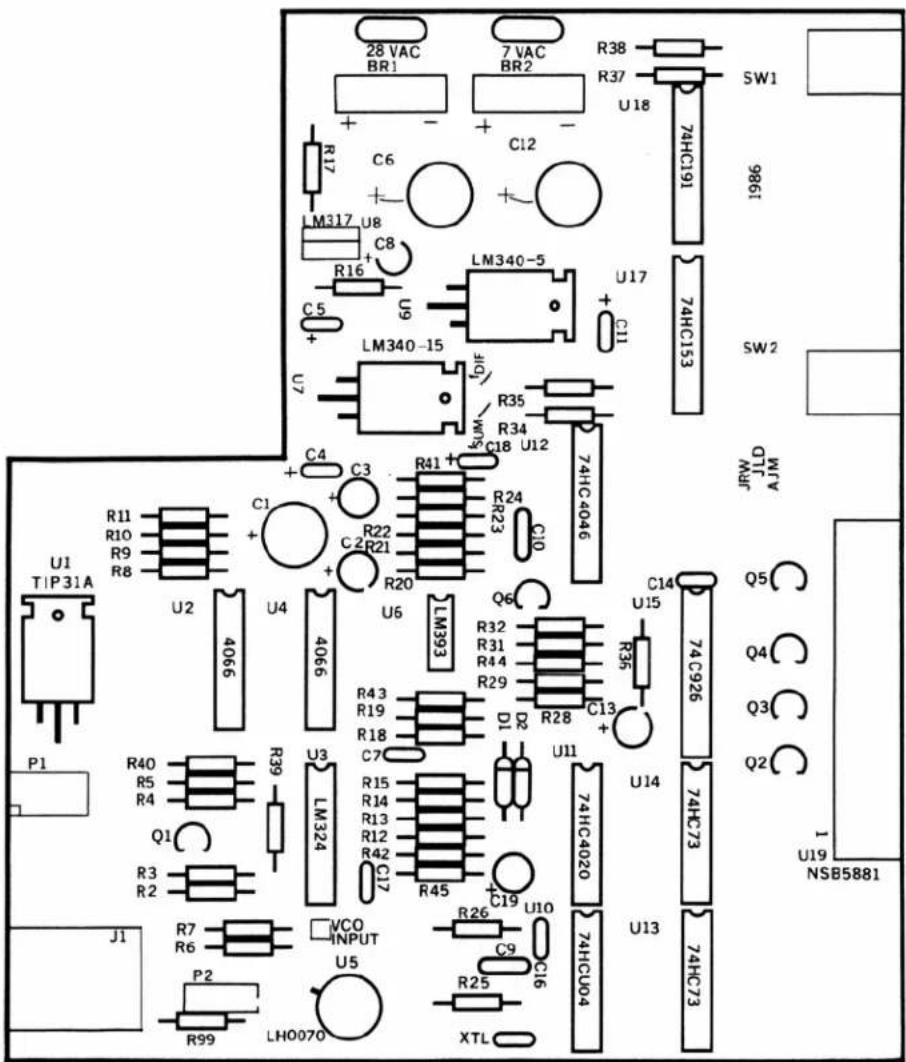
PC LAYOUT