
SWADS-DOORBK - Doorbell SWANN - Free user manual and instructions
Find the device manual for free SWADS-DOORBK SWANN in PDF.


| Type | Wireless Doorbell Kit |
| Brand | Swann |
| Model | SWADS-DOORBK |
| Indoor Receiver Power | 3 x AA alkaline batteries (not included) |
| Doorbell Power | 1 x CR2032 coin cell battery (pre-installed) |
| Chime Options | 36 selectable chimes |
| Volume Levels | High, Medium, Low |
| Silent Mode | Yes, with visual LED alert |
| Maximum Sensors per Channel | Up to 15 sensor devices |
| Mounting | Freestanding or wall-mounted (template included) |
| Doorbell Mounting | Adhesive strip included |
| Range | Not specified in manual |
| Low Battery Indication | LED indicators blink on receiver |
| Pairing | Pre-paired; manual pairing available |
| Warranty | 1 year limited warranty |
| FCC Compliance | Class B digital device, Part 15 |
| Included Accessories | Indoor Alarm Receiver, Doorbell, mounting template, screws, wall plugs, adhesive strip, user manual |
Frequently Asked Questions - SWADS-DOORBK SWANN
User questions about SWADS-DOORBK SWANN
0 question about this device. Answer the ones you know or ask your own.
Ask a new question about this device
Download the instructions for your Doorbell in PDF format for free! Find your manual SWADS-DOORBK - SWANN and take your electronic device back in hand. On this page are published all the documents necessary for the use of your device. SWADS-DOORBK by SWANN.
USER MANUAL SWADS-DOORBK SWANN
Thank you for choosing the Wireless Home Doorbell Kit from Swann. It's the ideal system for easily installing a doorbell without the hassle of wiring.
How does it work?
Basically, there are two parts to the Home Doorbell Kit.
- The Indoor Alarm Receiver works as an alarm buzzer. It monitors for signals coming from the Doorbell, and activates the chime and doorbell LED in response to that signal.
- The Doorbell enables visitors to send a chime to the Indoor Alarm Receiver so you know that someone is waiting at your doorstep.
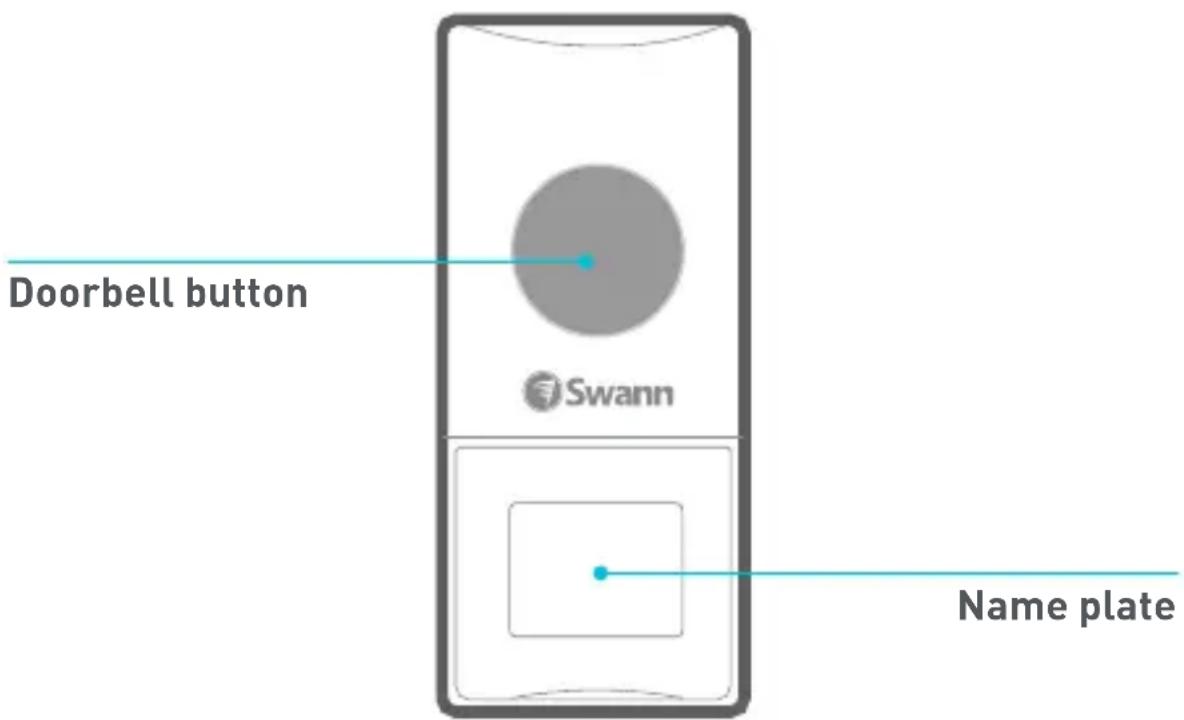
Getting to know your Doorbell
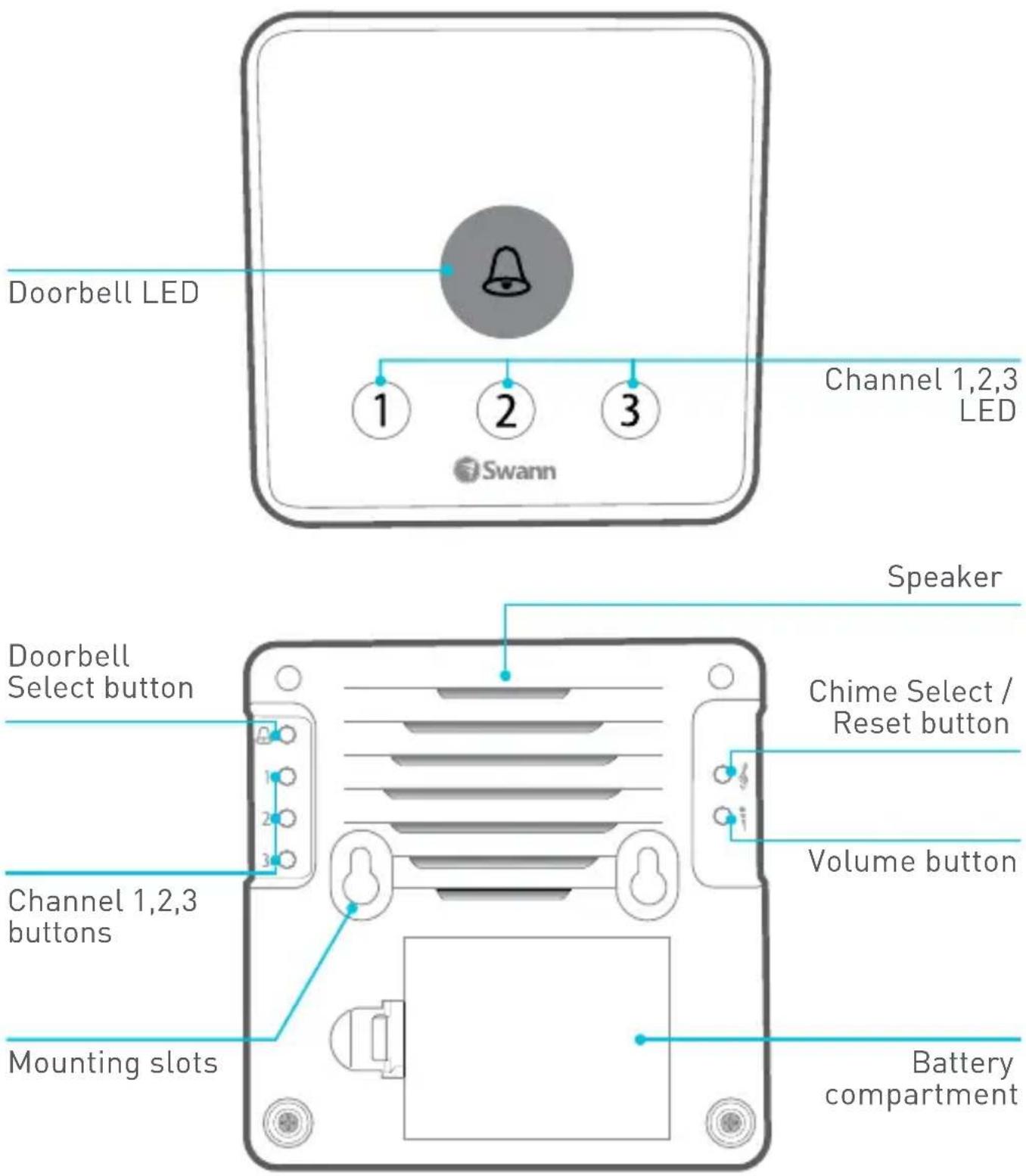
Getting to know your Indoor Alarm Receiver
Add versatility to your Indoor Alarm Receiver by purchasing add-on Alert Sensors to monitor critical areas such as entrances, driveways, garages, etc. Each channel is capable of supporting up to 15 sensor devices at a time.
Indoor Alarm Receiver
Installing batteries
Battery Safety Information
Replace batteries at the same time. Do not mix new and old batteries or battery types (for example, alkaline and lithium batteries). Keep batteries out of reach of children. Dispose of used batteries promptly in accordance with local regulations.
- Push the release tab and lift off the battery compartment cover.
- Insert 3 new "AA" alkaline batteries, matching the polarity markings (+ and -) inside the battery compartment.
- Put the battery compartment cover back on by pressing down until the release tab clicks into place.
Placement
There is no requirement to mount the Indoor Alarm Receiver. As it is also completely freestanding, you may find it more convenient to place it on a shelf or table. One of the benefits of a battery operated wireless receiver is that if you have a large house, you can take the receiver with you. No more missing visitors because you were all the way at the back of the house or by the pool!
If you would like to mount the Indoor Alarm Receiver, we've included all the gear (template, screws and wall plugs) you'll need to hang it on the wall. Refer to the supplied template for instructions on mounting the receiver.
Doorbell
!
WARNING: The Doorbell contains a coin/button cell battery. If the coin/button cell battery is swallowed, it can cause severe internal burns in just 2 hours and can lead to death. Keep new and used batteries away from children. If the battery compartment does not close securely, stop using the product and keep it away from children. If you think batteries might have been swallowed or placed inside any part of the body, seek immediate medical attention.
Activating
- Lift off the name plate using the notch on either side to reveal the battery compartment.
- Pull the plastic tab sticking out of the battery compartment to remove the tab and power on your Doorbell.
Mounting
The Doorbell can be mounted by sticking it to a wall using the included adhesive strip.
- Choose an appropriate location for your Doorbell - flat, smooth surfaces are ideal. Clean the surface with an alcohol/cleaning wipe, and let dry.
- Peel off the adhesive strip liner, and then attach the Doorbell to the wall by pressing firmly for 30 seconds.
OPERATING BASICS
Adjusting the chime volume
You can change the loudness of the Indoor Alarm Receiver using the Volume button on the back of the receiver.
Three volume levels are available: High, Medium and Low.
Changing the chime
The Indoor Alarm Receiver provides a choice of 36 different chimes. To change the doorbell chime:
- Press the Chime Select button on the back of the Indoor Alarm Receiver. The next chime is played. Keep pressing the button until you hear a chime you like.
- Press and hold the Doorbell Select button on the back of the Indoor Alarm Receiver until the Doorbell LED indicator lights up.
- Within 10 seconds, press the button on the Doorbell. The Indoor Alarm Receiver plays the selected chime for confirmation. The selected chime will now be heard whenever someone presses the Doorbell button.
Silent mode
Like some peace and quiet for a period of time? You can put the doorbell chime on “silent”. Simply press the Doorbell Select button on the back of the Indoor Alarm Receiver to turn the chime off. The Indoor Alarm Receiver beeps twice, confirming the chime has been muted.

If a visitor presses the Doorbell button while the chime is muted, you will still be visually alerted by the Doorbell LED indicator blinking on the Indoor Alarm Receiver.

To turn the chime back on, simply press the Doorbell Select button again. You will hear a single confirmation beep from the Indoor Alarm Receiver.
Low battery warning
The Indoor Alarm Receiver will notify you know when battery power in your devices is running low.
• Install new batteries for your Indoor Alarm Receiver when all 4 LED indicators start blinking at the same time.
- Install a new battery (CR2032) for your Doorbell when the Doorbell LED indicator on the Indoor Alarm Receiver starts blinking every 15 seconds.
Pairing your Doorbell
The Doorbell and Indoor Alarm Receiver in your kit have already been paired so all you have to do is put batteries in and your devices are ready to use. If for some reason pairing is lost, here's how to pair them again:
- Press and hold the Reset button on the back of the Indoor Alarm Receiver until all the LED indicators light up. This resets the Indoor Alarm Receiver.
- Press and hold the Doorbell Select button on the back of the Indoor Alarm Receiver until the Doorbell LED indicator lights up.
- Within 10 seconds, press the button on the Doorbell. The Indoor Alarm Receiver plays the default chime to confirm successful pairing.
Technical Support
All Countries E-mail: tech@swann.com
Telephone Helpdesk
USA 1800 627 2799
AUSTRALIA 1800 788 210
NEW ZEALAND 0800 479 266
UK
0808 168 9031
Limited Warranty Terms & Conditions
Swann Communications warrants this product against defects in workmanship and material for a period of one (1) year from it's original purchase date. You must present your receipt as proof of date of purchase for warranty validation. Any unit which proves defective during the stated period will be repaired without charge for parts or labour or replaced at the sole discretion of Swann. The end user is responsible for all freight charges incurred to send the product to Swann's repair centres. The end user is responsible for all shipping costs incurred when shipping from and to any country other than the country of origin.
The warranty does not cover any incidental, accidental or consequential damages arising from the use of or the inability to use this product. Any costs associated with the fitting or removal of this product by a tradesman or other person or any other costs associated with its use are the responsibility of the end user. This warranty applies to the original purchaser of the product only and is not transferable to any third party. Unauthorized end user or third party modifications to any component or evidence of misuse or abuse of the device will render all warranties void.
By law some countries do not allow limitations on certain exclusions in this warranty. Where applicable by local laws, regulations and legal rights will take precedence.
For Australia: Our goods come with guarantees which cannot be excluded under Australian Consumer Law. You are entitled to a replacement or refund for a major failure and for compensation for any other reasonably foreseeable loss or damage. You are also entitled to have the goods repaired or replaced if the goods fail to be of acceptable quality and the failure does not amount to major failure.
FCC Verification
This equipment has been tested and found to comply with the limits for Class B digital device, pursuant to part 15 of the FCC Rules. These limits are designed to provide reasonable protection against harmful interference in a residential installation. This equipment generates, uses and can radiate radio frequency energy and, if not installed and used in accordance with the instructions, may cause harmful interference to radio or television reception, which can be determined by turning the equipment off and on, the user is encouraged to try to correct the interference by one or more of the following measures:
- Reorient or relocate the receiving antenna
- Increase the separation between the equipment and the receiver
- Connect the equipment into an outlet on a circuit different from that to which the receiver is connected
- Consult the dealer or an experienced radio/TV technician for help
WARNING: Modifications not approved by the party responsible for compliance could void user's authority to operate the equipment.

Swann.
Advanced Security Made Easy
- How does it work?
- Indoor Alarm Receiver
- Installing batteries
- Battery Safety Information
- Placement
- Doorbell
- !
- Activating
- Mounting
- OPERATING BASICS
- Adjusting the chime volume
- Changing the chime
- Silent mode
- Low battery warning
- Pairing your Doorbell
- Technical Support
- Telephone Helpdesk
- Limited Warranty Terms & Conditions
- FCC Verification
Brand : SWANN
Model : SWADS-DOORBK
Category : Doorbell