
PRIMEPOWER RX2520 M1 - Server FUJITSU - Free user manual and instructions
Find the device manual for free PRIMEPOWER RX2520 M1 FUJITSU in PDF.


| Product Type | Server |
| Model | PRIMEPOWER RX2520 M1 |
| Form Factor | 2U rackmount |
| Processor | Up to two Intel Xeon E5-2400 v2 series (4/6/8/10 cores) |
| Memory | Up to 384 GB LRDIMM (12 slots, DDR3) |
| Storage Bays | Up to 12x 3.5" or 16x 2.5" hot-swap SATA/SAS |
| RAID Support | Integrated RAID 0/1/10; optional hardware RAID 5/6/50/60 |
| Network | 4x Gigabit Ethernet (onboard); optional 10GbE |
| Power Supply | 1 or 2 hot-plug 450W or 800W (platinum/gold/titanium) |
| Dimensions (approx.) | 2U: 3.5" (H) x 17" (W) x 25" (D) |
| Weight (approx.) | ~25 kg (fully loaded) |
| Management | Integrated Remote Management Controller (iRMC S4) with service LAN |
| Interfaces | 4x USB 2.0, 2x VGA, 1x serial, 1x service LAN |
| Operating Temperature | 5°C to 40°C with Cool-safe® Advanced Thermal Design option |
| Security | TPM module optional; chassis intrusion detection |
| Maintenance | Hot-swap fans, power supplies, and drives; tool-less access |
| Spare Parts | PSU dummy, fan upgrade kit, RAID controller battery backup |
| Compliance | CCC (China), CE, RoHS |
Frequently Asked Questions - PRIMEPOWER RX2520 M1 FUJITSU
User questions about PRIMEPOWER RX2520 M1 FUJITSU
0 question about this device. Answer the ones you know or ask your own.
Ask a new question about this device
Download the instructions for your Server in PDF format for free! Find your manual PRIMEPOWER RX2520 M1 - FUJITSU and take your electronic device back in hand. On this page are published all the documents necessary for the use of your device. PRIMEPOWER RX2520 M1 by FUJITSU.
USER MANUAL PRIMEPOWER RX2520 M1 FUJITSU
Configuration diagram
Configurator
0 System software
I Basic unit
II Processor
III Memory
IV Graphics
V Accessible drives
VI Hard disk drives
VII PCI Controller
VIII Communication/Network
IX System Management Products (RemoteView)
X Miscellaneous
XI Country specific power cord
Change report

natural_image
Pure electrical circuit lines without any symbols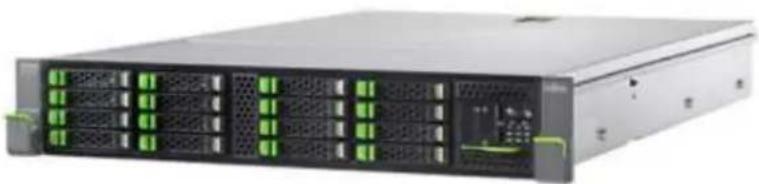
natural_image
Front view of a server rack with multiple drive bays and green indicator lights (no visible text or labels)PRIMERGY Server
Instructions
This document contains basic product and configuration information that will enable you to configure your system via PC-/System-Architect.
Only these tools will ensure a fast and proper configuration of your PRIMERGY server or your complete PRIMERGY Rack system.
You can configure your individual PRIMERGY server in order to adjust your specific requirements.
The System configurator is divided into several chapters that are identical to the current price list and PC-/SystemArchitect.
Please follow the lines. If there is a junction, you can choose which way or component you would like to take. Go through the configurator by following the lines from the top to the bottom.
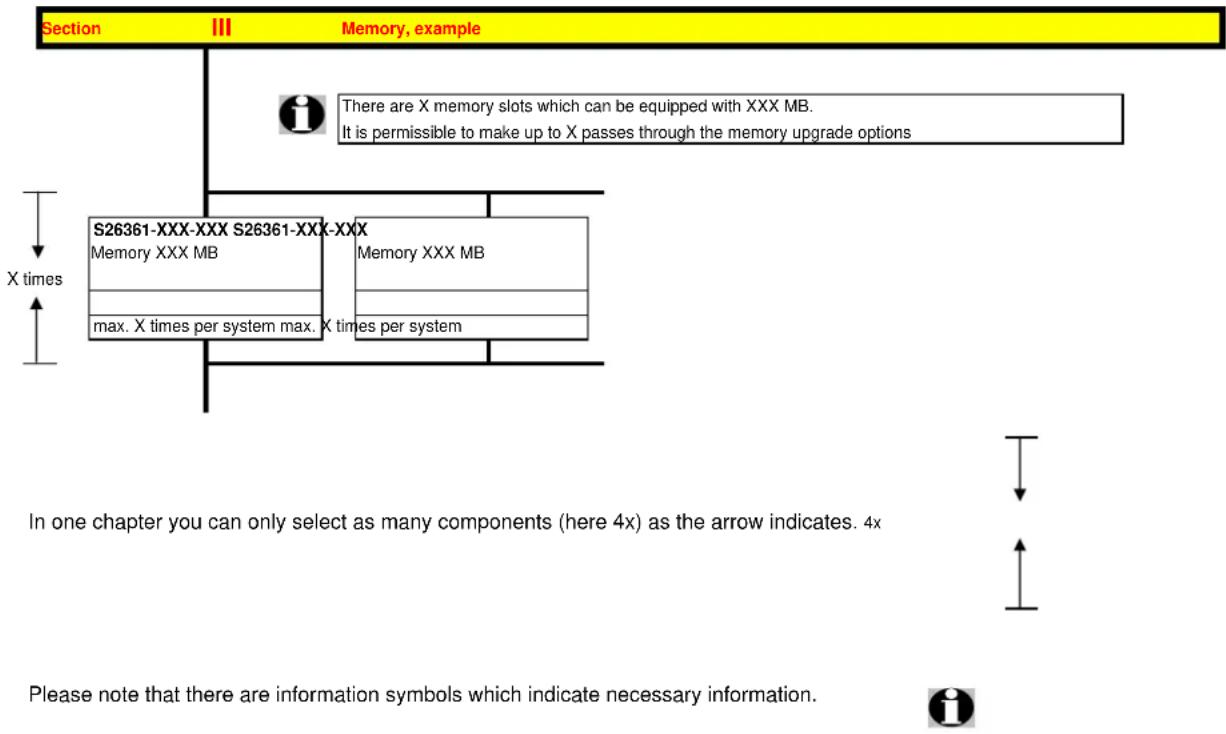
flowchart
graph TD
    A["Section III Memory, example"] --> B["S26361-XXX-XXX S26361-XXX-XXX"]
    B --> C["Memory XXX MB"]
    B --> D["Memory XXX MB"]
    B --> E["max. X times per system max. X times per system"]
    C --> F["X times"]
    D --> G["X times"]
    style A fill:#FFD700,stroke:#333
    style B fill:#E6F5FF,stroke:#333
    style C fill:#FFF,stroke:#333
    style D fill:#FFF,stroke:#333
    style E fill:#FFF,stroke:#333
    note right of B: "There are X memory slots which can be equipped with XXX MB.
It is permissible to make up to X passes through the memory upgrade options"
    note right of C: "In one chapter you can only select as many components (here 4x) as the arrow indicates. 4x"
    note right of D: "Please note that there are information symbols which indicate necessary information."
    note right of E: "Please note that there are information symbols which indicate necessary information.
For further information see:
http://ts.fujitsu.com/products/standard_servers/inc (internet)
https://partners.ts.fujitsu.com/com/order-supply/configurators/primergy_config/current/Pages/default.aspx (extranet)
Configuration diagram PRIMERGY RX2520 M1
System unit (I)
with up to 8x or 12x 3.5" Hard disk drives
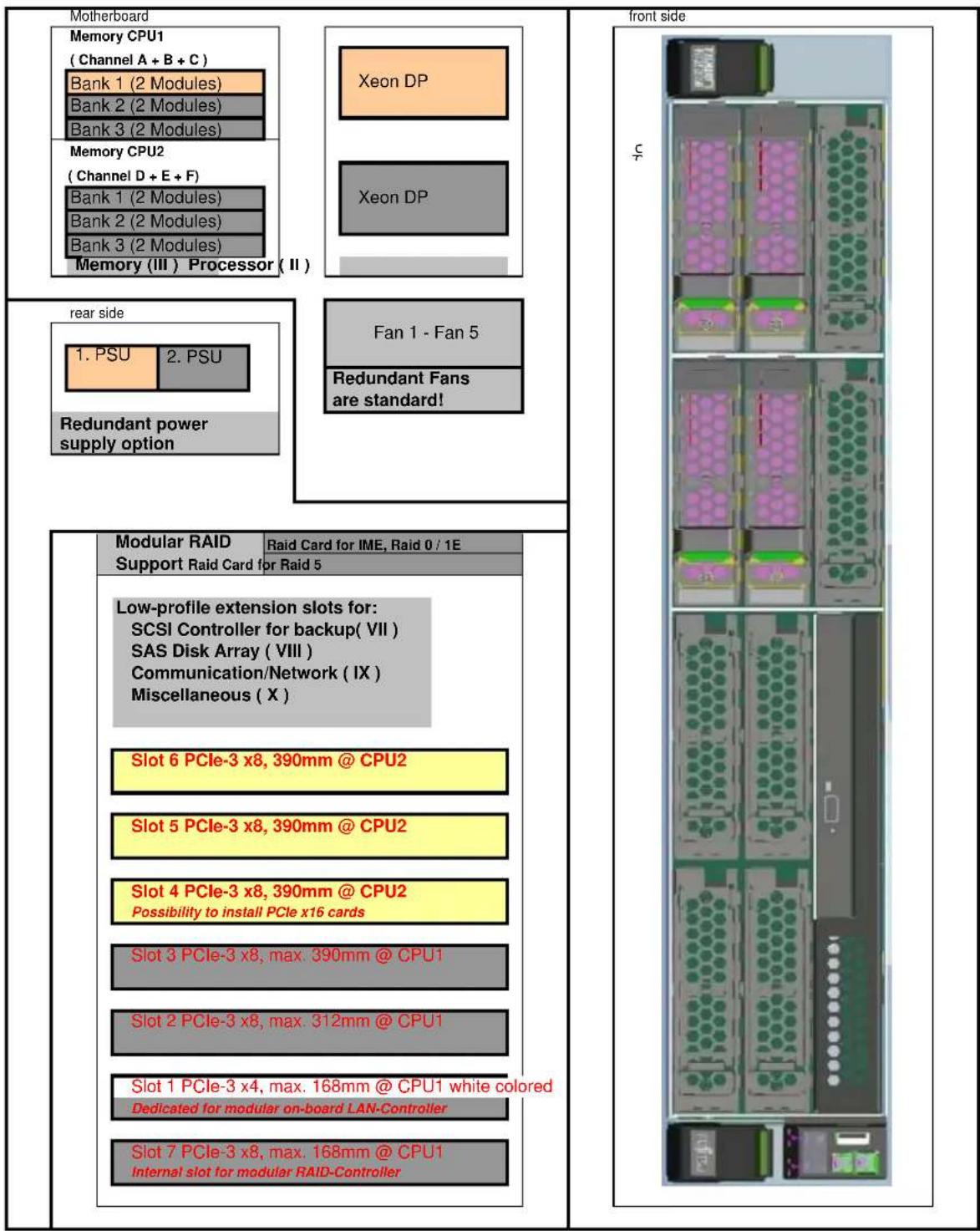
Key:

Included in basic unit Option


One CPU, one memory per CPU and one PSU has to be selected for an orderable basic unit.
Configuration diagram PRIMERGY RX2520 M1
System unit (I)
with up to 4, 8, 12 or 16x 2.5" Hard disk drives
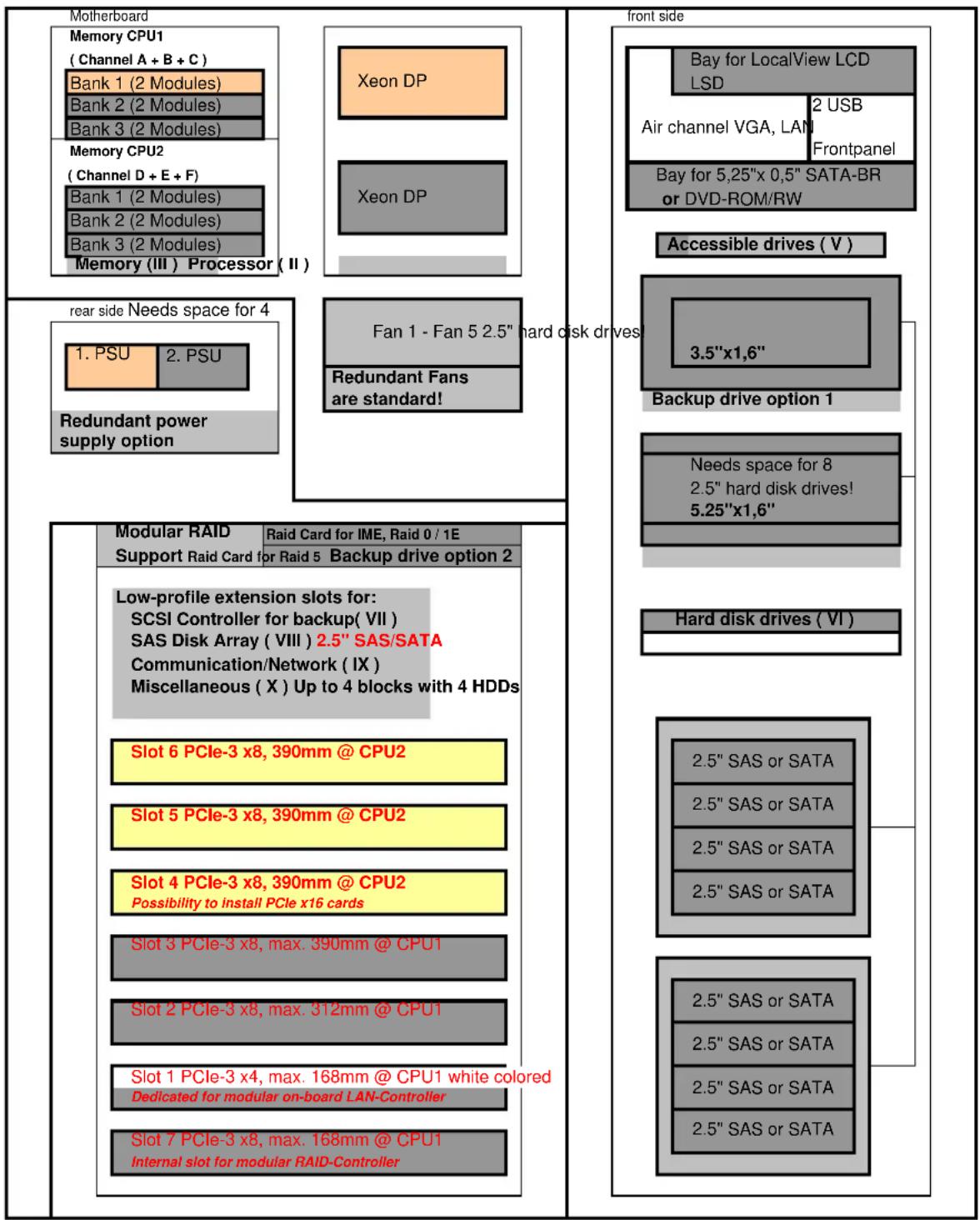
flowchart
graph TD
A["Motherboard Memory CPU1 (Channel A + B + C) Bank 1 (2 Modules)<br>Bank 2 (2 Modules)<br>Bank 3 (2 Modules)"] --> B["Memory CPU2 (Channel D + E + F) Bank 1 (2 Modules)<br>Bank 2 (2 Modules)<br>Bank 3 (2 Modules)<br>Memory (III) Processor (II)"]
B --> C["rear side Needs space for 4"]
C --> D["1. PSU"]
C --> E["2. PSU"]
C --> F["Redundant power supply option"]
D --> G["Modular RAID Support Raid Card for Raid 5 Backup drive option 2"]
E --> H["Low-profile extension slots for: SCSI Controller for backup( VII )<br>SAS Disk Array ( VIII ) 2.5" SAS/SATA<br>Communication/Network ( IX )<br>Miscellaneous ( X ) Up to 4 blocks with 4 HDDs"]
F --> I["Slot 6 PCIe-3 x8, 390mm @ CPU2"]
F --> J["Slot 5 PCIe-3 x8, 390mm @ CPU2"]
F --> K["Slot 4 PCIe-3 x8, 390mm @ CPU2<br>Possibility to install PCIe x16 cards"]
F --> L["Slot 3 PCIe-3 x8, max. 390mm @ CPU1"]
F --> M["Slot 2 PCIe-3 x8, max. 312mm @ CPU1"]
F --> N["Slot 1 PCIe-3 x4, max. 168mm @ CPU1 white colored Dedicated for modular on-board LAN-Controller"]
F --> O["Slot 7 PCIe-3 x8, max. 168mm @ CPU1 Internal slot for modular RAID-Controller"]
P["Front side Bay for LocalView LCD LSD Air channel VGA, LAN Frontpanel Bay for 5,25"x 0,5" SATA-BR or DVD-ROM/RW"] --> Q["Accessible drives (V) 3.5"x1,6" Backup drive option 1"]
Q --> R["Needs space for 8 2.5" hard disk drives! 5.25"x1,6""]
R --> S["Hard disk drives (VI) 2.5" SAS or SATA 2.5" SAS or SATA 2.5" SAS or SATA 2.5" SAS or SATA"]
S --> T["2.5" SAS or SATA 2.5" SAS or SATA 2.5" SAS or SATA 2.5" SAS or SATA"]
T --> U["2.5" SAS or SATA 2.5" SAS or SATA 2.5" SAS or SATA"]
Key:

Included in basic unit Option


One CPU, one memory per CPU and one PSU has to be selected for an orderable basic unit.
Section
Basic unit

System unit consisting of:
* 2U Housing without power supply modules
* Basic units with:
- 2 Hot-Plug Power Supply Bays
- 4 Bays for fans: 2 + 1 fans (redundancy option), 2nd CPU requires additional fan! note: 12x 3.5" HD basic unit contains allways 5 fans!
- 6 memory DIMMs per CPU => Total 12 DIMMs for two CPU's
* SAS Backplane for 12x 3.5" HD, SAS Backplanes for 4, 8, 12 or 16x 2.5" HD or PCIe Backplanes for with cable connection to on-board, modular RAID Controller
\* Drives/Bays
- 8 or 12 bays 1" for hot plug 3.5" HD (1" high) or 4, 8, 12 or 16 bays for hot plug 2.5" HD
- 1 bay for 3.5" and 1.6" high Backup device, not possible for 3.5" HD basic units or for basic unit with 12 or 16 x 2.5" HD
- 1 bay for 5.25" and 1.6" high Backup device, not possible for basic units 3.5" HD or for basic unit with 12 or 16 x 2,5" HD
- 1 bay SATA-CD- or DVD-ROM 0,5" height (option), not possible for 12x 3.5" HD basic unit - 1 bay for opt. LocalView LC-Display, not possible for 3.5" HD basic units
* Integrated ServerView Diagnostics Technology (Diagnosis LED's) for indication of internal failed components
Systemboard D3169 with:
* Up to two Xeon DP CPU's (Socket-B2)
with 1 serial QPI link (Quick Path Interconnect) and three memory channels per CPU First CPU has to be selected for an orderable basic unit,
* Chipset Intel® C600 Series (codenamed Patsburg)
* 7 PCI slots: -3x PCIe-3 x8 (Slots are connected to CPU 2, useable with configured 2nd CPU only!) all Gen 3 -2x PCIe-3 x8
- 1x PCIe-3 x4 Gen 2 only
- 1x PCIe-3 x8 (for internal modular RAID controller only)
* 12 memory slots for max. 192 GB RAM DDR3 available
- Memory is divided into 6 DIMMs per CPU (3 channels with 2 slots per channel)
Possible max. configurations are:
12x 16GB RDIMM (dual rank modules) = 192 GB
12x 32GB LRDIMM (quad rank modules) = 384 GB on project release only
12x 64GB LRDIMM (quad rank modules) = 768GB on project release only
First Memory (one module) has to be selected for an orderable basic unit per CPU
- Memory upgrade is possible module wise
* Dual Port 10/100/1000 x4 PCI Express* Gigabit Ethernet Intel LAN controller Powerville on-board
* IRMC S4 (Integrated Remote Management Controller) on-board server management controller with dedicated 10/100/1000 Service LAN-port and integrated graphics controller.
The Service LAN-port can be switched alternatively on standard Gbit LAN port 1
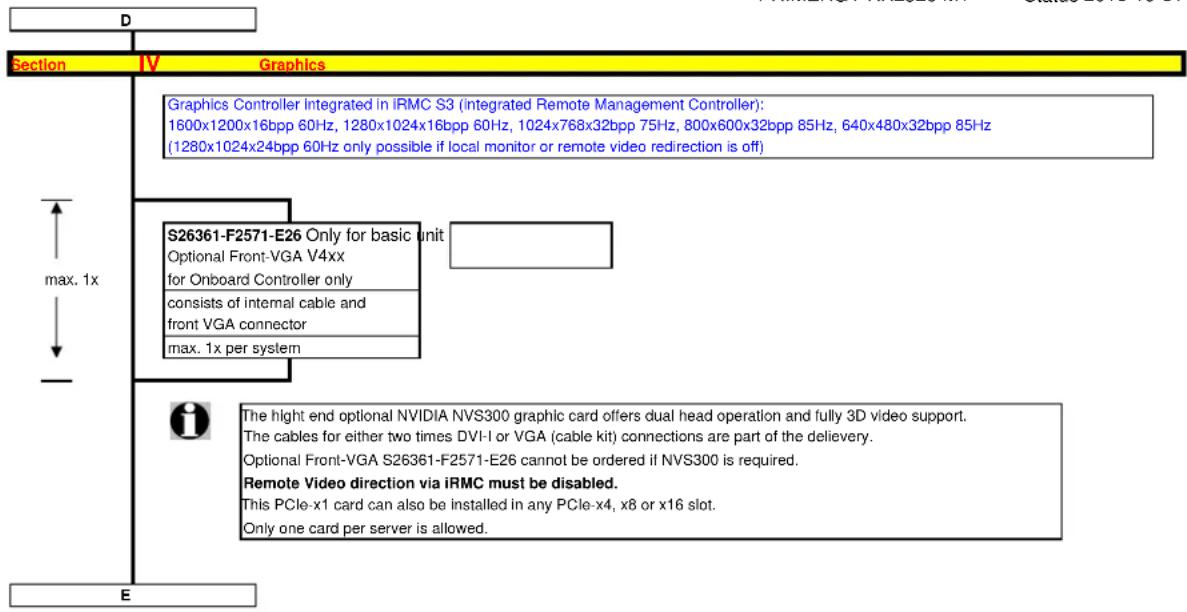
* Graphics Controller integrated in iRMC S4 (integrated Remote Management Controller):
1600x1200x16bpp 60Hz, 1280x1024x16bpp 60Hz, 1024x768x32bpp 75Hz, 800x600x32bpp 85Hz, 640x480x32bpp 85Hz
(1280x1024x24bpp 60Hz only possible if local monitor or remote video redirection is off)
Interfaces at the rear:
* 1x RS-232-C (serial, 9 pins) (usable for BMC or OS or shared)
* 1x VGA (15 pins)
* 4x USB 2.0 (UHCI) with 480MBit/s, no USB wakeup
Interfaces on the front:
* 2x USB 2.0 (UHCI) with 480MBit/s, no USB wakeup
* 1x VGA (15 pins) as an option
* 1x Service-LAN RJ45 as an option
Interfaces internal:
* 1x released internal USB Interfaces for backup devices,
* 1x USB 2.0 (UHCI) with 480MBit/s for dongle functionality (uSSD memory), no USB wakeup
* 1x SATA interface for DVD (only usable with 4x 2.5" HDD + DVD Option)
* 4x SATA/SAS interface for 4 SATA/SAS HD's or SAS Backup device
* 2x USB 2.0 ports for internal USB redirection connected to BMC
Software:
* ServerView Suite Software package incl. ServerStart, ServerBooks, Management Software and Updates
* Documentation engl. (multilingual on CD)
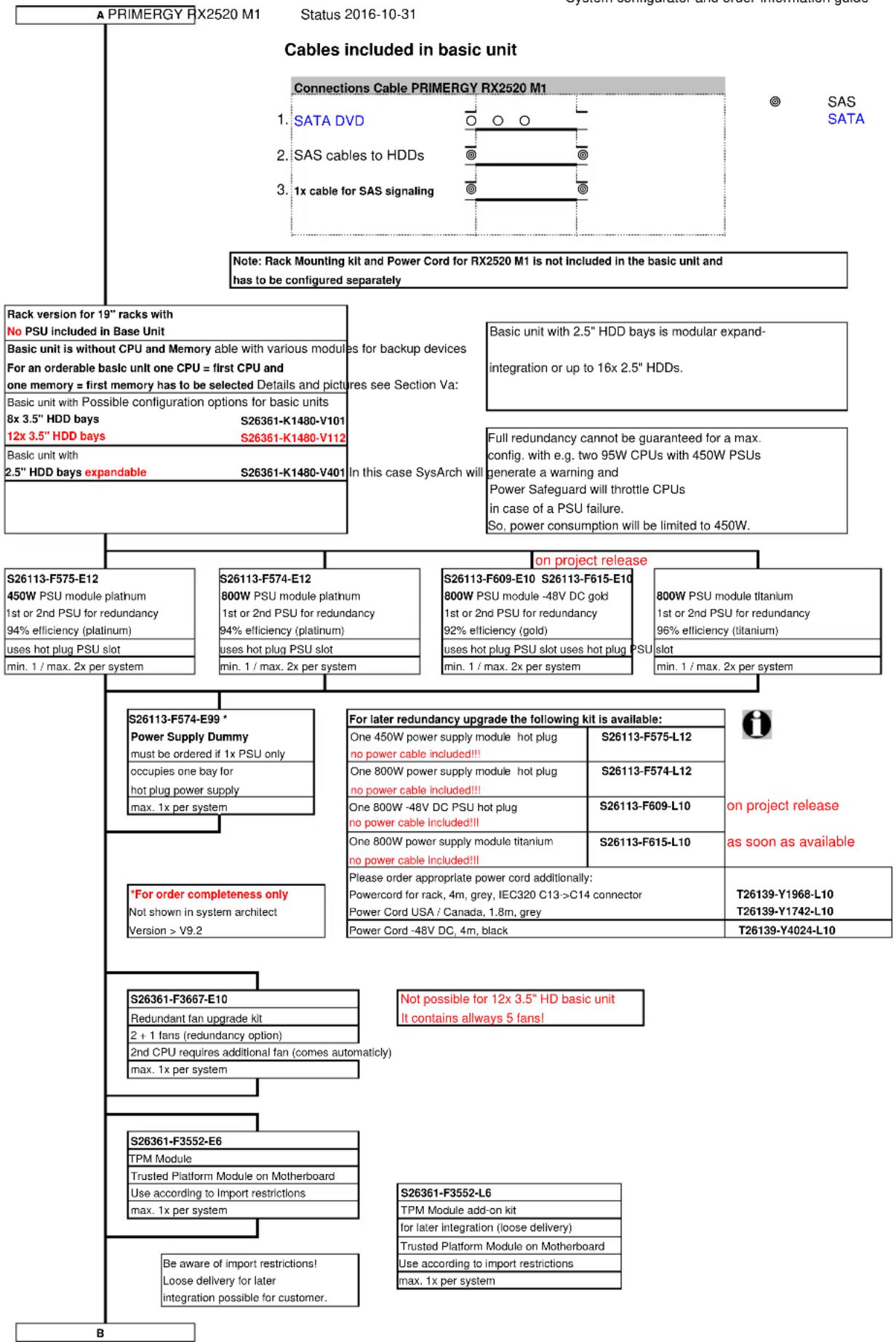
flowchart
graph TD
    A["PRIMERGY RX2520 M1"] --> B["Cables included in basic unit"]
    B --> C["Connections Cable PRIMERGY RX2520 M1"]
    C --> D["SATA DVD"]
    C --> E["SAS cables to HDDs"]
    C --> F["1x cable for SAS signaling"]
    D --> G["SAS SATA"]
    E --> H["Note: Rack Mounting kit and Power Cord for RX2520 M1 is not included in the basic unit and has to be configured separately"]
    F --> I["Rack version for 19" racks with No PSU included in Base Unit"]
    I --> J["Basic unit is without CPU and Memory able with various modules for an orderable basic unit one CPU = first CPU and one memory = first memory has to be selected Details and pictures"]
    J --> K["Basic unit with Possible configuration options for basic units 8x 3.5" HDD bays S26361-K1480-V101"]
    J --> L["12x 3.5" HDD bays S26361-K1480-V112"]
    J --> M["Basic unit with 2.5" HDD bays expandable S26361-K1480-V401"]
    M --> N["In this case SysArch will be limited to 450W."]
    O["S26113-F575-E12 450W PSU module platinum 1st or 2nd PSU for redundancy 94% efficiency (platinum) uses hot plug PSU slot min. 1 / max. 2x per system"] --> P["S26113-F574-E12 800W PSU module platinum 1st or 2nd PSU for redundancy 94% efficiency (platinum) uses hot plug PSU slot min. 1 / max. 2x per system"]
    O --> Q["S26113-F609-E10 S26113-F615-E10 800W PSU module -48V DC gold 1st or 2nd PSU for redundancy 92% efficiency (gold) uses hot plug PSU slot uses hot plug PSU slot min. 1 / max. 2x per system"]
    O --> R["S26113-F609-E10 S26113-F615-E10 800W PSU module titanium 1st or 2nd PSU for redundancy 96% efficiency (titanium) uses hot plug PSU slot uses hot plug PSU slot min. 1 / max. 2x per system"]
    O --> S["On project release"]
    T["S26113-F574-E99 * Power Supply Dummy must be ordered if 1x PSU only occupies one bay for hot plug power supply max. 1x per system"] --> U["For later redundancy upgrade the following kit is available: One 450W power supply module hot plug no power cable included!!!"]
    U --> V["S26113-F575-L12"]
    U --> W["S26113-F574-L12"]
    U --> X["S26113-F609-L10"]
    U --> Y["S26113-F615-L10"]
    Z["For order completeness only Not shown in system architect Version > V9.2"] --> AA["Please order appropriate power cord additionally: Powercord for rack, 4m, grey, IEC320 C13->C14 connector Power Cord USA / Canada, 1.8m, grey"]
    AA --> AB["T26139-Y1968-L10 T26139-Y1742-L10"]
    AA --> AC["T26139-Y4024-L10"]
    AD["S26361-F3667-E10 Redundant fan upgrade kit 2 + 1 fans (redundancy option) 2nd CPU requires additional fan (comes automatically) max. 1x per system"] --> AE["Not possible for 12x 3.5" HD basic unit It contains allways 5 fans!"]
    AF["S26361-F3552-E6 TPM Module Trusted Platform Module on Motherboard Use according to Import restrictions max. 1x per system"] --> AG["S26361-F3552-L6 TPM Module add-on kit for later integration (loose delivery) Trusted Platform Module on Motherboard Use according to import restrictions max. 1x per system"]
    AH["Be aware of import restrictions! Loose delivery for later integration possible for customer."] --> AI["B"]
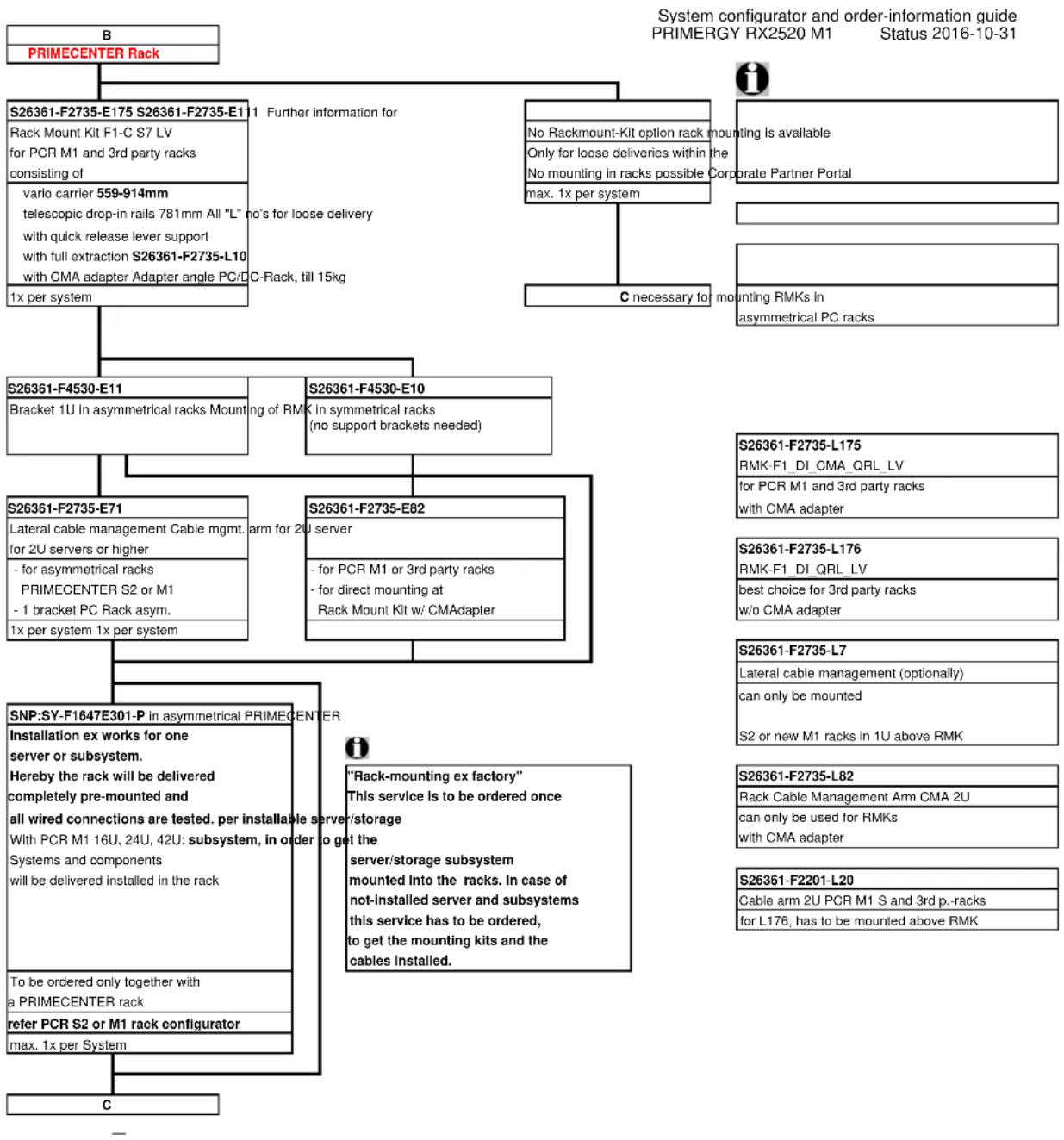
flowchart
graph TD
    A["B"] --> B["PRIMECENTER Rack"]
    B --> C["S26361-F2735-E175 S26361-F2735-E111 Further information for Rack Mount Kit F1-C S7 LV for PCR M1 and 3rd party racks consisting of varlo carrier 559-914mm telescopic drop-in rails 781mm All "L" no's for loose delivery with quick release lever support with full extraction S26361-F2735-L10 with CMA adapter Adapter angle PC/DC-Rack, till 15kg"]
    B --> D["S26361-F4530-E11 Bracket 1U in asymmetrical racks Mounting of RMK in symmetrical racks (no support brackets needed)"]
    B --> E["S26361-F4530-E10"]
    E --> F["S26361-F2735-E71 Lateral cable management Cable mgmt. arm for 2U server for 2U servers or higher - for asymmetrical racks PRIMECENTER S2 or M1 - 1 bracket PC Rack asym."]
    E --> G["S26361-F2735-E82"]
    G --> H["S26361-F2735-E82"]
    H --> I["S26361-F2735-L7 Lateral cable management (optionally) can only be mounted S2 or new M1 racks in 1U above RMK"]
    H --> J["S26361-F2735-L82 Rack Cable Management Arm CMA 2U can only be used for RMKs with CMA adapter"]
    J --> K["S26361-F2201-L20 Cable arm 2U PCR M1 S and 3rd p.-racks for L176, has to be mounted above RMK"]
    G --> L["SNP:SY-F1647E301-P in asymmetrical PRIMECENTER Installation ex works for one server or subsystem. Hereby the rack will be delivered completely pre-mounted and all wired connections are tested. per installable server/storage With PCR M1 16U, 24U, 42U: subsystem, in order to get the server/storage subsystem mounted into the racks. In case of not-installed server and subsystems this service has to be ordered, to get the mounting kits and the cables installed."]
    L --> M["To be ordered only together with a PRIMECENTER rack refer PCR S2 or M1 rack configurator max. 1x per System"]
    M --> N["C"]
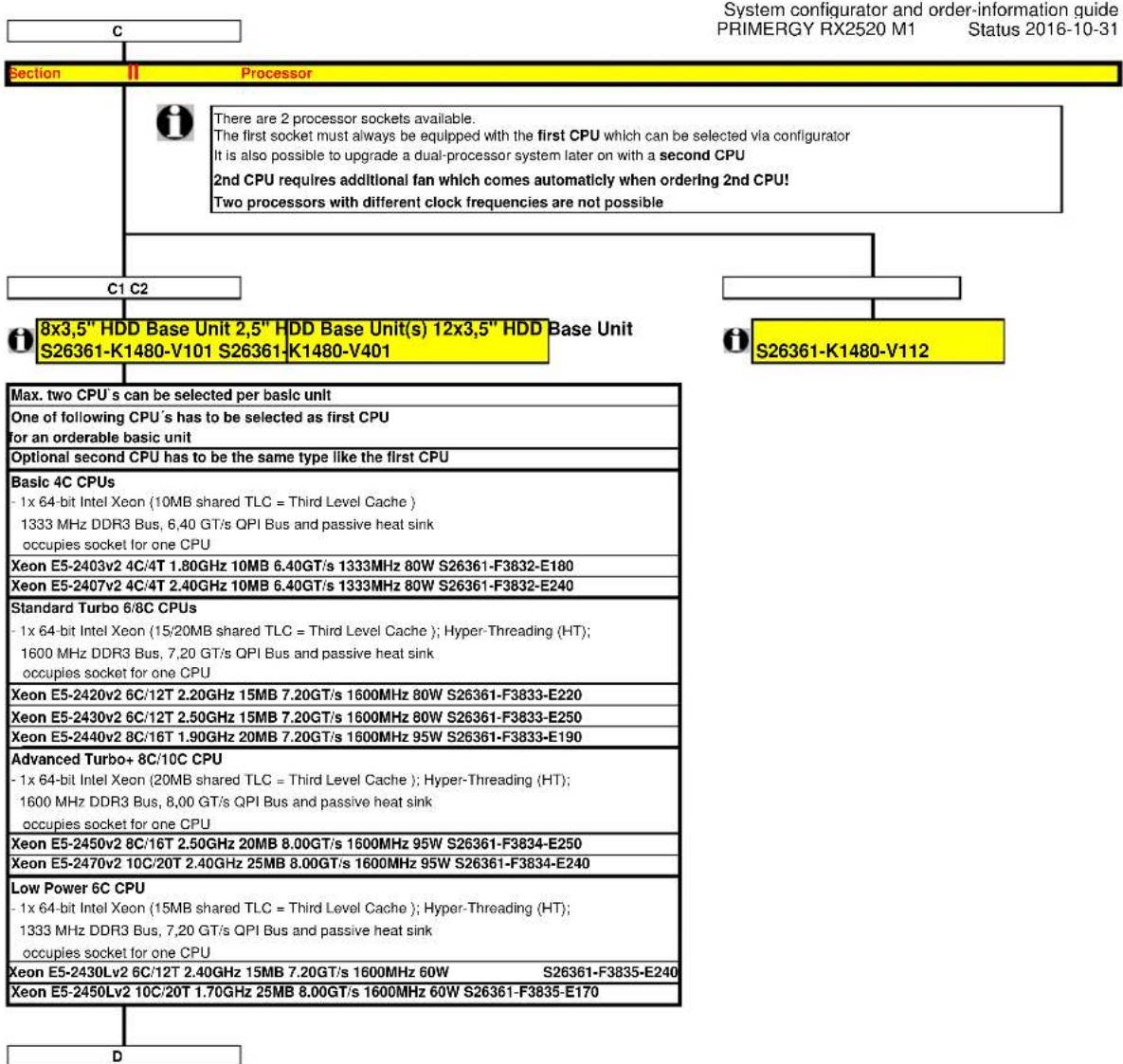
flowchart
graph TD
    A["Section"] --> B["Processor"]
    B --> C["C1 C2"]
    C --> D["8x3,5" HDD Base Unit 2,5" HDD Base Unit (s) 12x3,5" HDD Base Unit S26361-K1480-V101 S26361-K1480-V401"]
    B --> E["S26361-K1480-V112"]
    F["Max. two CPU's can be selected per basic unit"] --> G["One of following CPU's has to be selected as first CPU for an orderable basic unit"]
    F --> H["Optional second CPU has to be the same type like the first CPU"]
    I["Basic 4C CPUs"] --> J["1x 64-bit Intel Xeon (10MB shared TLC = Third Level Cache); Hyper-Threading (HT); 1333 MHz DDR3 Bus, 6,40 GT/s QPI Bus and passive heat sink occupies socket for one CPU"]
    I --> K["Xeon E5-2403v2 4C/4T 1.80GHz 10MB 6.40GT/s 1333MHz 80W S26361-F3832-E180"]
    I --> L["Xeon E5-2407v2 4C/4T 2.40GHz 10MB 6.40GT/s 1333MHz 80W S26361-F3832-E240"]
    M["Standard Turbo 6/8C CPUs"] --> N["1x 64-bit Intel Xeon (15/20MB shared TLC = Third Level Cache); Hyper-Threading (HT); 1600 MHz DDR3 Bus, 7,20 GT/s QPI Bus and passive heat sink occupies socket for one CPU"]
    M --> O["Xeon E5-2420v2 6C/12T 2.20GHz 15MB 7.20GT/s 1600MHz 80W S26361-F3833-E220"]
    M --> P["Xeon E5-2430v2 6C/12T 2.50GHz 15MB 7.20GT/s 1600MHz 80W S26361-F3833-E250"]
    M --> Q["Xeon E5-2440v2 8C/16T 1.90GHz 20MB 7.20GT/s 1600MHz 95W S26361-F3833-E190"]
    R["Advanced Turbo+ 8C/10C CPU"] --> S["1x 64-bit Intel Xeon (20MB shared TLC = Third Level Cache); Hyper-Threading (HT); 1600 MHz DDR3 Bus, 8,00 GT/s QPI Bus and passive heat sink occupies socket for one CPU"]
    R --> T["Xeon E5-2450v2 8C/16T 2.50GHz 20MB 8.00GT/s 1600MHz 95W S26361-F3834-E250"]
    R --> U["Xeon E5-2470v2 10C/20T 2.40GHz 25MB 8.00GT/s 1600MHz 95W S26361-F3834-E240"]
    V["Low Power 6C CPU"] --> W["1x 64-bit Intel Xeon (15MB shared TLC = Third Level Cache); Hyper-Threading (HT); 1333 MHz DDR3 Bus, 7,20 GT/s QPI Bus and passive heat sink occupies socket for one CPU"]
    V --> X["Xeon E5-2430Lv2 6C/12T 2.40GHz 15MB 7.20GT/s 1600MHz 60W S26361-F3835-E240"]
    V --> Y["Xeon E5-2450Lv2 10C/20T 1.70GHz 25MB 8.00GT/s 1600MHz 60W S26361-F3835-E170"]
    Z["D"] --> AA["End"]
| C2 | |
| 12x3,5" HDD Base UnitS26361-K1480-V112 | |
| as soon as available | |
| Max. two CPU's can be selected per basic unit | |
| One of following CPU's has to be selected as first CPUfor an orderable basic unit | |
| Optional second CPU has to be the same type like the first CPU | |
| Basic 4C CPUs- 1x 64-bit Intel Xeon (10MB shared TLC = Third Level Cache )1333 MHz DDR3 Bus, 6,40 GT/s QPI Bus and passive heat sinkoccupies socket for one CPU | |
| Xeon E5-2403v2 4C/4T 1.80GHz 10MB 6.40GT/s 1333MHz 80W S26361-F3832-E181 | |
| Xeon E5-2407v2 4C/4T 2.40GHz 10MB 6.40GT/s 1333MHz 80W S26361-F3832-E241 | |
| Standard Turbo 6/8C CPUs- 1x 64-bit Intel Xeon (15/20MB shared TLC = Third Level Cache ); Hyper-Threading (HT);1600 MHz DDR3 Bus, 7,20 GT/s QPI Bus and passive heat sinkoccupies socket for one CPU | |
| Xeon E5-2420v2 6C/12T 2.20GHz 15MB 7.20GT/s 1600MHz 80W S26361-F3833-E221 | |
| Xeon E5-2430v2 6C/12T 2.50GHz 15MB 7.20GT/s 1600MHz 80W S26361-F3833-E251 | |
| Xeon E5-2440v2 8C/16T 1.90GHz 20MB 7.20GT/s 1600MHz 95W S26361-F3833-E191 | |
| Advanced Turbo+ 8C/10C CPU- 1x 64-bit Intel Xeon (20MB shared TLC = Third Level Cache ); Hyper-Threading (HT);1600 MHz DDR3 Bus, 8,00 GT/s QPI Bus and passive heat sinkoccupies socket for one CPU | |
| Xeon E5-2450v2 8C/16T 2.50GHz 20MB 8.00GT/s 1600MHz 95W S26361-F3834-E251 | |
| Xeon E5-2470v2 10C/20T 2.40GHz 25MB 8.00GT/s 1600MHz 95W S26361-F3834-E241 | |
| Low Power 6C CPU- 1x 64-bit Intel Xeon (15MB shared TLC = Third Level Cache ); Hyper-Threading (HT);1333 MHz DDR3 Bus, 7,20 GT/s QPI Bus and passive heat sinkoccupies socket for one CPU | |
| Xeon E5-2430Lv2 6C/12T 2.40GHz 15MB 7.20GT/s 1600MHz 60W S26361-F3835-E241 | |
| Xeon E5-2450Lv2 10C/20T 1.70GHz 25MB 8.00GT/s 1600MHz 60W S26361-F3835-E171 |
System configurator and order-information guide
PRIMERGY RX2520 M1 Status 2016-10-31
| E | PRIMERGY RX2520 M1 Status 2016-10-31 | |
| Section III Memory | ||
| i | - There are 6 memory slots per CPU for max.96GB RDIMM (6x 16GB 2R)currently up to 192GB for two CPUs ( 96GB per CPU ), using RDIMM- The memory area is divided into 3 channels per CPU with 2 slots per channel- Slot 1 of each channel belongs to memory bank 1, the slot 2 belongs to memory bank 2. | |
| Memory can be operated at 1.5V or 1.35V, even if the modules are of low voltage type.Memory operating voltage can be set within BIOS (1.5V is default setting for max. speed).In a 2 DIMMs per channel configuration the max memory speed is 1600 MHz (depending on CPU)@1.35V the max memory speed is 1333MHz maxSDDC (Chipkill) is supported for registered x4 organized memory modules only | ||
| 1.) In the "Independent Channel Mode" is following configuration possibleChannels can be populated in any order in Independent Channel Mode. All four channels may be populated in any order and have no matching requirements. All channels must run at the same interface frequency but individual channels may run at different DIMM timings (RAS latency, CAS latency, and so forth) | ||
| 2.) "Performance Mode" configuration- In this configuration, the memory module population ex factory is spread across all channels.The BIOS is set to the max. performance for memory.Minimum configuration is: 3x identical modules | ||
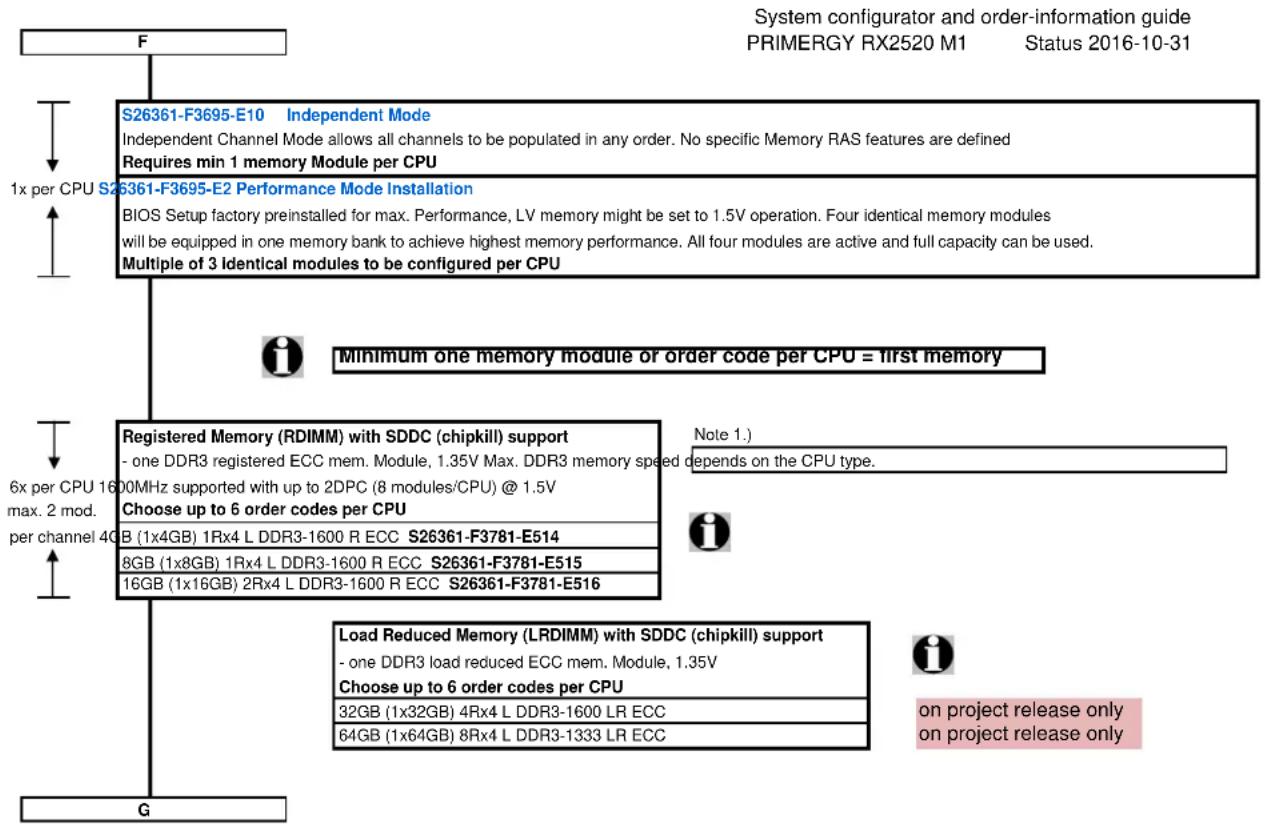
flowchart
graph TD
    A["F"] --> B["S26361-F3695-E10 Independent Mode\nIndependent Channel Mode allows all channels to be populated in any order. No specific Memory RAS features are defined\nRequires min 1 memory Module per CPU"]
    B --> C["S26361-F3695-E2 Performance Mode Installation\nBIOS Setup factory preinstalled for max. Performance, LV memory might be set to 1.5V operation. Four identical memory modules will be equipped in one memory bank to achieve highest memory performance. All four modules are active and full capacity can be used.\nMultiple of 3 identical modules to be configured per CPU"]
    C --> D["Minimum one memory module or order code per CPU = first memory"]
    D --> E["Registered Memory (RDIMM) with SDDC (chipkill) support\n- one DDR3 registered ECC mem. Module, 1.35V Max. DDR3 memory speed depends on the CPU type.\nChoose up to 6 order codes per CPU\nB (1x4GB) 1Rx4 L DDR3-1600 R ECC S26361-F3781-E514\n8GB (1x8GB) 1Rx4 L DDR3-1600 R ECC S26361-F3781-E515\n16GB (1x16GB) 2Rx4 L DDR3-1600 R ECC S26361-F3781-E516"]
    E --> F["Load Reduced Memory (LRDIMM) with SDDC (chipkill) support\n- one DDR3 load reduced ECC mem. Module, 1.35V\nChoose up to 6 order codes per CPU\n32GB (1x32GB) 4Rx4 L DDR3-1600 LR ECC\n64GB (1x64GB) 8Rx4 L DDR3-1333 LR ECC"]
    F --> G["G"]
    style A fill:#f9f,stroke:#333
    style G fill:#ccf,stroke:#333
Memory Configuration PRIMERGY RX2520 M1
Each CPU offers 6 Slots for DDR3 Memory Modules organised in 2 Banks and 3 Channels.
If you need more than 6 Slots you have to configure the 2nd CPU.
Depending on the amount of memory configured you can decide between 2 basic modes of operation (see explanation below).
| Mode Configuration RDIMM Application | |||
| x4 | |||
| SDDC (chipkill) support any yes detect multi-bit errors | |||
| Independent Channel 1, 2 for 3 Modules per Bank yes Mode use UDIMM modules for lowest cost | offers max. flexibility, upgradeability, capacity | ||
| Performance Mode 3 identical Modules / Bank yes offers maximum performance and capacity | |||
*) For the delivery ex works the system will be prepared with dedicated BIOS setting.
| Capacity Configuration H | DIMM Notes | ||
| Min. Memory per CPU | 1 Module / CPU | 4GB | with one CPU |
| Max. Memory per CPU | 6 Modules / CPU | 96GB | with one CPU |
| Max. Memory per System | 12 Modules / System | 192GB | if second CPU is configured |
Memory-Speed:
Max. DDR3 memory speed depends on the speed of the CPU
Real maximum memory-bus speed depending on CPU type and voltage setting (BIOS; default is 1.5V)
| Mem. Speed provided by CPU | RDIMM 1600MHz | |||
| Voltage setting (BIOS) | 1.5V | 1.35V | ||
| DIMM per Channel (DPC) | 1 | 2 | 1 | 2 |
| CPU with 1600MHz DDR3 Bus | 1600 | 1600 | 1333 | 1333 |
| CPU with 1333MHz DDR3 Bus | 1333 | 1333 | 1333 | 1333 |
Configuration hints:
- The memory sockets on the systemboard offer a color coding:
Bank I black sockets
Bank II blue sockets
- A so called Bank consists of 1 memory module on every Channel available on one CPU (examples see below)
Bank I on CPU 1/2 up to 3 memory modules connected to Channel A - F on the 1st/2nd CPU
Bank II on CPU 1/2 up to 3 memory modules connected to Channel A - F on the 1st/2nd CPU
- See below and next page for a detailed descriptions of the memory configuration supported.
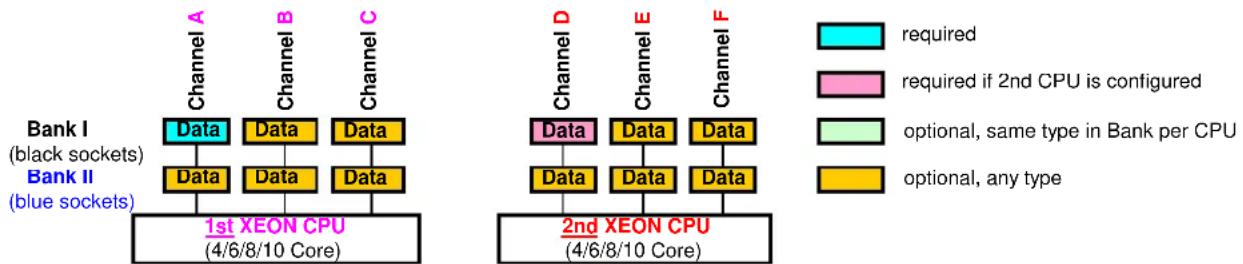
1. Independent Channel Mode
flowchart
graph TD
    subgraph_Bank_I["Bank I (black sockets)"]
        A1["Data"] --> B1["Data"]
        B1 --> C1["Data"]
        C1 --> D1["Data"]
        D1 --> E1["1st XEON CPU (4/6/8/10 Core)"]
    end
    subgraph_Bank_II["Bank II (blue sockets)"]
        A2["Data"] --> B2["Data"]
        B2 --> C2["Data"]
        C2 --> D2["Data"]
        D2 --> E2["Data"]
    end
    subgraph_2nd_XEON_CPU["2nd XEON CPU (4/6/8/10 Core)"]
        D3["Data"] --> E3["Data"]
        E3 --> F3["Data"]
        F3 --> G3["Data"]
        G3 --> H3["Data"]
        H3 --> I3["Data"]
    end
    note1["required"]
    note2["required if 2nd CPU is configured"]
    note3["optional, same type in Bank per CPU"]
    note4["optional, any type"]
    note5["Channel D"]
    note6["Channel E"]
    note7["Channel F"]
Independent Channel Mode allows all channels to be populated in any order
Can run with differently rated DIMMs and use the settings of the slowest DIMM installed in the system
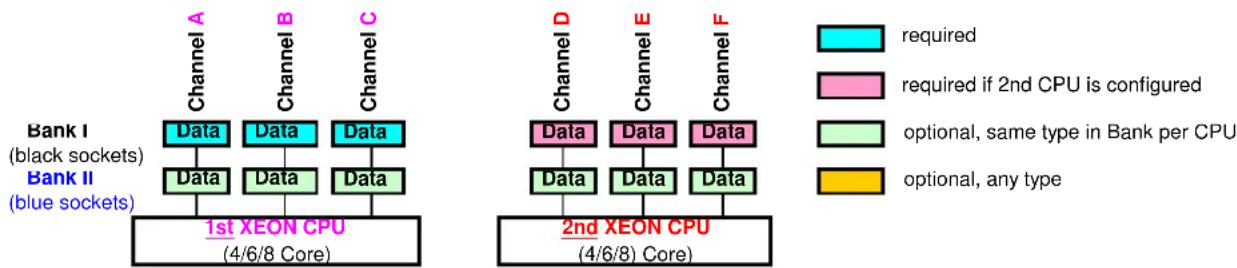
2. Performance Channel Mode
flowchart
```mermaid
graph TD
    subgraph "Bank I (black sockets)"
        A["Data"] --> B["Data"]
        B --> C["Data"]
        D["Data"] --> E["Data"]
        E --> F["Data"]
        G["1st XEON CPU (4/6/8 Core)"]
    end
    subgraph "Bank II (blue sockets)"
        H["Data"] --> I["Data"]
        I --> J["Data"]
        K["Data"] --> L["Data"]
        L --> M["Data"]
    end
    subgraph "2nd XEON CPU (4/6/8 Core)"
        N["Data"] --> O["Data"]
        O --> P["Data"]
        Q["Data"] --> R["Data"]
        S["Data"] --> T["Data"]
        U["Data"] --> V["Data"]
        W["Data"] --> X["Data"]
    end
    Note: Black and Blue lines represent black and blue socket configurations respectively. Legend indicates four conditions: required (cyan), required if 2nd CPU is configured (pink), optional, same type in Bank per CPU (light green), optional, any type (yellow). The chart visually maps these connections to the core layers of the two XEON CPUs. <|caption_end|>
    Note: The diagram shows a comparison of the core layers based on their respective CPU types and their operational types.
Performance Channel Mode requires identical modules on all channels of each Bank per CPU.
If this mode is used, a multiple of 3 identical modules has to be ordered.
Section
Va
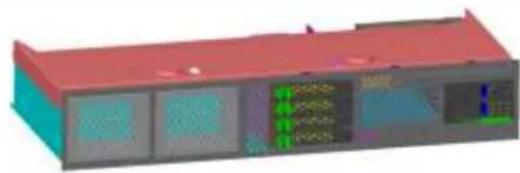
Possible configuration options for basic units
8 HDDs for -V101 plus ODD
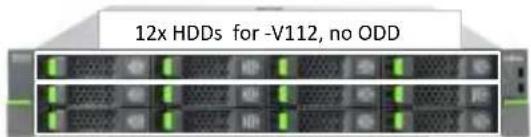
Basic unit S26361-K1480-V101 with 8x 3.5" HDDs
Basic unit S26361-K1480-V112 with 12x 3.5" HDDs
Available Upgrade kit for -V101:
Upgrade kit to 12x 3.5" HDD S26361-F1480-L119
natural_image
3D architectural model of a building with red roof and blue walls, showing internal panels and window displays (no text or symbols visible)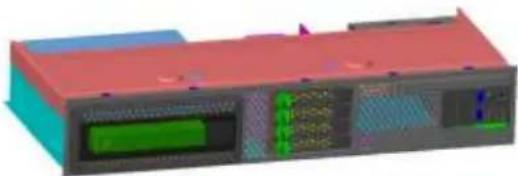
natural_image
3D rendering of a modular electronic device with green and blue components (no visible text or symbols)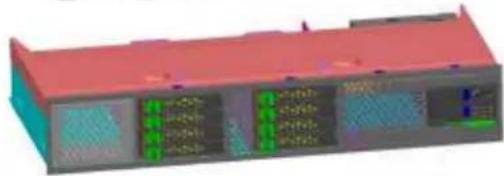
natural_image
3D rendering of a layered electronic or mechanical component with red top and green/red internal channels (no visible text or symbols)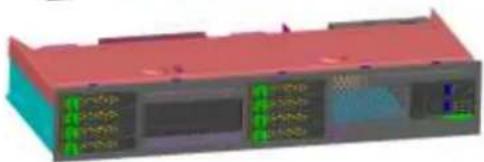
natural_image
3D rendering of a red and blue electronic device casing with internal components (no visible text or symbols)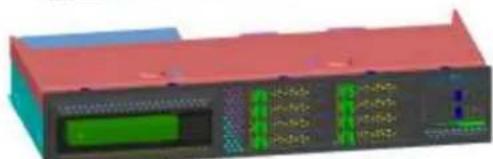
natural_image
3D rendering of a red and blue electronic device with a green display and control panel (no visible text or symbols)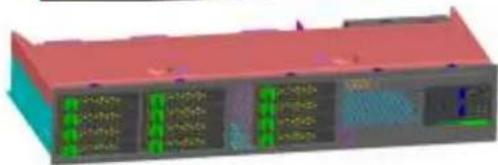
natural_image
3D rendering of a layered electronic or mechanical device with multiple ports and connectors (no visible text or symbols)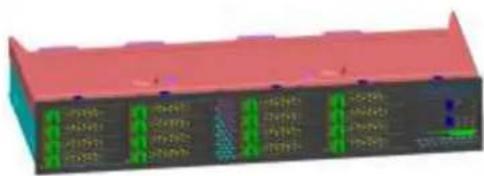
natural_image
3D rendered electronic component with green indicator lights and a red base (no visible text or symbols)| Basic unit S26361-K1480-V401 with expandableConfig 2: 4x 2.5" HDD S26361-F1373-E420 |
| Available Upgrade kits for this configuration option:Upgrade kit to 8x 2.5" HDD S26361-F1373-L424Upgrade kit to 12x 2.5" HDD S26361-F1373-L427Upgrade kit to 4x 2.5" HDD + LTO S26361-F1373-L423 |
| Basic unit S26361-K1480-V401 with expandableConfig 3: 4x 2.5" HDD + LTO S26361-F1373-E430 |
| Available Upgrade kits for this configuration option:Upgrade kit to 8x 2.5" HDD S26361-F1373-L436 |
| Basic unit S26361-K1480-V401 with expandableConfig. 4: 8x 2,5" HDD bays S26361-F1480-E440 |
| Available Upgrade kits for this fixed configuration:Upgrade kit to 12x 2.5" HDD S26361-F1373-L247Upgrade kit to 16x 2.5" HDD S26361-F1373-L248 |
| Basic unit S26361-K1480-V401 withConfig 5: 8x 2.5" HDD + 3.5" drive S26361-F1373-E450 |
| No Upgrade kit available! |
| Basic unit S26361-K1480-V401 withConfig 6: 8x 2.5" HDD + LTO S26361-F1373-E460no ODD and LSD bay available! |
| No Upgrade kit available! |
| Basic unit S26361-K1480-V401 with expandableConfig 7: 12x 2,5" HDD bays S26361-F1480-E470 |
| Available Upgrade kits for this configurations:Upgrade kit to 16x 2.5" HDD S26361-F1373-L378 |
| Basic unit S26361-K1480-V401 withConfig 8: 16x 2.5" HDD S26361-F1373-E480no ODD and LSD bay available! |
| No Upgrade kit available! |
| Includes all necessary bozels, cages, backplanes and cables |
*) these are the only HDD/SSD configuration opportunity without needed RAID controller
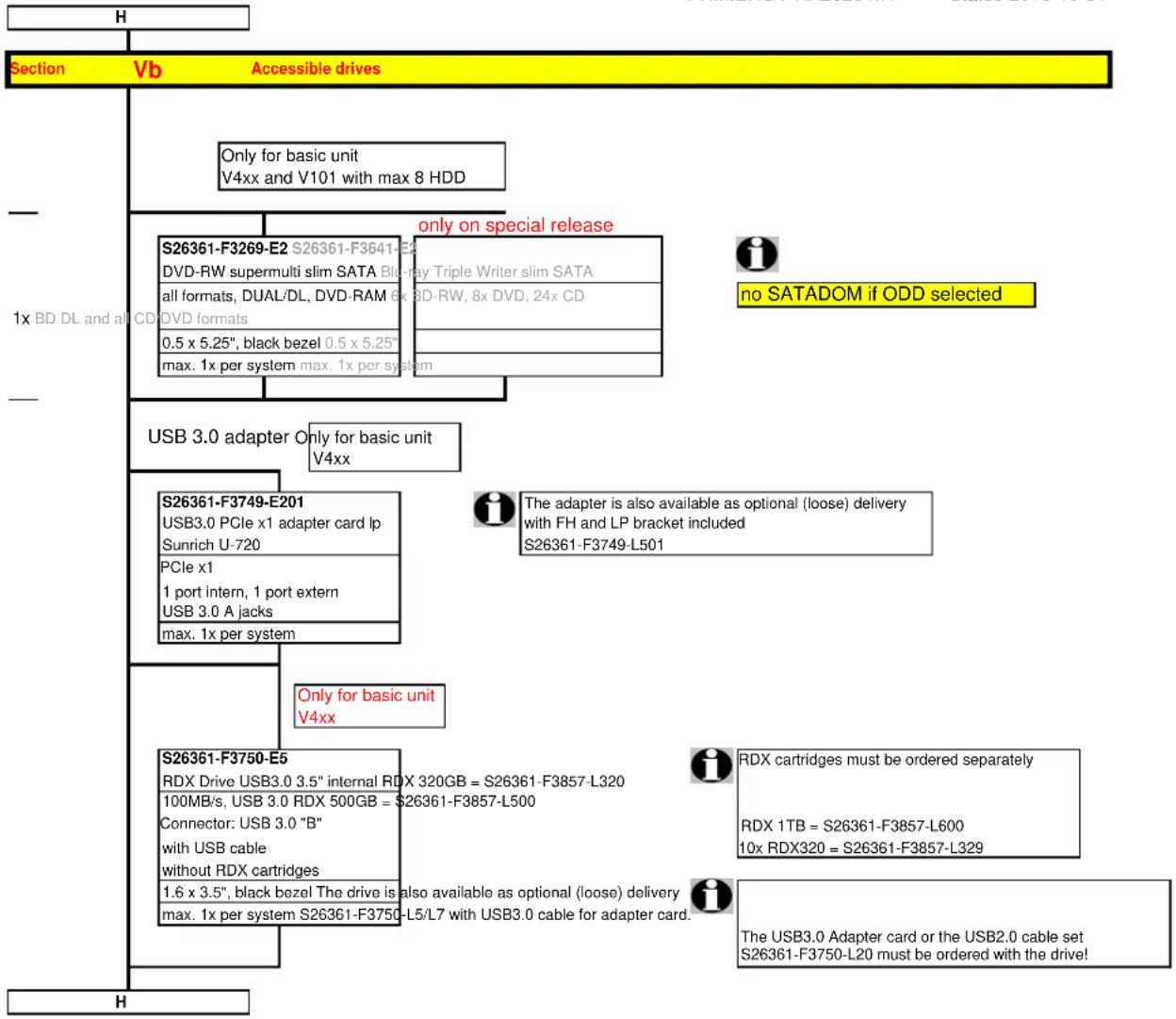
flowchart
graph TD
    A["H"] --> B["Section Vb Accessible drives"]
    B --> C["Only for basic unit V4xx and V101 with max 8 HDD"]
    B --> D["only on special release"]
    D --> E["S26361-F3269-E2 S26361-F3641-E2 DVD-RW supermulti slim SATA Blue-ray Triple Writer slim SATA all formats, DUAL/DL, DVD-RAM 6x 8D-RW, 8x DVD, 24x CD DVD formats 0.5 x 5.25", black bezel 0.5 x 5.25" max. 1x per system max. 1x per system"]
    D --> F["no SATADOM if ODD selected"]
    B --> G["USB 3.0 adapter Only for basic unit V4xx"]
    G --> H["S26361-F3749-E201 USB3.0 PCIe x1 adapter card lp Sunrich U-720 PCIe x1 1 port intern, 1 port extern USB 3.0 A jacks max. 1x per system"]
    G --> I["The adapter is also available as optional (loose) delivery with FH and LP bracket included S26361-F3749-L501"]
    H --> J["Only for basic unit V4xx"]
    H --> K["S26361-F3750-E5 RDX Drive USB3.0 3.5" internal RDX 320GB = S26361-F3857-L320 100MB/s, USB 3.0 RDX 500GB = S26361-F3857-L500 Connector: USB 3.0 "B" with USB cable without RDX cartridges 1.6 x 3.5", black bezel The drive is also available as optional (loose) delivery max. 1x per system S26361-F3750-L5/L7 with USB3.0 cable for adapter card."]
    K --> L["RDX cartridges must be ordered separately RDX 1TB = S26361-F3857-L600 10x RDX320 = S26361-F3857-L329"]
    K --> M["The USB3.0 Adapter card or the USB2.0 cable set S26361-F3750-L20 must be ordered with the drive!"]
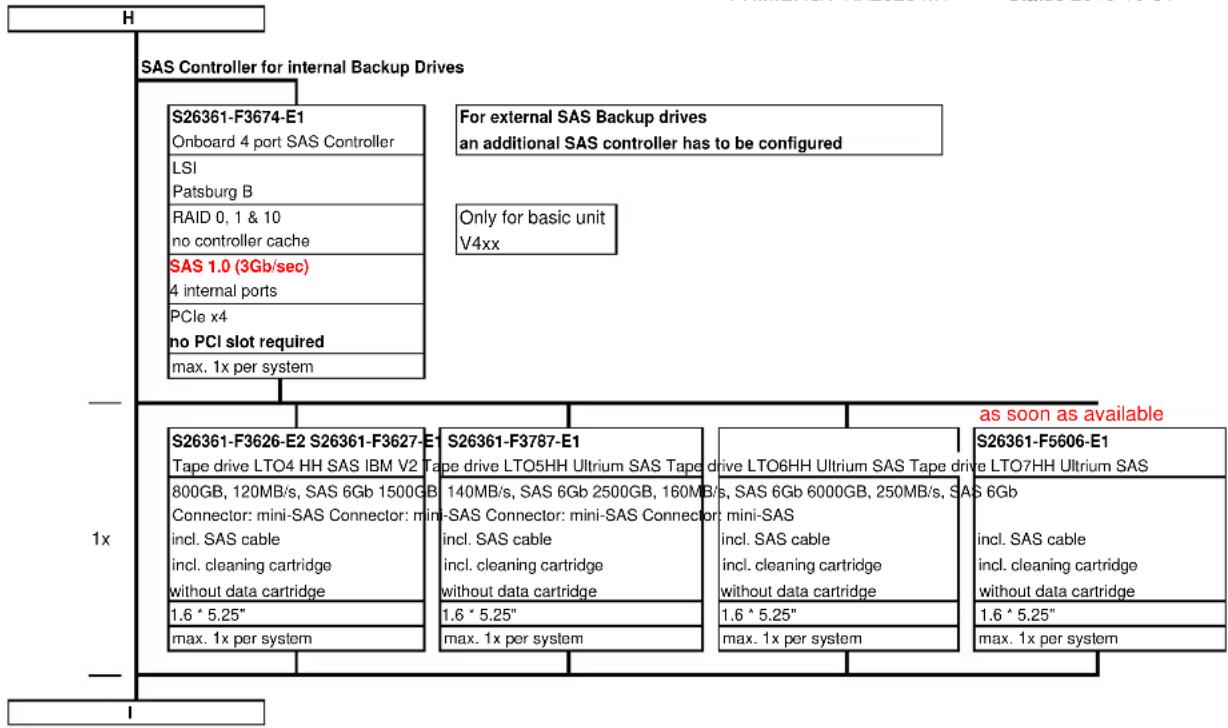
flowchart
graph TD
    A["H"] --> B["SAS Controller for internal Backup Drives"]
    B --> C["S26361-F3674-E1\nOnboard 4 port SAS Controller"]
    B --> D["LSI\nPatsburg B"]
    B --> E["RAID 0, 1 & 10\nno controller cache"]
    B --> F["SAS 1.0 (3Gb/sec)\n4 internal ports"]
    B --> G["PCIe x4\nno PCI slot required"]
    B --> H["max. 1x per system"]

    I["1x"] --> J["S26361-F3626-E2 S26361-F3627-E1\nTape drive LTO4 HH SAS IBM V2 Tape drive LTO5HH Ultrium SAS Tape drive LTO6HH Ultrium SAS Tape drive LTO7HH Ultrium SAS\n800GB, 120MB/s, SAS 6Gb 1500GB\nConnector: mini-SAS Connector: mini-SAS Connector: mini-SAS Connector: mini-SAS Cable\nincl. cleaning cartridge\nwithout data cartridge\n1.6 * 5.25"\nmax. 1x per system"]

    K["S26361-F3787-E1\nSape drive LTO5HH Ultrium SAS Tape drive LTO6HH Ultrium SAS Tape drive LTO7HH Ultrium SAS\n140MB/s, SAS 6Gb 2500GB, 160MB/s, SAS 6Gb 6000GB, 250MB/s, SAS 6Gb\nincl. cleaning cartridge\nwithout data cartridge\n1.6 * 5.25"\nmax. 1x per system"]

    L["S26361-F5606-E1\nSape drive LTO7HH Ultrium SAS\nincl. SAS cable\nincl. cleaning cartridge\nwithout data cartridge\n1.6 * 5.25"\nmax. 1x per system"]

    M["as soon as available"]

| Section VI Hard disks drives | |
| or 12x with S expander for basic unit V1xx | Modular Raid controller is connected to internal HDDs For basic unit V101 up to 12 SAS 3.5" hard disks can be configured also in mixed configuration. The option "Tape drive" is not possible for 3.5" Version (V1xx) Mixed configurations with Eco SATA drives and SAS drives are not allowed 3.5" SAS drives and 3.5" BC SATA drives can be mixed, but not used in one logical RAID volume Hard Disk Sector Format 512n HDD or HDD without sector size information: 512 byte sectors on the drive media. 512e (e=emulation) HDD: 4K physical sectors on the drive media with 512 byte logical configuration. 512e drives are not supported with the current versions of vSphere and VSAN |
| SATA Disk Drive 3.5" | |
| HDD SATA 6Gb/s 3.5" with hot plug/hot replace tray 500GB 7200rpm,<9,0ms, 64MB Cache S26361-F3815-E500 1TB 7200rpm,<9,0ms, 64MB Cache S26361-F3815-E100 2TB 7200rpm,<9,0ms, 64MB Cache S26361-F3815-E200 3TB 7200rpm,<9,0ms, 64MB Cache S26361-F3815-E300 4TB 7200rpm,<9,0ms, 64MB Cache S26361-F3815-E400 6TB 7200rpm,<9,0ms, 128MB Cache, 512e S26361-F3904-E600 max. 8x or 12x per System | |
| SAS Disk Drive 3.5" | |
| HDD SAS 6Gb/s 3.5" with hot plug/hot replace tray 300GB 15000rpm,<4,0ms, 16MB Cache S26361-F3819-E530 450GB 15000rpm,<4,0ms, 16MB Cache S26361-F3819-E545 600GB 15000rpm,<4,0ms, 16MB Cache S26361-F3819-E560 1TB 7200rpm,<9,0ms, 32MB Cache S26361-F3820-E100 2TB 7200rpm,<9,0ms, 32MB Cache S26361-F3820-E200 3TB 7200rpm,<9,0ms, 32MB Cache S26361-F3820-E300 4TB 7200rpm,<9,0ms, 32MB Cache S26361-F3820-E400 SAS 6Gb/s 2.5" HDD with 3.5" hot plug/hot replace tray 300GB 15000rpm,<3ms, 64MB Cache, S26361-F5521-E530 450GB 15000rpm,<3ms, 64MB Cache S26361-F5521-E545 600GB 15000rpm,<3ms, 64MB Cache S26361-F5521-E560 SAS 12Gb/s 2.5" HDD with 3.5" hot plug/hot replace tray 300GB 10000rpm 128MB Cache, 512n S26361-F5568-E130 600GB 10000rpm 128MB Cache, 512n S26361-F5568-E160 1.2TB 10000rpm 128MB Cache, 512n S26361-F5568-E112 1.8TB 10000rpm 128MB Cache, 512e S26361-F5569-E118 max. 8x or 12x per System | |
| SATA SSDs | |
| SSD SATA 6Gb/s, 2.5" SSD with 3.5" hot plug/hot replace tray (H-P) 100GB, Enterprise (EP), Mainstream Endurance (ME)* S26361-F5289-E100 200GB, Enterprise (EP), Mainstream Endurance (ME)* S26361-F5289-E200 400GB, Enterprise (EP), Mainstream Endurance (ME)* S26361-F5289-E400 800GB, Enterprise (EP), Mainstream Endurance (ME)* S26361-F5289-E800 max. 8x or 12x per System | |
| J | |
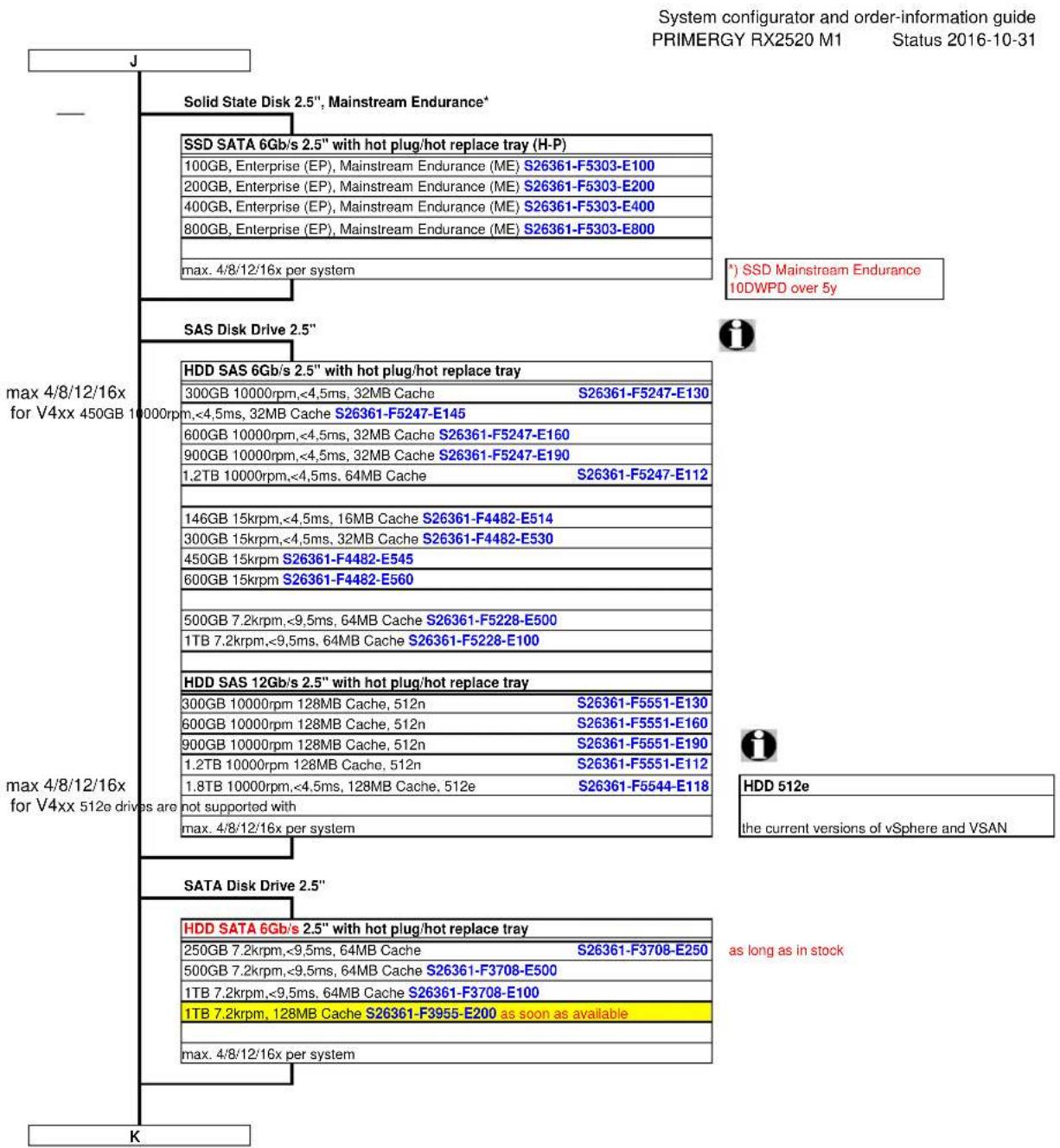
bar_stacked
| Category | System Name | Value | |---|---|---| | Solid State Disk 2.5", Mainstream Endurance* | SSD SATA 6Gb/s 2.5" with hot plug/hot replace tray (H-P) | | | Solid State Disk 2.5", Mainstream Endurance* | 100GB, Enterprise (EP), Mainstream Endurance (ME) S26361-F5303-E100 | | | Solid State Disk 2.5", Mainstream Endurance* | 200GB, Enterprise (EP), Mainstream Endurance (ME) S26361-F5303-E200 | | | Solid State Disk 2.5", Mainstream Endurance* | 400GB, Enterprise (EP), Mainstream Endurance (ME) S26361-F5303-E400 | | | Solid State Disk 2.5", Mainstream Endurance* | 800GB, Enterprise (EP), Mainstream Endurance (ME) S26361-F5303-E800 | | | Solid State Disk 2.5", Mainstream Endurance* | max. 4/8/12/16x per system | | | SAS Disk Drive 2.5" | HDD SAS 6Gb/s 2.5" with hot plug/hot replace tray | | | SAS Disk Drive 2.5" | 300GB 10000rpm,<4.5ms, 32MB Cache S26361-F5247-E130 | | | SAS Disk Drive 2.5" | 600GB 10000rpm,<4.5ms, 32MB Cache S26361-F5247-E160 | | | SAS Disk Drive 2.5" | 900GB 10000rpm,<4.5ms, 32MB Cache S26361-F5247-E190 | | | SAS Disk Drive 2.5" | 1.2TB 10000rpm,<4.5ms, 64MB Cache S26361-F5247-E112 | | | SAS Disk Drive 2.5" | 146GB 15krpm,<4.5ms, 16MB Cache S26361-F4482-E514 | | | SAS Disk Drive 2.5" | 300GB 15krpm,<4.5ms, 32MB Cache S26361-F4482-E530 | | | SAS Disk Drive 2.5" | 450GB 15krpm S26361-F4482-E545 | | | SAS Disk Drive 2.5" | 600GB 15krpm S26361-F4482-E560 | | | SAS Disk Drive 2.5" | 500GB 7.2krpm,<9.5ms, 64MB Cache S26361-F5228-E500 | | | SAS Disk Drive 2.5" | 1TB 7.2krpm,<9.5ms, 64MB Cache S26361-F5228-E100 | | | SAS Disk Drive 2.5" | HDD SAS 12Gb/s 2.5" with hot plug/hot replace tray | | | SAS Disk Drive 2.5" | 300GB 10000rpm 128MB Cache, 512n S26361-F5551-E130 | | | SAS Disk Drive 2.5" | 600GB 10000rpm 128MB Cache, 512n S26361-F5551-E160 | | | SAS Disk Drive 2.5" | 900GB 10000rpm 128MB Cache, 512n S26361-F5551-E190 | | | SAS Disk Drive 2.5" | 1.2TB 10000rpm 128MB Cache, 512n S26361-F5551-E112 | | | SAS Disk Drive 2.5" | 1.8TB 10000rpm,<4.5ms, 128MB Cache, 512e S26361-F5544-E118 | | | SAS Disk Drive 2.5" | not supported with HDD SAS 6Gb/s 2.5" with hot plug/hot replace tray | | | SAS Disk Drive 2.5" | max. 4/8/12/16x per system HDD SATA 6Gb/s 2.5" with hot plug/hot replace tray | | | SAS Disk Drive 2.5" | HDD SATA 6Gb/s 2.5" with hot plug/hot replace tray | | | SAS Disk Drive 2.5" | HDD SATA 6Gb/s 2.5" with hot plug/hot replace tray | | | SAS Disk Drive 2.5" | HDD SATA 6Gb/s 2.5" with hot plug/hot replace tray | | | SAS Disk Drive 2.5" | HDD SATA 6Gb/s 2.8" with hot plug/hot replace tray | | | SAS Disk Drive 2.5" | HDD SATA 6Gb/s 2.8" with hot plug/hot replace tray | | | SAS Disk Drive 2.5" | HDD SATA 6Gb/s 2.8" with hot plug/hot replace tray | | | SAS Disk Drive 2.5" | HDD SATA 6Gb/s 2.8" with hot plug/hot replace tray | as long as in stock | | SAS Disk Drive 2.5" | HDD SATA 6Gb/s 2.8" with hot plug/hot replace tray | | | SAS Disk Drive 2.5" | HDD SATA 6Gb/s 2.8" with hot plug/hot replace tray | | | SAS Disk Drive 2.5" | HDD SATA 6Gb/s 2.8" with hot plug/hot replace tray | | | SAS Disk Drive 2.5", Max. for V4xx 450GB to V4xx V4xx V4xx V4xx V4xx V4xx V4xx V4xx V4xx V4xx V4xx V4xx V4xx V4xx V4xx V4xx V4xx V4xx V4xx V4xx V4xx V4xx V4xx V4xx V4xx V4xx V4xx V4xx V4xx V4xx V4xx V4xx V4xx V4xxV4xx V4xx V4xx V4xx V4xx V4xx V4xx V4xx V4xx V4xx V4xx V4xx V4xx V4xx V4xx V4xx V4xx V4xx V4xx V4xx V4xx V4xx V4xx V4xx V4xx V4xx V4xx V4xx V4xx V4xx V4xx V4xx V4xx VK
VII
Modular Raid 0/1, Raid5 for SAS or SATA HD's. On-board Controller for max. 4x 2.5" SATA or SAS HD's
On board SATA Controller with 3 Gb/sec and up to 4x 2.5" SATA HDDs (no additional controller required)
For up to 4x 2.5" SAS HDDs with RAID 0/1 functionality a Patsburg Upgrade Kit is required
For all other HDD configurations a modular RAID-controller is required
Following optional onboard SAS RAID can be selected for 4x2.5" HDDs or one SAS Tape device
S26361-F3674-B
Onboard 4 port SAS Controller
LSI
Palsburg B
RAID 0, 1 & 10
no controller cache
SAS 1.0 (3Gb/sec)
4 internal ports
PCIe x4
no PCI slot required
max. 1x per system
Only for basic unit V4xx

Use PSAS CP400i for Software Defined Storage like Windows Storage Spaces (Part of Windows Server 2012) instead of HW-RAID Controllers below
S26361-F3842-E2
PSAS CP400i
LSI SAS3008
8 ports 3, 6 & 12Gb/s
SAS/SATA HDD/SSD
requires 1x FH PCIe 3.0 x8
RAID 0,1
No Cache
max. 1 per system

loose delivery: S26361-F3842-L502

loose delivery for FJJ only (bulk 20 units): S26361-F3842-L902
For more than 4 hard disks or 6 Gb/sec one of the following modular RAID-controllers is required

Modular Raid 0/1/5 controller for SAS/SATA S26361-F3554-E8, S26361-F3842-E1
This RAID controller supports max. 8 HDDs on internal SAS ports

Modular Raid 5/50, 6/60 controller for SAS/SATA S26361-F3554-E512, S26361-F3669-E4
RAID levels 0, 1, 10, 5, 50, 6 and 60
are supported.
This RAID controller supports max. 16 HDDs which can be
combined with internal SAS expander
The FBU is an option for the controller used once per controller.
If the FBU option has been chosen, the
TFM Module is needed once per FBU.
S26361-F3554-E8 S26361-F3842-
RAID Ctrl SAS 6G 8port internal
Based on chip LSISAS2008
LSI MegaRAID LSI MegaRAID LS
no Cache, no BBU no Cache 512N
RAID 0,1 & 10 RAID 0,1,10,1E,
Support for 3Gb/s and 6Gb/s 8 po
SATA and SAS hard drives SAS/S
BC16 x9
Low-profile MD2 form factor
max. 1x per system
S26361-F3554-E512 S26361-F366
PRAID CP400i 8port internal
Based on chip LSISAS3008
egaRAID
Cache with ECC 1GB Cache with E
50 RAID 0, 1, 10, 5, 50, 6, 60 RAID
3.6 & 12Gb/s
A HDD/ SSD Support for 3Gb/s and
PCIe 3.0 x8 SATA and SAS hard on
Low / High profile ox factory
LOW, High profile ex laboratory max. 1x per system
max. 1x per system
-E4
RAID Ctrl SAS 6G 8port internal
Based on chip LSISAS2108
The Ground Truth image displays a single, solid horizontal line. According to Rule 2 (UNDERSCORE & LINE RULES), this is a stylistic or background line, not a placeholder underscore. Therefore, the OCR result must ignore it. The provided OCR content is "____", which consists of four underscores. This is an incorrect interpretation of the line as a placeholder, violating the rule that stylistic lines must be ignored. The OCR has hallucinated text (underscores) where none should exist. Hence, the result is inconsistent with the Ground Truth.
1, 10, 5, 50, 6, 60
no BBU support optional FBU
\$Gb/s. Support for 3Gb/s and 6Gb/s
on SATA and SAS hard drives
PCIe x8
Low-profile MD2 form factor
max. 1x per system
RAID Ctrl SAS 6G 8port internal
Based on chip LSISAS2208
PCIe 3.0 x8
Low-profile MD2 form factor
max. 1x per system
fastpath is included
in controller FW
S26361-F3669-E670
RAID Advanced SW Option
CacheCade Int. License Activation
Key for CacheCade 2.0
max. 1x per Controller
Lose delivery options
S26361-F3669-L100
TFM Module for FBU option
max. 1x per Controller
S26361-F3669-L110
Flash Backup Unit
with 25cm, 55cm, 70cm cable set
max. 1x per Controller
S26361-F3669-E100
TFM Module for FBU option
(flash and FBU control logic)
max. 1x per Controller
RAID Advanced Software
free of charge test licence
available: PRIMERGY-PM
S26361-F3669-E125
Flash Backup Unit
with 25cm cable set
max. 1x per Controller
L
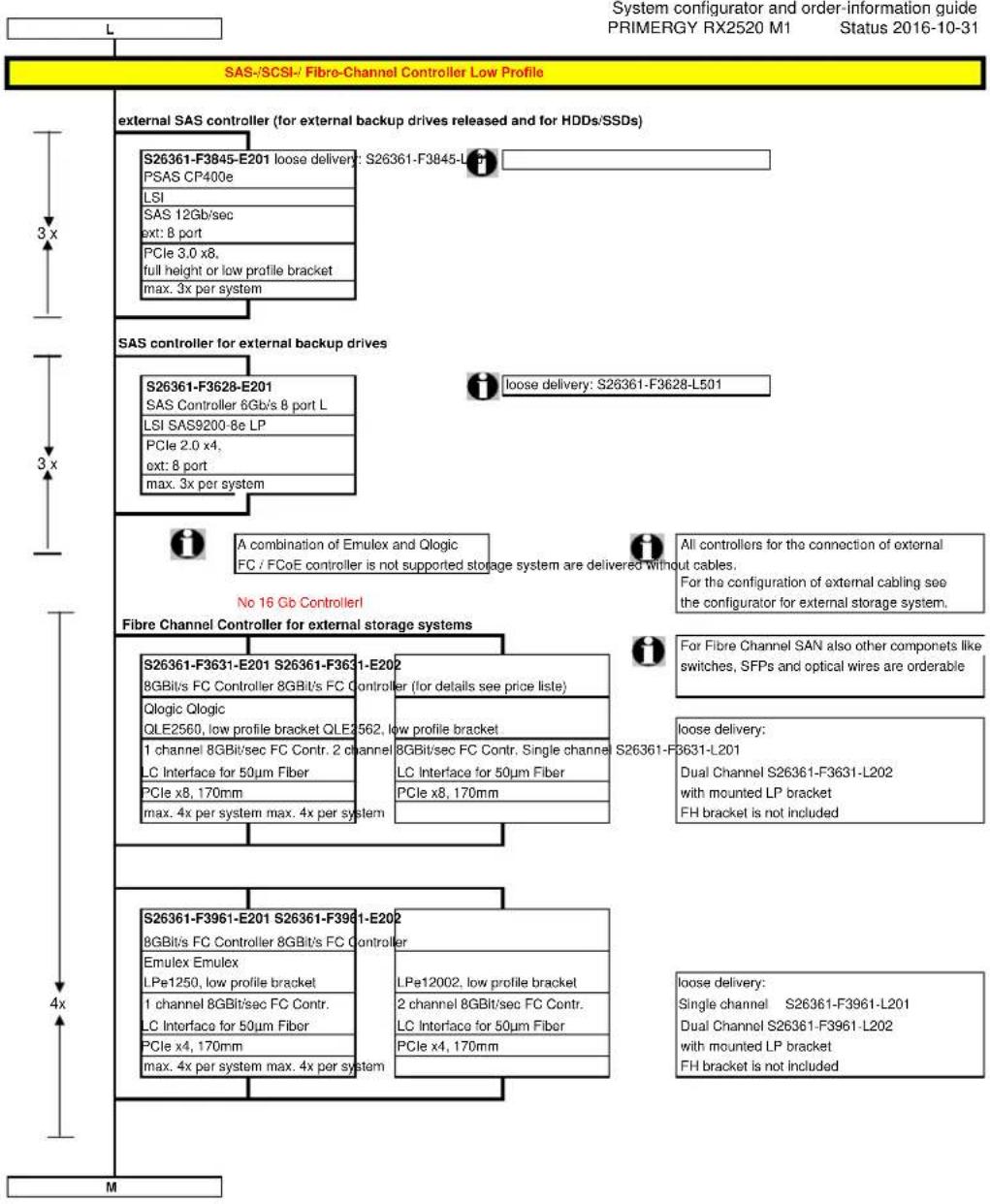
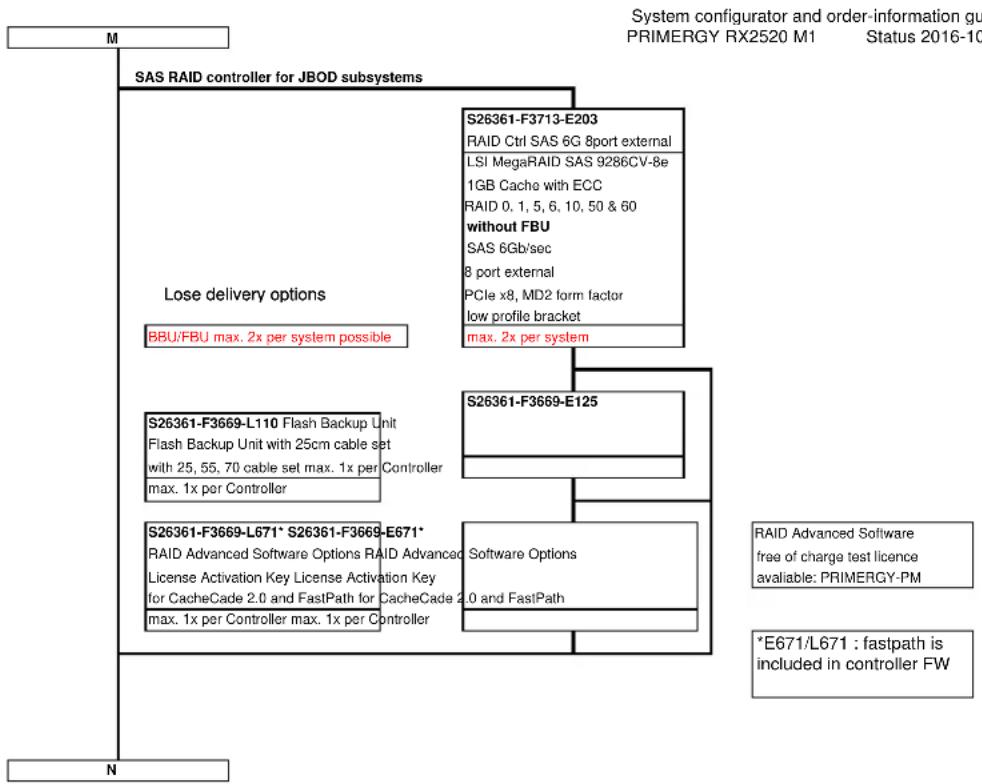
flowchart
graph TD
    A["M"] --> B["SAS RAID controller for JBOD subsystems"]
    B --> C["Lose delivery options"]
    C --> D["BBU/FBU max. 2x per system possible"]
    B --> E["S26361-F3713-E203"]
    E --> F["RAID Ctrl SAS 6G 8port external"]
    E --> G["LSI MegaRAID SAS 9286CV-8e"]
    E --> H["1GB Cache with ECC"]
    E --> I["RAID 0.1, 5, 6, 10, 50 & 60"]
    E --> J["without FBU"]
    J --> K["SAS 6Gb/sec"]
    J --> L["8 port external"]
    J --> M["PCIe x8, MD2 form factor"]
    J --> N["low profile bracket"]
    J --> O["max. 2x per system"]
    C --> P["S26361-F3669-E125"]
    P --> Q["S26361-F3669-L110 Flash Backup Unit"]
    P --> R["Flash Backup Unit with 25cm cable set"]
    P --> S["with 25, 55, 70 cable set max. 1x per Controller"]
    P --> T["max. 1x per Controller"]
    C --> U["S26361-F3669-L671* S26361-F3669-E671*"]
    U --> V["RAID Advanced Software Options RAID Advanced"]
    U --> W["License Activation Key License Activation Key"]
    U --> X["for CacheCade 2.0 and FastPath for CacheCade 2.0 and FastPath"]
    U --> Y["max. 1x per Controller max. 1x per Controller"]
    P --> Z["Software Options"]
    P --> AA["RAID Advanced Software free of charge test licence available: PRIMERGY-PM"]
    P --> AB["*E671/L671 : fastpath is included in controller FW"]
    B --> AC["N"]
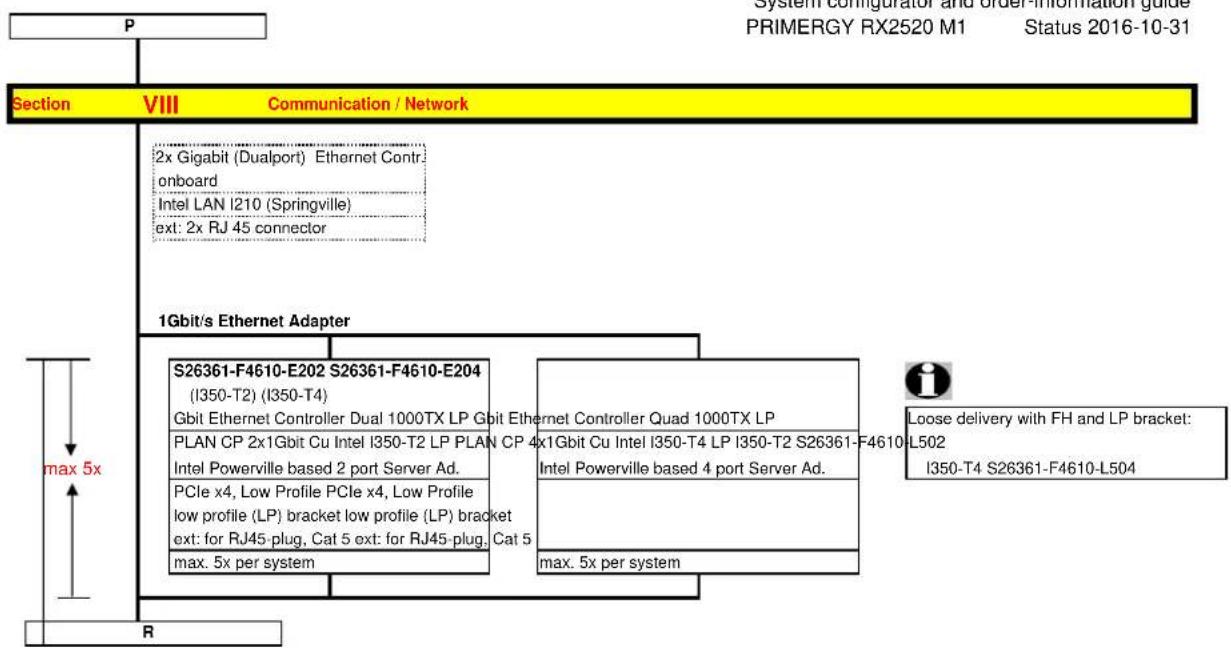
flowchart
graph TD
    A["P"] --> B["Section VIII Communication / Network"]
    B --> C["1Gbit/s Ethernet Adapter"]
    C --> D["S26361-F4610-E202 S26361-F4610-E204 (I350-T2) (I350-T4)"]
    C --> E["Gbit Ethernet Controller Dual 1000TX LP Gbit Ethernet Controller Quad 1000TX LP"]
    C --> F["PLAN CP 2x1Gbit Cu Intel I350-T2 LP PLAN CP 4x1Gbit Cu Intel I350-T4 LP I350-T2 S26361-F4610-L502"]
    C --> G["Intel Powerville based 2 port Server Ad."]
    C --> H["PCIe x4, Low Profile PCIe x4, Low Profile low profile (LP) bracket low profile (LP) bracket ext: for RJ45-plug, Cat 5 ext: for RJ45-plug, Cat 5 max. 5x per system"]
    C --> I["max. 5x per system"]
    J["R"] --> K["Loose delivery with FH and LP bracket: I350-T4 S26361-F4610-L504"]
    style A fill:#f9f,stroke:#333
    style B fill:#ccf,stroke:#333
    style C fill:#cfc,stroke:#333
    style D fill:#fcc,stroke:#333
    style E fill:#fcc,stroke:#333
    style F fill:#fcc,stroke:#333
    style G fill:#fcc,stroke:#333
    style H fill:#fcc,stroke:#333
    style I fill:#fcc,stroke:#333
    style J fill:#fcc,stroke:#333
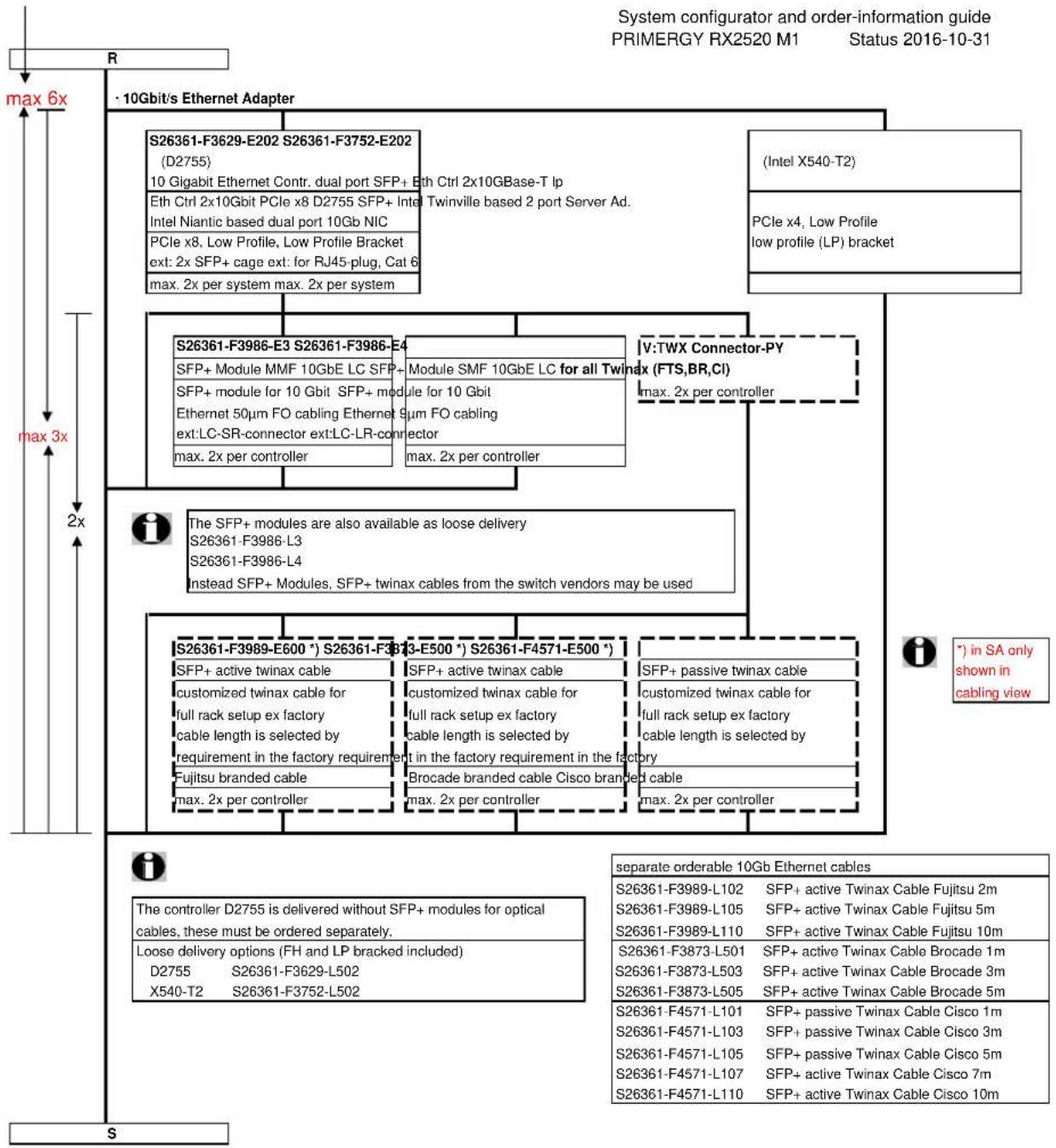
flowchart
graph TD
    A["Max 6x"] --> B["R"]
    B --> C["S26361-F3629-E202 S26361-F3752-E202 (D2755)"]
    B --> D["Eth Ctrl 2x10Gbit PCIe x8 D2755 SFP+ Intel Niantic based dual port 10Gb NIC"]
    B --> E["PCIe x8, Low Profile, Low Profile Bracket ext: 2x SFP+ cage ext: for RJ45-plug, Cat 6 max. 2x per system max. 2x per system"]
    B --> F["S26361-F3986-E3 S26361-F3986-E4"]
    B --> G["SFP+ Module MMF 10GbE LC SFP+ SFP+ module for 10 Gbit SFP+ module for 10 Gbit Ethernet 50μm FO cabling Ethernet 9μm FO cabling ext:LC-SR-connector ext:LC-LR-connector max. 2x per controller"]
    B --> H["V:TWX Connector-PY (FTS,BR,CI) max. 2x per controller"]
    B --> I["S26361-F3989-E600 *) S26361-F3989-E500 *) S26361-F4571-E500 *)"]
    B --> J["SFP+ active twinax cable"]
    B --> K["customized twinax cable for full rack setup ex factory cable length is selected by requirement in the factory requirement"]
    B --> L["Fujitsu branded cable"]
    B --> M["SFP+ active twinax cable"]
    B --> N["customized twinax cable for full rack setup ex factory cable length is selected by requirement in the factory requirement"]
    B --> O["Brocade branded cable Cisco branded cable"]
    B --> P["SFP+ passive twinax cable"]
    B --> Q["customized twinax cable for full rack setup ex factory cable length is selected by requirement in the factory requirement"]
    B --> R["S26361-F3989-L102 SFP+ active Twinax Cable Fujitsu 2m"]
    B --> S["S26361-F3989-L105 SFP+ active Twinax Cable Fujitsu 5m"]
    B --> T["S26361-F3989-L110 SFP+ active Twinax Cable Fujitsu 10m"]
    B --> U["S26361-F3873-L501 SFP+ active Twinax Cable Brocade 1m"]
    B --> V["S26361-F3873-L503 SFP+ active Twinax Cable Brocade 3m"]
    B --> W["S26361-F3873-L505 SFP+ active Twinax Cable Brocade 5m"]
    B --> X["S26361-F4571-L101 SFP+ passive Twinax Cable Cisco 1m"]
    B --> Y["S26361-F4571-L103 SFP+ passive Twinax Cable Cisco 3m"]
    B --> Z["S26361-F4571-L105 SFP+ passive Twinax Cable Cisco 5m"]
    B --> AA["S26361-F4571-L107 SFP+ active Twinax Cable Cisco 7m"]
    B --> AB["S26361-F4571-L110 SFP+ active Twinax Cable Cisco 10m"]
    A --> AC["Max 3x"]
    A --> AD["S"]
    AE["The controller D2755 is delivered without SFP+ modules for optical cables, these must be ordered separately."] --> AF["Loose delivery options (FH and LP bracked included) D2755 S26361-F3629-L502 X540-T2 S26361-F3752-L502"]
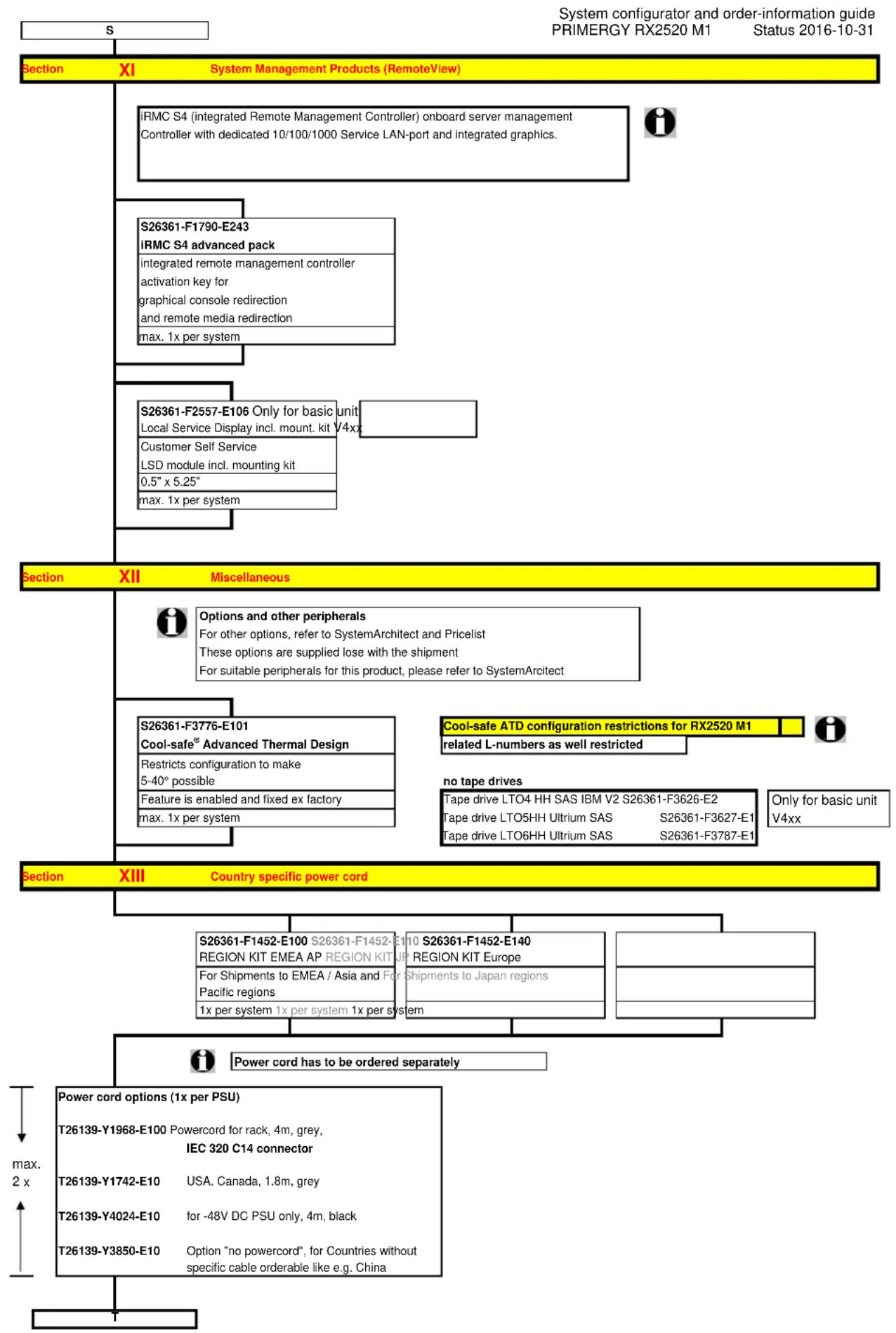
flowchart
graph TD
    A["Section XI"] --> B["System Management Products (RemoteView)"]
    B --> C["iRMC S4 (integrated Remote Management Controller) onboard server management Controller with dedicated 10/100/1000 Service LAN-port and integrated graphics."]
    B --> D["S26361-F1790-E243"]
    D --> E["IRMC S4 advanced pack"]
    D --> F["integrated remote management controller activation key for graphical console redirection and remote media redirection"]
    D --> G["max. 1x per system"]
    B --> H["S26361-F2557-E106 Only for basic unit"]
    H --> I["Local Service Display incl. mount. kit V4xx"]
    H --> J["Customer Self Service"]
    J --> K["LSD module incl. mounting kit"]
    J --> L["0.5" x 5.25""]
    J --> M["max. 1x per system"]
    B --> N["Section XII Miscellaneous"]
    N --> O["Options and other peripherals"]
    O --> P["For other options, refer to SystemArchitect and Pricelist"]
    O --> Q["These options are supplied lose with the shipment"]
    O --> R["For suitable peripherals for this product, please refer to SystemArchitect"]
    N --> S["S26361-F3776-E101"]
    S --> T["Cool-safe® Advanced Thermal Design"]
    T --> U["Restricts configuration to make 5-40° possible"]
    T --> V["Feature is enabled and fixed ex factory"]
    T --> W["max. 1x per system"]
    N --> X["Cool-safe ATD configuration restrictions for RX2520 M1"]
    X --> Y["related L-numbers as well restricted"]
    X --> Z["no tape drives"]
    Z --> AA["Tape drive LTO4 HH SAS IBM V2 S26361-F3626-E2"]
    Z --> AB["Tape drive LTO5HH Ultrium SAS S26361-F3627-E1"]
    Z --> AC["Tape drive LTO6HH Ultrium SAS S26361-F3787-E1"]
    N --> AD["Section XIII Country specific power cord"]
    AD --> AE["S26361-F1452-E100 S26361-F1452-E110 S26361-F1452-E140 REGION KIT EMEA AP REGION KIT UP REGION KIT Europe"]
    AD --> AF["For Shipments to EMEA / Asia and Pacific regions"]
    AD --> AG["For Shipments to Japan regions"]
    AD --> AH["1x per system 1x per system 1x per system"]
    AD --> AI["Power cord has to be ordered separately"]
    AD --> AJ["Power cord options (1x per PSU)"]
    AJ --> AK["T26139-Y1968-E100 Powercord for rack, 4m, grey, IEC 320 C14 connector"]
    AJ --> AL["T26139-Y1742-E10 USA, Canada, 1.8m, grey"]
    AJ --> AM["T26139-Y4024-E10 for -48V DC PSU only, 4m, black"]
    AJ --> AN["T26139-Y3850-E10 Option "no powercord", for Countries without specific cable orderable like e.g. China"]
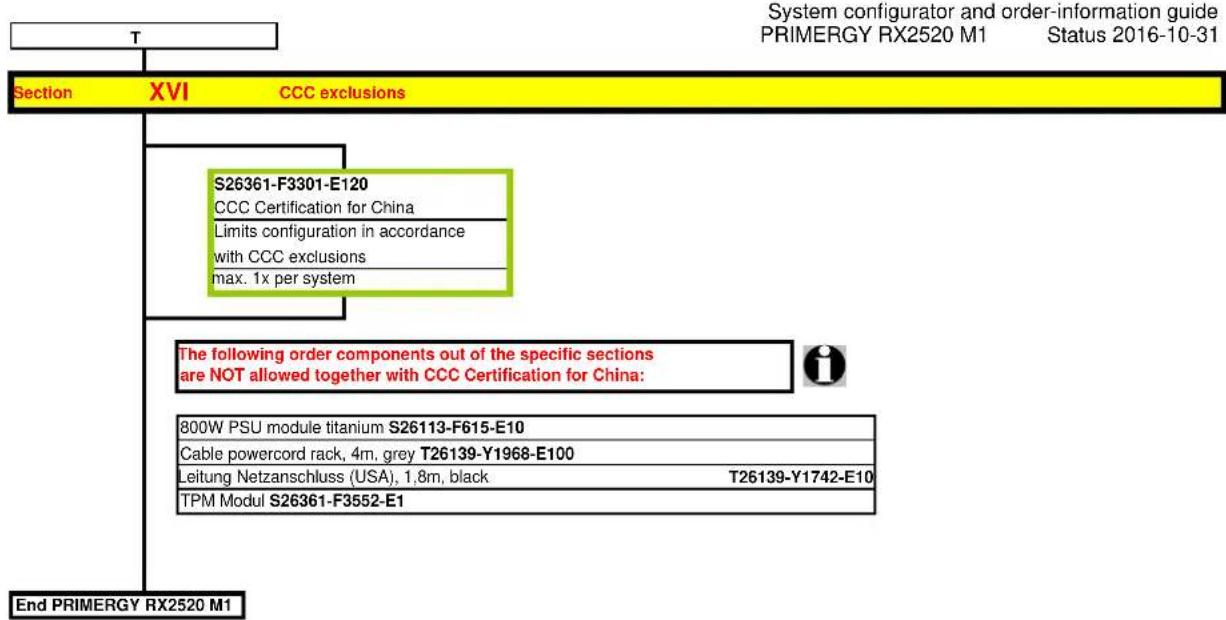
flowchart
graph TD
    A["Section XVI"] --> B["S26361-F3301-E120"]
    B --> C["CCC Certification for China"]
    C --> D["Limits configuration in accordance with CCC exclusions"]
    D --> E["max. 1x per system"]
    F["End PRIMERGY RX2520 M1"] --> G["800W PSU module titanium S26113-F615-E10"]
    G --> H["Cable powercord rack, 4m, grey T26139-Y1968-E100"]
    H --> I["Leitung Netzanschluss (USA), 1.8m, black T26139-Y1742-E10"]
    I --> J["TPM Modul S26361-F3552-E1"]
Change Report
| Date Order number | Changes | |
| 2016-09-27 S26361-F2735-L10 corrected from 50kg to 15kg | ||
| 2016-09-27 S26361-F2748-E637/L637 | removed | |
| 2016-09-15 S26361-F5606-E1/L1 LTO7 drive added | ||
| 2016-08-05 | S26361-F3955-E200 | added |
| 2016-05-12 | S26361-F3641-E2 | Blu-ray Triple Writer slim only on special release |
| 2016-05-10 | S26361-F3669-E660/L660 | removed |
| 2016-03-21 S26361-F1452-E140 added region kit Europe | ||
| 2016-03-14 | T26139-Y1742-E10 | changed color to black |
| 2016-03-10 | S26361-F3669-E/L671 | added Advanced SW Option CacheCade (with FastPath for free) |
| 2016-03-07 | S26361-F3669-E/L670 | added Advanced SW Option CacheCade (with FastPath for free) |
| 2015-09-25 | S26361-F3845-E201 | added 3x PSAS CP400e |
| 2015-09-24 | SATA DOM restriction added. | |
| 2015-08-26 | S26361-F556*-* | added 3.5" SAS 10K HDDs |
| 2015-07-21 | RAID controller updated | |
| 2015-07-21 | HDD SAS 12G 10K 512n added. | |
| 2015-06-01 | S26361-F3842-E2 | added PSAS CP400i for Software Defined Storage |
| 2015-05-05 S26361-F3904-E600 HDD 3.5" SATA 6G 7.2K 512e 6TB added. | ||
| 2015-05-05 S26361-F3842-E1 | removed "as soon as available" | |
| 2015-04-15 S26361-F3842-E1 | added PRAID CP400i as additional RAID5 controller | |
| 2015-02-27 S26361-F5544-E118 HDD 2.5" SAS 12G 10K 512e 1.8TB | ||
| 2015-02-27 S26361-F5521-* HDD 2.5" SAS 6G 15K up to 600GB within 3.5" Carrier | ||
| 2014-08-12 | S26361-F3554-E512 | S26361-F3554-E512: comment changed to "no BBU support" as in T50 and generally valid for all Systems launched in 2014 |
| 2014-06-20 | S26361-F3301-E120 | CCC Certification for China added |
| 2014-06-13 | Configuration diagram (2 Modules) corrected | |
| 2014-05-15 | S26361-F5289-E100 | New 3.5" SATA SSDs added. |
| 2014-03-04 | New processors for V112 | New processors only for basic unit with 12x 3.5" HDDs - as soon as available |
| 2014-03-04 | S26361-K1480-V112 | New basic unit for 12x 3.5" HDDs - as soon as available |
| 2014-01-23 | First Release | |
- PRIMERGY Server
- Instructions
- Configuration diagram PRIMERGY RX2520 M1
- System unit consisting of:
- \* Drives/Bays
- Systemboard D3169 with:
- Interfaces at the rear:
- Interfaces on the front:
- Interfaces internal:
- Software:
- Memory Configuration PRIMERGY RX2520 M1
- Memory-Speed:
- Independent Channel Mode
- Performance Channel Mode
Brand : FUJITSU
Model : PRIMEPOWER RX2520 M1
Category : Server