Mini-GIG - Blender DAP-Audio - Free user manual and instructions
Find the device manual for free Mini-GIG DAP-Audio in PDF.


| Product Type | Blender |
| Brand | DAP-Audio |
| Model | Mini-GIG |
| Jar Capacity | 1.5 liters |
| Jar Material | Tritan plastic |
| Blade Material | Stainless steel |
| Number of Speed Settings | 2 speeds + pulse |
| Power Consumption | 350 W |
| Power Supply | 220-240 V, 50/60 Hz |
| Dimensions (H x W x D) | 30 x 15 x 20 cm |
| Weight | 1.2 kg |
| Cord Length | 1.0 m |
| Safety Features | Non-slip feet, safety lock lid |
| Functions | Blending, pureeing, crushing ice, mixing |
| Cleaning | Detachable jar, dishwasher safe (top rack) |
| Maintenance | Wipe base with damp cloth; dry thoroughly |
| Spare Parts Availability | Replacement jars, blades, and lids available via DAP-Audio support |
| Repairability | User-serviceable blade assembly; professional repair for motor |
| Warranty | 2 years limited warranty |
| Country of Origin | China |
Frequently Asked Questions - Mini-GIG DAP-Audio
User questions about Mini-GIG DAP-Audio
0 question about this device. Answer the ones you know or ask your own.
Ask a new question about this device
Download the instructions for your Blender in PDF format for free! Find your manual Mini-GIG - DAP-Audio and take your electronic device back in hand. On this page are published all the documents necessary for the use of your device. Mini-GIG by DAP-Audio.
USER MANUAL Mini-GIG DAP-Audio
Unpacking Instructions....2
Safety Instructions 2
Operating Determinations 4
Return Procedure 4
Claims....4
Description of the device....5
Features 5
Overview 5
Installation....6
Instructions....6
Ready to start 6
Control Elements 7
Installation and connection ....10
Connection Cables....11
Block Diagram 12
Technical Specifications ....13
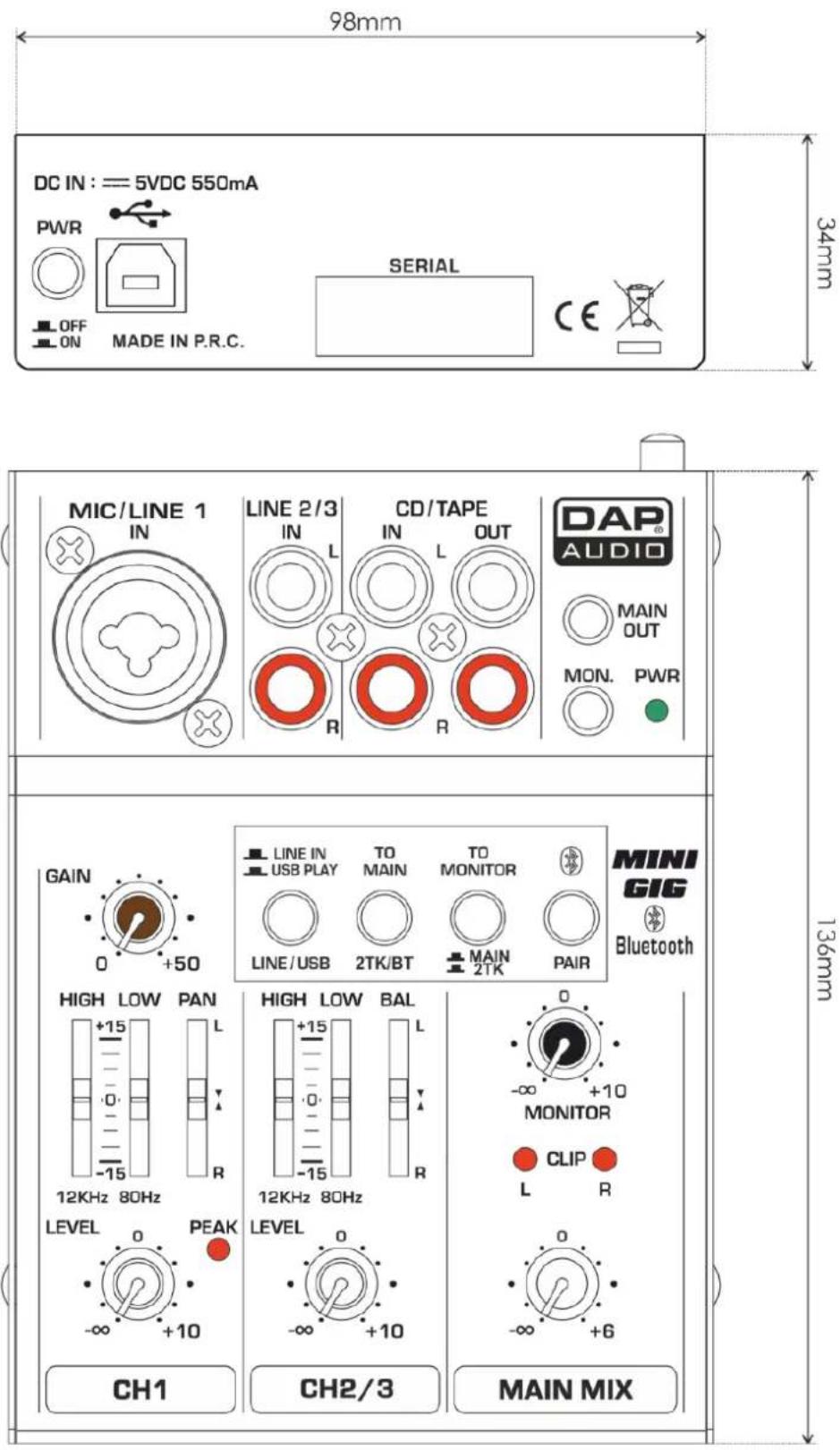
Dimensions....14
Warning

FOR YOUR OWN SAFETY, PLEASE READ THIS USER MANUAL CAREFULLY BEFORE YOUR INITIAL START-UP!

Unpacking Instructions
Immediately upon receiving this product, carefully unpack the carton and check the contents to ensure that all parts are present and have been received in good condition. Notify the dealer immediately and retain packing material for inspection if any parts appear damaged from shipping or the carton itself shows signs of mishandling. Save the carton and all packing materials. In the event that a fixture must be returned to the factory, it is important that the fixture be returned in the original factory box and packing.
Your shipment includes:
- Mini-GIG mixing console
• USB power adapter - USB cable
- User Manual

CAUTION!
Keep this device away from rain and moisture! Unplug mains lead before opening the housing!

Safety Instructions
Every person involved with the installation, operation and maintenance of this system has to:
- be qualified
- follow the instructions of this manual
CAUTION! Be careful with your operations.
With a dangerous voltage you can suffer a dangerous electric shock when touching the wires!
Before you initial start-up, please make sure that there is no damage caused by transportation. Should there be any, consult your dealer and do not use the system.
To maintain perfect condition and to ensure a safe operation, it is absolutely necessary for the user to follow the safety instructions and warning notes written in this manual.
Please consider that damages caused by manual modifications to the system are not subject to warranty.
This system contains no user-serviceable parts. Refer servicing to qualified technicians only.
IMPORTANT:
The manufacturer will not accept liability for any resulting damages caused by the non-observance of this manual or any unauthorized modification to the system.
- Never let the power-cord come into contact with other cables! Handle the power-cord and all connections with the mains with particular caution!
Mini-GIG
- Never remove warning or informative labels from the unit.
- Never use anything to cover the ground contact.
- Never leave any cables lying around.
- Do not insert objects into air vents.
• Do not connect this system to a dimmer pack. - Do not switch the system on and off in short intervals, as this would reduce the system's life.
- Do not open the device and do not modify the device.
• Do not drive the inputs with a signal level bigger, than required to drive the equipment to full output. - Do not plug Mics into the console (or stage box) while Phantom Power is on. Also mute the monitor / Pa system when turning Phantom Power on or off. Allow the system to adjust for a couple of seconds, before setting the input gains.
• Only use system indoor, avoid contact with water or other liquids. - Avoid flames and do not put close to flammable liquids or gases.
- Always disconnect power from the mains, when system is not used. Only handle the power-cord by the plug. Never pull out the plug by tugging the power-cord.
• Always operate the unit with the AC ground wire connected to the electrical system ground.
• Make sure you don't use the wrong kind of cables or defective cables.
• Make sure that the signals into the mixer are balanced, otherwise hum could be created.
• Make sure you use DI boxes to balance unbalanced signals; All incoming signals should be clear.
• Make sure that the available voltage is not higher than stated on the rear panel. - Make sure that the power-cord is never crimped or damaged. Check the system and the power-cord from time to time.
- Please turn off the power switch, when changing the power cord or signal cable, or select the input mode switch.
- Extreme frequency boosts in connection with a high input signal level may lead to overdriving your equipment. Should this occur, it is necessary to reduce the input signal level by using the INPUT control.
- To emphasize a frequency range, you don't necessarily have to move its respective control upward; try lowering surrounding frequency ranges instead. This way, you avoid causing the next piece of equipment in your sound path to overdrive. You also preserve valuable dynamic reserve ("headroom")
- Avoid ground loops! Always be sure to connect the power amps and the mixing console to the same electrical circuit to ensure the same phase!
- If system is dropped or struck, disconnect mains power supply immediately. Have a qualified engineer inspect for safety before operating.
- If the system has been exposed to drastic temperature fluctuation (e.g. after transportation), do not switch it on immediately. The arising condensation water might damage your system. Leave the system switched off until it has reached room temperature.
- If your Dap Audio device fails to work properly, discontinue use immediately. Pack the unit securely (preferably in the original packing material) and return it to your Dap Audio dealer for service.
• Repairs, servicing and electric connection must be carried out by a qualified technician. - For replacement use fuses of same type and rating only.
- WARRANTY: Till one year after date of purchase.
Disposing of this product should not be placed in municipal waste and should be separate collection.
Operating Determinations
- This device is not designed for permanent operation. Consistent operation breaks will ensure that the device will serve you for a long time without defects.
- The minimum distance between light-output and the illuminated surface must be more than 0.5 meter.
- The maximum ambient temperature t = 45^ must never be exceeded.
• The relative humidity must not exceed 50 % with an ambient temperature of 35°C. - If this device is operated in any other way, than the one described in this manual, the product may suffer damages and the warranty becomes void.
• Any other operation may lead to dangers like short-circuit, burns, electric shock, crash, etc.
You endanger your own safety and the safety of others!

Return Procedure

Returned merchandise must be sent prepaid and in the original packing, call tags will not be issued. Package must be clearly labeled with a Return Authorization Number (RMA number). Products returned without an RMA number will be refused. Highlite will not accept the returned goods or any responsibility. Call Highlite 0031-455667723 or mail aftersales@highlite.nl and request an RMA prior to shipping the fixture. Be prepared to provide the model number, serial number and a brief description of the cause for the return. Be sure to properly pack fixture, any shipping damage resulting from inadequate packaging is the customer's responsibility. Highlite reserves the right to use its own discretion to repair or replace product(s). As a suggestion, proper UPS packing or double-boxing is always a safe method to use.
Note: If you are given an RMA number, please include the following information on a piece of paper inside the box:
1) Your name
2) Your address
3) Your phone number
4) A brief description of the symptoms
Claims
The client has the obligation to check the delivered goods immediately upon delivery for any shortcomings and/or visible defects, or perform this check after our announcement that the goods are at their disposal. Damage incurred in shipping is the responsibility of the shipper; therefore the damage must be reported to the carrier upon receipt of merchandise.
It is the customer's responsibility to notify and submit claims with the shipper in the event that a fixture is damaged due to shipping. Transportation damage has to be reported to us within one day after receipt of the delivery.
Any return shipment has to be made post-paid at all times. Return shipments must be accompanied with a letter defining the reason for return shipment. Non-prepaid return shipments will be refused, unless otherwise agreed in writing.
Complaints against us must be made known in writing or by fax within 10 working days after receipt of the invoice. After this period complaints will not be handled anymore.
Complaints will only then be considered if the client has so far complied with all parts of the agreement, regardless of the agreement of which the obligation is resulting.
Description of the device
Features
- 1 mic input channel with XLR and balanced line input.
• 1 stereo input channel with RCA jack. - Ultra-low noise discrete Mic Preamps with +20V Phantom Power.
• 2-band EQ (Warm, natural) on mono and stereo channels.
• 1 Gain control on the mono channel. - Peak LED in mono channel & master.
• 2 RCA-Track inputs & 2 RCA-Track outputs.
• 2 RCA-Track inputs assign to Main Mix & Monitor outputs. - Main Mix & Monitor outputs use 3.5mm stereo jack.
• Built -in stereo USB/Audio interface. - Either USB bus-powered or external adaptor.
- Bluetooth player function.
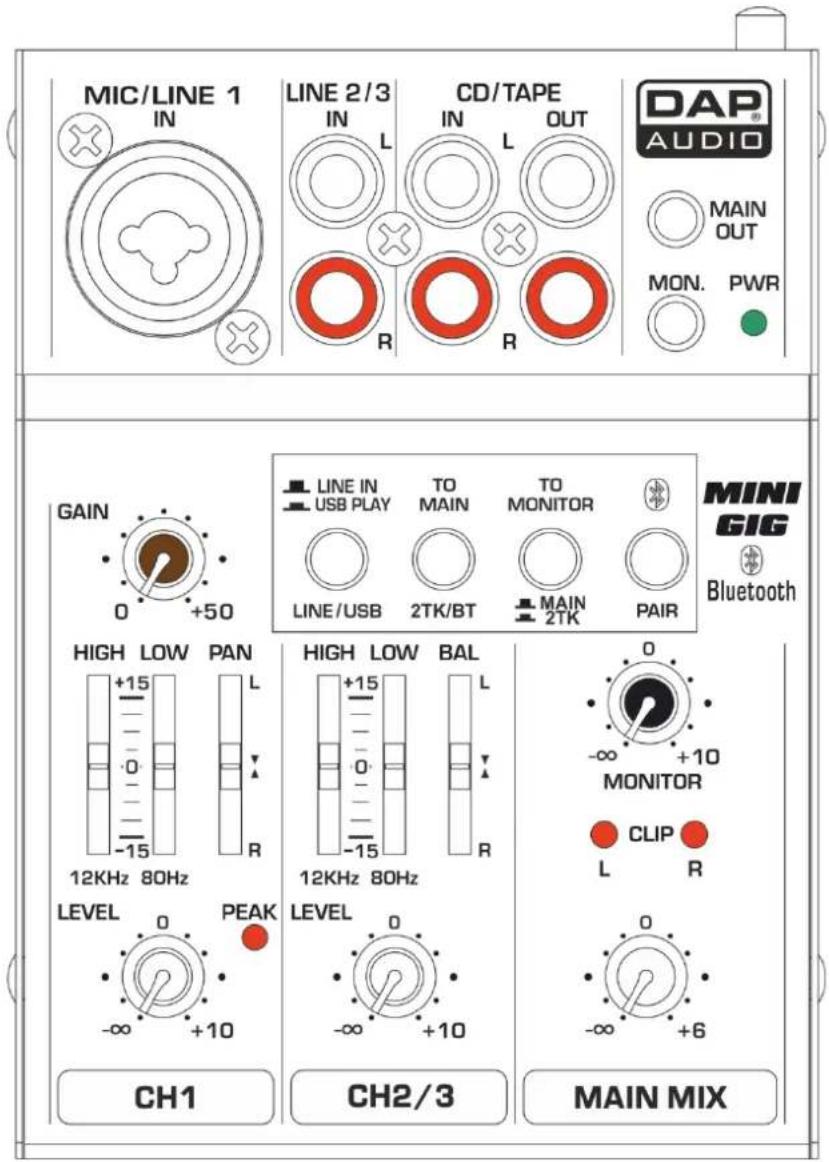
Overview
Installation
Instructions
Make sure the Mini-GIG mixer is used in an ventilated area. Do not install or use this product near any direct heat source(such as amplifier or heater).
Computer USB power or an external voltage converter can also supply power to the Mini-GIG mixer. Note: when using the computer USB as a power supply, please make sure the USB port of the computer complies with the standards of USB2.0(5V 500mA).
Ready to start
1) Please check the AC voltage available in your country before connecting your AC ADAPTOR to the AC socket.
2) Be sure that the main power switch is turned off before connecting the mixer to the AC socket. Also, you should make sure that all input and output controls are turned down. This will avoid damage to your speakers and avoid excessive noise.
3) Always turn on the mixer before the power amplifier; turn off the mixer after the power amplifier.
4) Before connecting and disconnecting the unit from the power source always turn off the unit.
5) Cleaning: Disconnect the mains power supply and then wipe the mixer with a damp cloth. Do not immerse in liquid. Do not use alcohol or solvents.
Control Elements
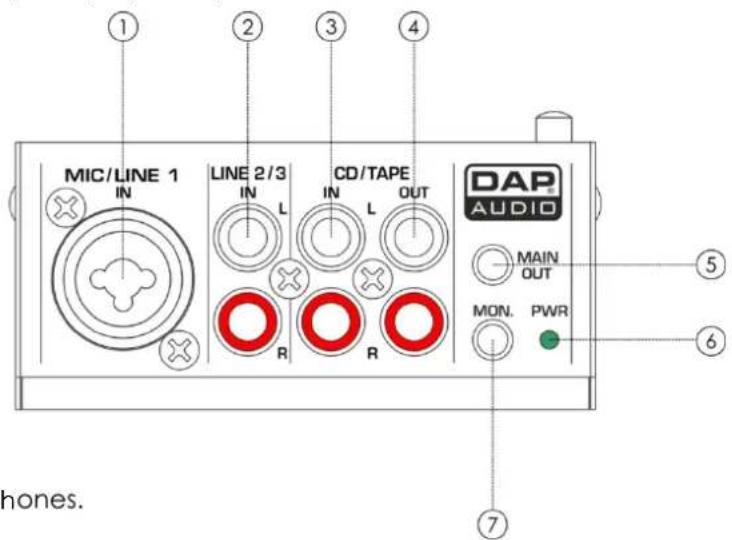
1. MIC/LINE IN JACK
This combined jack can be used to connect a mono signal, such as a XLR microphone or a 14 " jack connector which connects to line-level signal sources.
2. LINE IN JACK
These are unbalanced stereo RCA pin jacks.
3. 2TK IN JACK
The CD/TAPE input connectors are used to hook up CD players, tape decks or other line-level sources.
4. 2TK OUT JACK
The CD/TAPE output connectors provide the stereo main mix signal to a tape deck or DAT recorder to record your mix.
5. MAIN OUT JACK
The MAIN output is a 3,5mm stereo jack and provides the main mix signal.
6. POWER LED
This LED indicates when the power is switched on.
7. MONITOR OUT JACK
The MONITOR output lets you plug in your headphones.
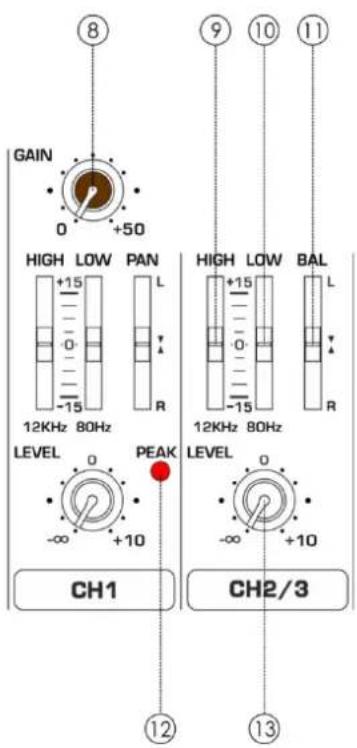
8. GAIN CONTROL
The GAIN CONTROL adjusts the input gain. Be sure to set this control fully counter-clockwise before you connect or disconnect a signal source to or from one of the inputs.
9. HIGH
The high-frequency range is processed with a shelving filter above 12 kHz. You can boost or cut the bands up to 15 dB. When in center position (0 dB), the equalizer has a flat response.
10. LOW
The low-frequency range is processed with a shelving filter below 80 Hz. You can boost or cut the bands up to 15 dB. When in center position (0 dB), the equalizer has a flat response.
11. PAN/BAL
The PAN control determines the position of the channel signal in the stereo mix to which the channel signal is routed.
12. PEAK LED
The PEAK LED lights up as soon as the channel's level is too high. In this case, reduce the channel's input amplification with the GAIN control. The Peak LED lights at a level of 3 dB below clipping.
13. LEVEL CONTROL
The LEVEL CONTROL adjusts the level of the channel signal as part of the main mix
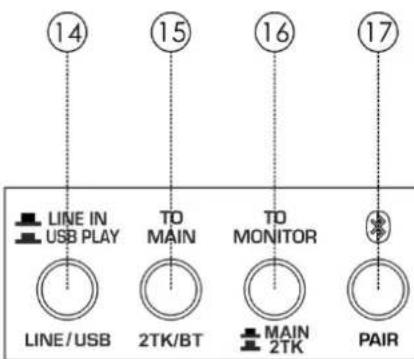
14. LINE IN/USB PLAY
This is the path control of the stereo sound source. When this control is engaged, the signal of channel 2/3 comes from the USB PLAY(computer). When the control is disengaged, the signal will be from the RCA jacks of channel 2/3.
15. 2TK/BT TO MAIN
This is the assignment control of the 2TK input and the Bluetooth input. When this control is engaged, the signal of the 2TK/BT will be assigned to the MAIN MIX OUT. When the control is disengaged, the assignment will be disconnected.
16. 2TK TO MONITOR
This is the assignment control of the 2TK output. When this control is engaged, the signal of the 2TK input will be assigned to the MONITOR OUT (The signal of the BT input will not be assigned to the MONITOR OUT). When the control is disengaged, the signal of the MAIN MIX OUT will be assigned to the MONITOR OUT.
17. PAIR AND DISPLAY LED
This button is used to control the Bluetooth player. The LED displays the working status of the Bluetooth player.
PAIR: Press this key and hold for 2-3 seconds, the player will change to matching state. In this state, the LED alternately flashes quickly and you can use your mobile phone, tablet or PC Bluetooth adapter to find devices, BT-2.1. If your device's Bluetooth version lower than 2.0, you should enter the password "0000". If your device's Bluetooth version higher than 2.0, you do not need to enter a password.
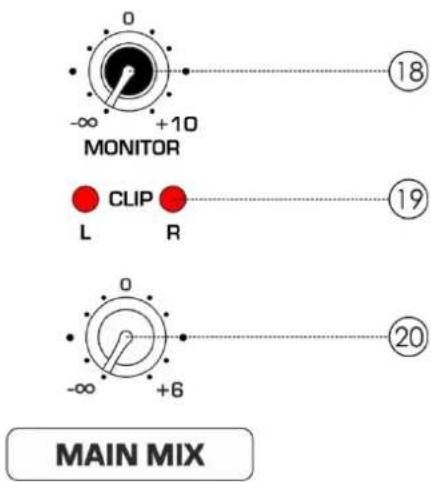
18. MONITOR
The MONITOR control adjusts the volume level of all signals routed to the headphone.
19. CLIP LED(L&R)
This is main mix level clip LED.
20. MAIN MIX
This is main mix control used for adjusting the main mix output level.
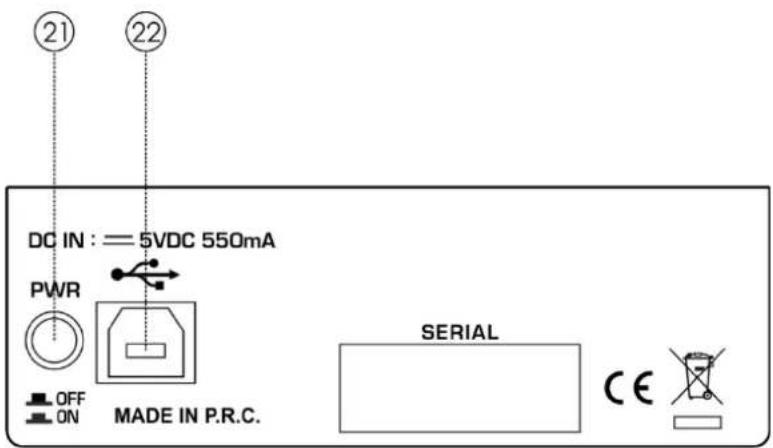
21. POWER SWITCH
Use the POWER switch to turn on the mixing console. The POWER switch should always be in the "Off" position when you are about to connect your unit to the mains.
22. USB PORT
This Type B USB port can be used to connect the computer via Type B to A connector.
Installation and connection
At this point you are in a position to successfully operate your Mini-GIG Mixing Console. However, we advise you to read carefully the following section to be a real master of your own mixer. Not paying enough attention to the input signal level, to the routing of the signal and the assignment of the signal will result in unwanted distortion, a corrupted signal or no sound at all. So you should follow these procedures for every single channel:
- Before connecting mics or instruments, make sure that the power of all your system components, including the mixer, are turned off. Also, make sure that all the input and output controls are turned down. This will avoid damage to your speakers and avoid excessive noise.
- Properly connect all external devices such as mics, power amplifiers, speakers, effect processor etc.
• Now, turn on the power of any peripheral devices, then power up the mixer. - Set the output level of your mixer or the connected power amplifier at no more than 75%.
- Set the CONTROL ROOM/PHONE level at no more than 50%.
- Position the HI and LOW EQ controls on middle position.
• You can shape the tone of each channel by adjusting the equalizer controls as desired.
• Now repeat the same sequence for all the input channels.
Connection Cables
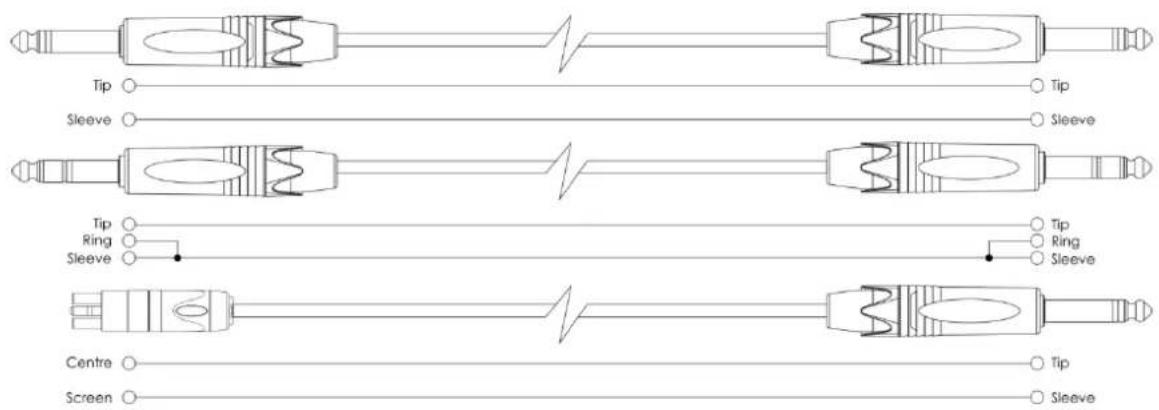
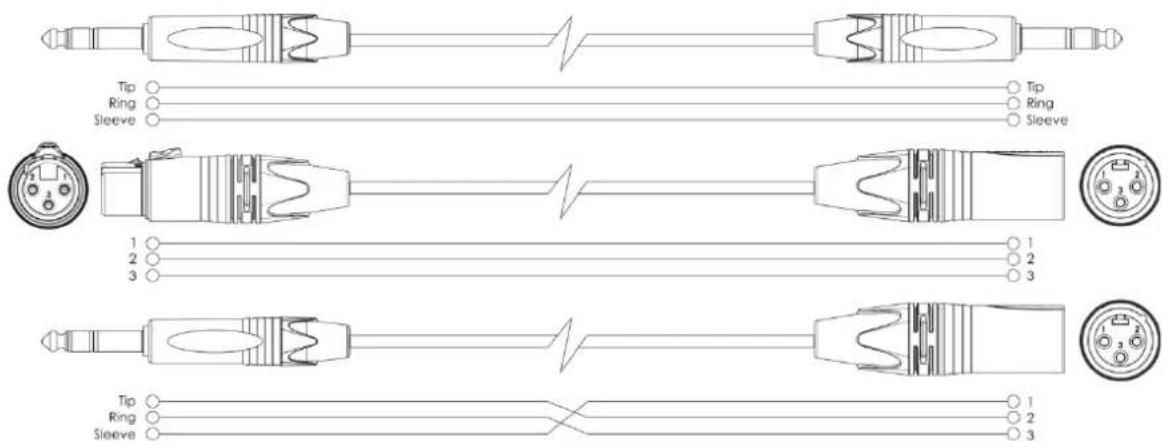
Take care of your cables, always holding them by the connectors and avoiding knots and twists when coiling them: This gives the advantage of increasing their life and reliability. Periodically check your cables. A great number of problems (faulty contacts, ground hum, discharges, etc.) are caused entirely by using unsuitable or faulty cables.
Headphone
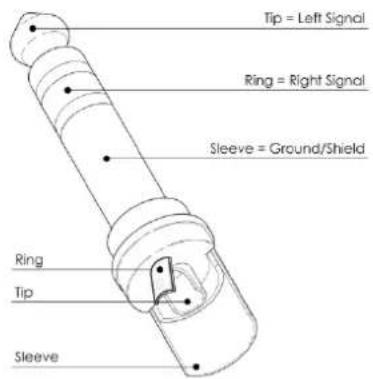
Unbalanced
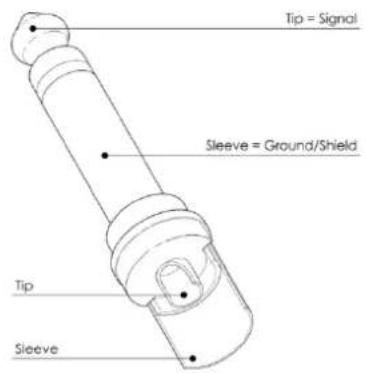
Balanced
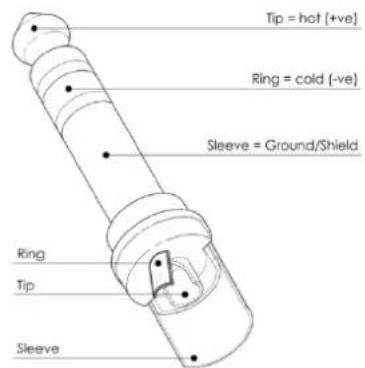
For these applications the unit provides 1/4" TRS and XLR connectors to easily interface with most professional audio devices. Follow the configuration examples below for your particular connection.
Unbalanced
Balanced
Block Diagram
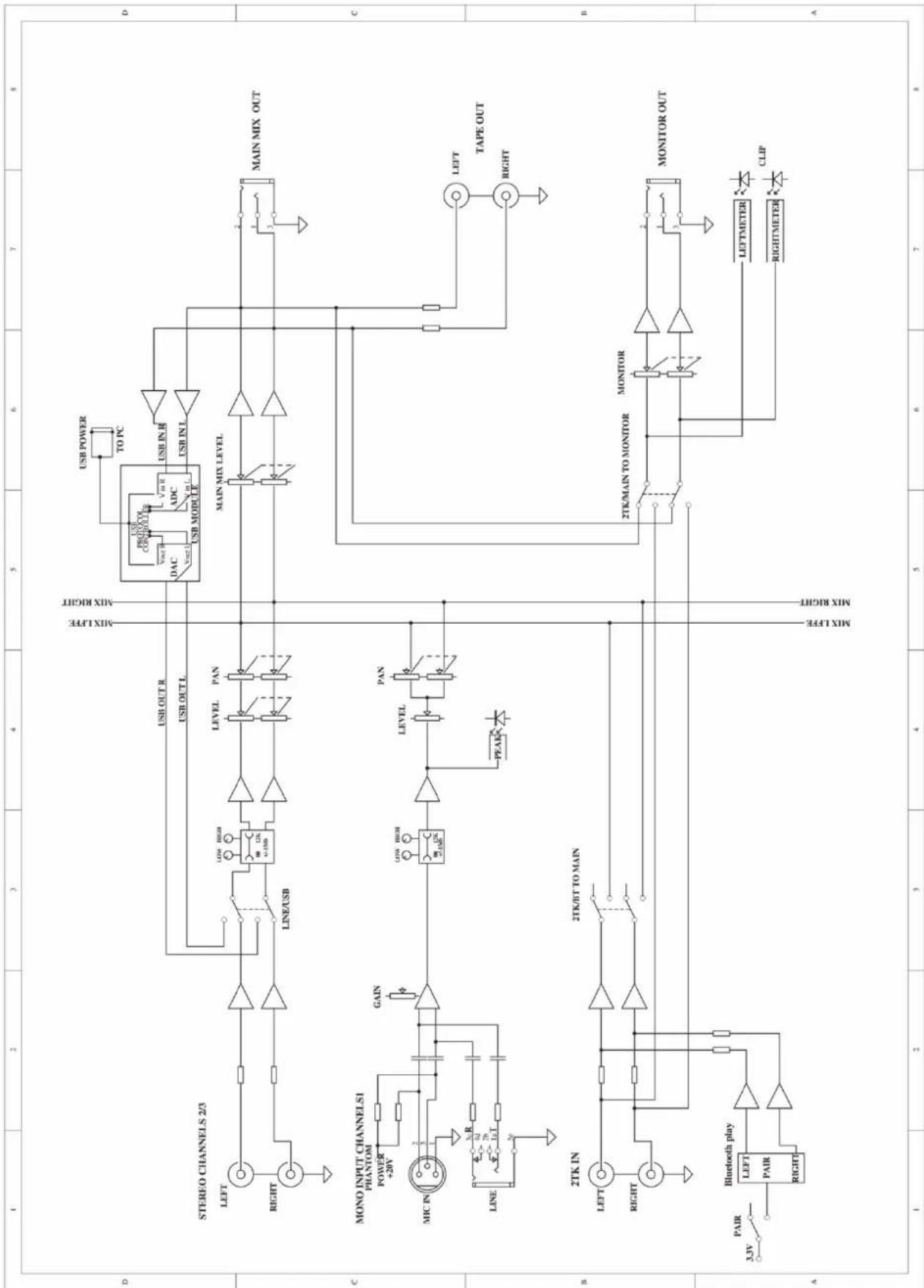
flowchart
graph TD
    subgraph Channel_D
        A["STEREO CHANNELS 2/3"] --> B["LEFT"]
        A --> C["RIGHT"]
        B --> D["LINE/USB"]
        D --> E["USB HIGH"]
        E --> F["LEVEL"]
        F --> G["PAN"]
        G --> H["MIX LFFE MIX RIGHT"]
        H --> I["USB POWER TO PC"]
        I --> J["USB PRODUCY COMPUTER"]
        J --> K["DAC"]
        K --> L["USB IN R ADC"]
        L --> M["USB IN L USB MODULE"]
        M --> N["MAIN MIX LEVEL"]
        N --> O["MAIN MIX OUT"]
    end

    subgraph Channel_C
        P["MONO INPUT CHANNELSI"] --> Q["PHANTOM POWER +20V"]
        P --> R["MIC IN"]
        P --> S["LINE"]
        S --> T["GAIN"]
        T --> U["LEVEL"]
        U --> V["PAN"]
        V --> W["PEAK"]
        W --> X["LEVEL"]
        X --> Y["PAN"]
        Y --> Z["LEVEL"]
        Z --> AA["PAIR"]
        AA --> AB["2TK/IN"]
        AB --> AC["LEFT"]
        AC --> AD["RIGHT"]
        AD --> AE["2TK/BT TO MAIN"]
        AE --> AF["MIX LFFE MIX RIGHT"]
        AF --> AG["2TK/MAIN TO MONITOR MONITOR MONITOR OUT"]
        AG --> AH["LEFTMETER LEFTMETER"]
        AG --> AI["RIGHTMETER RIGHTMETER"]
        AI --> AJ["CLIP"]
    end

    subgraph Channel_B
        AK["2TK IN"] --> AL["LEFT"]
        AK --> AM["RIGHT"]
        AL --> AN["2TK/IN TO MAIN"]
        AN --> AO["MIX LFFE MIX RIGHT"]
        AO --> AP["2TK/MAIN TO MONITOR MONITOR MONITOR OUT"]
        AP --> AQ["LEFTMETER LEFTMETER"]
        AP --> AR["RIGHTMETER RIGHTMETER"]
        AR --> AS["CLIP"]
    end

    subgraph Channel_A
        AT["3JV PAIR"] --> AU["Bluetooth play"]
        AU --> AV["LEFT"]
        AU --> AW["PAIR"]
        AU --> AX["RIGHT"]
    end

    A -->|USB OUT R| B
    A -->|USB OUT L| C
    B -->|USB HIGH| D
    D -->|LEVEL| E
    E -->|PAN| F
    F -->|LEVEL| G
    G -->|PAN| H
    H -->|LEVEL| I
    I -->|PAN| J
    J -->|LEVEL| K
    K -->|PAN| L
    L -->|LEVEL| M
    M -->|PAN| N
    N -->|LEVEL| O
    O -->|PAN| P
    P -->|LEVEL| Q
    Q -->|PAN| R
    R -->|LEVEL| S
    S -->|PAN| T
    T -->|LEVEL| U
    U -->|PAN| V
    V -->|LEVEL| W
    W -->|PAN| X
    X -->|LEVEL| Y
    Y -->|PAN| Z
    Z -->|LEVEL| AA
    AA -->|PAN| AB
    AB -->|LEVEL| AC
    AC -->|PAN| AD
    AD -->|LEVEL| AE
    AE -->|PAN| AF
    AF -->|LEVEL| AG
    AG -->|PAN| AH
    AH -->|LEVEL| AI
    AI -->|PAN| AJ
    AJ -->|LEVEL| AK
Technical Specifications
| Type: | 3 Channel USB MIXER | |
| Frequency Response: | Mic Input to any Output (Gain @ 0 dB, Rated output level) | 10 Hz to 40 kHz(0, -1dB)10 HZ to 100kHz(0, -3dB) |
| Distortion (THD&N) | Mic Input to MAIN Output (Gain @ 0 dB, Rated output level @ 20 Hz-20 kHz bandwidth) | 0.01%(A-weighted) |
| MIC EIN (Equivalent Input Noise) | Input: Channel INPUT MIC (Rs = 150 Ω, Gain @ Max., 20 Hz-20 kHz bandwidth) | -118dBu (A-weighted) |
| CMRR | Mic in to main out (Gain @ Max.,@ 1 kHz) | 70dB |
| Input Gain (20 Hz-20 kHz) | Mono Channel | MIC: 0 to 50dB, LINE: -35 to + 15dB |
| Stereo Channel | ---- | |
| Attenuation (Crosstalk) (20 Hz - 20 kHz) | Line in, 1/4" TRS Main Out,1 kHz relative to 0 dBu, 22 Hz 22 kHz Filter, Gain @ unity. | |
| Main Mix knob/fader @ -∞ | -79dBu(A-weighted) | |
| Channel Level knob/fader @ -∞ | -79dBu(A-weighted) | |
| Rated Output Level | Main, monitor, tape output (all knob/fader @ 0 dBu,1 kHz) | 0dBu |
| Maximum Output Level | Main, monitor, tape output (all knob/fader @ 0 dBu,1 kHz, 22 Hz - 22 kHz Filter,THD @ 1%) | +17 dBu |
| Maximum Voltage Gain (EQ and PAN/ BAL knob @ 0 dB, Other all knob or fader @ max,1 kHz, Rs=600 Ω) | Mono Channel MIC INPUT → MAIN OUT(3.5 Φ jack stereo) | 69 dBu |
| Mono Channel MIC INPUT → Monitor(3.5 Φ jack stereo) | 78 dBu | |
| Mono Channel MIC INPUT → TAPE OUT(RCA) | 69 dBu | |
| Mono Channel LINE INPUT → MAIN OUT(3.5 Φ jack stereo) | 53 dBu | |
| Stereo Channel LINE INPUT → MAIN OUT(3.5 Φ jack stereo) | 16 dBu | |
| TAPE INPUT → MAIN OUT(3.5 Φ jack stereo) | 6 dBu | |
| TAPE INPUT → Monitor(3.5 Φ jack stereo) | 9 dBu | |
| Main mix Noise (20 Hz-20 kHz) | MAIN OUT (all knob/fader @ 0 dBu, 22 Hz 22 kHz Filter, Gain @ unity) | |
| Main Mix knob/fader @ -∞ Channel Level knob/fader @ -∞ | -120dBu(A-weighted) | |
| Main Mix knob/fader @ 0dB, Channel Level knob/fader @ -∞ | -100dBu(A-weighted) | |
| Main Mix knob/fader @ 0dB, Channel Level knob/fader @ 0dB | -98dBu(A-weighted) | |
| Equalization | Mono channels | Stereo channels |
| High ±15 dB @12 kHz | High ± 15 dB @12 kHz | |
| Low ± 15 dB @80 Hz | Low ± 15 dB @80 Hz | |
| PEAK Indicator | Channel1 | +15dBu |
| VU Meters | Main Left and Right (1-segment) | Clip +15dBu |
| Impedance | Microphone Input | 2.6k Ω |
| Line Input | 10k Ω | |
| Tape Input | 10k Ω | |
| Main Outputs | 120 Ω | |
| Phones Outputs | 120 Ω | |
| Tape Output | 1K Ω | |
Dimensions