
LESPCAM01 - Camcorder Leotec - Free user manual and instructions
Find the device manual for free LESPCAM01 Leotec in PDF.


| Product Type | Camcorder |
| Brand | Leotec |
| Model | LESPCAM01 |
| Dimensions (Length × Width × Height) | 66 × 45 × 25 mm |
| Weight | Approximately 48 grams |
| Power Supply | Built-in 3.7V rechargeable lithium battery |
| Image Sensor | 1.3 megapixel CMOS |
| Lens | F3.1, f=9.3mm |
| Digital Zoom | 4 times |
| LCD Display | 2.0-inch touch screen |
| Image Resolution | 5M (2592×1944), 3M (2048×1536), 1M (1280×1024) |
| Video Resolution | VGA: 640×480 (60 fps), 720P: 1280×720 (30 fps) |
| File Formats | Image: JPEG, Video: AVI |
| Storage Medium | microSD card (up to 32GB), no built-in memory |
| Interface | High-speed USB 2.0 |
| Function Modes | Video recording, photo taking, vehicle-mounted mode, playback |
| Warranty | 24 months for product, 6 months for battery |
| Care and Cleaning | Use soft, dry cloth; avoid water, sand, and dust; do not touch lens |
| Safety Precautions | Do not expose to direct sunlight; keep away from high temperature, moisture, and dust |
| Spare Parts and Repairability | Memory card is replaceable; contact technical service for repairs |
Frequently Asked Questions - LESPCAM01 Leotec
User questions about LESPCAM01 Leotec
0 question about this device. Answer the ones you know or ask your own.
Ask a new question about this device
Download the instructions for your Camcorder in PDF format for free! Find your manual LESPCAM01 - Leotec and take your electronic device back in hand. On this page are published all the documents necessary for the use of your device. LESPCAM01 by Leotec.
USER MANUAL LESPCAM01 Leotec
natural_image
Black digital camera with 'Action' branding and lens (no additional text or symbols visible)Action Sport Cam HD
Manual de usuario
natural_image
Line drawing of a camera mounted on a textured surface (no text or symbols)Montaje en vehículo


Funciones
natural_image
3D model of a blue car body with a red arrow pointing to the side panel (no text or symbols)
natural_image
Blue rectangular object with a circular top and red pointer line (no text or symbols)(8)

natural_image
Top-down view of a car chassis with front and side panels, showing no text or symbols(9)

(1)Ranura de la tarjeta
(2)Reset
(3)Ranura USB
(4)Botón de encendido
(5)MIC
(6)Disparador
natural_image
Illustration of a blue and black device casing with labeled ports (no text or symbols beyond branding)natural_image
Silver sedan parked on a road with green trees and a camera interface overlay (no readable text or symbols in the image)Mounting Accessories

Quick User Guide
MOTO/BIKE SPORT EDITION

+
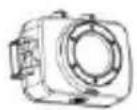
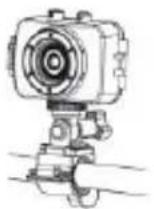
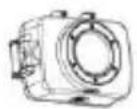
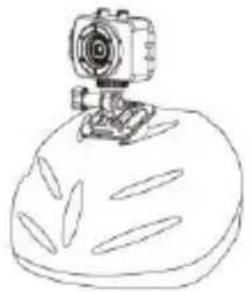
HELMET EDITION


+
natural_image
Simple line drawing of a camera mounted on a bread roll (no text or symbols)CAR DRIVING RECORDER EDITION
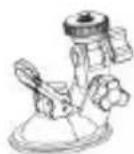


Functions
This user's manual has referred to the latest information we had when this user's manual was made. The screen display and illustrations are used in this user's manual for the purpose of introducing details of this digital camera in a more specific and direct way. Difference may arise between these displays and illustrations and the digital camera actually available for you due to difference in technological development and production batch, under which case, the actual functions of this video camera shall prevail.
Announcements
Please read the Announcements carefully before using this video camera for proper and safe operation, so as to bring its optimum performance into play and extend its service life.
Do not expose the video camera to sunshine directly, nor point its lens to sunlight. Otherwise, the image sensor of the video camera may be damaged.
Take good care of the video camera and prevent water or sand particles from entering the video camera when it is used on the beach or water, because water, sand particles, dust or component containing salt may damage the video camera.
◆ Keep the video camera contaminated free of dust and chemical materials. Place it in a cool, dry and well ventilated place. Do not place the video camera in a high temperature, moist or dusty place.
◆ Please check if the video camera can operate normally before use.
If dirt or stain is accumulated on the video camera or on its lens, use soft, clean and dry rag to wipe it away gently. If the video camera or its lens is stained with sand particles, blow them away gently. Do not use cloth to wipe arbitrarily. Otherwise, it may scratch the surface of video camera or its lens.
If it is required to clean camera surface, firstly blow away the sand dust accumulated on this surface, and then wipe the camera gently with rag or tissue applicable to optical equipments. Please use the cleaning agent of video camera for wiping if necessary. Do not use organic solvent to clean the video camera.
◆ Do not touch the lens surface with fingers.
◆ Please back up the data if the memory card inside this video camera is used for the first time.
◆ The externally installed memory-cards are manufactured from precise electronic components. Data may be lost or damaged under the following circumstances:
- Improper use of the memory card.
- The memory card is bent, dropped or collided.
- Place it under high temperature or moist environment or expose to sunshine directly.
- Electrostatic or electromagnetic field exists around the memory card.
- This memory card is taken out or power supply is interrupted when this video camera or computer is connected to the memory card (i.e. during reading, writing and formatting).
- Touch the metal contact surface of the memory card with fingers or metal materials.
| System Requirements | |
| Operating System | Microsoft Windows2000, XP, Vista, 7 |
| CPU | Intel Pentium III of more than 800MHz or other CPU with equivalent performance |
| Internal Memory | Larger than 512MB |
| Sound Card and Display Card | The sound card and display card shall support DirectX8 or higher version. |
| CD Driver | Speed of 4 times or faster |
| Hard Disk | Free space of more than 500MB |
| Others | One standard USB1.1 or USB2.0 port |
Introduction to Appearance and Keypad
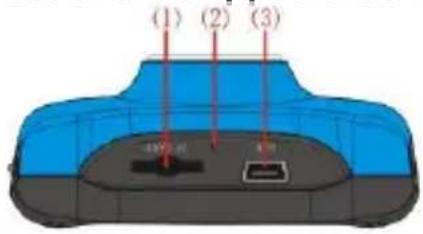


natural_image
3D model of a blue car body with a red arrow pointing to the side panel (no text or symbols)
natural_image
Blue rectangular object with a circular top and red pointer line (no text or symbols)(8)
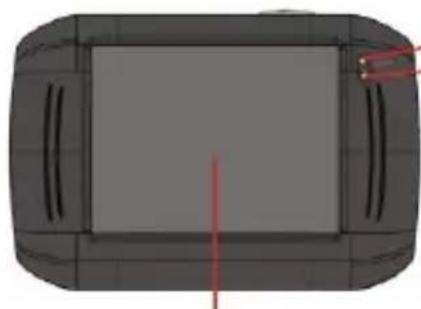
natural_image
Top-down view of a car chassis with front and side panels, showing no text or symbols(9)

(1)Memory card slot
(2)Reset
(3)USB slot
(4)Power button
(5)MIC
(6)Shutter button
(7)Mode Switch:
(8)Lens
(9)LCD TFT
(10) Working Indicator Light
(11)Indicator Light for charging
(12) Wrist strap eyelet
Us age
1. Charge the built-in lithium battery

Connect the video camera with computer for charging in the shutdown state. The indicator light for charging is on at this time and will be off after charging. In general, it can be fully charged after 2-4 hours.
2. Use of Memory Card
- Push the memory card into the card slot according to the concave lettering beside the slot of memory card till it is completely inserted.
- To take out the memory card, gently press the end of the memory card inward and it will pop up.

natural_image
3D diagram of a device rear panel showing blue casing, black buttons, and connector port (no text or symbols)Note: No built-in memory is available in this video camera. Make sure to insert memory card before using.
3. Startup/Shutdown
3.1 Startup: Press the POWER button for 3 seconds, the screen is displayed and the camera is on.

3.2. Shutdown: Press the POWER Key, and the camera will be shut down.
Automatic shutdown: when the idle time of the video camera reaches the time for automatic shutdown, it will be shut down automatically to save power. The default time of this camera for automatic shutdown is 5 minutes.
3.3. Shutdown in case of power shortage: when the power of the battery is insufficient, the LCD display screen will display the low power icon. Please charge it in time. When indicate light turns red and flickering, the video camera will be shut down automatically.
4. Conversion between Function Modes
Three modes are available for this video camera, i.e. picture taking mode, video recording mode and vehicle-mounted mode. Conversion is available via the mode switch after startup.
Picture taking mode: pictures can be taken;
Video recording mode: video can be recorded;
Vehicle-mounted mode: videotape can be recorded.
(one section every 5 minutes)

flowchart
graph TD
    A["Mode Switch"] --> B["Picture taking mode"]
    A --> C["Video recording mode"]
    A --> D["Vehicle-mounted mode"]
5. Indicator light
Busy light: when the camera is busy (such as, recording a film, taking photos, automatic off-screen), the busy light will be on.
Charging light: when the light is on for a long time, it prompts the user that the camera is charging.
6. Video recording mode
When the mode switch is turned to video recording mode, press the shutter button once or click the LCD center once to begin recording under previewing state; press the shutter button once again if you want to stop recording, and the camera will also stop recording, automatically when the memory card is full or the power is insufficient.
1 00:12:18: Timer means that video recording can still last for 12 minutes and 18 seconds.
2 : mode icon, represents that the video camera is in video recording mode.
3 : videoing size, clicks this icon and you can choose
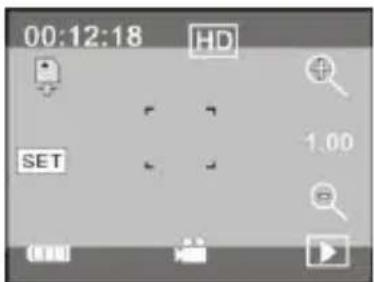
720P/VGA.
4 : means that the memory card is inserted at present.
5 : digital zoom icon, click it and enlarge it.
6 : digital zoom icon, click and minify it.
7 : visual shutter, touch this visible frame for taking photos or recording.
8 : battery icon, represents the power status of the battery.
9 : represents the status of digital zoom.
10 : click this icon to switch to the playback mode.
11 SET: click this icon to set the date and time, finished setting and press Shutter key to confirm.
7 Picture taking mode:
Switch the mode switch into the Picture taking mode, press the shutter button or click the LCD center once under the previewing state to take a photo:
1 0/1234: Counter, indicating current number of photos taken already /number of photos to be taken.
2 : mode icon, indicating that the camera is in photo taking mode.
3 : video size, click this icon to select the photo resolution.
4: means that the memory is been inserted at present.
5 : digital zoom icon, click it to enlarge.
6 : digital zoom icon, click it to minify.
7 : visual shutter, touch this visible frame for taking photos or recording.
8 : battery icon, indicates the power status of the battery.
9 : represents the status of digital zoom.
10 : click this icon to switch to the playback mode.

11 SET: click this icon to set the date and time, finished setting and press Shutter key to confirm.
8 Vehicle-mounted mode:
Turn the mode switch to vehicle-mounted mode, press the shutter button or click the LCD center once under the preview state to begin recording, save a segment for recording every 5 minutes, then start to record the next segment of video. When the storage card is full, the earliest segment of video will be deleted to release the corresponding space for continuous recording.
1 00:12:18 timer, indicating that the camera can still record for 12 minutes and 18 seconds.
2 : mode icon, representing that the camera is in vehicle-mounted mode.
3 : video size, click this icon to select 720P, VGA.
4 : represents that the memory card has been inserted.
5 : digital zoom icon, click it to enlarge.
6 : digital zoom icon, click it to minify.
7 : visual shutter, touch this visible frame for taking photos or recording.

8 : battery icon, representing the current power status of the battery.
9 : represents the status of digital zoom.
10 : click this icon to switch into the playback mode.
11 SET: click this icon to set the date and time, finished setting and press Shutter key to confirm.
Note: the screen will be off automatically during recording process in order to save power; user can press the power button shortly to start the screen and restore display.
9 Playback mode:
9.1 After starting up and entering the previewing state, click the playback icon (☐) at the lower right corner of the LCD to switch to the playback mode:
Click
1 : represents that the current file is an AVI video file.
2 : represents that there is one file in the current folder/one file in total.
3 : current folder name (such as: I:\DCIM\100MEDIA

natural_image
Silver sedan parked on a road with greenery and a camera interface overlay (no readable text or symbols in the image)I: is the movable disk of the device).
4 : Means that clicking can select files frontwards.
5 Means that clicking can select files backwards.
6 : Means that clicking can activate to confirm the deletion of the current file picture.
7 : Means that clicking can play the current movie clips.
8 : Means that clicking can switch back to the previous photo mode (video mode).
9.2 Movie clips playing:

Click to pause playing, click to play forward, and click to play backward.
9.3 File deletion:

Click YES to delete the current file immediately, or click NO to cancel the request of deletion.
Apply on the personal computer
Connect to personal computer
The camera is provided with the plug and play function. Connect the device to the computer with USB line under turning-on state, then it will be switched into the movable hard disk mode.
Icon of movable disk will appear on the window of "my computer". Photos/videos you have taken are saved in folder I:\DCIM\100MEDIA (I is the movable disk of this device) in the movable disk. Files recorded in vehicle-mounted mode are saved in I:\DCIM\RECORDER.
Technical parameters
| Image sensor | 1.3 million pixel (CMOS) | |
| Function mode | videoing, taking photos, vehicle-mounted mode, removable disk, | |
| Camera lens | F3.1 f=9.3mm | |
| Digital zooming | 4 times | |
| Shutter | Electronic shutter | |
| LCD display screen | 2.0-inch touch screen | |
| Image resolution | 5M (2592×1944), 3M (2048×1536), 1M(1280×1024) | |
| Video resolution | VGA: 640x480 (60 frames/second), 720P:1280x720 (30 frames/second) | |
| White balance | Automatic | |
| Exposure | Automatic | |
| File formats | Image | JPEG |
| Video | AVI | |
| Storage medium | microSD card (Supporting up to 32GB), (without built-in flash memory) | |
| USB interface | High-speed USB 2.0 interface | |
| Power Supply | Built-in 3.7V rechargeable lithium | |
| Dimension (length × width × height) | 66*45*25mm | |
| Weight | about 48 grams | |
Guarantee and responsibility
All LEOTEC products have a 24 month warranty from the invoice date to the end customer, except in the included accessories. The manufacturer guarantees the consumer that its products are free from defects in materials and workmanship at the time of purchase.
The batteries have 6 months warranty. Batteries whose maximum load capacity is equal to or less than 50% within that period are considered defective.
The warranty offered only covers defects in workmanship or materials that the product could have.
Defects or failures caused by misuse, breakage, wear are excluded.
Manipulating of the product by anyone other LEOTEC technical service, software updates not provided by LEOTEC and all faults or defects caused by natural disasters will void the warranty.
The warranty is valid only when the user has the ticket or proof of purchase and it is within the deadline
Support and Technical Service
For any technical consultation you can go to the place of purchase or contact the technical service of LEOTEC.
Visit our website and stay always updated in the download section of your product
There is more available information in the website: www.leotec.com or by means of the e-mail: support@leotec.com
DECLARATION OF CONFORMITY
Brand: LEOTEC
Supplier name: World Driver S.A.
Address: Ctra de l'Hospitalet 66 - 68
We declare under our sole responsibility that the product:
Action Sport Cam HD LESPCAM01
Country of manufacture: China
Referred to this statement, with the standard (s) or other document (s) policy (s) in accordance with the provisions of Directive 93/68/EEC, the European Parliament and of the Council of 22 July 1993, transposed into Spanish law by Royal Decree 1950/1995, of December 1, 1995.


Reference symbol both in the product and its user manual, indicates that at the end of life electrical and / or electronic, they should be recycled separately from your household waste. There are adequate means to collect this material for proper recycling. For more information, contact the local authority or your retailer where you purchased the product.

LEOTEC
digital lifestyle
www.leotec.com
- Funciones
- Quick User Guide
- MOTO/BIKE SPORT EDITION
- HELMET EDITION
- CAR DRIVING RECORDER EDITION
- Functions
- Announcements
- Us age
- Charge the built-in lithium battery
- Use of Memory Card
- Startup/Shutdown
- Conversion between Function Modes
- Indicator light
- Video recording mode
- Picture taking mode:
- Vehicle-mounted mode:
- Playback mode:
- Movie clips playing:
- File deletion:
- Apply on the personal computer
- Guarantee and responsibility
- Support and Technical Service
- LEOTEC
Brand : Leotec
Model : LESPCAM01
Category : Camcorder