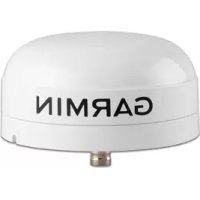
GMR 406 - TV Antenna GARMIN - Free user manual and instructions
Find the device manual for free GMR 406 GARMIN in PDF.


User questions about GMR 406 GARMIN
0 question about this device. Answer the ones you know or ask your own.
Ask a new question about this device
Download the instructions for your TV Antenna in PDF format for free! Find your manual GMR 406 - GARMIN and take your electronic device back in hand. On this page are published all the documents necessary for the use of your device. GMR 406 by GARMIN.
USER MANUAL GMR 406 GARMIN
natural_image
White GARMIN radar device with a curved base and top, against a plain blue background (no text or symbols on the device itself)© 2006, 2007 Garmin Ltd. or its subsidiaries
Garmin International, Inc.
1200 East 151 ^st Street,
Olathe, Kansas 66062, USA
Tel. (913) 397.8200 or (800) 800.1020
Fax (913) 397.8282
Garmin (Europe) Ltd.
Unit 5. The Quadrangle,
Abbey Park Industrial Estate,
Romsey, SO51 9DL, UK
Tel. +44 (0) 870.8501241 (outside the UK)
0808 2380000 (within the UK)
Fax +44 (0) 870.8501251
Garmin Corporation
No. 68, Jangshu 2 ^nd Road,
Shijr, Taipei County, Taiwan
Tel. 886/2.2642.9199
Fax 886/2.2642.9099
All rights reserved. Except as expressly provided herein, no part of this manual may be reproduced, copied, transmitted, disseminated, downloaded or stored in any storage medium, for any purpose without the express prior written consent of Garmin. Garmin hereby grants permission to download a single copy of this manual onto a hard drive or other electronic storage medium to be viewed and to print one copy of this manual or of any revision hereto, provided that such electronic or printed copy of this manual must contain the complete text of this copyright notice and provided further that any unauthorized commercial distribution of this manual or any revision hereto is strictly prohibited.

Information in this document is subject to change without notice. Garmin reserves the right to change or improve its products and to make changes in the content without obligation to notify any person or organization of such changes or improvements. Visit the Garmin Web site (www.garmin.com) for current updates and supplemental information concerning the use and operation of this and other Garmin products.
Garmin ^® , GPSMAP ^® , AutoLocate ^® , TracBack ^® , BlueChart ^® , and MapSource ^® are registered trademarks of Garmin Ltd. or its subsidiaries and may not be used without the express permission of Garmin.
INTRODUCTION
This manual covers the features and operation of the GMR 404/406 marine radar when viewed on a Garmin marine network chartplotter.
Installing Your GMR 404/406
To install your GMR 404/406, refer to the GMR 404/406 Installation Instructions included in this box. If you experience difficulty installing the radar, contact Garmin Product Support or an installation professional in your area.
About This Manual
To get the most out of your GMR 404/406, take time to read this manual and learn the operating procedures for your unit in detail. This manual is organized into the following sections.
The Introduction section contains the Table of Contents, Product Registration, and Software License Agreement.
The Basic Operation section describes the features and operation of the GMR 404/406.
The Appendix contains specifications, regulatory information, and maintenance information. You can also find warranty, European Licensing Requirements, and FCC information in the Appendix.
An Index is provided at the end of the manual for reference.
INTRODUCTION > TABLE OF CONTENTS
TABLE OF CONTENTS
Introduction ...... i
Installing Your GMR 404/406 ...... i
About This Manual ...... i
Product Registration .... iii
Contact Garmin....iii
Software License Agreement .... iii
Warnings iv
Important Information iv
Basic Operation ....1
Understanding Radar 1
Understanding the Radar Display 2
Radar Page 3
Configuring the Radar Page....3
Using the Radar Adjustment Menu 4
Map Page Radar Overlay 9
Radar Tab 10
General Sub Tab.... 10
Display Sub Tab 11
MARPA Sub Tab....12
Advanced Sub Tab 13
Appendix 14
Specifications 14
4 ft Open-Array Antenna 14
6 ft Open-Array Antenna 14
Open-Array Scanner 14
European License Requirements 15
Limited Warranty 16
FCC Compliance 17
Declaration of Conformity (DoC) 17
Index 18
INTRODUCTION > PRODUCT REGISTRATION AND SOFTWARE LICENSE AGREEMENT
Product Registration
Help us better support you by completing our online registration today! Connect to our Web site at www.garmin.com/registration/.
Use this area to record the serial number (8-digit number located on the back of the GMR 404/406 pedestal door) in case your GMR 404/406 needs service. Keep the original sales receipt, or a photocopy, in a safe place.
Serial Number:
Contact Garmin
Contact Garmin if you have any questions while using your GMR 404/406. In the USA contact Garmin Product Support by phone: 913/397.8200 or 800/800.1020, Monday–Friday, 8 AM–5 PM Central Time; or go to www.garmin.com/support/, and click Product Support.
In Europe, contact Garmin (Europe) Ltd. at +44 (0) 870.8501241 (outside the UK.) or 0808 2380000 (UK only).
Software License Agreement
BY USING THE GMR 404/406, YOU AGREE TO BE BOUND BY THE TERMS AND CONDITIONS OF THE FOLLOWING SOFTWARE LICENSE AGREEMENT. PLEASE READ THIS AGREEMENT CAREFULLY.
Garmin grants you a limited license to use the software embedded in this device (the "Software") in binary executable form in the normal operation of the product. Title, ownership rights, and intellectual property rights in and to the Software remain in Garmin.
You acknowledge that the Software is the property of Garmin and is protected under the United States of America copyright laws and international copyright treaties. You further acknowledge that the structure, organization, and code of the Software are valuable trade secrets of Garmin and that the Software in source code form remains a valuable trade secret of Garmin. You agree not to decompile, disassemble, modify, reverse assemble, reverse engineer, or reduce to human readable form the Software or any part thereof or create any derivative works based on the Software. You agree not to export or re-export the Software to any country in violation of the export control laws of the United States of America.

Warnings
Failure to avoid the following potentially hazardous situations could result in an accident or collision resulting in death or serious injury.
- The radar scanner transmits electromagnetic energy. Ensure that the scanner has been installed according to the recommendations given in this guide, and that all personnel are clear of the scanner before switching to transmit mode.
-
For protection from lightning, this installation must conform to NFPA code, section 302. The installation of a lightning protective mast is recommended, and the scanner must be connected to water ground using an 8 gauge copper cable.
-
Use the GMR 404/406 at your own risk. To reduce the risk of unsafe operation, carefully review and understand all aspects of this Installation Manual, and thoroughly practice operation using the simulator mode prior to actual use. When in actual use, carefully compare indications from the GMR 404/406 to all available navigation sources, including the information from other NAVAIDs, visual sightings, charts, etc. For safety, always resolve any discrepancies before continuing navigation.
- Use the GMR 404/406 only as a navigational aid. Do not attempt to use the GMR 404/406 for any purpose requiring precise measurement of direction, distance, location, or topography.
WARNING: This product, its packaging, and its components contain chemicals known to the State of California to cause cancer, birth defects, or reproductive harm. This Notice is provided in accordance with California's Proposition 65. See www.garmin.com/prop65 for more information.
Important Information
The California Electronic Waste Recycling Act of 2003 requires the recycling of certain electronics. For more information on the applicability to this product, see www.erecycle.org.
BASIC OPERATION
This section covers the features and operation of the GMR 404/406.
Understanding Radar
The GMR 404/406 transmits a narrow beam of microwave energy in a rotating 360° pattern. When the transmitted energy contacts a target, some of that energy is reflected and returned to the scanner. The scanner collects the returned energy to process and display. Your GMR 404/406 is operated and adjusted using controls on your Garmin Marine Network chartplotter. You can view radar data on the Radar Page or as an overlay on the Map Page. All radar controls are accessible from both pages.
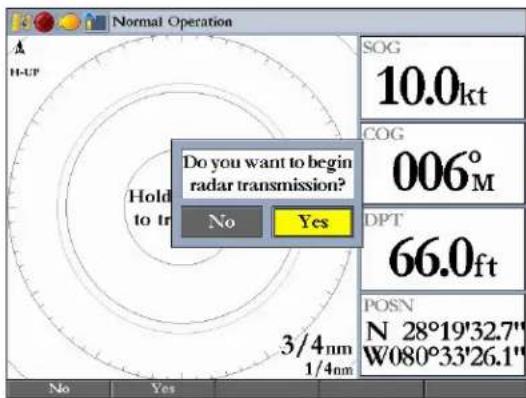
When you turn on the radar, the status bar shows the message "Radar Warming Up" with a countdown to Standby Mode. The countdown also appears in the middle of the Radar Page. When the countdown reaches 0 (zero), the "Hold FCTN to transmit" message appears.
As a safety feature, the radar enters standby mode after it warms up. This gives the operator an opportunity to verify that the area around the scanner is clear before beginning radar transmission. It is important to remember that the microwave energy transmitted by the scanner can potentially be dangerous.

CAUTION: The GMR 404/406 transmits microwave energy that has the potential to be harmful to humans and animals. Before beginning radar transmission, verify that the area around the radar is clear. The radar transmits a beam approximately 12° above and below a line extending horizontally from the center of the scanner. Avoid looking directly at the scanner, because the eyes are the most susceptible part of the body.
When the area surrounding the scanner is clear, press and hold FCTN. The message "Do you want to begin radar transmission?" is shown. Select Yes, and then press ENTER.
BASIC OPERATION > UNDERSTANDING RADAR
Before transmission begins, the message “Spinning Up” is shown while the radar antenna reaches nominal rotation speed. After the message disappears, the radar begins painting an image.
Understanding the Radar Display
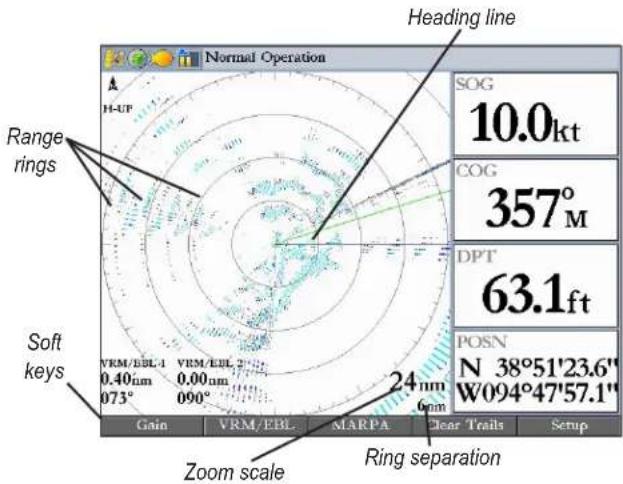
The Radar Page shows a status bar along the top, user-configurable digital navigation data down the right side, a Heading Line, and Range Rings. Soft keys that allow quick access to radar functions and setting changes appear along the bottom of the page.
2 GMR 404/406 Owner's Manual
Using Range Rings
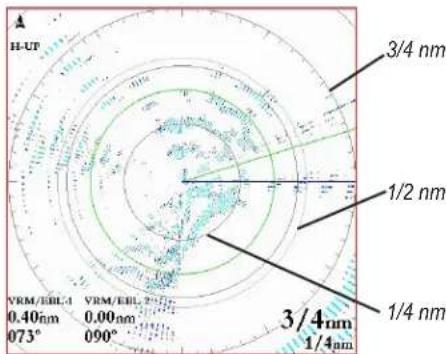
Use the Range Rings to quickly determine the distance to a target. The lower-right corner of the screen contains two scales. The top scale value represents the distance from the center of the radar display to the outermost complete ring. The bottom scale represents the ring separation or the distance between the Range Rings. Use the RANGE keys to zoom in or out. The tick marks on the Range Rings are arranged with major tick marks at 30 degree increments and minor tick marks every five degrees. The tick marks can help in quickly determining the azimuth to a target.
Heading Line
The Heading Line is shown from your current position along the path of your current heading.
Radar Page
A properly installed radar is detected as a new network connection when you turn on your Garmin Marine Network chartplotter.

NOTE: A software update may be needed for the radar to function properly. If the message "Incompatible Software Version" appears when you turn on your chartplotter, you must update your chartplotter software. A software update card is provided with the GMR 404/406.
When the new radar is detected, the Radar Page is added to the page sequence. If the Radar Page is not available, press and hold ADJ/MENU to open the Main Menu. Highlight the System tab, and select Radar from the Services list at the bottom of the page.
To view the Radar Page:
Press PAGE repeatedly until the Radar Page appears.
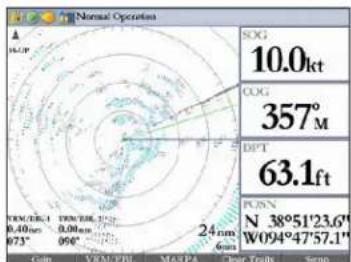
Radar Page
GMR 404/406 Owner's Manual 3
Configuring the Radar Page
You can customize the appearance of the Radar Page.

NOTE: For detailed information about configuring Digital 1 and Digital 2 data fields, see your chartplotter owner's manual.
To add or remove functions on the Radar Page:
- Open the Radar Page, and then press and hold the DATA/CNFG key to open the Configuration window.
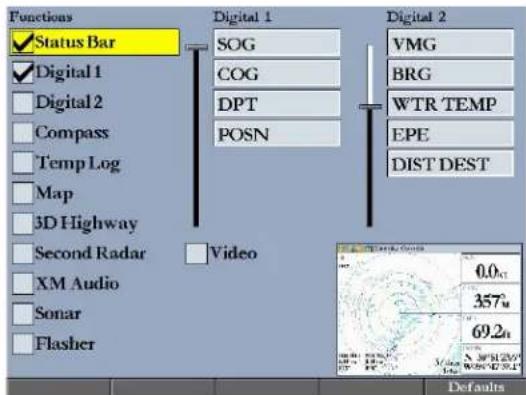
- Using the ROCKER, highlight the function you want to add or remove, and press ENTER. Only functions with a check mark in the check box next to them appear on the Radar Page.
Using the Radar Adjustment Menu
Use the Radar adjustment menu to access the settings and features most commonly used on the Radar Page including: Gain, Sea Clutter, Rain Clutter, FTC, Zoom, Target Expansion, Trails, Guard Zone, VRM/EBL, MARPA, and Hide/Show Navigation Features.
To select an adjustment option from the Radar Page
- Press ADJ/MENU to open the Radar adjustment menu.
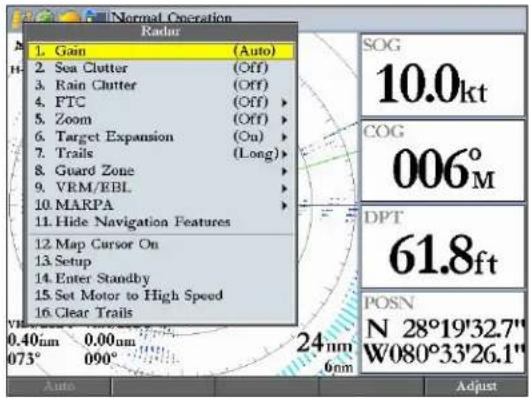
- Press up or down on the ROCKER to highlight the option you want to change, and then press ENTER.
To change a Radar adjustment menu setting:
- Select an adjustment menu option using the method described previously.
- Press up or down on the ROCKER to change the setting, range, or percentage.
- Press ENTER to accept the change, or press QUIT to close the Radar adjustment menu.
Gain
Gain controls the sensitivity of the Radar receiver. Auto (default) is the recommended setting. It automatically adjusts the gain to provide optimal performance. You can also set gain manually. To see more detail, increase the receiver sensitivity by selecting a higher gain. If there is too much detail, or the screen is cluttered, lower the sensitivity (lower the gain) to increase the clarity of the screen.
Sea Clutter
Sea Clutter controls unwanted screen clutter caused by choppy sea conditions. The slider has three preset positions: Calm, Moderate, and Rough.
Rain Clutter
Rain Clutter controls unwanted screen clutter caused by rain at close ranges (use the slider to select 1-100%).
FTC (Fast Time Constant)
FTC controls unwanted screen clutter caused by rain at a distance. The Fast Time Constant has four settings: Off, Low, Medium, and High.
Zoom
Zoom allows you to zoom in on a selected area of the radar screen. When you select a zoom range, a window showing a zoomed portion of the screen appears in the lower-left corner and a selection box appears. To view different areas at the selected zoom range, open the Radar adjustment menu, and then press the Move soft key. Use the ROCKER to move the selection box. The Zoom setting has four settings: Off, 2x, 4x, and Move.
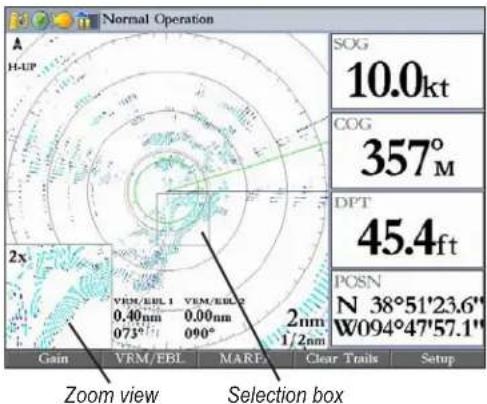
GMR 404/406 Owner's Manual 5
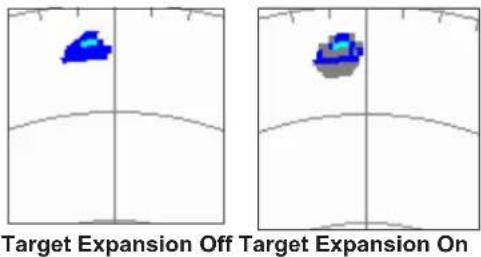
Target Expansion
Use Target Expansion to increase the size of a target. Select On or Off.

NOTE: The Target Expansion setting has no effect at range scales of 4 nm or greater.
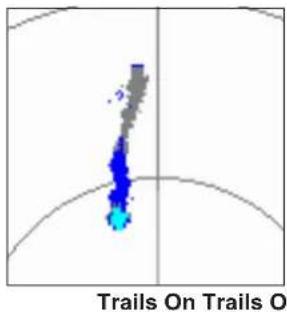
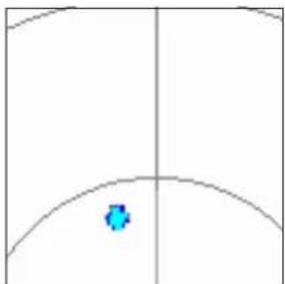
Trails allows you to select whether all returns on the screen leave a history trail, and allows you to determine the length of the history trail (Off, Short, Medium, or Long).
natural_image
Simple diagram with a blue circular symbol inside a curved boundary, no text or labels present.Guard Zone
A Guard Zone is a user-defined area of protection. If a target enters the Guard Zone, an alarm sounds. You can define two Guard Zones. The Guard Zone Menu has two areas, "Guard Zone 1" and "Guard Zone 2." Each area has two settings, Show (Hide) and Adjust.
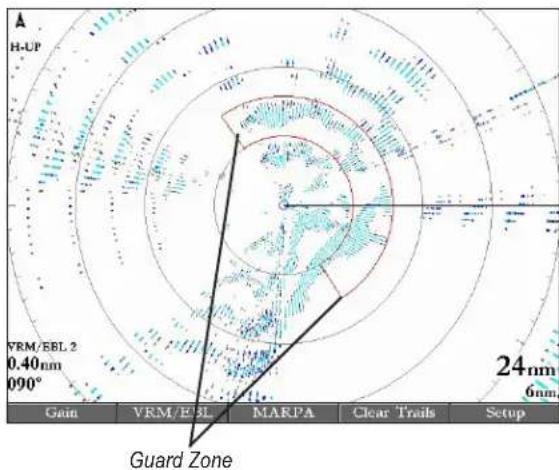
To Define a Guard Zone:
- Highlight Show Guard Zone 1 or 2, and press ENTER.
- Highlight Adjust, and press ENTER.
-
Using the ROCKER, define the area on the Radar Page by adjusting three points:
-
Corner 1
- Corner 2
-
Circular
-
Press ENTER to set the Guard Zone.
VRM/EBL
The (Variable Range Marker (VRM) and Electronic Bearing Line (EBL) tools measure range and bearing to a target. You can move the center point of the VRM, which allows you to measure from one target to another. Two VRM/EBL tools can be active at the same time.
The VRM/EBL option has two areas, VRM/EBL 1 and VRM/EBL 2. Each area has two settings, Show (Hide) and Adjust.
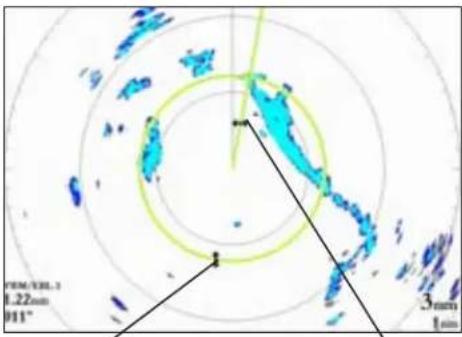
Variable Range Marker(VRM) Electronic Bearing Line (EBL)
To start VRM/EBL 1 or VRM/EBL 2:
On the Radar Adjustment menu, highlight Show VRM/EBL 1 or VRM/EBL 2, and then press ENTER.
You can adjust the diameter of the VRM and the angle of the EBL.
To adjust the VRM/EBL:
- Highlight Adjust and press the ROCKER to the right. Highlight Adjust and press ENTER.
- Press right or left on the ROCKER to rotate the EBL around the center point of the VRM.
- Press up or down on the ROCKER to increase or decrease the size of the VMR.
- Press ENTER to accept the changes.
To move the center location of the VRM:
- Highlight Move, and press ENTER.
- Using the ROCKER, move the center point of the VRM to the selected location.
- Press ENTER to set the new location.
To use the VRM/EBL, expand the diameter of the VRM so that the outer edge touches the target. Rotate the EBL until it intersects the VRM at the target location. The measured range and bearing are displayed in the lower-left corner of the screen.
The Mini Automatic Radar Plotting Aid (MARPA) function helps with collision avoidance. MARPA can track up to 10 designated targets. Detailed information including bearing, range, course, speed, closest point of approach (CPA), and time to closest point of approach (TCPA) for each target is shown in the MARPA list.

NOTE: MARPA requires the use of a heading sensor. The heading sensor must output the NMEA sentence HDM or HDG at format 0183, v2.30 or higher. The Gamin Marine Network was tested using the KVH® 1000 heading sensor using six second dampening.
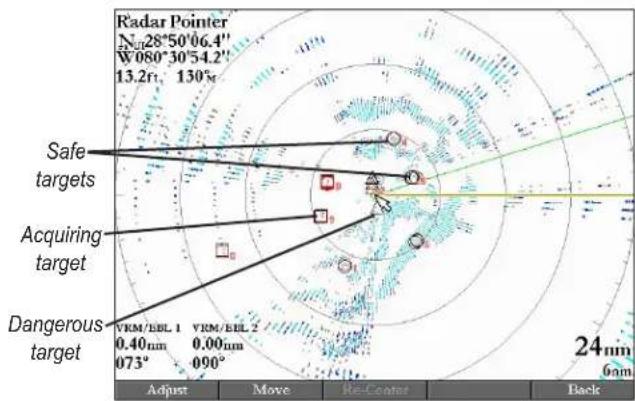
MARPA relies on a Heading Sensor to provide accurate own vessel heading information. Accurate heading data enhances MARPA's performance. Each target being tracked by MARPA is represented by a symbol. The symbols indicate the current state of the target.

Acquiring target

Target is safe

Target is dangerous

Lost target
For each target, a number and Vector Line is shown with the symbol. The number is the MARPA list ID number. The Vector Line is a visual reference of the target's course and speed.
To designate a MARPA target:
- Use the ROCKER to move the pointer to the target location.
- Press the Acquire Target soft key.
While a target is being designated, a red box appears around the target. When MARPA begins tracking the target, the box is replaced with the appropriate symbol.
radar
| Target Type | Value | | ----------------- | --------- | | Safe targets | 13.2 | | Acquiring target | 0.40 | | Dangerous target | 0.00 |To view the MARPA List:
Press the MARPA List soft key.
| ID Bearing | Range | Course | Speed | CPA | TCPA | |
| 0 | 184° | 5.3nm | 000° | 1.2kt | 0.3nm | 04:18:04 |
| 1 | 286° | 4.6nm | 116° | 0.3kt | 1.5nm | 21:30:59 |
| 2 | 174° | 1.9nm | 304° | 3.6kt | 1.5nm | 00:20:49 |
| 3 | 004° | 3.4nm | 277° | 1.7kt | 3.4nm | Passed |
| 4 | 202° | 7.6nm | 139° | 6.6kt | 6.7nm | Passed |
| 5 | 188° | 10.0nm | 099° | 12.4kt | 10.0nm | Passed |
| 6 | 173° | 8.5nm | 294° | 105kt | 7.3nm | 00:02:29 |
| 7 | 087° | 1.6nm | 257° | 126kt | 0.3nm | 00:00:45 |
| — | —° | —nm | —° | —kt | —nm | —:— |
| — | —° | —nm | —° | —kt | —nm | —:— |
Enter Standby (Begin Transmitting)
The Enter Standby (Begin Transmitting) option allows you to select whether the radar is in Standby Mode or is transmitting. Select Enter Standby to place the radar into Standby Mode. While in Standby Mode, the radar does not transmit, but power remains applied to the Magnetron. Select Begin Transmitting to remove the radar from Standby mode. After the radar completes “Spinning Up”, the radar begins transmitting.

NOTE: When the radar is placed into standby mode, the GMR 404/406 will reduce its spinning speed for approximately 15 seconds, then stop perpendicular to the length of the boat, or as defined by the Front of Boat Offset.
Set Motor to High Speed (Set Motor to Normal Speed)
The Set Motor to High Speed (Set Motor to Normal Speed) option allows you to select the motor speed of the GMR 404/406. Selecting Set Motor to High Speed to increases the speed at which the radar rotates, thus increasing the speed at which the screen updates.
Map Page Radar Overlay
Radar information can be shown as an overlay on the Map Page. When you overlay radar information on the Map Page, press ADJ/MENU to access radar options.

NOTE: Changing the map scale does not change the radar range. When you zoom in or our on the Map Page, the radar overlay is scaled to fit.
To overlay radar data on the Map Page:
On the Map Page, press the Show Radar soft key.
BASIC OPERATION > RADAR TAB
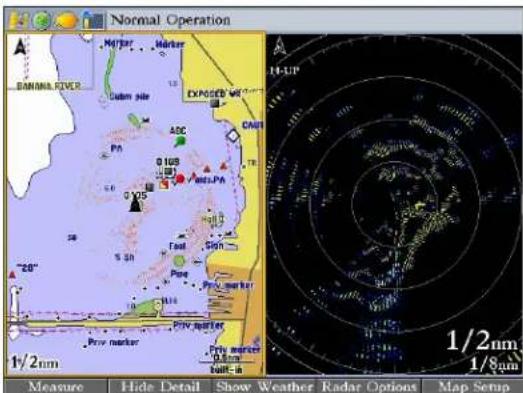
Map Page with Radar Overlay and Radar Page
To hide the radar data overlay on the Map Page:
- Press the Radar Options soft key.
- Press the Hide Radar soft key. The radar overlay is hidden.
Radar Tab
When GMR 404/406 is connected to a Garmin Marine Network chartplotter, and either the Auto-Detect Services or Radar check box is selected on the System tab, the Radar tab appears on the Main Menu.
Use the Radar tab to set up the Radar Page. The Radar tab has four sub tabs: General, Display, MARPA, and Advanced.
10 GMR 404/406 Owner's Manual
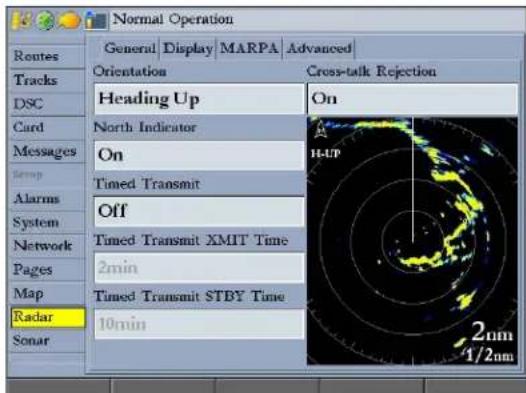
To access and change a setting on the Radar tab:
- Press the Setup soft key on the Radar Page to open the Main Menu. The Radar tab is automatically selected.
- Highlight the setting you want to change, and then press ENTER.
- Press QUIT to return to the Radar Page.
General Sub Tab
Use the General sub tab to select orientation, timed transmit, and cross-talk rejection. The available General sub tab options are:
- Orientation—sets the orientation of the Radar Page display. The settings are Heading Up, North Up, or Course Up.
- North Indicator—toggles the north indicator arrow on or off.
- Timed Transmit —used to save power, usually while at anchor. When Timed Transmit is On, the radar uses the settings in Timed Transmit XMIT Time and Timed Transmit STBY Time fields. When Timed Transmit is Off, these fields are unavailable.
- Timed Transmit XMIT Time—sets the amount of time (in minutes) for which the radar transmits. For example, if set to 01 min, the radar transmits for one minute before switching to standby for the amount of time entered in the Timed Transmit STBY Time field.
- Timed Transmit STBY Time —sets the amount of time (in minutes) that the radar is in standby mode. For example, if set to 10 min, the radar is in standby mode for 10 minutes before switching to transmission for the amount of time entered in the Timed Transmit XMIT Time field. When the radar is in standby mode, the scanner does not rotate or transmit; however, power is still applied to the Magnetron, eliminating the need for a warm-up cycle.
- Cross-talk Rejection—toggles cross-talk rejection on or off. Radar cross-talk may occur when two or more radar equipped vessels are operating in proximity to one another. Cross-talk rejection automatically filters out the cross-talk interference.
Display Sub Tab
Use the Display sub tab to adjust settings for: Center Offset, Rings, Background color, Heading Line, Bearing Reference, and Navigation Features.
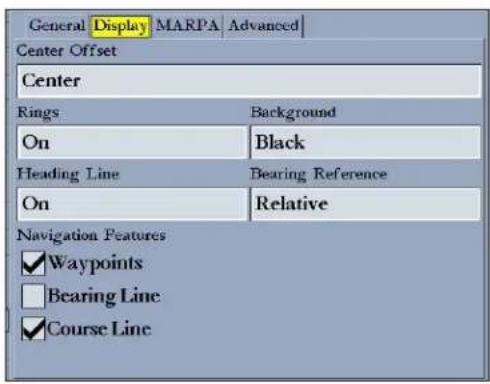
The available Display sub tab options are:
- Center Offset—sets your location on the screen. Center places your current location in the center of the screen. Look Ahead shifts your current location toward the bottom of the screen, allowing you to view an area farther ahead. Auto Shift adjusts your location on the screen according to the current speed.
BASIC OPERATION > RADAR TAB
- Rings—toggles the radar rings on or off.
- Background—sets the background color for the Radar Page. Available options are Black, Blue, or White.
• Heading Line—toggles the heading line on or off. - Bearing Reference—sets your bearing, either Absolute or Relative. Relative calculates the bearing relative to own vessel heading. Absolute calculates the bearing referring to North.
- Navigation Features—allows you to show or hide navigational features on the Radar Page. Use the ROCKER and the ENTER key to select or clear options.
- Waypoints—show user waypoints on the Radar Page.
- Bearing Line—show a bearing line on the Radar Page. The bearing line appears as a line from your current position to the active destination waypoint, similar to a traditional lollipop.
- Course Line—show a course line from your starting point to the active destination waypoint, which is similar to navigation on a map.
MARPA Sub Tab
The MARPA sub tab contains settings for Vector Length, Target History, Own Vessel Safe Zone, Time To Safe Zone, Safe Ring Zone, and Velocity Reference.
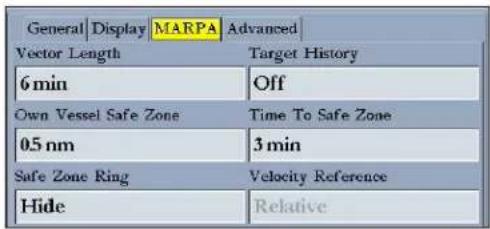
The available MARPA sub tab options are:
- Vector Length— predicts the target's approximate position at a set time interval. This setting determines the length of the Vector Line, based on the time interval setting and the target's speed. The time interval settings range from .05 minutes to 60 minutes.
- Target History— is a trail showing a target's movement. Target History can be turned On or Off.
- Own Vessel Safe Zone—is a circular area defined by a range setting that is centered on your own vessel. If a target enters the defined area an alarm is sounded. The Safe Zone can be set to a distance between .01 and 2 nautical miles.
-
Time To Safe Zone— sounds an alarm if MARPA determines that a target will intersect the Own Vessel Safe Zone within the defined time interval. The time interval settings range from 3 to 24 minutes.
-
Safe Zone Ring—displays a ring on the Radar Page depicting the Own Vessel Safe Zone.
- Velocity Reference—has two settings, Absolute and Relative. This setting determines how speed and direction are displayed on the MARPA list. Relative calculates target speed and direction relative to your own. Absolute shows the target's actual speed.
Advanced Sub Tab
Use the Advanced sub tab to set AFC mode, front of boat offset and antenna size.
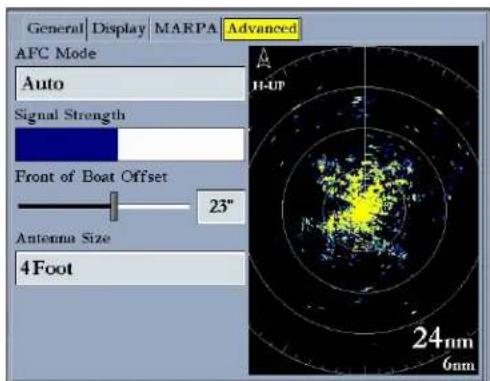
The available Advanced sub tab settings are:
GMR 404/406 Owner's Manual 13
- AFC Mode—sets how the scanner frequency is adjusted. Select Auto to automatically adjust the scanner frequency for optimal performance (recommended). Select Manual to set the frequency manually.
To manually adjust the scanner frequency:
- Highlight the AFC Mode field, and press ENTER.
- Select Manual, and press ENTER.
- Highlight the Freq button to the right of the AFC Mode field, and press ENTER.

NOTE: The Freq button is available only available if Manual is selected in the AFC Mode field.
- Press up or down on the ROCKER to adjust the scanner frequency.
- Press ENTER to accept the frequency change.

NOTE: The Signal Strength bar graph is damped and may be slow when responding to frequency tuning changes.
• Signal Strength—Shows the strength of the radar signal
- Front of Boat Offset—allows you to offset the front of the boat if you mount the radar at an angle.
- Antenna Size—allows you to select the size of your antenna (4 Foot or 6 Foot). Select 4 Foot for a GMR 404 radar; select 6 Foot for a GMR 406 radar.
APPENDIX > SPECIFICATIONS
APPENDIX
Specifications
4 ft Open-Array Antenna
Type: End fed slotted waveguide
Horizontal Beamwidth: 1.8 degrees
Horizontal Sidelobes: -23 dB within ±10 deg of main -30 dB outside ±10 deg of main
Vertical Beamwidth: 24 degrees
Antenna Gain: 29 dBi
Polarization: Horizontal
Input Return Loss: Better than -20 dB
Weight: 12 lbs (5.4 kg)
6 ft Open-Array Antenna
Type: End fed slotted waveguide
Horizontal Beamwidth: 1.1 degrees
Horizontal Sidelobes: -25 dB within ±10 deg of main -30 dB outside ±10 deg of main
Vertical Beamwidth: 24 degrees
Antenna Gain: 30 dBi
Polarization: Horizontal
Input Return Loss: Better than -20 dB
Weight: 16 lbs (7.3 kg)
14 GMR 404/406 Owner's Manual
Open-Array Scanner
Transmit Power: 4 kW
Transmitter Frequency: 9410 ±30 MHz
Input Voltage: 10.5 – 38 volts DC
Typical Input Power: 45 W
Input Power (100 kts wind): 130 W maximum
Range/Pulse Width/PRF (nm/nsec/Hz): 0.125/65/2304
0.250/65/2304
0.500/80/2304
0.750/200/1152
1.0/250/1152
1.5/500/576
2.0/500/576
3.0/800/576
4.0/800/576
6.0-24/1000/576
36-72/1000/288
Antenna Rotation: 24 rpm and 48 rpm
Maximum Wind Load: 100 kts
Receiver Noise Figure: Less than 4 dB
Environmental: Temp: -10°C to +60°C
Humidity: 95% at 35°C
Rel Wind: 100 kts
Waterproof to IEC 60529 IPX6
Range: 20 meters minimum, 72 nm max
Range Discrimination: 20 meters
Radar Interference: Anti-jamming algorithm
Clutter Suppression: Sea Clutter, Rain Clutter, FTC
Weight: 42 lbs (19 kg)
Dimensions: 17" x 11" x 16"
Cable: 49.21' (15 meters) long; 8.4 lbs (3.8 kg)
Radar Display Features
Presentation Modes: North up, Course up, Heading up
VRM/EBL: 2 user adjustable, capable of floating
Bearing Accuracy: 1 degree
Range Ring Accuracy: 20 meters or ±1.5% of range scale, whichever is greater.
Controls: Auto & Manual Gain Adjust; Manual or Auto (AFC) receiver tuning; Manual adjust for Rain Clutter and 3 presets for Sea Clutter; FTC presets.
Radar/Chart Overlay: Overlay mode is supported. Also has split overlay with standard radar presentation
Zoom Mode: 2x, 4x
Trails (Wakes): Short, Medium, Long
Guard Zone Alarm: 2 guard zones – user adjustable
Off center Function: Look ahead, Auto Shift, and Manual
Antenna RPM: Selectable to 24 or 48 rpm
MARPA: Tracks up to 10 MARPA targets for radar plotting and collision avoidance. (Heading sensor is required).
European License Requirements
The following table shows European License requirements for the GMR 404/406.
| Austria I Luxembourg I | G Spain | |||
| Belgium G The Netherlands I | ||||
| Czech Republic I Poland G | ||||
| Denmark G Portugal G | ||||
| Estonia I Slovakia * | ||||
| Finland I Slovenia | G | |||
| France | G Spain | * | ||
| Germany G Sweden | G | |||
| Greece G United Kingdom | I | |||
| Hungary | * | Cyprus | G | |
| Ireland | I Malta | * | ||
| Italy | G Iceland | G | ||
| Latvia | I Norway | I | ||
| Lithuania | G Switzerland | I |
I—requires an individual license for operation.
G—can be operated under a general license or license exemption.
* This product may require licensing in your country of use. Refer to the national radio or telecommunications office or ministry.
APPENDIX > LIMITED WARRANTY
Limited Warranty
All Garmin marine radomes and open array scanners are warranted to be free from defects in materials or workmanship for two years from the date of purchase. Within this period, Garmin will, at its sole option, repair or replace any components that fail in normal use. Such repairs or replacement will be made at no charge to the customer for parts or labor, provided that the customer shall be responsible for any transportation cost. This warranty does not cover failures due to abuse, misuse, accident, or unauthorized alteration or repairs.
THE WARRANTIES AND REMEDIES CONTAINED HEREIN ARE EXCLUSIVE AND IN LIEU OF ALL OTHER WARRANTIES EXPRESS, IMPLIED, OR STATUTORY, INCLUDING ANY LIABILITY ARISING UNDER ANY WARRANTY OF MERCHANTABILITY OR FITNESS FOR A PARTICULAR PURPOSE, STATUTORY OR OTHERWISE. THIS WARRANTY GIVES YOU SPECIFIC LEGAL RIGHTS, WHICH MAY VARY FROM STATE TO STATE.
IN NO EVENT SHALL GARMIN BE LIABLE FOR ANY INCIDENTAL, SPECIAL, INDIRECT, OR CONSEQUENTIAL DAMAGES, WHETHER RESULTING FROM THE USE, MISUSE, OR INABILITY TO USE THIS PRODUCT OR FROM DEFECTS IN THE PRODUCT. Some states do not allow the exclusion of incidental or consequential damages, so the above limitations may not apply to you. Garmin retains the exclusive right to repair or replace the unit or software or offer a full refund of the purchase price at its sole discretion. SUCH REMEDY SHALL BE YOUR SOLE AND EXCLUSIVE REMEDY FOR ANY BREACH OF WARRANTY.
To obtain warranty service, contact your local Garmin authorized dealer or call Garmin Product Support for shipping instructions and an RMA tracking number. Securely pack the unit and a copy of the original sales receipt, which is required as the proof of purchase for warranty repairs. Write the tracking number clearly
on the outside of the package. Send the unit, freight charges prepaid, to any Garmin warranty service station.
Online Auction Purchases: Products sold through online auctions are not eligible for rebates or other special offers from Garmin. Online auction confirmations are not accepted for warranty verification. To obtain warranty service, an original or copy of the sales receipt from the original retailer is required. Garmin will not replace missing components from any package purchased through an online auction.
International Purchases: A separate warranty is provided by international distributors for units purchased outside the United States. This warranty is provided by the local in-country distributor and this distributor provides local service for your unit. Distributor warranties are only valid in the area of intended distribution. Units purchased in the United States or Canada must be returned to the Garmin service center in the United Kingdom, the United States, Canada, or Taiwan for service.
Garmin International, Inc. Garmin (Europe) Ltd.
1200 East 151st Street, Unit 5, The Quadrangle,
Olathe, Kansas 66062, USA Abbey Park Industrial Estate,
Tel. (913) 397-8200 or Romsey, SO51 9DL, UK
(800) 800-1020 Tel. +44 (0) 870.8501241 (outside the UK)
Fax (913) 397-8282 0808.2380000 (within the UK)
Fax +44 (0) 870.8501251
Garmin Corporation
No. 68, Jangshu 2nd Road,
Shijr, Taipei County, Taiwan
Tel. 886/2.2642.9199
Fax 886/2.2642.9099
FCC Compliance
The GMR 404/406 complies with Part 80 of the FCC rules. It has received a grant of equipment authorization, issued under the authority of the FCC.
This equipment generates, uses, and can radiate radio frequency energy and, if not installed and used in accordance with the instructions, may cause harmful interference to radio communications. However, there is no guarantee that interference will not occur in a particular installation. If this equipment does cause harmful interference to radio or television reception, which can be determined by turning the equipment off and on, the user is encouraged to try to correct the interference by one of the following measures:
- Reorient or relocate the receiving antenna.
- Increase the separation between the equipment and the receiver.
- Connect the equipment into an outlet on a circuit different from that to which the receiver is connected.
- Consult the dealer or an experienced radio/TV technician for help.
Declaration of Conformity (DoC)
Hereby, Garmin, declares that this GMR 404/406 is in compliance with the essential requirements and other relevant provisions of Directive 1999/5/EC.
To view the full Declaration of Conformity, see the Garmin Web site for your Garmin product: http://www.garmin.com/products/gmr404/. Click Manuals, and then select the Declaration of Conformity link.
INDEX
INDEX
A
Advanced sub tab 13
AFC mode 13
auto-detect services 10
B
Bearing Line 12
bearing reference 11, 12
begin transmitting 9
C
center offset 11
clutter
rain 4
sea 4
configuring
Radar Page 3
cross-talk rejection 11
D
digital navigation data 2
Display sub tab 11
E
EBL 7
enter standby 9
F
FTC 4
G
gain 4
Garmin Marine Network 8
guard zone 4,6
defining 6
H
heading line 2, 11, 12
heading sensor 8
hide/show navigation features 4
M
main pages
Radar Page 3–7
manually adjust the radar 13
MARPA 4,8-9
list 9
target 8
MARPA sub tab 10, 12
motor speed
high 9
normal 9
N
navigation features 4, 11, 12
0
orientation 10
Own Vessel Safe Zone 12
R
Radar
adjustment menu 4
background color 11
range rings 1
understanding 1
radar overlay 9
Radar Page 3
configuring 3
viewing 3
Radar tab 10–13
Advanced sub tab 13
Display sub tab 11
General sub tab 10
MARPA sub tab 12
radar warming up 1
rain clutter 4
range rings 2
rings 11
S
safety feature 1
safe zone ring 13
sea clutter 4
signal strength 13
software update 3
soft keys 2
spinning up 2
status bar 1
T
target expansion 4,5
target history 12
Timed Transmit 11
STBY Time 11
XMIT Time 11
Time To Safe Zone 12
trails 4, 5
V
vector length 12
velocity reference 13
VRM 7
VRM/EBL 4
adjusting 7
W
warming up 1
waypoints 12
Z
zoom 4,5
Zoom level 5
For the latest free software updates (excluding map data) throughout the life of your Garmin products, visit the Garmin Web site at www.garmin.com.

GARMIN®
© 2006, 2007 Garmin Ltd. or its subsidiaries
Garmin International, Inc.
1200 East 151 ^st Street, Olathe, Kansas 66062, USA
Garmin (Europe) Ltd.
Unit 5, The Quadrangle, Abbey Park Industrial Estate, Romsey, SO51 9DL, UK.
Garmin Corporation
No. 68, Jangshu 2 ^nd Road, Shijr, Taipei County, Taiwan
www.garmin.com
Part Number 190-00669-00 Rev. B