CD Box S - CD Player PRO-JECT - Free user manual and instructions
Find the device manual for free CD Box S PRO-JECT in PDF.


| Product Type | CD Player |
| Brand | Pro-Ject |
| Model | CD Box S |
| Drive Type | Top-loading with magnetic disc clamp |
| Supported Disc Formats | CD, CD-R, CD-RW |
| DAC Resolution | 24-bit / 192 kHz |
| Analog Outputs | RCA (unbalanced) |
| Digital Outputs | Optical (TOSLINK), Coaxial (RCA) |
| Frequency Response | 20 Hz – 20 kHz (±0.5 dB) |
| Signal-to-Noise Ratio | > 110 dB |
| Total Harmonic Distortion | < 0.003% |
| Power Consumption | 15 W (max) |
| Standby Power Consumption | < 0.5 W |
| Power Supply | External DC adapter (12 V, 1 A) |
| Dimensions (W x H x D) | 206 x 72 x 200 mm |
| Weight | 2.2 kg |
| Color Options | Silver, Black |
| Remote Control | Included (IR) |
| Display | LED display |
| Chassis Material | Aluminum (brushed) |
| Cleaning | Use a soft, dry cloth for exterior; lens cleaner for CD lens |
| Safety Precautions | Do not place near heat sources or in direct sunlight; avoid moisture |
| Spare Parts / Repairs | Contact your local Pro-Ject dealer or service center |
Frequently Asked Questions - CD Box S PRO-JECT
User questions about CD Box S PRO-JECT
0 question about this device. Answer the ones you know or ask your own.
Ask a new question about this device
Download the instructions for your CD Player in PDF format for free! Find your manual CD Box S - PRO-JECT and take your electronic device back in hand. On this page are published all the documents necessary for the use of your device. CD Box S by PRO-JECT.
USER MANUAL CD Box S PRO-JECT
BY PRO-JECT AUDIO SYSTEMS
INSTRUCTIONS FOR USE
Pro-Ject CD Box S
Dear music lover,
thank you for purchasing a PRO-JECT AUDIO CD Box.
In order to achieve maximum performance and reliability you should study these instructions for use carefully.

Warning of a hazard for the user, the unit or possible misuse.

Important notice.
Caution! Laser diode, discs to avoid, safety instructions
This product contains a laser diode of higher class than 1. To ensure continued safety, do not remove any covers or attempt to gain access to the inside of the product. Refer all servicing to qualified personnel.
If a disc is cracked, chipped, warped, or otherwise damaged, don't risk to play it. You could end up damaging the unit. This player is designed for use with fully circular, full size CDs only. Use of shaped discs is not recommended. The manufacturer and the distributor disclaims all liability arising in connection with the use of damaged or shaped discs.

AC outlet voltages vary from country to country. Before connecting to the mains, make sure that the voltage in your area meets the voltage requirements printed on the power supply.
The power supply is used to disconnect the unit from the mains. Make sure that the power supply is easily accessible at all times. Never handle the device, the power supply while your hands are wet or damp.
Avoid letting liquids enter the device or the power supply. Never place any item containing liquid, such as a flower vase on or near the device. Never spill any liquid on the device or the power supply. Never place any naked flame sources, such as lighted candles on or near the device. The product shall not be used in damp or wet locations, next to a bathtub, sink, swimming pool or any other similar conditions.
Connectors


Make all connections whilst the CD player is disconnected from the power supply.
Take care to connect the left and right channels correctly. The right channel is usually marked red, the left channel black or white.
Never use any other power supply than the one supplied with the unit.
Connection to the amplifier
Connect the Out socket to a line input (such as AUX) on your amplifier.
Connection to a external A/D-converter
Connect the Co-axial out socket to a coaxial digital input on the D/A converter or AV processor. Doing so allows you to use the signal in its digital for further digital processing.
Mains power connection
Connect the low voltage plug from the power supply to the Power 9V= socket before connecting the power supply to the mains.
Remote control
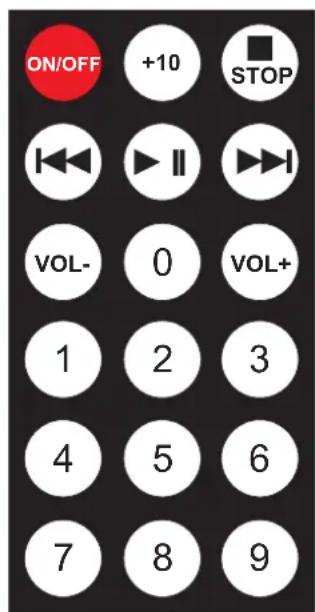
To switch on from standby or to standby

turns the unit on or back into standby
Volume control
adjust the sound volume of your Pro-Ject Audio amplifier
Stop

stops playback
Play / Pause

starts and pauses playback
Selecting tracks
1 9 +10 and
accesses a specific track directly and start playback.
For example, to play track 19, press
+10, 1 and 9. To play track 29, press +10, 2 and
9
Stepping between tracks, scanning through the disc
Press or
Press and hold the button 🏠️ for fast reverse scanning. 🏠️ activates fast forward scanning.
Repeat
Pressing the 0


button repeatedly selects the repeat modes in turns. The display shows:

repeat play for the current track
repeat play for all tracks
Pressing
0
again takes the CD player back to standard playback.
Front panel controls

To switch on from standby or to standby
A short press of the push button on the left hand side switches the player to its fully operational status. To return to standby, press the button for more than four seconds. The display shows STANDBY when the unit is in standby. To switch to standby, playback must be stopped.
Inserting and ejecting a disc
Switch the unit on from standby. Insert the disc into the slot, with the label side facing upwards. The slot-loading mechanism will load the disc automatically. The display shows the total number of tracks on the disc and the total duration of the disc.
A short press of the button ■ stops playback. Pressing ■ again, ejects the disc.
Play
▶ starts playback of the first track. The display shows the current track number, the elapsed time of the current track and the play icon.
Pause
▶ pauses playback. The display shows the current track number, the elapsed time of the current track and the pause icon.
To resume playback press ▶ again.
Stop
A short press of the button ■ stops playback. The display shows the total number of tracks on the disc, the total duration of the disc and the stop icon.
Stepping between tracks
Press the buttons ◀◀ (previous track) or ▶▶ (next track). The display shows the number of the tracks as you step, the elapsed time of the current track and the step icon.
Scanning through the disc
Press and hold the button ⬆ (fast backward) or ▶ (fast forward) to scan through the disc. The display shows the current track number, the elapsed time of the current track and the scan icon.
Releasing ◀◀ or ▶▶Will take you back to playback.
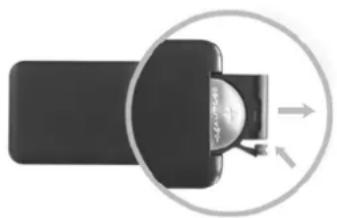
Replacing batteries
Proceed as follows:
- Unlock and slide open the battery case cover
- Replace the battery.
Make sure the battery is the right way round! - Close the battery case cover
Battery type: 1 x CR2032 / 3V or 1 x CR2025 / 3V
natural_image
Diagram showing a device with a circular arrow pointing to a component, no text or symbols present
Do not dispose the batteries as ordinary domestic refuse. Please dispose your exhausted batteries at the appropriate collection sites - usually located at supermarkets and drugstores.
Technical specifications Pro-Ject CD Box S
Supports: CD, CD-R, CD-RW and Hybrid-SACD
Frequency response: 20Hz - 20kHz/-0,3dB
Noise floor: 96dBA
THD: 0,01%
Line-level output: 1 pair RCA/phono sockets
Output voltage: 1Vrms
Digital output: 1 x co-axial (S/PDIF)
D/A converter: Texas Instruments TLV320DAC23
24Bit/96kHz, 8-times oversampling
Outboard power supply: 9V/2.000mA DC; suitable for your country's mains supply
Power consumption: 300 - 1.500mA DC, <1W in standby
Replacement battery remote control: 1 x CR2032 / 3V or 1 x CR2025 / 3V
Dimensions W x H x D (D with sockets): 206 x 36 x 150 (156)mm
Weight: 1.260g without power supply
Service
Should you encounter a problem which you are not able to alleviate or identify despite the above information, please contact your dealer for further advice. Only when the problem cannot be resolved there should the unit be sent to the responsible distributor in your country.
Warranty

The manufacturer accepts no responsibility for damage caused by not adhering to these instructions for use. Modification or change to any part of the product by unauthorized persons release the manufacturer from any liability over and above the lawful rights of the customer.
Copyright
PRO-JECT is a Registered Trademark of H. Lichtenegger.
This guide was produced by: Audio Trade GmbH Copyright © 2012. All rights reserved.
The information was correct at the time of going to press. The manufacturer reserves the right to make changes to the technical specification without prior notice as deemed necessary to uphold the ongoing process of technical development.
- INSTRUCTIONS FOR USE
- Pro-Ject CD Box S
- Caution! Laser diode, discs to avoid, safety instructions
- Connectors
- Connection to the amplifier
- Connection to a external A/D-converter
- Mains power connection
- Remote control
- To switch on from standby or to standby
- Volume control
- Stop
- Play / Pause
- Selecting tracks
- Stepping between tracks, scanning through the disc
- Repeat
- Front panel controls
- Inserting and ejecting a disc
- Play
- Pause
- Stepping between tracks
- Scanning through the disc
- Replacing batteries
- Technical specifications Pro-Ject CD Box S
- Service
- Warranty
- Copyright
Brand : PRO-JECT
Model : CD Box S
Category : CD Player