iBBU08 - Battery LSI - Free user manual and instructions
Find the device manual for free iBBU08 LSI in PDF.


User questions about iBBU08 LSI
0 question about this device. Answer the ones you know or ask your own.
Ask a new question about this device
Download the instructions for your Battery in PDF format for free! Find your manual iBBU08 - LSI and take your electronic device back in hand. On this page are published all the documents necessary for the use of your device. iBBU08 by LSI.
USER MANUAL iBBU08 LSI
MegaRAID® LSliBBU08 Intelligent Battery Backup Unit
Quick Installation Guide
46307-00, Revision A, August 2010

natural_image
Abstract geometric pattern with diagonal colored bands (green, orange, blue, light green) radiating from a central point on white background, no text or symbols present.Revision History
Version and Date Description of Changes
46307-00, August 2010 Initial release of document.
LSI and the LSI logo are trademarks or registered trademarks of LSI Corporation or its subsidiaries. All other brand and product names may be trademarks of their respective companies.
LSI Corporation reserves the right to make changes to the product(s) or information disclosed herein at any time without notice. LSI Corporation does not assume any responsibility or liability arising out of the application or use of any product or service described herein, except as expressly agreed to in writing by LSI Corporation; nor does the purchase, lease, or use of a product or service from LSI Corporation convey a license under any patent rights, copyrights, trademark rights, or any other of the intellectual property rights of LSI Corporation or of third parties.
This document contains proprietary information of LSI Corporation. The information contained herein is not to be used by or disclosed to third parties without the express written permission of LSI Corporation.
Corporate Headquarters Website
Milpitas, CA www.lsi.com
800-372-2447
Document Number: 46307-00 Rev. A
Copyright © 2010 LSI Corporation
All Rights Reserved
Quick Installation Guide
MegaRAID® LSliBBU08 Intelligent Battery Backup Unit
The LSI™ MegaRAID LSliBBU08 is an intelligent battery backup unit (iBBU) that protects the integrity of the cached data on a MegaRAID RAID controller for up to 48 hours (depending on the derated retention time selected) in case of a complete AC power failure or a brief power outage.
Thank you for purchasing the LSI MegaRAID LSliBBU08. Before you install your RAID controller, please take a few minutes to read this quick installation guide. If you need more information about any topic covered in this guide, refer to the related documents on your MegaRAID Universal Software Suite CD.
This quick installation guide explains how to install the LSliBBU08 directly or remotely with your RAID controller. The LSliBBU08, which is based on Lithium ion (LiON) battery cell technology, can be used in two application modes:
Mode 1: The LSliBBU08 uses a small board-to-board connector to mount directly to the following SAS RAID controllers:
■ MegaRAID SAS 9260-4i
■ MegaRAID SAS 9260-8i
■ MegaRAID SAS 9261-8i
■ MegaRAID SAS 9280-4i4e
■ MegaRAID SAS 9280-8e
Mode 2: The LSliBBU08 connects remotely to the following SAS RAID controllers using a 12-inch cable or, where applicable (*), a 12-inch cable and a remote interposer board that are sold separately in a Remote Battery Kit:
■ MegaRAID SAS 9260-4i*
■ MegaRAID SAS 9260-8i*
■ MegaRAID SAS 9260-16i
■ MegaRAID SAS 9261-8i
■ MegaRAID SAS 9280-4i4e
■ MegaRAID SAS 9280-8e
■ MegaRAID SAS 9280-16i4e
■ MegaRAID SAS 9280-24i4e
LSI provides a family of MegaRAID iBBUs for use with its high-performance MegaRAID RAID controllers. The LSI MegaRAID iBBUs provide an inexpensive alternative to using an uninterruptible power supply (UPS) and a second level of fault tolerance when used with a UPS.
To mount the LSliBBU08 on the RAID controller directly, follow the steps in Installing the LSliBBU08 Directly on the MegaRAID SAS RAID Controller.
To connect the LSliBBU08 to the RAID controller remotely, follow the steps in Connecting the LSliBBU08 Remotely to the MegaRAID SAS RAID Controller.
Front View and Rear View of the LSliBBU08
The following figure shows the front view and the rear view of the LSliBBU08. The front view is the side that you can see after you install the LSliBBU08 on the RAID controller. Note that the LSliBBU08 combines a battery pack with a daughtercard. The LSliBBU08 uses screws and standoffs to connect to the controller.
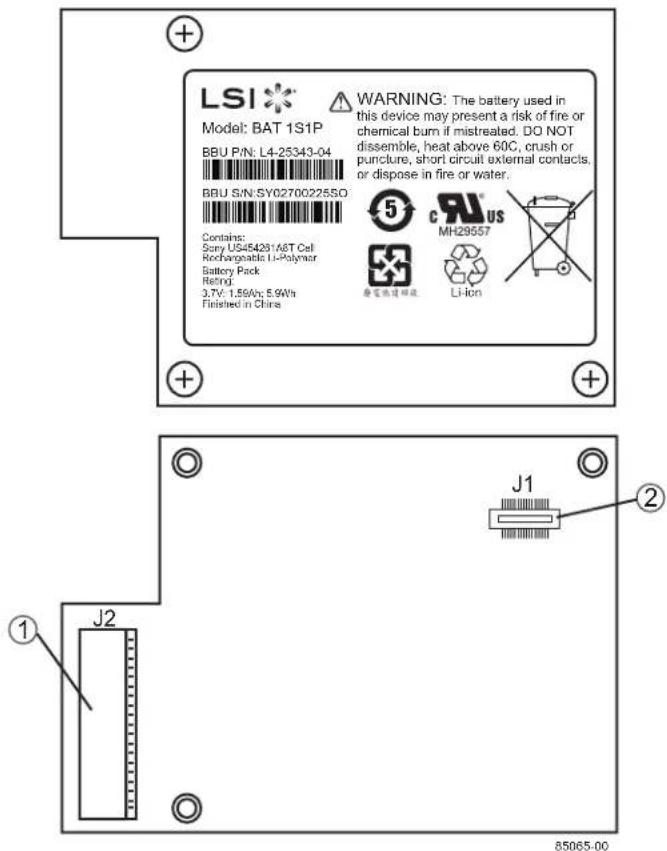
- J2 remote connector
- J1 board-to-board connector
Figure 1: Front View and Rear View of the LSliBBU08
NOTE: Record your controller serial number in a safe location in case you need to contact LSI.
Installing the LSliBBU08 Directly on the MegaRAID SAS RAID Controller
This section describes how to install the LSliBBU08 directly on the MegaRAID SAS 9280-8e RAID controller. You can connect the LSliBBU08 in the same way to the other MegaRAID SAS RAID controllers that use this iBBU. For information about the BBU connectors on these controllers, see the MegaRAID 6Gb/s SAS RAID Controllers User's Guide.
Perform the following tasks described in this section, in order, to connect the LSliBBU08 directly to the RAID controller:
- Removing the RAID Controller from the Computer
- Installing the LSliBBU08 on the RAID Controller
- Reinstalling the RAID Controller on the Motherboard
CAUTION: Electrostatic discharge can damage the LSliBBU08 and the MegaRAID SAS RAID controller. Make sure that you install the LSliBBU08 at an ESD-safe workstation that meets the requirements of EIA-625 – "Requirements For Handling Electrostatic Discharge Sensitive Devices." When you install the LSliBBU08, follow the ESD-recommended practices in the latest revision of IPC-A-610.
Removing the RAID Controller from the Computer
Follow these steps to remove the RAID controller from the computer.
- Turn off the power, and unplug the power cords.
- Ground yourself and make sure the system is grounded.
- Remove the cover from the computer, according to the instructions in the system user's manual, to allow access to the controller.
- Unplug all cables from the controller, remove the screw attaching the bracket to the computer chassis, and carefully remove the controller from the slot.
- Place the controller on a flat, clean, static-free surface, and continue with the next procedure.
Installing the LSliBBU08 on the RAID Controller
Follow these steps to install the LSliBBU08 on the front of the SAS 9280-8e RAID controller.
WARNING: Danger of an explosion exists if the battery is incorrectly replaced. Replace the battery only with the same or equivalent type recommended by the manufacturer. Dispose of used batteries according to the manufacturer's instructions.
- Ground yourself and make sure the system is grounded.
- Remove the LSliBBU08 daughtercard from the package.
- Place the LSliBBU08 front-side-up on a flat, clean, static-free surface.
- With the front side up, place the RAID controller on a flat, clean, static-free surface.
- Hold the LSliBBU08 daughtercard so that the battery side is up and the J1 connector lines up with the J6B1 BBU connector on the SAS 9280-8e RAID controller, as shown in the following figure.
NOTE: See the MegaRAID 6Gb/s SAS RAID Controllers User's Guide for the BBU connectors to use on the other RAID controllers that use the LSIIBBU08.
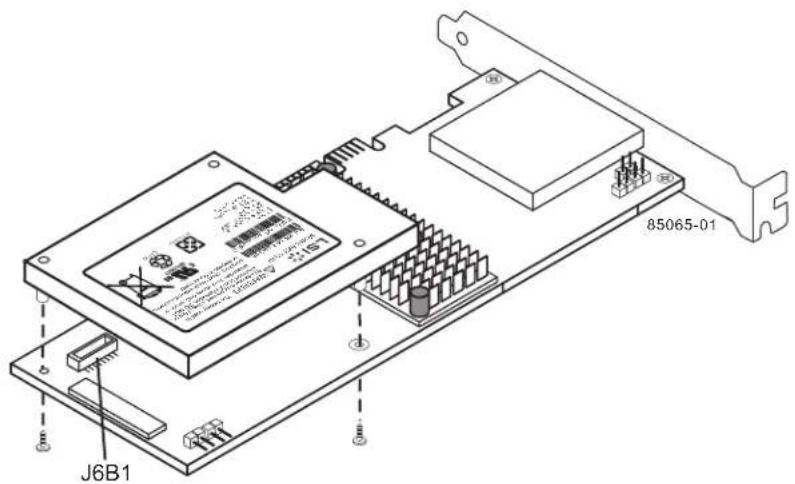
Figure 2: Installing the LSIIBBU08 Daughtercard on the SAS 9280-8e RAID Controller
-
Carefully press the LSliBBU08 onto the RAID controller so that the two connectors are firmly joined.
-
Secure the LSlibBU08 to the RAID controller with the screws and the standoffs in the three screwholes.
The standoffs are threaded at both ends, and a screw goes into each end. The screw threads from the back of the controller board into the board-to-board standoffs on the bottom of the LSliIBBU08.
CAUTION: Center the screwdriver carefully to avoid stripping the screw heads. Do not overtighten the screws.
Reinstalling the RAID Controller on the Motherboard
Follow these steps to reinstall the RAID controller on a motherboard.
- With the power to the chassis still turned off, and the power cords unplugged, make sure the chassis is grounded and has no AC power.
- Install the RAID controller in a PCI Express slot on the motherboard, as shown in Figure 3.
NOTE: Some PCI Express slots support only PCI Express graphics cards; if a RAID controller is installed in one of these slots, it will not function. Refer to your computer documentation for information about the PCI Express slot.
- Press down gently but firmly to seat the card correctly in the slot.
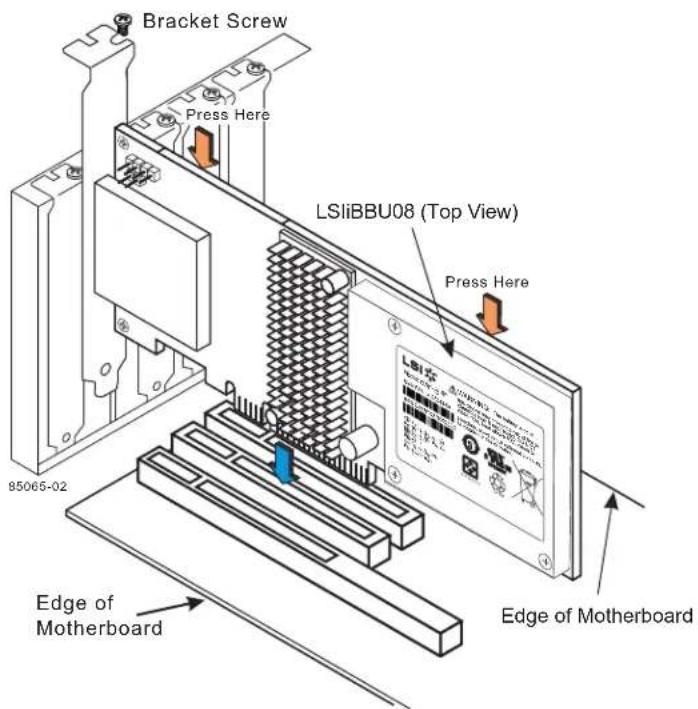
Figure 3: Reinstalling the MegaRAID SAS 9280-8e RAID Controller
- Secure the controller to the computer chassis with the bracket screw.
- Replace the computer cover and reattach the power cords.
- Turn on the power to the computer.
Connecting the LSliBBU08 Remotely to the MegaRAID SAS RAID Controller
This section describes the two methods you can use to connect the LSlibBBU08 remotely to your MegaRAID SAS RAID controller using a cable or, where applicable, a cable and a remote interposer board that are sold separately in a Remote Battery Kit:
Use the cable to connect the remote LSliBBU08 to the BBU connector on the RAID controller (Connecting the LSliBBU08 Remotely to the MegaRAID SAS RAID Controller)
Use the cable to connect the remote LSliBBU08 to a daughtercard that is connected to the BBU connector on the RAID controller (Connecting the Remote LSliBBU08 to an Interposer Card on the MegaRAID SAS RAID Controller)
The procedures in this section show how to connect the LSlibBU08 remotely to the MegaRAID SAS 9280-8i RAID controller. You can connect the LSlibBU08 in the same way to the other MegaRAID SAS RAID controllers that use this iBBU.
For information about the BBU connectors on these controllers, see the MegaRAID 6Gb/s SAS RAID Controllers User's Guide.
Connecting the Remote LSliBBU08 to the BBU Connector on the RAID Controller
This section describes how to connect the remote LSliBBU08 to the BBU connector on the SAS 9280-8e RAID controller.
To connect the remote RAID controller to the BBU connector on the RAID controller, perform the following tasks in order:
- Removing the RAID Controller from the Computer
- Connecting the Remote LSliBBU08
- Reinstalling the RAID Controller on the Motherboard
NOTE: Because server and workstation chassis vary from vendor to vendor, no standard mounting option exists that is compatible with the various system configurations. The LSIiBBU08 battery kit, in combination with the Remote Battery Kit, includes the battery, daughtercard, cable, and standoff. This combination enables authorized resellers and chassis manufacturers to customize the location of the remote battery to provide the most flexibility within various environments.
Removing the RAID Controller from the Computer
Follow these steps to remove the RAID controller from the computer.
- Turn off the power, and unplug the power cords.
- Ground yourself and make sure the system is grounded.
- Remove the cover from the computer according to the instructions in the system user's manual to allow access to the controller.
- Unplug all cables from the controller, remove the screw attaching the bracket to the computer chassis, and carefully remove the controller from the slot.
- Place the controller on a flat, clean, static-free surface, and continue with the next procedure.
Connecting the Remote LSliBBU08
Follow these steps to connect the remote LSliBBU08 to the BBU connector on the RAID controller.
- Ground yourself and make sure the system is grounded.
- Remove the LSliBBU08 from the package.
- Use the three Phillips-head screws that are provided to secure the LSIiBBU08 to the motherboard or the server chassis.
- Connect one end of the 12-inch, 20-pin cable (included in the remote battery kit) to the J2 connector on the LSIIBBU08, and the other end to the J6B1 BBU connector on the SAS 9280-8e RAID controller RAID controller, as shown in the following figure.
The black triangles on the connectors help you install them properly. Insert the cable connectors so that the black triangles are aligned.
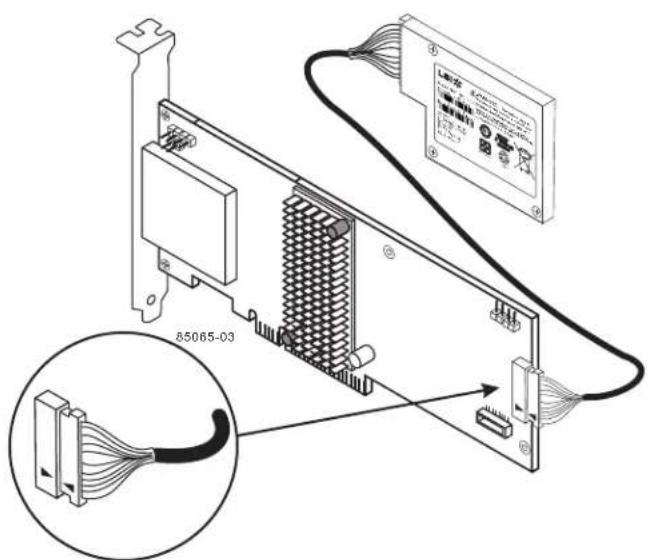
Figure 4: Connecting the LSliBBU08 Remotely to the SAS 9280-8e RAID Controller
Reinstalling the RAID Controller on the Motherboard
Follow these steps to reinstall the RAID controller on a motherboard.
- With the power to the chassis still turned off, and the power cords unplugged, make sure the chassis is grounded and has no AC power.
- Insert the RAID controller in a PCI Express slot on the motherboard, as shown in Figure 5.
NOTE: Some PCI Express slots support only PCI Express graphics cards; if a RAID controller is installed in one of these slots, it will not function. Refer to your computer documentation for information about the PCI Express slot.
- Press down gently but firmly to seat the card correctly in the slot.
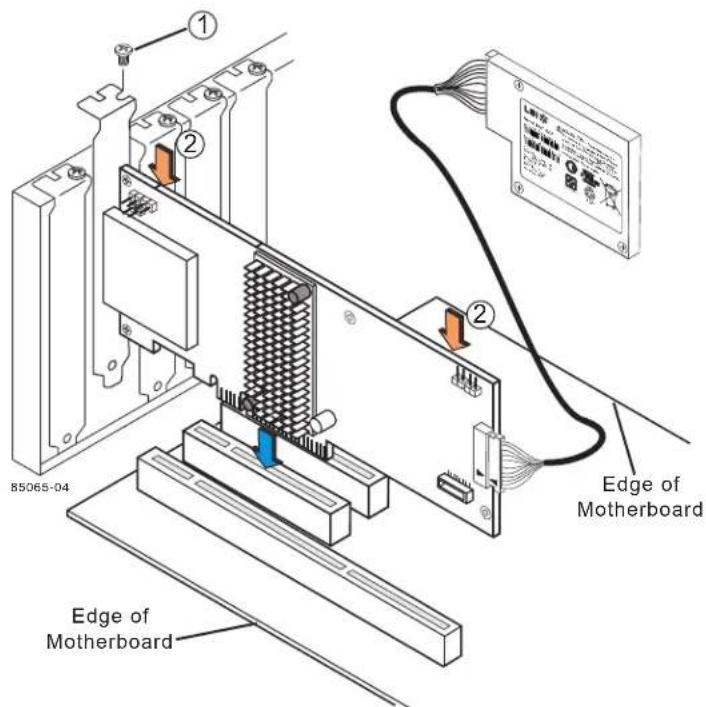
Figure 5: Installing the MegaRAID SAS Controller
- Secure the controller to the computer chassis with the bracket screw.
- Replace the computer cover and reattach the power cords.
- Turn on the power to the computer.
Connecting the Remote LSliBBU08 to an Interposer Card on the MegaRAID SAS RAID Controller
This section describes how to install the LSliBBU08 remotely on the MegaRAID SAS 9260-8i RAID controller. You can connect the LSliBBU08 in the same way to the other MegaRAID SAS RAID controllers that use this iBBU.
NOTE: Only the MegaRAID SAS 9260-4i and SAS 9260-8i RAID controllers use the interposer card with the LSIIIBBU08.
To connect a remote RAID controller to an interposer card on your RAID controller, perform the following tasks in order:
- Removing the RAID Controller from the Computer
- Installing the Interposer Card on the Controller
- Connecting the Cable Between the Interposer Card and the LSliBBU08
- Reinstalling the Controller in the Computer
Removing the RAID Controller from the Computer
NOTE: Because server and workstation chassis vary from vendor to vendor, no standard mounting option exists that is compatible with the various system configurations. The LSIIBBU08 battery kit, in combination with the Remote Battery Kit, includes the battery, daughtercard, cable, and standoff. This combination enables authorized resellers and chassis manufacturers to customize the location of the remote battery to provide the most flexibility within various environments.
Follow these steps to remove the RAID controller from the computer.
- Turn off the power, and unplug the power cords.
- Ground yourself and make sure the system is grounded.
- Remove the cover from the computer, according to the instructions in the system user's manual, to allow access to the controller.
- Unplug all cables from the controller, remove the screw attaching the bracket to the computer chassis, and carefully remove the controller from the slot.
- Place the controller on a flat, clean, static-free surface, and continue with the next procedure.
Installing the Interposer Card on the Controller
Follow these steps to install the interposer card on the controller, as shown in Figure 6.
- With the controller on a flat, clean, static-free surface, ground yourself and make sure the system is grounded.
- Remove the interposer card, standoff, and screws from the package.
- Place the standoff on the controller so that the bottom side is over the screwhole next to the JT3 BBU connector on the controller.
- Use one of the screws to secure the standoff to the controller.
CAUTION: Center the screwdriver carefully to avoid stripping the screwhead. Do not overtighten the screws.
- Hold the interposer card so that the J1 board-to-board connector on the interposer card lines up with the JT3 board-to-board connector on the controller.
- Carefully press the J1 connector on the interposer card into the JT3 connector on the controller so that the two connectors are firmly joined.
The connectors fit only when they are in the correct alignment. - Use the other screw to secure the interposer card to the controller and continue with the next procedure.
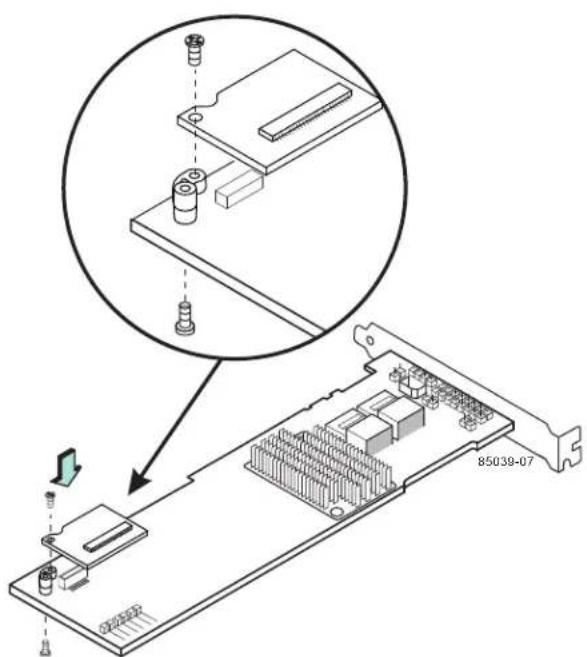
Figure 6: Connecting the Interposer Card to the MegaRAID SAS 9260-8i RAID Controller
Connecting the Cable Between the Interposer Card and the LSliBBU08
Follow these steps to connect the cable between the interposer card on the controller and the LSliBBU08.
- Mount the LSlibBU08 to the chassis of your computer based on the location and the type of mounting option.
- With the controller on a flat, clean, static-free surface, ground yourself and make sure the system is grounded.
- Remove the cable included in the Remote Battery Kit (sold separately).
- Insert one end of the cable into the 20-pin J2 connector on the LSliBBU08 and the other end into the 20-pin J1 connector on the interposer card, as shown in Figure 7.
Align the black triangles on the connectors to make sure they are connected properly.
NOTE: The cable connectors are polarized and can be inserted into the connectors on the interposer card and the LSlibBBU08 only if the rails on the cable connectors align with the slots on the other connectors. Do not force the cable into the 20-pin connectors. The cable end inserts into the connector with minimal resistance.
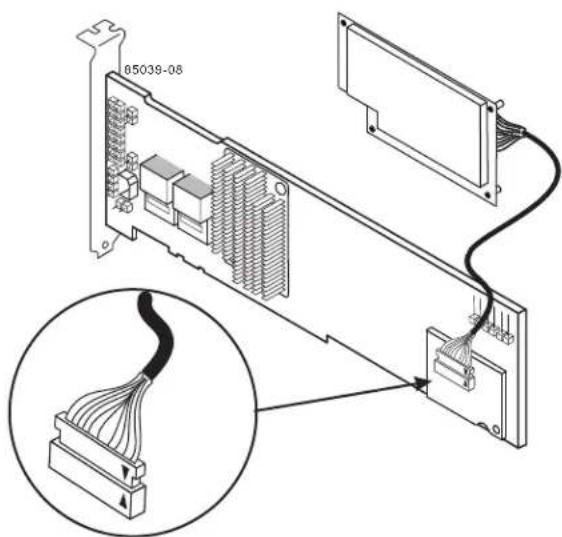
Figure 7: Connecting the LSliBBU08 Remotely to the Interposer Card
Reinstalling the Controller in the Computer
Follow these steps to install the RAID controller in the computer.
- With the power to the chassis still turned off, and the power cords unplugged, make sure the chassis is grounded and has no AC power.
- Insert the RAID controller in a PCI Express slot on the motherboard, as shown in Figure 8.
NOTE: Some PCI Express slots support only PCI Express graphics cards; if a RAID controller is installed in one of these slots, it will not function. Refer to your computer documentation for information about the PCI Express slot.
- Press down gently but firmly to seat the card correctly in the slot.
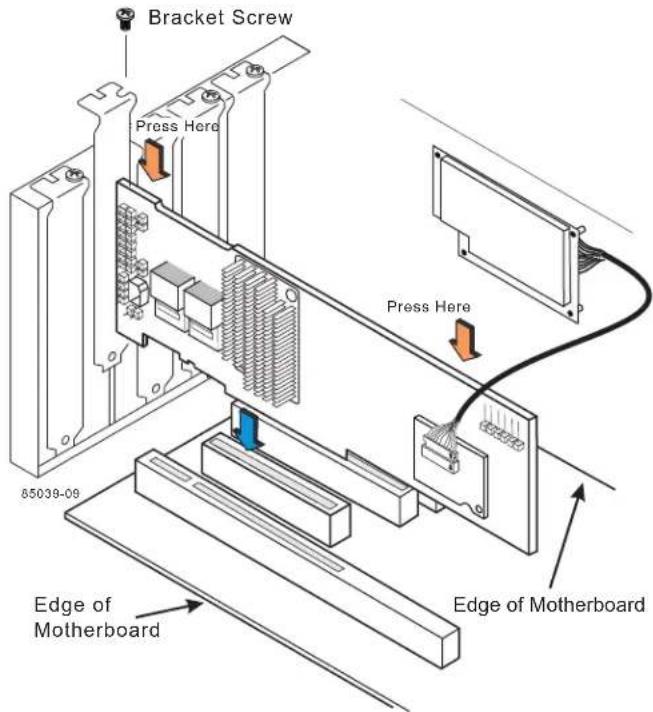
Figure 8: Reinstalling the MegaRAID SAS Controller
- Secure the controller to the computer chassis with the bracket screw.
- Replace the computer cover and reattach the power cords.
- Turn on the power to the computer.
See the MegaRAID SAS Software User's Guide for information about running the RAID configuration utility and installing the software drivers.
Technical Support
For assistance in installing, configuring, or running the LSliBBU08, contact an LSI Technical Support representative.
NOTE: Record your controller serial number in a safe location in case you need to contact LSI about your RAID controller.
Click the following link to access the LSI Technical Support page for storage and board support:
http://www.lsi.com/support/storage/tech_support/index.html
From this page, you can send an email or call Technical Support, or submit a new support request and view its status.
Support Request:
http://www.lsi.com/support/support_form.html
Phone Support:
http://www.lsi.com/support/storage/phone_tech_support/index.html
NOTE: The international toll-free number does not require country-specific access codes.
LSI
