musiphone mp3 - Answering machine Beyertone - Free user manual and instructions
Find the device manual for free musiphone mp3 Beyertone in PDF.


User questions about musiphone mp3 Beyertone
0 question about this device. Answer the ones you know or ask your own.
Ask a new question about this device
Download the instructions for your Answering machine in PDF format for free! Find your manual musiphone mp3 - Beyertone and take your electronic device back in hand. On this page are published all the documents necessary for the use of your device. musiphone mp3 by Beyertone.
USER MANUAL musiphone mp3 Beyertone
User manual and installation guide
musiphone®
www.beyertone.com
MP3
© BEYERTONE AG • Max-Volmer-Str. 29 • D-40724 Hilden
Tel. +49 (0) 2103 / 2480-0 • Fax: +49 (0) 2103 / 2480-40
Email: info@beyertone.com • Internet: www.beyertone.com
Contents
- Packaging contents .... 3
- Operation....3
- Installation 4
- Programming....6
4.1 MP3 file formats....6
4.2 CompactFlash memory card....6
4.3 Programming MP3 files....6
- Troubleshooting / Support hotline....7
- Software add-ons, updates, and royalty-free music files ....7
- Technical data....8
- Safety regulations:
Store the device in a dry place, at temperatures between 5^ C and 45^ C.
Please use only the power pack included in the packaging to operate the musiphone®.
BEYERTONE AG's guarantee does not cover any damage to the musiphone® or interruptions in the operation of telecoms systems connected to the device, due to poor handling, wrong connections, or the use of indeterminate data.
- Despite our every effort for accuracy, we cannot not completely exclude the existence of mistakes in these instructions. The manufacturer does not assume any responsibility for missing indications and their consequences. Please give the device to third parties only if equipped with the complete documentation.
• EU compliance statement:
The musiphone® MP3 complies with the EU directives 2004/108/EC and 2006/95/EC by fulfilling the requirements of the relevant provisions of EN 55022 / EN 55024 and EN 60950 (power supply).
1. Packaging contents
Upon receiving the device, please check that the packaging includes all the following parts:
- musiphone ^ MP3
• RJ11/RJ11 cable (for connection with a LINE port) - RJ11 cable with phone plug (for phone sockets)
• Phone jack adaptor for RCA plugs (for RCA sockets) - Transformer
- CompactFlash memory card (min. capacity 64 MB) with royal-free music sample
• The present user manual
2. Operation
The musiphone® MP3 is a wear-free digital unit for high-quality on-hold music-playback (Music on Hold) for telephone devices.
The ‘Music on Hold’ function enables on-hold music-playback, which callers can listen to during the telephone call (enquiry calls / connection with extension). This is asynchronous audio and is heard simultaneously by all callers on hold at any given time.
The advantages of the musiphone® MP3:
- The musiphone ^® MP3 is compatible with all telephone devices featuring music reproduction during call waiting.
- The musiphone ^® MP3 uses the well-known MP3 audio format for all music played.
- When used as a storage medium, the musiphone® MP3 accepts commercially available CompactFlash memory cards for up to 16 hours of sound storage (at 1 GB).
- Software updates are made simply via the memory card.
3. Installation
Only authorised personnel may install the musiphone ^® MP3. The procedure followed is described below:
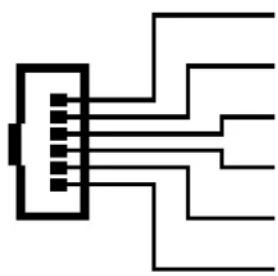
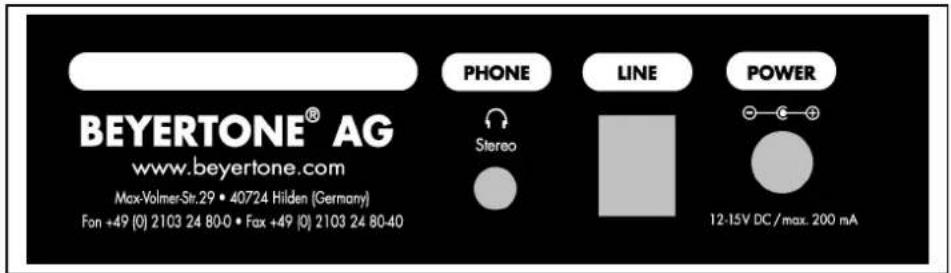
- Activate the external Music on Hold input of the PBX system. Connect the musiphone® MP3's LINE connection with the MoH input of the PBX using one of the cables included in the packaging. The unit's wires must be connected as follows:
natural_image
Pure electrical circuit lines without any symbols| UAE 6/6 RJ 11/12 | UAE 8/8 RJ 45 | a/b or audio | Function | ||
| 1 2 - a-wire HIC * | |||||
| 2 | 3 | - | |||
| 3 | 4 | a | a | - | w i |
| 4 5 b b-wire / Audio | |||||
| 5 | 6 | - | |||
| 6 7 - b-wire HIC * | |||||
* HIC = MoH connection to HiPath 4000 / Hicom 300
The PBX's MoH input may either be a voltage-free audio input (phone/RCA plug) or an analogue a/b-port (with loop current). Both ways of connection can be used alternatively without changing the musiphone® MP3 settings.
- During the connection of MoH to the HiPath 4000 (Hicom 300) please pay particular attention to the different wire arrangement (see chart). Depending on the response of the telephone's MoH port, you may switch wires if necessary.
- In no case should you use the RJ11 phone plug cable to connect the musiphone® MP3's PHONE output to the a/b port. BEYERTONE AG bears absolutely no responsibility for faults caused by such connections!
- Plug in a CompactFlash card with MP3 audio data (for programming please refer to chapter 4) straight into the device.
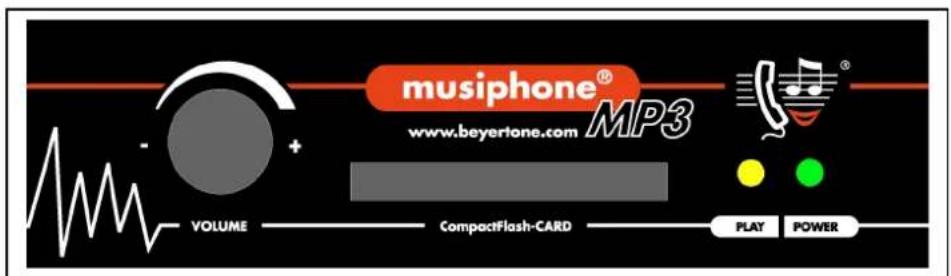
- Connect the mains adapter to the POWER input of the musiphone® MP3 and plug it in to a wall outlet. The green 'POWER' LED lights up to show that the unit is ready for operation. Only use the mains adapter delivered with the unit.
- The yellow 'PLAY' LED flashes to indicate the start-up of the integrated software. After that, audio playback will start automatically. Playback of MP3 audio data is indicated by the flickering of the LED. (For more information see also chapter 4).
- Set the music volume you want on your on-hold loop by turning the 'VOLUME' button on the front panel of the musiphone® MP3.
- The ‘PHONE’ output of the musiphone® MP3 provides an additional output for headphones to check the music playback. The PHONE-output is not electrically isolated (like the LINE output) and its volume cannot be adjusted.
Front and back view / Volume boost
Front view of the musiphone® MP3
Back view of the musiphone® MP3
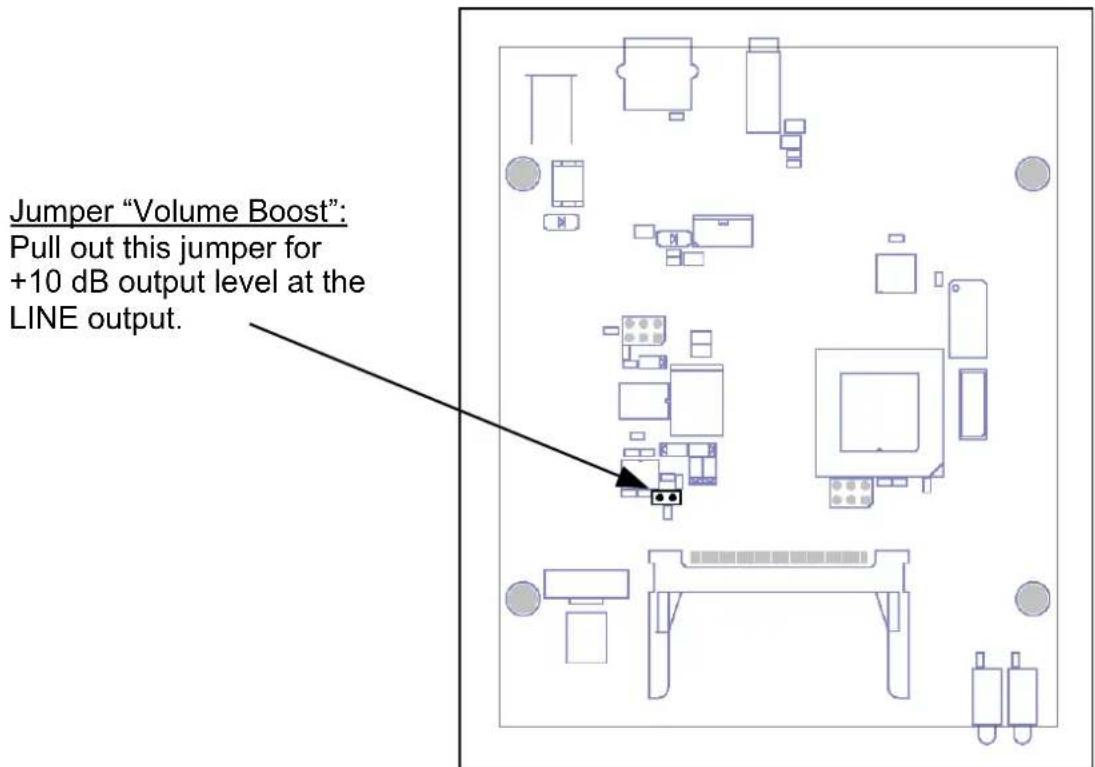
NOTE: If the LINE-output level of the musiphone® MP3 is too low, you can pull out the 'Volume Boost' jumper inside the unit to achieve an additional 10 dB output level. Make sure to disconnect all wires from the unit, mains adapter and telephone device before opening the unit's casing. Before reconnecting the wires and setting the unit into operation again, the casing should be closed completely.
4. Programming
4.1 MP3 file formats
The musiphone® MP3 reproduces all MP3 audio files, from the plugged in CompactFlash card, that comply with the following specifications:
- Bitrate 96 to 192 kBit/s / stereo or mono / sampling frequency up to 44,1 kHz
NOTE: For best quality, a bitrate of 128 or 160 kBit/s is recommended. At 96 kBit/s loss of sound quality should be expected.
4.2 CompactFlash memory card
As a storage medium, the musiphone ^® MP3 accepts commercially available CompactFlash memory cards with the following specifications:
- CompactFlash, minimum recommended capacity: 64 MB
• Memory card formatting: FAT16 ("FAT") exclusively
IMPORTANT: "Microdrives" (hard-disks in CompactFlash housing) may not be used!
4.3 Programming MP3 files
To program the music files you want to be played by the unit, take a commercially available card reader for CompactFlash memory cards and simply copy the files - e.g. using your PC/Laptop's Explorer - to the memory card. During the process, please note the following:
- All files you wish to reproduce must be in the root directory of the memory card. The files will be recognised by their name extension 'mp3' / 'MP3'. Additionally, the musiphone® MP3 can play coded audio files with the extension 'mpm' / 'MPM'. These files can only be generated by authorised service providers.
- Files with invalid extensions will be ignored by the musiphone® MP3, and such files should not be copied to the memory card. Files in subfolders or file lists will not be detected by the unit.
- The files will be played in the order they have been copied to the card. To be sure, you may have to format the memory card in advance specifically and copy the files to the card one by one.
• After playing all files, playback will be repeated automatically in an endless loop.
5. Troubleshooting / Support hotline
If your musiphone® MP3 malfunctions or fails to work, please check the following points:
- Is everything connected as per the installation instructions?
- Is the MoH-port correctly activated in the PBX system?
- Is the pin-configuration of the LINE-output correct?
- Is the volume setting high enough?
- Are the MP3 audio-files copied to the CompactFlash card valid?
- Is the CompactFlash card plugged in correctly? Is it formatted as FAT 16 (FAT)?
- When the memory card is plugged in, switch off the unit, wait 10 seconds and switch on again. Do the LEDs show the functions described in chapter 3?
BEYERTONE's customer service hotline is available to provide technical assistance with installing musiphone® MP3 units:
Customer Service Hotline: +49 (0) 2103 / 2480-20 or support@beyertone.com
Mon. – Thurs.: 08:00 - 17:00 CET
Friday: 08:00 - 15:00 CET
6. Software add-ons, updates, and royalty-free music files
BEYERTONE AG offers several software-add-ons and updates as well as a selection of royalty-free music titles for the musiphone® MP3. You may receive the user manual in a variety of languages. You can access the free download service under the following link:
www.beyertone.com/mp3onhold
NOTE: During the reproduction of non-royalty-free music files, please pay particular attention to cash payment requests, if applicable.
7. Technical data
- Unit
| operating voltage DC 12 - 15 V | |
| power consumption | max 200 mA |
| Internal fuse | 200 mA self-resetting |
| LINE output | impedance 600 Ohm / isolated, nom. level- 6dBm at 300 ... 3400 Hz |
| PHONE output | 3,5mm stereo-phone-jack, for headphones > 30 Ohms |
| Memory card / capacity | Type 1 CompactFlash, min. capacity 64 MB, requires FAT16 formattingMP3 File capacity at 128 kBit/s stereo:In a 64 MB card ~ 1 hourIn a 1 GB card ~ 16 hours |
| MP3 file formats | Compression according to MPEG 2 / Layer 3(only for files without additional header data)96 to 192 kBit/s, stereo / mono, to 44,1 kHz |
| Environmental temperature | 5°C to 45°C |
| Dimensions | 130 x 130 x 42 mm |
| weight | 250 g |
- Adaptor
| Input voltage | 100-240V~, 50/60 Hz (Europe), other countries as stated on adapter |
| Output voltage | 12 V DC / max. 500 mA |
| Weight | 120 g |
© BEYERTONE AG • Max-Volmer-Str. 29 • D-40724 Hilden
Tel. +49 (0) 2103 / 2480-0 • Fax: +49 (0) 2103 / 2480-40
Email: info@beyertone.com • Internet: www.beyertone.com