HM-RC-12-W - Remote control EQ-3 - Free user manual and instructions
Find the device manual for free HM-RC-12-W EQ-3 in PDF.


| Product Type | Remote Control |
| Brand | eQ-3 |
| Model | HM-RC-12-W |
| Dimensions (approx.) | 150 x 45 x 20 mm |
| Weight (without batteries) | 120 g |
| Power Supply | 2x AAA batteries (1.5 V) |
| Number of Buttons | 12 |
| Wireless Protocol | HomeMatic Bidirectional Radio (868.3 MHz) |
| Range (approx.) | Up to 100 m (free field) |
| Functions | Control of HomeMatic devices (lights, blinds, heating, etc.) |
| LED Indicator | Yes, for status and transmission confirmation |
| Battery Life | Up to 2 years (depending on usage) |
| Operation Temperature | 5 °C to 35 °C |
| Housing Material | Plastic (ABS) |
| Color | White |
| Mounting | Handheld or wall mount (bracket not included) |
| Maintenance & Cleaning | Wipe with a dry cloth; do not use solvents |
| Safety | Use only specified batteries; dispose properly |
| Spare Parts & Reparability | Batteries replaceable; device not user-serviceable |
| General Information | Compliant with EU directives; for indoor use only |
Frequently Asked Questions - HM-RC-12-W EQ-3
User questions about HM-RC-12-W EQ-3
0 question about this device. Answer the ones you know or ask your own.
Ask a new question about this device
Download the instructions for your Remote control in PDF format for free! Find your manual HM-RC-12-W - EQ-3 and take your electronic device back in hand. On this page are published all the documents necessary for the use of your device. HM-RC-12-W by EQ-3.
USER MANUAL HM-RC-12-W EQ-3
text_image
HomeMaticRadio remote control 12 buttons HM-RC-12, HM-RC-12-B
Page 20 - 34
Printed in Hong Kong
- English edition 04/2011
Documentation © 2007 eQ-3 Ltd., Hong Kong
All rights reserved. No parts of this manual may be reproduced or processed in any form using electronic, mechanical or chemical processes in part or in full without the prior explicit written permission of the publisher. It is quite possible that this manual has printing errors or defects. The details provided in this manual are checked regularly and corrections are done in the next edition. We do not assume any liability for technical or printing errors.
All registered trade marks and copyrights are acknowledged.
Printed in Hong Kong
We reserve the right to make changes due to technical advancements without prior notice.
74780 / V 1.01
Inhaltsverzeichnis
natural_image
Pure diagram of a device panel with an arrow pointing right, no text or symbols presentnatural_image
Pure technical line drawing of a mechanical component with no text or symbolsnatural_image
Technical line drawing of a device casing with internal components and dimension annotations (no text or symbols)natural_image
Diagram of an inclined ladder system with a moving arrow indicating motion (no text or symbols present)natural_image
Technical line drawing of a mechanical assembly with no visible text or symbols1 Information concerning these instructions ..... 2 1
2 Hazard information 21
3 This is what your remote control can do ..... 2 2
4 General system information on HomeMatic ..... 2 3
5 General information on radio operation. 23
6 Start up 24
6.1 Installing and changing batteries ..... 2 4
6.1.1 Installing batteries....24
6.1.2 Changing batteries 24
6.1.3 Behavior after changing batteries ..... 2 5
6.2 Teaching 25
7 Operation....27
7.1 Simple operating functions..... 2 7
7.2 Device LED feedback 28
8 Resetting to factory status 29
9 Changing the label cards .... 30
10 Error messages 32
10.1 Weak battery 32
10.2 Command not confirmed 32
11 Maintenance and cleaning 32
12 Technical specifications .... 3 3
1 Information concerning these instructions
Read these instructions carefully before beginning operation with your HomeMatic components.
Keep the instructions handy for later consultation!
Please hand-over the operating manual as well when you hand-over the device to other persons for use.
Symbols used:

Attention! This indicates a hazard.

Note.
This section contains additional important information!
2 Hazard information

Do not open the device. It does not contain any parts to be maintained by the user. In case of a fault, please send the device to our service department.
This device is to be operated indoors only and keep away from the influences of humidity, dust and sunshine or other radiating heat sources.
3 This is what your remote control can do
Hand transmitters and remote controls are used to control the receivers that they are taught to work with. A single button can be taught to work with one or more components and address them all simultaneously. That means that pressing a single button can execute many different tasks.
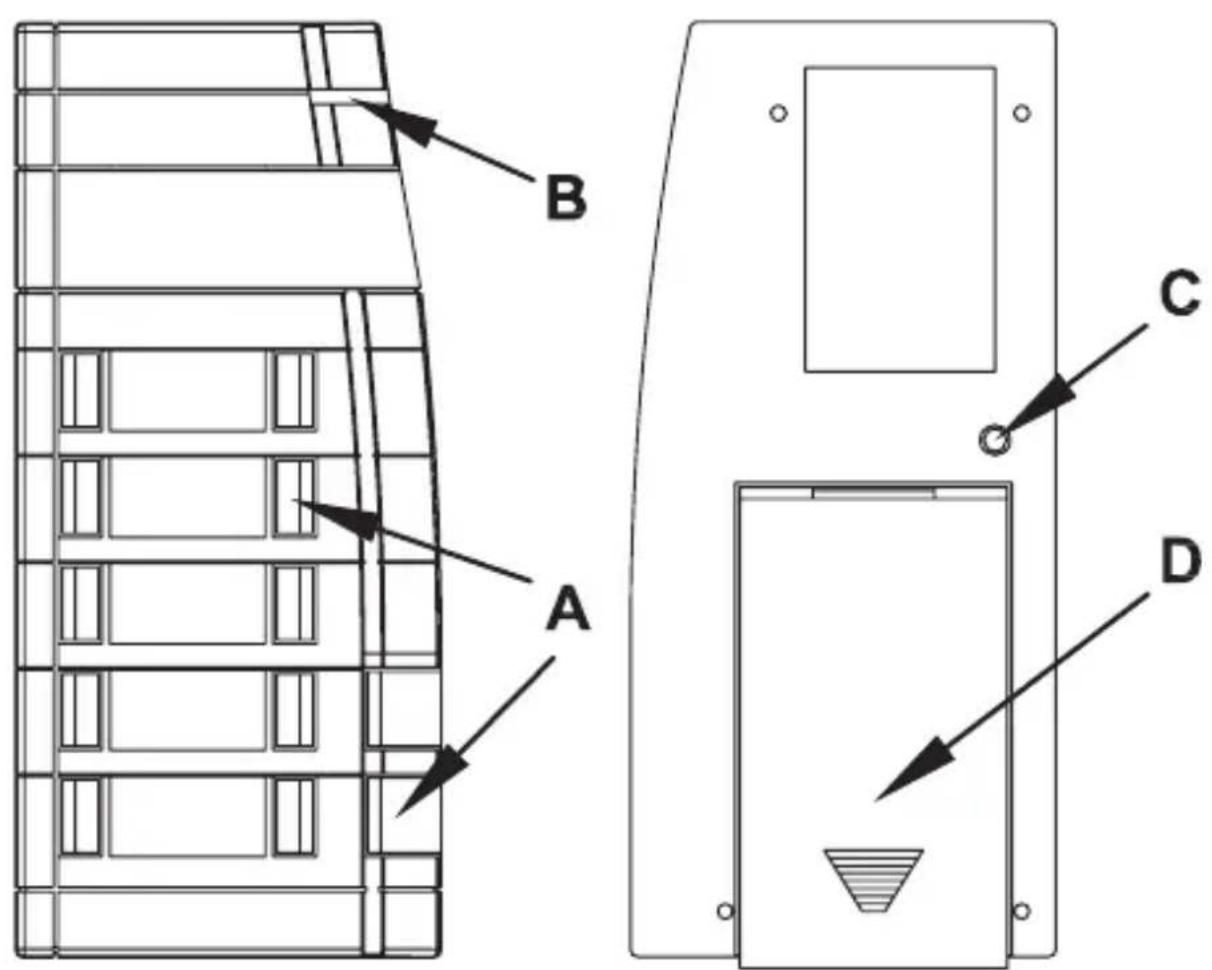
text_image
B A C DA – Operating push-buttons (Button-pairs)
B - Device LED
C - Teach button
D - Battery cover
4 General system information on HomeMatic
This device is a part of the HomeMatic home control system and works with the bidirectional BidCoS® wireless protocol.
All devices are delivered in a standard configuration.
The functionality of the device can also be configured with a programming device and software.
Further resulting functionality and the additional functions provided in the HomeMatic system combined with other components are described in the separate Configuration Instructions and in the HomeMatic System Manual.
All current technical documents and updates are provided under www.HomeMatic.com.
5 General information on radio operation
The radio transmission is on a non-exclusive transmission path which means that there is a possibility of interference occurring. Other interfering sources can be caused by switching operations, electrical motors or defective electrical devices.
The range of transmission within buildings can greatly deviate from open air distances. Besides the transmitting power and the

reception characteristics of the receiver, environmental influences such as humidity in the vicinity and local structures also play an important role.
Hereby eQ-3 Entwicklung GmbH, declares that this device conforms with the essential requirements and other relevant regulations of Directive 1999/5/EC.
The full declaration of conformity is provided under www.HomeMatic.com.
6 Start up
6.1 Installing and changing batteries
6.1.1 Installing batteries
natural_image
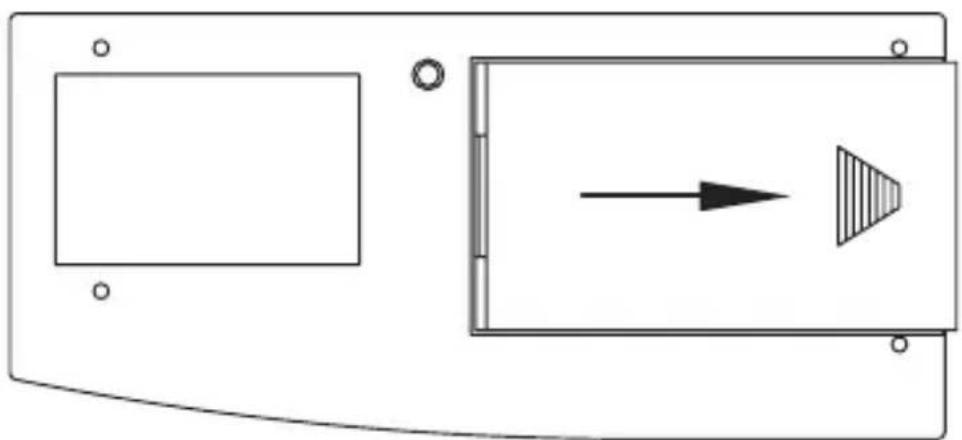
Pure diagram of a device panel with an arrow pointing right, no text or symbols presentOpen the rear battery compartment by pushing the battery cover in the direction of the arrow. Insert the three Micro batteries (Type LR 03) that are supplied and make sure that the polarity matches that of the markings in the battery compartment.
Close the battery compartment by putting the battery compartment cover back on and pushing it in the opposite direction of the arrow until the cover clicks into place.
6.1.2 Changing batteries

Caution! Danger of explosion if battery is replaced improperly.

Used batteries are not to be disposed of with the house-hold waste! Please dispose them at your local battery collection point!
If there is no reaction from the device that you want to control when you press a button or if the flash-code for empty batteries is shown, the used batteries are to be replaced with three new batteries of type LR03 (Micro) as described in the previous chapter. Make sure that the batteries are inserted with proper polarity.
6.1.3 Behavior after changing batteries
After inserting the battery, the remote control will run a self-test. This runs for approx. 2 seconds.
The initialization runs next. The completion is indicated with the LED test display: red, green, orange, each for a half second. If an error occurs, it is indicated with red flashing!
| One long flash, two short flashes, pause (repeated 2 times) | Battery power too low |
| One long flash, one short flash, pause (infinite) | Remote control defective |
If the battery power is low, as long as the power level allows, the button actuation is activated and the remote control is ready for operation. Depending on the requirements, the battery may recover and send again many times after a short break. If the power drops too low when sending, the respective error code is displayed again.
6.2 Teaching
Please read this section completely before starting with any teaching!
The remote control supports three different modes
• Operation mode (normal operation)
- Configuration mode (for changing remote control parameters)
- Teach mode (Teaching HomeMatic components)
Training requires that both devices to be connected are put into teach mode and the desired channel is selected for training.
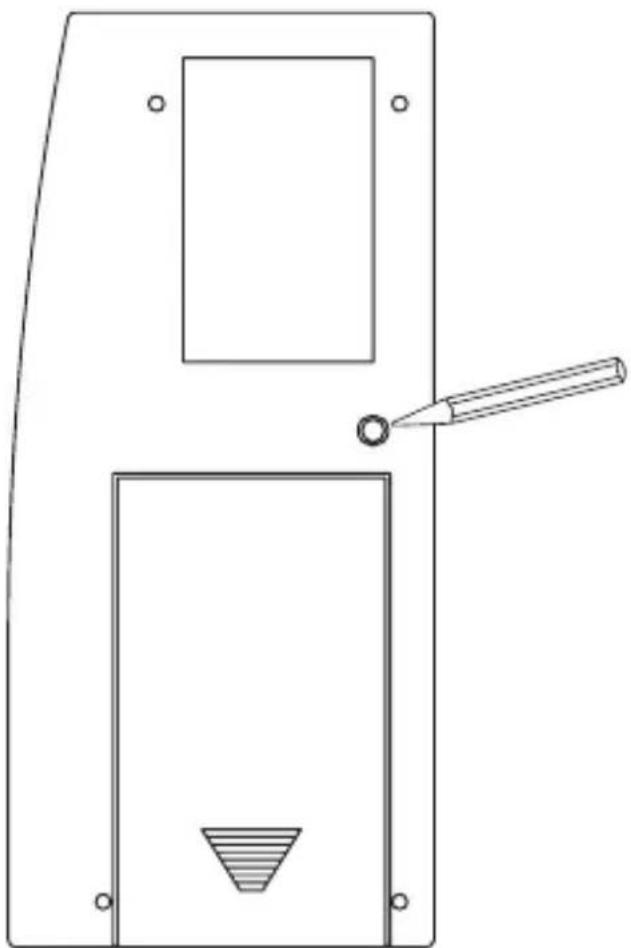
The teach button is on the back of the hand transmitter at the right over the battery compartment cover. This button is located within a recess in the housing so that it cannot be pressed accidentally.
natural_image
Pure technical line drawing of a mechanical component with no text or symbolsTo actuate teach mode on the remote control, press the teach button with a pointed object.
The remote control is then in configuration mode, indicated with a flashing green of the device LED. (If you want to exit configuration mode, press the teach button again.)
Press the operating button that you want to teach to enter teach mode.
The device LED flashes orange. (Cancel by pressing the teach button briefly, the device LED then turns red.)
If no teaching occurs, teach mode is automatically ended after 20 seconds. If other devices are in teach mode, these are taught. Successful teaching is indicated with flashing green (the length depends on whether the configuration is still running).
Note: If the remote control is already taught for a center and

therefore is blocked for direct training, it can still be put in teach mode as described above, the device LED is illuminated in red for 2 seconds after pressing an operating button however.
Direct teaching is not possible!
| Min. 2 sec green LED Teaching successful | |
| 2 sec red LED Teaching failed | |
| Orange flashing Only remote control in teach mode | |
| Brief orange flashing and 2 sec red or green (depending upon success) | Other device in teach mode and remote control put in teach mode. |
| Remote control in configuration mode and illuminated red with button actuation | Remote control already taught for center and is therefore blocked from direct teaching |
7 Operation
7.1 Simple operating functions
After teaching, simple operating functions are available.
The 12 buttons are taught as 6 separate button pairs (ON/OFF) for one receiver upon delivery, depending on from which pair the button was pressed for teaching. Switch actuators and dimmers can then be switched ON/OFF or dimming occurs by holding the button pressed. The blind actuators move up or down.
The 12 button remote control is equipped with a shock sensor. The background lighting of the button field is illuminated for 5 seconds when the remote is shocked or if a button is pressed. The time is extended by 5 seconds each time a shock is registered or a button is pressed while the background is illuminated.

Do not carry the remote control in a pocket or laying in your vehicle. Accidentally switching the background lighting on consumes battery power and reduces the
lifespan of the batteries!
7.2 Device LED feedback
The feedback signals apply for operation with and without the center.
No actuators have been taught yet:
Brief press of the button: LED is illuminated in orange for 1 second,
Extended button press: LED is illuminated in orange for 1 second,
Button held down: LED is illuminated as long as the button is pressed and goes dark afterward.
Actuators are taught:
Brief/long press of the button: LED is illuminated in orange as long as the function transfer requires, this time depends on the number of actuators that have been taught for this button, the number of required transmission attempts and the encoding and transmission mode.
After the radio transmission is complete, the LED is illuminated in either red or green for 1 second.
Green: all actuators have confirmed the (last) bi-directional command,
Red: at least one actuator has confirmed the (last) bi-directional command.
Button held down: LED is illuminated in orange as long as the button is held down and behaves as above afterward, button held down (receiver with burst transmission mode):
Orange as long as transmitting, then feedback indicated with 1 second in red or green when held pressed.
Remote control in special mode:
LED flashes slowly in green: Configuration mode (waiting for radio signal),
LED flashes quickly in green: Configuration mode is active and data is being received.
LED flashes slowly in orange: Teach mode (waiting for radio signal),
LED flashes slowly in red: Preparatory stage for resetting to factory defaults (waiting for long button press on the teach button for resetting, or brief button press for ending).
8 Resetting to factory status
Hold the teach button down for at least 5 seconds. The remote control LED starts to flash slowly. (If you want to abort the reset procedure at this time, you can press the teach button briefly again or wait 15 seconds. In either case, the flashing red will stop.)
To reset the remote control, press the teach button again for at least 5 seconds.
The LED starts to flash in red faster while the button is held down. Releasing the button completes the reset procedure and the LED is illuminated for approx. 3 seconds to confirm the reset operation.

Possible error messages:
(This error can occur now if you have a center and have taught the remote control for this center.)
If the LED does not start flashing after holding the button down for 5 seconds but is illuminated continuously, the remote control cannot be reset!
In this case, the encoding is active using a system security key that differs from the key delivered with the system. In order to reset the remote control, you must use the configuration software of the center for resetting! The procedure is described in the center software instructions.
9 Changing the label cards
natural_image
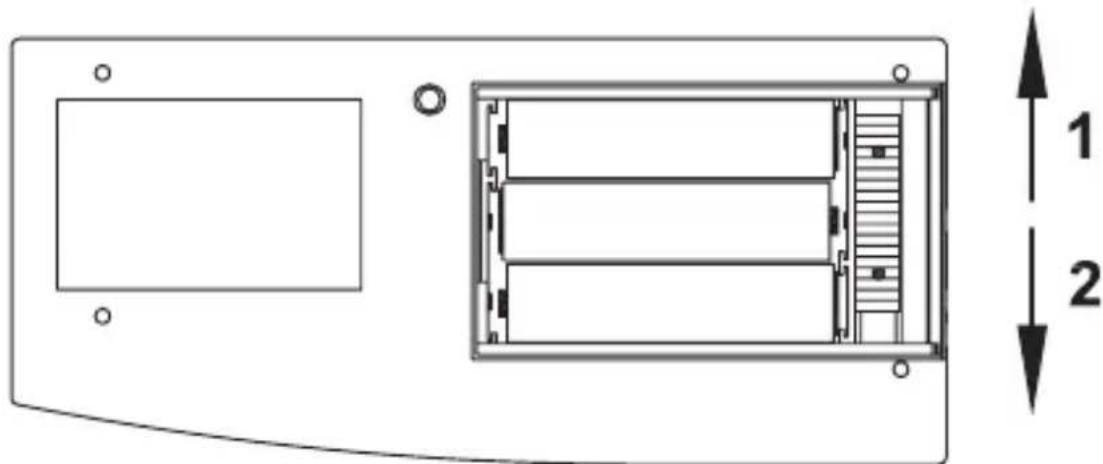
Technical diagram of a device rear panel with internal structure and dimension annotations (no text labels or symbols)First, open the battery compartment cover as described for changing batteries. A red slider switch is located under the batteries. Push the slider switch in direction 2.

natural_image
Diagram of an inclined ladder on a platform with an arrow indicating motion (no text or symbols)Set the remote control down on the table in front of you with the buttons facing up. Flip the button cover up and pull the cover out of the device at an angle.
The lighting sheet can be accessed between the buttons now.
A diffuser sheet is already mounted on it and ensures even illumination and should therefore not be removed.
Numerous labels for various applications are provided on the enclosed sheet.
Choose the desired labels and separate them carefully from the sheet using the perforations provided.
natural_image
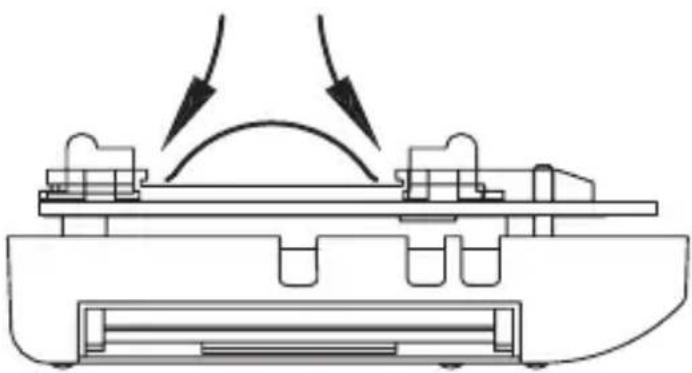
Technical line drawing of a mechanical assembly with two curved arrows indicating motion or force direction (no text or symbols)Slip the label card into the slot on one side next to the button to be labeled then. Bow the label card upward slightly to push it through to the opposite side in the slot. The label card should now lay flat on the lighting sheet. Repeat this procedure for all other label cards.
When finished, replace the keypad cover on the remote control again and lock it in place using the slider switch in the battery compartment.
Insert the batteries again and close the battery compartment.
If no suitable label exists on the card provided, use the sheet of unprinted labels. These labels can be printed with a standard printer.
Templates can be downloaded under www.HomeMatic.com.
10 Error messages
10.1 Weak battery
If the batteries are weak, the respective error code (see Changing the batteries) is shown.
If the batteries are so weak that a reset is triggered several times in a row without transmitting successfully, no transmission will be made for following button presses and the LED will only be illuminated in red for 0.5 seconds.
10.2 Command not confirmed
If a receiver does not confirm a command (at least one when more than one have been taught), the device LED is illuminated in red when the transmission is complete. The error will then be found with the receiver:
- Receiver not accessible
- Receiver cannot execute command (load failure, mechanical blockage, etc.)
• Defective receiver
11 Maintenance and cleaning
The product is maintenance-free besides possibly requiring a battery change. Maintenance or repairs are only to be done by trained professionals. Clean the product using a soft, clean, dry and lint-free cloth.
To remote heavier contamination, make the cloth damp with lukewarm water. Cleaning agents that contain solvents are not to be used because it can harm the plastic housing and the labels.
12 Technical specifications
Radio frequency: 868.3 MHz
Typ. outdoor range: 200 m
Power supply: 3x LR03 (Micro)
Battery lifespan: approx. 3 years
(10 actuations per day)
Protection type: IP20
Housing: ABS
Housing colors: Pure white with silver faceplate,
Graphite black
with black faceplate
Dimensions: 123 x 56 x 19 mm
(H x W x D, without key-chain)
Weight: 66 g (without battery)
Subject to technical changes.
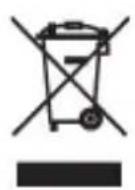
Instructions for disposal
Do not dispose off the device as part of household garbage! Electronic devices are to be disposed of in accordance with the guidelines concerning electrical and electronic devices via the local collection point for old electronic devices.
CE The CE sign is a free trade sign addressed exclusively to the authorities and does not include any warranty of any properties.

text_image
eQBeQ-3 AG
Maiburger Straße 29
D-26789 Leer
www.eQ-3.com