MD2045 - Microwaves Oursson - Free user manual and instructions
Find the device manual for free MD2045 Oursson in PDF.


| Product Type | Countertop Microwave Oven |
| Brand | Oursson |
| Model | MD2045 |
| Capacity | 20 Liters |
| Power Output | 700 Watts |
| Control Type | Rotary Knob and Buttons |
| Display | LED Digital |
| Turntable | Yes, 25.5 cm glass |
| Defrost Function | Yes, by weight or time |
| Auto Cook Menus | 8 preset programs |
| Timer | Up to 95 minutes |
| Door Opening | Side-hinged with handle |
| Interior Material | Stainless steel |
| Dimensions (W x D x H) | 440 x 360 x 258 mm |
| Weight | 11.5 kg |
| Power Supply | 220-240 V, 50 Hz |
| Power Consumption | 1050 Watts |
| Child Lock | Yes |
| Cleaning | Wipe with damp cloth; mild detergent |
| Spare Parts Available | Turntable, fuse, bulb |
| Repairability Index | 6.5 / 10 |
| Color | White / Black (depending on variant) |
| Warranty | 2 years |
Frequently Asked Questions - MD2045 Oursson
User questions about MD2045 Oursson
0 question about this device. Answer the ones you know or ask your own.
Ask a new question about this device
Download the instructions for your Microwaves in PDF format for free! Find your manual MD2045 - Oursson and take your electronic device back in hand. On this page are published all the documents necessary for the use of your device. MD2045 by Oursson.
USER MANUAL MD2045 Oursson
with a warranty card
natural_image
Plate of meatballs with sauce, garnished with fresh vegetables and lettuce (no text or symbols visible)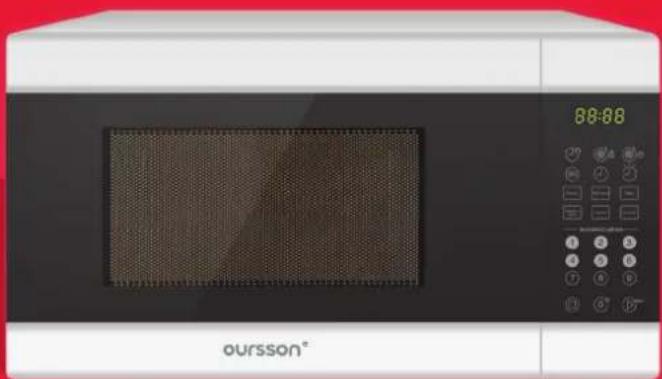
natural_image
Exterior view of a modern microwave oven with digital display and control buttons (no visible text or symbols on main body)Microwave MD2045

bar
| Category | Value | |---|---| | Bar 1 | 100 | | Bar 2 | 100 |
natural_image
Simple white line drawing of a heart on a solid red background (no text or symbols)Congratulations on buying your new Microwave
CONTENT
6 Chapter 1: Introduction
6 Safety Instructions
8 Danger of exposure to microwave energy
9 Recommendations for the installation, operation, maintenance and storage
10 Features
11 Materials that are allowed to be used in microwave
13 Materials that are not allowed to be used in microwave
14 Installation of the microwave
15 Product set
16 Control Panel
17 Chapter 2: Operation
17 Setting the clock
19 Microwave power level matching the designations on the control panel
21 Fast start
21 Defrost by weight
21 Defrost by time
22 Automatic cooking programs
23 Timer function
24 Programming multi-stage cooking process
24 Parent control
25 Programs saving function
25 Informational function
CONTENT
26 Chapter 3: Possible problems and solutions
28 Chapter 4: Other
28 Specifications
29 Cleaning and maintenance
29 Radio Interference
30 Servicing
INTRODUCTION
SAFETY INSTRUCTIONS

ger symbol
minder to user about high voltage.

rning symbol
minder to user about the necessity of operating exactly according to the instructions.
WARNINGS:
- Use the device according to the following instructions manual.
- Do not use the device in places where the air can contain vapors of flammable substances.
- Use only the tools, which are included in the product set.
- To protect against risk of electrical shock do not put the cord in water or other liquid. If for some reason the water got into the device, contact an authorized service center (ASC) OURSSON AG.
-
Never attempt to open the device by yourself – it could possibly be the reason of an electrical shock can lead to product malfunction and will invalidate the manufacturer's warranty.
-
For repair and maintenance, contact only authorized service centers meant for repair of products under the trademark OURSSON.
- For power supply, use a power grid with proper characteristics.
- Do not expose this device to high levels of direct sunlight, high-humidity or wet conditions. Avoid sudden changes in temperature and humidity.
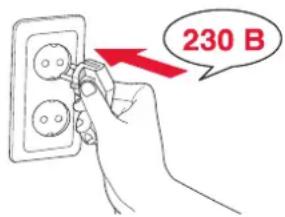
- When moved from a cool to a warm place and vice versa unpack it before use and wait 1-2 hours without turning it on.
• Install the device on a stable surface. - Do not move or lift the microwave when it is working.
- Do not place on the device foreign objects.
- Keep the device from bumps, falls, vibration and other mechanical influences.
- Keep in mind that display of the device is fragile and can be damaged even with a little effort.
- When cleaning the device do not use abrasives and organic cleaners (alcohol, gasoline etc.). When cleaning the body of the device it is allowed to use a small amount of neutral detergent.
INTRODUCTION
- For power supply, use a power grid with proper characteristics.
- In order to prevent electrical shock do not immerse the entire product or the wires into the water.
- Do not leave children unattended near a working microwave.
- Do not allow children to play with the product.
- Make sure to disconnect the device from the power grid before cleaning it.
- After use, make sure to disconnect the device from the power grid.
natural_image
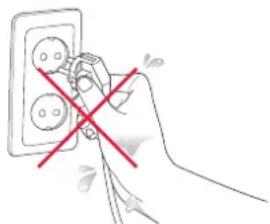
Hand holding a wall socket with a red X symbol indicating no change or dislocation (no text or symbols present)- Do not install the device near gas and electric stoves and ovens.
- Do not use the microwave if the cord is damaged, or if there is a malfunction in its operation or it was dropped or damaged in any other ways.
- This appliance is not intended for use by persons (including children) with reduced physical, sensory or mental capabilities, or lack of experience and knowledge. They can only use the device under the supervision of the person responsible for their safety or
natural_image
Hand holding a plug with a red lightning bolt, connected to a wall-mounted power outlet (no text or symbols visible)after instruction on the safe use of the device.
- The power cord is specially made relatively short in order to avoid the risk of injury.
- Do not connect this device to a grid, which is overloaded with other appliances: it can lead to the fact that the device will not function properly.
- Do not use the device outdoors.
- This product is intended only for use in domestic purposes.
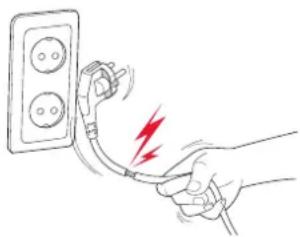
- When disconnecting the device from the socket, hold the plug, do not pull the cord – it can damage the cord or socket and cause a short circuit.
- Do not allow the cord to hang over the sharp edge of the table or touch hot / surfaces.
INTRODUCTION
DANGER OF EXPOSURE TO MICROWAVE ENERGY
- Do not try to use microwave oven with opened door, it can lead to dangerous exposure to microwave energy. It is very important not to disrupt or interfere with the safety interlocks the door.
- Do not place any object between the door and surface of the inner chamber of the microwave, do not allow dirt and remains of the detergents to accumulate on the surfaces of the microwave oven.
- If you don't keep the microwave clean, the state of its surface may deteriorate and affect the life of the microwave oven or lead to dangerous situations.
NOTE! If the door or door seals are damaged, microwave must not be used, until the specialist from OURSSON AG service center resolves the problem.
INTRODUCTION
RECOMMENDATIONS FOR THE INSTALLATION, OPERATION, MAINTENANCE AND STORAGE
- Please read the instruction manual before using the device. Keep the manual after reading for further use.
- All illustrations in this manual are schematic representations of real objects, which may differ from the actual images.
- Unpack the device and remove all packing material. Wipe the body and inner surface with a clean dry cloth. Do not use abrasive cleaners and harsh sponges.
- Liquids and other food must not be heated in closed containers, they may blow.
- Do not remove the upper cover of the microwave by yourself, as it may lead to exposure of microwaves energy. The upper cover may be removed by a specialist from the authorized service center OURSSON AG.
- When microwave is working in a combined mode its surface is heated. In this case, child may use the microwave only under
the supervision of an adult.
- If there is smoke coming from the device, unplug it and do not open the door, to prevent fire from spreading.
- The device is not intended for heating places, utilizing in industrial or laboratory purposes.
- If the power cord is damaged, to avoid danger, it must be replaced by a specialist from the authorized service center OURSSON AG.
- Do not store food in the microwave.
- Remove metallic objects from paper or plastic ware before using it in the microwave.
- You must not heat or cook eggs with shell in the microwave, because they may explode even after the cooking process.
• After heating bottles or baby food, you must shake them and check the
temperature before giving them to children to avoid burns.
- Drinks that are heated in the microwave can boil, be careful when removing them from the microwave.
- The rear side of the microwave should be turned to the wall to avoid injury.
- Microwave shouldn't be placed into the cabinet, if it is not designed for this.
- Do not use the microwave as a timer.
- Do not overheat the food.
- This device must be grounded. In case of an electrical short circuit, grounding reduces the risk of electric shock. This device is equipped with an grounded power cord with a grounded plug. It must be plugged into a grounded socket and be properly installed. Consult an electrician if you're not sure that your socket is grounded and properly installed.
INTRODUCTION
FEATURES
- Digital control
- LED-display
- Timer with a sound signal
• Automatic defrost program
• Automatic cooking program by weight - Programs saving function
• «Parent Control» function
• Microwave Power: 700 W - Adjustable microwave power: 10 levels
- Illuminated chamber with 20L capacity.
- Rotating table 255 mm
- Color:
MD2045/BL - Black
MD2045/WH - White
INTRODUCTION
MATERIALS THAT ARE ALLOWED TO BE USED IN MICROWAVE
For cooking or heating in the microwave, use only cookware that is suitable for this. Dishes that are designed for use in microwaves have a special symbol on them. If you have doubts about cookware that can be used in microwaves, ask the manufacturer of the dishes, or perform the next test.
- Place into the microwave one container that is suitable for microwaves and fill it with one 250ml cup of water, and place an empty test container.
- Turn on the microwave on a maximum temperature for 1 minute.
- After it stops, check the empty container, if it is hot, it isn't suitable for microwaves.
| Aluminum foil | Just as protection. Can be used for coating thin slices of meat or poultry to avoid sticking. Arcing can occur if the foil is too close to the inner walls of the oven. The foil should be positioned at least 2,5 cm from the walls. |
| Pottery | Follow the instructions of the manufacturer. Do not use dishes that contain decorative metal trims, splits and cracks. |
| Tableware | Follow the instructions of the manufacturer. Do not use dishes that contain decorative metal trims, splits and cracks. |
| Glass jars | Always remove the lid. Use only for heating food. Many glass jars are not made of heat-resisting glass and may burst. |
| Glassware | Ware made of a heat-resistant glass. Make sure there are no metal trims. Do not use ware with splits and cracks. |
INTRODUCTION
| Paper plates and cups | Use only for heating food. Don't leave the device unattended when cooking. |
| Paper towels | Use only for heating food, to prevent splattering or as a package for steaming. Don't leave the device unattended when cooking. |
| Parchment Use only for heating | food, to prevent splattering or as a package for steaming. |
| Plastic ware | Follow the instructions of the manufacturer. Ware that is designed for use in microwaves has a special symbol on them. Some plastic containers get soften when used in microwaves. Bags for steaming and tightly closed plastic bags should be pre-pierced for the steam. |
| Plastic packaging | Plastic packaging may be used to wrap food and prevent moisture from coming out when heated. Do not allow plastic packaging to come in contact with food. |
| Thermometers | Follow the instructions of the manufacturer. Use special thermometers for measuring temperature of meat, poultry and fish. |
| Wax paper | Use only for heating food, to prevent splattering and keeping moisture in food. Wrap loosely, leaving holes for steam. |
INTRODUCTION
MATERIALS THAT ARE NOT ALLOWED TO BE USED IN MICROWAVE
| Aluminum pans | Can cause arcing. Put the food in a bowl that is safe for use in microwave ovens. |
| Food cardboard with metal handles | |
| Metal plates | |
| Paper bags May catch fire. | |
| Metal wires Arcing can occur that may cause a fire in the microwave. | |
| Soap Can melt and cause contamination of the microwave. | |
| Wood Dries when used in microwave, can crack. | |
WARNING! When heating the food in paper or plastic containers, keep an eye on the microwave, a fire may occur.
INTRODUCTION
INSTALLATION OF THE MICROWAVE
Carefully unpack the microwave. Remove all packaging material and remove all accessories from the inner chamber of the microwave.
Carefully inspect the microwave for dents on the body or damaged door. If you notice that the door of the microwave is damaged, do not install or use this microwave.
Install the microwave on a flat surface, which provides enough space for ventilation and opening the door.
The minimum space between the side and rear panels of the microwave oven and the wall should be at least 7.5 cm.
Space between the upper panel of the microwave must be at least 30 cm.
Do not remove the legs from the bottom of the microwave.
If there is a protective wrap, remove it from the surface of the microwave.
Do not remove the light-brown cover from the inner chamber of microwave it protects the magnetron.
Blocking the vents of the microwave can cause damage.
Install the microwave as far away from radios and televisions as possible. Microwave can affect their performance.
Plug in the microwave into a grounded socket. Open the door and install the roller ring and a turntable plate, combining the clamp on the turntable with a holder in the center of the microwave.
Check if the turntable is installed tight: it shouldn't be turning freely.
Close the door and press ☐ button. Display will show «0:00» numbers.
Your microwave is ready for work and is in standby mode.
INTRODUCTION
PRODUCT SET
- Microwave oven 1 pc.
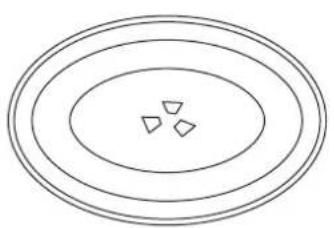
- Glass turntable 1 pc.
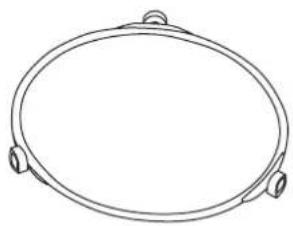
- Roller ring 1 pc.
- Instructions manual with a warranty card 1 pc.
natural_image
Concentric ovals with three small triangles at the center (no text or symbols)Glass turntabel Roller ring
natural_image
Simple line drawing of an oval-shaped object with two side handles (no text or symbols)NOTE! Never install the glass turntable upside down. You should use glass turntable and roller ring at the same time when cooking. If the glass turntable or roller ring are damaged, (have splits or cracks), they must be replaced. To do this, contact an authorized OURSSON AG service center.
INTRODUCTION
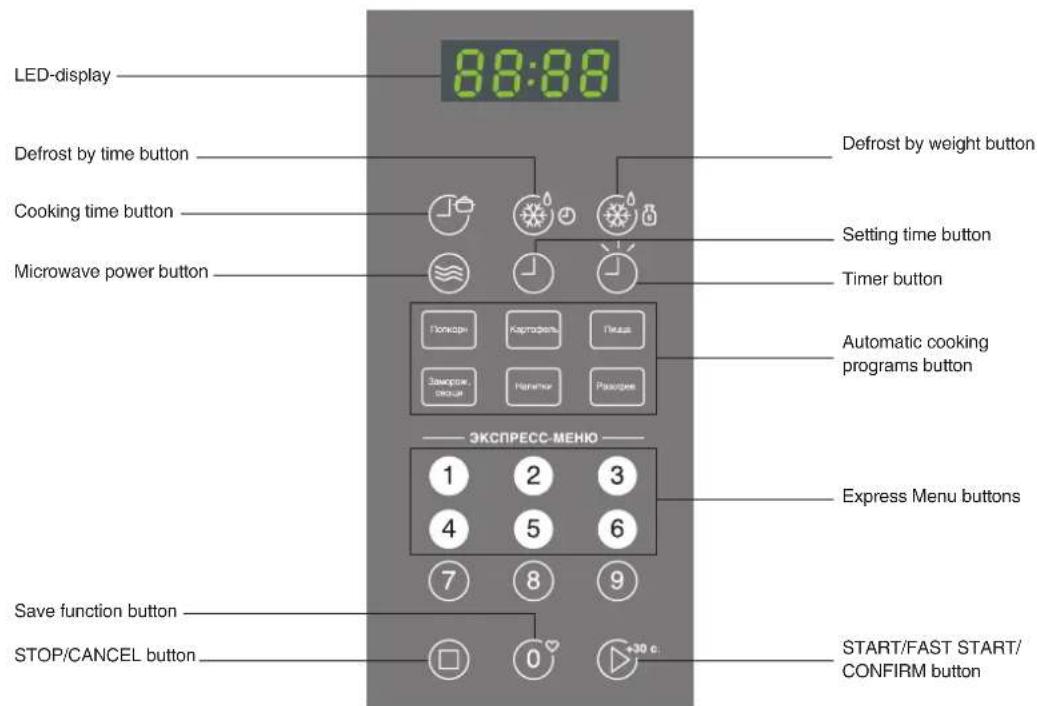
CONTROL PANEL
OPERATION
SETTING THE CLOCK
Plug in the microwave, display will show «0:00» and you will hear a sound signal.
- Press ⏻ button, to select the setting clock function, on the display two numbers will flash.
- Pressing the corresponding buttons from 0 to set the hours, them minutes. Time format is 12-hour clock, from 1:00 to 12:59.
- Press ⏻ button to finish the setting, «:» indication will flash and set time will be displayed.
Example:
- Press ⏻ button.
- Press ①, ②, ② ⑤ buttons to set times.
- Press O button to confirm the set time.
NOTE! To reset the time, repeat 1-3 steps.
NOTE! If there will be no action within 1 minute, the microwave will automatically go into a standby mode. To cancel or reset the values of the set clock press ☐ button.
OPERATION
PREPARING
IN THE «MICROWAVE» MODE
Press 🤨 button, display shows 00:00, then press corresponding numbers on the control panel (from 📄 to set the cooking time from 0:01 seconds to 99:00 minutes.
Press 📋 button to select the power level of the microwaves, display will show a predetermined microwaves power level 100% – «PL10».
Press the corresponding buttons on the control panel from ① to ⑨ set microwaves power level from «PL9», «PL8», «PL7», «PL6», «PL5», «PL4», «PL3», «PL2», «PL1». Selected level will be displayed.
Press ▶+30 c. button to begin cooking.
Example: if you want to use 50% from the power level in 20 minutes, you must do the following:
- Press 📋 button, 00:00 will be displayed.
- Press (2)(0)(0)(0) in this order, to set cooking time «20:00».
- Press ②, ①, button once, «PL10» will be displayed.
- Press ⑤ button, to select «PL5» power level.
- Press ▶+30 c. button to begin cooking.
NOTE!
During preparation, you can change the power of the microwave by pressing button. After pressing the button for 3 seconds, you need to set the desired microwave power level by pressing the corresponding number (from 1 to 9) on the control panel of the device. In the remaining cooking time, microwave will operate with a changed power level.
OPERATION
| Power level type | Designation on the control panel | Microwave power in % | Usage |
| Maximum | PL10 100% | Water boilingCooking minceCooking vegetableReheating | |
| PL9 90% | Cooking small pieces of tender meatCooking pieces of poultry | ||
| High | PL8 80% | Cooking big pieces of meat and a whole chicken.Cooking mushrooms and seafood. | |
| PL7 70% | Cooking dishes that contain eggs and cheese.Heating milk | ||
| Above Average PL6 60% | Stewing poultry.Cooking soup and different cereals. | ||
| Average PL5 50% | Preparing custard.Cooking fish.Cooking egg dishes. |
OPERATION
| Below Average PL4 40% | Stewing tough meat | ||
| Low/defrost | PL3 30% | Defrosting different products.Melting chocolate and butter. | |
| PL2 20% | Keeping dishes warmCareful reheat of tender dishes | ||
| Minimal PL1 10% | Softening cheese.Softening ice cream. |
OPERATION
FAST START
DEFROST BY WEIGHT DEFROST BY TIME
- If you press button in standby mode, the microwave will for 30 second in «Microwaves» mode with 100% power level. Every press of the button will add 30 seconds, until 99:99 minutes. It is comfortable for a fast reheat.
- While in the «Microwaves» mode or defrost mode, pressing ▶ ^+30 button will add 30 seconds to the current mode.
-
If in standby mode you press from ① to ⑥ buttons, the device will be working in «Microwaves» mode from 1 to 6 minutes with a 100% power level. Every press of the ▶ button will add 30 seconds, until 99:99 minutes.
-
Press the Ⓞ button once, «dEF-1» will be displayed.
- Press the corresponding buttons on the control panel, to choose the weight of the defrosting product from 100 to 2000 grams.
- Press ▶ ^+30 ° button to begin defrost. Example: you need to defrost 600 grams of ram ribs.
- Press the Ⓞ button to select the defrost mode.
- Press Ⓞ, Ⓐ, Ⓞ, Ⓗ buttons in this order, to set weight to 600 grams.
-
Press ▶+30° button to begin cooking.
-
Press the Ⓞ button, to select defrost by time mode, «dEF-2» will be displayed.
- Press the corresponding buttons from 0° to 9 on the control panel, to set the defrost time from 0:01 seconds to 99:99 minutes.
- Press ▶+30° button to begin defrost.
NOTE! Power level of the microwaves in defrost mode is 30%(P30), it can't be changed.
OPERATION
AUTOMATIC COOKING PROGRAMS
For some of the most common types of products we have developed special cooking programs. They are included in the list of automatic programs.
Popcorn
- Press a few times «Popcom» button, until the weight of your back is displayed, «50», «100».
- Press ▶ ^30 button to begin preparation. When it is complete, you will hear 5 sound signals meaning that preparation is complete.
Potato
- Press a few times «Potato» button, and select the required cooking mode 1, 2 and 3.
- Press 📋 button to begin preparation. When it is complete, you will hear 5 sound signals meaning that preparation is complete and the device will be in a standby mode.
| Display indication Potato, g. | |
| 1 230 | |
| 2 460 | |
| 3 690 | |
Pizza
- Press a few times «Pizza» button, and select the weight of your pizza (100, 200, 400 grams).
- Press ▶ ^30 button to begin preparation. When it is complete, you will hear 5 sound signals meaning that preparation is complete and the device will be in a standby mode.
NOTE! If you are using a package of popcorn in weight from 85 to 100 grams, it is recommended to open the top edges of the package before cooking. If the popcorn pack burst or gets off the turntable, press the ☐ button once, open the door of the microwave and place the pack onto the center of the microwave.
OPERATION
TIMER FUNCTION
Frozen vegetables
- Press a few times «Fro. vegetables» button, and select the weight of your products (150, 350, 500 grams).
- Press ☑ ^30 button to begin preparation. When it is complete, you will hear 5 sound signals meaning that preparation is complete and the device will be in a standby mode.
Reheating
- Press a few times «Reheat» button, and select the weight of your ingredients (250, 350, 500 grams).
- Press ▶ ^30 button to begin preparation. When it is complete, you will hear 5 sound signals meaning that preparation is complete and the device will be in a standby mode.
Warming drinks
- Press a few times «Drinks» button, and select the desired number of cups you want to warm up (1, 2, 3 cups). The volume of 1 cup is 120 ml.
- Press 📋+30c button to begin preparation. When it is complete, you will hear 5 sound signals meaning that preparation is complete and the device will be in a standby mode.
-
The temperature of the liquid in cups, after the warming process, is 50-60°C
-
Press ⏻ button, «00:00» will be displayed.
- Set the required working time, from 00:01 seconds to 99:99 minutes.
- Press the +30c button to confirm selected time and a countdown will start.
- When it is complete, you will hear 5 sound signals meaning that preparation is complete and the device will be in a standby mode.
OPERATION
PROGRAMMING MULTI-STAGE COOKING PROCESS
You can program not more than two cooking modes. If one of the modes is "Defrost" mode, it must be programmed first and them cooking.
Example: if you want to cook frozen food by putting it frozen and taking out cooked.
- In standby mode, press 📋 button, «dEF-2» will be displayed.
- To set the required defrost time, press ① to ⑨ buttons.
- Press 🕒 button, «PL10» will be displayed.
- Press the corresponding buttons from ① to ⑨ to select the required microwaves power level.
- Press ▶+30 c. button to confirm the selected power level.
-
Press 📋 button and set the cooking time, using ⏻ to Ⓗ buttons.
-
Press ^30c . button to begin cooking. After the defrost, you will hear one sound signal, which means that the first step is completed. Than you will hear another sound signal, meaning that the second step had begun. When the program is completed, you will hear five sound signals.
- Serve the dish.
PARENT CONTROL
Blocking: In standby mode, press and hold □ button for 3 seconds, you will hear a sound signal and microwave will be blocked. Display will show «——» symbol.
Unblock: In blocking mode, press and hold button for 3 seconds, you will hear a long sound signal and microwave will unblock and go into standby.
NOTE! In blocking mode, the door of the microwave isn't blocked, control panel is.
OPERATION
PROGRAMS SAVING FUNCTION INFORMATIONAL FUNCTION
This program allows saving to memory from 1 to 3 single or multistage cooking modes.
Saving the cooking programs:
- In standby mode press Ⓞ button from 1 to 3 times, to select one of three memory space, «1, 2 or 3» will be displayed.
- Press ⏻ button and set the required cooking mode, using numbers from Ⓞ to ⓝ
- Press 📋 button once, «PL10» will be displayed. Press the corresponding buttons from ① to ⑨ to select the required microwaves power level.
- Press 30^c button once, to confirm the settings, you will hear a sound signal and microwave will go into standby mode.
-
Press 📋 button again and setting will be saved into one of the memory spaces, selected before.
-
To select previously saved cooking program, in standby mode press Ⓞ button from 1 to 3 times, to select one of three memory space, then press 📋 button to start the process.
-
If you want to see the current time when cooking, press ⏻ button.
- To see installed microwave power level, when cooking, press 🕒 button. After 3 seconds, the display will show the remaining cooking time.
NOTE! When the microwave is unplugged, all previously made settings reset to the initial state.
POSSIBLE PROBLEMS AND SOLUTIONS
| POSSIBLE PROBLEMS SOLUTIONS | |
| Microwave isn’t working | The door isn’t well closed.The power cord ill plugged.No voltage in the socket.Mode is improperly set. |
| Condensation on the grill grate and walls of the microwave. | When cooking food that contains water, steam is formed, which partly comes out the microwave and partly settles as a condensate on the grill grate and walls of the microwave. |
| Spark inside the microwave. | When preparing in «Microwaves» mode, do not turn the microwave on without loading products first.Remove the packaging that contains metallic parts.Do not use dishes that contain decorative metal trims |
| Products are not heated enough. | You have selected an incorrect microwave mode.Frozen products haven’t been defrosted before cooking. |
| Products burn up. • You have selected an incorrect microwave mode. | |
| Food heats unevenly. | When cooking, several times suspend the program and mix the food.Products that are cut same size heat more evenly.Do not rotate the glass turntable. |
POSSIBLE PROBLEMS AND SOLUTIONS
NOTE! Please check the possible problems, before calling service center. If after checking, the microwave still does not work, contact an authorized OURSSON AG service center. A qualified specialist of OURSSON AG service center should only repair the microwave.
OTHER
| SPECIFICATIONS | ||
| MODEL MD2045 | ||
| Power consumption, W 1050 | ||
| Rated voltage 220~230V; 50 Hz | ||
| Magnetron frequency 2450 MHz | ||
| Microwaves power output, W 700 | ||
| Inner chamber capacity, L 20 | ||
| Glass turntable diameter, mm 255 | ||
| Temperature requirements: | Operation +15°C to +35°C | |
| Storage and transportation | -40°C to +55°C | |
| Humidity Requirements: | Operation 15-75% | |
| Storage and transportation | 15-75% | |
| Electric shock protection class I | ||
| Dimensions (HxWxL), mm | 335x439,5x257,6 | |
| Weight, kg | 10,5 | |
CLEANING AND MAINTENANCE
- Before cleaning, unplug the microwave.
- Keep the inner surface clean and dry. Remove any remnants of food and crumbs. Grease stains must be removed with a damp cloth, do not use abrasive detergents.
- Remove dirt from the outer surface with a soft napkin, adding non-abrasive detergents.
- Do not allow water to get into the ventilation of the device, this may result in malfunction of the device.
- The control panel must be cleaned only with a damp cloth, do not use any sprays or other detergents, as they can leave stains and spots.
-
If there is condensate inside and outside of the microwave, carefully remove it with a soft cloth.
-
To clean the glass turntable, remove it from the device. Glass turntable may be washed in a dishwasher.
- Regularly clean the roller ring. The roller ring may be washed in a dishwasher. Roller ring must always be installed correctly.
- To get rid of a bad smell in the inner chamber of the microwave, place in it a container with water and a slice of lemon in the water, set the timer for 5 minutes. After that, clean thoroughly your microwave.
RADIO INTERFERENCE
Microwave can create television and radio interference.
In this case:
- wipe the door and the seal of the microwave.
- move radio or television antenna away from the microwave.
- ensure the correct installation and operation of the television or radio.
- plug the microwave into a separate socket.
NOTE! Do not use abrasive materials, such as scouring powder, metal sponge or plastic pads. Wipe the microwave with a damp cloth.
OTHER
SERVICING
Company OURSSON AG expresses great appreciation to you for choosing our products.
We have done everything possible so that this meets your needs, and the quality corresponds to the best world standards. If your OURSSON branded product will need maintenance, please contact one of the authorized service center (hereinafter - ASC). A complete list of ASC and their exact addresses can be found on the website www.oursson.ru, as well as by calling
free hotline number OURSSON AG.
If you have questions or problems with OURSSON AG products, please contact in writing form the organization authorized to accept and meet the demands for the products of poor quality, – «BBK Service Center», 109202, Moscow, Fraser Highway, 17A, 1A or email info@oursson.ru.
Warranty obligations OURSSON AG:
- Warranty obligations OURSSON AG, provided ASC OURSSON AG, apply only to models designed OURSSON AG for the production or supply and sale within the country where the warranty service is provided, purchased in this country, certified for compliance with the standards of this country, and also marked the with official marks of conformity.
- Warranty obligations OURSSON AG operate within the law on protection of consumer rights and are regulated by the laws of the country in which they are provided, and only when the product is used exclusively for personal, family or household purposes. Warranty obligations OURSSON AG shall not apply to uses of goods for business purposes or in connection with the acquisition of goods to meet the needs of enterprises, institutions and organizations.
OTHER
- OURSSON AG sets for its products the following terms of use and warranty periods:
| Product name Terms of use Warranty Period | |||
| Microwave ovens breadmakers, induction hobs 60 12 | |||
| Multicookers, kitchen processors, electric kettles, electric grills, hand blenders, hand mixers, meat grinders, blenders, toasters, airpots, toasters, juicers, steamers, coffee makers, choppers | 36 12 | ||
| Kitchen scales | 24 12 | ||
-
Warranty obligations OURSSON AG shall not apply to the following products, if their replacement is assumed and is not connected with disassembling products:
-
Batteries.
-
Cases, straps, cords for carrying, mounting accessories, tools, documentation that came with the product.
-
Warranty does not cover defects caused due to violations of the rules of consumer use, storage or transportation of the goods, actions of third parties or force majeure, including but not limited to the following cases:
OTHER
- If the defect was a result of careless handling, used for other purposes, violations of conditions and rules of operation set forth in the instruction manual, including as a result of exposure to high or low temperatures, high humidity or dust, traces of opening the device independently and/or self-repair, mismatch state standards for power grids, getting liquids, insects or other foreign objects, substances inside the device, as well as long-term use of the product in extreme operational modes.
- If the defect of the product was a result of unauthorized attempts to test the product or make any changes in its construction or software programs, including repair or maintenance in unauthorized service centers.
- If the defect of the product was a result of use of non-standard and/or low quality equipment, accessories, spare parts, batteries.
- If the defect of the product is associated with its use in conjunction with additional equipment (accessories), other than additional equipment recommended by OURSSON AG for use with this product. OURSSON AG is not responsible for the quality of the additional equipment (accessories) manufactured by third parties, for the quality of its products together with such equipment, as well as the quality of the work of the additional equipment of OURSSON AG together with the products of other manufacturers.
- Product defects detected during the lifetime of the product are eliminated by the authorized service centers (ASC). During the warranty period, elimination of defects is free of charge with the presentation of the original certificate of guarantee and documents that confirm the fact and date of the contract of retail purchase. In the absence of such documents, warranty period is calculated from the date of manufacture of goods. It should be taken into account:
- Setup and Installation (assembly, the connection, etc.) of the product described in the documentation attached to it, does not enter the scope of warranty OURSSON AG and can be performed by the user as well as the specialists of most authorized service centers on a paid basis.
OTHER
- Work upon maintenance of products (cleaning and lubricating the moving parts, replacement of consumables and supplies, etc.) are made on a paid basis.
- OURSSON AG is not responsible for any damage directly or indirectly caused by their products to people, pets, property, if it occurred as a result of non-observance of the rules and conditions of use, storage, transportation or installation of the product, intentional or negligent actions of consumer or third parties.
- Under no circumstances, OURSSON AG is not responsible for any special, incidental, indirect or consequential loss or damage, including but not limited to: lost profits, damages caused by interruptions in the commercial, industrial or other activities, arising from the use of or inability to use the product.
- Due to continuous product improvement, design elements and some technical specifications are subject to change without prior notice from the manufacturer.
OTHER
Using the product when after the terms of use (lifetime):
- Lifetime set by OURSSON AG for this product applies only when the product is used exclusively for personal, family or household needs, as well as the consumer observes the correct operation, storage and transportation of products. Under the condition of careful handling of the product and compliance with the rules of operation the actual life may exceed the lifetime set by OURSSON AG.
- At the end of the product lifetime, you should contact an authorized service center for to conduct a preventive maintenance of the product and determine the suitability for further use. Work on conducting a preventive maintenance of the products is also made in service centers on paid basis.
- OURSSON AG does not recommend the use of this product after the end of its lifetime without its preventive maintenance by the authorized service center, since in this case, the product can be dangerous to the life, health or property of the consumer.
Product Recycling and Disposal
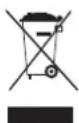
After the expiration of the lifetime, the product cannot be disposed with another household waste. Instead, it shall be deposited in the appropriate recycling collection point for electrical and electronic equipment for proper treatment and disposal in accordance with federal or local law. By disposing correctly this product, you will help to conserve natural resources and preventing the product from damaging the environment and human health. For more information on the collection point and recycling of this product, please contact your local municipal authorities or the enterprise for household waste disposal.
OTHER
Date of manufacture
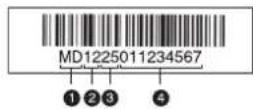
Each product has a unique serial number in the form of alphanumeric row and is duplicated with a barcode that contains the following information: name of the product group, date of manufacture, serial number of the product.
Serial number is located on the rear of the product, on the package and the warranty card.
① The first two letters-correspondence to the product group (Microwave - MD).
The first two digits – year of manufacture.
The second two digits – week of manufacture.
④ The last two digits – serial number of product.
Note! To avoid misunderstandings, we highly recommend you to read carefully the instruction manual and the warranty obligations. Check the correctness of the warranty card. Warranty card is valid only if the following are correctly and clearly stated: model, serial number, date of purchase, clear stamps, buyer's signature. The serial number and the model of the device must be the same as in the warranty card. If these conditions are not fulfilled or the data specified in the warranty card was changed, the warranty card is invalid.
oursson®
OURSSON AG hotline provides complete information about the company's activity in Russia, CIS and Baltic countries. Professional operators quickly answer to any question. You can contact the unified center for service support, for recommendations about the setup and connection, to get information about local sales, with questions about the promotions and yearly drawings conducted by the company, as well as with any other questions about the company's activities on the territory of Russia,
CIS and Baltic countries.
Any questions? Call us, we can help!
Hotline OURSSON AG (free calls from fixed phones)
8 800 100 8708.
The hotline work schedule is: Monday-Friday from 9:00 to 20:00 (Moscow time). Saturday, Sunday and public holidays are rest days.
This manual is under protection of international and Russian copyright law. Any unauthorized use of the instructions, including copying, printing and distribution, but not limited to, involves the application of the guilty person to civil liability and criminal liability in accordance with Article 146 of the Criminal Code and the administrative responsibility in accordance with Article 7.12 of the Administrative Code (previously Article 150.4).
Contact information:
- Manufacturer of goods - OURSSON AG (Orson AG) Utokvay 39, 8008 Zurich, Switzerland.
- Organization authorized to accept and meet the demands for the goods of poor quality, – «Management Service Company», 109202, Moscow, Fraser Highway 17A, 1A. Ukraine LLC «Universal Distribution Company», 03065, Kyiv, blvd. I.Lepse / Academica Kablukova, 51/16.
- Certification information product available on the website www.oursson.com.
- Importers of products OURSSON AG: Russia: OOO "Orson", 125171, Russia, Moscow, Leningrad Highway 16A, 2. Republica Moldova: S.C. «PLAI VERDE» S.R.L. MD-2002, str. Muncesti highway., 271/A, Chisinau. Ukraine: TOV "Universal Distribution Company"; 03065, Kyiv, blvd. I.Lepse / Akademika Kablukova, 51/16.
- Product Suppliers OURSSON AG: Belarus: "Nikita plus", 220094, Minsk, 2nd Cycle lane., 30, office 603.


bar
| Category | Value | |---|---| | Bar 1 | 100 | | Bar 2 | 100 |www.oursson.com
