
WS-01 - Network card / adapter Ipevo - Free user manual and instructions
Find the device manual for free WS-01 Ipevo in PDF.


| Product Type | Network Adapter |
| Model | WS-01 |
| Brand | IPEVO |
| Connectivity Technology | Wired |
| Interface | USB 3.0 |
| Ethernet Speed | 10/100/1000 Mbps |
| Dimensions (L x W x H) | 2.8 x 0.8 x 0.6 in (71 x 20 x 15 mm) |
| Weight | 0.9 oz (25 g) |
| Power Source | Bus-powered via USB |
| Operating Systems | Windows, macOS, Chrome OS, Linux |
| LED Indicators | Link/Activity |
| Cable Length | 6 in (15 cm) integrated USB cable |
| Compliance | IEEE 802.3, 802.3u, 802.3ab |
| Operating Temperature | 32°F to 104°F (0°C to 40°C) |
| Storage Temperature | -4°F to 140°F (-20°C to 60°C) |
| Warranty | 1 year limited |
| Maintenance | Wipe with dry cloth; avoid liquids |
| Safety | Compliant with FCC, CE, RoHS |
Frequently Asked Questions - WS-01 Ipevo
User questions about WS-01 Ipevo
0 question about this device. Answer the ones you know or ask your own.
Ask a new question about this device
Download the instructions for your Network card / adapter in PDF format for free! Find your manual WS-01 - Ipevo and take your electronic device back in hand. On this page are published all the documents necessary for the use of your device. WS-01 by Ipevo.
USER MANUAL WS-01 Ipevo
natural_image
Line drawing of a desk lamp with adjustable arm and connected to a black electronic device (no text or symbols)User Manual
Wireless Station for USB Document Cam
WS-01
IPEVO
www.ipevo.com

natural_image
Line drawing of a tablet with 3D geometric shapes (cube, sphere) on its surface, no text or symbols present1. Getting Started
Congratulations on your purchase of the WS-01 Wireless Station for USB Document Cameras. This User Manual will help you get WS-01 set up right away.
Note: This document will refer to the WS-01 Wireless Station for USB Document Cam as simply WS-01.
Package Contents
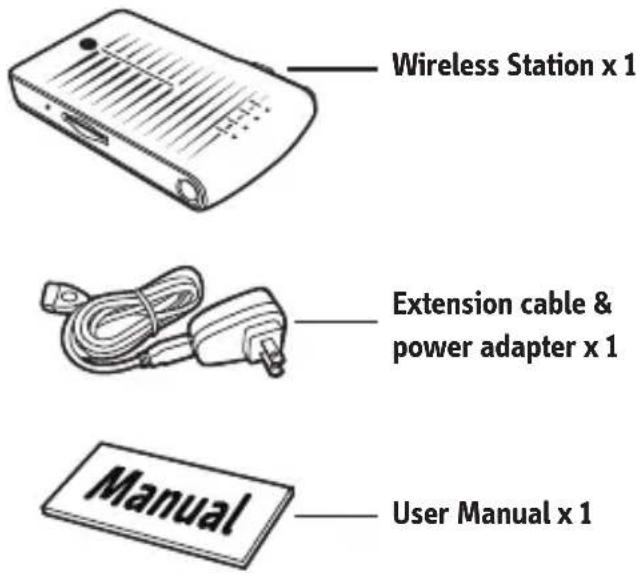
Your package should contain the following:
• Wireless Station and attached USB cord
• 1.5m USB extension cable and AC power adapter
- User Manual (this document)
Note: The WS-01 is intended to be used with one of IPEVO's USB document cameras – the Point 2 View, Ziggi or Ziggi HD – which are sold separately.
2. The Basics
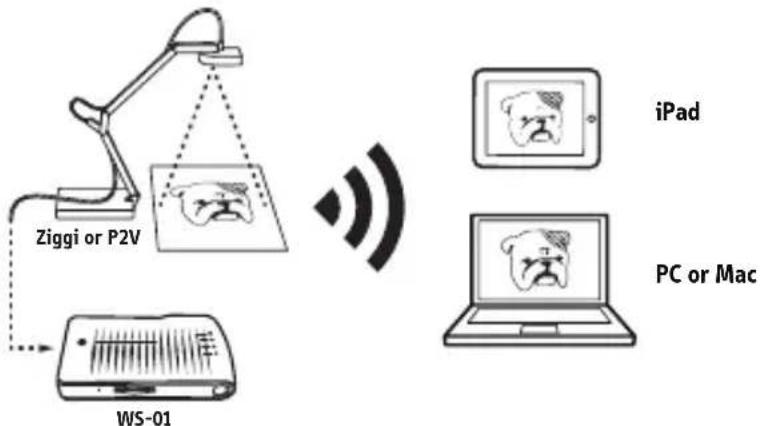
The WS-01 Wireless Station for USB Document Cam lets your IPEVO document camera – the Point 2 View, Ziggi or Ziggi HD – communicate wirelessly so you can do even more:
- Stream live images from Ziggi or P2V to iPad, PC or Mac via Wi-Fi
- Upgrade your Ziggi or P2V to a Wi-Fi enabled wireless document camera
• Take advantage of the free Whiteboard App to further enhance your doc cam's use on the iPad - Use the station as a USB drive or USB card reader with the built-in SD card slot. You can wirelessly share files on the WS-01 via Wi-Fi
flowchart
graph TD
    A["Ziggi or P2V"] -->|Signal| B["iPad"]
    C["WS-01"] -->|Signal| D["PC or Mac"]
    B --> E["Smartphone with Dog Icon"]
    D --> F["Smartphone with Dog Icon"]
3. Getting to know your WS-01
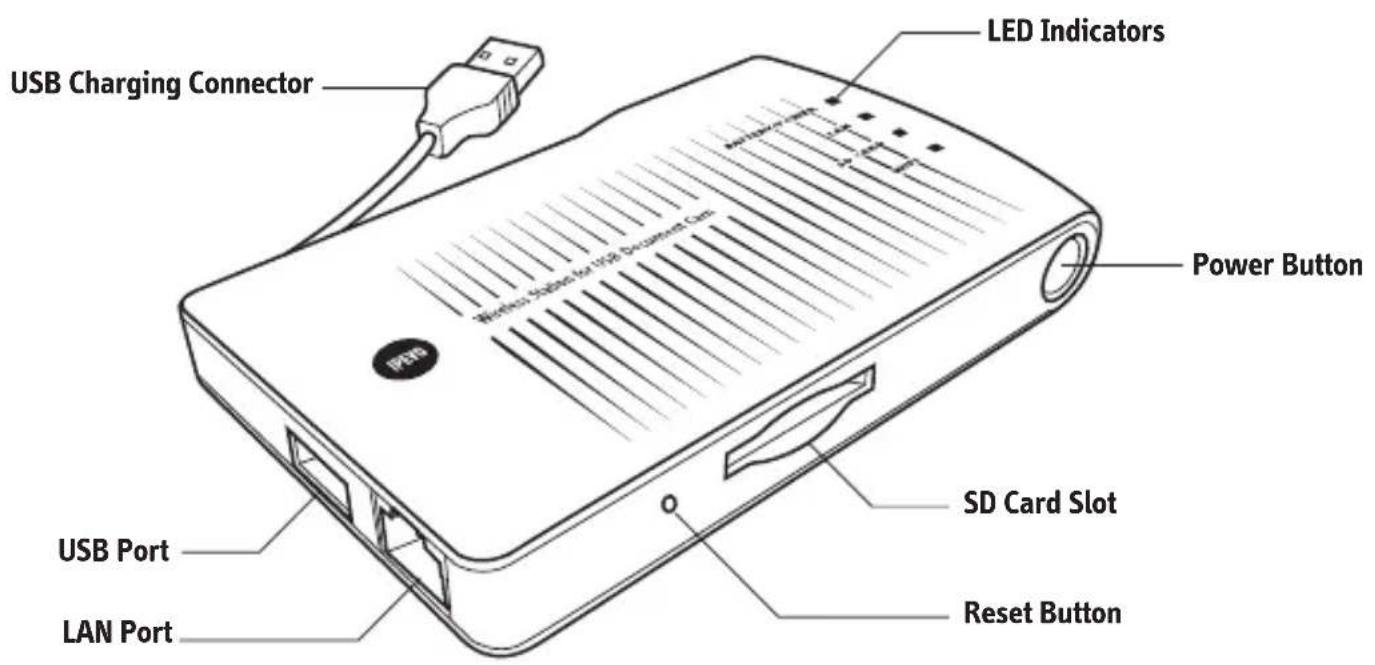
LED Indicators: Lights indicate activity in four areas: Battery/Power, LAN, SD Card, and Wi-Fi.
USB Port: Connect your Ziggi or P2V for live streaming, or connect a USB drive for file sharing.
LAN Port: Plug in an Ethernet cable (not included) to connect to your existing internet network. (Note: when connecting in this manner, please set the WS-01's wireless connection to "Off (Ethernet Cable)" in the "Internet Connection" setting. See Page 20 for instructions.)
USB Charging Connector : This built-in cord can be used in two ways:
- Plug in to the included AC adapter to charge WS-01's battery
- Plug in to a computer's USB port to use WS-01 as an SD card reader
Reset Button: Press the button with a pin or paper clip to reset the device. After pressing the reset button, WS-01 will reboot in 3-5 seconds. The Wi-Fi LED indicator will start blinking red and blue, and will take about 100 seconds for WS-01 to complete the booting process.
SD Card Slot: Insert SD Cards and use WS-01 as a wireless file sharing device.
Power Button: Press and hold for 2 seconds then release to turn on WS-01, or press briefly to shut down WS-01.
4. Understanding the LED indicators
The color (red or blue) and frequency (solid or blinking) of the WS-01's LED indicators will tell you more about the device's status.
| Indicator | Color and Frequency |
| Battery/Power | Blue: Battery is normal with sufficient charge, or charging is completeRed: Battery is chargingBlinking Red: Low battery. Please plug in the power adapter |
| LAN | Blue: Ethernet cable is connectedBlinking Blue: Data is transferringLED Off: Ethernet cable is unplugged |
| SD Card | Blue: SD Card is inserted and readyBlinking Blue: SD Card data is transferringLED Off: SD Card slot is empty |
| WIFI | Red and Blinking Red: System is booting upBlue: Wi-Fi is on / System is onBlinking Blue: Data is being transferred via Wi-FiBlinking Red and Blue: System is shutting down |
5. Charging Your WS-01
Charge WS-01's built-in battery prior to powering up the device for the first time. This ensures the battery will have sufficient power.
- Connect the built-in USB connector to the included power adapter, then connect the power adapter to an outlet.

-
The battery/power LED indicator will stay red while charging. When the battery is fully charged, this indicator will turn blue.
-
The battery may also be charged by plugging the built-in USB connector directly into a computer's USB port. However, this method will take longer than using the power adapter.

natural_image
Simple line drawing of a laptop connected to a computer (no text or symbols present)Note: Wi-Fi will be disabled when plugged into a computer's USB port.
Battery Tips:
- Charging to full will take approximately 6 hours, or more if you are using the WS-01 while charging.
- The WS-01's 3300mAh battery will power the device for about 4 hours before requiring a charge.
- A blinking red battery/power LED means your battery is low. Please recharge your device if so.
Important Caution!
Please do not attempt to use any power adapter other than the one included with your package. Using a different adapter may damage the WS-01 and will void the manufacturer warranty.
6. Setting Up Your WS-01
WS-01 is compatible with iPad, PC and Mac, and can be installed following these steps:
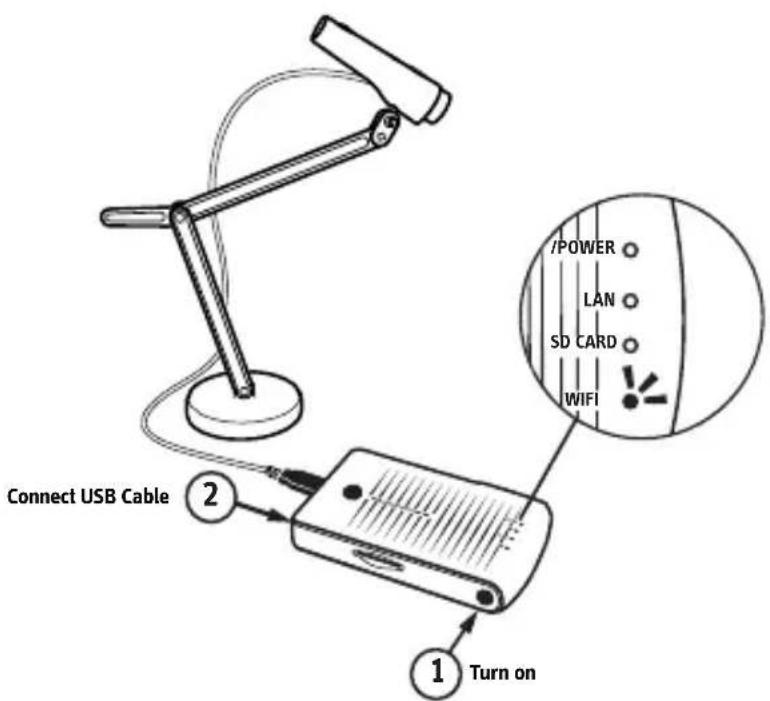
- Press the power button and hold for 2 seconds. The Wi-Fi indicator will flash from red to blue.
- Connect your Ziggi or P2V Document Camera to the USB port on WS-01.
7. Installing your WS-01
On iPad:
- Go to the Apple App Store on your iPad. On App Store, search for and install the free "IPEVO Whiteboard" app.

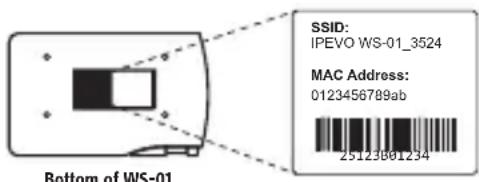
- Hit "Settings" on your iPad and enter "Wi-Fi Settings." Browse the available connections and connect to WS-01's SSID (SSID can be found on the label located on the bottom of the device).

- Launch IPEVO Whiteboard and follow the onscreen guide to access WS-01's features.

natural_image
Illustration of a hand interacting with a tablet displaying a grid of square icons and a black square with a plus symbol (no text or labels)- a) Tap the Wireless Station icon and b) Select WS-01 under available wireless stations. The menu bar next to Wireless Station should then expand once WS-01 is selected.

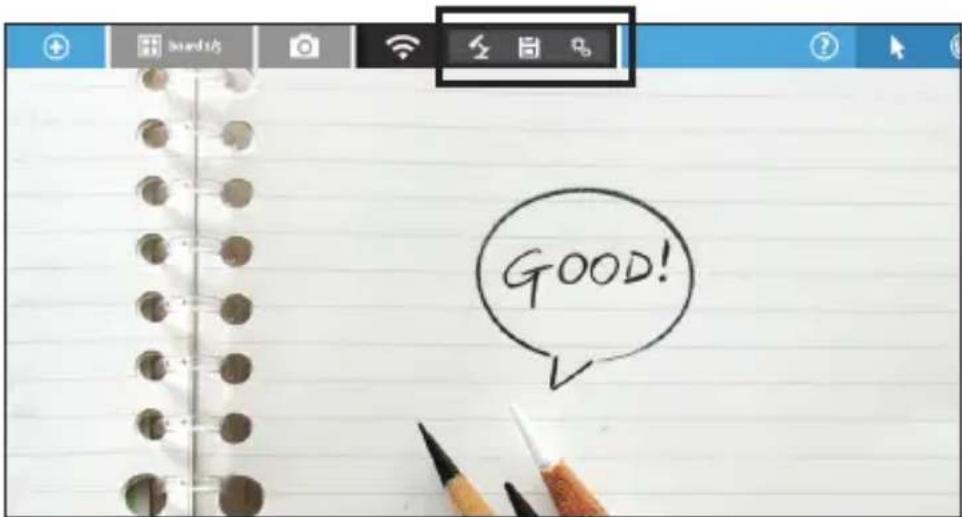
- Use the icons on the extended menu to view Live View, access data and settings.

Live View: View the live feed from your Document Camera

Storage: Access files stored on WS-01 wirelessly

Settings: Access the settings page
On Mac or PC:
- Browse your available wireless networks and connect to WS-01's SSID (SSID can be found on the label located on the bottom of the device).

- Launch your browser and connect to the IP address of WS-01 by typing it into the address bar. The default for this IP address is 10.10.10.1.
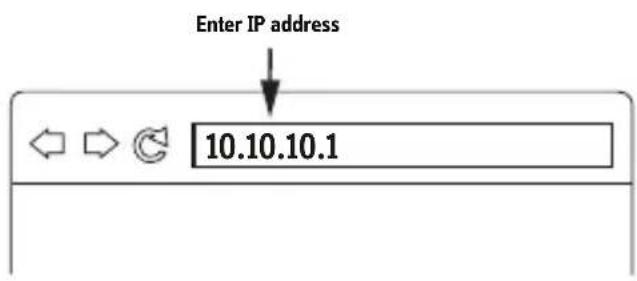
- Enter the login password at the prompt, which by default is "admin".

- Click on "Live View" on the Settings page to access the video stream and related options.

- In the top right-hand corner of the video stream window is an icon with 4 arrows. Click this icon to enlarge the video screen.

8. Using WS-01 for Data Sharing
WS-01's SD Card slot and USB port allows you to insert SD cards or USB drives with curriculum to view and share via your browser or the IPEVO Whiteboard App. Additionally, files edited using Whiteboard can be saved to an installed SD card.
On iPad: Using the IPEVO Whiteboard App to access Data Sharing
- Connect to WS-01 (follow the steps on Page 9) and launch the IPEVO Whiteboard App.
- Select WS-01 under Wireless Stations (follow the steps on Page 10).
- On the extended menu bar, tap the Disk icon to access files stored on WS-01.

On Mac or PC: Using your Browser to access Data Sharing
- Click "Wireless Disk" on the Settings Page to access and manage the SD Card's or USB Drive's data.
(See Page 12 for accessing the Settings Page.)
- Click on the SD Card or USB Drive image.
File names, sizes, and last modified dates will be shown.

- Use the four icons above the file list to manage the data:


Home: Return to the root directory

Up: Go up one level to the parent directory

Delete: Checkmarked files will be deleted

Download: Download checkmarked files. This function is disabled when using iPad
Note: for Delete and Download functions, click the white check boxes to the left of file names to mark files accordingly.
9. Connecting to the Internet with WS-01
Your computer/iPad will lose its connection to the internet once you connect to WS-01. However, WS-01 will act as a bridge from your computer/iPad to your interent-enabled network.
Generally, your iPad/Computer can access the internet via your Wi-Fi router

With IPEVO WS-01,
you can view the IPEVO Doc Cam from your iPad/Computer in real time. Plus, you can connect to the Internet by linking WS-01 to the Wi-Fi network you already use.

Follow these simple steps to set up a Wi-Fi Internet connection for the WS-01. It will only take a minute.
Connecting to the internet with WS-01:
- Please make sure your iPad, Mac or PC is connected to WS-01. To connect WS-01, please follow the steps starting on Page 8.
- Tap the Internet Connection icon on the WS-01 Settings Page. (To use the IPEVO Whiteboard App to access the Settings page on iPad, a) tap the Wireless Station Icon, then b) select the Gear icon in the extended menu).

In IPEVO WhiteboardIn your Browser

-
Under "Wireless Connection," select "On." If a wired connection is preferred, please select "Off (Ethernet Cable)" and plug an Ethernet cable (not included) into the LAN port.
-
A list of available Wi-Fi networks will appear. Select your network.

- Enter the password for your network and click OK.
- A pop-up window will appear. Please click "Restart" to restart WS-01 and complete the process, or click "Later" to manually restart WS-01 later. WS-01 will connect to your network in 30 seconds. Your device is now connected to the Internet through WS-01.

flowchart
graph LR
    A["Restart"] --> B["Later"]
Note: • If you are not returned to the WS-01 Settings Page after the 30 second countdown, please reconnect your iPad to WS-01 by going to Settings > Wi-Fi > Select WS-01's Network.
- WS-01 is unable to determine if your password is correct or if you have successfully connected to your network. If you are unable to access the internet after restart, please check if the password is entered correctly (case sensitive) and try again.
10. Securing your WS-01 Wireless Network
To prevent unwanted access of your Live View and files, secure your WS-01 Wi-Fi network by adding a password using the Wireless Password function.
- To set your Wireless Password, access the WS-01 Settings page (see Page 12).
- Tap on Wireless Password. The WS-01 network name (SSID) and network password can be changed here.

11. Customizing Your Login Information
Set a new password for accessing the Settings Page. An additional 8 guest users can be added. Guest users will have access to the SD Card data and Live View, but will not have access to Internet Connection, Admin Password, Wireless Password, or Advanced Settings.
- To set your Admin Password, access the WS-01 Settings page (see Page 12).
- On the Settings Page select Admin Password.
Note: • The Admin account cannot be changed.
• To delete users, empty the Account and Password field and click OK.

12. Using Apple TV Airplay
You can use Apple TV Airplay to wirelessly project live action from the IPEVO Whiteboard onto the big screen.

flowchart
graph LR
    A["Ziggi or P2V"] --> B["WS-01"]
    B --> C["iPad"]
    C --> D["Apple TV"]
    D --> E["Projector"]
    E --> F["Monitor with Dog Icon"]
    style A fill:#f9f,stroke:#333
    style B fill:#ccf,stroke:#333
    style C fill:#cfc,stroke:#333
    style D fill:#fcc,stroke:#333
    style E fill:#cff,stroke:#333
    style F fill:#ffc,stroke:#333
Follow these steps to project live action from your Document Cam using Apple TV Airplay:
- Connect your Apple TV device to WS-01. Navigate to Settings > General > Network > Wi-Fi.
- A list of available wireless networks will appear. Select WS-01's network and enter the password if required. (Steps continue on next page)
Follow these steps to project live action from your Document Cam using Apple TV Airplay (cont'd):
- Turn on the Airplay mode in Apple TV.
- Double tap the Home button on your iPad to bring up the Multitasking Bar. Swipe to move to the left of the Multitasking Bar, tap the Airplay button, and select Apple TV in the pop-up menu.
Note: AirPlay is only available when both iPad and AppleTV are connected to WS-01.
- Turn on the Mirror switch to enable Mirror mode.
- Launch IPEVO Whiteboard on your iPad. Now Apple TV, WS-01, and your iPad are communicating. Changes you make in Whiteboard will be reflected on Apple TV and its screen.

flowchart
graph TD
    A["Ziggi or P2V"] -->|Wireless Signal| B["iPadWS-01 Apple TV"]
    C["TV"] -->|Signal| B
    D["Apple TV"] -->|Signal| B
13. FAQ
- I forgot my network name (SSID) or Admin password.
Use a pin or paper clip to press the Reset button on WS-01 to reset the device. WS-01 will reboot after 3-5 seconds. It takes about 100 seconds for WS-01 to complete the booting process. The Default network name (SSID) can be found on the label located on the bottom of the device (see Page 12), and the default password for Admin is "admin".
- Can I stream video from WS-01 on multiple devices simultaneously?
Yes. But due to bandwidth limitations, it is not recommended to have more than 3 devices streaming video from WS-01 simultaneously. Connecting to WS-01 with multiple devices may cause Live View to lag.
- Some of my files in WS-01's storage will not open.
Your file is not compatible with iOS/Safari. For more information on what file format is supported, please refer to Apple's iOS Technology Overview.
• I am looking for more networks settings on WS-01.
Follow the steps on Page 12 to access WS-01 settings. Hit "Advanced Settings." You should find more options under Advanced Settings. Please consult your internet administrators for Advanced Settings regarding network connection.

- I need to use static IP for all devices on my network setup. What do I do?
- Follow the steps on Page 12 to access your WS-01 settings. Hit "Advanced Settings."
- From there, go to Wired Network Setting > Mode > Fixed IP Address.
- Enter the IP Address, Subnet Mask, Default Gateway and other settings in their respective fields, and click OK.
• What is the battery life for different charge times?
| Charge Time | Battery life |
| 2 hr | 2 hours |
| 1 hr | 1 hour |
Note: Test results are for reference only. Actual battery life may vary accordingly.
- Can I charge WS-01 via a computer's USB port?
Yes, but charging via a computer's USB port is slower than charging via AC adapter. WS-01's Wi-Fi will be disabled when plugged into a USB port and will turn into an SD card reader.
14. Troubleshooting
- The image from my document camera and WS-01 does not show up on IPEVO Whiteboard.
- Make sure your doc cam is connected to the USB port of WS-01.
- Make sure your iPad is connected to WS-01 via Wi-Fi. Follow the steps on Page 9.
- Shut down the device and restart.
- Remove the doc cam and then reconnect its USB cable.
- Close and re-launch the IPEVO Whiteboard App.
- I've followed the steps on Pages 8 to 14 but I cannot connect to WS-01.
- Use a pin or paper clip to press the Reset button on WS-01 to reset the device. Wait 3-5 seconds to allow WS-01 to reboot. Try connecting again after the reset.
- Contact your Internet administrator for assistance.
- If a reset does not resolve the problem, please contact IPEVO customer service.
- I am unable to connect WS-01 to my existing network.
- Please ensure the password you're entering is correct.
- Contact your Internet administrator for assistance.
• WS-01 cannot find my Wi-Fi network.
- Go to the Internet Connection page (See Page 18), and click the "Refresh Network List" button. See if your network name appears.
- Shut down the device and restart. Search for your network after restarting.
• I cannot turn off my WS-01.
- Press and hold the power button for 3 seconds then release to force shutdown of WS-01.
15. Federal Communication Commission Interference Statement
This equipment has been tested and found to comply with the limits for a Class B digital device, pursuant to Part 15 of the FCC Rules. These limits are designed to provide reasonable protection against harmful interference in a residential installation.
This equipment generates, uses and can radiate radio frequency energy and, if not installed and used in accordance with the instructions, may cause harmful interference to radio communications. However, there is no guarantee that interference will not occur in a particular installation. If this equipment does cause harmful interference to radio or television reception, which can be determined by turning the equipment off and on, the user is encouraged to try to correct the interference by one of the following measures:
. Reorient or relocate the receiving antenna.
. Increase the separation between the equipment and receiver.
. Connect the equipment into an outlet on a circuit different from that to which the receiver is connected.
. Consult the dealer or an experienced radio/TV technician for help.
FCC Caution:
To assure continued compliance, any changes or modifications not expressly approved by the party responsible for compliance could void the user's authority to operate this equipment.
(Example - use only shielded interface cables when connecting to computer or peripheral devices).
FCC Radiation Exposure Statement
This equipment complies with FCC RF radiation exposure limits set forth for an uncontrolled environment. This equipment should be installed and operated with a minimum distance of 20 centimeters between the radiator and your body.
This transmitter must not be co-located or operating in conjunction with any other antenna or transmitter.
The antennas used for this transmitter must be installed to provide a separation distance of at least 20 cm from all persons and must not be co-located or operating in conjunction with any other antenna or transmitter.
Model: WS-01/ FCC ID: WKP-CSAW-02IP
This device complies with Part 15 of the FCC Rules. Operation is subject to the following two conditions:
(1) This device may not cause harmful interference, and (2) This device must accept any interference received, including interference that may cause undesired operation.
© 2013 IPEVD Inc. All rights reserved.
IPEVO, Ziggi, P2V, the IPEVO logo and other IPEVO marks are owned by IPEVO Inc. and may be registered. All other trademarks are the property of their respective owners.
Apple, the Apple logo, Apple TV, and iPad are trademarks of Apple Inc., registered in the U.S. and other countries. App Store is a service mark of Apple Inc.

Customer Service (USA)
Email: cs@ipevo.com
Tel: +1-408-490-3085
Customer Service (International)
Email: service@ipevo.com
Tel: +886-2-5550-8686
- User Manual
- Getting Started
- Congratulations on your purchase of the WS-01 Wireless Station for USB Document Cameras. This User Manual will help you get WS-01 set up right away.
- Package Contents
- The Basics
- The WS-01 Wireless Station for USB Document Cam lets your IPEVO document camera – the Point 2 View, Ziggi or Ziggi HD – communicate wirelessly so you can do even more:
- Getting to know your WS-01
- Understanding the LED indicators
- Charging Your WS-01
- Charge WS-01's built-in battery prior to powering up the device for the first time. This ensures the battery will have sufficient power.
- Battery Tips:
- Important Caution!
- Setting Up Your WS-01
- WS-01 is compatible with iPad, PC and Mac, and can be installed following these steps:
- Installing your WS-01
- On iPad:
- On Mac or PC:
- Using WS-01 for Data Sharing
- On iPad: Using the IPEVO Whiteboard App to access Data Sharing
- On Mac or PC: Using your Browser to access Data Sharing
- Connecting to the Internet with WS-01
- Connecting to the internet with WS-01:
- Securing your WS-01 Wireless Network
- Customizing Your Login Information
- Using Apple TV Airplay
- Follow these steps to project live action from your Document Cam using Apple TV Airplay (cont'd):
- FAQ
- • I am looking for more networks settings on WS-01.
- - I need to use static IP for all devices on my network setup. What do I do?
- Troubleshooting
- Federal Communication Commission Interference Statement
- FCC Caution:
- FCC Radiation Exposure Statement
- Model: WS-01/ FCC ID: WKP-CSAW-02IP
- This device complies with Part 15 of the FCC Rules. Operation is subject to the following two conditions:
Brand : Ipevo
Model : WS-01
Category : Network card / adapter