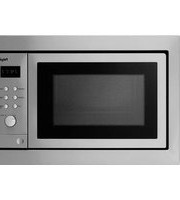
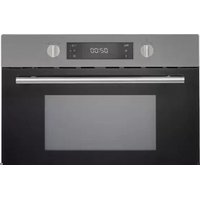
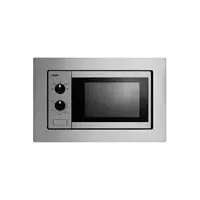
MAG536RVS - Microwave Pelgrim - Free user manual and instructions
Find the device manual for free MAG536RVS Pelgrim in PDF.


| Brand | Pelgrim |
| Model | MAG536RVS |
| Product Type | Built-in Microwave with Grill |
| Capacity | 25 Liters |
| Microwave Power | 900 W |
| Grill Power | 1000 W |
| Control Type | Electronic Touch Control |
| Display | LED Display |
| Number of Power Levels | 5 |
| Defrost Function | Yes, by weight or time |
| Auto Cook Programs | 8 |
| Clock Timer | Yes |
| Child Lock | Yes |
| Door Type | Drop-down door |
| Interior Light | Yes |
| Dimensions (HxWxD) | 388 x 595 x 400 mm |
| Built-in Dimensions (HxWxD) | 382 x 560 x 550 mm |
| Net Weight | 17 kg |
| Power Supply | 230 V, 50 Hz |
| Energy Consumption (Standby) | < 1 W |
| Cleaning | Stainless steel interior, easy to clean with damp cloth |
| Spare Parts Availability | Yes, via authorized Pelgrim service centers |
| Repairability Index | 8.5/10 (estimated) |
| Warranty | 2 years standard |
Frequently Asked Questions - MAG536RVS Pelgrim
User questions about MAG536RVS Pelgrim
0 question about this device. Answer the ones you know or ask your own.
Ask a new question about this device
Download the instructions for your Microwave in PDF format for free! Find your manual MAG536RVS - Pelgrim and take your electronic device back in hand. On this page are published all the documents necessary for the use of your device. MAG536RVS by Pelgrim.
USER MANUAL MAG536RVS Pelgrim
8.2 Productspecifications
natural_image
Line drawing of a microwave oven with control panel and door (no text or symbols)

natural_image
Line drawing of a microwave oven with an open door and control panel, showing a black arrow indicating direction (no text or symbols)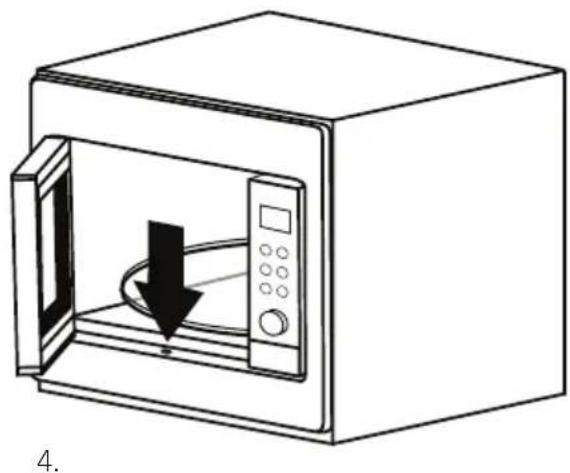
natural_image
Line drawing of a microwave oven with a black arrow indicating airflow or cooling process (no text or symbols)natural_image
Symbol of a trash bin crossed with no text or numbers, representing waste sorting or disposal (no text present)1 Your microwave oven
1.1 Appliance description 28
1.2 Introduction 29
2 Safety instructions
What you should pay attention to... 30 - 31 - 32
3 Use
3.1 Before use 33
3.2 Setting the clock 33
3.3 Do's and don'ts 33 - 34
4 Working
How the microwave oven works 35
5 Operation
5.1 Cooking 36 - 37 - 38 - 39 - 40
5.2 Childproof lock 40
5.3 Cooking tips 40 - 41 - 42 - 43
6 Maintenance
Keeping your appliance neat 44
7 Faults
What to do if... 45
8 Installation
8.1 Technical information 46
8.2 Technical specifications 46
8.3 Electrical connection 46
8.4 Placement 46
8.5 Installation dimensions 47
8.6 Building in 48
9 Appendix
Disposal of packaging and appliance
49
1.1 Appliance description


- Door lock
- Door
- Window
- Glass turntable
- Roller stay / Turntable support
- Turntable shaft
- Control panel
- Display
- Magnetron (Microwave)
- Opwarmen (Reheat)
- Ontdooien (Defrost)
- Stop
- Klok (Clock)
- Start
- Controlknop
- Door release
Do not use the microwave oven without the turntable and the rollerstay. The turntable must be placed on the driving mechanism with the indentation for the driving mechanism downwards.
1 Your microwave oven
1.2 Introduction
Cooking with your new microwave oven is safe and relaxing. You can have the tastiest dishes on the table in no time at all. The appliance is extremely easy to use, partly thanks to the automatic cooking and defrosting programmes.
You will find information about the installation, safety, operation and maintenance of your appliance in this instruction manual.
Read the manual thoroughly before using the appliance, and store these instructions in a safe place for future reference.
Furthermore, this manual is required for the mechanic service. Therefore aspply the enclosed information sticker in the intended frame at the back of this manual.
This sticker contains all information the mechanic service needs to answer your questions adequately.
Happy cooking!

What you should pay attention to
Be aware of the safety instructions listed below to reduce the risk of fire, electric shock, injury to persons and exposure to excessive microwave energy.
Keep the appliance clean, this will extend the lifetime of your microwave oven and prevent hazardous situations.
This microwave oven is designed for domestic use, and is not intended for industrial use, laboratory use, or use in the hotel and catering industry. Use this application exclusively for preparing meals. All other uses should be considered improper and dangerous.
We do not accept responsibility in the event of damage due to improper, incorrect or irrational use of the appliance, these kinds of damage are not covered by the warranty.

Precautions to avoid exposure to high voltage: •
Danger! ° Do not disassemble this appliance. Touching internal components of this appliance can cause serious personal injury or death.
Danger! Any intervention other than cleaning and normal maintenance by the customer must be carried out by an approved service centre. For your own safety, only use the accessories and spare parts from the manufacturer which are suitable for the appliance.

Precautions to avoid exposure to excessive microwave energy: •
° Caution! Your microwave oven is only safe if the door closes properly.
° Caution! Never place an object in the door opening of the oven.
° Caution! Do not use the microwave oven if there is any damage to the door (bent), the hinges and catch (defective or loose) or the seal.
° Caution! Make sure that the door and seal are always clean.

- Warning! Microwave heating of liquids (such as water) can result in delayed eruptive boiling. This means that liquid starts boiling without you seeing any movement. Once removed from the oven, the liquid can start to boil rapidly and spatter out of the cup with the risk of injury. The effect of eruptive boiling can be eliminated by placing a plastic / glass spoon in the fluid before cooking it in the microwave oven.
- Warning! Only connect the device to an AC power supply, from a grounded socket, with a mains voltage as specified on the type plate of the device.

- Warning! Be sure to disconnect the microwave oven from the power supply before cleaning or repairing the appliance, preferably by removing the plug from the socket or turn the switch in the meter cupboard to zero.
- Warning! Do not use the microwave oven when the plug, the power cord or the appliance itself is damaged or when the appliance is not working properly (anymore).
- Warning! Children are not aware of the dangers that can arise when operating electrical equipment. For this reason do not allow children to use the microwave oven. Place the appliance outside of childrens' reach.
• Warning! Take care with baby food and jars:
Caution! ° The contents of feeding bottles and baby food jars must be stirred on shaken after heating.
Caution! Carefully check the temperature of the contents before consumption, in order to avoid burns.
- Warning! Liquids and other foods in sealed containers may only be heated after making little holes in the seal, since the containers are liable to explode otherwise
- Warning! Be careful with water near the appliance. Do not store or use this appliance outdoors, in damp rooms or near a water tap. Do not touch the appliance with wet hands.
• Warning! Utensils can be hot after use in the microwave oven!
- Caution! Only use utensils and dishes suitable for use in the microwave oven. Take care with dishes with metallic decorations.
° Caution! Remove metallic twist-ties from paper or plastic containers/bags before placing them in the microwave oven.
- Caution! Do not use the microwave oven when empty. The appliance cannot dissipate its energy and can get damaged.
Caution! • Never leave the appliance unattended when in use.
Caution! • Keep cord away from heated surface.
Caution! • Do not cover any vents on the oven.
- Caution! The appliance is not intended for use by persons (including children) with reduced physical, sensory or mental capabilities, or lack of experience and knowledge, unless they have been given supervision or instruction concerning use of the appliance by a person responsible for their safety.
- Caution! Only use the microwave oven for defrosting and cooking food and not, for example, for drying clothes or paper. These can catch fire.

2 Safety instructions

Caution! • If smoke or fire is observed:
Switch off or unplug the appliance.°
Keep the oven door closed in order to stifle any flames.°
Remove the plug from the socket.°
Caution! • Do not use chemicals in this appliance.
Caution! • Do not use the oven cavity for storage purposes.
- Caution! Install the microwave oven according to the placement instructions.
- Caution! Never unplug the appliance from the socket by pulling on the cable.
- Caution! Avoid touching warm surfaces, especially on the outside of the microwave oven when it is operating.
- Caution! If the device does not work after it has been switched on, then a fuse may have been blown or the residual current device in the meter cabinet has been disabled. The relevant group may have been overloaded or the device that was installed is defective.
- Caution! If you decide to discontinue using the device, on account of a fault, we advise you to cut the cord after you have pulled the plug out of the socket. Take the device to the relevant municipal waste disposal unit.
3.1 Before you begin
Open the door and remove the packaging material. Do not install the microwave oven when it is damaged, but contact the manufacturer.
Remove the protection foil from the outside of the microwave oven.
Clean the inside of the oven and the accessories with a damp cloth. Do not use abrasive cleaners or any strongly smelling detergents.
Place the roller stay in the middle of the microwave oven. The turntable must be placed on the driving mechanism with the indentation for the driving mechanism downwards.
Check if the microwave oven is working correctly. Put a glass of water inside the oven space. Switch the microwave oven on for 1 minute on its highest setting (press the start button 'START' twice). After 1 minute, the water should be hot.
3.2 Setting the clock
The clock will work as long as the oven is connected to the mains. If the time has not been set, the display will show '0:00'.

Setting the clock
Press button 'KLOK'. 1.
In the display the hour figure will flash.
Turn the control knob to set the hours.2.
Press button 'KLOK' again. 3.
In the display the minute figure will flash.
Turn the control knob to set the minutes.4.
Press button 'KLOK' again to confirm the setting. 5.
The clock is set and the ‘:’ will flash.

3.3 Do's and don'ts
The door may be opened when the microwave oven is switched on; press button 'STOP', the microwave oven switches off and the time stoppes. Open the door. After closing the door, press the start button 'START' to start the cooking again.

The microwave oven is not suitable for:
preserving food; •
heating oil for deep-fat frying; •
boiling eggs in their shells, these are liable to explode (even after the microwave oven is switched off).
Not all materials are suitable for use in the microwave oven. The table below shows which materials you can use and which you cannot.
- Warning! Only use utensils and dishes suitable for use in the microwave oven. Take care with dishes with metallic decorations.
Caution! ° Remove metallic twist-ties from paper or plastic containers and bags before placing them in the microwave oven.
| Material Permitted | |
| Paper Yes | |
| Aluminium foil | Yes |
| Cling film | Yes |
| Aluminium trays | No |
| Freezer / microwave dishes | Yes |
| Heat-resistant plastic | Yes |
| Unglazed pottery | No |
| Glazed pottery | Yes |
| Metal cooking utensils | No |
| Normal glass | Yes |
| Pyrex and other ovenproof glass and ceramics | Yes |
| Dishes with metallic decoration | No |
| Metallic twist-ties | No |
| Mercury thermometer | No |
| Sealed pots | No |
| Bottle with narrow neck | No |
| Roasting bags | Yes |
How the microwave oven works
A microwave oven is a cooking appliance that uses microwaves to heat food. Microwaves are electromagnetic waves, just like radio and television waves. A radio converts these waves into sound, whereas a microwave oven converts them into heat.
The heat arises because the microwaves cause water and fat molecules, that are always present in food, to move quickly. The molecules slide past each other quickly and friction occurs. This friction causes heat (try rubbing your hands together quickly).
The microwave oven heats food very intensively, because the microwaves penetrate the food directly. The waves do not just heat the outside of the food, as in traditional methods of cooking, but get right inside the food. Compared to conventional methods of cooking, with small quantities, the cooking time is much shorter.
Microwave power levels
You can see from the table below from which five power levels you can choose and for which foods the power levels are suitable.
| Power level Display Food | ||
| High P 100 - Boiling water, reheating- Cooking chicken, fish, vegetables | ||
| Medium-high P 80 - Reheating- Cooking mushrooms, shellfish- Cooking dishes containing eggs and cheese | ||
| Medium P 50 - Cooking rice, soup | ||
| Medium-low P 30 - Defrosting- Melting chocolate and butter | ||
| Low P 10 - Defrosting sensitive/delicate foods- Defrosting irregularly-shaped foods- Softening ice cream- Allowing dough to rise | ||

5.1 Cooking
- Warning! Microwave heating of liquids (such as water) can result in delayed eruptive boiling. This means that liquid starts boiling without you seeing any movement. Once removed from the oven, the liquid can start to boil rapidly and spatter out of the cup with the risk of injury. The effect of eruptive boiling can be eliminated by placing a plastic / glass spoon in the fluid before cooking it in the microwave oven.
Warning! • Take care with baby food and jars:
Caution! ° The contents of feeding bottles and baby food jars must be stirred or shaken after heating.
° Caution! Carefully check the temperature of the contents before consumption, in order to avoid burns.
Warning! • Utensils can be hot after use in the microwave oven!
The step quantities for adjusting the time are as follow:
You want to use 80% microwave power to cook for 20 minutes.

- Press button 'MAGNETRON'.
In the display 'P 100' will flash.

-
Press (several times) button 'MAGNETRON' or turn the control knob until 'P 80' (or 'P 50', 'P 30' or 'P 10') appears in the display.
-
Press the start button 'START' to confirm the setting. The power is set to 'P 80'.
-
Turn the control knob until '20:00' appears in the display.
-
Press the start button 'START' to start the cooking or press button 'STOP' to cancel the setting.

Note
See pages 40, 41, 42 and 43 for cooking tips and information about food.
5 Operation

Quick start
With just one press on the start button 'START' you can cook for 30 seconds on maximum power. By pressing the start button repeatedly you can increase the cooking time in steps of 30 seconds.

Defrosting by weight
Press button 'ONTDOOIEN'. 1.
The display shows 'dEF1'.
Turn the control knob to set the weight from 100 - 2000 grammes. 2.
The display shows the weight in grammes and a 'g'.
Press the start button 'START' to start defrosting.3.

Defrosting by time
Press button 'ONTDOOIEN' twice. 1.
The display shows 'dEF2'.
Turn the control knob to set the time.2.
Press the start button 'START' to start defrosting.3.

Auto reheat
Press button 'OPWARMEN'. 1.
The display shows '200'.
Press (several times) button 'OPWARMEN' or turn the control knob to set the weight 2. (200, 400 or 600 grammes).
Press the start button 'START' to start cooking.3.

Inquiring function
In states of microwave cooking, press button 'MAGNETRON', the current power will be displayed for 4 seconds.
In cooking state, press button 'KLOK' to display the time and the time will flash for 4 seconds.


Multi-section cooking
At most 2 sections can be set for cooking. In multi-section cooking, if one section is defrosting, the item that needs to be defrosted must be placed in the first section.
Example
You want to defrost food for 5 minutes, and after that 7 minutes of 80% microwave power to cook.

Press button 'ONTDOOIEN' twice. 1.

The display shows 'dEF2'.
Turn the control knob until '5:00' appears in the display.2.
Press button 'MAGNETRON'. 3.

In the display 'P 100' will blink.
Press (several times) button 'MAGNETRON' or turn the control knob until 'P 80' 4. appears in the display.
Press start button 'START' to confirm the setting. 5.

The power is set to 'P 80'.
Turn the control knob until '5:00' appears in the display.6.
Press start button 'START' to start cooking. 7.

A beep is heard and the defrosting begins. The defrosting time in the display counts down. If the first section is finished, there will be a beep again and the second section begins. If the second section is finished, there will be five beeps.
Programme set in advance
Set the clock first (see page 33).1.
Input the cooking programme. Two stages can be set at most. Defrosting should 2. always be set as the first stage, if it is included in the multi-level programme.

Attention: do NOT press the start button 'START' after setting the cooking programme.
Press button 'KLOK'. 3.
In the display the hour figure will flash.
Turn the control knob to set the hours.4.
Press button 'KLOK' again. 5.
In the display the minute figure will flash.
Turn the control knob to set the minutes.6.
Press the start button 'START' to confirm the setting. 7.
If the door is closed and the programmed time arrives, the buzzer will ring twice and the cooking will start automatically.

5 Operation

Auto menu
Turn the control knob to choose an automatic programme (A - 1 until A - 8, see table 1. below).
Press start button 'START' to confirm the setting.2.
Turn the control knob to set the weight. 3.
The display shows the weight in grammes and a 'g'.
Press the start button 'START' to start cooking or press button 'STOP' to cancel the 4. setting.
In the table below, you can see which cooking programmes you can use and for which foods the programmes are suitable.
| Programmes Function Weight Display | |||
| A - 1 Pizza | 200g 200g | ||
| 400g 400g | |||
| A - 2 Chicken pieces | 200g 200g | ||
| 400g 400g | |||
| 600g 600g | |||
| A - 3 Meat | 250g 250g | ||
| 350g 350g | |||
| 450g 450g | |||
| A - 4 | Vegetables | 200g 200g | |
| 300g 300g | |||
| 400g 400g | |||
| A - 5 | Fish | 250g 250g | |
| 350 g | 350g | ||
| 450g 450g | |||
| A - 6 Pasta | 50g | (with 450ml cold water) | 50g |
| 100g (with 800ml cold water) | 100g | ||
5 Operation
| Programmes Function Weight Display | |||
| A - 7 Soup | 200ml 200ml | ||
| 400ml 400ml | |||
| A - 8 Porridge | 550g 550g | ||
| 1100g 1100g | |||
5.2 Childproof lock
You can 'lock' your microwave oven, so it is no longer possible to start it.

Lock:
Press button 'STOP' and keep it pressed for 3 seconds, until a long beep is heard. The display will show a 'lock'. The time is no longer shown in the display and all the controls have been made inoperative.

Lock quitting:
Press button 'STOP' and keep it pressed for 3 seconds, until a long beep is heard. The display will show the time and the microwave oven can be used normally again.
5.3 Cooking tips
5.3.1 Heating and cooking

The microwave oven always heats with the same intensity. The more you put in the microwave oven, the longer the cooking time.
Wide, flat dishes become hot more quickly than narrow, tall dishes.
Covering dishes with cling film or a suitable lid prevents spattering, shortens cooking • time and helps maintaining humidity of the dish.

Caution! Remove the cling film or lid carefully afterwards. The steam that comes off can be very hot!
- If necessary, moisten foods that quickly dehydrate. First soak potatoes and vegetables in cold water for a moment before placing them in the microwave oven. This prevents a skin forming on them.
• For uniform results, it is best to stir or turn meals once or twice.
5 Operation
When reheating foods that have already been cooked before, always select the highest microwave power level.
When cooking in a microwave oven, only small quantities of water, salt and seasoning are necessary. Best add salt after cooking. This prevents moisture being drawn out of the food.
Food continues to cook for some time after the microwave oven has been switched off. Keep this in mind, don't overcook your meals.
- Caution! When heating small quantities of powdery products (such as when drying herbs), always place a glass of water in the microwave. Otherwise, due to the small quantity, there is a chance of spontaneous combustion.

5.3.2 Defrosting

Always defrost large, dense pieces using the defrosting programme. The food will • defrost gradually and evenly, you will not run the risk of the outside drying while the centre is still frozen.
To speed up the defrosting process, it is recommended that after a while the food be divided up into smaller pieces.
For large pieces of meat and dense food, introduce a couple of breaks into the • defrosting process.
When defrosting irregularly shaped food, halfway through the defrosting time you can cover or wrap the thin parts with aluminium foil.

5.3.3 Factors that affect the cooking process
The temperature of the ingredients affects the cooking times. A cold meal will require a longer cooking time than a meal that is already at room temperature.
Light, delicate foods cook more quickly than heavy, solid foods, such as stews and rolled meats. Take care when cooking light, delicate foods. The edges quickly become dry and tough.
Small pieces of food are heated more evenly if you place them separately in the microwave, preferably in a circle.
Bones and fat conduct heat better than meat. Covering chicken legs and wings with aluminium foil prevents burning these parts.
- Microwaves penetrate food to a depth of about 3 cm. The centre of thick foods is heated as a result of heat from the heated part (the outside) spreading to the inside.
5 Operation
Meat and poultry that is cooked in the microwave for more than about 15 minutes becomes lightly browned. Any food cooked for a shorter time can be rubbed beforehand with a 'browning' sauce, such as Worcestershire sauce, soya bean oil or barbecue sauce.
Greaseproof paper prevents splattering. It also retains heat better.
5.3.4 Basic techniques
Arranging food
Place thicker pieces on the edge on the turntable. Foods placed on the edge of the turntable receive the most microwaves.
Stirring
By stirring dishes regularly you distribute the heat stored in them. Always stir from outside to inside, since the outside of the dish always becomes hot first.
Turning
Turn large, thick foods frequently. They then cook more evenly and quickly.
Pricking
Foods with a skin or shell, such as egg yolks, shellfish and fruit, burst in the microwave. You can prevent this by pricking them a few times with a fork or skewer beforehand.
Checking
Foods cook quickly. You should therefore check them frequently. Take food out of the microwave just before it is done.
Standing
Once you have taken it out of the microwave, let the food stand covered for, in general, 3 to 10 minutes. The food continues to cook. Foods that have a dry crust, such as cake, should not be covered.
Freezing
When freezing foods, you can already allow for them being defrosted easily in the microwave by not using aluminium foil or trays and by freezing flatter portions.


5.3.5 Cooking vegetables
Use fresh vegetables if possible. If the vegetables have become limp because they have been kept for too long, you can refresh them by soaking them in cold water for a little while.
Use a large dish to cook vegetables, so the bottom of the dish is not covered by too thick a layer.
Preferably cook vegetables with the water that clings to them.
Always cover the dish with a lid or microwave cling film.
Do not add salt. The salts naturally present in the vegetables usually provide enough • flavour. If you must add salt, do so after cooking.
Cook vegetables for as short a time as possible. Allow for them continuing to cook • after the microwave has been switched off.
Check whether the vegetables are done by pricking them with a fork or skewer.

5.3.6 Cooking fish
Fish should be cooked gradually. With thin fish, fatty fish or small portions, therefore, set the power level to 30%. In other cases, you can safely set the power level a bit higher.
Allow, however, for the food continuing to cook after the microwave has been switched off. Fish is done when the flesh has become opaque.

Keeping your appliance neat
Clean the inside and outside of the oven regularly using soapy water and dry it • thoroughly with a dry cloth. Make sure that the microwave distributer cover (inside the oven on the right) is clean. A cover which is not clean may cause sparking.
Clean the inside immediately after use. Use a damp cloth to remove any • condensation, liquid that has boiled over and food remains. Crumbs and liquid that remain behind absorb microwave energy and lengthen cooking times.
Clean the accessories regularly; use soapy water and a brush and dry the accessories • thoroughly with a dry cloth. The accessories may also be washed in a dishwasher.
Odours will disappear if you put a glass of vinegar or water - with lemon juice added - in the oven space. Switch the microwave on for two minutes on full power. Then wipe with a damp cloth.
7 Faults
What to do if...
If the microwave oven does not cook as well as it should do, if there is sparking inside it, or if it does not start, etc., first try to find the reason for the problem yourself before calling the service department.
Check:
Is the plug in the socket? •
Is the door closed properly? •
Have the power level and the cooking time been set properly?
Are there any objects in the microwave oven which shouldn't be there?
Are you using the correct cooking utensils? •
Are both the roller stay and the turntable in the microwave oven?
Are the vents blocked? •
Has the food been defrosted sufficiently? •
Did you stir or turn the food during cooking? •
Is the childproof lock turned on? •
8.1 Technical information
On the label on the inside of this equipment, you will find the total wattage, the required voltage and the frequency.
8.2 Technical specifications
| External dimensions (wxdxh) 595 x 400 x 388 incl. frame | |
| Oven capacity 25 liter | |
| Turntable diameter 315 mm | |
| Rated voltage 230 V / 50 Hz | |
| Rated input power 1450 W | |
| Rated output power 900 W | |
8.3 Electrical connection
This appliance requires a mains power supply of 230 V, 50 Hz alternating current. The device has a grounded power cord.

Caution! The appliance must be grounded and under no circumstances should it be connected to a direct current supply. Incorrect use could cause an electric shock.

8.4 Placement
- Danger! Do not disassemble this appliance. Touching internal components of this appliance can cause serious personal injury or death. Place the microwave oven on a firm, flat surface.
- Make sure that there is sufficient ventilation around the microwave oven. Keep a 30 cm space free at the top. At the rear and sides keep at least 10 cm free.
- Do not cover the air vents.
- The adjustable feet should not be removed.
- Do not place the microwave oven near a heat source.
- Transmitting and receiving equipment such as radios and televisions can affect the operation of the microwave oven.
8.5 Installation dimensions


8.6 Building in
The appliance is assembled with short feet (hight 15 mm). To fit the 380 mm high cabinet, the short feet must be replaced by the 4 longer feet, which can be found inside the package.
Unpack the appliance. Turn it over and replace the short feet with the longer feet in 1. the accessory package.
Place the mounting frame A around the microwave and attach it using the 4 screws 2. that were supplied.
Carefully push the microwave into the box, making sure that it is in the centre.3.
Open the door and screw down the microwave with the screw that was supplied.4.
Finally, place the cap on top of the screw.

natural_image
Line drawing of a microwave oven with control panel and door (no text or symbols)

natural_image
Line drawing of a microwave oven with an open door and control panel, showing a black arrow indicating direction (no text or symbols)
natural_image
Line drawing of a microwave oven with a black arrow indicating airflow or cooling (no text or symbols)Disposal of packaging and appliance
In the manufacturing of this appliance durable materials were used. Make sure to dispose of this equipment responsibly at the end of its lifecycle. Ask the authorities for more information regarding this.
The appliance packaging is recyclable. The following may have been used:
cardboard; •
polythene film (PE); •
CFK-free polystyrene (PS hard foam). •
Dispose of these materials in a responsible manner and in accordance with government regulations.
As a reminder of the need to dispose of household appliances separately, the product is marked with the symbol of a crossed-out wheeled dustbin. This means that at the end of its working life, the product must not be disposed of as urban waste. It must be taken to a special local authority differentiated waste collection centre or to a dealer providing this service.

natural_image
Symbol of a trash bin crossed with no visible text or labelsDisposing of a household appliance separately avoids possible negative consequences for the environment and health deriving from inappropriate disposal and enables the constituent materials to be recovered to obtain significant savings in energy and resources.



- Productspecifications
- Your microwave oven
- Safety instructions
- Use
- Working
- Operation
- Maintenance
- Faults
- Installation
- Appendix
- Appliance description
- Introduction
- What you should pay attention to
- Precautions to avoid exposure to high voltage: •
- Precautions to avoid exposure to excessive microwave energy: •
- Before you begin
- Setting the clock
- Setting the clock
- Do's and don'ts
- How the microwave oven works
- Microwave power levels
- Cooking
- Note
- Quick start
- Defrosting by weight
- Defrosting by time
- Auto reheat
- Inquiring function
- Multi-section cooking
- Example
- Programme set in advance
- Auto menu
- Childproof lock
- Lock:
- Lock quitting:
- Cooking tips
- Heating and cooking
- Defrosting
- Factors that affect the cooking process
- Basic techniques
- Arranging food
- Stirring
- Turning
- Pricking
- Checking
- Standing
- Freezing
- Cooking vegetables
- Cooking fish
- Keeping your appliance neat
- What to do if...
- Check:
- Technical information
- Technical specifications
- Electrical connection
- Placement
- Installation dimensions
- Building in
- Disposal of packaging and appliance
Brand : Pelgrim
Model : MAG536RVS
Category : Microwave