
FM32FD05B - Lighting PHILIPS - Free user manual and instructions
Find the device manual for free FM32FD05B PHILIPS in PDF.

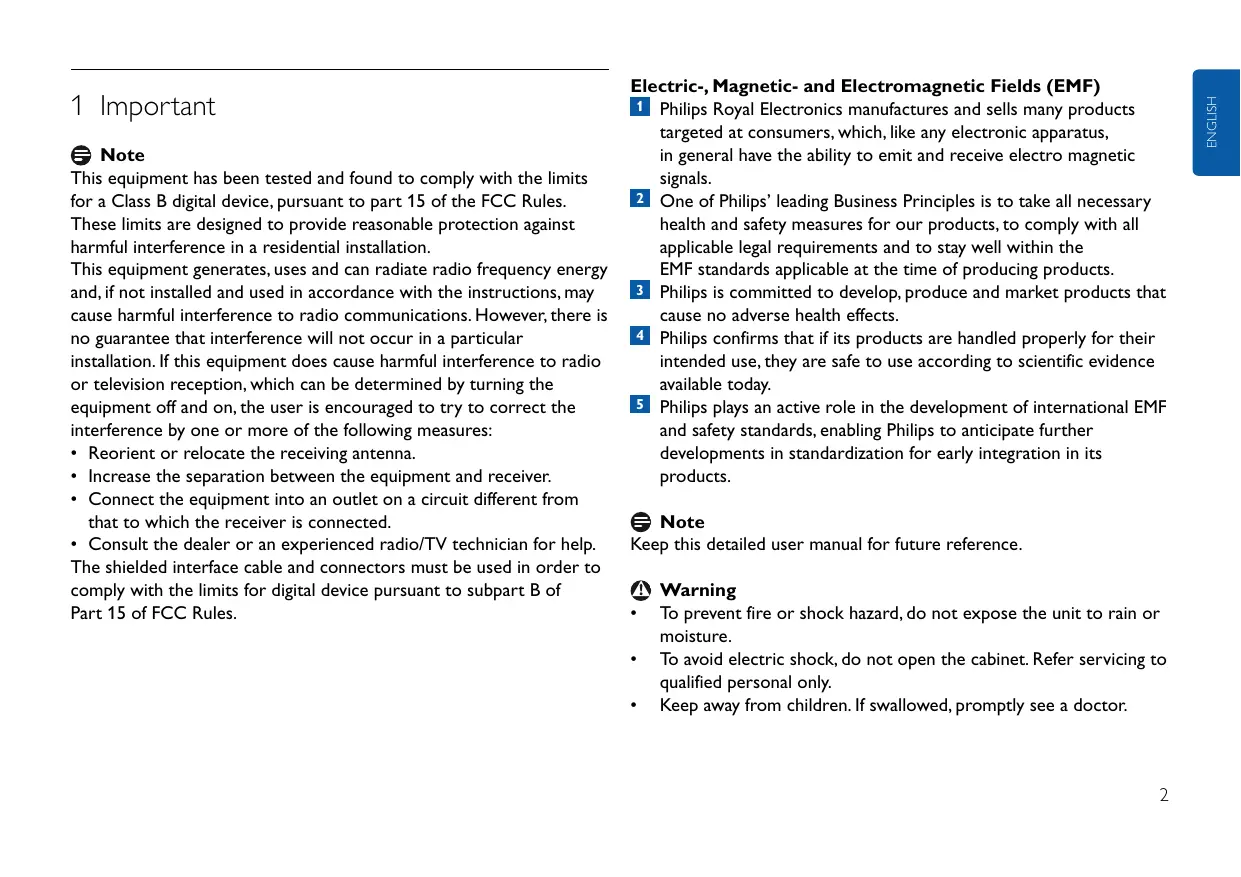


| Product Type | USB Key / USB Flash Drive |
| Capacity | 32 GB |
| Interface | High-Speed USB 2.0 (USB 1.1 compatible) |
| Read Transfer Rate | Up to 14 MB/s |
| Write Transfer Rate | Up to 5 MB/s |
| Compatible Operating Systems | Windows Vista, XP, 2000, ME, 98SE; Mac OS 9.0 or later; Linux 2.4.0 or later |
| Power Supply | Via USB port (5V, 500 mA) |
| Power Consumption (Standby) | Minimal (less than 0.5 W) |
| Dimensions (approx.) | 70 x 20 x 10 mm |
| Weight (approx.) | 10 g |
| Housing Material | Plastic |
| Indicator Light | Activity LED (flashing during transfer) |
| Included Accessories | Protective Cap |
| Maintenance | Clean with a soft, dry cloth. Avoid moisture and chemicals. |
| Safety | Do not expose to water, do not open the casing. Keep out of reach of children. |
| Warranty | 2 years (standard Philips) |
| Environmental Information | Compliant with RoHS and WEEE directive. Recyclable. |
Frequently Asked Questions - FM32FD05B PHILIPS
User questions about FM32FD05B PHILIPS
0 question about this device. Answer the ones you know or ask your own.
Ask a new question about this device
Download the instructions for your Lighting in PDF format for free! Find your manual FM32FD05B - PHILIPS and take your electronic device back in hand. On this page are published all the documents necessary for the use of your device. FM32FD05B by PHILIPS.
USER MANUAL FM32FD05B PHILIPS
Register your product and get support at
www.philips.com/welcome
EN Vivid Edition Click here 2
FR Vivid Edition Cliquez ici 10
DE Vivid Edition Hier klichen 18
ES Vivid Edition HagaWhile 26
NL Vivid Edition Klik hier 34
IT Vivid Edition Fare cliq qui 42
PT Vivid Edition Clique aqui 50
GR Vivid Edition KavEe Klik Edelta 58
SV Vivid Edition Klicka hare 66
Fl Vivid Edition Napsautata tata 74
PL Vivid Edition Kliknij tutaj 82
CZ Vivid Edition Klepnete zde 90
SK Vivid Edition Kliknite sem 98
HU Vivid Edition Kattintson ide 106
RU Vivid Edition 114
USB Flash Drive
FMxxFD05B
| RO | Vivid Edition | Faceți clic aici | 122 |
| TC | Vivid Edition | 請按這裡 | 130 |
| SC | Vivid Edition | 单击此处 | 138 |
| KO | Vivid Edition | 어머를 썸리 하심지오 | 146 |
| JA | Vivid Edition | 乙亥をケリック | 154 |
1 Important
Note
This equipment has been tested and found to comply with the limits for a Class B digital device, pursuant to part 15 of the FCC Rules.
These limits are designed to provide reasonable protection against harmful interference in a residential installation.
This equipment generates, uses and can radiate radio frequency energy and, if not installed and used in accordance with the instructions, may cause harmful interference to radio communications. However, there is no guarantee that interference will not occur in a particular installation. If this equipment does cause harmful interference to radio or television reception, which can be determined by turning the equipment off and on, the user is encouraged to try to correct the interference by one or more of the following measures:
- Reorient or relocate the receiving antenna.
- Increase the separation between the equipment and receiver.
- Connect the equipment into an outlet on a circuit different from that to which the receiver is connected.
- Consult the dealer or an experienced radio/TV technician for help. The shielded interface cable and connectors must be used in order to comply with the limits for digital device pursuant to subpart B of Part 15 of FCC Rules.
Electric-, Magnetic- and Electromagnetic Fields (EMF)
Philips Royal Electronics manufactures and sells many products targeted at consumers, which, like any electronic apparatus, in general have the ability to emit and receive electro magnetic signals.
2 One of Philips' leading Business Principles is to take all necessary health and safety measures for our products, to comply with all applicable legal requirements and to stay well within the EMF standards applicable at the time of producing products.
3 Philips is committed to develop, produce and market products that cause no adverse health effects.
Philips confirms that if its products are handled properly for their intended use, they are safe to use according to scientific evidence available today.
5 Philips plays an active role in the development of international EMF and safety standards, enabling Philips to anticipate further developments in standardization for early integration in its products.

Note
Keep this detailed user manual for future reference.

Warning
- To prevent fire or shock hazard, do not expose the unit to rain or moisture.
- To avoid electric shock, do not open the cabinet. Refer servicing to qualified personal only.
- Keep away from children. If swallowed, promptly see a doctor.

Note
Data is safe in the following environments: In X-ray security systems at airports and in magnetic fields with strengths not exceeding 3,500 Oe.
For customers in the U.S.A.
Changes or modifications made to this equipment not expressly approved by company may void the FCC authorization to operate this equipment.
Operation is subject to the following two conditions:
this device my not cause harmful interference, and
this device must accept any interference received, including interference that may cause undesired operation.

Caution
You are cautioned that any changes or modifications not expressly approved in this manual could void your authority to operate this equipment.
For customers in Canada
This Class B digital apparatus complies with Canadian ICES-003. This device complies with Part 15 of the FCC Rules and with RSS-210 of Industry Canada.
For customers in Europe
This product conforms to the following European Directives: 89/336/EEC, 2006/95/EEC (safety directive) and 93/68/ECC (EC Marking Directive). This product complies with EN55022 Class B and EN55024 for use in the following areas; residential, commercial, and light-industrial.

Notes on Use
- The USB flash drive may not function correctly if it is connected to the computer when the computer is started up, restarted, or restored from sleep mode. Always disconnect the USB flash drive from the computer before performing any of these operations.
- Do not place the drive in locations that are:
extremely hot or cold;
- vibrating;
exposed to corrosive gases;
-dusty or dirty;
- very humid;
exposed to direct sunlight.
- Microsoft and Windows are registered trademarks of Microsoft Corporation in the United States and other countries.
Mac and Macintosh are trademarks of Apple Computer, Inc., registered in the U.S. and other countries. - Other system names and product names that appear in this manual are registered trademarks or trademarks of their respective owners. Note that the _TM and symbols are not used in this manual.
Power consumption in standby mode: < 100mA . - Our product warranty is limited only to the USB flash drive itself, when used normally in accordance with these operating instructions and with the accessories that were included with this unit in the specified or recommended system environment. Services provided by the Company, such as user support, are also subject to these restrictions.
-
The Company cannot accept liability for damage or loss resulting from the use of this unit, or for any claim from a third party.
-
The Company cannot accept any liability for: problems with your computer or other hardware arising from the use of this product; the suitability of this product for specific hardware, software, or peripherals; operating conflicts with other installed software; data loss; or other accidental or unavoidable damage.
- The Company cannot accept any liability for financial damages, lost profits, claims from third parties, etc., arising from the use of the software provided with this unit.
- The software specifications may be subject to change without notice.
Environmental information
Disposal of your old product
Your product is designed and manufactured with high quality materials and components, which can be recycled and reused.


When this crossed-out wheeled bin symbol is attached to a product it means the product is covered by the European Directive 2002/96/EC. Please inform yourself about the local separate collection system for electrical and electronic products.
Please act according to your local rules and do not dispose of your old products with your normal household waste. The correct disposal of your old product will help prevent potential negative consequences for the environment and human health.

Be responsible Respect copyrights
The making of unauthorized copies of copy-protected material, including computer programmes, files, broadcasts and sound recordings, may be an infringement of copyrights and constitute a criminal offence.
This equipment should not be used for such purposes.
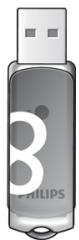
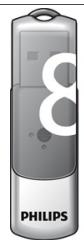
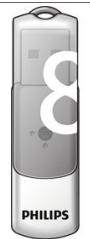
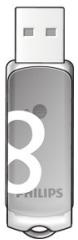
2 Your USB flash drive
Congratulations on your purchase and welcome to Philips!
To fully benefit from the support that Philips offers, register your product at www.philips.com/welcome
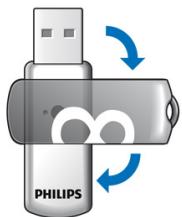
1
3 Install
Microsoft® Windows Vista, XP, 2000, ME, MAC OS 9.0 or higher:
- The device driver is installed automatically when the drive is connected to a USB port of the computer. However, with some USB 2.0 cards or boards, you may need to initiate installation manually. In this case, follow the on-screen instructions to search for a suitable driver. Refer to the operating system's Help file if you need any help.

Note
Do not remove USB flash drive from the computer USB port as long as the download process is in progress.
Windows 98SE:
1 Download the device driver at http://www.philips.com/storage
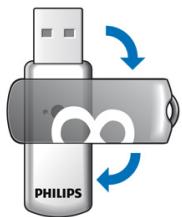
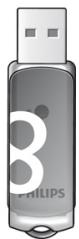
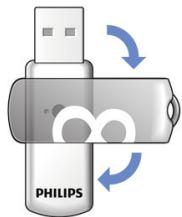
2 Remove the protective cap from the USB connector and turn it backwards (fig.1).
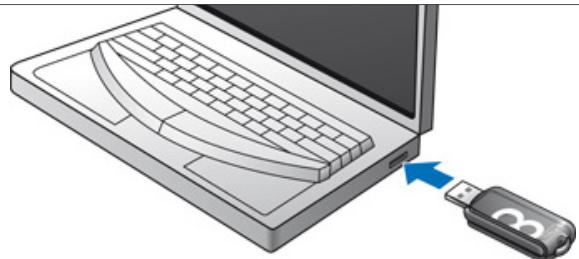
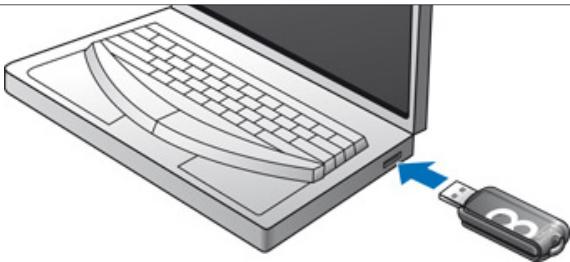
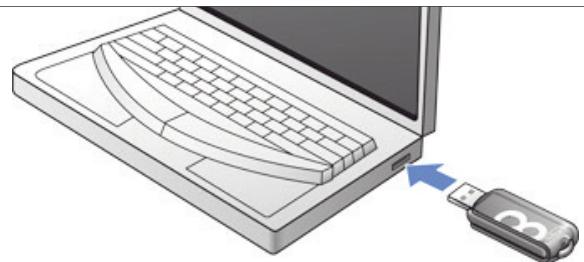
3 Insert the flash drive USB connector into one of the computer's USB ports (fig. 2).
The New Hardware wizard starts and the drive's LED lights up. The light intensity of the LED will gradually increase and then diminish again. This will continue for as long as the drive is connected to the computer.
4 Click the Next button.
5 Click Search for the best driver for your device. Then click the Next button.
Click Specify a location. Then click the Browse button.
6 When the dialog box appears, specify the folder where the installation program is stored.
7 Click the OK button to close the dialog box. Then click the Next button.
8 Click the Next button.
9 Click the Finish button.
Installation of the driver starts.
Once the installation process is complete, a drive icon for the USB flash drive appears in the My Computer window.
10 After confirming that the drive is in standby mode you can remove the drive from the computer's USB port.
4 Connect
Connecting the USB flash drive to your computer
Note
You can use a USB extension cable or an optional USB hub to connect the USB flash drive to your computer.
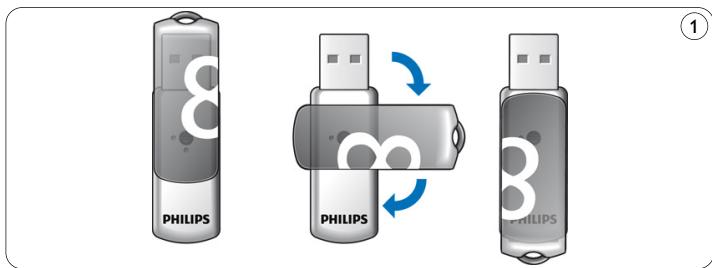
1 Remove the protective cap from the USB connector and turn it backwards (fig.1).
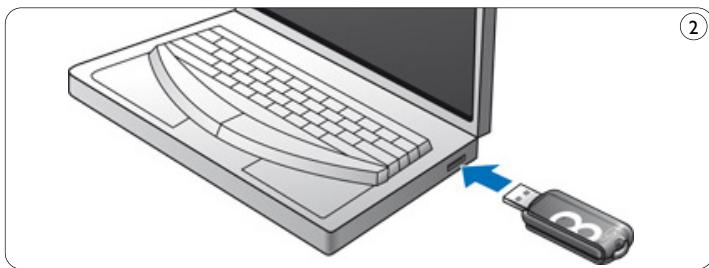
2 Insert the USB flash drive's USB connector into one of the computer's USB ports (fig. 2).
The USB flash drive's LED lights up. The light intensity of the LED will gradually increase and then diminish again. This will continue for as long as the drive is connected to the computer.
5 Enjoy
Operating the USB flash drive
-
Once the USB flash drive is connected to the USB port of the computer:
-
a software package will automatically start up enabling you to activate various applications. See the software help file for further instructions.
Visit our website www.philips.com/storage for software related questions and software updates.
- the drive icon for the USB flash drive will appear. You can now copy and save data on the drive by dragging files and folders on the drive icon, just like when you copy data to a hard disk, CD-ROM, DVD or floppy disk.
When copying data the LED's light intensity will quickly increase and diminish.
Notes
- Do not remove the USB flash drive from the computer USB port while copying and saving data otherwise the drive will no longer be recognized by your system.
- When operating under Windows the drive name varies, depending on your Windows version.
Disconnecting the USB flash drive from your computer
Windows® 98SE
- After confirming that the USB flash drive is in standby mode you can remove the flash drive from the computer's USB port.
Windows® ME and Windows® 2000
1 Double-click the Unplug or eject hardware icon in the task bar in the lower right part of the screen.
In the window that appears, select the name of the device that is to be removed, then click the STOP button.
3 When the Stop a hardware device screen appears, make sure the correct information is displayed, then click the OK button.
4 When a message appears, indicating that the USB flash drive can be safely removed, remove the USB flash drive from the computer's USB port.
Windows® Vista, XP
1 Double-click the Safely Remove Hardware icon in the task bar in the lower right part of the screen.
In the window that appears, select the name of the device that is to be removed, then click the STOP button.
3 When the Stop a hardware device screen appears, make sure the correct information is displayed, then click the OK button.
4 When the message Safe to Remove Hardware appears, remove the USB flash drive from the computer's USB port.
Mac OS 9.0 and higher
Drag the drive icon to theTrash.
After confirming that the USB flash drive is in standby mode, remove the USB flash drive from the computer's USB port.
6 Technical specifications
Interface
High-Speed USB 2.0 (backwards compatible with USB 1.1)
Transfer rate
- Read: max. 14MB per second /Write: max. 5MB per second (High-speed USB 2.0 port required to achieve maximum speed)
Compatible OSs
- Microsoft®Windows®Vista, XP, 2000, ME and 98SE (with driver)
Mac OS 9.0 or later
Linux 2.4.0 or later
7 Need help?
Online help: www.philips.com/support
For interactive help and frequently asked questions.
For software updates and support: www.philips.com/storageupdates
1 Important
Remarque
Be responsible Respect copyrights
Be responsible Respect copyrights
Be responsible Respect copyrights
Per i clienti in Canada
Be responsible Respect copyrights
Para clients no Canada
Be responsible Respect copyrights
H nmuopvia avtipapwv uikou nou ppei npoostaia kata ts avtipapns, ounepiiauavouevw npoypaumaw yia unoloyiotes, apxieiw, metaoeww kai nxntikwv eyypawv xwpiis ouoiodotnon evexetai va anotele i npaiaan twv nveuataikwv dikaiuwatw kai katouvenia noiviko aikna.
Be responsible Respect copyrights
Be responsible Respect copyrights
Visit our website www.philips.com/storage for software related questions and software updates.
Be responsible Respect copyrights
Be responsible Respect copyrights
Be responsible Respect copyrights
3Kcpiyataun DaOnyCTnMa pR N BbIIOAHeHn CaeDyIOux AByX yCAOBN:
1 DaHHoe YcTPOIcTBO He DOAnKHO Co3aBaTaB BpeHbIe NOpExn I
2 DaHHoe yCTpOcTBo DOAnKHO coXpaHnTb pa6OtocNoc6HoCTb npn PnneMe AIO6bIX NOMex, BkAIOUaY IOMexu, cNoC06HbIe Bbl3bIBaTb HeKeAaTeAbHoe fYHKUOHNPOBaHne.
PpeOocTepeXeHne
BbI npEaynpeJxdeHbI O TOM,HTO AnObIe H3MeHeHnA HmMOAnHKnKaUIn, He ODo6peHbIe B RAHOB fOpMe B DaHOMpyKOBoAcTBe, MOrTy PnIBecTHN K aHNyInpOBAHnIO BaJero nPaBa3KcNAYaTHPOBAbT daHHOe yCTpoiCTBO.
AЯ nokynataTeeB KaHaDe
AaHHOe UΦPOBOE yCTPOIcTBO Kλacca B OTBeuayet Tpe6OBaHnAm KaHaACKOrO cTaHaApTa ICES-003.
AaHHOy yCTPOIcTBO COOTBETCTByET Tpe6OBAHm YacTn 15 npaBn FCC n KaHaCKOro NpOMbiUeHHOrO cTaHApTa RSS-210.
AЯ nokynaTeAeB Ebpone
AaHbI npOaKy OTBeaet Tpe6oBaHNm CLeAeYIOx EBPOneKcx AnpeKTbB:89/336/EEC,2006/95/EC (AnpeKTbBA no 6e3oNaChocTn) n 93/68/EEC (AnpeKTbBA EC no MapKnOpOBke).AaHbI npOaKy OTBeaet Tpe6oBaHNm HOpM EN55022 ABy yCTpoiCTB Klacca B n EN55024 pIn NcNoA3oBaHNn B XnAbx, KOMMepecknx N AeKnx npomblAeHHbIX NOMeUeHNX.
PpHMeaHHIO NcNOb3OBAHHIO
-
DaaHnaaI-NaMraTb USB MoKxet yHKuHnHPOBaTb HePpaBnAho, ecAn OHa IOnA KluOaETcK KOMNbIOTepy Bo BpeMa ero 3arpy3Kn, nepe3arpy3Kn HAn BblXoDa n3 cPnEero peKIma. Bcerda oTcoeAnHnIte fAaI-NaMraTb OT KOMNbIOTepa NepeA BblnoHeHem AIO6oN i3 3TNx ONEpaun.
He nomeuauTe 山 山 -namrB CaeAyoune Mecta: -
C ouheHb BbICOKoN HAn OueHb Hn3KO TEmpepaTpaMn;
- C Bn6paunei;
- C rα3aMn, Bbl3bIbAIOUIMN Koppo3HIO;
-3aNbIeHHbIe HnI rpa3HbIe; - C BblcOKOIN BlaXHOCTbIO;
-
C Haannnem npraMbIX COaHeuHbIX Ayei.
-
Microsoft Windows - 3apernctpnpoBaHHbIe TOPROBIE MapKn KOMpaHmN Microsoft B CoeAnHeHHbIX L7TaTax N Apyrnx C7paHax.
Mac Macintosh - Toprobles MapKu Apple Computer, Inc., 3apernctpnpoBaHHbE B CLU A npyrrx ctpaHax.
-Дугпе НаЗваня СИСТЕМ И ПОДУКТОВ, YПОМИHAЯБЛБЕ B DAнHOMpyKOBOДСТBE,ЯВАЮТСЯЗERNTРИРОВАHHыIMN TOPROBыIMNMapKaMи ИМ TopROБыIMМ МарКами ИМ TopROБыIMМ МарКами ИХ BAДeАьцEB.ЧУТHTE,ЧTO BDAHHOMpyKOBOДСТBE He ИСПОАБ3YIOTСССHMBOАbl T M N
-ПOTpe6ЯemblТOKВржимеoxиданг: <100mA.
Ha7a rapaHTna Ha npOdyKT pacrIpocTpahJeTcToIbKO Ha camy A3Hn-PlaTb USB pRn ee HOpMaIbHOM hCIOAb3OBAHNN B COOTBeTCTBm C DaHHbIMN IHCTpyKUZMn PO 3KcPAAyTaUcN C AkCECCyapAMn, BKAIOUHeHHbIMN B KOMPiAEKT NOCtABKn DaHHORO YCTPOJCTBa, B CpeuHfNUPoBAHHOH NAn peKOMeHDOBAHHOH CNCTemHOH cpeAe. PpeAOCTabAEHne KOMNaHne TaKINx YCAUY, KaK NOAdepJkKa INoAb3OBATeAei, TAKKe ORpaHNUEHO 3TNMIY UCAOBIAHMI.
KOMnHaHn He Hecet OTBETCTBeHHOCTn 3a yUeep6 nAn IOTepn, Bbl3BaHHbIe NcIOAusbOBAHNem DaHHORO yCTPOiCtBa,a TaKKe 3a AIO6bIe PpeTeH3m TpeTbNx ANL.
KOMnHaHn He Hecet OTBcTBeHHocTh 3a np6Aembl BaIeO KOMnBIOTepe HAn DpyrOTo aINapaTHoro ObecneueHn, BbI3BaHHbIe NcIOAIB3OBaHNEm DaHHORo PPOykTa; COBMecTUMOCtB DaHHORo PPOykTa C ONpeAeAeHHbIM aINpapaTHbIM I pOrpaMMhbIM ObecneueHnEM HAn nepHepRnHbIMN yCTPOnCTBaMn; KOHΦANKtBc APyrIM YCTaHOBaeHHbIM pOprpaMMhbIM ObecneueHnem; NOTepIO DaHHbIX HAn DpyrHe cayauhBiE Hn Hen36ExKhBiE BnDbIy uIe6a.
KOMPAnHnHe He Hecet OTBeTcBHeHHocTn 3a HnHaHCoBbI yUeep6, yNyEHHyIO np6blA,b, ppeTeH3N TpeTBNX AINu N.T.I., Bbl3BaHHbIe NCPOAusbAHmE MnporpaMMHOrO oecneueHn, NOCTabAAreMOrO c DaHHbIM YCTPOICTBOM.
CneuHnKaun npOrpaMMHoro o6ecneueHHaMOT 6bITb H3MeHebl 6e3 yBeOMAeHHa.
Hhopmaun o6 oxpae okpykaioe cpebl
YTHH3aunBaWero cTaporo npOyKta
Bau npOyKT cKOHCTpyNPOBaH nI3ROTOBAeH n3 MaTePnaAOB n
KOMIOHEnTOB BbICOKOTo KaueCTBa, KOTOpBie MOrTy 6bITb
YTHH3nPOBaHbI n IcNoA3OBaHbI NOBtOPHo.


Ecn Ha npOyKTe HmEeTcAaHbH CnMbOa C nepeeepKHytbIM KOHTeHepOM Ha KOLeCaX,3TO O3HaueT,HTo npOyKT OTBeuayet Tpe6oBaHnM EbpOneNcKO AnPeKTHBbl 2002/96/EC. IoxaLynta, POlyuHTe INHOpMaunIO mEcTHoN cNCTeMa3dEhHO rC6opa 3AEkTPnueckNX n 3AEkTPOHbIX npOyKTOB.
IOnkaIyIcTa,co6IoOaIteBaIIN MeCTHbIe npabIIa HneYTHn3NpyTe BaIIN CTapBIE NPOAdyKtBi BMECTC O6bluHbIMN 6blTOBbIMN OTXoAAMN. IpaBuaHna YTHnImzauNbaWero CTAPORIO pOAdykTA NOMOXET IpeDoTbPaTntb OTPUaTeAusbHbIe NocAeCTBnA DAA OKpyKaIOUe CpeAbI N3DOPOBBaIIODei.

Be responsible Respect copyrights
N3ROTOBHeHne HeaBTOPI3OBaHBIX KOJIIM MaTePnaIOB C 3aUHHeHHbIMn ABTOPCKIMn IpaBaMn, BKIAOyAR KOMbIOTepHbIE npoRpAMMbI, AByIbI, WInPOKOBeAteLbHbIe IPOrpaMMbI n 3BYKObIE 3aINCH, MoXET YBaTbCn HApYSeHnEM 3aKoHa O6 aBTOPCKOM npabe H yROAOBbIM PnecTyPAHHeM. DaHHOe O6OpdyoBAHHe He CLeAye T NcNOAb3OBAbTB TaKHX UeAAx.
2 Baša φλήω-παмγΤb USB
Mbl nO3aPbAaem Bac C Bauei NOKyPkoi. O6po NOKaIobatb B PAbi nOKyPatei Philips!
YTo6bI NcNoAa3ObaTb BCE PpeMMyueCTBa NpOAdepKKn, PpeAaaraEMoKOMpaHnei Philips, 3apernctprpyTe BaW pOaKyT Ha Be6-cTpaHnCe www.philips.com/welcome
1
②
3 YCTaHOBka
Microsoft® Windows Vista, XP, 2000, ME, MAC OS 9.0 HAM 60AAe HOBBie:
- Δpaibep yctpoiCTBa yctaHaBbAbaTcra ABTomauceKn npn IIOAKIoUeHInn fAmTn K nOpy USB kOMnbIOTepa. OAnako npn Icnoab0aHmN HeKOTopbIX Kapr nn PAt USB 2.0 MoKeT Bo3HKnHyb Notpe6hocb B pyHOn HINuCaHN yCTaHOBKn. B 3tOM CAYae BbIIOaHInTe OTO6paXaemble Ha 3kPaHe INCTpyKUn, YTO6bl NaHTn IOxOaJusn dpaiBep. EcAn Bam Tpe6yETcN NMOuCb, CM.
Cnpabky onepaunOHnCNCTembl.

Примechане
He oTcoeAHHaTe 山 山 -nAmrUB USB ot npra USB KOMIbIOtepa BO Bpem npocecca 3arpy3kn.
Windows 98SE:
3aŋpy3nTe āpaɪBep yCTpOiCTBa c caɪTa http://www.philips.com/storage
2 CHIMnTe 3aunThbI KOAnauOK c pa3beMa USB n NOBepHnte ero Ha3aD (pnc. l).
3 BctaBbTe pa3beM USB 3山 - N amrTH B OAnH n3 npToB USB KOMnIbOtepa (pnc.2).
3aynycaaetcMaCTep yctahOBKn 6OpyoBaHn n 3aropaeTcN HAnKaTOp 山 -NaMaTn. JPKoCTb CbeHeHn INAikKaTopa NocTepeHHo YBeAMuHbAeTcA, a 3aTEM CHOba YMeHbShaTeC. 3To 6yEt npoAoJkaTbcra, noka 山 -NaMaTb NOkAIOueHa K KOMMbIOTepy.
HaKMMTe KHOINKy Aaee.
5 HaJIIMTe BbIIOAHNtB NOINCK HAN6Oaee nOAnxoAJeero ApaIBepeA AIA BaIbero yCTpoiCTBa.
3aTeM HauKmIte KhoNkY Aaee.
HaKmTe yKaKnTe pa3MeueHne.
3aTeM HaxMnTe KHOIpKy O63Op.
6 Korda nOaBnTcAHaAoROBoe OKHO, yKaJnte npAnKy, B KOTopoI coXpaHeHa npOrpamMa yCTaHOBKn.
7 HaxmTe KOnKy OK yTo6bl 3aKpbItb AnaIorOBoE OKHO.
3aTeM HauKmIte KhoNkY AaAee.
8 HaxMNTe KhoNky AaAee.
9 HaxmTe KhoNky FoTOBO.
- BbICOKOCKOPoCTHOu USB 2.0 (o6paTHo CoBMeCTHmblc USB 1.1)
CkopoocTb npeaun AaHHbIX
- YeHHe: MaKc. 14 M6nt/c / 3aNcB: MaKc. 5 M6nt/c (AЯобспeчEHMaKcHMaAьHоJ cKOpOCTn Tpe6yETca BbICOKOCKoPocTHOH nOPT USB 2.0)
COBmecThMbIe OC
- Microsoft®Windows®Vista, XP, 2000, ME u 98SE (c āpaǔBepoM)
Mac OS 9.0 HAN 60Aee HOBAJ
Linux 2.4.0 nnn 6oAee HOBa
7 Tpe6yeTcya nOmoa?
3aektponha cnpaBka: www.philips.com/support
AINHTepaKTNBHOMOUNuacTO3aDaBaEmbIX BONPocOB. AAno6HOBaeHn pOrpaMMHOrO oecneueHn IIOAdepKKN: www.philips.com/storageupdates
1 Important
Notă
Be responsible Respect copyrights
Realizarea de copii neAutorizate ale materialelor protejate la copiere, incluzand programele informatie, fiierele, transmisunile si inregistrarile audio, poate reprenta o incalcare a drepturilor de autor si constitue io infractiene.
4 Faceti clipe be butonul Next (Urmator).
5 Savurati experienta
Be responsible Respect copyrights
Be responsible Respect copyrights
iE93/68/ECC(EC 5022 Class B EN55024
OReIeJrJrJrJrJrJrJrJrJrJrJrJrJrJrJrJrJrJrJrJrJrJrJrJrJrJrJrJrJrJrJrJrJrJr
iJ 1


Be responsible Respect copyrights
咸帝托弘隆,开日,响及音乐,有
i
2 USB 語籤連電電動電動電動電動電動電動電動電動電動電動電動電動電動電動電動電動電動電動電動電動電動電動電動電
FILICUSJL 1
PhilipSta Dritn is Jtwn htek to bntouh s uot doLok www.philips.com/welcomee n
1
3 世界第一
Microsoft Windows Vista, XP, 2000, ME, MAC OS 9.0 | | |
Be responsible Respect copyrights
CONBUN-100 100 100 100 100 100 100 100 100 100 100 100 100 100 100 100 100 100 100 100 100 100 100 100 100 100
All rights reserved. Reproduction in whole or in part is prohibited without the prior written consent of the copyright owner.
The information presented in this document does not form part of any quotation or contract, is believed to be accurate and reliable and may be changed without notice. No liability will be accepted by the publisher for any consequence of its use. Publication there of does not convey nor imply any license under patent- or other industrial or intellectual property rights.
April 2009

- Register your product and get support at
- www.philips.com/welcome
- USB Flash Drive
- FMxxFD05B
- Important
- Note
- Electric-, Magnetic- and Electromagnetic Fields (EMF)
- Warning
- For customers in the U.S.A.
- Caution
- For customers in Canada
- For customers in Europe
- Notes on Use
- Environmental information
- Disposal of your old product
- Be responsible Respect copyrights
- Your USB flash drive
- Install
- Microsoft® Windows Vista, XP, 2000, ME, MAC OS 9.0 or higher:
- Windows 98SE:
- Connect
- Connecting the USB flash drive to your computer
- Enjoy
- Operating the USB flash drive
- Notes
- Disconnecting the USB flash drive from your computer
- Windows® 98SE
- Windows® ME and Windows® 2000
- Windows® Vista, XP
- Mac OS 9.0 and higher
- Technical specifications
- Interface
- Transfer rate
- Compatible OSs
- Need help?
- Online help: www.philips.com/support
- Remarque
- Per i clienti in Canada
- Para clients no Canada
- PpeOocTepeXeHne
- AЯ nokynataTeeB KaHaDe
- AЯ nokynaTeAeB Ebpone
- PpHMeaHHIO NcNOb3OBAHHIO
- Hhopmaun o6 oxpae okpykaioe cpebl
- Baša φλήω-παмγΤb USB
- YCTaHOBka
- Microsoft® Windows Vista, XP, 2000, ME, MAC OS 9.0 HAM 60AAe HOBBie:
- Примechане
- CkopoocTb npeaun AaHHbIX
- COBmecThMbIe OC
- Tpe6yeTcya nOmoa?
- 3aektponha cnpaBka: www.philips.com/support
- Notă
- Savurati experienta
- USB 語籤連電電動電動電動電動電動電動電動電動電動電動電動電動電動電動電動電動電動電動電動電動電動電動電動電
- 世界第一
- Microsoft Windows Vista, XP, 2000, ME, MAC OS 9.0 | | |
Brand : PHILIPS
Model : FM32FD05B
Category : Lighting