HVAC 3 - Measurement PCE Instruments - Free user manual and instructions
Find the device manual for free HVAC 3 PCE Instruments in PDF.


| Product Type | Multifunction HVAC Meter |
| Model | HVAC 3 |
| Brand | PCE Instruments |
| Measurement Category | HVAC, Pressure, Temperature, Air Velocity |
| Differential Pressure Range | 0 to 5000 Pa |
| Air Velocity Range | 0.15 to 30 m/s |
| Temperature Range | 0 to 50°C (32 to 122°F) |
| Dimensions | 150 x 70 x 30 mm |
| Weight | Approx. 200 g |
| Power Supply | 9V battery (not included) |
| Display | Backlit LCD, dual line |
| Data Hold | Yes |
| Min/Max Memory | Yes |
| Auto Power Off | Yes, after 30 minutes |
| Overrange Indication | Yes |
| Low Battery Indicator | Yes |
| Operating Temperature | 0 to 50°C |
| Storage Temperature | -10 to 60°C |
| Maintenance | Clean casing with damp cloth; recalibrate annually |
| Safety Precautions | Do not exceed maximum pressure; avoid condensation |
| Accessories Included | Carrying case, tubing, thermocouple probe |
| Spare Parts Available | Replacement probes, tubing, batteries from PCE Instruments |
| Reparability | Service by authorized PCE center; user-replaceable battery |
| Warranty | 2 years |
Frequently Asked Questions - HVAC 3 PCE Instruments
User questions about HVAC 3 PCE Instruments
0 question about this device. Answer the ones you know or ask your own.
Ask a new question about this device
Download the instructions for your Measurement in PDF format for free! Find your manual HVAC 3 - PCE Instruments and take your electronic device back in hand. On this page are published all the documents necessary for the use of your device. HVAC 3 by PCE Instruments.
USER MANUAL HVAC 3 PCE Instruments
1 Safety notes....11
2 Specifications....11
2.1 Technical specifications.... 11
2.1 Technical specifications.... 11
2.2 Delivery contents 12
3 System description....12
3.1 Device 12
3.2 Display 13
3.1 Device.... 12 3.2 Display.... 13
4 Getting started....14
4 Getting started....14
4.1 Power supply 14
5 Operation....14
5.1 Measurement.... 14
5.1.1 Switch on the instrument.... 14
5.1.2 Perform measurements 14
5.1.3 Measurement of absolute moisture.... 14
5.1.4 Measurement of the dew point temperature 14
5.1.5 Measurement of the wet bulb temperature 14
5.1.6 Measurement of the temperature.... 14
5.2 Further functions.... 14
5.2.1 Data-HOLD 14
5.2.2 Measurement of minimum and maximum values 14
5.2.3 Backlight 15
5.2.4 Auto Power Off 15
6 Maintenance ....15
6.1 Storage 15
7 Contact....16
8 Disposal 16
Thank you for purchasing a thermo-hygrometer from PCE Instruments.
1 Safety notes
Please read this manual carefully and completely before you use the device for the first time. The device may only be used by qualified personnel and repaired by PCE Instruments personnel. Damage or injuries caused by non-observance of the manual are excluded from our liability and not covered by our warranty.
- The device must only be used as described in this instruction manual. If used otherwise, this can cause dangerous situations for the user and damage to the meter.
- The instrument may only be used if the environmental conditions (temperature, relative humidity, ...) are within the ranges stated in the technical specifications. Do not expose the device to extreme temperatures, direct sunlight, extreme humidity or moisture.
- The case should only be opened by qualified PCE Instruments personnel.
- Never use the instrument when your hands are wet.
- You must not make any technical changes to the device.
- The appliance should only be cleaned with a damp cloth. Use only pH-neutral cleaner, no abrasives or solvents.
- The device must only be used with accessories from PCE Instruments or equivalent.
- Before each use, inspect the case for visible damage. If any damage is visible, do not use the device.
- Do not use the instrument in explosive atmospheres.
- The measurement range as stated in the specifications must not be exceeded under any circumstances.
• Non-observance of the safety notes can cause damage to the device and injuries to the user.
We do not assume liability for printing errors or any other mistakes in this manual.
We expressly point to our general guarantee terms which can be found in our general terms of business.
If you have any questions please contact PCE Instruments. The contact details can be found at the end of this manual.
2 Specifications
2.1 Technical specifications
| Display | LCD |
| Measurement range humidity | 0 ... 100 % |
| Measurement range temperature | -30 ... +100 °C |
| Resolution humidity | 0 ... 20 %: ±4 % RH20 ... 40 %: ±3 % RH40 ... 60 %: ±2 % RH60 ... 80 %: ±3 % RH80 ... 100 %: ±4 % RH |
| Resolution temperature | -30.0 ... -19.9 °C: ±1.0 °C-20.0 ... +60.0 °C: ±0.5 °C60.1 ... 100.0 °C: ±1.0 °C |
| Response time | <15 seconds |
| Type of sensor (humidity) | Precise capacitive sensor |
| Type of sensor (temperature) | Thermistor sensor |
| Absolute humidity | 0 ... +500 g/m3 |
| Measurement range wet bulb temperature | 0 ... +80 °C |
| Measurement range dew point temperature | -30 ... +100 °C |
| Operating conditions | 0 ... +50 °C, <80 % RH (non-condensing) |
| Storage conditions | -40 ... +85 °C, <99 % RH (non-condensing) |
| Power supply | 9 V battery |
| Battery life | approx. 48 h |
| Dimensions | 300 x 75 x 80 mm |
| Weight | 400 g |
2.2 Delivery contents
1 x PCE-HVAC 3 thermo-hygrometer
1 x 9 V battery
1 x carrying case
1 x user manual
3 System description
3.1 Device
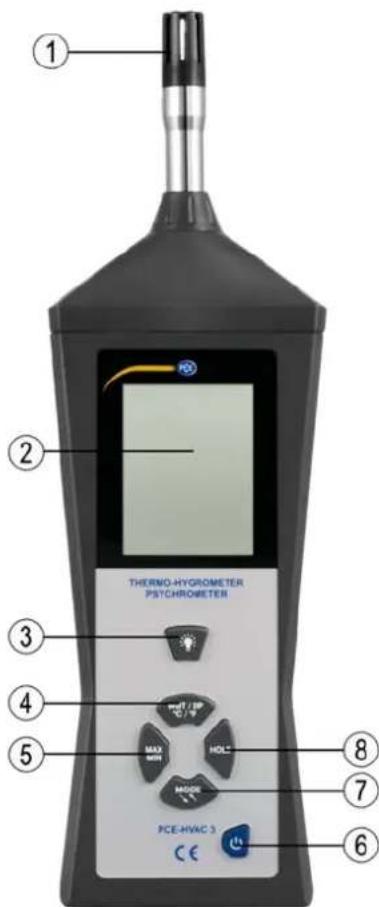
- Sensor
- LCD
- Backlight button
- Button for °C / °F / wet bulb temperature / dew point temperature
- MIN / MAX button
- Power button
- MODE button (absolute moisture / relative humidity)
- HOLD button
Note: The battery compartment cover is on the back of the device.
3.2 Display
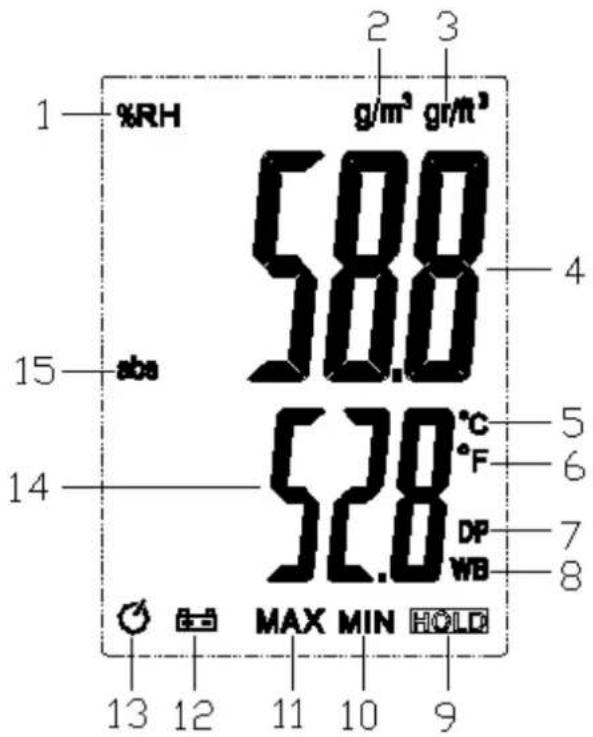
- Relative humidity (%)
- Measurement in g/m ^3 (absolute moisture)
- Measurement in g/f³ (absolute moisture)
- Humidity / moisture reading
- Measurement in °C
- Measurement in °F
- Dew point temperature
- Wet bulb temperature
- Hold function activated
- Min function activated
- Max function activated
- Low battery icon
- Auto Power Off activated
- Temperature / dew point temperature / wet bulb temperature reading
- Absolute moisture
4 Getting started
4.1 Power supply
The battery compartment cover is located on the back of the device. If the battery voltage is too low to ensure reliable measurement values, this will be indicated on the display by the low battery icon. The battery then needs to be replaced. To do so, the screw on the battery compartment cover must be loosened. The cover can then be opened and the battery can be replaced. Mind correct polarity when inserting the battery. After replacing battery, re-attach the cover and fasten the screw again.
5 Operation
5.1 Measurement
5.1.1 Switch on the instrument
Press the power button to switch on the PCE-HVAC 3.
5.1.2 Perform measurements
- Place the thermo-hygrometer's sensor in the area where the measurements are to be made.
- Wait until the measurement value has stabilized.
- Press the MODE button several times to choose between RH% , g / m^3 or g / ft^3 .
- The function key for ^ C and ^ F changes the temperature unit.
5.1.3 Measurement of absolute moisture
- Use the MODE key to choose the absolute moisture function (g/m ^3 or gr/ft ^3 ) as described. “abs” will appear on the left side of the display.
- The displayed measurement value shows the absolute moisture.
5.1.4 Measurement of the dew point temperature
- In order to measure the dew point temperature, you must press the °C / °F button until the display indicates "DP" in the bottom right corner.
- The displayed measurement value shows the dew point temperature.
5.1.5 Measurement of the wet bulb temperature
- Press the °C / °F button until "WB" is shown in bottom right corner of the display.
- The displayed measurement value shows the wet bulb temperature.
5.1.6 Measurement of the temperature
- If temperature measurements need to be made, you have to press the °C / °F button until °C or °F is displayed in the bottom right corner of the display.
- The displayed measurement value shows the temperature in the chosen temperature unit.
5.2 Further functions
5.2.1 Data-HOLD
Press and quickly release the HOLD button to freeze the displayed measurement value. In the bottom right corner, "HOLD" will be shown. To deactivate the function and get back to normal measurement mode, you simply need to press the button once again.
5.2.2 Measurement of minimum and maximum values
- This mode allows you to only show the highest or lowest value on the display. The measurement value that is permanently shown in the display will not be changed until a lower / higher value is measured in the background.
- If the MIN / MAX button is pressed once and the display shows "MIN", the instrument will start the minimum value measurement.
- By pressing the MIN / MAX button once again, the instrument will only show the highest measurement value and display "MAX".
- If you press the MIN / MAX button again, the instrument will return to normal measurement mode. "MIN" or "MAX" is no longer shown in the display.
5.2.3 Backlight
The instrument has a display which can be backlit. To activate or deactivate this, press the backlight button.
5.2.4 Auto Power Off
The thermo-hygrometer has an Auto Power Off function. This function is activated by default and turns the instrument off when it has not been used for 10 minutes. An icon in the display shows that the function is activated. This function helps to save battery power but it can also be deactivated. It can be deactivated by pressing the HOLD button while starting the instrument. When the PCE-HVAC 3 is turned off and on again, the function will automatically be re-activated.
6 Maintenance
6.1 Storage
The thermo-hygrometer should be stored in a dry place with mild environmental conditions. The environmental conditions include temperature and humidity. The specific environmental conditions can be found in the technical specification of this manual.
7 Contact
If you have any questions, suggestions or technical problems, please do not hesitate to contact us. You will find the relevant contact information at the end of this user manual.
8 Disposal
For the disposal of batteries, the 2006/66/EC directive of the European Parliament applies. Due to the contained pollutants, batteries must not be disposed of as household waste. They must be given to collection points designed for that purpose.
In order to comply with the EU directive 2012/19/EU we take our devices back. We either re-use them or give them to a recycling company which disposes of the devices in line with law.
If you have any questions, please contact PCE Instruments.

PCE Instruments contact information
Germany France Turkey
PCE Deutschland GmbH PCE Instruments France EURL PCE Teknik Cihazları Ltd.Şti.
Im Langel 4 76, Rue de la Plaine des Bouchers Halkali Merkez Mah
D-59872 Meschede 67100 Strasbourg Ataman Sok. No.:4/4
Deutschland France Türkiye
Tel.: +49 (0) 2903 976 99 0 Téléphone: +33 (0) 972 3537 17 Tel: +90 (0) 212 471 11 47
www.pce-instruments.com/turkish
United States of America
PCE Americas Inc.
711 Commerce Way suite 8
Jupiter / Palm Beach
33458 FL
USA
Tel: +1 (561) 320-9162
Fax: +1 (561) 320-9176
info@pce-americas.com
www.pce-instruments.com/us
United Kingdom
PCE Instruments UK Ltd
Units 12/13 Southpoint Business Park
Ensign Way, Southampton
Hampshire
United Kingdom, SO31 4RF
Tel: +44 (0) 2380 98703 0
Fax: +44 (0) 2380 98703 9
info@industrial-needs.com
www.pce-instruments.com/english
Italy
PCE Italia s.r.l.
Via Pesciatina 878 / B-Interno 6
55010 LOC. GRAGNANO
CAPANNORI (LUCCA)
Italia
www.pce-instruments.com/dutch
China
PCE (Beijing) Technology Co., Ltd
1519 Room, 4 Building
Men Tou Gou Xin Cheng 50 Gloucester Road
Men Tou Gou District
102300 Beijing / China
Tel: +86 (10) 8893 9660
Hong Kong
PCE Instruments HK Ltd.
Unit 1601, 16/F., Malaysia Building
ster Road
Wanchai
Hong Kong
Tel: +852-301-84912
info@pce-instruments.cn jyi@pce-instruments.com
www.pce-instruments.cn
www.pce-instruments.cn
- Safety notes
- Specifications
- Delivery contents
- System description
- Device
- Display
- Getting started
- Power supply
- Operation
- Measurement
- Switch on the instrument
- Perform measurements
- Measurement of absolute moisture
- Measurement of the dew point temperature
- Measurement of the wet bulb temperature
- Measurement of the temperature
- Further functions
- Data-HOLD
- Measurement of minimum and maximum values
- Backlight
- Auto Power Off
- Maintenance
- Storage
- Contact
- Disposal
- PCE Instruments contact information
- Germany France Turkey
- United States of America
- United Kingdom
- Italy
- China
- Hong Kong
Brand : PCE Instruments
Model : HVAC 3
Category : Measurement