MP350 Classic - Hi-Fi System JBL - Free user manual and instructions
Find the device manual for free MP350 Classic JBL in PDF.


| Product Type | Hi-Fi System |
| Brand | JBL |
| Model | MP350 Classic |
| Dimensions (Main Unit) | 430 x 140 x 370 mm (W x H x D) |
| Weight (Main Unit) | Approx. 8.5 kg |
| Power Supply | AC 220-240V, 50/60 Hz |
| Power Consumption | 150 W (max) |
| Speaker Output Power | 2 x 50 W RMS |
| Frequency Response | 40 Hz – 20 kHz |
| Connectivity | Bluetooth, USB, AUX input, FM/AM tuner, CD player |
| Supported Media | CD, CD-R/RW, MP3 files via USB, FM/AM radio |
| Control Options | Front panel buttons, remote control |
| Display | LCD screen with backlight |
| Material | Wooden cabinet with vinyl finish, metal grille |
| Warranty | 2 years |
| Cleaning Instructions | Wipe with a soft, dry cloth. Do not use solvents. |
| Safety Warnings | Do not expose to moisture, heat, or direct sunlight. Keep ventilation slots clear. |
| Spare Parts Availability | Contact JBL support or authorized service centers |
| Repairability Score | 7/10 (modular design, some parts user-replaceable) |
Frequently Asked Questions - MP350 Classic JBL
User questions about MP350 Classic JBL
0 question about this device. Answer the ones you know or ask your own.
Ask a new question about this device
Download the instructions for your Hi-Fi System in PDF format for free! Find your manual MP350 Classic - JBL and take your electronic device back in hand. On this page are published all the documents necessary for the use of your device. MP350 Classic by JBL.
USER MANUAL MP350 Classic JBL
MP350 Classic - Digital Media Player
Owner's Manual

Download the setup app:
GET IT ON Google Play

Download on the App Store

IMPORTANT SAFETY INSTRUCTIONS
- Read these instructions.
- Keep these instructions.
- Heed all warnings.
- Follow all instructions.
- Clean only with a dry cloth.
- Do not block any ventilation openings. Install this apparatus in accordance with the manufacturer's instructions.
- Do not install this apparatus near any heat sources such as radiators, heat registers, stoves or other apparatus that produce heat.
- Do not defeat the safety purpose of the polarized or grounding-type plug. A polarized plug has two blades with one wider than the other. A grounding-type plug has two blades and a third grounding prong. The wide blade or the third prong is provided for your safety. If the provided plug does not fit into your outlet, consult an electrician for replacement of the obsolete outlet.
- Protect the power cord from being walked on or pinched, particularly at plugs, convenience receptacles and the point where they exit from the apparatus.
-
Use only attachments/accessories specified by the manufacturer.
-
Use only with the cart, stand, tripod, bracket, or table specified by the manufacturer or sold with the apparatus. When a cart is used, use caution when moving the cart/apparatus combination to avoid injury from tip-over.
-
Unplug this apparatus during lightning storms or when unused for long periods of time.
-
Refer all servicing to qualified service personnel. Servicing is required when the apparatus has been damaged in any way, such as when the power-supply cord or plug is damaged, liquid has been spilled or objects have fallen into the apparatus, or the apparatus has been exposed to rain or moisture, does not operate normally or has been dropped.
-
To disconnect this apparatus from the AC mains completely, disconnect the power-supply cord plug from the AC receptacle.
-
The mains plug of the power-supply cord shall remain readily operable.
-
This apparatus is intended to be used only with the power supply and/or charging cable provided by the manufacturer.

The following instructions may not apply to waterproof devices. Refer to your device user manual or quick start guide for more waterproof instruction if any.
- Do not use this apparatus near water.
- Do not expose this apparatus to dripping or splashing, and ensure that no objects filled with liquids, such as vases, are placed on the apparatus.
WARNING: TO REDUCE THE RISK OF FIRE OR ELECTRIC SHOCK, DO NOT EXPOSE THIS APPARATUS TO RAIN OR MOISTURE.
| CAUTION | |
| RISK OF ELECTRIC SHOCK. DO NOT OPEN. | |
 | THIS SYMBOL ON THE PRODUCT MEANS THERE IS UNINSULATED, DANGEROUS VOLTAGE WITHIN THE PRODUCT ENCLOSURE THAT MAY PRESENT A RISK OF ELECTRICAL SHOCK. |
 | THIS SYMBOL ON THE PRODUCT MEANS THERE ARE IMPORTANT OPERATING AND MAINTENANCE INSTRUCTIONS IN THIS GUIDE. |
Visit the product page at JBL.com and download the Safety Sheet for a full list of safety instructions.
Class II Product
This equipment is a Class II or double insulated electrical appliance. It has been designed in such a way that it does not require a safety connection to electrical earth (“ground” in the U.S.).
Table of Contents
IMPORTANT SAFETY INSTRUCTIONS....2d
Class II Product 2d
Table of Contents 3d
Package Contents 4d
Placing The Unit 4d
Front Panel....5d
Rear Panel 5d
Remote Control....6d
Connecting the Streamer....7d
Network Connection 7d
Wired Connections: 7d
Wi-Fi Connections: 7d
Analog Audio Connection....8d
Digital Audio Connection....9d
Operation....10d
Power 10d
Auto Standby 10d
Playback....10d
USB....10d
Menu 11d
Menu Tree 11d
Supported File Formats....11d
Troubleshooting....12d
Specifications 12d
Trademarks and Licenses 13d
Thank you for choosing JBL
For over 75 years, JBL has been creating best in class audio equipment for concerts, studios, theaters, and homes around the world. JBL is the trusted choice of leading recording artists and sound engineers.
The JBL MP350 is designed to provide you with upgradable audio streaming for decades to come, all with exceptional musicality so you get the most enjoyment from your music.
This handbook is a guide to installing and using the MP350 and includes information on its more advanced features.
In the unlikely event of any fault, or you require technical assistance, please contact our dedicated support teams by email using luxurysupport@harman.com, or by telephone using +44 (0) 1707 668012 or +1 888 691 4171. Or, if you simply require further information about JBL products, our network of dealers will be happy to help you. Further information can also be found on the JBL website at JBL.com.
Package Contents
■ JBL MP350 Classic streaming music player
- IR remote
■ 2x AAA batteries for the remote control
■ Region specific power cords
Quick start guide
■ Safety and compliance document
Placing The Unit
Place the streamer on a level, firm surface, avoiding direct sunlight and sources of heat or damp.
Do not place the MP350 on top of an amplifier or other source of heat.
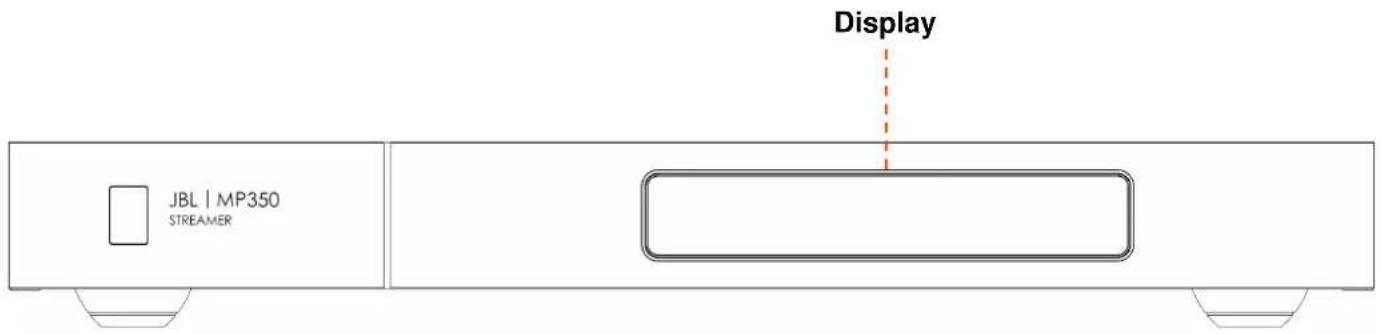
■ Make sure the remote-control receiver to the left of the front panel display is unobstructed, otherwise this will impair the use of the remote-control.
Do not place your record deck on top of this unit. Record decks are very sensitive to the noise generated by mains power supplies which will be heard as a background 'hum' if the record deck is too close.
The normal function of the unit may be disturbed by strong electromagnetic interference. If this occurs, simply reset the unit with the switch on the rear panel, or move the unit to another location.
Front Panel
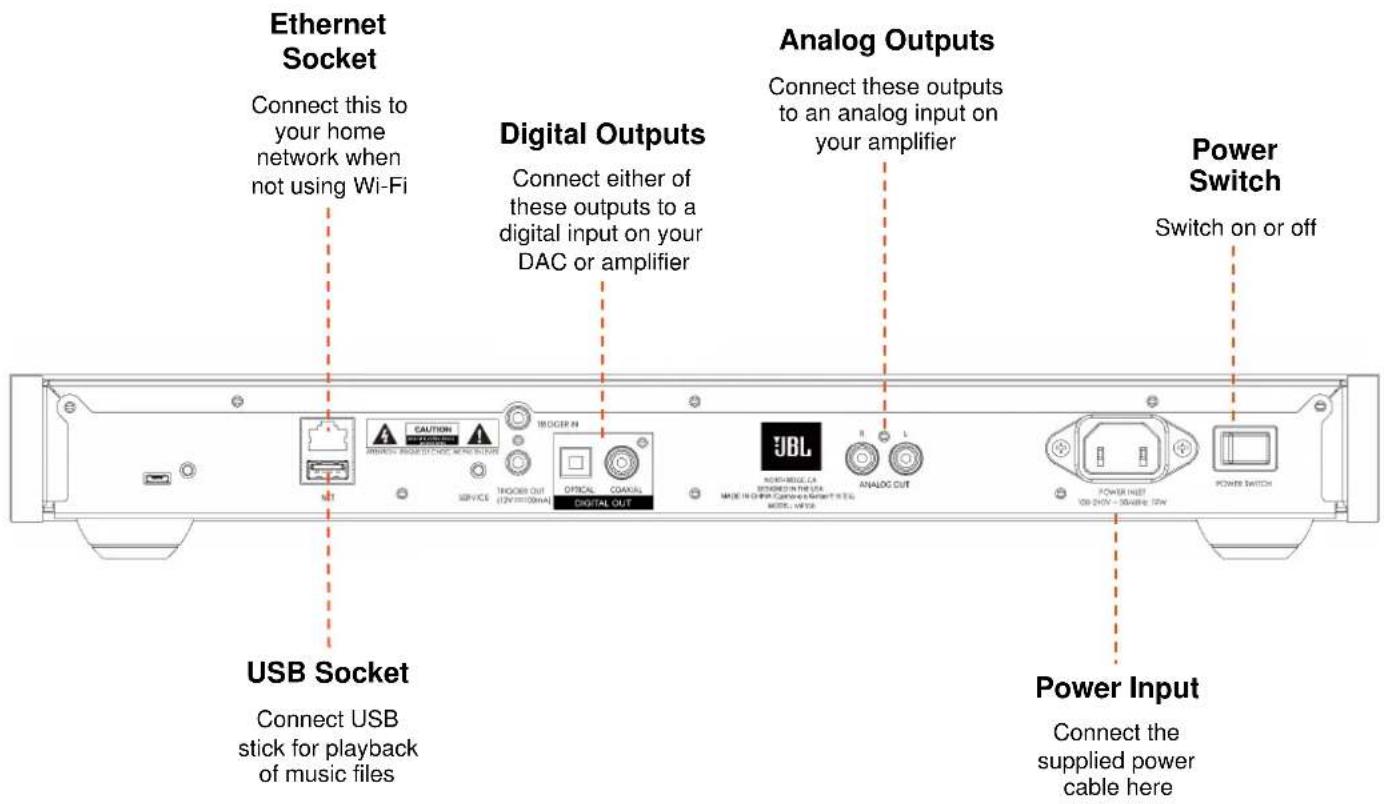
Rear Panel
Remote Control
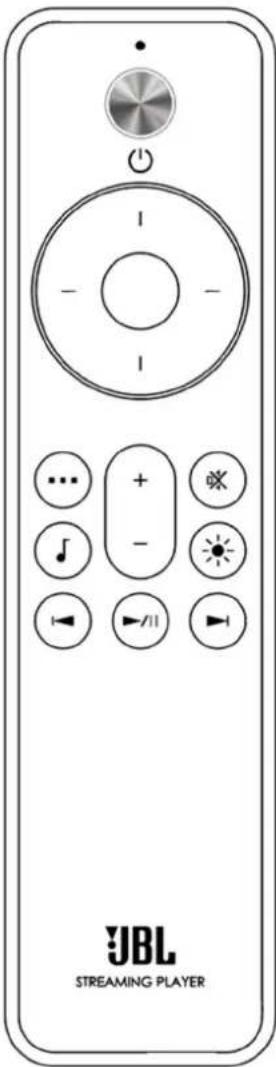
| Toggle Standby Operation | |
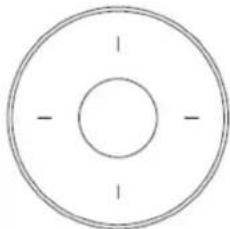 | Menu NavigationCenter button to select |
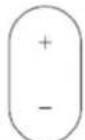 | Volume Control(for MP350 or SA550) |
 | Mute On or Off(for MP350 or SA550) |
 | Display Brightness |
 | Transport Keys (Play/Pause, Skip back/forward) |
 | Menu button |
 | Music info button |
Note: Incorrect use of batteries can have hazardous results. Do not mix old and new batteries together. Do not use non-identical batteries together. Although they may look similar, different batteries may have different voltages. Ensure the batteries are inserted in the correct direction.
Remove batteries from equipment that is not going to be used for a month or more. When disposing of used batteries, please comply with governmental or local regulations that apply in your country or area.
Connecting the Streamer
Network Connection
Wired Connections:
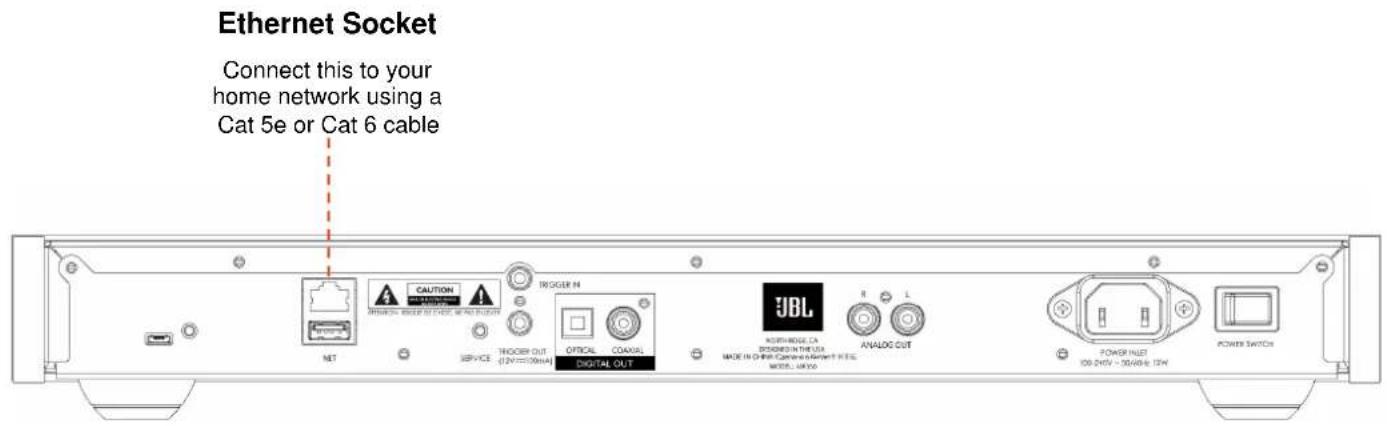
Wi-Fi Connections:
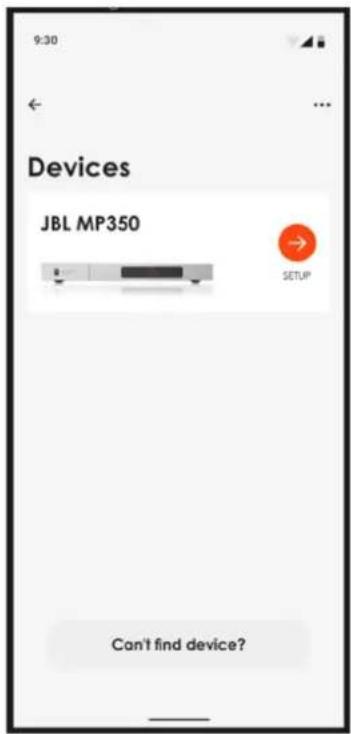
To make a Wi-Fi connection, download the JBL Premium Audio app to your smartphone or tablet. Links are on the front page of this manual.
Power on the JBL MP350 streamer and open the app to discover it after the MP350 is Ready. Select it and follow the prompts to connect it to your Wi-Fi network.
Alternatively, you can connect the JBL MP350 to your Wi-Fi network using Apple Airplay speaker setup in the Wi-Fi settings of your Apple device, or the Google Home app in both Android and Apple devices.
Analog Audio Connection
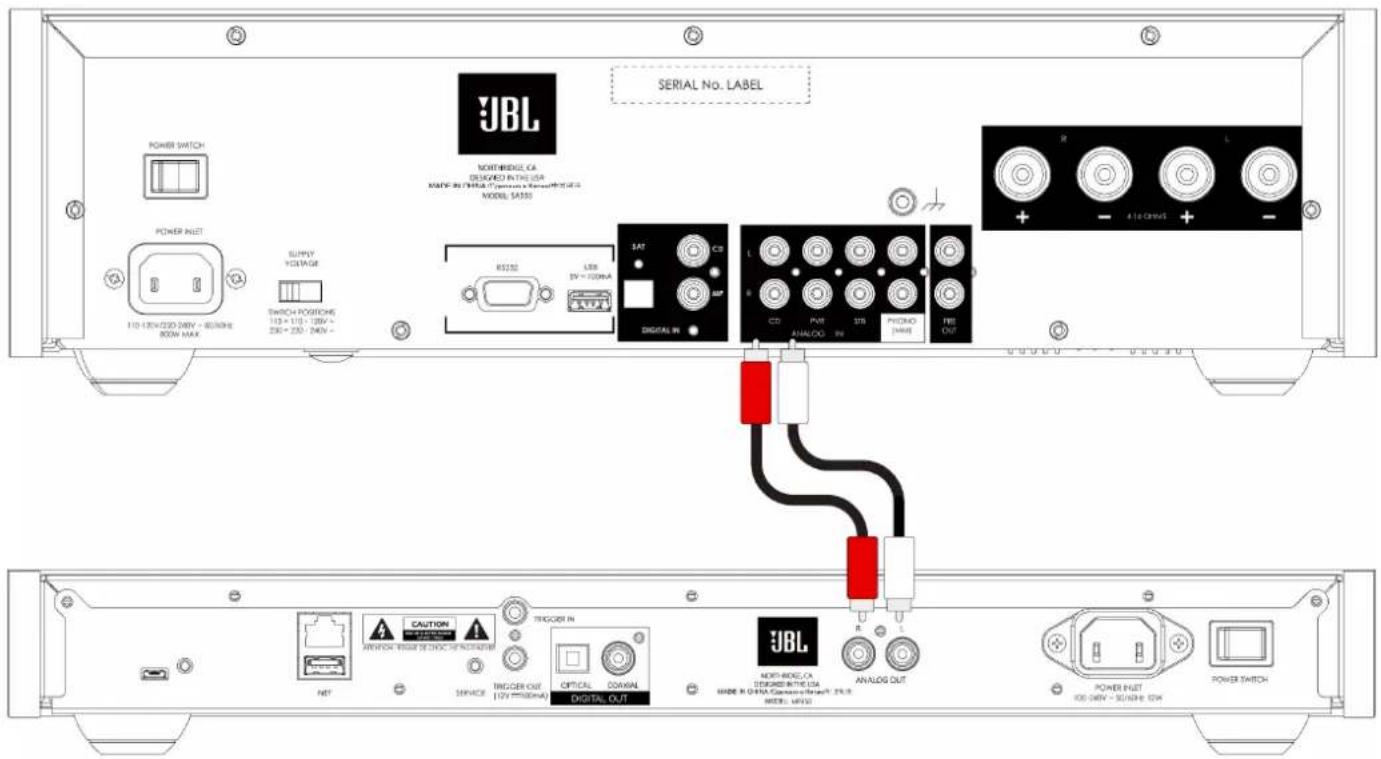
Step 1, ensure power is disconnected from the Streamer and Amplifier.
Step 2, using analog interconnect cables, connect the right (R), red terminal of the analog output on the streamer to the right (R), usually red terminal of an analog input on your amplifier.
Step 3, connect the left (L), white terminal of the analog output on the streamer to the left (L), usually white terminal of an analog input on your amplifier.
Top Tips
■ After making connections: switch the amplifier on with no input and reduce the volume to minimum. Select the input that corresponds to your connection, and then slowly increase the volume to a suitable listening level to avoid loud sounds or product damage in the event of incorrect connection.
If you are unsure as to how your system should be connected, please contact your JBL dealer who will be happy to help you.
Digital Audio Connection
Step 1, ensure power is disconnected from the streamer and amplifier.
Step 2, using a digital coax interconnect cable, connect the digital coaxial output on the streamer to a digital coaxial input on your amplifier.
Alternatively, using an optical Toslink interconnect cable, connect the digital optical output to a digital optical input on your amplifier.
Note 1: Digital outputs are disabled by default. To use a Digital output, change the Output Type in the settings menu. To use the menu, see Page 11
Note 2: Variable output is not available when Digital output is enabled. When Digital output is selected, Output Volume will default to Fixed.
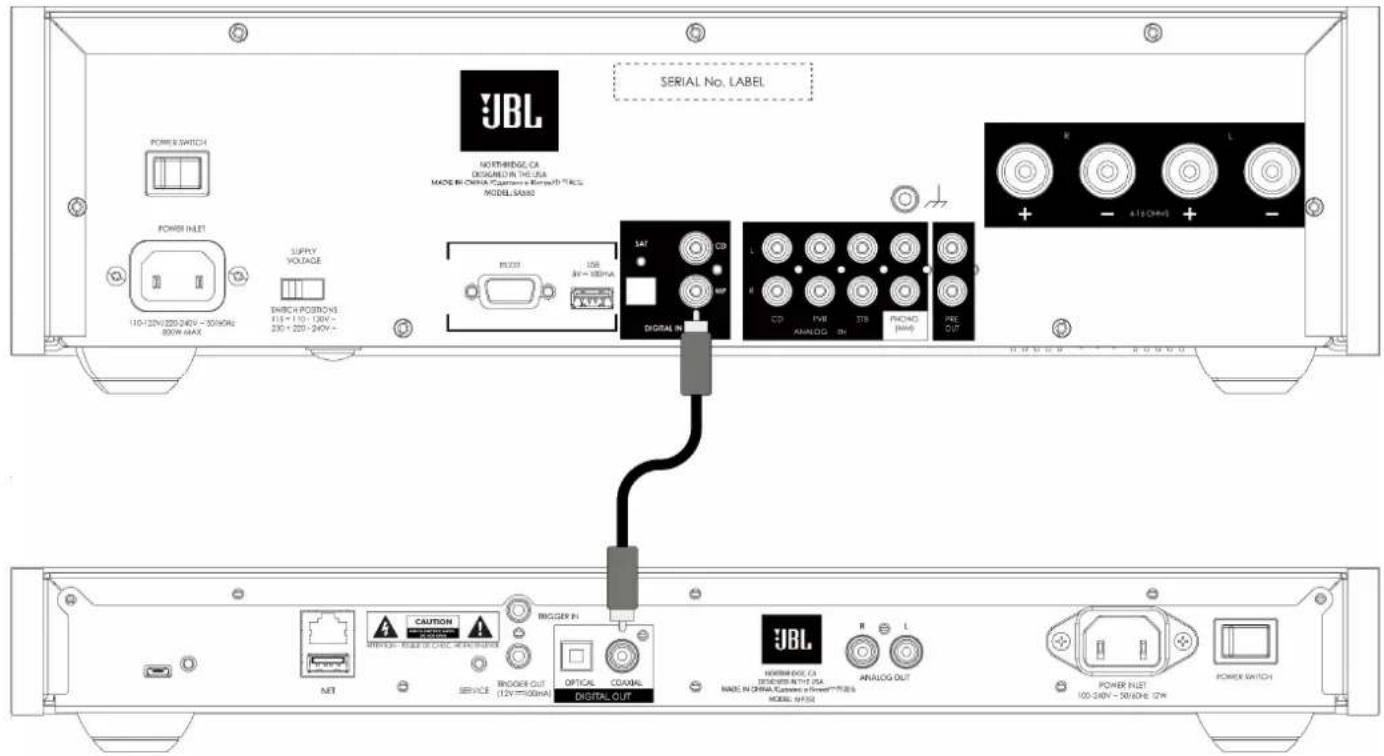
Top Tips
Digital audio connections are recommended when using the MP350 with the JBL SA550 amplifier.
■ After making connections: switch the amplifier on with no input and reduce the volume to minimum. Select the input that corresponds to your connection, and then slowly increase the volume to a suitable listening level to avoid loud sounds or product damage in the event of incorrect connection.
If you are unsure as to how your system should be connected, please contact your JBL dealer who will be happy to help you.
Operation
Power
The power switch on the rear panel switches the amplifier on or off. When you have finished making connections, switch the amplifier on.
Auto Standby
The MP350 is designed to enter standby automatically after 20 minutes with no audio playing, and no user interaction. This is to meet international power consumption regulations. This can be turned off in the menu. To use the menu, see page 11.
Playback
The JBL MP350 can be connected to, and play music from the following apps and services:
Spotify Connect
Tidal Connect
Apple Airplay 2
- Chromecast (requires acceptance of Google terms in the JBL Premium App or additional setup steps in the Google Home app)
■ Roon (requires additional setup in Roon app)
From the JBL Premium Audio app, you can access setup favorites and access other services including but not limited to:
Internet Radio
Podcasts
■ Connected USB media
■ Local network storage (UPnP)
USB
Insert the USB storage device into the USB socket on the rear panel. Do not use a USB extension cable.
The JBL MP350 can play music files stored on a USB flash drive. Music files contained within the USB storage can be browsed using the JBL Premium Audio app.
Please refer to Supported File Formats on page 11.
Menu
To access the setting menu, press the MENU button ⋯ on the remote control.
To navigate the menu use the navigation buttons on the remote control.
Menu Tree
| Output Type | Selects which output to use, Analog or Digital with full or partial MQA decoding (where MQA encoded content is being played). Default is Analog. |
| Output Volume | Selects whether the audio output volume is fixed or variable. Default is Variable. |
| Display Select Display Brightness. Default is Full. | |
| Auto Standby | When enabled, the streamer will enter standby after 20 minutes with no user interaction or playback. Default is On. |
| DAC Filter Select a digital filter for the analog outputs. Default is Slow. | |
| System Reset Press Select/OK to initiate a reset of all settings to default. | |
| USB Update | Press Select/OK to initiate a software update from a USB stick present in the USB socket on the rear panel. |
| NET Version Displays the current software version in operation on the NETWORK device. | |
| Host Version Displays the current software version in operation on the HOST device. | |
| IP Address Displays the current IP address of the MP350 on your network. | |
| MAC Address Displays the MAC address of the MP350. | |
| UNIT ID | Displays the NETWORK ID of the MP350 as identified to other devices on the network. |
Supported File Formats
| File Type Bit Depths Sample Rates | ||
| AAC 16 or 24 bit 44.1, 48, 88.2 or 96 kHz | ||
| AIFF | 16 or 24 bit 44.1, 48, 88.2, 96, 176.4 or 192 kHz | |
| ALAC | 16 or 24 bit 44.1, 48, 88.2, 96, 176.4 or 192 kHz | |
| FLAC | 16 or 24 bit 44.1, 48, 88.2, 96, 176.4 or 192 kHz | |
| MP3 16 bit | 44.1 or 48 kHz | |
| OGG | 16 bit | 44.1 or 48 kHz |
| WAV | 16 or 24 bit 44.1, 48, 88.2, 96, 176.4 or 192 kHz | |
| WMA | 16 bit | 44.1 or 48 kHz |
Troubleshooting
| Problem Check the following | |
| No sound | Is the streamer correctly plugged in and switched on?Is the streamer correctly connected to the amplifier, with the correct input selected?Is the amplifier muted?Is the correct output mode selected (Analog or Digital)? (See menu on page 11) |
| The streamer does not respond to the remote control | Are there fresh batteries in the remote control?Are you pointing the remote control towards the amplifier window without obstruction? |
| The front panel display is blank | Is the streamer correctly plugged in and switched on?Is the streamer in standby?Is the display dimmed to “Off”?Press the button on the remote control. |
| Cannot control the volume | Is Fixed volume enabled? (See menu on page 11)Is Digital output selected? (See menu on page 11) |
| Cannot discover the streamer in an app | Is the streamer correctly plugged in and switched on?Does the streamer have a network connection, wired by Ethernet or Wi-Fi?For Wi-Fi connections, has setup been completed using the JBL Premium Audio app?Is your smartphone or tablet connected to the same local network? |
Specifications
| Interfaces | |
| USB | USB 2.0 High Speed (480Mbps) |
| Ethernet | 10/100Mbps |
| Wi-Fi | 802.11b/g/n |
| Analog Outputs | |
| Digital to Analog Converter | TI PCM1796 |
| Signal/Noise Ratio (Awtd) | 115dB |
| Harmonic Distortion (1kHz) | < 0.007% |
| Frequency response | 10 Hz – 20 kHz ± 0.5dB |
| Output level (fixed) | 2.2V rms |
| Output Impedence | 47Ω unbalanced |
| Jitter RMS | < 20 psec |
| General | |
| Mains voltage | 110–240V, 50–60Hz |
| Maximum power consumption | 12W |
| Dimensions in mm (including feet, control knob and connectors) | 448 W x 58 H x 285 D |
| Weight (net) | 4.5kg |
| Weight (gross) | 7.0kg |
Trademarks and Licenses
| [Z3BY] Works withApple AirPlay | Apple®, AirPlay® and the AirPlay LogoTM, iPod®, iPhone® and iPad® are trademarks of Apple Inc., registered in the U.S. and other countries. App Store is a service mark of Apple Inc.To use AirPlay with the JBL MP350, the latest version of iOS, iPadOS, or macOS is recommended. |
 Spotify Spotify | The Spotify software is subject to third party licenses that can be found here:https://developer.spotify.com/legal/third-party-licenses/ |
 CERTIFIED CERTIFIED | The Wi-Fi CERTIFIEDTM logo is a registered trademark of Wi-Fi Alliance®. |
 Chromecast built-in Chromecast built-in | Google, Google Play, Chromecast, and other related marks are trademarks of Google LLC. The Google Assistant requires an internet connection and is not available in certain countries and languages. Availability and react of certain features and services are device, service, and network-dependent and may not be available in all areas. Controlling certain devices in your home requires compatible smart devices.Subscriptions for services and applications may be required and additional terms, conditions and/or charges may apply. |
 MQA MQA | MQA and the Sound Wave Device are registered trademarks of MQA Limited. © 2016MQA (Master Quality Authenticated).MQA is an award-winning British technology that delivers the sound of the original master recording. The master MQA file is fully authenticated and is small enough to stream or download.Visit mqa.co.uk for more information.The JBL MP350 includes MQA technology, which enables you to play back MQA audio files and streams, delivering the sound of the original master recording.MQA or MQA Studio indicates that the product is decoding and playing an MQA stream or file and denotes provenance to ensure that the sound is identical to that of the source material.MQA Studio indicates it is playing an MQA Studio file, which has either been approved in the studio by the artist/producer or has been verified by the copyright owner. |
| MP3 | MPEG Layer-3 audio decoding technology licensed from Fraunhofer IIS and Thomson multimedia. |
| FLAC | FLAC Decoder Copyright © 2000, 2001, 2002, 2003, 2004, 2005, 2006, 2007, 2008 Josh CoalsonRedistribution and use in source and binary forms, with or without modification, are permitted provided that the following conditions are met:Redistributions of source code must retain the above copyright notice, this list of conditions and the following disclaimer.Redistributions in binary form must reproduce the above copyright notice, this list of conditions and the following disclaimer in the documentation and/or other materials provided with the distribution.Neither the name of the Xiph.org Foundation nor the names of its contributors may be used to endorse or promote products derived from this software without specific prior written permission.THIS SOFTWARE IS PROVIDED BY THE COPYRIGHT HOLDERS AND CONTRIBUTORS ‘AS IS’ AND ANY EXPRESS OR IMPLIED WARRANTIES, INCLUDING, BUT NOT LIMITED TO, THE IMPLIED WARRANTIES OF MERCHANTABILITY AND FITNESS FOR A PARTICULAR PURPOSE ARE DISCLAIMED. IN NO EVENT SHALL THE FOUNDATION OR CONTRIBUTORS BE LIABLE FOR ANY DIRECT, INDIRECT, INCIDENTAL, SPECIAL, EXEMPLARY, OR CONSEQUENTIAL DAMAGES (INCLUDING, BUT NOT LIMITED TO, PROCUREMENT OF SUBSTITUTE GOODS OR SERVICES; LOSS OF USE, DATA, OR PROFITS; OR BUSINESS INTERRUPTION) HOWEVER CAUSED AND ON ANY THEORY OF LIABILITY, WHETHER IN CONTRACT, STRICT LIABILITY, OR TORT (INCLUDING NEGLIGENCE OR OTHERWISE) ARISING IN ANY WAY OUT OF THE USE OF THIS SOFTWARE, EVEN IF ADVISED OF THE POSSIBILITY OF SUCH DAMAGE. |

HARMAN International, Incorporated
8500 Balboa Boulevard, Northridge, CA 91329 USA
Danzigerkade 16G 1013 AP Amsterdam, Netherlands
Ground Floor, Westside 2, London Road, Apsley, Hemel Hempstead,
Hertfordshire, HP3 9TD, United Kingdom
www.jbl.com
© 2023 HARMAN International Industries, Incorporated. All rights reserved.
JBL is a trademarks of HARMAN International Industries, Incorporated, registered in the United States and/or other countries.
Features, specifications, and appearance are subject to change without notice.
