
LX8300SA - Hi-Fi System PHILIPS - Free user manual and instructions
Find the device manual for free LX8300SA PHILIPS in PDF.


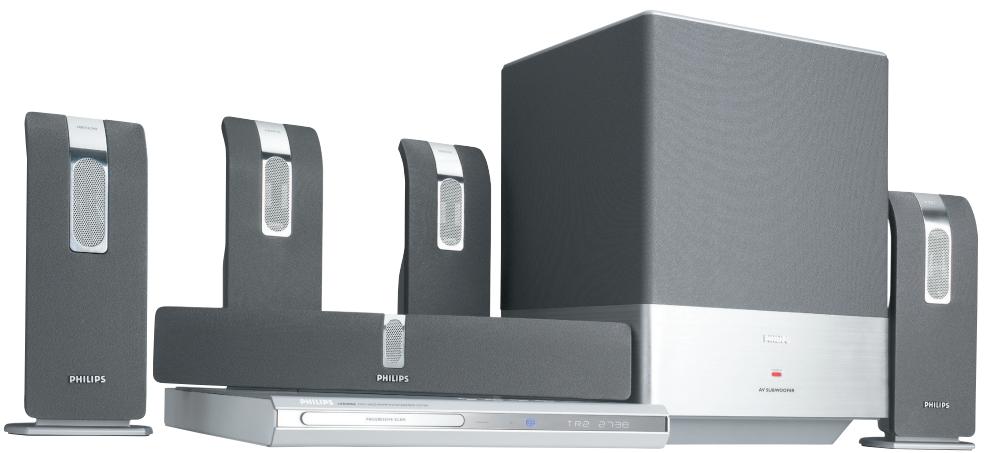
| Product type | Hi-Fi home cinema system with DVD player, FM/MW tuner and amplifier |
| Brand | PHILIPS |
| Model | LX8300SA |
| Total output power | 400 W RMS (front 50 W/channel, rear 50 W/channel, center 50 W, subwoofer 150 W) |
| Compatible disc formats | DVD, VCD, SVCD, SACD, DVD+R/RW, CD, MP3, JPEG, DivX, MPEG-4, CD-R/RW |
| Tuner | FM (87.5-108 MHz) and MW (531-1602 kHz) with memory for up to 30 stations |
| Sound modes | Dolby Digital, DTS, Dolby Pro Logic II, multi-channel surround, digital effects (Rock, Jazz, etc.) |
| Main player dimensions | 360 mm x 40 mm x 305 mm (W x H x D) |
| Main player weight | 2.5 kg |
| Front/rear speaker dimensions | 95 mm x 255 mm x 82 mm each |
| Front/rear speaker weight | 0.9 kg each |
| Center speaker dimensions | 435 mm x 76 mm x 70 mm |
| Center speaker weight | 1.4 kg |
| Subwoofer dimensions | 300 mm x 400 mm x 300 mm |
| Subwoofer weight | 12 kg |
| Subwoofer power supply | 220-240 V, 50 Hz, power consumption 130 W |
| Player power supply | 34 V DC, power consumption 20 W |
| Connections | SCART (Péritel), S-Video, composite video, Y Pb Pr, auxiliary input, digital input, line output |
| Supplied accessories | SCART cable, FM wire antenna, MW loop antenna, remote control with batteries, speaker bases, cable covers |
| Maintenance and cleaning | Clean the cabinet with a soft, slightly damp cloth (no abrasive products). Discs: wipe from the center outward. |
| Safety instructions | Do not open the device (risk of electric shock). Ensure ventilation: 10 cm of space around. Avoid humidity and heat sources. |
| Reparability | Any attempt at repair by the user voids the warranty. Contact an authorized Philips service center for any maintenance. |
Frequently Asked Questions - LX8300SA PHILIPS
User questions about LX8300SA PHILIPS
0 question about this device. Answer the ones you know or ask your own.
Ask a new question about this device
Download the instructions for your Hi-Fi System in PDF format for free! Find your manual LX8300SA - PHILIPS and take your electronic device back in hand. On this page are published all the documents necessary for the use of your device. LX8300SA by PHILIPS.
USER MANUAL LX8300SA PHILIPS
Visit us at www.p4c.philips.com for service support
PHILIPS
Informations generales
Accessoires fournis 8
balayage progressif 12
(DVD commencement) 26
(DVD commencement) 27
Lecture multi-angle 29
Mode nocturne - activation/désactivation 33
Menu Reglages video 33
Type TV 33
Affichage TV 33
Fonction de balayage progressif - activation/désactivation 34
TIPS: The operating features described here might not be possible for certain discs. Always refer to the instructions supplied with the discs.
Program: Track (01-17)
104 6
10 7
3 11 8
4- 9
5 10
EXIT START NEXT
MULTI-CHANNEL (Muticanal)
Mode nocturne - activation/désactivation
$$ " S L E E C P " \rightarrow " S L E E C P " $$
CLASS 1 LASER PRODUCT
3139 115 23271

SgPJ-0425/22A-7
QUICK USE GUIDE
12nc:313911523211
LX8300SA
First connect …… then play
(see next page)
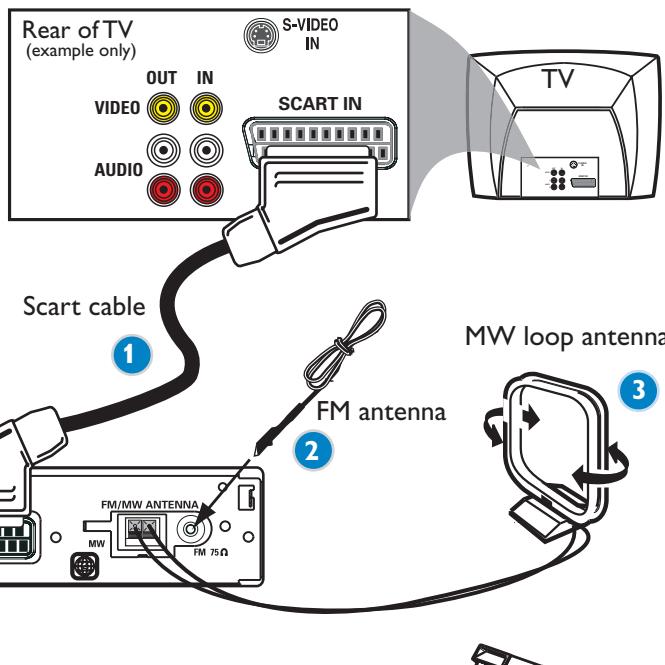

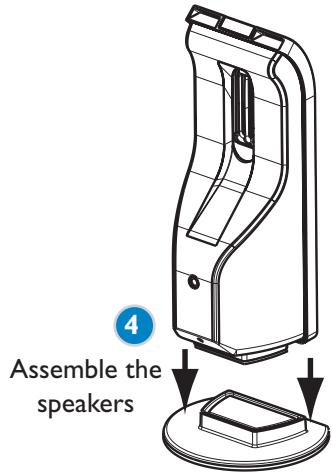
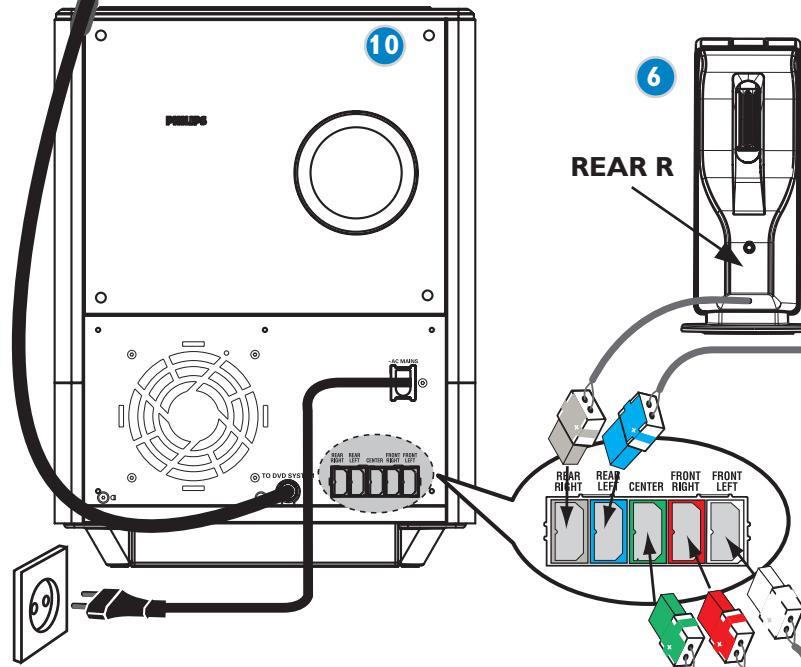
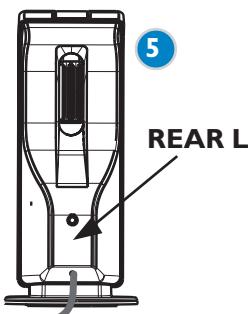
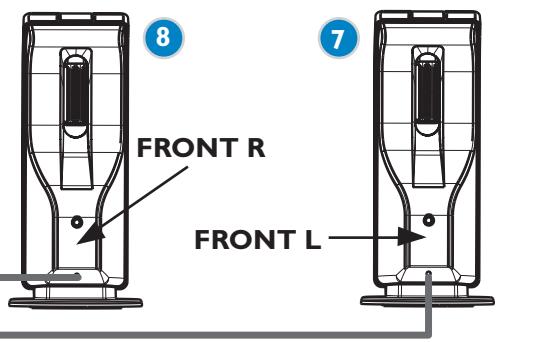
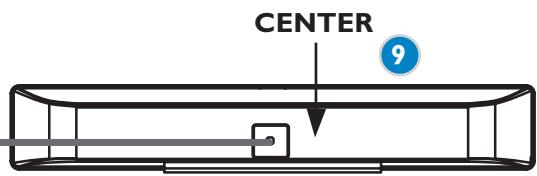
4 Assemble the speakers
Helpful Hints
You only need to make one video connection to your TV in order to view the DVD playback.
If your TV is not equipped with a SCART connector, connect your TV through the corresponding video connection A or B (cables not supplied).
If your TV has progressive scan function, connect your TV using Y Pb Pr (cables not supplied). Refer to page 19 in the user manual for "Switching to YUV video output setting" before use.
PHILIPS
Playing a disc
Make sure your DVD system and TV are connected and turned on!
1 Press SOURCE on the remote control until "DISC" appears on the display panel.
The DISC LED on the remote will light up for a few seconds.
2 Turn on the TV and select the correct Video In mode.
You should see the blue DVD background screen on the TV (if no disc in the DVD system).
3 Press OPEN/CLOSE at the top of the DVD system and load a disc, then press OPEN/CLOSE again to close the disc tray.
Make sure the disc label is facing up. For double-sided discs, load the side you want to play face up.
4 Playback will start automatically.
If a disc menu appears, use buttons on the remote to make the necessary selection, then press OK to confirm. Or, use the numeric keypad on the remote to select features. Follow the instructions given in the disc menu.
5 To stop playback, press STOP.
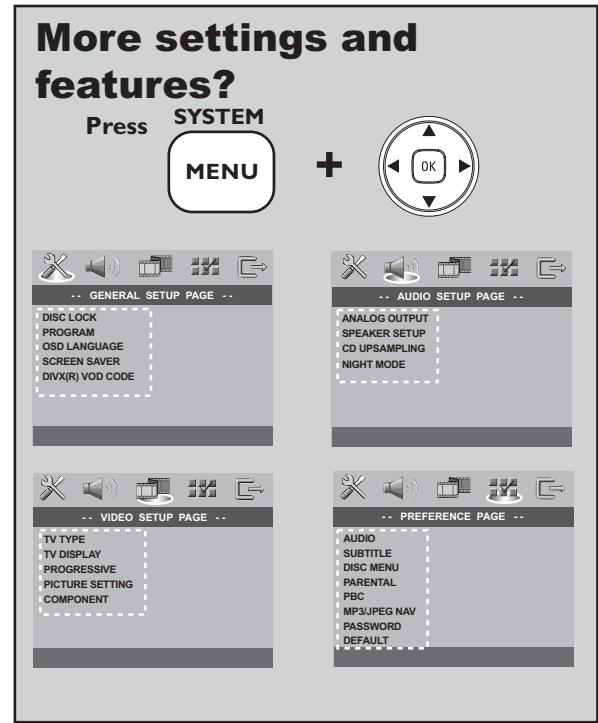
Refer to chapters "Getting Started" and "DVD Setup Menu Options" in the user manual.
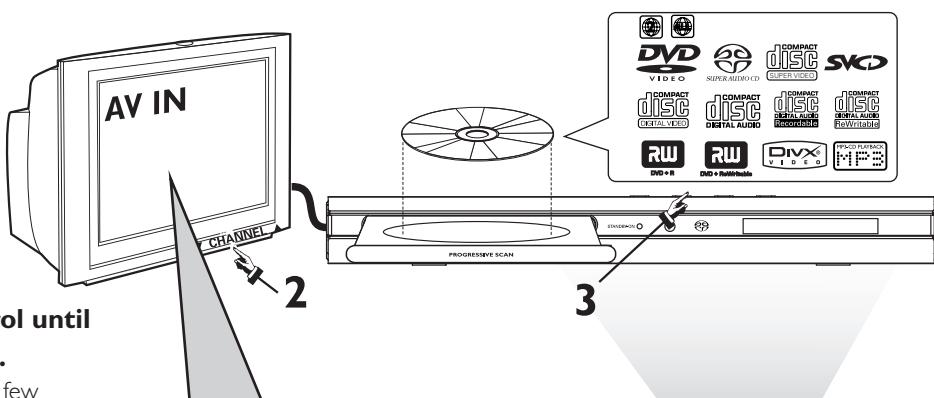
No picture?
Check the AV (Audio/Video) mode on your TV.
- Usually this channel is between the lowest and highest channels and may be called FRONT, A/V IN, or VIDEO.
- Or, you may go to channel 1 on your TV, then press the Channel down button repeatedly until you see the Video In channel.
- Or, your TV remote control may have a button or switch that chooses different video modes.
- See your TV manual for more details.
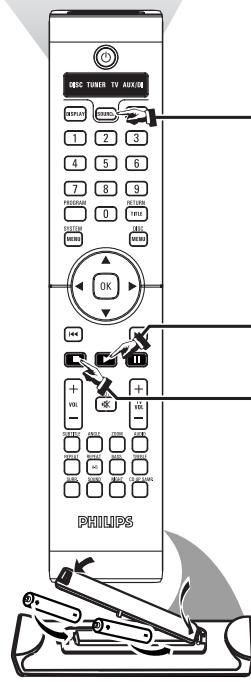
No sound from rear speakers?
Press SURR to select 'MULTI-CHANNEL'.

Enhance the sound quality?
Press SOUND to select a predefined digital
sound effect.
ORAND


Refer to chapters "Getting Started - Setting the speakers' channel" and "Sound Controls" in the user manual.
...3aTEM BOCPON3BOAHTe
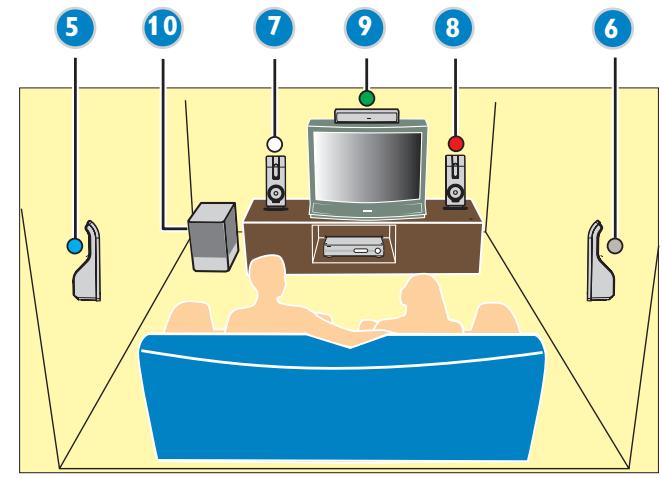
① Ka6eAa Scart
② ΠpoBODaHаaHTeHHa FM
③ PamOuHa aHTeHHa
(4) VCTaHOBKa KOLOHOK
⑤ TblbHaKa KOAnHka (AeBa)
⑥ TbIbHaa KOaOHKa (Pabay)
⑦ ΠepeAЯKoAOnKa(ΛeBa)
⑧ ΠepeaHЯ KOAOHa (PpaBa)
9 LcHTpaBna K0AOHka
10 A/B-ca6ByΦep
I0Ae3HbIe COBeTbI
AЯ BOCIPON3BBeHЯ AINCKOB DVD Heo6XoAMO BbIIOAHHTb TOaKo OaHO BndeOcoeAnHeHne C TeAEBN3OpOM.
Ecamy TABN3opa HT pa3bMa SCART, NOAcoaHHT TABN3Op 4p3 COOTBTCTBYIOU, BnDO CoaHHN A mB (Ka6A H npnaIaIOTc).
BocnpoH3BeAeHne Ancka
Y6eAHTecb, YTO MHKPOCHTeMa DVD N TeLEBn3Op COeAHHeHbI IN BKAIOUeHbI!
1 HaKMTe KhoNky SOURCE 06eTecb NOBAAEHnHa AnCnAee "DISC". Ha Heckoabko cekyHa Na NpIbTe AY 3arOpNTcH INANKATOP ANCKA
2 BkAIOHTe TeAEBN3Op N BbI6epNTe COOTBETCTBYIOUHn peXHM BnEoBXOda. Ha TeAEBN3ope DOAXeH IOABNTbc4 fOHOBbl 3KpAH (ecAN B cnCTeme DVD HET dNcKa).
3 Haxmnte KhoNky OPEN/CLOSE ,yTo6bl OTKpbItb AOTOK DAAnCKa N yCTaHOBnTb B HEM Anck, 3aTem CHOba HaxmTe TY XeKhoNky, yTO6bl 3aKpbItb AOTOK. Y6eAnTeCb, yTO Anck BCTaBAeH 3TNKeTko BBepx. Ancku, 3aINcaHbIe C o6eNXCTOPOH, BCTaBAJte BBepx CTOpOHOU, KOtopar 6yAET npOnrPbIbTaBCra.
4 Bocnpon3BeAeHne NaHHeTcABTomatNueckn. EcaI NOBIAOC MeHO AICKa, pRi NOMOUI KHOIOK ▲▼ ▶CaeAaTe HxKbI BbI6Op, dA IOATBepKAdEHN HaKMITE OK. MoXHo TaKKe HcNOAb3OBAtb cHΦpOByo KlaBnAtpy Ha NtBte Dv. CaeDyIte HNCTpyKlmaM, PnBBeAeHHbIM B MeHO AICKa.
5 AAnOCTaHOBKn BOCnPOn3BeAeHnHaXMMTe STOP
Het n306paXeHnHa !!
Cm. rAAbbI "IpeBbI wearn" n "BaPnAHmbI MeHIO hAcmpoIK CNcMeMbI" B pykoBogcmbe noA3OBaMeAIA.
I3 3aDHnx AnHnAMNKOB He cAibiHo 3ByKa?
HaXmTeSURAAByBb6opa onuMu MULTI-CHANNEL (MHOrOKAHAAhbl).
YayuHtB KaueCTBO 3Byka?
HaKMTe KHOPIky SOUND (3ByK) AIA BbIbopa npeDoIpeAeHnHO 4uΦpOBORO 3ByKOBORO ΘΦeKTa.
MAN/
Hakmnte KhoNky TREBLE NAN BASS VOL +-.
Cm. rAabby "IpeBbie warr-Hacmpoika KaHaaOB KoAOHOK" n "YnpabaeHne 3BykOM B Pykoobogcme noa30abeAa.

- PHILIPS
- Informations generales
- Program: Track (01-17)
- MULTI-CHANNEL (Muticanal)
- Mode nocturne - activation/désactivation
- CLASS 1 LASER PRODUCT
- QUICK USE GUIDE
- Helpful Hints
- Playing a disc
- No picture?
- No sound from rear speakers?
- Enhance the sound quality?
- I0Ae3HbIe COBeTbI
- BocnpoH3BeAeHne Ancka
- Het n306paXeHnHa !!
Brand : PHILIPS
Model : LX8300SA
Category : Hi-Fi System