
NR-F603GT-WU - Refrigerator PANASONIC - Free user manual and instructions
Find the device manual for free NR-F603GT-WU PANASONIC in PDF.


| Product Type | Refrigerator-Freezer (Household Use) |
| Model | NR-F603GT-WU |
| Dimensions (W x D x H) | 685 mm x 745 mm x 1828 mm |
| Weight | 114 kg |
| Total Storage Volume | 488 L |
| Refrigerator Compartment Volume | 301 L |
| Freezer Compartment Volume | 77 L |
| Vegetable Compartment Volume | 87 L |
| Prime Fresh / Chilled Select Room Volume | 18 L |
| Ice Compartment Volume | 5 L |
| Temperature Control | Electronic control panel with 3-stage settings for fridge, freezer, and prime fresh/chilled; 9-stage fine adjustment available |
| Cooling Technology | Inverter compressor with ECONAVI (storage, smart, night eco) and nanoe™ X ion generator |
| Ice Maker | Automatic ice maker with quick ice making (approx. 80 min) and AUTO ICE OFF function |
| Prime Fresh / Chilled Select Room | Adjustable temperature: Prime Fresh (-3°C to -1°C) or Chilled (0°C to 2°C) with Prime Fresh Quick Mode |
| Fresh Freezing Compartment | Quick freeze function (approx. -19°C to -17°C) with aluminum plate for rapid cooling |
| Vegetable Compartment | Humidity control with Moisture Control Filter and separate small-item case |
| Shelving | Removable glass trays (including slide tray), adjustable door shelves, 2way egg case |
| Control Panel Lock | Child lock function (CL indicator) |
| Lighting | LED lamps (room lamps and select room lamp) |
| Separately Sold Parts | Water purification filter (ARMH00B00820), adjustment plates (CNR79-338120) |
Frequently Asked Questions - NR-F603GT-WU PANASONIC
User questions about NR-F603GT-WU PANASONIC
0 question about this device. Answer the ones you know or ask your own.
Ask a new question about this device
Download the instructions for your Refrigerator in PDF format for free! Find your manual NR-F603GT-WU - PANASONIC and take your electronic device back in hand. On this page are published all the documents necessary for the use of your device. NR-F603GT-WU by PANASONIC.
USER MANUAL NR-F603GT-WU PANASONIC
Operating Instructions
Refrigerator (Household use)
Manual Penggunaan
natural_image
Line drawing of a multi-tier refrigerator with front panels and doors (no text or symbols)NR-F603GT
NR-F603HX
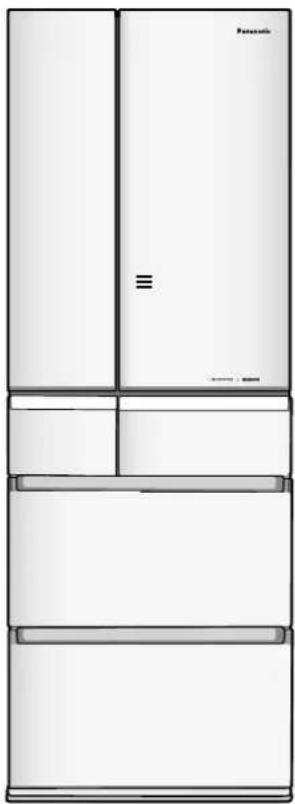
natural_image
Line drawing of a multi-tier refrigerator with doors and front panel (no text or symbols)NR-F503GT
NR-F503HX
Model No. No. Model 型號
NR-F603GT-X6 NR-F603GT-W6 NR-F603GT-N6 NR-F603GT-XP NR-F603GT-XU NR-F603GT-WU NR-F503GT-X6 NR-F503GT-W6 NR-F503GT-T6 NR-F503GT-T7 NR-F603HX-X3 NR-F603HX-W3 NR-F603HX-N3 NR-F503HX-X3 NR-F503HX-W3 NR-F503HX-N3
Thank you for purchasing this Panasonic product.
Please read these instructions carefully before using this product.
Please keep this manual for future reference.
Photos and illustrations of NR-F603GT are used for explanation in this manual.
Other models can be used in the same way.
Safety instructions....3
Installation....6
Choosing the right location ....6
To use all features....7
Temperature setting and a guide of temperature 7
Control panel 8
How to operate ....8
ECONAVI Operation 9
nanoe™ X Operation....9
Refrigerator compartment 10
Prime Fresh/Chilled select room 12
Fresh Freezing compartment 13
Ice compartment....14
Freezer compartment ....16
Vegetable compartment ....16
Appendix
Cleaning, removing and re-installing 17
Cleaning 17
Setting to suit your preferences 20
Troubleshooting 22
In these cases? 25
If the following sounds or indications are generated 26
Specifications 27
Separately sold parts 27
●This appliance is intended to be used in household and similar applications such as
- staff kitchen areas in shops, offices and other working environments;
- farm houses and by clients in hotels, motels and other residential type environments;
- bed and breakfast type environments;
- catering and similar non-retail applications.
For saving energy
- Do not stuff food into the compartments.
That may interfere with the cold air flow. Provide sufficient space between foods. - Open the door only when necessary.
Minimizing the number of times the door is opened/closed prevents cold air from escaping and reduces the amount of wasted electricity. - Do not block the cold air outlet with food items.
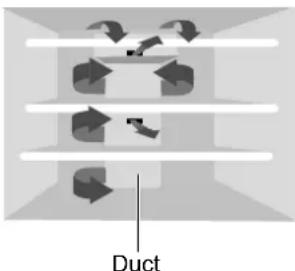
If cold air does not spread into every corner of compartments, then the interior will not be sufficiently cooled and more electricity will be consumed. - The cold air discharges from the outlet of the duct at the back.
- Store warm food and drinks after they are cooled.
Otherwise, they will not only raise the interior temperature, but also affect the freshness of other foods.
Disposing of the packaging

Please recycle where possible (e.g. cardboard, plastic bags, adhesive tape and polystyrene) and make sure you dispose of all other packing materials safely.
Keep the packaging out of reach of babies and young children to avoid injury or suffocation.
Safety instructions
What the symbols mean.
| Do not | Make sure you do this | Indicates the appliance must be earthed to prevent electric shock |
| Do not take apart | Warning;Risk of fire / flammable materials | |
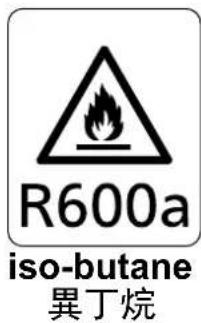

Indicates risk of death or serious injury.

●WARNING: Do not use mechanical devices or other means to accelerate the defrosting process, other than those recommended by the manufacturer.
●WARNING: Do not damage the refrigerant circuit.
(Otherwise, the flammable refrigerant may catch fire and lead to an explosion.)
●WARNING: Do not use electrical appliances inside the food storage compartments of the appliance, unless they are of the type recommended by the manufacturer. (If the refrigerant leaks, it may catch fire due to sparks on the contacts.)
- Do not store explosive substances such as aerosol cans with a flammable propellant in this appliance.
●WARNING: Do not locate multiple portable socket-outlets or portable power supplies at the rear of the appliance.

●This appliance is not intended for use by persons (including children) with reduced physical, sensory or mental capabilities, or lack of experience and knowledge, unless they have been given supervision or instruction concerning use of the appliance by a person responsible for their safety. Children should be supervised to ensure that they do not play with the appliance.
- If the power cord or plug of the appliance is damaged, it must be replaced by the manufacturer or its service agent or similarly qualified person in order to avoid a hazard.
●WARNING: Fill with potable water only.
●WARNING: Keep ventilation openings, in the appliance enclosure or in the built-in structure, clear of obstruction.
●WARNING: When positioning the appliance, ensure the supply cord is not trapped or damaged.
For power plugs and cords...

- Do not use extension cords.
- Do not insert or disconnect the power plug into/from the wall socket with wet hands.
- Do not damage the power plug or cord. Do not cut or process the plug or cord; do not expose them to high temperatures; do not excessively bend, twist or pull them; do not place heavy objects onto them; and do not arrange them in bunches.
→ Contact your dealer for repairing the plug or cord. - Do not push the rear of the refrigerator against the power plug.
- Do not use while the cord or power plug is damaged, or while the plug is not fully inserted into the outlet.

- Periodically remove dirt such as dust from the power plug.
●Plug into a wall outlet of the rated voltage on its own with the rated current and insert plug fully. - When disconnecting the power plug, hold the plug itself not the cord.
● Disconnect the plug when cleaning the refrigerator. - If you do not intend to use the refrigerator for an extended period of time, disconnect it. (Otherwise, it may cause a fire or electrical shock.)
Stop using the refrigerator immediately and pull out the plug, if there is an abnormality or failure.
(Otherwise, it may cause smoke, a fire or electrical shock.)

Abnormality and failure examples
●Power cord or plug is abnormally hot
●Power cord is deeply cut or deformed
●There is a burning smell
●You can feel tingly electricity
Contact your dealer immediately for inspection and repair.
On top of the refrigerator...

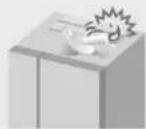
- Do not put anything.
Otherwise, it may fall due to vibration and cause injury.
●Do not put anything on the top cover.
(Otherwise, parts may be deformed and may cause electrical shock.)
When using...

- Do not hang or ride on the door.
- Do not apply water on the body or interior.
(Otherwise, electrical insulation deteriorates and may cause an electric shock or fire.)
- Do not touch the mechanisms above the ice-making tray.
- Do not remove the ice-making tray when the ice making function is operating.
- Do not store flammable items in the refrigerator.
● Do not store chemicals or scientific specimens.
- Do not spray combustible chemicals near the refrigerator.
- Do not add a high impact on glass doors.
(Otherwise, glass may be broken and cause injury.)
→ If you find a crack, do not touch the glass and consult your dealer immediately.

●Children should be supervised to ensure that the refrigerator should be used properly.
When installing...

- Do not install the product in locations exposed to water.
- Do not fill the gaps around the refrigerator.
(If the refrigerant leaks, it may catch fire.)

●Provide safety measures against overturning caused by such as earthquakes.

●Ensure that the refrigerator is plugged into an earthed mains socket.
Do not plug into an unearthed mains socket. (3-pin plug)
When disposing and recycling the product...

- When a concern exists for possible entry of a child during recycling, remove the door packing.
●Flammable gas is used for refrigerant.
And Cyclo-Pentane is used for insulation of this refrigerator.
When you throw away this product, please dispose it by proper method.
●The warning labels mentioned above should be kept throughout the life of the refrigerator.
This manual should be handed over to any person who would use or handle the refrigerator whenever the refrigerator would be transferred to another location or delivered to a recycling plant.
In case of emergency...

●Absolutely do not open the top cover and the back cover.
●Absolutely do not disassemble, repair or modify the refrigerator. (Otherwise, it may cause injury, burn, or electrical shock.)

- If you detect a gas (such as city gas) leak, do not touch the refrigerator and open the windows to ventilate the kitchen.
●A flammable refrigerant is used. If you have damaged the cooling circuit (piping), open the windows to ventilate the kitchen and contact your dealer.
●Maintenance work must only be carried out at workshop by well-trained maintenance worker. (Otherwise, it may cause an electrical shock, ignition or explosion.)
Indicates risk of injury or damage to property.
When storing food...

- Do not add a high impact on glass trays.
(Otherwise, the glass trays may be broken and you may be injured.)
- Do not allow foods to protrude from the glass shelf.
- Do not store food containers on the door shelves if they do not reach the bottom of the shelves. (Otherwise, food may fall and cause an injury.)
- Do not freeze bottles. (If the liquid in a glass bottle is frozen, the bottle may be broken and you may be injured.)
- Do not touch frozen food or containers (especially metal), aluminum plate with wet hands. (Otherwise, you may get frostbite.)
- Do not eat food that has an unusual odor or is discolored. (Rotten food may cause illness.)
When opening/closing the doors...

- Do not open/close it if others come into contact with the refrigerator.
- Do not put your fingers in the gap on the side of the refrigerator compartment door when opening/closing the door.
- Do not open/close the ice compartment and the fresh freezing compartment with holding the top side of the drawer.
- Do not place your feet under the bottom drawer. (Otherwise, your toes may get caught.)
- Do not open or close the door with excessive force. (Otherwise, food may fall and cause an injury.)
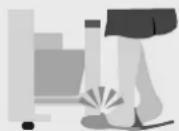
When cleaning...

- Do not touch a metal rail directly.
- Do not place your hands or feet beneath the bottom of the refrigerator. (The edges of the metal panel may cause an injury.)

- Please be careful when you fit or remove a glass shelf. (Dropping glass shelves may cause shelf damage or an injury due to broken shelves.)
When moving or transporting the refrigerator...

● Fix the refrigerator with adjustable legs on the flat and stout floor.
(Otherwise, the refrigerator moves or overturns and may cause an injury.)
- Apply protective covering, etc. to floors with a fragile surface.
- When transporting the refrigerator, hold the carrying handles and move with at least 2 people.
(Otherwise, your hands may slip and cause an injury.)
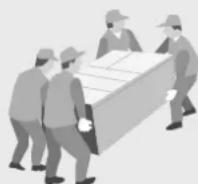
Installation
Choosing the right location
1. Place the refrigerator in the following locations.
- Locations free from heat and direct sunlight
- Minimize reduction of cooling power, and prevent electricity waste.
- Well-ventilated locations with low humidity
- Minimize rust and generation of condensation.
●Stout and flat floor With carpet, tatami mats or vinyl floors, deformation or discoloration may occur, so place a board underneath the refrigerator. - Place the refrigerator away from other devices Prevent noise and jammed image display on TVs and other devices.
- Locations where allow the power plug to be cleaned easily Clean dust regularly.
(To prevent fire caused by dust.)
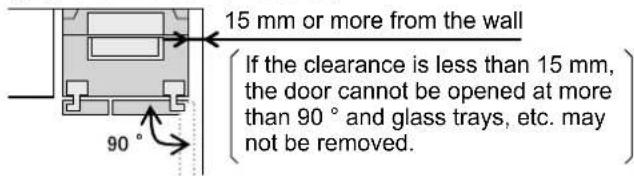
- Locations where allow a heat to dissipate Place the refrigerator away from the wall (30mm or more) when vibration noise, discoloration of wall or dew condensation on the back surface bothers you.
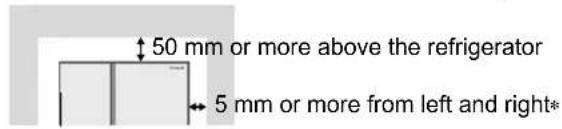
* In case of installing by the wall. (Figure as viewed from above.)
Before using the refrigerator for the first time. (P. 17 \~ P. 19)
- Wipe the inside of the refrigerator with a wet, soft cloth.
- Rinse the water supply tank, water purification filter and ice-making tray.
2. Fix the refrigerator.
- If the refrigerator has not been stabilized completely, you may hear rapping noises when the door is opened/closed. (This will not affect the performance.) Install the refrigerator on a stout and flat floor.
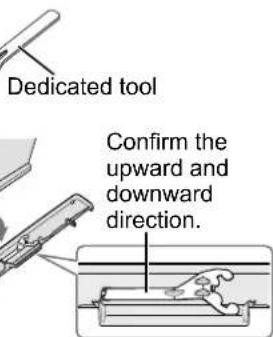
- Check whether the right and left doors of refrigerator compartment are parallel. If not, adjust the level of doors with the dedicated tool for adjustable legs.
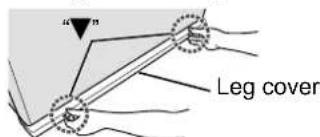
● The refrigerator doors may be lowered due to the tilt angle of the installation site or the flooring used. - At the time of purchase, the dedicated tool for adjusting the adjustable legs is attached to the leg cover. After use, you can store it in the back of the leg cover.
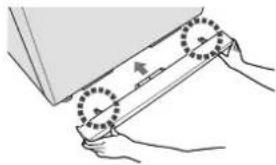
① Remove the leg cover. Insert hands underneath the “▼ on both sides of the leg cover and pull it out.
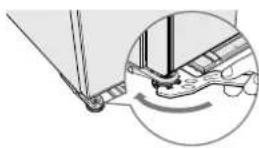
② Turn the adjustable legs (right and left) until they reach the floor to stabilize the refrigerator.
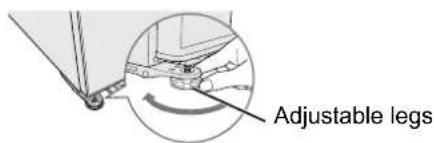
If the door is slanted downwards.
Turn the adjustable leg on the lower side, as shown in the illustration on the right, in order to adjust the level.
- The freezer/refrigerator doors may be slanted within 4 to 5 days after installation due to the load of the food or adaptation to the floor surface. In this case turn the adjustable legs again to restore. - If it cannot be fixed by this method, use an adjustment plates. (Separately sold parts: P. 27)
③If a door has been lowered, turn the adjustable leg with the dedicated tool and adjust the level so that the doors become parallel.
④Reattach the leg cover.
natural_image
Illustration of hands using a tool to lift a rectangular object, with no visible text or symbols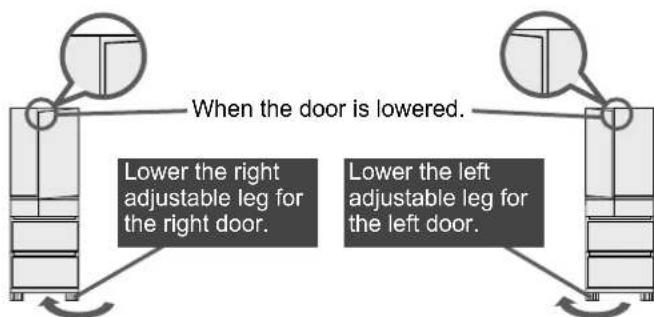
3. Plug into a wall outlet.
Plug into a wall outlet of the rated voltage on its own with the rated current and insert plug fully.
●The power plug can be plugged into an outlet immediately after installation.
- The surroundings and surfaces (side surfaces) of the refrigerator may become hot (approximately 50 °C to 60 °C when the ambient temperature is 30 °C) when the power is turned on, but this is not abnormal. (P. 23)
- If the power plug is removed, wait at least 7 minutes before plugging it back in. (P. 25)
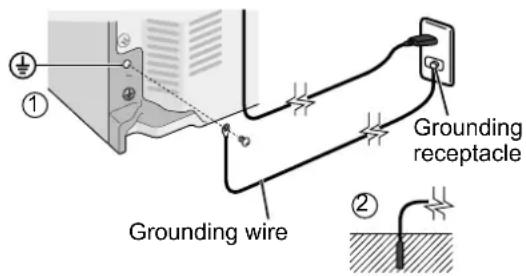
- If there is no grounding wiring plug in refrigerator, it should be connected with grounding connection to prevent electrical hazard due to electric leakage.
For safety, the refrigerator should be grounded (For refrigerators with ungrounded 2-pin plugs)
A ground connection will prevent danger from electric shock.
A ground connection can be made in either of the 2 following ways:
- When using a socket with a grounding receptacle, connect the ground wire to it and the screw for the ground connection on the rear of the refrigerator (please find the ⊕ symbol) as shown in illustration ①
- When using a socket without a grounding receptacle, connect the ground wire to the screw on the rear of the refrigerator (please find the ⓣ symbol), and then connect the other end to the ground rod as shown in illustration ②
Ground connections must not be made with the following
●Gas pipes and water supply pipes (risk of electric shock or explosion)
●Ground wires of telephone cords and lightning rods (risk of lighting strike)
4. Cool the refrigerator interior.
- It may take approximately 4 hours to cool the interior.
- It may take 24 hours or more to cool the interior and achieve equilibrium in the summer, etc.
- Ice-making starts only after the interior has been cooled sufficiently.
- Do not open/close the doors until the interior has been cooled sufficiently.
(Warm air flowing into the interior will block the cooling function.)
Requests Notices
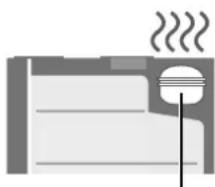
☐ not place objects on the top of the refrigerator.
It may become hot due to heat generated by the compressor at the top of the refrigerator.
If it is difficult to release heat, the cooling capacity may be lowered.
natural_image
Simple line drawing of a steaming room with a chimney and steam rising (no text or symbols)Compressor
- Immediately after the installation, the noise becomes larger a little because the interior of the refrigerator is not cooled yet and the compressor or the fan is operated with high-speed rotation, but it is not abnormal. (Once the interior of the refrigerator is cooled, the noise becomes smaller.)
To use all features
Temperature setting and a guide of temperature
| Temperature setting | CHILLED 1 2 | 3 | ||
| FRIDGE | Approx. 2 ^ 3 ^ higher than “ 2 ” | Approx. 3 ^ 6 ^ | Approx. 2 ^ 3 ^ lower than “ 2 ” | |
| FREEZER | Approx. 2 ^ 3 ^ higher than “ 2 ” | Approx. -20 ^ -18 ^ | Approx. 2 ^ 3 ^ lower than “ 2 ” | |
| PRIMEFRESH | Approx. 0 ^ 2 ^ | Approx. 1 ^ 2 ^ higher than “ 2 ” | Approx. -3 ^ -1 ^ | Approx. 1 ^ 2 ^ lower than “ 2 ” |
(These are rough indications for when the ambient temperature is 32 °C , there is no food in the refrigerator and the interior temperatures have stabilized. The temperatures may differ depending on the ambient temperature, food storage state, door opening/closing and other usage conditions.)
To use all features
Control panel
Usually, the function setting section and the temperature setting section are not visible.
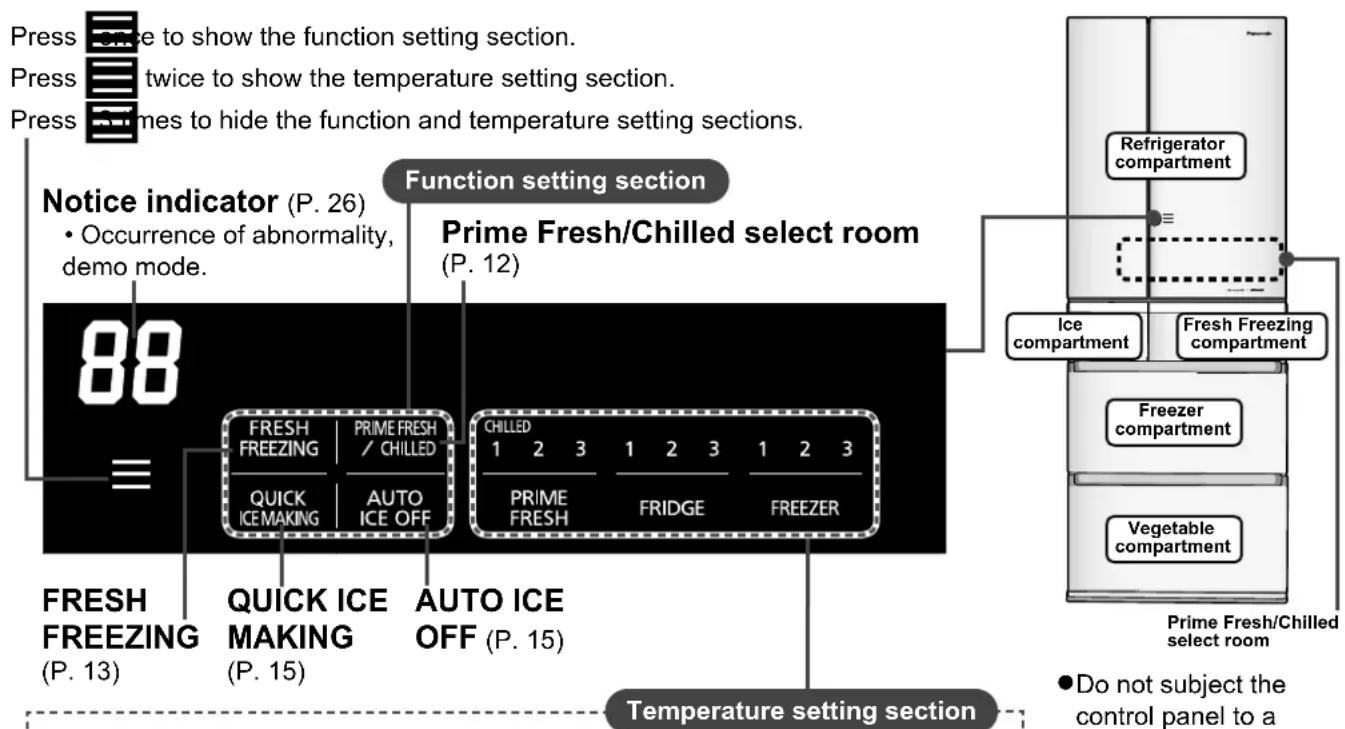
Normally, use the refrigerator with the temperature set to "2". When you want to change the temperature setting, operate the control panel.
(If the temperature control of the freezer compartment or refrigerator compartment is set to other than “2”, ECONAVI does not operate.)
- Please see "Display" (P. 23) when the temperature setting indicator is flashing.
- Do not subject the control panel to a strong impact, or hit it with a hard object. (The surface may be cracked or scratched.)
- You can change the setting only when the doors of refrigerator compartment are closed.
- When "CL" appears in the notice indicator, operation lock function is activated. (P. 21)
How to operate (Example: To use the select room as the prime fresh room)
The select room is set to [CHILLED] at the time of purchase. Operate the control panel as follows.
▶ select temperature setting of [PRIME FRESH]
![PANASONIC NR-F603GT-WU - ▶ select temperature setting of [PRIME FRESH] - 1](/content/2026/05/1011293/images/1c7e5303dd876a26a3bdaca93af9ffd0cd1d2fa5537e216d60a7d378ca609fcb.jpg)
![PANASONIC NR-F603GT-WU - ▶ select temperature setting of [PRIME FRESH] - 2](/content/2026/05/1011293/images/52319be5b854c91adb8b9b28159821b3fb8c82ac486f2ebf5f0cdfb26b2e7f16.jpg)
- The function setting section appears. (The indicator of function currently activated is lit.)
![PANASONIC NR-F603GT-WU - ▶ select temperature setting of [PRIME FRESH] - 3](/content/2026/05/1011293/images/d70af972d051d4f981e35abcff6746c8256cacd4d33b3c2aeb9b0b930a84a673.jpg)
![PANASONIC NR-F603GT-WU - ▶ select temperature setting of [PRIME FRESH] - 4](/content/2026/05/1011293/images/dc8843e1e3e3e85df40561f599677b9e92c496907c0851d97fa214f6c4bdb41f.jpg)
- The current status is lit. When CHILLED is displayed, PRIME FRESH does not operate.

![PANASONIC NR-F603GT-WU - ▶ select temperature setting of [PRIME FRESH] - 6](/content/2026/05/1011293/images/99ee144702fba3f248c7d09710b0a8c2ac9c0651b73fdd4bfb5886ccbe58ec36.jpg)
![PANASONIC NR-F603GT-WU - ▶ select temperature setting of [PRIME FRESH] - 7](/content/2026/05/1011293/images/62b4a142aa1a51f5d47cfe94dab231065e4ee483017f5b627f417b3c6e028335.jpg)
- The display changes to PRIME "2". (The default setting is "2".)
![PANASONIC NR-F603GT-WU - ▶ select temperature setting of [PRIME FRESH] - 8](/content/2026/05/1011293/images/ff7f1582823a737512bc4d70c4f5981c9292dd1f243c0c02ef418edc91df8461.jpg)
![PANASONIC NR-F603GT-WU - ▶ select temperature setting of [PRIME FRESH] - 9](/content/2026/05/1011293/images/cbcfc33e9c76db78da527bb045e25fe6ed7f3c0a3c52752e66047405464ea4bd.jpg)
- Each press of PRIME FRESH switches to the next temperature setting and the indicator of selected temperature setting is lit.
![PANASONIC NR-F603GT-WU - ▶ select temperature setting of [PRIME FRESH] - 10](/content/2026/05/1011293/images/68125554ff6a59f0cf3aaeead7b772ec746abe4b75b82abba7cea47a74da862f.jpg)
When you finish operating, the function and temperature setting sections will disappear approximately 10 seconds later.
T adjust the temperature setting of refrigerator or freezer compartments.

- The indicator of temperature setting currently selected is lit.


erature setting section.
ECONAVI Operation
3ECO functions detect the storage amount and the lifestyle.
Energy is effectively and automatically saved. ^*1
ECONAVI lamp is on during ECONAVI operation.
ECONAVI operates only when the temperature setting is "2" for both the freezer and refrigerator compartments.
Storage Eco
The storage sensors detect the change in the storage amount in the refrigerator compartment.
Smart Eco
3 weeks' worth of the number of door opening/closing and the change in the storage amount for each day of the week and every hour are memorized, analyzed and estimated.
Night Eco
The light intensity sensor*2 detects the brightness of the room.
- The ON/OFF pattern of the lamp may change after 4th week in which what learnt starts functioning.
●The brightness of the lamp is lowered approximately 5 minutes after the lamp turns on. (The lamp can be turned off if it bothers you. P. 20) - During detecting the change in the storage amount, ECONAVI lamp flashes slowly. (Approximately 15 seconds after closing the door of the refrigerator compartment.)
When the temperature setting of the refrigerator compartment and the freezer compartment is other than "2", the lamp does not flash but the sensors are detecting the storage amount. - ECONAVI operation may not be performed depending on the usage state of the refrigerator.
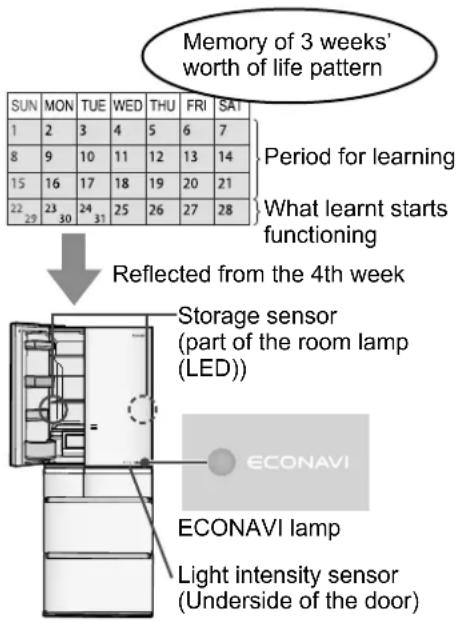
*1Effectiveness differs depending on the ambient temperature, ambient brightness, number of times of opening and closing of the doors and state in which food is stored.
*2The light intensity sensor operates at approx. 20 lux or below.
nanoe™ X Operation
A nanoe ^TM is a nano-sized ion particle coated with water particles.
nanoe ^TM X are nano-sized electrostatic atomized water particles with 10 times the OH radicals of nanoe ^TM . The operation mode of nanoe ^TM X is switched automatically regardless of temperature setting.
●The brightness of lamp can be adjusted. (P.21)
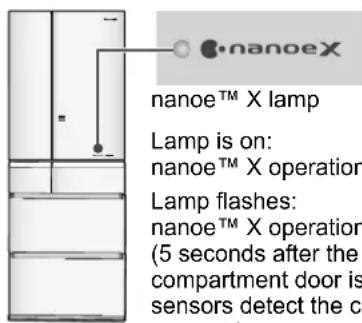
nanoe ^TM X lamp
Lamp is on:
nanoe ^TM X operation is in normal mode
Lamp flashes:
nanoe™ X operation is in powerful mode (5 seconds after the refrigerator compartment door is closed, the storage sensors detect the change in the storage amount.)
Notices
- The nanoe™ X emission outlet is on the ceiling side of the vegetable compartment.
- nanoe™ X is generated by gathering moisture in the air and the effect may change.
- nanoe™ X operation is switched to powerful mode automatically when the storage sensors detect that the storage amount is increased or full.
- There is a slight "jee" sound when nanoe™ X is in operation.
Refrigerator compartment
Approx. 3 °C \~ 6 °C
![Rotary partition ● When the rotary partition is opened forward, put it back into place. (The doors cannot be closed and it may cause damage.) Left door Rotary partition Opened forward. Put it back into place. Room lamp (LED) Tray (2) Slide tray Partition shelf Room lamp (LED) Glass shelf *1 Left door Room lamp (LED) Duct Door shelf (3) Right door*1 Door shelf (2) Mini door shelf Bottle shelf Water supply tank Bottle shelf 2way egg case (P. 11) Select room lamp (LED) Prime Fresh/Chilled select room ● Temperature zone can be chosen for [PRIME FRESH] or [CHILLED] to fit the type of food. (P. 12) • Illustrations of NR-F603GT are used for explanation.](/content/2026/05/1011293/images/b3a423a04621c4d26b8da8d20b04987dabd74e1ad7eb42abe16d190e3d2817b4.jpg)
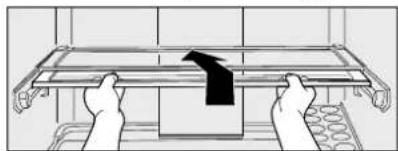
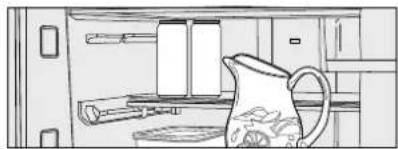
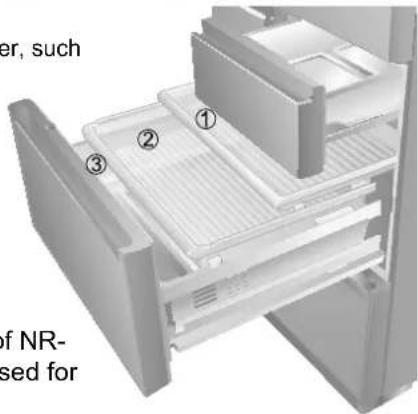
Slide tray (the third shelf from the top)
Slide the front part back, you can place taller items in front.
natural_image
Illustration of hands assembling a metal tray with a black arrow indicating the process (no text or symbols)
natural_image
Line drawing of a kitchen cabinet with a pitcher and shelves (no text or symbols)●You can easily place large pots.
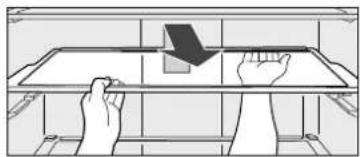
Glass tray (only the second shelf from the top)
①Lift up the back of the tray and pull it forward. Once the protrusions of the tray are unhooked from the rails, tilt the tray and remove it.
natural_image
Illustration of hands holding a rectangular object on a shelf, with a downward arrow indicating motion (no text or symbols)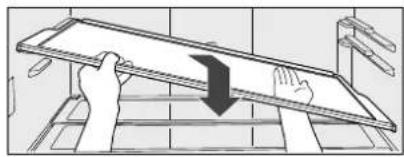
natural_image
Illustration of a hand pressing down on a metal tray with a downward arrow (no text or symbols)②Insert the tray in the desired position by reversing the steps.
natural_image
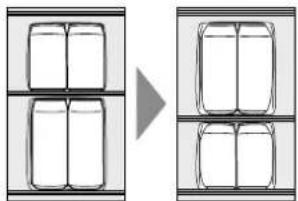
Diagram showing a transformation from a grid of four boxes to a three-box box, with no text or symbols present.2way egg case
The egg tray can be set in 2 ways.
- When storing eggs, place them on the right side of the partition shelf. (Eggs may be frozen if they are placed in front of the air outlet.) (P.2)
Place on the tab.
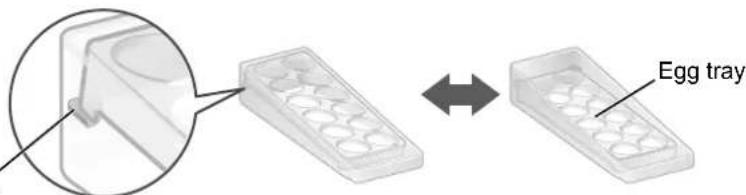
●Placing the egg tray inclined makes easier to take out eggs.
The "door shelves" can be moved.
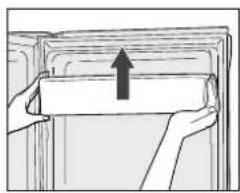
natural_image
Illustration of a hand holding a rectangular object with an upward arrow, no text or symbols present① While holding one end of the shelf with one hand, lightly tap the other end to raise it.
②Move the door shelf to your favorite position.
- For the right door, only the first shelf from the top.
- For the left door, only the second shelf from the top.
Requests
- If any food with a high water content is placed in front of the air outlet, it may be cooled excessively or frozen. (P. 2)
(There is a risk of burst especially when sodas are frozen.)
Put the following foods into an airtight container or wrap with plastic wrap.
- Green onions or other strong smelling vegetables.
(→ Odors will spread to other nearby food.)
- Cut citrus fruits.
(→ The plastic will be discolored white.)
Prime Fresh/Chilled select room
The select room is set to [CHILLED] at the time of purchase. Please set to fit the intended purpose of food.
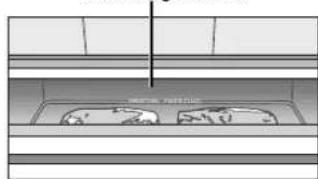
Using as the prime fresh room
Approx. -3 °C \~ -1 °C
When you want to extend the life of food by partially-freezing it.
●This room is suitable for storing fresh food such as meat or fish.
- Compared to storing in the chilled room or the refrigerator compartment, the storage life of meat or fish becomes longer.
- Temperature can be set to either “1”, “2” or “3” to fit the volume and type of food. (P. 8)
- The setting of PRIME FRESH “1”, “2” and “3” consumes 10% more energy than the setting of [CHILLED].
The select room lamp (LED) is lit in light blue
natural_image
Pure technical diagram of a mechanical assembly without any text, numbers, or symbols- When food is frozen too much.....
Sliced raw fish or sliced meat may be frozen too much. Set the temperature setting to "1" to prevent food from over frozen.
- When food is not partially-frozen.....
Depending on the type of food such as a block of meat or a large fish, the storage conditions and the ambient temperature, food may not be partially-frozen as it intended. Set the temperature setting to "3".
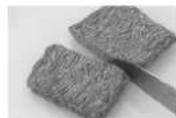
Easy to cut.
The partially-frozen food is easy to cut! It comes in handy.
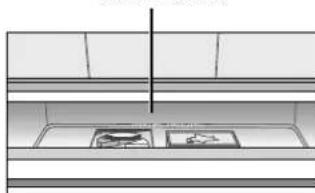
Using as the chilled room
Approx. 0 °C \~ 2 °C
When you do not want to freeze food.
●This room is suitable for storing chilled food or dairy products.
●Depending on food, it may be frozen partially.
Change the position of food or set the temperature setting of the refrigerator compartment to "1".
The select room lamp (LED) is lit in white
natural_image
Interior view of a kitchen appliance with shelves, counter, and fixtures (no visible text or symbols)Tips for storing
Which is the suitable setting for these foods?
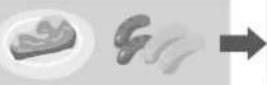
- Meat
●Fish PRIME FRESH
- Chilled food
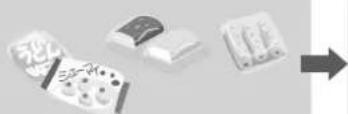
- Cheese
- Fresh cream
- Boiled noodle
natural_image
Illustration of four electronic components with a right-pointing arrow, no visible text or symbolsCHILLED
What is the unsuitable food for the Prime Fresh/Chilled?
•Egg
•Milk
•Water
- Juice
- Tofu In the refrigerator compartment
- Vegetable
- Fruit In the vegetable compartment

• Ice
- Ice cream
●Frozen food In the freezer compartment
Requests
- When you change the temperature setting, surely replace food to fit the set temperature.
Using "QUICK MODE"
When the temperature setting of the prime fresh/chilled select room is set to "1", "2" and "3", Prime Fresh Quick Mode is set and operated automatically.
While Prime Fresh Quick Mode is operated, cold air comes out more than usual and the time to freeze foods partially is reduced.
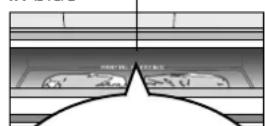
- When closing the flap of the case, the select room lamp (LED) is turned from light blue to blue, and Prime Fresh Quick Mode starts and automatically ends. (The select room lamp is turned to light blue after the completion of Prime Fresh Quick Mode.)
●Depending on usage state, Prime Fresh Quick Mode may start with a delay. - It may take longer time to freeze foods partially depending on types of food, packing conditions, amount stored and the operating situation.
- When storing in the case, put your food within the height of the case. (Foods may fall in the back from the case and the flap may not be closed firmly and sensor detection may not work correctly.)
●While Prime Fresh Quick Mode is on, the sound becomes slightly louder and energy consumption increases more than usual.
During Prime Fresh Quick Mode the select room lamp (LED) is lit in blue
In these cases, Prime Fresh Quick Mode time may become shorter or Prime Fresh Quick Mode may not start.
- When amount of food stored is small, or when refrigerator judges that Prime Fresh Quick Mode is not necessary because the temperature of food is low enough.
- Immediately after Prime Fresh Quick Mode ends. (to avoid that the food is cooled too much).
- During defrosting.
- When "Fresh Freezing" or "Quick Ice Making" has been set.
Fresh Freezing compartment
Approx. -19 °C \~ -17 °C
Using "FRESH FREEZING"
Fleeze ingredients or heated food such as hot rice instantly to keep the freshness of them.
①Press
The function setting section appears. (The indicator of function currently activated is lit.)
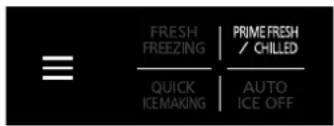
②Press

Fresh Freezing function. When setting is completed,
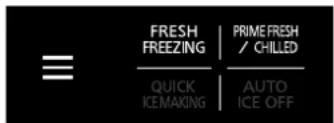

turns on.
While Fresh Freezing is operated,

When Fresh Freezing is completed,
3 conditions of delicious Fresh Freezing
① Tightly wrap the food.
② Make the food closely contact with the aluminum plate.
③ Wrap hot food too.
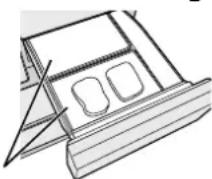
Aluminum plate
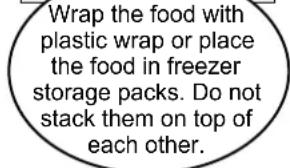
- Wrap the food with plastic wrap or place it in freezer storage packs, and put it on the aluminum plate.
●Fresh Freezing ends automatically after approximately 150 minutes. - When you want to stop Fresh Freezing in the middle, do the same operation as described on the left.
- When food is stored for long periods after Fresh Freezing, store it in the freezer compartment.
- You can use as a freezer compartment when the Fresh Freezing does not operate.
- Store ice creams which contain much milk fat etc. in the freezer compartment.
- Do not put bottles or cans. (They may split or burst.)
- Do not put food that is taller than the case. (It will prevent the door from being closed properly, resulting in frost.)
●During Fresh Freezing, energy consumption increases more than usual. - Prime Fresh Quick Mode or ECONAVI does not operate when Fresh Freezing has been set.
Ice compartment
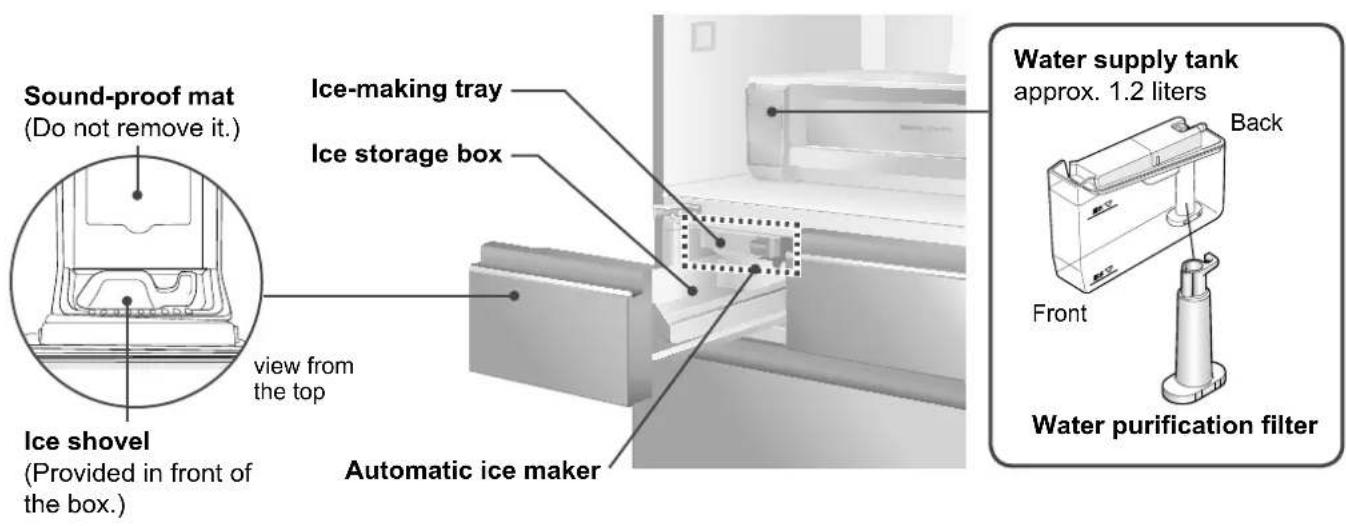
To use the automatic ice maker in comfort
Please use only the drinking water for auto ice making.
Clean the water supply tank and the ice-making tray with water frequently. (P. 19)

When the following water is used, wash the water supply tank frequently! (P. 19)
The hardness of water must be 100 mg/L or less.
Drinking water

Do not put liquids such as the following into the water supply tank.
(These may damage the ice compartment or cause ice cubes stick to each other.)
Juice, etc.
Sports drinks Carbonated drinks

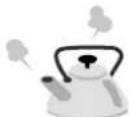
Hot water
Requests Notices
- Do not slam the ice compartment door open/close. (Ice may drop to the freezer compartment case or into other places.)
- Do not pour water directly into the ice-making tray to make ice. (This may cause damage to the ice maker or ice cubes may stick together.)
- Do not pour water directly into the ice storage box to make ice. (Otherwise, the ice storage box may be broken.)
- Hardness of water must be 100 mg/L or less. The minerals may appear as white floating particles. They are not harmful.
- Do not put food or other items into the ice compartment. (Otherwise, the amount of ice cannot be correctly detected and auto ice making may be stopped or the door cannot be opened.)
- When you use the ice compartment for the first time, odor or dust may be on the ice-making tray etc. Please throw away the first lot of ice.
Auto ice making operation stops automatically when the box is filled with ice cubes. (The operation does not work correctly in the following cases.)
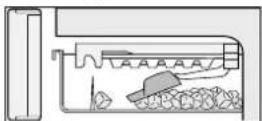
The ice shovel left in the ice storage box hits the ice detection lever.
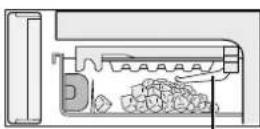
Ice cubes forming a mound hit the ice detection lever.
Ice detection lever (When pressed, stops the auto ice making function.)
It will take longer to make ice in the following cases.
- When the refrigerator is used for the first time. (It may take 24 hours or more because the auto ice making function will start only after the interior has cooled sufficiently.)
- When the doors are opened frequently.
-
When the door is ajar.
-
When a large amount of food is stored at once.
- When the ambient temperature is low in winter, or it is high in summer.
- When a power failure occurs.
- When the washable ice-making tray has been cleaned. (P. 19)
To make ice
Ice can be made in approx. 2 hours!
①Take out the water supply tank.
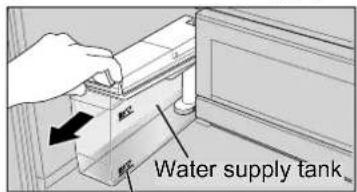
Add water if the level is below the “給水” line. (Replace the water in the water supply tank at least once a week.)
②Fill with water.
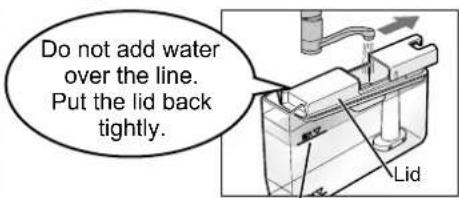
Add water up to the “满水” line.
③Install the water supply tank.
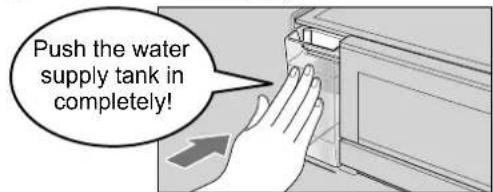
Hold the water supply tank horizontally. Confirm the direction of the tank and install securely. (If the tank is inclined, water may be spilled.)
To make ice quickly
When [QUICK ICE MAKING] is set, the speed of ice making is increased.
Ice can be made within 80 minutes * at the quickest.
①Press
The function setting section appears. (The indicator of function currently activated is lit.)
②Press QUICK ICE MAKING Quick Ice Making function.
When setting is completed, QUICK ICE MAKING n.
While Quick Ice Making is operated, is lit.
While usual Ice Making is operated, turns off.
- When you want to stop quick ice making in the middle, operate the control panel as described on the left. (The indicator turns off.)
●After approximately 6 hours, it returns to normal auto ice making. - When defrosting is on, the indicator flashes.
[QUICK ICE MAKING] re-starts automatically when defrost is completed.
● During quick ice making, energy consumption increases more than usual. - If [FRESH FREEZING] is pressed during [QUICK ICE MAKING], QUICK ICE MAKING is canceled.
●ECONAVI does not operate while QUICK ICE MAKING has been set.
*Ambient temperature of 20 °C, temperature in each compartment set to "2", doors not opened or closed.
To stop auto ice making
Stop auto ice making if you do not want to make ice and before cleaning the ice-making tray.
①Press
The function setting section appears. (The indicator of function currently activated is lit.)
②Press AUTO ICE OFF auto ice making.
When setting is completed, AUTO ICE OFF turns on.
While AUTO ICE OFF is set, AUTO ICE OFF is lit.
- Operate the control panel as described above when you cancel AUTO ICE OFF.
- If the indicator bothers you, it can be turned off.
Requests
- There is a beep sound, then the indicator changes from flashing to lighting. Do not open the ice compartment door when the indicator is flashing. (Ice making cannot be stopped.)
Notices
- When you stop the auto ice making for a long term, empty the water supply tank and clean it. (P. 19)
● Ice in the middle of making is released after AUTO ICE OFF is canceled.
To turn off the indicator
AUTO ICE OFF
The indicator AUTO ICE OFF turned off while the auto ice making is stopped.
Setting Procedure
Press and
AUTO ICE OFF
simultaneously.

A beep sounds, and after a while the indicator AUTO ICE OFF turns off.
●To cancel, operate as described above.
Notices
●While the indicator
AUTO ICE OFF
open the ice compartment door and the indicator turns on. When closing the door, the indicator turns off.
Freezer compartment
Approx. -20 °C \~ -18 °C
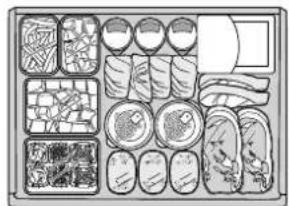
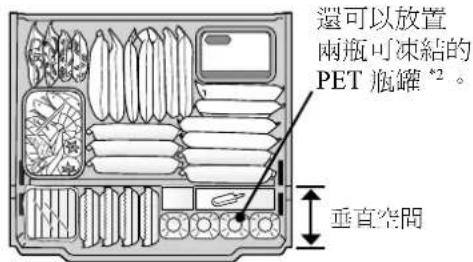
① Freezer case (Upper) ^4
A small piece of food may not get lost.
② Freezer case (Middle)
A lot of small food items with thickness can be stored.
③ Freezer case (Lower)
Tall foods can be placed vertically.
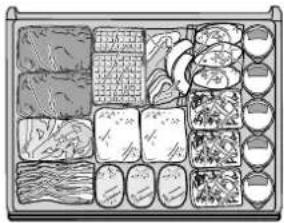
natural_image
Illustration of a food tray with various items arranged in a grid (no text or symbols visible)- Lift the handle and slide the case in the back.
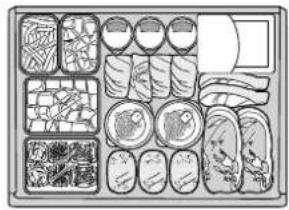
natural_image
Illustration of a food preparation tray with various dishes and cutlery (no text or labels)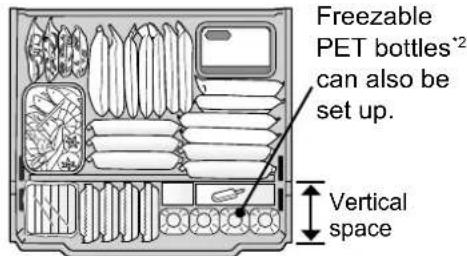
*1 NR-F503GT and NR-F503HX do not have the upper freezer case.
*2 Do not put other than the freezable PET bottle specified by the beverage manufacturer, such as a glass bottle.
Requests
- For the upper and middle cases of the freezer, put your food within the height of the case.
- For the lower case of the freezer, put your food below the upper limit line (↓食品はここまで↓) marked inside the case.
(Otherwise, the door may not close completely and frost may occur.)
●Do not cram foods into the vertical space.
• Illustrations of NR-F603GT are used for explanation.
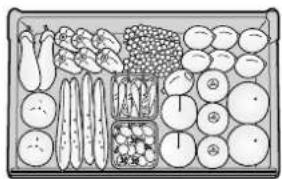
Vegetable compartment
Approx. 3 °C \~ 8 °C
- Cut vegetables, those to be stored for a long time or small quantity may require wrapping.
① Small-item vegetable case (Upper)
Put tomatoes and green peppers in the small-item vegetable case.
natural_image
Illustration of a grocery store display with vegetables, fruits, and customers (no text or labels)③ Bottle support
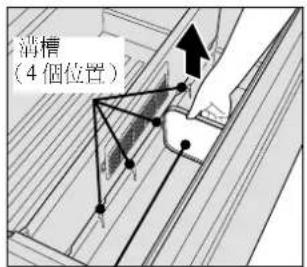
The position of the bottle support can be changed.
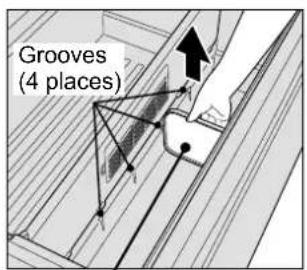
Pull the bottle support straight up and place it in your desired position!
② Main vegetable case (Lower)
Put leafy vegetables, large vegetables, bottles or rice in the main vegetable case.
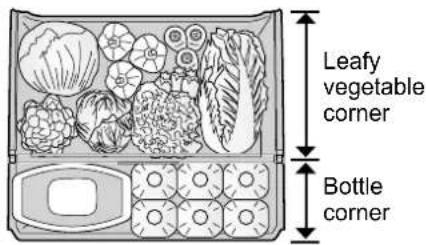
●Tightly seal rice before storing it. (Container for preserving rice is not equipped.)
●The number of bottles that can be stored varies between models.
●Storing vegetables in the bottle corner may require wrapping. Moisture control effect does not cover in the bottle corner.
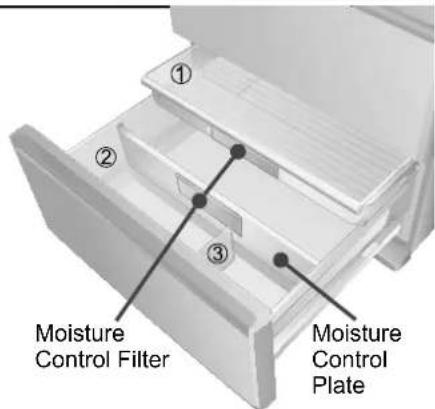
Requests
● The humidity in the vegetable compartment is high and condensation may occur. Just wipe off the waterdrop.
- For the small-item vegetable case, put your vegetables below the upper limit line (↑食品はここまで↑) marked inside the case.
- Put vegetables and fruits within the height of the leafy vegetable corner. (Otherwise, the door may not close completely, condensation may occur, or vegetables and fruits may have stuck and damaged.)
* NR-F503GT and NR-F503HX do not have the bottle support.
- Illustrations of NR-F603GT are used for explanation.
Cleaning, removing and re-installing
Before cleaning or conducting maintenance, be absolutely sure to disconnect the power plug from the wall outlet. Do not connect or disconnect the power plug with wet hands. Doing so may result in getting an electric shock or injury.
Cleaning
Clean the refrigerator immediately after it is stained.
Wipe off easily removable dirt using a cloth soaked in lukewarm water.
Wipe off stubborn dirt using a cloth soaked in diluted neutral detergent for kitchen.
Then take up the remaining detergent using a cloth soaked in lukewarm water.
Clean hidden areas at least once a year.
Remove dust accumulated on the wall outlet or the top surface and in gaps around the refrigerator.
Remove the leg cover when you do the cleaning. (P. 6)
When finger prints and stains cannot be removed easily, wipe them with a cloth lightly soaked in neutral kitchen detergent and then wipe with a wet cloth. Wipe again with a dry cloth to finish up.
Doors are made of glass. Do not apply an impact on the surface and the end surface. (It may cause cracks.)
The fulcrum part of the rotation of the refrigerator compartment door has been coated with lubricant. Do not wipe it off.
→ If you wiped it off, consult your dealer.
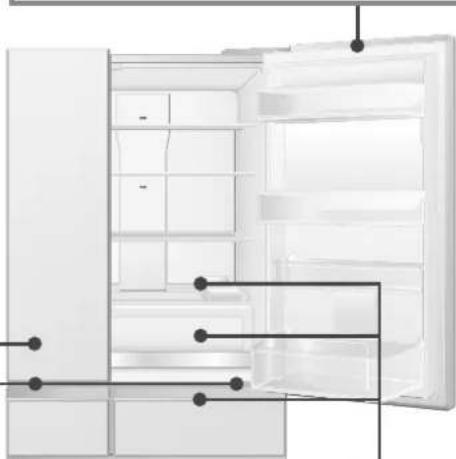
For the door packing, wipe with a wet soft cloth, then wipe with a dry cloth to finish up.
(Dirty packing gets damaged easily and it may cause leakage of cold air.)
natural_image
Diagram of a refrigerator interior showing open door, shelves, and door compartments (no text or labels)Wipe immediately! If liquid trickles at the edge of the door, quickly press a dry cloth and wipe it.
Attention
● Firmly wring the wet cloth. (If water enters gaps, it may lead to malfunction of electrical parts.)
- Do not use a dish washer/dryer for washing plastic parts such as the water supply tank and the washable ice-making tray. (It may cause deformation of the parts.)
- Do not use the following items for cleaning.

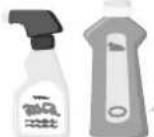
Alkaline or faintly alkaline
Kitchen detergents (other than neutral detergents), Glass detergents (chlorine bleach) (They crack plastic.)

Scrubber, Polishing sponger
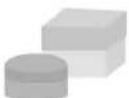
Cleanser, Soap powder
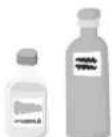
Benzine, Thinner, Alcohol, Acid, Petroleum
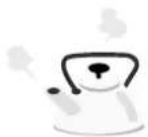
Hot water
Moisture Control Filter
Whenever the dirt bothers you
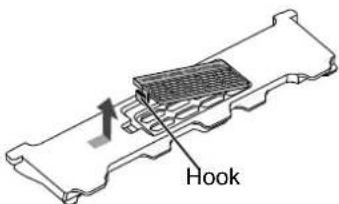
Moisture Control Filter is fixed by the hook to the Moisture Control Plate.
Remove and rinse with water. (The Moisture Control Plate is not detachable.)
After rinse, drain the water well. Wipe off the waterdrop and reinstall.
For the stubborn dirt, wash gently with diluted kitchen detergent (neutral) and soft toothbrush, and then rinse away the detergent.
Attention
- Do not use the bleach or do not scrub. (Performance of the filter may be deteriorated.)
Trays / Slide tray (made of glass)
Once every 3 months
May (Upper shelf in the refrigerator)
Unhook the protrusion at the back of the tray and pull it.
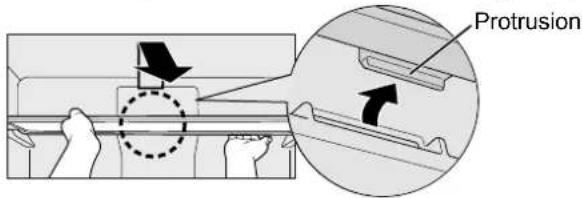
Slide tray
Lift the front half and slide inward, then stack and lift the pile of 2 shelves.
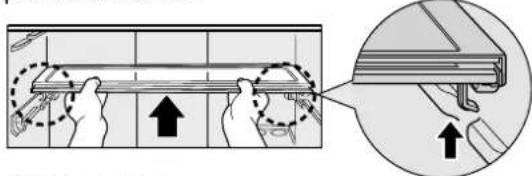
Place the pile of 2 shelves in the back, then pull the front half and slide forward.
Tay (2nd shelf from the top in the refrigerator)
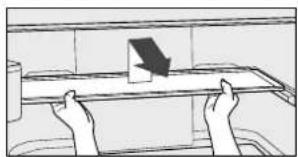
Lift up the back of the tray and pull it forward.
Once the protrusions of the tray are unhooked from the rails, tilt the tray and remove it.
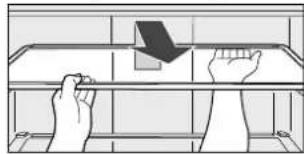
natural_image
Illustration of two hands holding a tray with a downward arrow, no text or symbols presentLower the front part and slide backwards along the rail.
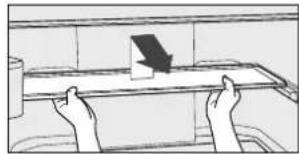
natural_image
Simple line drawing of two hands holding a rectangular object on a table, with a small object above (no text or symbols)Attention
●The partition shelf is not removable. When cleaning, wipe with a soft cloth without removing it.
● Trays, the slide tray and the partition shelf are made of glass and heavy.
Please handle them with care so that they do not fall and cause any damage or injury.
When the door cannot be fully opened and it is hard to remove the slide tray, slide the front half inward.
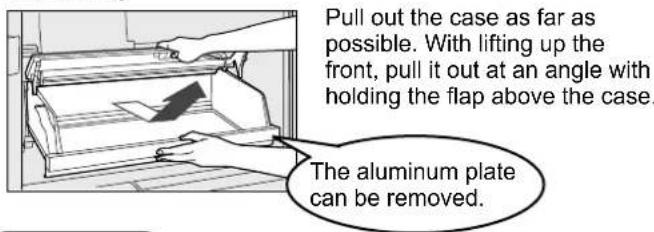
Case (Prime Fresh/Chilled select room)
Once every 3 months
Removing
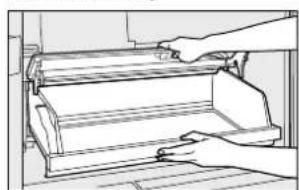
Re-installing
natural_image
Line drawing of a hand operating a mechanical device with rollers (no text or symbols)With holding up the flap, lift the back of the case and install it along the rails inside.
Attention
- Please take out the bottle shelf first when removing the case. (Otherwise, the bottle shelf may be damaged.)
- Please take out the case first when removing the aluminum plate.
If the aluminum plate is washed with water, please reattach it after draining water and wiping the waterdrop remaining on it.
●The contact sections between the case and the right and left ends of the flap have been coated with lubricant. Do not wipe it off. → Consult your dealer if you wipe off.
Door shelf/Bottle shelf
Once every 3 months
Removing
Tap the bottom of the door shelves upward or slide alternately the left and right of the bottle shelves upward, and raise them slowly. (The shelves have been tightly attached.)
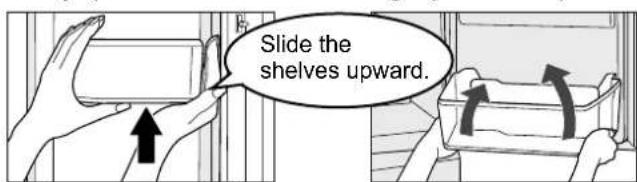
Re-installing
Set each shelf horizontally, with the mark [>PS<] on the right, and push it down to its proper position.
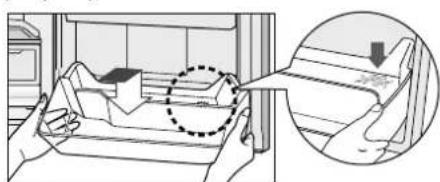
natural_image
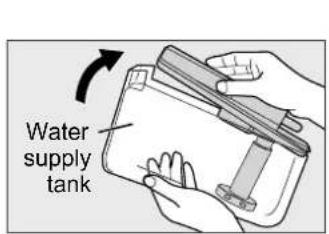
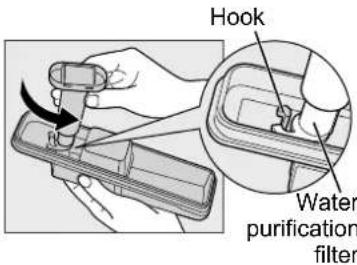
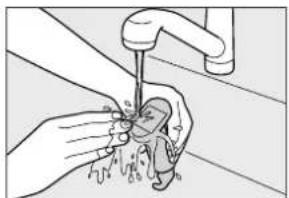
Illustration of hands holding a device with a magnified inset showing a close-up of the device (no text or symbols present)Water supply tank / Water purification filter
Once a week
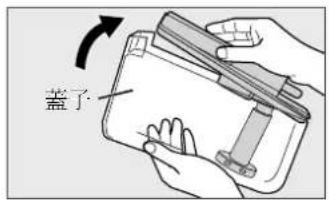
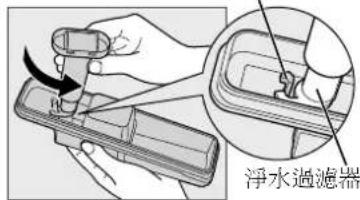
①Remove the lid and clean the water supply tank with water.
②Turn the water purification filter to unhook and remove it.
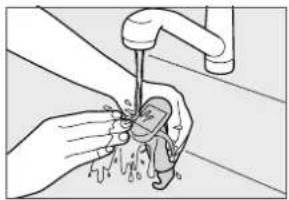
③ Gently wash the water purification filter in water.
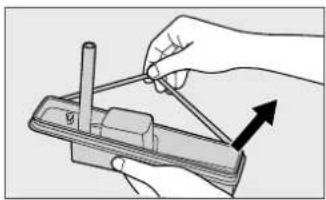
④Remove the packing running on the edges from the back. Clean it with water.
natural_image
Illustration of hands cleaning a faucet with water spray (no text or symbols)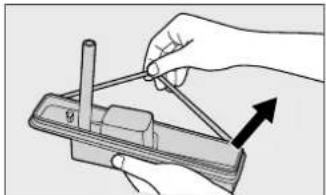
natural_image
Illustration of a hand using a tool to adjust or install a mechanical component (no text or symbols visible)⑤Fit the water purification filter and the packing.
●As a guide, replace the water purification filter every 3 years. (Separately sold parts: P. 27)
- If there is water scale on the water purification filter, ice may not be properly made.
Washable ice-making tray (Inside the ice compartment)
Once or twice a year
Remove the ice-making tray and rinse it.
① Press then press a AUTO ICE OFF ice making.
(AUTO ICE OFF turns on. P. 15)
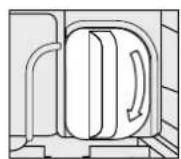
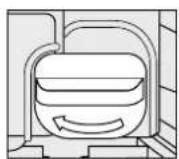
② Turn the knob in the ice compartment to the unlock position.
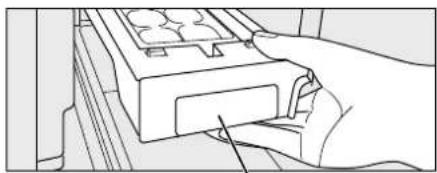
③ Pull forward the lever to pull out the ice-making tray.
④ Clean it with water. Do not rub the surface with a sponge etc.
(If the ice-making tray is scratched, ice may not be properly released, leading to a malfunction.)
●The ice-making tray and its frame cannot be separated.
- Do not use a dishwasher-dryer.
Re-installing
① Push in until it makes a clicking sound.
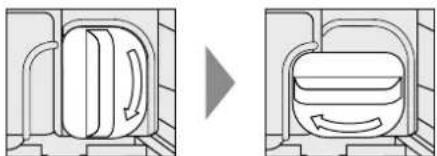
②Turn the knob to the lock position.
Ice may not be made if the ice-making tray is not locked.
③Press ☐ then press a AUTO ICE OFF cart ice making.
(AUTO ICE OFF turns off. P. 15)
● Ice is not made until [AUTO ICE OFF] is canceled.
- Do not put water directly in the ice-making tray after cleaning. (That may cause ice cubes sticking together or a malfunction.)
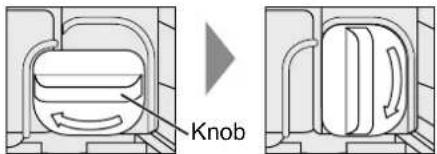
Lock position Unlock position
natural_image
Line drawing of a hand pressing a component on a wooden surface (no text or symbols)Lever
natural_image
Diagram showing a mechanical or fluidic component before and after transformation, with no visible text or symbols.Unlock position Lock position
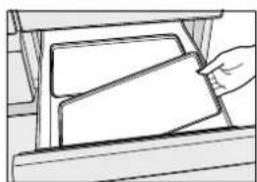
Case (Ice/Fresh Freezing/Freezer/Vegetable compartment)
Once every 3 months
natural_image
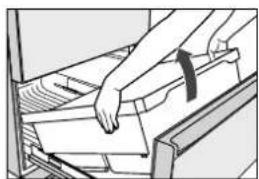
Illustration of a hand inserting or removing documents into a filing cabinet (no text or symbols visible)Pull out at an angle
Pull out the door as far as possible, and pull out at an angle while lifting up the front.
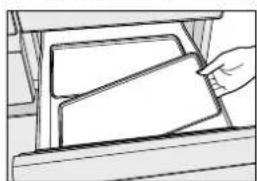
natural_image
Simple line drawing of a hand inserting a card into a folder (no text or symbols)Remove the aluminum plate
Requests
●The contact sections of the drawer rails have been coated with lubricant. Do not wipe it off.
→Consult your dealer if you wipe it off.
- When the top case in the freezer compartment or the small-item vegetable case has been removed, install by positioning "手前 FRONT" that is written on the bottom of the case on the front side.
- Do not touch the aluminum plate with wet hands, for example when cleaning the plate.
(It may cause a freezing injury.)
- When the case and the aluminum plate are washed, install them after draining water and wiping the remaining waterdrop.
Setting to suit your preferences
To adjust the temperature in more detail
The temperature for refrigerator compartment and freezer compartment can be set in 9 stages, more detailed than as “1”, “2” and “3”.
(ECONAVI does not operate when the temperature is adjusted in detail.)
For the refrigerator compartment
Setting Procedure
①Press twice and set the temperature of the refrigerator to setting "1".
②Press and hold FRIDGE east 10 seconds.
(There is a beep sound and 2 turns on, then 1st stage) turns on after 10 seconds.)
③ Press FRIDGE lect the stage of your choice.
(The stage goes higher every one press of FRIDGE If FRIDGE sed when the 9th stage is set
(3s on), the setting goes back to "1" ( 1on).
Canceling Procedure
①Press twice and set the temperature of the refrigerator to setting "1".
②Press and hold FRIDCE east 10 seconds.
(There is a beep sound, then 1 turns on and 2 shes.)
③ The cancellation of the detailed temperature setting is completed.
Set the temperature to fit your usual use.
| Setting Stage Indicator | |
| “3”[OATH] | 9 3 |
| 8 ≧2 ≧3 | |
| 7 2 3 | |
| 6 2 ≧3 ≧ | |
“2” | 5 2 |
| 4 ≧1 ≧2 | |
| 3 1 2 | |
| 2 1 ≧2 ≧ | |
| “1” | 1 1 |
Indicator status On Flash On Flash  | |
For the freezer compartment
Operate above ①\~ steps with pressing in FREEER. FRIDGE
●The temperature of the prime fresh/chilled select room cannot be adjusted in detail.
- Set this when there is no indication on the notice indicator area.
To turn off the ECONAVI lamp
The ECONAVI lamp can be turned off during ECONAVI operation. (P.9)
( Set this when there is no indication on the notice indicator area and the freezer compartment and refrigerator compartment are set to "2".)
Setting Procedure
Press twice, then press and hold FRIDGE for at least 3 seconds.

A beep sounds, the ECONAVI lamp flashes, and the setting is completed.
(After a short time, the ECONAVI lamp turns off.)
●ECONAVI operation is performed even if the above setting is set.
Canceling Procedure
Press twice, then press and hold FRIDGE for at least 3 seconds.

There is a beep sound, then the ECONAVI lamp is on for 3 seconds, and the cancellation is completed.
(After a short time, the ECONAVI lamp turns off. However, it will remain on during ECONAVI operation.)
To adjust the brightness of nanoe™ X lamp
The brightness of nanoe™ X lamp can be adjusted. (P. 9)
(You can adjust only when the temperature setting indicator of PRIME FRESH is not flashing.)
Setting Procedure
Press ☐vice, then press and hold PRIME FRESH for at least 10 seconds.

•nanoeX
A beep sounds.
Press PRIME to select your desired brightness.
Approx. 10 seconds later, setting is completed.
| Setting 1 2 3 | ||
| Brightness OFF Dim Bright |
(The setting is "3" at the time of purchase.)
- Above setting does not affect the effect of nanoe™ X.
- To cancel, operate as above and set to "3" (Bright).
To lock operation on the control panel
You can lock the control panel so that the settings are not changed with unintended operation or operation by children.
Setting Procedure
Press and hold for at least 3 seconds.


A beep sounds, "CL" appears in the notice indicator, and the setting is completed. (After a short time, "CL" disappears in the notice indicator.)
●While lock function is activated and any key is pressed, "CL" appears in the notice indicator.
●To unlock, do the same operation as above.
Troubleshooting
If you feel that the refrigerator is not working properly, check out the following points first.
If the trouble persists, disconnect the power plug and contact your dealer or an authorized service center.
The following sounds are not abnormal.
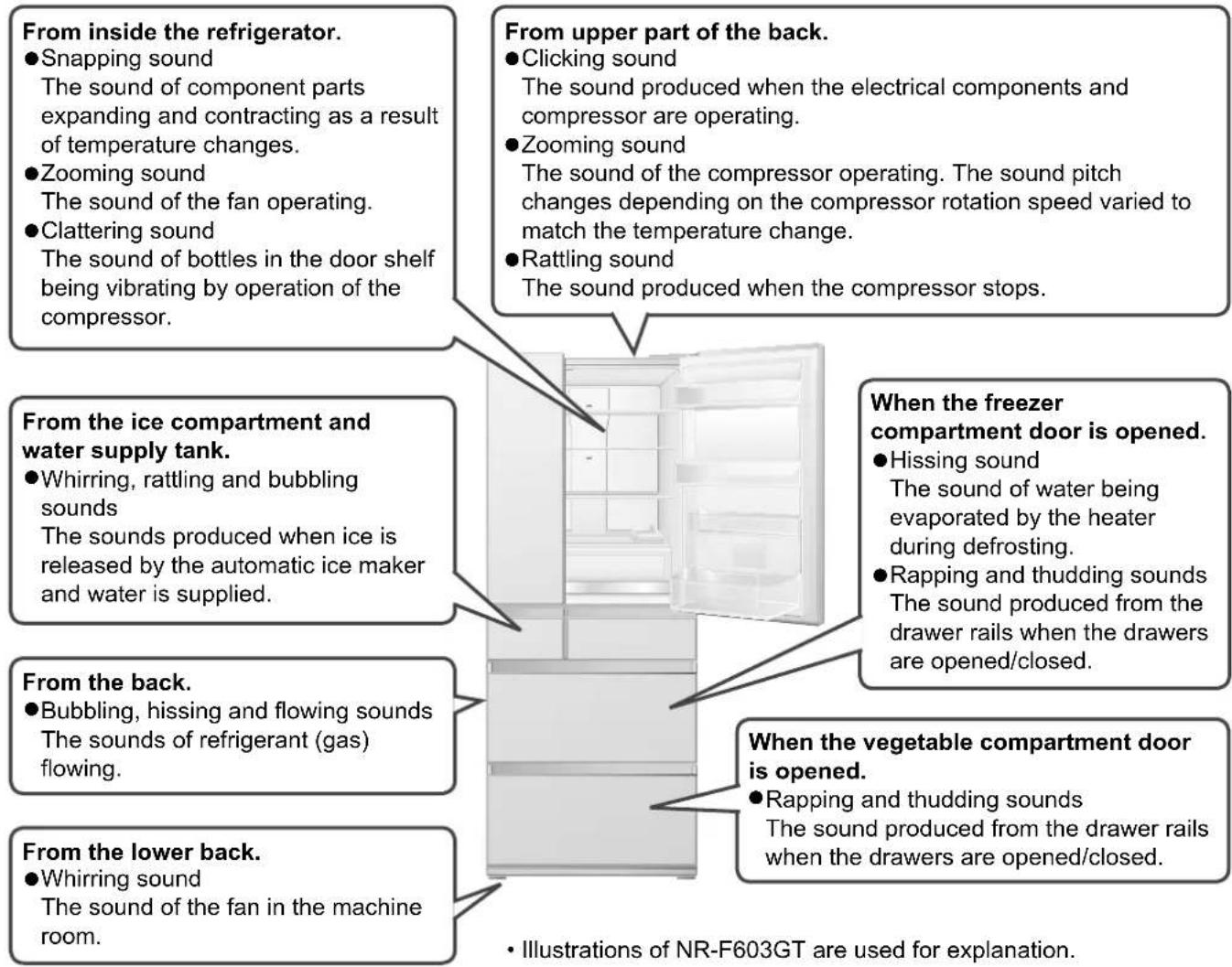
| Sound | Rattling noise | ●Place the refrigerator on a stout and flat floor, make both adjustable legs reach the floor and fixed the refrigerator. (P. 6)●Do the sides or the back side of refrigerator or the power cord touch the walls or furniture around the refrigerator?→ Place the refrigerator so that it does not touch surrounding objects. |
| Noise bothers me. | ●The compressor or the fan may make loud noise when the refrigerator is being cooled, such as when the refrigerator is not still cooled soon after installation, the doors are frequently opened and closed, the temperature around the refrigerator is high or Fresh Freezing is set ON. This is not abnormal.→ When the refrigerator has been cooled, the noise becomes small. | |
| Rapping noise | ●When the floor is uneven or the door is closed with a force, the refrigerator shakes and generates noise.→ Place a plate under the refrigerator to prevent it from shaking. (P.6) | |
| There is a noise all the time. | ●It is because that the rotation speed of the compressor is adjusted with the inverter control. (Noise may not stop but it is not abnormal.) | |
| Body | The top of the refrigerator is hot. | ●The mechanical section releases heat. (P. 7) |
| Front (or side) panel is hot. | ●The left and right side surfaces may become hot to let out heat generated when the refrigeration system operates. The temperature may become 50 °C to 60 °C (when the ambient temperature is 30 °C) after installation or in the summer. | |
| The side surface looks warped. | ●In the manufacturing process, the warpage or surface waviness may occur, but this is not abnormal. | |
| Display | Temperature setting on the control panel is flashing. | ●Has the temperature of the refrigerator compartment or the freezer compartment been adjusted in detail? (P. 20)→ When the temperature is set in detail, the indicator flashes. Cancel the setting. (P. 20) |
| Door | The door is heavy when opening it immediately after closing. | ●Air taken into the interior is suddenly cooled. The inner pressure becomes lower than the external air momentarily. The doors seem to be pulled towards inside. |
| Magnets do not stick to the doors. | ●The doors are made of glass. Magnets do not stick. | |
| Ice making | Ice cannot be made. | ●When you use this refrigerator for the first time, ice will be made after the interior has cooled sufficiently. (24 hours or more may be required.)●Make sure that [AUTO ICE OFF] is not set. (P. 15)●Push in the water supply tank as far as it will go. Push in the ice-making tray until you hear a clicking sound. (P. 15)●Make sure that the ice-making tray has been locked. (P. 19)●Do not put foods etc. in the ice storage box. (P. 14)●Take in and out the ice-making tray only when necessary.●To confirm whether or not the ice maker is operating, press and hold [AUTO ICE OFF] for at least 10 seconds. If water in the water supply tank decreases, the ice maker is operating.●If water has spilled into the ice storage box, wipe it off.●If water does not decrease, the ice maker is not operating.→ Consult your dealer. |
| Inside the ice cube is not frozen. | ●Has the freezer compartment temperature control been set to “1”?→ Set it to “2” or “3”. (P. 8) | |
| The shape of ice is not “cubic”. | ●There are projections.→ The groove of the ice-making tray may be frozen.●The ice cubes are round or connected to other ice cubes.→ Is the ice stored for a long time?(Ice cubes get round or connected by sublimation.)●The ice is small.→ Small ice cubes sometimes produced when no water remains in the tank. | |
| Smell | Ice smells. | ●Clean the water supply tank and water purification filter once a week. (P. 19)●Do not use cleaning agent or bleach for washing the water supply tank and the water purification filter.●Replace the water purification filter every 3 year. (Separately sold part: P. 27) |
| The interior smells. | ●Store strong smelling food in airtight containers.●Odor often attaches to the interior walls.→ Wipe the walls with a soft cloth soaked in lukewarm water. | |
| Cooling | Does not get cold at all. | ●If indicated in the notice indicator area of the control panel, cancel the demo mode. (P. 26)●Make sure that there is no power failure, the power cord is connected to the outlet or the breaker is not operated. |
| Does not get cold enough. | ●When you use the refrigerator for the first time, it will take 4 to 24 hours or more (in the summer time, etc.) until the refrigerator begins to cool.●Change the temperature setting to the colder setting. (P. 8)●Make sure that foods are not blocking the cold air outlet. (P. 2)●Do not place the refrigerator where it is subjected to direct sunlight. (P. 6)●Secure sufficient spaces around the refrigerator. (P. 6)●It may take the refrigerator longer time to be cooled if food is stuffed too much or “Fresh Freeing” is used for a long time. | |
| Frost and dew | ●Do not keep the door open for a long time or open frequently when humidity is high.●When a store bought accessory such as a tube stand is caught in the door, remove it.●If food is fallen in the back from the case in the freezer compartment or the vegetable compartment, the door is not closed properly. Remove the food.●Frost or dew may be formed on the outer surface of the refrigerator when humidity is high.→ Wipe with a piece of dry cloth. | |
| The food is frozen. | ●Set the temperature setting to “2” (or “1”). (P. 8)●Is the ambient temperature 5 °C or below?→ Set the temperature setting to “1”. (P. 8)●Do not put food with high water content near the cold air outlet in the refrigerator (P. 2) or in the prime fresh/chilled select room. | |
| Prime Fresh | Prime Fresh Quick Mode is stopped soon, or stopped in the middle of operation. | ●In the following cases, the time for the quick mode may become short (it returns to the normal Prime Fresh operation from the quick mode shortly).●Immediately after the completion of the quick mode.●When the refrigerator judges the quick mode is not necessary based on the amount of food or temperature.●During defrosting.●When the temperature of the refrigerator compartment or the freezer compartment is high.●Depending on the usage conditions, the quick mode may stop and re-start after the temperature inside the compartment is stable. |
In these cases?
| The power failed. | ●Keep the doors closed and do not store additional food.●[FRESH FREEZING] and [QUICK ICE MAKING] stop. Set these functions again to use after power recovery. | |
| The power plug was disconnected. | ●Wait at least 7 minutes, and then plug in the power plug.(If it is plugged in immediately, the compressor will be overloaded, which may cause a malfunction.) | |
| The refrigerator is not used for a long time. | ●Remove all foods and drinks and clean the refrigerator.1Disconnect the power plug.2Clean the compartments and the ice-making tray. (P. 17 ~ P. 19)3Keep the doors opened for 2 to 3 days to dry the compartments.(When drying is insufficient, the compartment may get moldy or have a foul smell.) | |
| The room lamp does not turn on. | → Consult your dealer. (When the room lamps are flashing, see P. 26.) | |
| Glass was broken.(Glass trays · doors) | ●When glass trays and glass doors were broken, do not touch the broken glass.→ Contact your dealer immediately. | |
| Moving the refrigerator. | ●To prevent the floor surface from being damaged, place a protective board or the like.1Disconnect the power plug.2Remove the leg cover, and then raise the adjustable legs. (P. 6)3Move the refrigerator in the forward or backward direction.4After moving, fix the refrigerator completely with adjustable legs. Reattach the leg cover. (P.6) | |
| When you move or transport the refrigerator. | ●Transport the refrigerator with at least 2 people. Do not transport it in a horizontal position. (It may cause an injury or break down of the refrigerator.)1Remove the food and drinks and discard water in the water supply tank.2Stop the auto ice making function. (P. 15)3Clean the ice-making tray. (P. 19)4Disconnect the power plug.5Remove the leg cover screw in the adjustable legs. (P. 6) (Remove the leg cover before transporting the refrigerator.)6Place a vessel underneath the drainage hole (whose height is 2 cm or less).7Tilt the refrigerator backward to drain water from the drainage hole. (To prevent water from leaking out, tilt back the refrigerator slowly.)8Place a protective sheet or the like and move the refrigerator. (Since water may remain the inside.) | 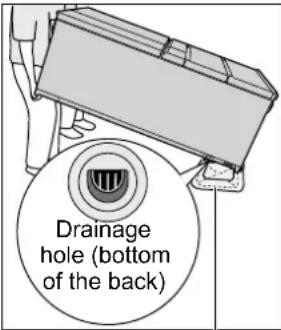 Place container and rag.(Water may overflow.) Place container and rag.(Water may overflow.) |
| Attention●If frost remains on the cooling unit (not visible from the outside) in the refrigerator, water may spill when it is moved.(It takes approximately 15 hours for the frost on the cooling unit to melt after the refrigerator power plug is disconnected.) | ||
The automatic ice maker is not used for a long time.
- Stop ice making, with the water supply tank empty, and clean the ice maker.
①Discard water in the water supply tank.
②Press when press a AUTO ICE OFF ice making. (P. 15)
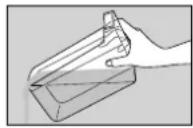
③Discard the stored ice in the ice-making tray and the ice storage box.
- When the ice is stored for a long time, ice cubes get round or connected by sublimation.
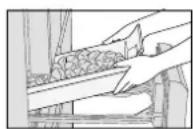
④ Rinse the ice storage box, ice shovel and water supply tank. Wipe off the water and return them to their original positions.
- Dry the water purification filter thoroughly. (The water purification filter contains moisture. If it is not dried thoroughly, it may cause molds or smell.)
→ When starting to use the automatic ice maker again, cancel the "AUTO ICE OFF". (P. 15)
If the following sounds or indications are generated
Alarm makes beep sound and the room lamp (LED) flashes, and the letter "U" and "10" are alternately indicated on the notice indicator area.
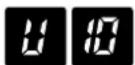
The refrigerator compartment, ice compartment or freezer compartment door is open.
Close the open door.
| Alarm | Room lamp (LED) | |
| 1 minute later Double-beep Flashes once | ||
| 3 minutes later 2 double-beep Flashes twice | ||
| 5 minutes later | Continuous double-beep | Flashes 3 times |
| More than 5 minutes later | Continuous double-beep | Flashes 3 times every 2 minutes |
- After 5 minutes, ECONAVI and nanoe™ X lamp flash simultaneously.
The letter "H" and a number are alternately indicated on the notice indicator area.
"Example"
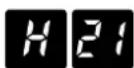
An abnormality may have occurred.
If the indicator does appear, contact and consult your dealer.
“dd” is displayed on the notice indicator area. The room lamps flash.

The refrigerator is in demo mode.
• The cooling operation is stopped.
Cancel the demo mode.
① Open the ice compartment and freezer compartment doors.
②Press ■vice to show the temperature setting section.
③ Open the refrigerator compartment doors.
④ Press and hold FREEZ-R east 10 seconds. (Beep sounds and dd disappears. Demo mode is canceled.)
⑤ Close the refrigerator compartment, freezer compartment and ice compartment doors.
Specifications
| MODEL | NR-F603GT-X6NR-F603GT-W6NR-F603GT-N6NR-F603HX-X3NR-F603HX-W3NR-F603HX-N3 | NR-F603GT-XP | NR-F603GT-XUNR-F603GT-WU | NR-F503GT-X6NR-F503GT-W6NR-F503GT-T6NR-F503GT-T7NR-F503HX-X3NR-F503HX-W3NR-F503HX-N3 |
| TOTAL GROSS VOLUME 628 L | 589 L 628 L | 528 L | ||
| TOTAL STORAGE VOLUME 488 L | 488 L 488 L 492 L | 402 L | ||
| STORAGE FRIDGEVOLUME | 301 L 301 L 304 L | 250 L | ||
| STORAGE ICE VOLUME 5 L | L 5 L | 4 L | ||
| STORAGE FRESHFREEZING VOLUME | 18 L 18 L 18 L | 14 L | ||
| STORAGE FREEZERVOLUME | 77 L 77 L 78 L | 63 L | ||
| STORAGE VEGETABLEVOLUME | 87 L 87 L 87 L | 71 L | ||
| OUTSIDE DIMENSIONSWIDTH×DEPTH×HEIGHT | 685 mm × 745 mm × 1828 mm | 650 mm × 699 mm× 1828 mm | ||
| WEIGHT 114 k | g/ 251 lb 105 k / 231 lb | g | ||
| RATED VOLTAGERATED FREQUENCY | Indicated on the quality indication label on the inside of the refrigeratorcompartment door. | |||
●The volume of models other than NR-F603GT-XP, NR-F603GT-XU and NR-F603GT-WU is based on IEC 62552.
●The volume of NR-F603GT-XP is based on ISO 8561.
●The volume of NR-F603GT-XU and NR-F603GT-WU is based on AS/NZS 4474.
Separately sold parts
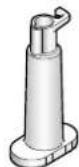
Water purification filter for water supply tank (P. 19) ARMH00B00820
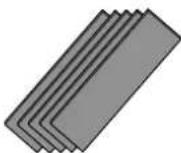
A set of adjustment plates (P. 6) CNR79-338120
Kandungan
Pengenalan
Arahan keselamatan....29
Pemasangan
Pemasangan 32
Panel kawalan ....34
natural_image
Illustration of hands using a cart with wheels, no text or symbols presentJika pintu condong ke bawah.
natural_image
Illustration of a hand holding a rectangular object on a shelf, with no visible text or symbols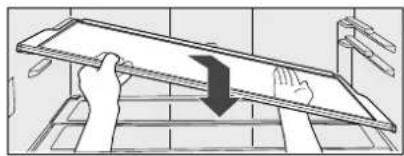
natural_image
Illustration of hands using a ruler to lift a flatboard (no text or symbols visible)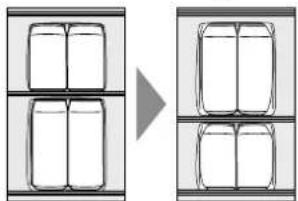
natural_image
Diagram showing two panels of rectangular boxes with a right-pointing arrow, no text or symbols presentBekas telur 2 variasi
natural_image
Illustration of a hand holding a rectangular object with an upward arrow, no text or symbols presentnatural_image
Pure technical diagram of a mechanical assembly without any text, numbers, or symbolsnatural_image
Architectural floor plan showing two furniture fixtures on a shared shelf (no text or labels)Petua menyimpan
natural_image
Illustration of a food delivery tray with various food items arranged in a grid (no text or labels visible)natural_image
3D diagram of a refrigerator interior showing internal compartments and ventilation slots (no text or symbols)Petak Sayuran
Anggaran 3 °C \~ 8 °C
natural_image
Illustration of a grocery store display with vegetables, tomatoes, and fruit boxes (no text or labels)natural_image
Illustration of two hands holding a tray with a downward arrow, no text or symbols presentnatural_image
Simple line drawing of two hands holding a rectangular object on a table, with a small object above (no text or symbols)Perhatian
natural_image
Line drawing of a hand operating a mechanical device with rollers (no text or symbols)Tangki bekalan air / Penapis penulenan air
Sekali seminggu
natural_image
Illustration of a hand washing a faucet with water flowing from the sink (no text or symbols)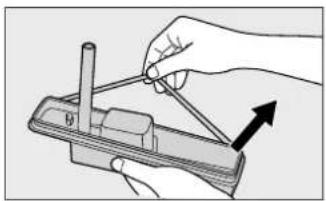
natural_image
Illustration of a hand using a tool to adjust a mechanical component (no text or symbols visible)natural_image
Line drawing of a hand pressing a component on a surface (no text or symbols)Tuil
Kedudukan buka

Kedudukan kunci
natural_image
Illustration of a hand inserting or removing documents into a filing cabinet (no text or symbols visible)natural_image
Simple line drawing of a hand inserting a card into a folder (no text or symbols)Permintaan
natural_image
Illustration of hands using a tool to move a rectangular object with circular motion indicators (no text or symbols)3. 插頭插入壁裝電源插座。
natural_image
Simple line drawing of a steaming room with a lid and chimney (no text or symbols)壓縮器
natural_image
Illustration of hands holding a metal rack with a black arrow indicating compression or lifting (no text or symbols)

natural_image
Line drawing of a kitchen cabinet with a pitcher and shelves (no text or symbols)- 你可以輕鬆放置大的罐子。
玻璃置物架(只有頂部的第二個架子)
①向上托起置物架後部朝前拉。
natural_image
Illustration of two hands interacting with a laptop keyboard (no text or symbols visible)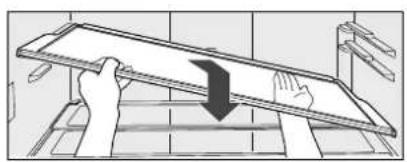
natural_image
Illustration of hands using a ruler to lift a flatboard (no text or symbols visible)natural_image
Diagram showing a transformation from two rectangular chambers to a three-segmented cylindrical container (no text or symbols)兩向雞蛋存放盒
■雞蛋架可以採用兩種安裝方式。
natural_image
Illustration of a hand holding a rectangular object with an upward arrow, no text or symbols presentnatural_image
Diagram of a kitchen counter with two circular fixtures and a central tray (no text or symbols)●食品過度凍結 .....
生魚片或肉片可能會過度凍結。
natural_image
Interior view of a kitchen appliance with two square windows and a vertical line above (no text or symbols)儲存小貼士
■哪些設置適合這些食物?
●肉
魚
PRIME FRESH(微凍結)
natural_image
Three product boxes with a right-pointing arrow, no visible text or symbolsCHILLED(冰温)
■什麼食品不適用微凍結 / 冷凍?
●蛋
●牛奶
●水
橙汁
●豆腐

冷藏室内
●蔬菜·水果
●冷凍食品
急凍室内

蔬果室内
冰
●霜淇淋

須知事項
natural_image
Illustration of a traditional Chinese food tray with various items arranged in a grid (no text or symbols visible)- 抬起把手並將容器向後滑動。
②急凍室容器(中間)
可以儲存較厚的小塊食物。
natural_image
Illustration of a traditional Chinese food tray with various items arranged in a grid (no text or symbols visible)③急凍室容器(下部)
高的食物可以垂直放置。
natural_image
Illustration of a grocery store display with vegetables, tomatoes, and fruit arranged in a rectangular frame (no text or labels)③ 瓶罐支架\*
瓶罐支架的位置可變更。
natural_image
Interior view of a refrigerator with open door and doorrests, showing internal compartments and doorways (no text or symbols visible)立即擦洗!
natural_image
Illustration of two hands holding a tray with a downward arrow, no text or symbols present<重新安裝>
降低前半部分並沿著軌向後滑動。
natural_image
Simple line drawing of two hands reaching toward a table with a small object on the top (no text or symbols)注意事項
natural_image
Line drawing of a hand opening a refrigerator drawer (no text or symbols)natural_image
Illustration of hands holding a device with a magnified inset showing a close-up of the component (no text or symbols present)儲水器 / 淨水過濾器
一週一次
①取下蓋子並用水清洗儲水器。
②旋轉淨水過慮器以使其脫鉤取出。卡瓜
③在水中輕輕清洗淨水過濾器。
natural_image
Illustration of hands using a faucet to clean water, showing water flowing from a pipe (no text or symbols)④取下後面邊緣運行的填充物。用水清洗。
natural_image
Illustration of a hand using a tool to adjust or install a mechanical component (no text or symbols visible)⑤安裝淨水過慮器並填料。
natural_image
Diagram showing a mechanical component before and after processing, with no visible text or symbols.解鎖位置 鎖定位置
natural_image
Illustration of a hand inserting a folder into a file (no text or symbols visible)拉出一個傾斜角
迅速拉出門並抬起前端拉出個傾斜角。
natural_image
Line drawing of a hand inserting a card into a folder (no text or symbols)取出鋁板
須知事項
- Operating Instructions
- Refrigerator (Household use)
- Manual Penggunaan
- Appendix
- For saving energy
- Disposing of the packaging
- Safety instructions
- What the symbols mean.
- Indicates risk of death or serious injury.
- For power plugs and cords...
- Stop using the refrigerator immediately and pull out the plug, if there is an abnormality or failure.
- (Otherwise, it may cause smoke, a fire or electrical shock.)
- On top of the refrigerator...
- When using...
- When installing...
- When disposing and recycling the product...
- In case of emergency...
- Indicates risk of injury or damage to property.
- When storing food...
- When opening/closing the doors...
- When cleaning...
- When moving or transporting the refrigerator...
- Installation
- Choosing the right location
- Place the refrigerator in the following locations.
- Fix the refrigerator.
- If the door is slanted downwards.
- Plug into a wall outlet.
- For safety, the refrigerator should be grounded (For refrigerators with ungrounded 2-pin plugs)
- Ground connections must not be made with the following
- Cool the refrigerator interior.
- Requests Notices
- ☐ not place objects on the top of the refrigerator.
- To use all features
- Temperature setting and a guide of temperature
- Control panel
- How to operate (Example: To use the select room as the prime fresh room)
- ▶ select temperature setting of [PRIME FRESH]
- T adjust the temperature setting of refrigerator or freezer compartments.
- ECONAVI Operation
- 3ECO functions detect the storage amount and the lifestyle.
- Storage Eco
- Smart Eco
- Night Eco
- nanoe™ X Operation
- A nanoe TM is a nano-sized ion particle coated with water particles.
- Notices
- Refrigerator compartment
- Slide tray (the third shelf from the top)
- Glass tray (only the second shelf from the top)
- 2way egg case
- The "door shelves" can be moved.
- Requests
- Put the following foods into an airtight container or wrap with plastic wrap.
- Prime Fresh/Chilled select room
- Using as the prime fresh room
- When you want to extend the life of food by partially-freezing it.
- Easy to cut.
- Using as the chilled room
- When you do not want to freeze food.
- Tips for storing
- Which is the suitable setting for these foods?
- What is the unsuitable food for the Prime Fresh/Chilled?
- Using "QUICK MODE"
- In these cases, Prime Fresh Quick Mode time may become shorter or Prime Fresh Quick Mode may not start.
- Fresh Freezing compartment
- Using "FRESH FREEZING"
- conditions of delicious Fresh Freezing
- Ice compartment
- To use the automatic ice maker in comfort
- Please use only the drinking water for auto ice making.
- It will take longer to make ice in the following cases.
- To make ice
- To make ice quickly
- When [QUICK ICE MAKING] is set, the speed of ice making is increased.
- To stop auto ice making
- Stop auto ice making if you do not want to make ice and before cleaning the ice-making tray.
- To turn off the indicator
- The indicator AUTO ICE OFF turned off while the auto ice making is stopped.
- Setting Procedure
- Freezer compartment
- ① Freezer case (Upper) 4
- ② Freezer case (Middle)
- ③ Freezer case (Lower)
- Vegetable compartment
- ① Small-item vegetable case (Upper)
- ③ Bottle support
- ② Main vegetable case (Lower)
- Cleaning, removing and re-installing
- Cleaning
- Clean the refrigerator immediately after it is stained.
- Clean hidden areas at least once a year.
- Attention
- Moisture Control Filter
- Trays / Slide tray (made of glass)
- May (Upper shelf in the refrigerator)
- Slide tray
- Tay (2nd shelf from the top in the refrigerator)
- Case (Prime Fresh/Chilled select room)
- Door shelf/Bottle shelf
- Removing
- Re-installing
- Water supply tank / Water purification filter
- Washable ice-making tray (Inside the ice compartment)
- Remove the ice-making tray and rinse it.
- Case (Ice/Fresh Freezing/Freezer/Vegetable compartment)
- Pull out at an angle
- Setting to suit your preferences
- To adjust the temperature in more detail
- For the refrigerator compartment
- Canceling Procedure
- For the freezer compartment
- To turn off the ECONAVI lamp
- To adjust the brightness of nanoe™ X lamp
- To lock operation on the control panel
- Troubleshooting
- If the following sounds or indications are generated
- Separately sold parts
- Kandungan
- Pengenalan
- Pemasangan
- Jika pintu condong ke bawah.
- Bekas telur 2 variasi
- Petua menyimpan
- Petak Sayuran
- Perhatian
- Tangki bekalan air / Penapis penulenan air
- Sekali seminggu
- Permintaan
- 插頭插入壁裝電源插座。
- - 你可以輕鬆放置大的罐子。
- 玻璃置物架(只有頂部的第二個架子)
- ①向上托起置物架後部朝前拉。
- 兩向雞蛋存放盒
- ■雞蛋架可以採用兩種安裝方式。
- 儲存小貼士
- ■哪些設置適合這些食物?
- ■什麼食品不適用微凍結 / 冷凍?
- 須知事項
- ②急凍室容器(中間)
- ③急凍室容器(下部)
- ③ 瓶罐支架\*
- 注意事項
- 儲水器 / 淨水過濾器
- 拉出一個傾斜角
- 取出鋁板
Brand : PANASONIC
Model : NR-F603GT-WU
Category : Refrigerator