
IB-G226L-C31 - Hard Drive Icy Box - Free user manual and instructions
Find the device manual for free IB-G226L-C31 Icy Box in PDF.


| Product Type | External Hard Drive Enclosure |
| Compatible Drive | 2.5" SATA HDD/SSD (up to 9.5mm height) |
| Interface | USB 3.1 Gen2 Type-C (USB-C) |
| Data Transfer Rate | Up to 10 Gbps |
| Dimensions | 130 x 80 x 12 mm |
| Weight | 100 g |
| Material | Aluminum with plastic ends |
| Color | Black |
| Power Supply | Bus-powered via USB (5V, 0.9A) |
| LED Indicator | Power and activity LED |
| Supported Operating Systems | Windows, macOS, Linux |
| Plug & Play | Yes, no driver required |
| UASP Support | Yes |
| Cooling | Passive (aluminum body acts as heatsink) |
| Installation | Tool-free sliding mechanism |
| Cleaning | Wipe with a soft, dry cloth |
| Safety Precautions | Do not expose to liquids or extreme temperatures |
| Spare Parts / Repairability | Not user-serviceable; no spare parts available |
| Warranty | 2 years (depending on region) |
| Package Contents | Enclosure, USB-C cable, user manual |
Frequently Asked Questions - IB-G226L-C31 Icy Box
User questions about IB-G226L-C31 Icy Box
0 question about this device. Answer the ones you know or ask your own.
Ask a new question about this device
Download the instructions for your Hard Drive in PDF format for free! Find your manual IB-G226L-C31 - Icy Box and take your electronic device back in hand. On this page are published all the documents necessary for the use of your device. IB-G226L-C31 by Icy Box.
USER MANUAL IB-G226L-C31 Icy Box
RGB illuminated enclosure for 2.5 SATA SSD
Handbuch IB-G226L-C31
natural_image
Black rectangular electronic device with purple and green lighting, no visible text or symbolsPlease read carefully the following information to prevent injuries, damage to material and device as well as data loss:
Warning levels
Signal words and safety codes indicate the warning level and provide immediate information in terms of the probability of occurrence as well as the type and severity of the consequences if the measures to prevent hazards are not complied with.

DANGER
Warns of a directly hazardous situation causing death or serious injury.

WARNING
Warns of a potentially hazardous situation that may cause death or serious injury.

CAUTION
Warns of a potentially hazardous situation that may cause minor injury.

IMPORTANT
Warns of a potential situation that may cause material or environmental damage and disrupt operative processes.
1. Risk of electrical shock

WARNING
Contact with parts conducting electricity
Risk of death by electrical shock
- Read the operating instructions prior to use
• Make sure the device has been de-energised prior to working on it - Do not remove contact protection panels
- Avoid contact with conducting parts
- Do not bring plug contacts in contact with pointed and metal objects
• Use in intended environments only - Operate the device using a power unit meeting the specifications of the type plate only!
- Keep the device/power unit away from humidity, liquid, vapour and dust
- Do not modify the device
• Do not connect the device during thunderstorms - Approach specialist retailers if you require repairs
2. Hazards during assembly (if intended)

CAUTION
Sharp components
Potential injuries to fingers or hands during assembly (if intended)
- Read the operating instructions prior to assembly
- Avoid coming into contact with sharp edges or pointed components
• Do not force components together
- Use suitable tools
• Use potentially enclosed accessories and tools only
3. Hazards caused by a development of heat

IMPORTANT
Insufficient device/power unit ventilation
Overheating and failure of the device/power unit
• Prevent externally heating up components and ensure an exchange of air
- Do not cover the fan outlet and passive cooling elements
- Avoid direct sunlight on the device/power unit
Safety information IB-G226L-C31
• Guarantee sufficient ambient air for the device/power unit
- Do not place objects on the device/power unit
4. Hazards caused by very small parts and packaging

WARNING
Risk of suffocation
Risk of death by suffocation or swallowing
- Keep small parts and accessories away from children
- Store/dispose of plastic bags and packaging in an area that is inaccessible to children
- Do not hand over small parts and packaging to children
•
5. Potential data loss
IMPORTANT
Data lost during commissioning
Potentially irreversible data loss
• Always comply with the information in the operating instructions/quick installation guide
• Exclusively use the product once the specifications have been met
• Back up data prior to commissioning
• Back up data prior to connecting new hardware
• Use accessories enclosed with the product
6. Cleaning the device
IMPORTANT
Harmful cleaning agents
Scratches, discolouration, damage caused by moisture or short circuit in the device
- Disconnect the device prior to cleaning
- Aggressive or intense cleaning agents and solvents are unsuitable
• Make sure there is no residual moisture after cleaning
• We recommend cleaning devices using a dry, anti-static cloth
7. Disposing of the device
IMPORTANT
Environmental pollution, unsuitable for recycling
Potential environmental pollution caused by components, recycling circle interrupted
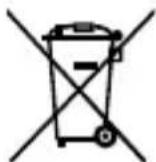
This icon on product and packaging indicates that this product must not be disposed of as part of domestic waste. In compliance with the Waste Electrical and Electronic Equipment Directive (WEEE) this electrical device and potentially included batteries must not be disposed of in conventional, domestic waste or recycling waste. If you would like to dispose of this product and potentially included batteries, please return it to the retailer or your local waste disposal and recycling point.
If you have any questions, please do not hesitate to contact our support at support@raidsonic.de or visit our website at www.raidsonic.de.
Manual IB-G226L-C31
Package content
1x IB-G226L-C31, 1x USB Type-C® to Type-C® cable, 1x Sim tool, 1x 1.5 mm EVA inlay, 1x 4 mm EVA inlay, 1x manual
System requirements
One free USB 3.1 (Gen 2) Type-C® or Type-Aport on your host computer.
Overview
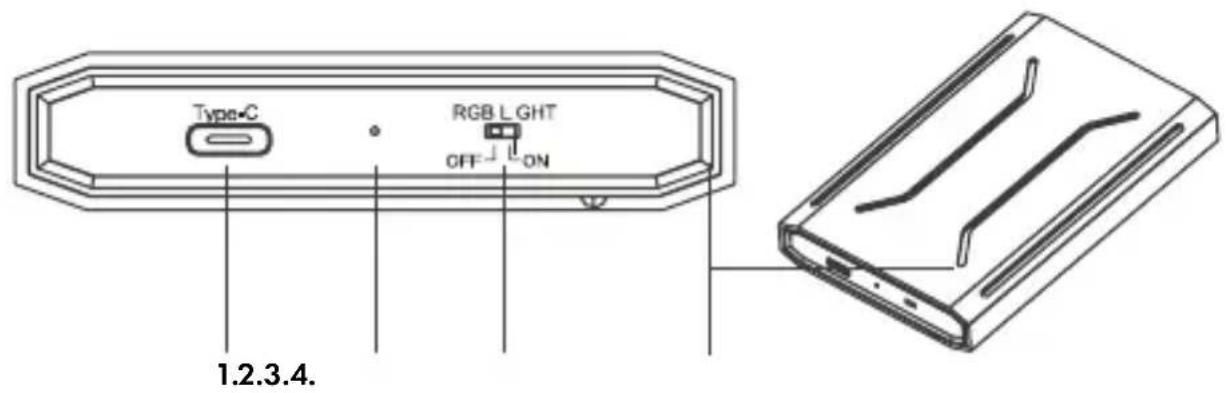
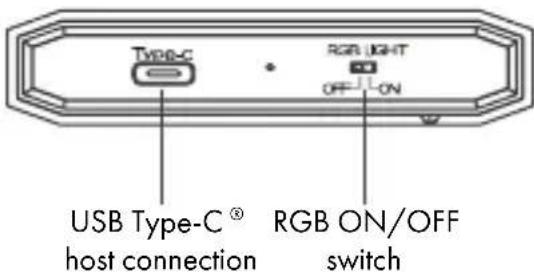
- USB 3.1 (Gen 2) Type-C
- Status LED (blue)
- RGB ON/OFF switch
- RGB illumination
Manual IB-G226L-C31
Key features
- USB 3.1 (Gen 2) Type-C ^® enclosure for 2.5" SATA SSD
• RGB illuminated with changing, pulsating colours
• USB 3.1 (Gen 2) data transfer rates of up to 10 Gbit/s
• High-grade aluminium enclosure
• Hot Plug and Plug & Play support - For Windows ^ and macOS ^
Drive installation
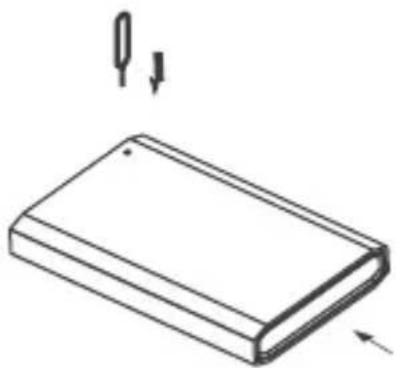
- To open the enclosure, please use the delivered Sim tool. Push the Sim tool with the pointed side ahead in the little hole on the bottom side of the enclosure.
natural_image
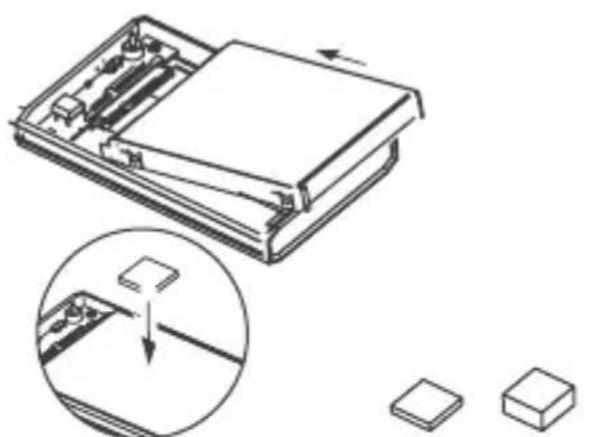
Simple line drawing of a rectangular block with two arrows pointing downward (no text or symbols)- Then push the inner frame out of the housing.
- Insert the 2.5" SSD/HDD gently into the SATA connector.
- Place the corresponding EVA inlay on the SSD/HDD.
natural_image
Technical illustration of a mechanical assembly with an inset showing a component being inserted into a base (no text or symbols present)4 mm EVA for 7 mm SSD/HDD 1.5 mm EVA for 9.5 mm SSD/HDD


1.5 mm EVA
4 mm EVA
Manual IB-G226L-C31
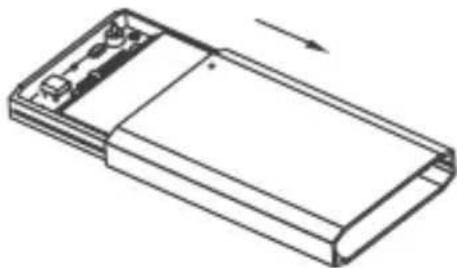
- Push the inner frame back into the housing.
ATTENTION: Make sure that the inner frame is placed in the right direction.
natural_image
Line drawing of a rectangular electronic device with a handle and top panel, showing an arrow indicating direction (no text or symbols)Application
- Connect the enclosure to a free USB 3.1 (Gen 2) Type-C of your host computer using the delivered USB Type-C ^ port ^ cable.
- The Drive will be recognized automatically by the operating system via Plug & Play.
Note: A new drive must be initialized, partitioned and formatted by the operating system to be displayed by the system. If the hard disc is not recognized instantly by the operating system, please check: -if the drive is initialized, partitioned and formatted -if the driver software is installed (USB)
- The enclosure can be connected or disconnected from the host computer via USB cable without shutting down the computer.
ATTENTION: Please await the end of read/write operations before disconnecting the Venclosure in order to avoid data loss!
Manual IB-G226L-C31
Note: The maximum data transfer rate of up to 10 Gbit/s can or achieved with a USB 3.1 (Gen 2) port. USB 2.0/3.0 ports can be used as well, but only with the maximum USB 2.0 data transfer rate of 480 Mbit/s and USB 3.0 datatransfer rate of up to 5 Gbit/s.
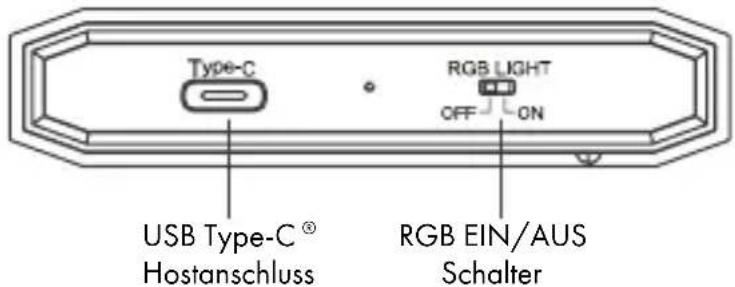
- The RGB illumination can be switched ON or OFF. Use the RGB light ON/OFF switch to set your choice.
Handbuch IB-G226L-C31
Verpackungsinhalt
natural_image
Simple line drawing of a rectangular block with two arrows pointing downward (no text or symbols)natural_image
Technical illustration of a mechanical device with an inset showing a close-up of a component being processed (no text or symbols present)4 mm EVA for 7 mm SSD/HDD 1,5 mm EVA for 9,5 mm SSD/HDD

1,5 mm EVA 4 mm EVA
Handbuch IB-G226L-C31
natural_image
Isometric line drawing of a rectangular electronic device with a base and top panel, showing an arrow indicating direction (no text or symbols)Anwendung
natural_image
Abstract geometric icon of a cube with white lines, no text or symbols presentICY BOX
CE FC
© Copyright 2021 by RaidSonic Technology GmbH. All Rights Reserved.
The information contained in this manual is believed to be accurate and reliable. RaidSonic Technology GmbH assumes no responsibility for any errors contained in this manual. RaidSonic Technology GmbH reserves the right to make changes in the specifications and/or design of the above-mentioned product without prior notice. The diagrams contained in this manual may also not fully represent the product that you are using and are there for illustration purposes only. RaidSonic Technology GmbH assumes no responsibility for any differences between the product mentioned in this manual and the product you may have. Apple and macOS are registered trademarks of Apple Computer

- Handbuch IB-G226L-C31
- Warning levels
- DANGER
- WARNING
- CAUTION
- IMPORTANT
- Risk of electrical shock
- Contact with parts conducting electricity
- Hazards during assembly (if intended)
- Sharp components
- Hazards caused by a development of heat
- Insufficient device/power unit ventilation
- Safety information IB-G226L-C31
- Hazards caused by very small parts and packaging
- Risk of suffocation
- Potential data loss
- Data lost during commissioning
- Cleaning the device
- Harmful cleaning agents
- Disposing of the device
- Environmental pollution, unsuitable for recycling
- Manual IB-G226L-C31
- Package content
- System requirements
- Overview
- Key features
- Drive installation
- Application
- Verpackungsinhalt
- Anwendung
- ICY BOX
- CE FC
- © Copyright 2021 by RaidSonic Technology GmbH. All Rights Reserved.
Brand : Icy Box
Model : IB-G226L-C31
Category : Hard Drive