
SWV6813 - Audio-video cables PHILIPS - Free user manual and instructions
Find the device manual for free SWV6813 PHILIPS in PDF.



| Product Type | HDMI Switch 3 inputs / 1 output |
| Brand | Philips |
| Model | SWV6813 |
| Dimensions (L x W x H) | 160 mm x 105 mm x 28 mm |
| Weight | Approximately 150 g |
| Power Supply | 5 V DC, 1 W max |
| AC Adapter Included | Yes, model Ktec KSAFB05000050WIUS |
| HDMI Connector Type | Type A (standard) |
| Supported Resolutions | 480i, 480p, 720p, 1080i, 1080p |
| Video Bandwidth | 1.65 GHz |
| HDCP Compatibility | Yes |
| Selection Modes | Automatic and manual |
| LED Indicators | Green light (power), red light (active input) |
| Maintenance | Clean with a damp cloth; avoid dust and moisture |
| Usage | Indoor only, room temperature |
| Warranty | 1 year limited (parts and labor) |
| Country of Quality Control | United States |
Frequently Asked Questions - SWV6813 PHILIPS
User questions about SWV6813 PHILIPS
0 question about this device. Answer the ones you know or ask your own.
Ask a new question about this device
Download the instructions for your Audio-video cables in PDF format for free! Find your manual SWV6813 - PHILIPS and take your electronic device back in hand. On this page are published all the documents necessary for the use of your device. SWV6813 by PHILIPS.
USER MANUAL SWV6813 PHILIPS
The switcher allows you to easily share a single HDMI display or a HDMI-compatible TV with three HDMI devices.
Features
• Supports 480i, 480p, 720p, 1080i and 1080p screen resolutions.
- Extends HDMI signal for a longer transmission.
• Supports HDCP compliant devices.
- Easy to install and simple to operate
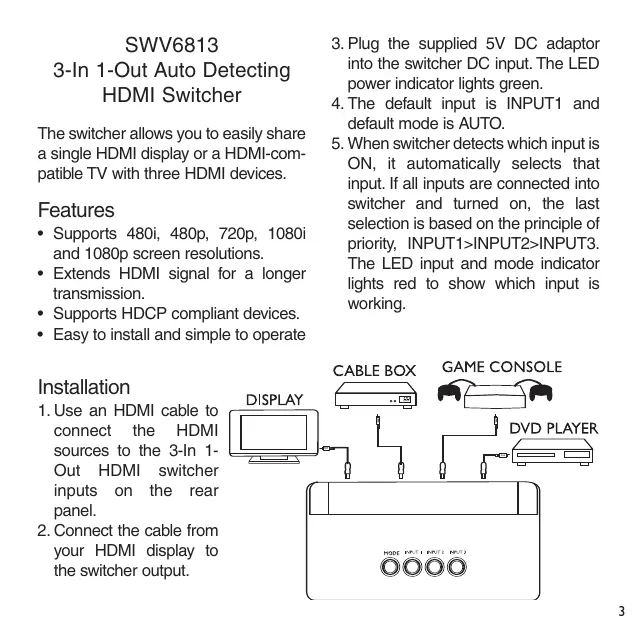
- Plug the supplied 5V DC adaptor into the switcher DC input. The LED power indicator lights green.
- The default input is INPUT1 and default mode is AUTO.
- When switcher detects which input is ON, it automatically selects that input. If all inputs are connected into switcher and turned on, the last selection is based on the principle of priority, INPUT1>INPUT2>INPUT3. The LED input and mode indicator lights red to show which input is working.
Installation
- Use an HDMI cable to connect the HDMI sources to the 3-In 1-Out HDMI switcher inputs on the rear panel.
- Connect the cable from your HDMI display to the switcher output.
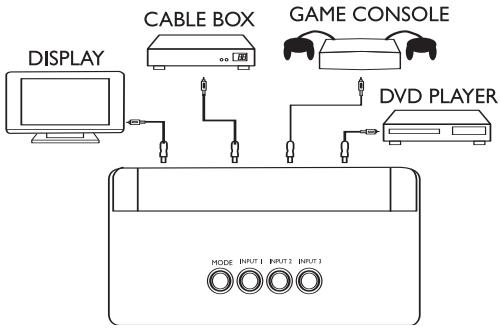
- When user presses the MODE button, the mode changes to MANUAL mode. In this mode, all the inputs are selected by user's operating.
Specification
Video Amplifier Bandwidth : 1.65 GHz
Format Support : Up to 1080p
HDMI Input/Output Connector Type : Type A
Power Consumption: 1 W(max.)
Power Supply : 5 Volt(DC)
Dimensions:
160(mm)x105(mm)x28(mm)
Care
- Keep the switcher dry.
- Use and store the switcher only in moderate indoor environments. Handle the switcher carefully; do not drop it.
- Keep the switcher away from dust and dirt. Wipe it with a moist cloth occasionally to keep it clean.
- Use only power supply Ktec KSAFB05000050W1US
Limited One-Year Warranty
Philips warrants that this product shall be free from defects in material, workmanship and assembly, under normal use, in accordance with the specifications and warnings, for one year from the date of your purchase of this product. This warranty extends only to the original purchaser of the product, and is not transferable. To exercise your rights under this warranty, you must provide proof of purchase in the form of an original sales receipt that shows the product name and the date of purchase. For customer support or to obtain warranty service, please call 919-573-7863. THERE ARE NO OTHER EXPRESS OR IMPLIED WARRANTIES. Philips' liability is limited to repair or, at its sole option, replacement of the product. Incidental, special and consequential damages are disclaimed where permitted by law. This warranty gives you specific legal rights. You may also have other rights that vary from state to state.
Technical Support
For Technical support send an email with the model number of the product and a detailed description of your problem to:
Email: accessorysupport@philips.com
©2006
Accessories Service Center
Philips Accessories and Computer
Peripherals,
Ledgewood, NJ 07852 USA
Quality assured in USA
Printed in China
SWV6813
accessorysupport@philips.com
Impreso en China
©2006 Accessories Service Center
Philips Accessories and Computer
Peripherals,
Ledgewood, NJ 07852 USA
Quality assured in USA
SVW6813
Assistance technique
Courriel :
accessorysupport@philips.com
©2006
Accessories Service Center
Philips Accessories and Computer Peripherals, Ledgewood, NJ 07852 USA
Fabriqué en Chine
Specifications are subject to change without notice Trademarks are property of Philips Accessories and Computer Peripherals 2006® Philips Accessories and Computer Peripherals, Ledgewood, NJ USA www.philips.com
Brand : PHILIPS
Model : SWV6813
Category : Audio-video cables