
IR 20 H - Heating Heylo - Free user manual and instructions
Find the device manual for free IR 20 H Heylo in PDF.


| Product Type | Infrared Heater |
| Brand | Heylo |
| Model | IR 20 H |
| Power Consumption | 2000 W |
| Voltage | 220-240 V ~ 50/60 Hz |
| Heating Element | Quartz infrared tube |
| Heating Area | Up to 20 m² |
| Dimensions (H x W x D) | 40 cm x 30 cm x 20 cm |
| Weight | 3.5 kg |
| Thermostat | Adjustable thermostat with temperature control |
| Safety Features | Tip-over switch, overheat protection, cool-touch housing |
| Modes | Low heat (1000 W), High heat (2000 W), Eco mode |
| Control Type | Manual knob with power settings |
| Mounting | Freestanding |
| Noise Level | Silent operation |
| Material | Metal body with powder coating |
| Certifications | CE, RoHS |
| Cleaning | Wipe with dry cloth; do not use water |
| Spare Parts | Heating tube available; replaceable by qualified technician |
| Warranty | 2 years |
Frequently Asked Questions - IR 20 H Heylo
User questions about IR 20 H Heylo
0 question about this device. Answer the ones you know or ask your own.
Ask a new question about this device
Download the instructions for your Heating in PDF format for free! Find your manual IR 20 H - Heylo and take your electronic device back in hand. On this page are published all the documents necessary for the use of your device. IR 20 H by Heylo.
USER MANUAL IR 20 H Heylo
Translation of the original instruction manual
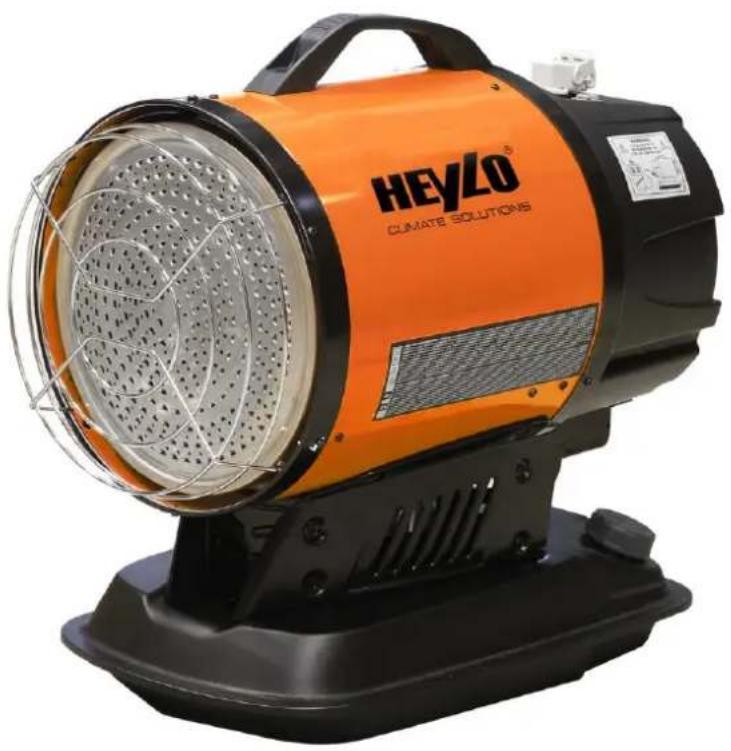
DE Infrarot-Ölheizer IR 20 H (Akku)
EN Infrared oil heater IR 20 H (battery)
Inhaltsverzeichnis
Abb. 5: Bedienfeld
Abb. 7: Auspacken
Abb. 8: Akku laden
| 1 | Akku | 2 | Ladegerät |
1
Abb. 14: Ölpumpe
12 About this operating manual 23
12.1 The purpose of this manual. ---- 23
12.2 Keep the manual safe and at hand at all times 23
12.3 Symbols and definitions used ---- 23
12.4 Warranty 24
12.5 Contact to HEYLO GmbH 24
12.6 Copyright notice 24
13 Safety 24
13.1 Notes on fire protection 25
13.2 Fuel 26
13.3 Instructions for battery operation ---- 26
13.4 Protection of the environment ---- 26
13.5 Operating conditions---- 26
13.6 Personal protective equipment---- 27
14 Product description 28
14.1 Identification 28
14.2 General description 28
14.2.1 Intended use 29
14.2.2 Improper use 29
14.2.3 Foreseeable misuses 29
14.3 Safety devices---- 29
14.4 Control and display elements ---- 30
15 Transport, installation and commissioning - 30
16 Device operation and control ---- 32
17 Malfunctions 33
17.1 Restarting after an unscheduled downtime 34
17.2 Malfunctions during operation---- 34
18 Cleaning and maintenance ---- 36
18.1 Checking and cleaning the device ---- 37
18.2 Inspecting electrical system ---- 38
18.3 Burner service---- 38
18.3.1 Adjusting combustion chamber damper 38
18.4 Wear and spare parts 39
18.5 Customer service by the manufacturer --- 39
19 Repairs 39
20 Decommissioning, storage and disposal ---- 39
20.1 Decommissioning 39
20.2 Storing the device 40
20.3 Disposal 4C
21 Technical data and factory settings ---- 40
22 Supplementary documents 40
22.1 Accessories 40
22.2 Declaration of conformity 40
12 About this operating manual
This operating manual (hereinafter referred to as the "manual") will enable you to operate the IR 20 H (battery) (hereinafter referred to as the "device") safely. It describes the device manufactured by HEYLO (hereinafter "HEYLO").
- Please read the manual carefully.
– Follow all safety instructions.
12.1 The purpose of this manual.
The manual serves the company operating the device and all the staff who use it as a guide and reference book on the operation and technical aspects of the device.
The technical data on settings, maintenance and the electrical features have been prepared for specialists who are specially authorized for these areas of responsibility. Unauthorized persons may not carry out the work specified here.
12.2 Keep the manual safe and at hand at all times
The manual must always be kept where the machine is located. The company operating the device must make the instructions available to the technical staff and all the operators of the device throughout the service life of the device.
12.3 Symbols and definitions used
This section explains the symbols used in this manual.
Instructions
The safety instructions in this manual contain the following elements:

DANGER
Warning indicating an immediate danger for people
This safety instruction warns of a directly hazardous situation that can lead to serious injury or death.

WARNING
Warning indicating a potential danger for people.
This safety instruction warns of a possibly hazardous situation that can lead to serious injury or death.

CAUTION
Warning indicating a potential danger for people.
This safety instruction warns of a possibly hazardous situation that may lead to minor to moderate injuries.

ATTENTION
Warning of possible damage to property.
This safety instruction warns of damage to machinery.
A safety instruction coonsts of (in addition to the symbol and the signal word):
- Signal word
– Type and source of the hazard - Effects
- Escape (= measures to escape from the danger)
Example

DANGER
Electric shock arising from high voltage (type and source of hazard)
Death from electric shock! (effects)
a) Wait four minutes before starting work on the motor connections! (measures)
Important or helpful instructions, information and tips have the following structure:

NOTICE
Information
User tips and useful information that help you to make optimal use of the device's functions are listed below this symbol.
Mandatory symbols
The manual uses the following mandatory symbols.
| Symbol | Meaning |
| General prohibitionThis symbol indicates instructions and may signal prohibitions. |
Table 6: Mandatory symbols
Markings in the text
- Listings are indicated by an indent mark (-).
- Text that is highlighted in this way, highlights references and hyperlinks that refer to related topics, internet addresses, and other related information.
- Text that is in bold refers to emphases or subheadings.
- Menu items, tabs, buttons, and softkey buttons are set inside angle brackets <...> such as
. - Sequences are set in angle brackets <...> such as
. - Keys or indicator lights on a keyboard or control panel are enclosed in square brackets, for example [Start].
- Text marked this way SPS indicates a cross-reference to the glossary together with a definition.
Action instructions
As a rule, action instructions have the following structure:
√ Conditions that are necessary in order for the action to be carried out may also be referred to here.
a) These are followed by operating steps
b) Another operating step
⇒ Partial result after one operating step
c) Another operating step
→ Overall result of an action instructions
12.4 Warranty
The General Business Terms and Conditions of HEYLO GmbH apply. The statutory warranty period for defects is 12 months for commercial clients and 24 months for private buyers, from the date of purchase. Improper use shall void all warranty.
12.5 Contact to HEYLO GmbH
If you have any questions about the device, please get in touch with your sales partner.
We will also gladly provide information ourselves. Please get in touch with HEYLO GmbH by mail, e-mail or phone, or submit a query form through our website, quoting:
- Your name and address,
- contact person at your company,
– data printed on type plate: type, serial no. and year of manufacture
Address: HEYLO GmbH
Im Finigen 9
28832 Achim
Phone: +49 (0) 4202 / 97 55 0
Fax: +49 (0) 4202 / 97 55 97
E-mail: info@heylo.de
HEYLO GmbH is the owner of the copyright to this document.
The distribution, duplication and storage of this document, as well as the exploitation and communication of its contents are not permitted unless granted in writing by HEYLO GmbH.
Any violations of this obligation shall lead to the payment of compensation.
All rights are reserved in the event that a patent or utility model registration is granted.
All the product names referred to herein are trademarks of the respective companies concerned.
We reserve the right to make technical modifications.
13 Safety
The device has been designed and manufactured according to best engineering practice and conforms to all relevant safety rules. However, incorrect operation can pose a risk to life and limb of the operator or third parties, and/or cause damage to the device and other property.
Only use the device:
– for the purpose for which it is intended,
- when it is in proper working order.
Following a malfunction that might affect the safety of the device, do not restart the device until you have ensured yourself that the malfunction has been fully eliminated.
Persons who install, operate, service or clean the device must be aware of the hazards that may arise from electrically powered equipment in environments with a high air humidity, and must have read and understood this operating manual.
Avoiding hazardous situations
The following instructions apply to all work on or with the device:
- A complete and legible copy of this operating manual must be kept at hand, near the place where the device is used.
-
The device must only be used for its intended purpose.
-
The device must be kept in proper working order. Before using the device, its condition must be checked.
- All relevant statutory accident prevention regulations and other applicable safety rules must be strictly adhered to.
- Keep the device away from children. Take suitable measures to ensure that children cannot access the device while it is in operation.
- Certain components of the device can become very hot, causing burns. Special safety measures are required when the device is operated in areas where there are children or other vulnerable persons.
Safety instructions for work on electrical equipment
The following rules apply to all work on the electrical equipment of the device:
- There is a risk of fatal injury from incorrect installation of the electrical system or from a failure of the insulation during operation.
- All work on the electrical equipment must be carried out by a qualified electrician. Always keep switch cabinets closed.
- For mains power operation, the device must be earthed. The mains socket to which the device is connected must be equipped with a RC circuit breaker.
- When the device is connected to the power mains and the device switch is off, the device remains powered.
- After work on the device, test the safety devices to make sure they work properly.
– Unauthorized modifications to the device are prohibited.
Instructions for transport and installation
The following general rules apply to the transport and installation of the device:
- Before lifting or moving the device, switch it off, remove the battery or disconnect the mains plug and allow the device to cool down.
- Always lift and move the device by its handle.
Safety instructions for device operation
The following general rules apply to the operation of the device:
- The device must only be operated by persons who have been properly instructed in its operation.
- Do not cover the device during operation.
-
Never modify, bypass, remove or otherwise disable safety devices. Regularly check and test the safety devices.
-
When operated unattended, the device must be controlled by a room thermostat (optional equipment).
- All guards, covers and hoods must be correctly installed.
- It is forbidden to make any modifications to device.
- Do not operate the device, if its battery or the power cord is damaged.
- Never disconnect the device plug by pulling the power cord. Do not touch the mains plug with wet or moist hands.
- After running the heater for the first time, the heating plate changes colour. This is normal.
Maintenance and troubleshooting
The following general rules apply to all maintenance and troubleshooting work:
- Maintenance and troubleshooting tasks must be performed by suitably qualified persons only.
- Before commencing work, allow the device to cool down.
- Switch off the device and remove the battery or disconnect the mains plug.
13.1 Notes on fire protection
The device generates heats from burning fuel. Due to the ignition source (burner) and the high temperatures, increased precautions must be taken to minimise the risk of fire.
- WARNING! Never cover the device, as it might otherwise overheat.
- Keep the air inlet to the burner unobstructed and free of dirt. Reduced air flow can lead to overheating of the device. Do not operate the device near curtains or other objects that might come into contact with it or might block its air inlet.
- Do not operate the device near open fires or other heat sources.
- Do not operate the device near flammable objects.
- Do not operate or store the device in aggressive atmospheres, or areas where there might be combustible gases, gas-air or dust-air mixtures.
- Do not operate or store the device in areas where combustible fumes of gasoline, solvents or thinners are present.
- Portable fuel tanks must be installed and operated in accordance with the technical rules for the storage of liquid and solid hazardous substances in stationary containers and filling and emptying installations for non-stationary containers (TRGS 509).
- Do not install or operate the device in atmospheres containing oil, sulphur or salt vapours.
13.2 Fuel

NOTICE
Admissible fuel
The device must only be run with diesel or petroleum.
The use of a suitable fuel (see Technical data and factory settings [▶ 40]) minimises the risk of fire and explosion. Never use benzene, paint stripper, alcohol or other highly flammable fuels.
At temperatures below 5 °C, use only fuels that are stable up down to a temperature of approx. -20 °C, such as winter diesel or polar diesel conforming to DIN EN 590.
13.3 Instructions for battery operation
- Before using the battery, read the instructions and warnings attached to the battery and the charger.
- Never operate the device with a damaged or defective battery.
- Protect the battery from impacts, and do not drop it.
- Do not open or disassemble the battery.
-
If you notice that the battery life is much shorter than expected, shut down the device without delay. Otherwise, there is a risk of overheating or even explosion.
– Never short circuit the battery: -
Ensure that the battery contacts do not come into touch with an electrically conductive material.
- Do not store the battery together with metal objects such as nails, coins, etc.
- Keep the battery dry at all times.
- A short circuit in the battery leads to very high currents, which in turn can cause overheating, damage to the battery and injury from burns.
- Do not expose the battery to temperatures of 50°C or higher.
- Do not incinerate the battery, even if it is damaged or can no longer be charged. When set a-light, the battery might explode.
- In case of electrolyte in the eye, rinse the eye with clean water and immediately seek medical attention. Otherwise, there is a risk of permanent sight loss.
– Lithium-ion batteries are subject to the statutory regulations that govern hazardous substances. For commercial transport, e.g. by courier ser-
vice, etc., the packaging and labelling must meet specific requirements. Observe the applicable statutory regulations.
Do not tape over or otherwise cover exposed contacts, and pack the battery so that it cannot move inside the packaging.
- Strictly follow the statutory regulations for the disposal of batteries.
- Only use the battery for products for which it has been approved by HEYLO. Do not use the battery in products for which it has not been approved, as this can lead to fire, overheating, explosion or electrolyte release.
Maintaining maximum battery life
- Recharge the battery before it has been fully discharged. Regularly check the charging level indicated by the batter charge indicator on the battery.
If the battery is low, switch off the device and recharge the battery in the charger. - Charge the battery at a room temperature between 10 and 40°C . If the battery is hot, allow it to cool down to this temperature. If the battery is colder than 10°C , bring it to room temperature before charging it.
- If the battery is not to be used for more than six months, charge it fully before putting it into storage.
13.4 Protection of the environment
Safety-conscious and forward-looking action on the part of the personnel helps prevent damage to the environment.
To protect the environment, observe the following general rules:
- Never release environmentally hazardous substances released into the ground or the sewerage system.
- Observe the statutory regulations for waste prevention, disposal and recycling.
- Always store environmentally hazardous substances in appropriate containers, and label the containers accordingly.
13.5 Operating conditions
The device has been designed for stationary or non-stationary operation in well-ventilated rooms (e.g. halls) or outdoors (e.g. construction sites).
Under inadmissible operating conditions, the operating safety and performance of the device cannot be guaranteed. Such operating conditions must therefore be avoided in all circumstances.
Place of installation
For the installation of the device, observe the following general rules:
- The device is a heater devised for operation in well-ventilated rooms or outdoors.
- Do not operate the device in areas with a potentially explosive atmosphere, or in the presence of combustible liquids or gases.
- The floors and ceilings at the place of installation must be fire retardant.
- Keep a suitable safety distance to flammable objects, such as furniture, curtains, etc.
- Keep the air inlet and outlet openings of the device unobstructed at all times. Strictly observe the prescribed safety distances.
- Ensure that the textiles (e.g. curtains) do not touch the device.
- Do not operate the device at locations where there is overpressure or underpressure, as the burner might otherwise malfunction.
- The device must be installed in a stable, upright position.
- Only operate the device with a clean oil filter and intact oil nozzle.
- The rated battery voltage and the voltage of the power mains must correspond to that specified on the type plate.
- Only use extension cords that meet the performance data on the type plate, as there is otherwise a risk of overload.
Keep extension cables as short as possible and only ever use them when they are fully extended.
- For mains power operation, connect the device to a mains socket that is earthed or protected by an integrated RC circuit breaker.
- To prevent overloading of the mains socket, only ever operate one device from one socket at the time.
- Do not switch on the device automatically through a timer or similar switching device.
– During operation, monitor the device and keep children and pets at a safe distance.
Handling
The following rules apply to handling the device:
- Handle the device with care. Do not drop or throw the device, and do not transport while unsecured.
- Use only original spare parts or parts approved by the manufacturer.
- The device must not be operated by persons under the influence of alcohol, drugs or medication.
Indoor installation
For the installation of the device in well-ventilated rooms, observe the following general rules:
- The minimum room size must correspond to an average heat requirement for the installation room of 0.058 kW / m3 .
- As a rule, a natural air renewal rate of 2.5 times the room air volume per hour must be maintained at all times (to ensure an adequate supply of fresh air and the safe removal of combustion gases).
To ensure adequate fresh air supply and exhaust air removal, the following minimum openings must be in place:
- Fresh air: 2.8 m2
- Exhaust air: 2.8 m2
The table below shows the required natural air renewal rate for various room sizes and heat output rates.
| Heat output [kW] | Room size [m3] | Natural air renewal rate [m3/h] |
| 25 | 500 | 1250 |
Outdoor installation
The following rules apply to outdoor installation of the device:
- Operation of the device must not cause any danger or unacceptable nuisance to persons or animals.
- Protect the device against unauthorised interference.
- Dirt, rain and snow can be sucked in by the device. Prevent this by adequate protection.
Safety clearances
The following minimum distances apply in the installation room:
| Side panels to combustible objects | 60 cm |
| Heat emitting side to combustible objects | 200 cm |
| Intake side | 60 cm |
| At the top | 300 cm |
| To fuel store (except device tank) | 800 cm |
See also
Technical data and factory settings [▶ 40]
13.6 Personal protective equipment
Personal protective equipment serves to protect staff against any hazards that could affect their safety or health at work.
The following personal protective equipment must be worn during transport and installation:
- Protective gloves to prevent injury to hands from crushing
- Safety footwear to prevent injury from impact or tripping
During cleaning and maintenance, the following must be worn:
- Respiratory protection to prevent inhalation of soot particles and dust
14 Product description
The device is a compact and portable unit that produces radiation heat. It is particularly suitable for heating small areas or well-ventilated rooms and outdoor spaces (e.g. warehouses, workshops, construction sites).
14.1 Identification
The device is clearly identified by means of the type plate attached its housing.
Type plates
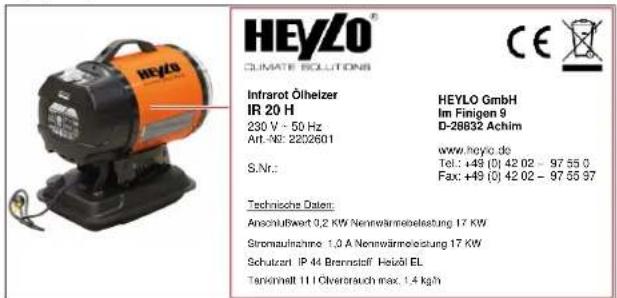
Illustration 16: Type plate on device
The type plate contains the following information:
- Model
- Type number
- Electrical connection data
- Serial number
14.2 General description
The device is a compact and portable unit that produces radiation heat.
The device must only be operated:
- For the purpose for which it is intended
- In compliance with the safety instructions in chapter Safety [▶ 24]
Design and scope of delivery

Illustration 17: Device design (front side)
| 1 | Control panel | 2 | Housing cover |
| 3 | Combustion chamber with safety housing | 4 | Fuel tank cap |
| 5 | Fuel tank | 6 | Heating plate |
| 7 | Protective grille | 8 | Handle |
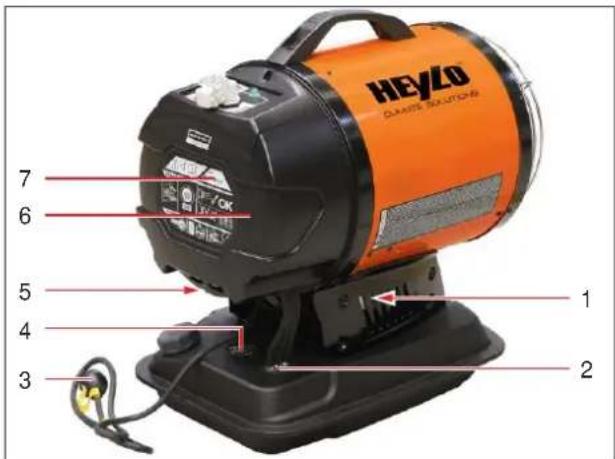
Illustration 18: Device design (operating side)
| 1 | Motor with fan | 2 | Fuel inlet/return line with fuel filter |
| 3 | Power cord | 4 | Fuel tank level indicator |
| 5 | Battery slot | 6 | Connection for power cord (not shown) |
| 7 | Reset button |
The scope of delivery includes:
- Infrared oil heater
- Handle
- Battery
-
Charger
-
Power cord
- Operating manual
Mode of operation
The device is a radiation heater with an oil burner. The device can be electrically powered from a battery or from the power mains.
The fuel is taken by the oil pump from the tank, compressed to operating pressure and fed to the nozzle. The nozzle injects the fuel as a mist into the combustion chamber where it ignites. The result is a flame which, together with its combustion gases, heats the combustion chamber and the heating plate.
The exhaust gases are fed out of the device.
The heating plate provides uniform radiation heat. The heating plate is protected by a cover and a protective grille to prevent direct contact with flammable materials.
The device is switched off and on with the device switch.
Operation with room thermostat
The device can be run in conjunction with a room thermostat so that it is operated on the basis of the actual room temperature.
See also
Intended use [▶ 29]
14.2.1 Intended use
The device is designed to produce radiation heat. It is particularly suitable for the heating of small areas and of well-ventilated rooms and outdoor spaces (e.g. warehouses, workshops, construction sites). The device can be electrically powered from a battery or from the power mains.
Intended use also includes compliance with the operating conditions (see Operating conditions [▶ 26]).
Any use other than the specified is deemed improper. Improper use shall void all warranty cover.
See also
Technical data and factory settings [▶ 40]
14.2.2 Improper use
Any use other than the intended is prohibited. Improper use can lead to danger.
- Improper use includes interference with safety-relevant components of the device.
- Improper use includes further operation of the device under inadmissible operating conditions and insufficient maintenance.
14.2.3 Foreseeable misuses
Reasonably foreseeable misuse includes:
– Operation under inadmissible operating conditions, non-adherence to safety clearances
– Operation in small, or insufficiently ventilated rooms
– Unsupervised operation without installed room thermostat
14.3 Safety devices
If safety devices are not installed properly, or configured incorrectly, there is a risk of injury. Do not modify, dismantle or disable safety devices. All safety devices must be freely accessible at all times.
Familiarize yourself with the safety devices, in order to be able to prevent or minimise the risk of injury and/or damage to property.
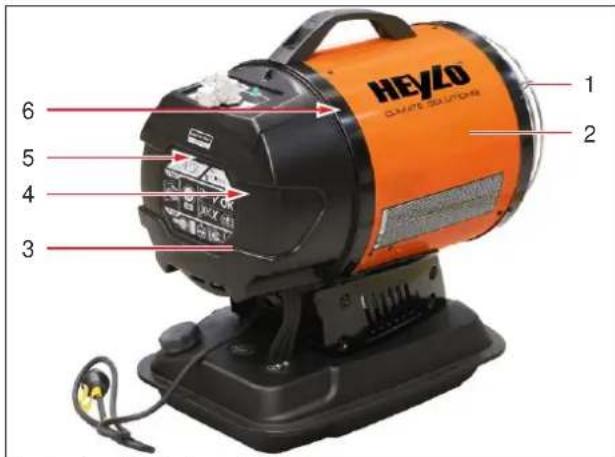
Illustration 19: Safety devices
| 1 | Protective grille | 2 | Safety housing |
| 3 | Housing | 4 | Photocell (flame monitoring) |
| 5 | Angle sensor | 6 | Safety temperature limiter (STL) |
The device is equipped with the following safety devices:
- Safety temperature limiter triggering a safety shutdown of the device in case of overheating.
- Photocell monitoring the flame in the combustion chamber to prevent operation of the device without a flame.
- Angle sensor triggering a safety shutdown of the device in case of tipping over.
Signalling devices
The device display of the control panel (see Control and display elements [▶ 30]) shows the operating status of the device.
Safety shutdown
In the event of a burner malfunction, the device automatically switches off and a fault code is displayed at the control panel.
Do not restart the device until all the malfunctions have been rectified.
14.4 Control and display elements
The device is operated solely through the buttons at the control panel. The device can be controlled by a room thermostat (optional).
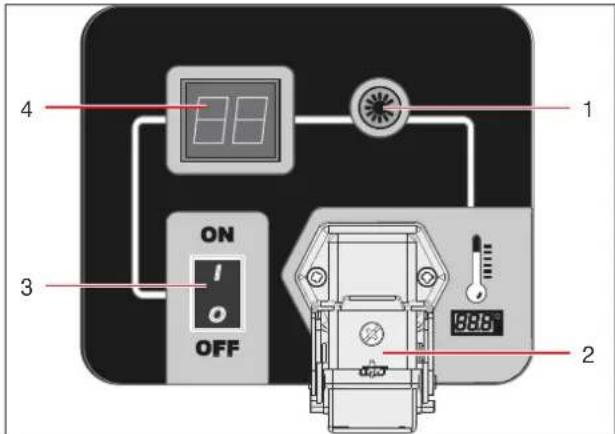
Illustration 20: Control panel
| 1 | Operating status indicator | 2 | Room thermostat connection |
| 3 | Device switch | 4 | Display |

Illustration 21: Reset button
| 1 | Reset button |
The device is switched on and off with the device switch.
The display shows the fault codes, if any. Press the reset button to reset the device after a fault or malfunction has been rectified. Press and hold the reset button until the fault code is no longer displayed.
The operating status indicator indicates whether the device is switched on and running.
Room thermostat
By connecting a room thermostat (see Accessories [▶ 40]), the device can be operated without constant
supervision. In this case, the device runs continuously until the set room temperature is reached.
15 Transport, installation and commissioning
The device has been assembled, configured and tested at the factory. Therefore, there may still be oil residues in the pipes.
In order to avert the risk of serious or fatal injury and damage to the device during transport and installation, observe the following:
- The device must be transported and installed by suitably qualified and authorised persons.
- Transport routes must be wide enough to transport the device safely.
- All work on the electrical equipment must be performed by qualified electricians.

DANGER
Danger to life from electric shock
Touching live parts can be fatal.
a) Before transporting the device to a different location, switch it off at the device switch and disconnect the mains plug (mains power operation).
b) Never pull the device by the power cord; always move it by the handle provided.

CAUTION
Risk of injury from burns on hot surfaces
The housing of the device and in particular the heating plate, the protective grille, the combustion chamber and the guard become very hot during operation, and can cause burns. Particular caution is required at places where children or persons with a physical, sensory or mental disability are present.
a) Do not touch hot surfaces.
b) Wear protective gloves.
c) If children or persons with a physical, sensory or mental disability are present near the device, supervise them closely.

CAUTION
Risk of injury due to device toppling over
There is a serious risk of injury, if the device topples over or falls during transport.
a) Wear safety footwear and protective gloves.
b) Carry the device by the handle.
a) Wear safety footwear and protective gloves. b) Carry the device by the handle.
Unpacking and assembling device
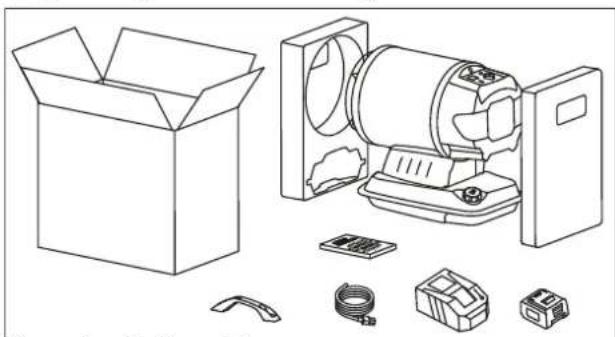
Illustration 22: Unpacking
a) Open the packaging and remove it from the device.
b) Check the delivery for completeness.
Report any transport damage or incomplete delivery to your dealer.
c) Make sure that the battery and the power cord are not damaged.
d) Using the supplied screws, attach the handle to the device.
e) Dispose of the packaging according to the applicable statutory regulations.
Charging battery
The lithium-ion battery must be charged with the original battery charges supplied with the device. Operate the battery charger only in a dry and dust-free room. The charger comes with a control unit that controls the charging cycle. It features an indicator showing the status of the charging process.
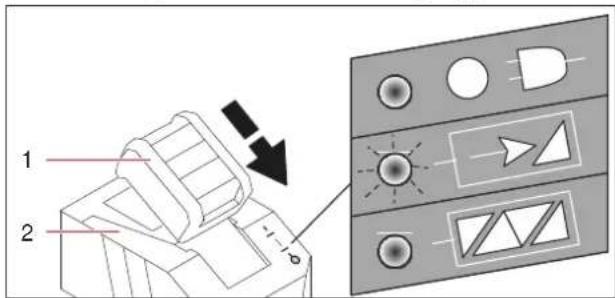
Illustration 23: Charging battery
| 1 | Battery | 2 | Charger |
a) Connect the power cord to the power port of the battery charger.
b) Connect the mains plug to a mains socket that is earthed or protected by an integrated RC circuit breaker (see Technical data and factory settings [▶ 40]).
c) Slide the battery to the stop into the battery cradle of the charger.
→ The charging process starts automatically.
d) When the battery is fully charged, the status indicator on the charger is lit,
→ and the charger switches to trickle charging mode
Refuelling

Illustration 24: Refuelling
| 1 | Fuel tank cap | 2 | Fuel tank level indicator |
a) Open the fuel tank cap and fill the tank with a suitable fuel (see also Fuel [▶ 26]). Do not overfill the tank. Monitor the filling level at the filling level indicator.
NOTICE! Use only fuels that are suitable for the device.
b) Close the fuel tank cap.
Installing device on site
To install the device on site, observe the Operating conditions [▶ 26] and the following rules:
- Transport the device by the handle.
- Position the device so that the air intake is not obstructed.
- Ensure adequate air circulation around the combustion chamber. Keep the prescribed minimum distances to other objects (see Operating conditions [▶ 27]).
- Keep the device away from loose objects, including curtains, etc.
- Do not place the device on a wet surface.
- There should be no objects between the device and the item to be heated.
- The device must be in a stable position so that it cannot topple during operation.
Connecting device to power supply
Battery operation
a) For battery operation: Slide the battery into the battery slot of the device and ensure that it engages.
⇒ The device is now ready for operation.
Mains power operation
a) Connect the power cord to the power port of the device.
b) Connect the mains plug to a mains socket that is earthed or protected by an integrated RC circuit breaker (see Technical data and factory settings [▶ 40]).
→ The device is now ready for operation.
Connecting external room thermostat

NOTICE
Use original accessories
To ensure reliable device operation, only connect original accessories to the device.

Illustration 25: Connecting thermostat
| 1 | Socket for thermostat | 2 | Protective cap |
| 3 | Thermostat plug | 4 | Thermostat |
√ The device is in standby mode – the device is switched off and the battery is inserted in the slot or the mains plug is connected.
a) Remove the protective cap from the device socket.
b) Plug the thermostat plug into the socket and lock the plug.
c) Place the thermostat in a suitable position.
16 Device operation and control
Safety instructions for operation

CAUTION
Risk of injury from burns on hot surfaces
The housing of the device and in particular the heating plate, the protective grille, the combustion chamber and the guard become very hot during operation, and can cause burns. Particular caution is required at places where children or persons with a physical, sensory or mental disability are present.
a) Do not touch hot surfaces.
b) Wear protective gloves.
c) If children or persons with a physical, sensory or mental disability are present near the device, supervise them closely.
Prior to switching on
a) Make sure that the device is not standing on a wet surface and that it is in an upright and stable position.
b) Make sure that there is fuel in the tank.
c) For battery operation: Make sure that the battery is free of defects, charged and inserted into the device.
d) For mains power operation: Make sure that the power cord is properly connected and not damaged.
Make sure that the device is connected to a mains socket with the correct voltage and protection (see Technical data and factory settings [▶ 40]).
e) Strictly adhere to all instructions in the Operating conditions [▶ 26] are adhered to.
Switching device on
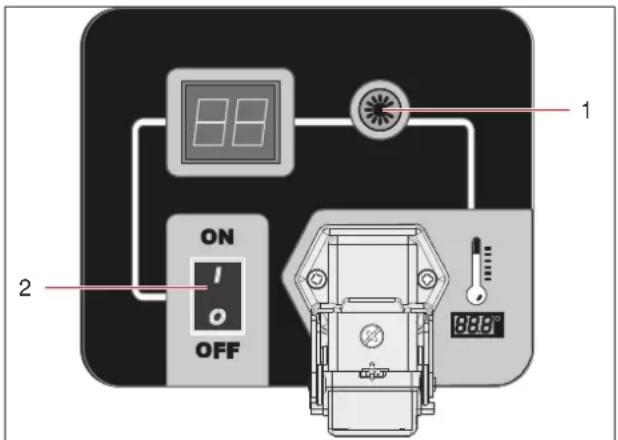
Illustration 26: Switching device on
| 1 | Operating status indicator | 2 | Device switch |
a) Set the device switch at the control panel to position [ON].
The device starts within a few seconds. Should the device fail to start, refer to section Malfunctions during operation [▶ 34].
⇒ The device is switched on and runs in continuous mode.
NOTICE! After a short time of operation, the target temperature is reached and the fuel pump is switched to energy-saving mode. This prolongs the battery time. When the fuel pump is in energy-saving mode, it makes a ticking noise. This is normal and not a sign of a defect or fault.
Resetting device
If a malfunction occurs, the device is automatically switched to fault mode and the reset button at the control panel is lit (see Malfunctions during operation [▶ 34]). Depending on the fault code, the device needs to be reset.
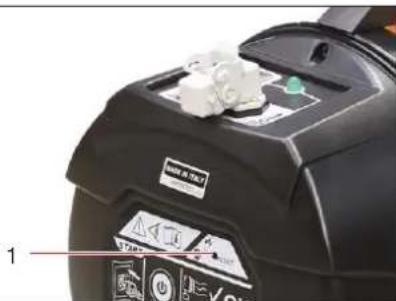
Illustration 27: Resetting device
| 1 | Reset button |
√ A fault code is shown in the display.
a) Eliminate the cause of the fault (see also Malfunctions during operation [▶ 34]).
b) Press and hold the reset button for 2 seconds until the fault message is no longer displayed.
⇒ The device is reset and switches on automatically.
If you are unable to eliminate the cause of the problem, contact the HEYLO service department.
Switching device off

ATTENTION
Damage to combustion chamber by disconnecting power supply
If the device is switched off by removing the battery or disconnecting the mains plug, it cannot cool down properly, and this can lead to damage to the burner and the combustion chamber.
a) Always switch off the device at the device switch and let the cooling time elapse (until the fan stops) before removing the battery or disconnecting the device from the power mains.
a) Set the device switch to position [OFF].
CAUTION! Do not remove the battery or disconnect the mains plug while the fan is running!
⇒ The temperature control system of the device switches off the fan with a delay to ensure that the combustion chamber cools down properly.
⇒ The device is now switched off.
Operation with room thermostat
√ The room thermostat is connected and the device is ready for operation.
a) Set the room thermostat to the desired target temperature.
b) Set the device switch to position [ON].
→ The device runs in heating mode as long as the room temperature is below the set target temperature.
The device is automatically switched off as soon as the set target temperature is reached. The fan continues to run until the combustion chamber is at room temperature. If the temperature drops again below the set target temperature, the device resumes heating operation.
17 Malfunctions
For troubleshooting, observe the following general rules:
- All work must be carried out by trained and authorised technicians.
- During the statutory warranty period, all work on the device must be carried out by the manufacturer or by persons authorised by the manufacturer.
a) Let the device cool down.
b) Wear suitable protective clothing.
c) Check all fuel pipes and fuel system components for leakage.
d) Before restarting the device, install all safety devices as attached at the factory.
e) Check that the safety devices are working properly.
f) After completion of the work, remove all tools and objects from the working area around the device.
Safety instructions for troubleshooting

DANGER
Danger to life from electric shock
Touching live parts can be fatal.
a) Before carrying out any work on electrical components, let the device cool down, if necessary, and remove the battery (battery operation) or disconnect the mains plug (mains power operation).

WARNING
Risk of deflagration
If the burner is repeatedly restarted without working properly, there is a risk of deflagration of the fuel that has collected in the combustion chamber.
a) Do not restart the burner more than 3 times in succession. Risk of deflagration!
b) Contact the HEYLO service department.

CAUTION
Risk of injury from burns on hot surfaces
The housing of the device and in particular the heating plate, the protective grille, the combustion chamber and the guard become very hot during operation, and can cause burns. Particular caution is required at places where children or persons with a physical, sensory or mental disability are present.
a) Do not touch hot surfaces.
b) Wear protective gloves.
c) If children or persons with a physical, sensory or mental disability are present near the device, supervise them closely.

CAUTION
Risk of injury due to missing guards
Missing guards can lead to injury.
a) Before switching on the device, install all guards that may have been removed for troubleshooting.
b) Check all the safety devices before switching on the device.

NOTICE
Cleaning combustion chamber and checking exhaust gas values
If there is soot in the combustion chamber, it might be necessary to clean it.
After cleaning the combustion chamber, check whether the heater runs without producing soot.
17.1 Restarting after an unscheduled downtime
Power failure
After a power failure, or if the battery is fully discharged, the burner might be in fault mode.
a) Reconnect the device to the power supply (battery operation or mains power operation).
b) Press the reset button at the control panel and reset the burner.
c) Start the device.
⇒ If the device returns to failure mode, there might be a problem with overheating. In this case, shut down the device and arrange for a repair to be carried out.
17.2 Malfunctions during operation

NOTICE
If the device is supplied with power from the mains socket, all work on the electrical system must be carried out by a qualified electrician or an electrically instructed person in accordance with DGUV regulation 3 or DIN VDE 0105-100 or DIN VDE 0701-702.
Have all repair work on the electrical, gas and oil connections carried out by HEYLO service personnel or by HEYLO service partners.
To identify and eliminate problems, refer to the troubleshooting table below:
| Fault code | Possible cause / remedy |
| F0 | Device switch in ON position; battery inserted or device connected to power mains– Remove the battery or disconnect the mains plug.– Set the device switch to OFF.– Insert the battery or connect the mains plug.– Set the device switch to ON. |
| F1 | No fuel- Set the device switch to OFF.- Top up fuel tank.Fuel contaminated- Set the device switch to OFF.- Empty the tank and fill it with clean fuel (see Checking and cleaning the device [▶ 37]).- Clean the filter (see Checking and cleaning the device [▶ 37]). |
| Photocell dirty or defectiveContact HEYLO Customer Service. | |
| Fuel filter cloggedClean the filter (see Checking and cleaning the device [▶ 37]). | |
| Ignition failureContact HEYLO Customer Service. | |
| F2 | Cable breakContact HEYLO Customer Service. |
| Sensor defectiveContact HEYLO Customer Service. | |
| F3 | Overheating of deviceSwitch off the device and let it cool down.Angle sensor (tipping protection)Place the device on a level, sturdy surface. |
| F4 | Incorrect voltageCheck the battery or the mains power supply (see Technical data and factory settings [▶ 40]). |
| FF | No fuel supplyContact HEYLO Customer Service. |
| Fuel filter cloggedContact HEYLO Customer Service. | |
| Photocell dirty or defectiveContact HEYLO Customer Service. | |
| Nozzle blocked or defectiveContact HEYLO Customer Service.Angle sensor triggeredContact HEYLO Customer Service. | |
| PF | Battery emptyCharge the battery. |
| Fault code | Possible cause / remedy |
| [-] | Thermostat connectedThe thermostat target temperature is set to a value below room temperature. |
| Changing from mains power to battery operationAutomatic restart (if the device is run from the mains power and the battery is inserted, and the power cord is disconnected, the device is automatically switched off and on). |
Table 7: Fault codes shown on display
| Malfunction / message | Possible cause / remedy |
| Device fails to start | Device lockedSwitch the device off and then back on again. |
| Device switch in position [OFF]Set device switch to position [ON]. | |
| No power– Charge the battery.– Connect the power cord to the power port of the device.– Check the power supply (see Technical data and factory settings [▶ 40]).– Contact HEYLO Customer Service. | |
| Supply line disconnectedContact HEYLO Customer Service. | |
| Electronics disabled– Switch the device off and then back on again.– Read the fault code on the display.– Contact HEYLO Customer Service. | |
| Incorrect room thermostat settings (optional equipment)Set the room thermostat to a temperature that is higher than the current ambient temperature. | |
| Safety temperature limiter (STL) triggered– Wait 10 minutes and then try to switch on the device.– Contact HEYLO Customer Service. | |
| Fuse blownContact HEYLO Customer Service. | |
| The motor/pump starts, but there is no ignition or flame | No fuel- Set the device switch to OFF.- Top up fuel tank.- Switch on the device - set the device switch to position ON. |
| Ignitor dirtyContact HEYLO Customer Service. | |
| Fuel contaminatedClean the filter (see Checking and cleaning the device [▶ 37]). | |
| Nozzle blockedContact HEYLO Customer Service. | |
| Photocell dirty, defective or incorrectly installedContact HEYLO Customer Service. | |
| Foreign objects in tank- Set the device switch to OFF.- Empty the tank and fill it with clean fuel (see Checking and cleaning the device [▶ 37]).- Clean the filter (see Checking and cleaning the device [▶ 37]). | |
| Electrodes spent or installed at wrong distance to each otherContact HEYLO Customer Service. | |
| Rotor blocked or rotating too slowly | Motor defectiveContact HEYLO Customer Service. |
Table 8: Malfunction table
18 Cleaning and maintenance
For cleaning and maintenance, observe the following general safety rules:
- All work must be carried out by trained and authorised technicians.
a) Switch off the device before starting work, wait until the cooling phase has elapsed and then remove the battery or disconnect the mains plug.
b) Wear suitable personal protective equipment.
c) Before restarting the device, install all safety devices as attached at the factory.
d) Check that the safety devices are working properly.
e) After completion of the work, remove all tools and objects from the working area around the device.
f) Use only original spare parts and accessories.

DANGER
Danger to life from electric shock
Touching live parts can be fatal.
a) Before carrying out any work on electrical components, let the device cool down, if necessary, and remove the battery (battery operation) or disconnect the mains plug (mains power operation).

CAUTION
Risk of injury from burns on hot surfaces
The housing of the device and in particular the heating plate, the protective grille, the combustion chamber and the guard become very hot during operation, and can cause burns. Particular caution is required at places where children or persons with a physical, sensory or mental disability are present.
a) Do not touch hot surfaces.
b) Wear protective gloves.
c) If children or persons with a physical, sensory or mental disability are present near the device, supervise them closely.

CAUTION
Risk of injury from inadvertent device start-up
Uncontrolled start-up of the burner can lead to injury.
a) Switch the device off at the device switch and remove the battery or disconnect the mains plug.

CAUTION
Risk of injury due to missing guards
Missing guards can lead to injury.
a) Before switching on the device, install all guards that may have been removed for troubleshooting.
b) Check all the safety devices before switching on the device.

CAUTION
Risk of injury from not wearing personal protective equipment
When cleaning and maintaining the device, you may injure yourself on sharp edges, or through inhaling or coming into contact with toxic substances.
a) Wear protective gloves and respiratory protection.

ATTENTION
Damage to device from insufficient maintenance
Insufficient maintenance leads to excessive wear and expensive repairs.
a) Carry out the necessary maintenance work in accordance with the manufacturer's instructions.
b) In the event of damage to mechanical parts, switch off the device without delay and arrange for professional repair with original spare parts.

NOTICE
Performing regular maintenance
Regular maintenance is part of proper use and indispensable for safe and efficient operation.
18.1 Checking and cleaning the device
The cleaning intervals for the device depend on the actual operating conditions. Check and clean the device regularly.

NOTICE
Suitable cleaning products
Suitable cleaning products for your device are available from your dealer or directly from HEYLO.
- Cleaning can be performed with compressed air, a vacuum cleaner or by wiping with a damp cloth. CAUTION! Never use a hose or high-pressure cleaner.
- The electrical system must be checked regularly for signs of damage.
- To ensure trouble-free operation, regularly check and clean the filters of the device.
Switching device off
To clean and check the device, switch it off as follows:
a) Switch off the device at the device switch and let the cooling time elapse.
b) Remove the battery or disconnect the mains plug.
Cleaning device housing
a) Clean the housing with a damp, lint-free cloth and a mild detergent. The original gloss can be restored with polish.
Cleaning fuel tank
Clean the fuel tank at least once a year, or as required.
a) Place a container that can hold the entire tank volume under the fuel tank cap.
b) Open the fuel tank cap.
c) Let the content of the fuel tank drain into the container.
d) Rinse the tank with clean fuel.
e) Dispose of the fuel according to the relevant statutory regulations.
Cleaning filter
Clean the oil filter at least once a year, or as required. Always replaced damaged old filters.
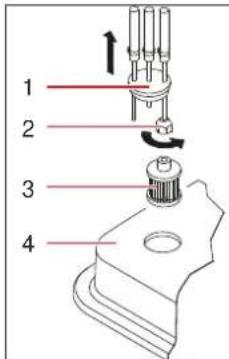
Illustration 28: Cleaning oil filter
| 1 | Filter lid with fuel feed/return line | 2 | Nut |
| 3 | Filter cartridge | 4 | Fuel tank |
The oil filter must be checked regularly and replaced if necessary. Proceed as follows:
√ Keep a cloth to collect any escaping fuel ready.
a) Carefully pull the filter lid with the fuel feed/return lines from the fuel tank.
b) Pull the filter cartridge from the fuel tank.
c) Loosen the nut from the filter lid and remove the filter cartridge.
Collect any fuel escaping in the process with the cloth.
d) Clean the filter cartridge with clean fuel. Do not damage the filter when handling it.
If the filter cartridge is damaged, replace it.
e) Push the filter cartridge into the filter lid and mount the nut.
f) Carefully place the filter lid with the fuel feed/return lines in the fuel tank.
g) Dispose of the spent filter cartridge and the fuel according to the relevant statutory regulations.
Cleaning fuel pump filter
The fuel pump filter must be cleaned at least once a year, or as required. Contact the HEYLO service department.
Replacing oil nozzle
The oil nozzle must be replaced at least once a year. Contact the HEYLO service department.
Cleaning ignition electrodes, fan propeller and combustion chamber
The ignition electrodes, fan propeller and combustion chamber must be cleaned as required. Contact the HEYLO service department.
18.2 Inspecting electrical system

DANGER
Touching electrically live parts can be fatal.
Improper or inadequate inspection and maintenance can lead to device components becoming live during device operation.
a) The electrical system must be inspected and serviced by a qualified electrician.
b) Once the work has been completed, all safety devices must be reinstalled as specified and checked.
a) Check all the electrical components of the device for visible damage, loose contacts and contamination. To do this, remove the guard in order to inspect the internal wiring. Remove any external contamination with a lint-free cloth and replace any defective or damaged components.
b) If used commercially in Germany: An annual DGUV V3 inspection in accordance with German Statutory Accident Insurance (DGUV) rules must be carried out and documented.
⇒ The inspection of the electrical system of the device is now complete.
18.3 Burner service
The burner must be serviced regularly as follows:
- Clean the oil filter (see Checking and cleaning the device [▶ 37])
- Adjust the combustion chamber damper (see Adjusting combustion chamber damper [▶ 38])
Before carrying out any maintenance work:
a) Switch the device off at the device switch and remove the battery or disconnect the mains plug.
For any of the tasks below, contact the HEYLO Service department (see also Malfunctions during operation [▶ 34]):
- Replacing oil nozzle
- Adjusting ignition electrode settings
- Adjusting pump pressure
– Exhaust gas analysis
Oil pump service
To service the oil pump, you need additional information about the pump settings. Contact the HEYLO service department.
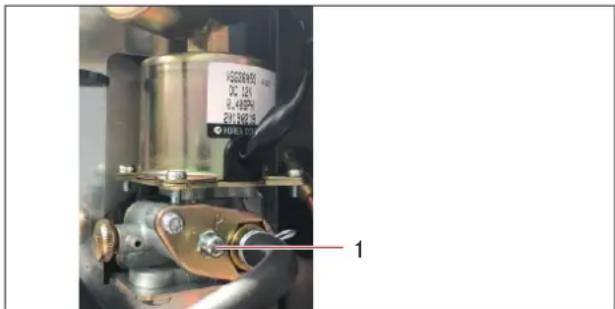
Illustration 29: Oil pump
| 1 | Oil pressure adjusting screw (sealed; adjustment only by HEYLO service personnel) |
18.3.1 Adjusting combustion chamber damper
The combustion chamber damper must be checked regularly and readjusted, if necessary. The opening of the damper depends primarily on the ambient temperature.
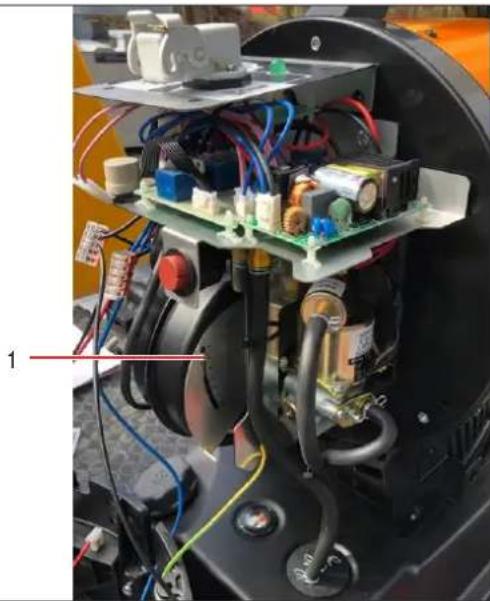
Illustration 30: Adjusting combustion chamber damper
| 1 | Damper adjusting screw |
√ Switch off the device and let it cool down. Remove the battery or disconnect the mains plug.
a) Loosen the screws of the housing cover and remove the cover.
b) Adjust the damper screw, using a screwdriver.
→ Start the device to make sure that it ignites properly and does not produce soot. If necessary, readjust the damper.
c) Mount the housing cover.
⇒ The combustion chamber damper is correctly set.
18.4 Wear and spare parts
Spare parts must meet the technical requirements specified by HEYLO. HEYLO original spare parts must meet stringent requirements.
HEYLO assumes no warranty for damage caused by the use of spare parts from other manufacturers.
To order wear and spare parts, please contact your dealer or HEYLO directly, providing the following information:
- Device type
- Serial number,
- Designation of the component
- Quantity
- Shipping method
See also
Contact to HEYLO GmbH [▶ 24]
18.5 Customer service by the manufacturer
HEYLO recommends taking out a maintenance contract with the HEYLO Service Department.
See also
Contact to HEYLO GmbH [▶ 24]
19 Repairs
This section describes which repair tasks can be performed by whom.

NOTICE
During the warranty period, all repairs must be performed by persons authorised by the manufacturer.
Repair by device owner
After the warranty period has elapsed, certain repair can be carried out by the device owner, provided he or she has the necessary skills. HEYLO shall not be liable for damage caused by such repairs.
If you have any questions about repairs, contact the HEYLO service department or your dealer.
See also
Contact to HEYLO GmbH [▶ 24]
20 Decommissioning, storage and disposal
The following principles apply for the decommissioning, storage and disposal of the device:
These tasks may only be carried out by trained and authorized specialists.

DANGER
Danger to life due to electric shock
Touching electrically live parts can be fatal.
a) Switch off the device and pull out the mains plug.
20.1 Decommissioning
Temporary decommissioning
a) Switch off the device at the device switch and let the cooling time elapse.
b) Remove the battery or disconnect the mains plug.
c) Empty the fuel tank and dispose of the fuel according to the statutory regulations.
d) Clean the device (see Checking and cleaning the device [▶ 37]).
⇒ The device has now been temporarily decommissioned.
Final decommissioning
√ Carry out all the steps for temporary decommissioning.
a) Disconnect all incoming and outgoing lines (power supply).
⇒ You have now taken the device permanently out of service.
See also
Contact to HEYLO GmbH [▶ 24]
20.2 Storing the device
a) Before putting the device in storage, run it briefly in heating mode with winter diesel to fill the pipes with a frost-proof fuel.
b) Store the device in a dry place where it is protected against frost. Observe the prescribed storage temperature range (see Technical data and factory settings [▶ 40]).
20.3 Disposal
The device is primarily made of recyclable materials. If handled properly, it does not present a hazard to the operator and the environment. However, operation of the device might produce waste containing harmful and/or environmentally hazardous substances (air filters). These materials must be disposed of properly according to the statutory regulations.
The individual components of the device (e.g. pumps, metal components, etc.) must be taken to a qualified disposal and recycling company. Commission a qualified, specialist company to dispose of and recycle the device.
See also
Contact to HEYLO GmbH [▶ 24]
21 Technical data and factory settings
| Model | IR 20 H |
| Prod. no. | 2202601 |
| Rated heat output [kW / BTU/h / kcal/h] | 17 / 58000 / 14600 |
| Fuel autonomy [h] | 7 |
| Fuel consumption [l/h] | 1.35 |
| Model | IR 20 H |
| Admissible fuels | Diesel, petrol |
| At temperature below 5°C | Winter diesel |
| Fuel tank capacity [l] | 11 |
| Battery voltage [V] | 14 |
| Main power connection [V/Hz] | 220-240 / 50 |
| Power consumption [kW] | 0.2 |
| Current consumption [A] | 0.4 |
| Protection class [IP] | 44 |
| Weight without fuel [kg] | 19 |
| Length [mm] | 560 |
| Width [mm] | 345 |
| Height [mm] | 575 |
Table 9: Technical data
| Parameter | Value |
| Oil pump pressure [bar] | 9.5 |
| Oil nozzle injection rate [US gal/h] | 0.40 |
| Air intake setting | 1.5 |
| Nozzle type | Danfoss0.40 gal/h 60°S |
Table 10: Factory settings
22 Supplementary documents
22.1 Accessories
| HEYLO art.no. | Description |
| 1240100 | Room thermostat |
22.2 Declaration of conformity
EC Declaration of Conformity IIA in accordance with European Machinery Directive 2006/42/EC

For device series: Infrared oil heater
Type: IR 20 H
HEYLO GmbH, Im Finigen 9, 28832 Achim, Germany, hereby declares that the design and construction of the equipment described in this document in the version provided by us comply with the fundamental health and safety requirements specified in Directive 2006/42/EC, Annex I.
Applicable European Directives:
Machinery Directive 2006/42/EC
Low Voltage Directive 2014/35/EU
EMC Directive 2014/30/EU
Unauthorised modifications to the equipment shall void this Declaration of Conformity.
Applied standards:
EN 62233:2008
- Managing Director -
SIE HABEN FRAGEN? WIR HELFEN IHNEN GERN! Do you have any questions? We are happy to help you!
HEYLO Kundendienst – Technischer Support und Service HEYLO Customer Service – Technical Support and Service
Tel. +49 (0) 42 02 - 97 55 15


- TRANSLATION OF THE ORIGINAL INSTRUCTION MANUAL
- INHALTSVERZEICHNIS
- 12 ABOUT THIS OPERATING MANUAL 23
- 13 SAFETY 24
- 14 PRODUCT DESCRIPTION 28
- 15 TRANSPORT, INSTALLATION AND COMMISSIONING - 30
- 16 DEVICE OPERATION AND CONTROL ---- 32
- 17 MALFUNCTIONS 33
- 18 CLEANING AND MAINTENANCE ---- 36
- 19 REPAIRS 39
- 20 DECOMMISSIONING, STORAGE AND DISPOSAL ---- 39
- 21 TECHNICAL DATA AND FACTORY SETTINGS ---- 40
- 22 SUPPLEMENTARY DOCUMENTS 40
- 12 ABOUT THIS OPERATING MANUAL
- 12.1 THE PURPOSE OF THIS MANUAL
- 12.2 KEEP THE MANUAL SAFE AND AT HAND AT ALL TIMES
- 12.3 SYMBOLS AND DEFINITIONS USED
- INSTRUCTIONS
- DANGER
- WARNING INDICATING AN IMMEDIATE DANGER FOR PEOPLE
- WARNING
- WARNING INDICATING A POTENTIAL DANGER FOR PEOPLE
- CAUTION
- ATTENTION
- WARNING OF POSSIBLE DAMAGE TO PROPERTY
- EXAMPLE
- ELECTRIC SHOCK ARISING FROM HIGH VOLTAGE (TYPE AND SOURCE OF HAZARD)
- NOTICE
- INFORMATION
- MANDATORY SYMBOLS
- MARKINGS IN THE TEXT
- ACTION INSTRUCTIONS
- 12.4 WARRANTY
- 12.5 CONTACT TO HEYLO GMBH
- 13 SAFETY
- AVOIDING HAZARDOUS SITUATIONS
- SAFETY INSTRUCTIONS FOR WORK ON ELECTRICAL EQUIPMENT
- INSTRUCTIONS FOR TRANSPORT AND INSTALLATION
- SAFETY INSTRUCTIONS FOR DEVICE OPERATION
- MAINTENANCE AND TROUBLESHOOTING
- 13.1 NOTES ON FIRE PROTECTION
- WARNING! NEVER COVER THE DEVICE, AS IT MIGHT OTHERWISE OVERHEAT
- 13.2 FUEL
- ADMISSIBLE FUEL
- 13.3 INSTRUCTIONS FOR BATTERY OPERATION
- MAINTAINING MAXIMUM BATTERY LIFE
- 13.4 PROTECTION OF THE ENVIRONMENT
- 13.5 OPERATING CONDITIONS
- PLACE OF INSTALLATION
- HANDLING
- INDOOR INSTALLATION
- FOR THE INSTALLATION OF THE DEVICE IN WELL-VENTILATED ROOMS, OBSERVE THE FOLLOWING GENERAL RULES
- OUTDOOR INSTALLATION
- SAFETY CLEARANCES
- SEE ALSO
- 13.6 PERSONAL PROTECTIVE EQUIPMENT
- 14 PRODUCT DESCRIPTION
- 14.1 IDENTIFICATION
- TYPE PLATES
- 14.2 GENERAL DESCRIPTION
- DESIGN AND SCOPE OF DELIVERY
- MODE OF OPERATION
- OPERATION WITH ROOM THERMOSTAT
- 14.2.1 INTENDED USE
- 14.2.2 IMPROPER USE
- 14.2.3 FORESEEABLE MISUSES
- 14.3 SAFETY DEVICES
- SIGNALLING DEVICES
- SAFETY SHUTDOWN
- 14.4 CONTROL AND DISPLAY ELEMENTS
- ROOM THERMOSTAT
- 15 TRANSPORT, INSTALLATION AND COMMISSIONING
- DANGER TO LIFE FROM ELECTRIC SHOCK
- RISK OF INJURY FROM BURNS ON HOT SURFACES
- RISK OF INJURY DUE TO DEVICE TOPPLING OVER
- UNPACKING AND ASSEMBLING DEVICE
- ILLUSTRATION 22: UNPACKING
- CHARGING BATTERY
- ILLUSTRATION 23: CHARGING BATTERY
- REFUELLING
- ILLUSTRATION 24: REFUELLING
- INSTALLING DEVICE ON SITE
- CONNECTING DEVICE TO POWER SUPPLY
- BATTERY OPERATION
- MAINS POWER OPERATION
- CONNECTING EXTERNAL ROOM THERMOSTAT
- USE ORIGINAL ACCESSORIES
- 16 DEVICE OPERATION AND CONTROL
- PRIOR TO SWITCHING ON
- RESETTING DEVICE
- SWITCHING DEVICE OFF
- DAMAGE TO COMBUSTION CHAMBER BY DISCONNECTING POWER SUPPLY
- 17 MALFUNCTIONS
- SAFETY INSTRUCTIONS FOR TROUBLESHOOTING
- RISK OF DEFLAGRATION
- RISK OF INJURY DUE TO MISSING GUARDS
- CLEANING COMBUSTION CHAMBER AND CHECKING EXHAUST GAS VALUES
- 17.1 RESTARTING AFTER AN UNSCHEDULED DOWNTIME
- POWER FAILURE
- 17.2 MALFUNCTIONS DURING OPERATION
- 18 CLEANING AND MAINTENANCE
- RISK OF INJURY FROM INADVERTENT DEVICE START-UP
- RISK OF INJURY FROM NOT WEARING PERSONAL PROTECTIVE EQUIPMENT
- DAMAGE TO DEVICE FROM INSUFFICIENT MAINTENANCE
- PERFORMING REGULAR MAINTENANCE
- 18.1 CHECKING AND CLEANING THE DEVICE
- SUITABLE CLEANING PRODUCTS
- CLEANING DEVICE HOUSING
- CLEANING FUEL TANK
- CLEANING FILTER
- CLEANING FUEL PUMP FILTER
- REPLACING OIL NOZZLE
- CLEANING IGNITION ELECTRODES, FAN PROPELLER AND COMBUSTION CHAMBER
- 18.2 INSPECTING ELECTRICAL SYSTEM
- TOUCHING ELECTRICALLY LIVE PARTS CAN BE FATAL
- 18.3 BURNER SERVICE
- BEFORE CARRYING OUT ANY MAINTENANCE WORK
- OIL PUMP SERVICE
- 18.3.1 ADJUSTING COMBUSTION CHAMBER DAMPER
- 18.4 WEAR AND SPARE PARTS
- 18.5 CUSTOMER SERVICE BY THE MANUFACTURER
- 19 REPAIRS
- REPAIR BY DEVICE OWNER
- 20 DECOMMISSIONING, STORAGE AND DISPOSAL
- DANGER TO LIFE DUE TO ELECTRIC SHOCK
- 20.1 DECOMMISSIONING
- TEMPORARY DECOMMISSIONING
- FINAL DECOMMISSIONING
- 20.2 STORING THE DEVICE
- 20.3 DISPOSAL
- 21 TECHNICAL DATA AND FACTORY SETTINGS
- 22 SUPPLEMENTARY DOCUMENTS
- 22.1 ACCESSORIES
- 22.2 DECLARATION OF CONFORMITY
- EC DECLARATION OF CONFORMITY IIA IN ACCORDANCE WITH EUROPEAN MACHINERY DIRECTIVE 2006/42/EC
- APPLICABLE EUROPEAN DIRECTIVES
- APPLIED STANDARDS
- SIE HABEN FRAGEN? WIR HELFEN IHNEN GERN! DO YOU HAVE ANY QUESTIONS? WE ARE HAPPY TO HELP YOU
Brand : Heylo
Model : IR 20 H
Category : Heating