Speedlite V1 Canon - Flash GODOX - Free user manual and instructions
Find the device manual for free Speedlite V1 Canon GODOX in PDF.


| Product Type | Round-head flash for Canon cameras |
| Dimensions (approx.) | 76 x 93 x 197 mm (3 x 3.7 x 7.8 in) |
| Weight (including battery) | Approx. 530 g (18.7 oz) |
| Power Source | Rechargeable lithium-ion battery pack (7.2 V, 2600 mAh) |
| Guide Number (ISO 100, 200 mm) | GN 76 (m) |
| Flash Coverage | Auto zoom (20–200 mm) with manual/automatic adjustment |
| TTL Compatibility | Canon E-TTL / E-TTL II |
| High-Speed Sync (HSS) | Up to 1/8000 s (depending on camera) |
| Wireless Control | Built-in Godox 2.4G wireless (Master/Slave, up to 100 m) |
| Modeling Light | Built-in LED modeling light (10 levels) |
| Recycle Time | ~0.01–1.5 s (depending on power level) |
| Flash Duration | 1/300 s – 1/20000 s (depending on power) |
| Color Temperature | Approx. 5600 K ± 200 K |
| Firmware Upgrade | Via USB-C port (using Godox G3 software) |
| Camera Compatibility | Canon EOS cameras with hotshoe |
| Maintenance & Cleaning | Wipe with a soft, dry cloth; avoid liquids |
| Safety Precautions | Do not disassemble; use only specified battery/charger; avoid heat/moisture |
| Spare Parts & Repairability | Replaceable flash tube, battery, and battery charger available; service by authorized centers |
| Additional Features | Silent mode, quick-release lock, external power port |
Frequently Asked Questions - Speedlite V1 Canon GODOX
User questions about Speedlite V1 Canon GODOX
0 question about this device. Answer the ones you know or ask your own.
Ask a new question about this device
Download the instructions for your Flash in PDF format for free! Find your manual Speedlite V1 Canon - GODOX and take your electronic device back in hand. On this page are published all the documents necessary for the use of your device. Speedlite V1 Canon by GODOX.
USER MANUAL Speedlite V1 Canon GODOX
TTL Li-ion Round Head Camera Flash
V1©
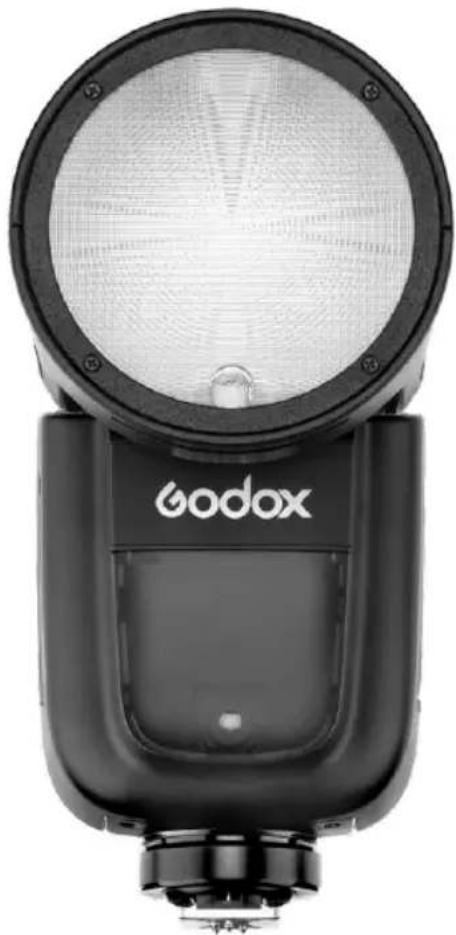
natural_image
Black and white photo of a Godox brand flash unit (no visible text or symbols on body)INSTRUCTION MANUAL 说明手册
深圳市神牛摄影器材有限公司
GODOX Photo Equipment Co., Ltd.
1st to 4th Floor, Building 2/1st to 4th Floor, Building 4, Yaochuan Industrial Zone,
Tangwei Community, Fuhai Street, Bao'an District, Shenzhen 518103, China
电话/Tel: +86-755-29609320(8062) 传真/Fax: +86-755-25723423
邮箱/E-mail: godox@godox.com
705-V1C000-00
http://www.godox.com
Made In China
F€ CE RoHS
在使用本产品之前:
Before using this product:
Please read this user manual carefully in order to ensure your safety and the proper operation of this product. Keep for future reference.
Foreword
Thank you for purchasing this product.
This V1C camera flash applies to Canon EOS series cameras and is compatible with E-TTL II autoflash. With this E-TTL II compatible flash, your shooting will become simpler. You can easily achieve a correct flash exposure even in complex light-changing environments. This camera flash features:
- With round flash head to achieve soft, even and more creative light effects. It has a 2W LED modeling lamp, which can be used off the camera.
- 76Ws power output at the max step. 81 steps from 1/1 to 1/128.
- 6 max 480Pro 2 00mAh Li-ion Battery-.1.5s recycle- full power pops.
- Fully support Canon E-TTL II camera flash. Workable as Master or Slave unit in a wireless flash group.
- Use dot-matrix LCD panel to make clear and convenient operations.
- With built-in 2.4GHz wireless remote system to support transmitting and receiving.
- Provided multiple functions, include HSS (up to 1/8000s), FEC, FEB, etc.
- Stable consistency and color temperature with good even lighting.
- Support with firmware upgrade.
Warning
▲ Always keep this product dry. Do not use in rain or in damp conditions.
Do not disassemble. Should repairs become necessary, this product must be sent to an authorized maintenance center.
Keep out of reach of children.
⚠️ Stop using this product if it breaks open due to extrusion, falling or strong hit. Otherwise, electric shock may occur if you touch the electronic parts inside it.
Do not fire the flash directly into the eyes (especially those of babies) within short distances. Otherwise visual impairment may occur.
Do not use the flash unit in the presence of flammable gases, chemicals and other similar materials. In certain circumstance, these materials may be sensitive to the strong light emitting from this flash unit and fire or electromagnetic interference may result.
Do not leave or store the flash unit if the ambient temperature reads over 50°C. Otherwise the electronic parts may be damaged.
Turn off the flash unit immediately in the event of malfunction.

text_image
VING Pioneering TTL Li-ion Round Head Camera FlashConventions used in this Manual
- This manual is based on the assumption that both the camera and camera flash's power switches are powered on.
- Reference page numbers are indicated by "p.**".
- The following alert symbols are used in this manual:
The Caution symbol gives supplemental information.
The Note symbol indicates a warning to prevent shooting problem.
Contents
31 Foreword
32 Warning
35 Name of Parts
Body
Control Panel
Dot-matrix LCD Panel
LCD Panel in Three Modes
What's in the Box of V1C Kit?
Separately Sold Accessories
39 Battery
40 LED Modeling Lamp
40 Attaching to a Camera
40 Power Management
41 Flash Mode — E-TTL Autoflash
FEC (Flash Exposure Compensation)
FEB (Flash Exposure Bracketing)
FEL: Flash Exposure Lock
High-Speed Sync
Second-Curtain Sync
44 M: Manual Flash
45 Multi: Stroboscopic Flash
46 Wireless Flash Shooting: Radio (2.4G) Transmission
Wireless Settings
Master Unit's Flash OFF
Setting the Communication Channel
Wireless ID Settings
Scan the Spare Channel
ETTL: Fully Automatic Wireless Flash Shooting
ETTL: Use the Wireless Flash Shooting of Flash Ratio
M: Wireless Flash Shooting with Manual Flash
Multi: Wireless Flash Shooting with Manual Flash
53 Other Applications
Sync Triggering
Modeling Flash
Auto Focus Assist Beam
Bounce Flash
ZOOM: Setting the Flash Coverage
Low Battery Indicator
55 C.Fn: Setting Custom Functions
56 Control with the Camera's Menu Screen
57 Protection Function
58 Technical Data
59 Troubleshooting
60 Firmware Upgrade
60 Compatible Camera Models
60 Maintenance
Name of Parts
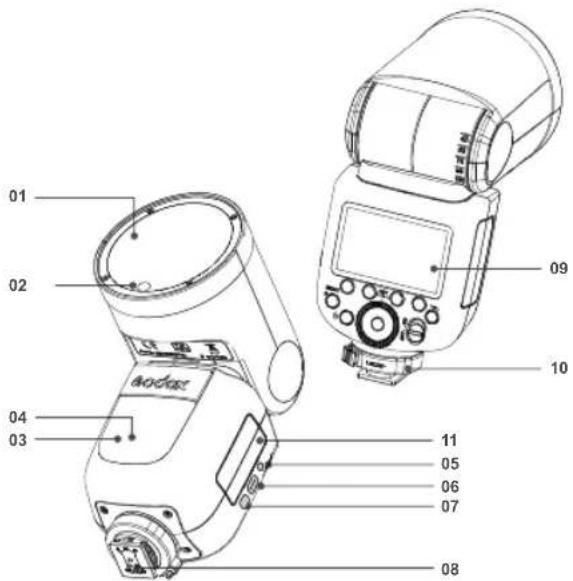
text_image
01 02 04 03 11 05 06 07 08 10 09- Body
- Flash Head 07. Battery Remove Button
- LED Modeling Lamp(01\~10) 08. Hotshoe
- Wireless Sensor 09. LCD Panel
- Focus Assist Beam 10. Hotshoe Fixing Buckle
-
Sync Cord Jack 11. Lithium Battery
-
Type-C USB Port
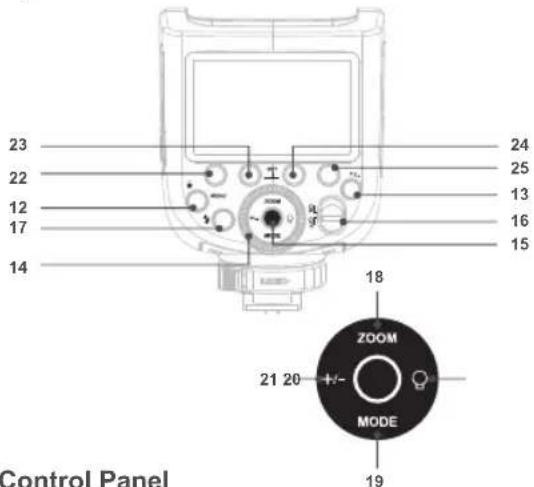
text_image
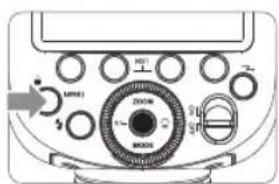
23 22 12 17 14 24 25 13 16 15 18 ZOOM 21 20 MODE 19 Control Panel- Control Panel
>Wireless Selection Button - Select Dial
- Set Button
- ON/OFF Power Switch
- <⚡> Test Button / Flash Ready Indicator
Focus Length Mode Selection Button - <♀>Modeling Lamp Setting
- <+->Power Output
- Function Button 1
- Function Button 2
- Function Button 3
- Function Button 4
Setting
- LCD Panel
(1)E-TTL Autoflash
Zoom : zoom display (Page 54)
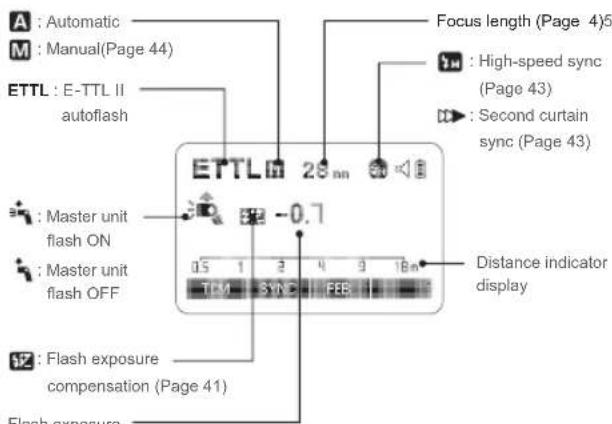
text_image
A : Automatic M : Manual(Page 44) ETTL : E-TTL II autoflash Master unit flash ON Master unit flash OFF Flash exposure compensation (Page 41) Focus length (Page 4)5 High-speed sync (Page 43) Second curtain sync (Page 43) 0.7 Distance indicator display ETTLm 28 mm 0.5 1 2 4 9 18m TLM 3SYNC FEBFlash exposure compensation amount
• The display will only show the settings currently applied.
- The functions displayed above function buttons 1 to 4, such as SYNC and , change according to settings' status.
- When a button or dial is operated, the LCD panel illuminated.
(2)M Manual Flash
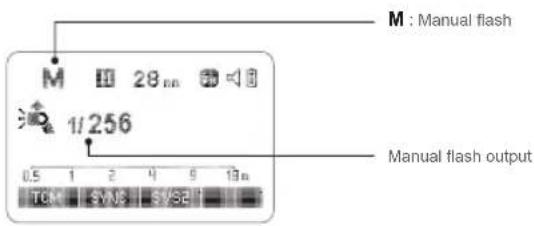
text_image
M : Manual flash M 28 in 1/256 0.5 1 2 4 9 19 in TCM SVM SVSP Manual flash output(3)Multi Flash
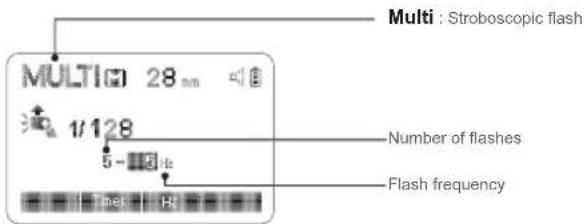
text_image
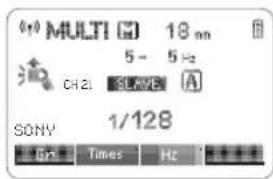
Multi : Stroboscopic flash MULTI: 28 nm 1/128 5 - 3 Hz Number of flashes Flash frequency(4) Radio Transmission Shooting
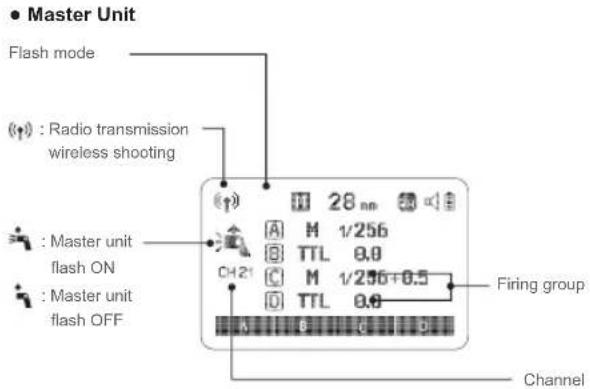
text_image
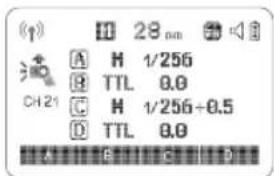
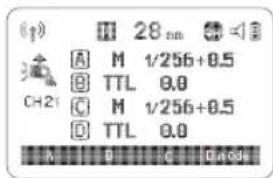
Master Unit Flash mode Radio transmission wireless shooting Master unit flash ON Master unit flash OFF 28 nm A M 1/256 B TTL 0.0 C M 1/256+0.5 D TTL 0.0 Firing group Channel- Slave Unit

text_image
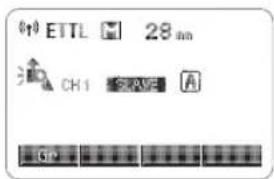
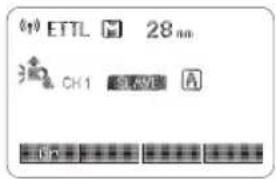
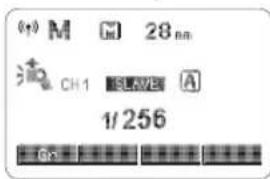
: Slave icon CH1 SLAVE 0.5 mm 28 mm SLAVE : Slave• LCD Panel in Three Modes
- Attached to the Camera
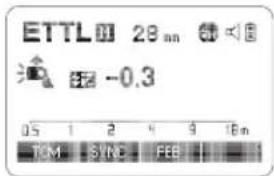
text_image
ETTL 28 mm -0.3 05 1 2 4 9 16m TOM SYNC FEB• 2.4G Radio Transmission: As a Master Unit
text_image
28 pm A H 1/256 B TTL 0.0 C H 1/256+0.5 D TTL 0.0 A B C D• 2.4G Radio Transmission: As a Slave Unit
text_image
ETTL 28 mm CH1 SPAV A G0• What's in the Box of V1C Kit?
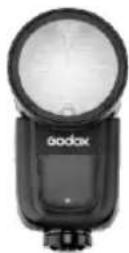
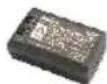
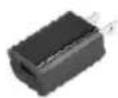
- Flash Unit 2. Lithium Battery 3. USB Battery Charger
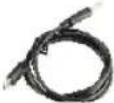
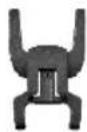
- USB Line 5. Charger 6. Mini Stand
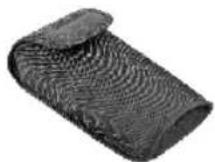
- Protection Case 8. Instruction Manual
1
2

3
4
5
6
7
• Separately Sold Accessories
The product can be used in combination with the following accessories sold separately, so as to achieve best photography effects:
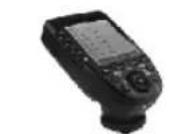
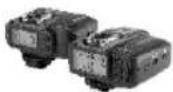
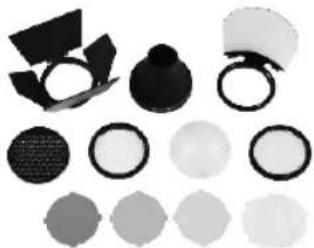
XProC & X1C TTL wireless flash trigger, AK-R1 accessory kit for round flash head, etc.
natural_image
Collection of various black and white geometric shapes including a sphere, ring, and hexagonal shapes (no text or symbols)Battery
- Features
- This flash unit uses Li-ion polymer battery which has long runtime. The available charge-and-discharge times are 500.
- It is reliably safe. The inner circuit is against overcharge, overdischarge, overcurrent, and short circuit.
- Take only 3.5 hours to fully charge the battery by using the standard battery charger.
- Cautions
- Do not short circuit.
- Do not expose to rain or immerse into water. This battery is not water proof.
- Keep out of reach of children.
- No over 24 hours' continuous charging.
- Store in dry, cool, ventilated places.
- Do not put aside or into fire.
- Dead batteries should be disposed according to local regulations.
- If the battery had ceased using for over 3 months, please make a full recharge.
- Loading and Unloading the Battery
natural_image
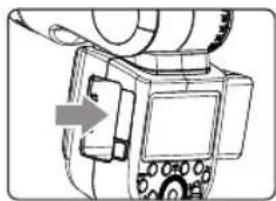
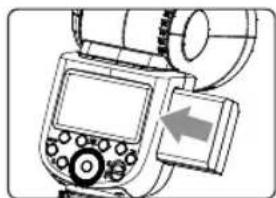
Line drawing of a camera with an arrow pointing to the lens (no text or symbols present)1 To unload the battery, hold down the battery remove button and push the battery downwardly to take it out.
natural_image
Diagram of a camera or electronic device with control panel and display (no visible text or symbols)2 According to the triangle sign on the battery pack, insert it into the compartment until a white knob locks the battery with a click sound.
● Battery Level Indication
Make sure the battery pack is securely loaded in the flash. Check the battery level indication on the LCD panel to see the remaining battery level.
| Battery Level Indication | Meaning |
| 3 grids | Full |
| 2 grids | Middle |
| 1 grid | Low |
| Blank grid | Lower battery, please recharge it. |
| Blinking | The battery level is going to be used out immediately. And the flash will auto power off in 1 minute.Note: Please recharge the battery as soon as possible (within 10 days). Then, the battery can be used or be placed for long period. |
LED Modeling Lamp
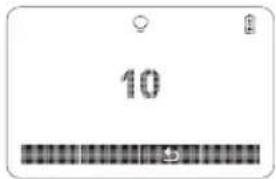
Press the Modeling Lamp Setting button to set the modeling lamp. Short press the Set Button to turn on or off the modeling lamp. When turning the modeling lamp on, turn the select dial to set its brightness. There are 10 levels(01\~10) for choice.
text_image
10Attaching to a Camera
natural_image
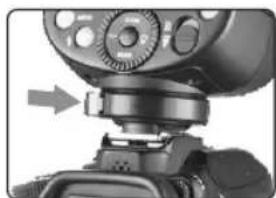
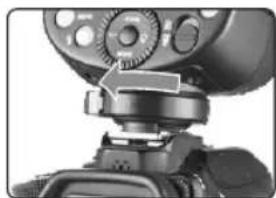
Close-up of a camera module with adjustment arrows, no visible text or symbols1 Attach the Camera Flash.
- Rotate the hotshoe fixing buckle to the left and insert the camera flash into the camera's hotshoe.
natural_image
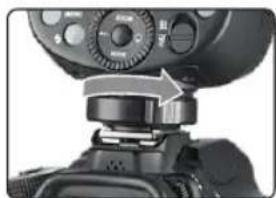
Close-up of a camera lens assembly with adjustment knob and control knobs (no visible text or symbols)2 Secure the Camera Flash.
- Rotate the hotshoe fixing buckle to the right until it locks up.
natural_image
Close-up of a camera lens assembly with no visible text or symbols2 Detach the Camera Flash.
- Press the button and rotate the hotshoe fixing buckle to the left until it is loosened.
Power Management
Use ON/OFF Power Switch to power the flash unit on or off. Turn off if it will not be used for an extended period of time. Setting as a master flash, it will turn the power off automatically after a certain period (approx. 90 seconds) of idle use. Pressing the camera shutter halfway or pressing any flash button will wake up the flash unit. Setting as a slave flash, it will enter sleep mode after a certain period (adjustable, 60 minutes by default) of idle use. Pressing any flash button will wake it up.
C.Fn Disabling Auto Power Off function is recommended when the flash is used off camera. (C.Fn-STBY, Page 55)
C.Fn Slave Auto Power Off Timer is set to 60 minutes by default. Another option "30 minutes" is available. (C.Fn-Sv STBY, Page 55)
Flash Mode—E-TTL Autoflash
This flash has three flash modes: E-TTL, Manual (M), and Multi (Stroboscopic). In E-TTL mode, the camera and the flash will work together to calculate the correct exposure for the subject and the background. In this mode, multiple TTL functions are available: FEC, FEB, FEL, HSS, second curtain sync, modeling flash, control with the camera's menu screen.
* Press < MODE > Mode Selection Button and three flash modes will display on the LCD panel one by one with each pressing.
ETTL Mode
Press < MODE > Mode Selection Button to enter E-TTL mode. The LCD panel will display.
- Press the camera release button halfway to focus. The aperture and effective flash range will be displayed in the viewfinder.
- When the shutter button is fully pressed, the flash will fire a pre-flash that the camera will use to calculate exposure and flash output the instant before the photo is taken.
FEC: Flash Exposure Compensation
With FEC function, this flash can adjust from -3 to +3 in 1/3rd stops. It is useful in situations where minor adjusting of the TTL system is needed based on the environment.
Setting FEC:
text_image
Diagram of a digital multimeter with labeled ports and a dial indicator showing 200W, 1V, and 24Ω.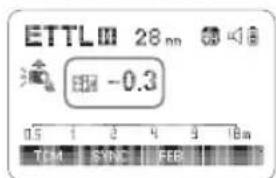
text_image
ETTL 28 nm -0.3 TCM SYNC FEB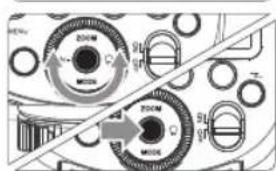
text_image
Diagram showing mechanical components with labeled parts including zoom, mode, and directional arrows1 Press Function Button 2
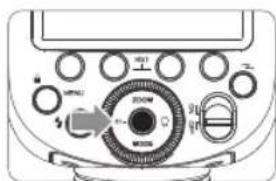
Press the <+/-> button. The icon < +Z> and flash exposure compensation amount will be highlighted on the LCD panel.
2 Set the flash exposure compensation amount.
- Turn the Select Dial to set the amount.
- "0.3" means 1/3 step, "0.7" means 2/3 step.
- To cancel the flash exposure compensation, set the amount to "+0".
3 Press Set Button again to confirm the setting.
FEB: Flash Exposure Bracketing
You can take three flash shots while automatically changing the flash output for each shot from -3 to +3 in 1/3rd stops. The camera will record three images with different exposures: one exposed according to camera calculations, one over-exposed and another under-exposed. Over and under exposure amount is user adjustable. This function helps get correct exposure especially in shooting moving objects or when environmental lights are complex.
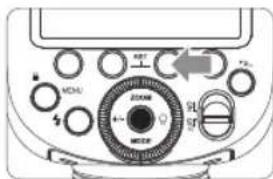
text_image
MOAL 200W 4- MOAL 9L 9L1 Press function button 3 < FEB>. The icon < 📋> and the exposure bracketing amount will be highlighted on the LCD panel.
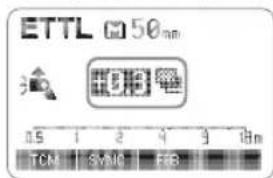
text_image
ETTL 50mm TCN SMNC FEB2 Set the flash exposure compensation amount. - Turn the Select Dial to set the amount. - "0.3" means 1/3 step, "0.7" means 2/3 step.
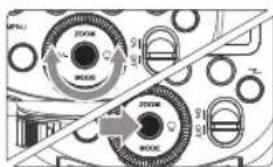
text_image
ZOOM MODE ZOOM MODE3 Press Set Button again to confirm the setting. Then your FEC and FEB settings are displayed on the LCD panel.
• FEB will be cancelled after three photos are taken.
- For best results, set the camera drive mode to "single" and ensure the flash is ready before shooting.
- FEB can be used with FEC and FEL.
C.Fn You can prevent the FEB from being cancelled automatically after three photos are taken. (C.Fn-FEB ACL, Page 55)
FEL: Flash Exposure Lock
FEL can lock the correct flash exposure setting for any part of the scene.
With
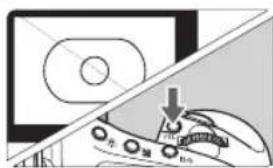
text_image
Diagram showing a hand operating a car with a downward arrow and partial text labels, likely illustrating a mechanical or electrical process.1 Focus the subject.
2 Press the
- Aim the subject at the center of the viewfinder and press
button. - The camera flash will fire a preflash and the required flash output for the subject is retained in memory.
-
Each time the
button is pressed, a preflash will be fired and a new flash exposure setting will be locked. -
If the subject is too far away and underexposure, the < 1> icon will blink in the viewfinder. Move closer to the subject and try the FE lock again.
- If
is not displayed on the LCD panel, FE lock cannot be set. - If the subject is too small, FE lock might not be very effective.
High-Speed Sync
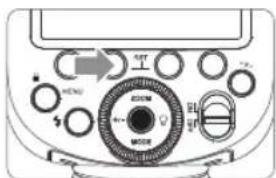
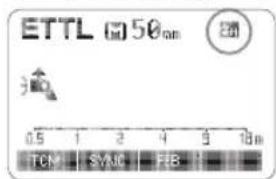
High Speed Sync (FP flash) enables the flash to synchronize with all camera shutter speeds. This is convenient when you want to use aperture priority for fill-flash portraits.
text_image
Diagram of an electronic device control panel with labeled buttons and a rotary indicator1 Press Function Button 2
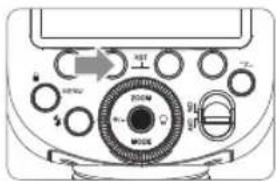
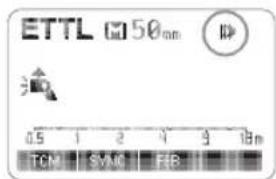
2 Check that < 📋> is displayed in the viewfinder. With a slow shutter speed, you can create a light train following the subject. The flash fires right before the shutter closes. Press function button 2 < SYNC > button so that < ➞ > is displayed on the LCD panel. The flash output is adjustable from 1/1 full power to 1/256th power in 1/10th stop increments. To obtain a correct flash exposure, use a hand-held flash meter to determine the required flash output. 1 Press < MODE > button so that < M > is displayed. 2 Turn the Select Dial to choose a desired flash output amount.
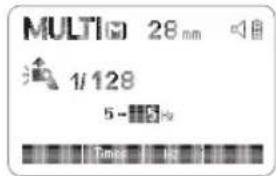
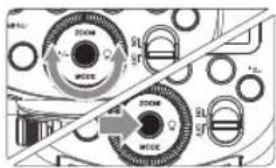
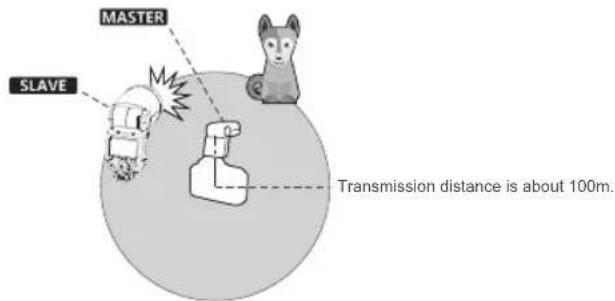
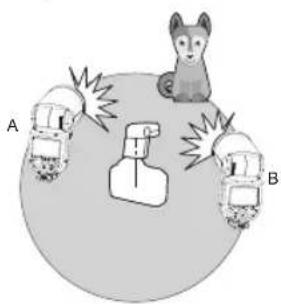
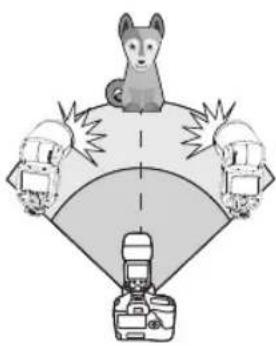
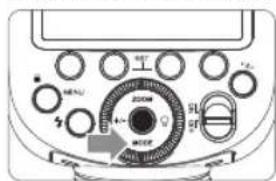
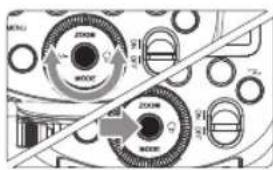
3 Press Set Button again to confirm the setting. In M manual flash mode, press Press - S1 and S2 optic triggering is only available in M manual flash mode. With stroboscopic flash, a rapid series of flashes is fired. It can be used to capture a multiple images of a moving subject in a single photograph. You can set the firing frequency (number of flashes per sec. expressed as Hz), the number of flashes, and the flash output. 1 Press 2 Set the flash frequency and flash times. 3 Turn the Select Dial to choose a desired flash output. - After you finish the setting, press Set Button and all the settings will be displayed. During stroboscopic flash, the shutter remains open until the firing stops. Use the formula below to calculate the shutter speed and set it with the camera. Number of Flashes / Flash Frequency = Shutter Speed For example, if the number of flashes is 10 and the firing frequency is 5 Hz, the shutter speed should be at least 2 seconds. To avoid overheating and deteriorating the flash head, do not use stroboscopic flash more than 10 times in succession. After 10 times, allow the camera flash to rest for at least 15 minutes. If you try to use the stroboscopic flash more than 10 times in succession, the firing might stop automatically to protect the flash head. If this happens, allow at least 15 minutes' rest for the camera flash. - Stroboscopic flash is most effective with a highly reflective subject against a dark background. • Using a tripod and a remote control is recommended. - Stroboscopic flash is most effective with a highly reflective subject against a dark background. Maximum Stroboscopic Flashes: When the camera's shooting mode is set to a fully automatic mode or an Image Zone mode, the operations in this chapter are not available. Set the camera's shooting mode to P/Tv/Av/M/B (Creative Zone Mode). - The V1C attach to the camera is called the master unit, and a V1C that is wirelessly controlled is called the slave unit.
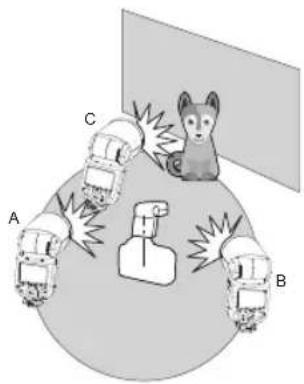
- You can also wirelessly control the V1C set as the slave unit with the transmitter X1T-C (sold separately). For details on setting the master unit functions, see the transmitter's instructions. Using a flash (master/slave) with a radio transmission wireless shooting function make it easy to shoot with advanced wireless multiple flash lighting, in the same way as E-TTL II autoflash shooting. The basic relative position and operation range are as shown in the picture. You can then perform wireless E-TTL II autoflash shooting just by setting the master unit to Positioning and Operation Range (Example of wireless flash shooting) • Autoflash Shooting with One Slave Unit • Use the supplied mini stand to position the slave unit. You can divide the slave units into two or three groups and perform E-TTL II autoflash while changing the flash ratio (factor). In addition, you can set and shoot with a different flash mode for each firing group, for up to 4 groups. • Auto Shooting with Two Slave Groups • Auto Shooting with Three Slave Groups - Shooting with a Different Flash Mode set for Each Group * The flash mode settings are indicated only as an example You can switch between normal flash and wireless flash. For normal flash shooting, be sure to set the wireless setting to OFF. Press < z> button so that < (φ)> is displayed on the LCD panel. Press When the master unit is set to OFF, only the slave units will fire a flash. 1 Press - Set the other camera flash as the wireless slave Unit. - If the master unit and slave unit(s) are set to a different channel, set them to the same channel. (Page 49) - Position the camera and flashes as the picture shows. (Page 47) When stronger flash output or more convenient lighting operation is needed, increase the number of slave units and set it as a single slave unit. To add slave units, use the same steps as setting "automatic wireless flash with a single slave unit". Any flash group can be set (A/B/C/D/E). When the number of slave units is increased and the master unit flash firing is ON, automatic control is implemented to make all groups of flashes fire the same flash output and ensure the total flash output up is to standard exposure. - Press the depth-of-field preview button on the camera to fire a modeling flash. - If the slave unit's auto power off function is workable, press the master unit's test button to power it on. Please note that test firing is unavailable during the camera's regular metering time. - The effective time of slave auto power off is changeable. (C.Fn-Sv STBY Page 55) - By making some settings, the auto AF-assist transmitter will not blink after the slave unit's flash ready indicator is lightened. (C.Fn-AF Page 55) The FEC and other settings that set on the master unit will also be appeared on the slave unit automatically. The slave unit does not need any operation. Use the following settings to make wireless flashes according to the same methods with normal flash shooting. - Flash Exposure Compensation ( Page 41) - Flash Exposure Lock (Page 42) - Manual Flash (Page 44) • Stroboscopic Flash (Page 45) Use two or more master units. By preparing several cameras that with master units flash attached, cameras can be changed in shooting while keeping the same lighting source (slave unit). This describes wireless (multiple shooting) using manual flash. You can shoot with a different flash output setting for each slave unit (firing group). Set all parameters on the master unit. 1 Setting the flash mode to 2 Setting flash output.1/2/3/4 - Press Function Button 3
< Gr>. Turn the Select Dial to set the flash output of the groups. Press Set Button to confirm. 3 Taking the picture.
• Each group fires at the set flash ratio. You can directly operate the slave unit to manually set the manual flash or stroboscopic flash. 1 Setting the slave unit.
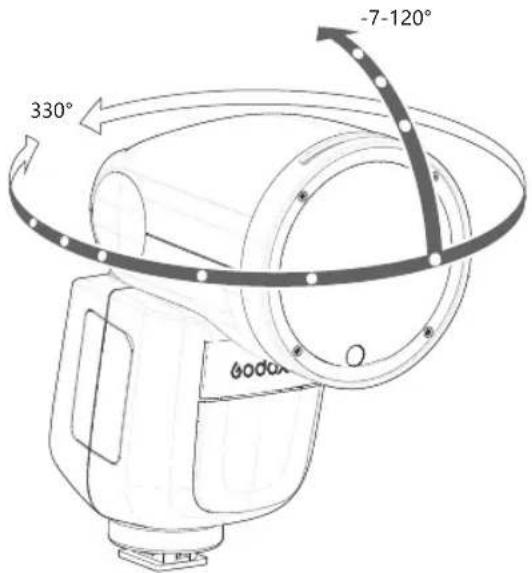
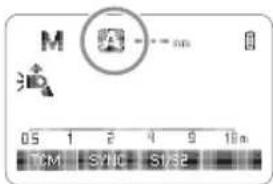
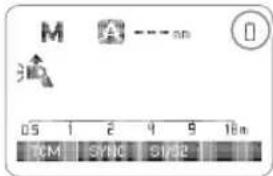
2 Setting flash mode to Setting - Press - Setting the stroboscopic flash. (Page 45) The Sync Cord Jack is a 2.5mm plug. Insert a trigger plug here and the flash will be fired synchronously with the camera shutter. If the camera has a depth-of-field preview button, pressing it will fire the flash continuously for 1 second. This is called modeling flash. It enables you to see the shadow effects on the subject and the lighting balance. You can fire the modeling flash during wireless or normal flash shooting. To avoid overheating and deteriorating the flash head, do not fire the modeling flash for more than 10 consecutive times. If you fire the modeling flash 10 consecutive times, allow at least 10 minutes' break for the camera flash. In poorly-lit or low-contrast shooting environments, the built-in auto focus assist beam will automatically light on to make it easier for autofocus. The beam will light up only when autofocus is difficult and get out as soon as the autofocus becomes correct. If you want to turn off the auto focus assist beam, set the "AF" to "OFF" on the C.Fn settings. - If you find the auto focus assist beam does not light up, this is because the camera has got a correct autofocus. By pointing the flash head toward a wall or ceiling, the flash will bounce off the surface before illuminating the subject. This can soften shadows behind the subject for a more natural-looking shot. This is called bounce flash. To set the bounce direction, hold the flash head and turn it to a satisfying angle. The flash coverage can be set automatically or manually. It can be set to match the lens focal length from 28mm to 105mm. In Manual Zoom mode, press the If you set the flash coverage manually, make sure it covers the lens focal length so that the picture will not have a dark periphery. If the battery power is low, < □> will appear and blink on the LCD panel. Please replace the battery immediately. The following table lists the available and unavailable custom functions of this flash. C.Fn Custom Functions Press Select the Custom Function No. - Turn the Select Dial to select the Custom Function No. Change the Setting. Press Set Button and the Setting No. blinks. After you set the Custom Function and press In the C.Fn states, long press the "Clear" button for 2 seconds until "OK" is displayed on the panel, which means the values in C.Fn can be reset. If the camera flash is attached to an EOS camera which has a speedlite control function, the flash can be controlled using the camera's menu screen. For the menu operation procedure, refer to your camera's instruction manual. Setting Camera Flash Functions ● The following flash functions are settable according to different flash modes. Flash function settings screen Flash C.Fn settings screen * Screens from the EOS-1D Mark III. Number of flashes that will activate over-temperature protection: Number of flashes that will activate over-temperature protection in high-speed sync triggering mode: The system provides real-time protection to secure the device and your safety. The following lists prompts for your reference: Technical Data If there is a problem, refer to this Troubleshooting Guide. • < ? > or < ?H > is not displayed in the view finder of camera. →Wait until the flash is fully recycled and the flash ready indicator lights up. →If the flash ready indicator lights up, but < ♣ > or < ♣H> is not displayed in the view finder, check whether this flash unit is securely attached to the camera hotshoe. →If the flash ready indicator does not light up after a long wait, check whether the battery power is enough. If the battery power is low, < ☐ > will appear and blink on the LCD panel. Please replace the battery immediately. - You used high-speed sync. →With high-speed sync, the effective flash range will be shorter. Make sure the subject is within the effective flash range displayed. - You used Manual Flash mode. →Set the flash mode to ETTL or modify the flash output. - The focal length of lens exceeds the flash coverage. →Check the flash coverage you set. This flash unit has the flash coverage between 28 and 105mm, which fits medium-format cameras. This flash unit can be used on the following Canon EOS series camera models: To This table only lists the tested camera models, not all Canon EOS series cameras. For the compatibility of other camera models, a self-test is recommended.
Rights to modify this table are retained. This device complies with part 15 of the FCC Rules. Operation is subject to the following two conditions: (1) This device may not cause harmful interference, and (2) this device must accept any interference received, including interference that may cause undesired operation. Any Changes or modifications not expressly approved by the party responsible for compliance could void the user's authority to operate the equipment. Note: This equipment has been tested and found to comply with the limits for a Class B digital device, pursuant to part 15 of the FCC Rules. These limits are designed to provide reasonable protection against harmful interference in a residential installation. This equipment generates uses and can radiate radio frequency energy and, if not installed and used in accordance with the instructions, may cause harmful interference to radio communications. However, there is no guarantee that interference will not occur in a particular installation. If this equipment does cause harmful interference to radio or television reception, which can be determined by turning the equipment off and on, the user is encouraged to try to correct the interference by one or more of the following measures: ▶ Reorient or relocate the receiving antenna. This equipment complies with FCC radiation exposure limits set forth for an uncontrolled environment. This equipment should be installed and operated with minimum distance 20cm between the radiator & your body. is displayed.
text_image
ETTL 50nm
TCN SYNC FIB
• Over-temperature protection may be activated after 15 consecutive high-speed sync flashes.Second-Curtain Sync
text_image
Diagram of an analog multimeter with labeled buttons and rotary dial, showing control interface and settings.
text_image
ETTL 50mm
0.5 1 2 3 4 5 18m
TCN SYNC FIB
M: Manual Flash
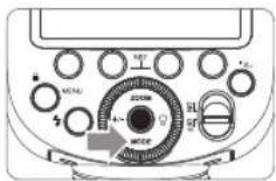
text_image
Diagram of an analog multimeter with labeled knobs and dials, showing control panel and dial indicators
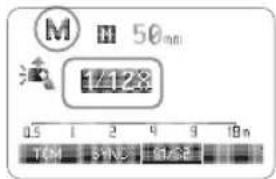
text_image
M 50nm
17:28
0.5 1 2 4 9 10 n
TOM 3VHz 6V/6V
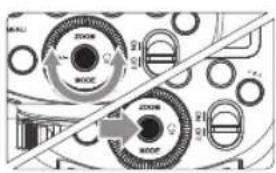
flowchart
graph TD
    A["MODE"] --> B["ZOOM"]
    B --> C["MODE"]
    C --> D["MODE"]
    D --> E["ZOOM"]
    E --> F["MODE"]
    F --> G["MODE"]
    G --> H["ZOOM"]
    H --> I["MODE"]
    I --> J["ZOOM"]
    J --> K["MODE"]
    K --> L["ZOOM"]
    L --> M["MODE"]
    M --> N["ZOOM"]
    N --> O["MODE"]
    O --> P["ZOOM"]
    P --> Q["MODE"]
    Q --> R["ZOOM"]
    R --> S["MODE"]
    S --> T["ZOOM"]
    T --> U["MODE"]
    U --> V["ZOOM"]
    V --> W["MODE"]
    W --> X["ZOOM"]
    X --> Y["MODE"]
    Y --> Z["ZOOM"]
Optic S1 Secondary Unit Setting
Optic S2 Secondary Unit Setting
Multi: Stroboscopic Flash
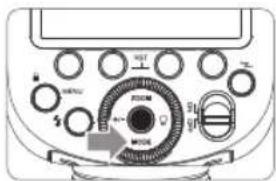
text_image
Diagram of an analog multimeter with labeled knobs and dial indicators
text_image
MULTI 28 mm
1/128
5 - 5 V
Time 1 Hz
text_image
200KM
MWC
200KM
MWC
Calculating the Shutter Speed
- A flash output of 1/1 and 1/2 cannot be set for stroboscopic flash.
- Stroboscopic flash can be used with "buLb".
- If the number of flashes is displayed as "--", the firing will continue until the shutter closes or the battery is exhausted. The number of flashes will be limited as shown by the following table.Flash output\Hz 1 2 3 4 5 6-7 8-9 1/4 8 6 4 3 3 2 2 1/8 14 14 12 10 8 6 5 1/16 30 30 30 20 20 20 10 1/32 60 60 60 50 50 40 30 1/64 90 90 90 80 80 70 60 1/128 100 100 100 100 100 90 80 1/256 100 100 100 100 100 90 80 Flash output\Hz 10 11 12-14 15-19 20-50 60-199 1/4 2 2 2 2 2 2 1/8 4 4 4 4 4 4 1/16 8 8 8 8 8 8 1/32 20 20 20 18 16 12 1/64 50 40 40 35 30 20 1/128 70 70 60 50 40 40 1/256 70 70 60 50 40 40 Wireless Flash Shooting: Radio (2.4G) Transmission
text_image
MASTER
SLAVE
Transmission distance is about 100m.
- Before shooting, perform a test flash and test shooting.
- The transmission distance might be shorter depending on the conditions such as positioning of slave units, the surrounding environment and whether conditions.Wireless Multiple Flash Shooting
text_image
A
B
text_image
Diagram showing a cat reacting to three cars labeled A, B, and C around a central object with explosion effects.
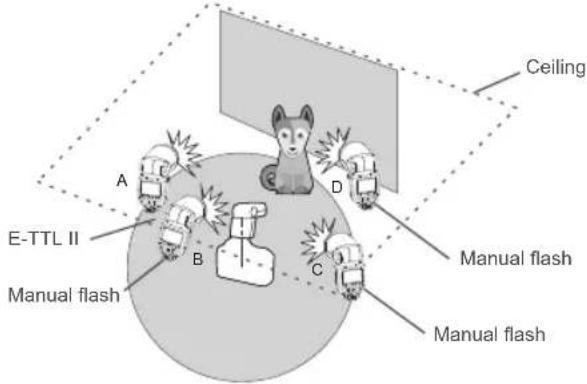
text_image
Ceiling
A
D
E-TTL II
Manual flash
B
C
Manual flash
Manual flash
1. Wireless Settings
Master Unit Setting
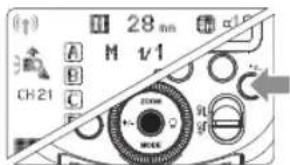
text_image
(↑)
A
B
C
CH21
M 28 mm
M v/1
2000
90
g
Slave Unit Setting
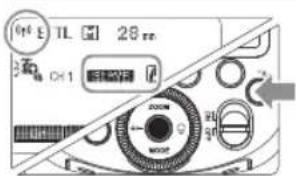
text_image
Off E TL 28 ms
OK1
OK1
2. Master Unit's Flash OFF
text_image
200W
50Hz
text_image
ETTL 28 nm
CH1 SLAVE A
OK
2 Slave Unit Setting
3 Check the communication channel.
4 Position the camera and flashes.
5 Set the master unit's flash mode to
6 Check that the flash is ready.
7 Check the flash operation. • Press the master unit's
Using Automatic Wireless Flash with Multiple Slave Units
natural_image
Illustration of a dog standing on a platform with three cameras and a camera, no text or symbols present.
Using Fully Automatic Wireless Flash
About Master Unit
7. M: Wireless Flash Shooting with Manual Flash
text_image
Diagram of an analog multimeter front panel with labeled buttons and a dial indicator showing 200A, 30A, 50A, and 60A.
text_image
(↑)
28 nm
A M 1/256+0.5
B TTL 0.0
C M 1/256+0.5
D TTL 0.0
A B C D Accs
text_image
MOCA
MOCA
MOCA
MOCA
MOCA
MOCA
MOCA
MOCA
MOCA
MOCA
MOCA
MOCA
MOCA
MOCA
MOCA
MOCA
MOCA
MOCA
MOCA
MOCA
MOCA
MOCA
MOCA
MOCA
MOCA
MOCA
MOCA
MOCA
MOCA
MOCA
MOCA
MOCA
MOCA
MOCA
MENI
Setting
text_image
M 28 mm
清 CH1 SLAVE A
1/256
0s
8. Multi: Wireless Flash Shooting with Manual Flash
text_image
MULTI 18 mm
5 - 5 Hz
CH 2L SLAVE A
SONY 1/128
Gn Times Hz
Other Applications
Sync Triggering
Modeling Flash
- The modeling flash cannot be fired with the EOS 300 and Type-B cameras.Auto Focus Assist Beam
Position Effective Range Center 0.6~10m / 2.0~32.8 feet Periphery 0.6~5m / 2.0~16.4 feet Bounce Flash
text_image
330°
-7-120°
600mm

ZOOM: Setting the Flash Coverage
text_image
M
05 1 2 4 9 10m
TCM S/HC S/32

text_image
M
A --- an
05 1 2 4 9 10m
TCM SYNC S1/32
Low Battery Warning
C.Fn: Setting Custom Functions
Custom Function Signs Function Setting No. Settings & Description m/ft Distance indicator m m ft feet AF AF-assist beam ON ON OFF OFF STBY Auto sleep setting ON ON OFF OFF Sv STBY Slave auto power off timer 60min 60min 30min 30min SCAN Scan the spare channel OFF OFF START Start to find the spare channel CH Channel setting 01-32 Choose channels from 01-32 ID Wireless ID OFF Off 01-99 Choose any figure from 01-99 BEEP Beeper ON ON OFF OFF LIGHT Backlighting time 12sec Off in 12 sec. OFF Always off ON Always lighting LCD LCD contrast ratio -3~+3 7 levels FEB ACL FEB auto cancel ON ON OFF OFF MASTER Master unit control OFF OFF ON ON
Control with the Camera's Menu Screen
Custom Functions of Camera Flash
C.Fn-00, C.Fn-01, C.Fn-03, C.Fn-08, C.Fn-10, C.Fn-20, C.Fn-22.Clear All Flash Custom Functions
Flash function settings Flash mode E-TTL II Shutter syne, FEB 1st curtain-3.2.1.0.1.2.3 Flash exp. comp -3.2.1.0.1.2.3 E-TTL II Evaluative Flash firing Enable Clear Speedlite Settings Flash C.Fn settingsAuto power off 0:Enabled 1:Disabled
Protection Function
1. Over-Temperature Protection
Power Output Level Number of Flashes 1/1 30 1/2 +0.7 40 1/2 +0.3 50 1/2 60 1/4(+0.3,+0.7) 100 1/8(+0.3,+0.7) 200 1/16(+0.3,+0.7) 300 1/32(+0.3,+0.7) 500 1/64(+0.3,+0.7) 1000 1/128(+0.3,+0.7) Power Output Times 1/1 15 1/2(+0.3,+0.7); 20 1/4(+0.3,+0.7) 30 1/8(+0.3,+0.7); 1/16(+0.3,+0.7) 40 1/32(+0.3,+0.7); 1/64(+0.3,+0.7); 50 1/128(+0.3,+0.7); 2. Other Protections
Prompts on LCD Panel Meaning E1 A failure occurs on the recycling system so that the flash cannot fire.Please restart the flash unit. If the problem still exists, please send this product to a maintenance center. E2 The system gets excessive heat. Please allow a rest time of 10 minutes. E3 The voltage on two outlets of the flash tube is too high. Please send this product to a maintenance center. E9 There are some errors occurred during the upgrading process. Please using the correct firmware upgrade method. Model V1C Compatible Cameras Canon EOS cameras (E-TTL II autoflash) Power(1/1 output) 76Ws Flash Coverage 28 to 105mm • Auto zoom (Flash coverage set automatically to match the lens focal length and image size) • Manual zoom • Swinging/tilting flash head (bounce flash): 0 to 330° horizontally and -7° to 120° vertically Flash Duration 1/300 to 1/20000 seconds • Exposure Control Exposure control system E-TTL II autoflash and manual flash Flash exposure compensation (FEC) Manual. FEB: ±3 stops in 1/3 stop increments (Manual FEC and FEB can be combined.) FE lock Withbutton or* > button Sync mode High-speed sync (up to 1/8000 seconds), first-curtain sync, and second-curtain sync Multi flash Provided (up to 100 times, 199Hz) • Wireless Flash Wireless flash function Master, Slave, Off Master groups A, B, C, D Controllable slave groups A, B, C, D, E (E group can be controlled by X series flash trigger) Transmission range (approx.) 100m Channels 32 (1~32) ID 01~99 Modeling flash Fired with camera's depth-of-field preview button • Auto Focus Assist Beam Effective range (approx.) Center: 0.6~10m / 2.0~32.8 feet Periphery: 0.6~5m / 2.0~16.4 feet • LED Modeling Lamp Power 2W Color Temperature 3300K±200K • Power Supply Power source 7.2V/2600mAh Li-ion battery Recycle time Approx 1.5 seconds. Green LED indicator will light up when the flash is ready. Full power flashes Approx. 480 Power saving Power off automatically after approx. 90 seconds of idle operation. (60 minutes if set as slave) • Sync Triggering Mode Hotshoe, 2.5mm sync line • Color Temperature 5600±200k • Dimensions W x H x D 76*93*197mm Weight without battery 420g Weight with battery 530g 2.4G Wireless Frequency Range 2413.0MHz-2464.5MHz Max. Transmitting Power of 2.4G Wireless 5dbm Troubleshooting
The Camera Flash does not fire.
→Attach the camera's mounting foot securely to the camera. The power turns off by itself.
→Press the shutter button halfway or press any flash button to wake up.
→Press any flash button to wake up.Auto zoom does not work.
→Attach the camera flash's mounting foot to the camera.The flash exposure is underexposed or overexposed.
→Use FE lock (FEL).Photos have dark corners or only parts of the target subject are illuminated.
Firmware Upgrade
Compatible Camera Models
1DX 5D Mark III 5D Mark II 6D 7D 60D 50D 40D 30D 650D 600D 550D 500D 450D 400D Digital 5D Mark IV 7D Mark II 6D Mark II 760D 750D 70D 80D 77D M5 M3 M50800D EOS R 1500D 3000D Maintenance
FCC Warning
▶ Increase the separation between the equipment and receiver.
- Connect the equipment into an outlet on a circuit different from that to which the receiver is connected.
- Consult the dealer or an experienced radio/TV technician for help.\*RF warning: