
MRS 777 - Radio MAC AUDIO - Free user manual and instructions
Find the device manual for free MRS 777 MAC AUDIO in PDF.


| Product Type | Portable Radio |
| Brand | Mac Audio |
| Model | MRS 777 |
| Dimensions | Approx. 250 x 150 x 80 mm |
| Weight | Approx. 1.2 kg |
| Power Supply | AC 230V~50Hz or 6 x D batteries (not included) |
| Frequency Bands | FM/MW/SW |
| Functions | Radio, alarm, sleep timer, headphone jack, telescopic antenna |
| Controls | Volume, tuning, band selector, on/off, alarm set |
| Display | Analog frequency dial |
| Speaker | Built-in, mono |
| Output Power | Approx. 2 W RMS |
| Connections | 3.5mm headphone jack |
| Materials | Plastic casing |
| Maintenance | Wipe with dry cloth, avoid moisture |
| Safety | Keep away from water, do not disassemble |
| Spare Parts | Available through Mac Audio service centers |
| Repairability | Modular design for easy repair |
| General Information | User manual included, 20 pages |
Frequently Asked Questions - MRS 777 MAC AUDIO
User questions about MRS 777 MAC AUDIO
0 question about this device. Answer the ones you know or ask your own.
Ask a new question about this device
Download the instructions for your Radio in PDF format for free! Find your manual MRS 777 - MAC AUDIO and take your electronic device back in hand. On this page are published all the documents necessary for the use of your device. MRS 777 by MAC AUDIO.
USER MANUAL MRS 777 MAC AUDIO
The Bluetooth® word mark and logos are registered trademarks owned by Bluetooth SIG, Inc. and any use of such marks by Mac Audio is under license. Other trademarks and trade names are those of their respective owners.

At the end of the product's useful life, please dispose of it at appropriate collection points provided in your country.
(D) 4
GB 10
natural_image
Technical line drawing of a device casing with internal components and mounting holes (no text or symbols)16
Thank you for choosing the Mac Audio MRS 777.
Please read the following information carefully before starting to use the MRS 777.
IMPORTANT SAFETY PRECAUTIONS
- Please read the instruction manual carefully before use and keep it in a safe place.
- This device is only intended for use with 100 - 240 V / 50/60 Hz AC voltage.
- Only operate the device at an ambient/room temperature between 10^ and 40^ .
- Make sure there is sufficient ventilation for the device. There must be a minimum gap of 10 cm between objects to the side, to the rear and above the device.
- The ventilation slots should not be covered by any items (e.g. curtains, newspaper, etc.) in order to ensure sufficient ventilation for the device. Please do not position any sources of heat, such as radiators, ovens, naked flames or other devices that generate heat in close proximity to the device.
- The device and the remote control should not be exposed to dripping or splash water or high levels of humidity.
- No naked flame sources, such as lighted candles, should be placed on the apparatus.
- No objects filled with liquids, such as vases, shall be places on the unit.
- In the event of contact with moisture or liquids remove the mains adapter immediately.
- Only clean the device using a dry cloth.
- Do not use any cleaning agents or chemical solvents when cleaning, as these could damage the surface of the device.
- Never open the device.
- The mains cable must always be suitable for operation and it should only ever be laid out in a manner that prevents it from being trodden on. It should not be pinched by objects either, as this can damage the cable. When using plugs and power strips it must be ensured that the cable is not kinked at the point where it emerges from the socket. Do not connect or remove the mains cable with damp hands.
- Do not connect or remove the mains cable with damp hands.
- The mains plug is used as the disconnecting device. Disconnecting devices shall remain readily operable.
- Danger of explosion if battery is incorrectly replaced. Replace only with the same or equivalent type.
- Batteries (battery pack or batteries installed) shall not be exposed to excessive heat, such as sunshine, fire and the like.
• Always refer to a qualified specialist for any maintenance or repair work. - If the device is not going to be used for a prolonged period, remove the mains plug.
- Please remove the mains plug in the event of thunderstorms.
DAMAGE THAT MUST BE RECTIFIED BY A SPECIALIST:
If any of the following damage occurs, disconnect the device from the mains immediately and contact a specialist to conduct the repair work:
- Damage to the mains cable or the mains plug. A damaged cable should not be repaired, but must be replaced.
- If moisture or water has entered the device or foreign objects have fallen into the device.
GB
- If the device has fallen and the housing is damaged.
- If the device does not work properly, even though all of the information in the instruction manual has been observed.
Only those subsequent alterations approved by the manufacturer may be conducted.
Only original spare parts should be used for repair.
After conducting any repairs the safety of device should be checked to ensure it is functioning correctly and safely.
Repairs must always be conducted by qualified specialists, as you might otherwise be exposed to dangerous high voltage levels or other hazards.

This symbol warns the user that high voltage is used within the device which can result in electric shock.

This symbol makes the user aware that there are important notes in the enclosed instruction manual which must be observed.

WARNING:DO NOT OPEN! RISK OF ELECTRIC SHOCK! To reduce the risk of fire or electric shock, do not expose this unit to rain or moisture.
CE
DECLARATION OF CONFORMITY
Hereby, Magnat Audio-Produkte GmbH declares that the MRS 777 is in compliance with the essential requirements and other relevant provisions of directive 2014/53/EU. The Declaration of Conformity can be found at http://www.mac-audio.de in the download area of the device.
INSTRUCTIONS FOR DISPOSAL
In accordance with European Directive 2012/19/EU all electrical and electronic appliances must be disposed of separately via local collection points. Please observe the local regulations and do not dispose of your old appliances with normal household waste.
BATTERY DISPOSAL
Old batteries are hazardous waste and must be disposed of in accordance with current regulations.
GB

1 ON/OFF: Switches the device on or off.
2 Battery charge level:
The internal battery is charged when the device is switched on and the power cord is connected. The 4 LEDs (LOW, 1, 2 and 3) display the current charge level (from LOW: almost empty to 3: battery fully charged).
During mobile use via the internal battery, the current battery charge level can be displayed via the „BATTERY LEVEL“ button if at least the LOW and 1 LEDs are illuminated. During mobile use via the internal battery, the „LOW“ LED also serves as a visual status indicator.
3 INPUT POWER: Connect the power supply cable provided and plug it into an electric socket at home.
GB
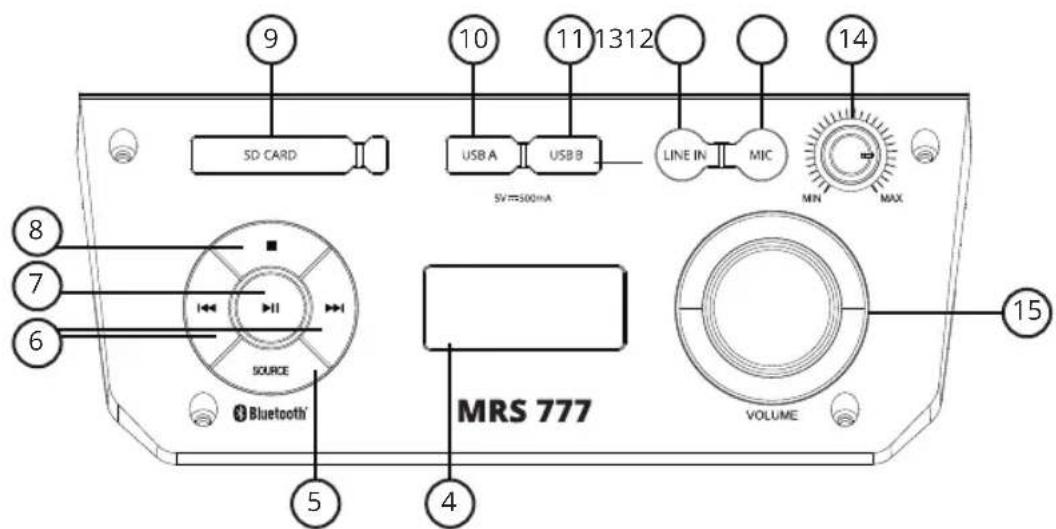
4 Display: Display of the currently selected function or display of the current playback time in MP3/SD mode.
5 Source: You can cycle through the various sources in the following order by repeatedly pressing the Source button: Bluetooth, USB, SD card, radio and Line In.
6 |◀/▶▶:
The previous or next track can be selected by pressing these buttons briefly during MP3 playback. Pressing and holding these buttons will rewind or fast forward the track.
Pressing and holding these buttons in the radio mode will trigger a search for stations broadcasting on higher or lower frequencies. Briefly pressing these buttons will gradually increase or decrease the reception frequency manually.
When the Bluetooth mode is used, the previous or next track can be selected.
7 PLAY/PAUSE:
When playing MP3s via USB or SD card, this button can be used to start or pause playback.
When the radio mode is selected, pressing and holding this button triggers the station scanning and auto preset function (up to 20 station presets) (towards higher frequencies).
In Bluetooth mode, playback can be started or paused by briefly pressing this button.
Search for new Bluetooth sources with your phone or tablet. You will find the MAC AUDIO MRS 777. Connect your device with the MAC AUDIO MRS 777. If you are asked for a password, use "0000".
In Bluetooth mode, pressing and holding this button will disable Bluetooth pairing.
8 STOP:
When playing MP3s via USB or SD card, this button can stop playback.
9 Input source for SD card reader: For playback of MP3 music.
10 Input source USB A: USB storage devices can be connected to the MRS 777 for MP3 music playback.
GB
11 USB B port: This USB port is only used to charge external USB devices.
12 LINE IN input: External audio sources can be reproduced via a 3.5 mm stereo jack.
13 Mic: An external microphone can be connected via a 3.5 mm stereo jack for singing karaoke or for making announcements.
14 Microphone volume: The volume that is used for karaoke or making announcements can be adjusted via the microphone volume knob.
15 Volume knob: Adjusts the volume. The volume is shown on the display (4). (VOL 00 - VOL 32/ max).

natural_image
Technical line drawing of a device casing with internal components and mounting holes (no text or symbols)16Telescopichandle: The telescopic handle can be locked at several heights using the unlocking or locking knob to facilitate transportation via the two built-in rollers.
N.B.:
During battery operation, the maximum volume is limited to 2/3 of the volume (VOL 20) in order to achieve significantly longer battery life (min. 12 hours). If you connect the power supply plug during battery operation, the volume limit will remain active. To reactivate maximum power output with the power cord connected, switch off the MRS 777 and switch it on again.
TECHNICAL SPECIFICATIONS
Phone Connectivity
Wireless Bluetooth® 2.1 with EDR (Enhanced Data Rate)
Operating frequency: 2402-2480 MHz
Maximum power transmitted acc. EN62479: 2.81 dBm
FM Tuner
FM PLL Tuner (87.5 - 108 MHz)
Built-in FM antenna
Loudspeakers
Equipment: 1 x 76 mm (3") tweeter/midrange, 1 x 203 mm (8") woofer
Principle: closed enclosure
Miscellaneous
Total power output 50 watts
Connections 1x USB A input: MP3 playback
1 x USB B port: to charge external USB devices
SD card reader for MP3 playback
AUX input (Line In): 3.5 mm jack
Microphone input (MIC): 3.5 mm jack
Mains voltage 100 - 240 V AC/50 - 60 Hz, built-in linear power mains adapter
Electricity consumption 50 W
Standby: < 0.5 W
Display/Settings 4 segment display (color: orange)
Weight 10.7 kg
Dimensions (wxhxd) 413 x 544 x 245 mm
Subject to technical modifications.


natural_image
Blank gray image with no visible content, text, or symbols


natural_image
Blank gray image with no visible content, text, or symbols

natural_image
Blank white image with no visible content, text, or symbols.


natural_image
Pure horizontal and vertical lines forming a symmetrical pattern (no text or symbols)
natural_image
Pure horizontal and vertical lines forming a symmetrical pattern (no text or symbols)
natural_image
Pure horizontal and vertical lines forming a symmetrical pattern (no text or symbols)
natural_image
Pure horizontal and vertical lines forming a symmetrical pattern (no text or symbols)| 1 | 2 |
| 1 | 2 |
| 1 | 2 |
| 1 | 2 |
| 1 | 2 |
natural_image
Blank white image with no visible content, text, or symbols.
natural_image
Blank white image with no visible content, text, or symbols.
natural_image
Blank white image with no visible content, text, or symbols.
natural_image
Blank white image with a single horizontal gray bar at the top (no text or symbols)
natural_image
Blank white image with a single horizontal gray bar at the top (no text or symbols)
natural_image
Blank white image with a single horizontal gray bar at the top (no text or symbols)
natural_image
Blank white image with a single horizontal gray bar at the top (no text or symbols)
natural_image
Blank white image with a single horizontal gray bar at the top (no text or symbols)
natural_image
Blank white image with a single horizontal gray bar at the top (no text or symbols)
natural_image
Blank white image with a single horizontal gray bar at the top (no text or symbols)
natural_image
Blank white image with a single horizontal gray bar at the top (no text or symbols)
natural_image
Blank white image with a single horizontal gray bar at the top (no text or symbols)
natural_image
Blank white image with no visible content, text, or symbols.
natural_image
Blank white image with no visible content, text, or symbols.
natural_image
Blank white image with no visible content, text, or symbols.
GB Congratulations! You have made a wise selection in becoming the owner of a MAC AUDIO product. We grant a 2-years warranty for this product.
The equipments are checked and tested continuously during the entire production process. In case you have problems with your Mac Audio equipment, kindly observe the following:
-
The guarantee period commences with the purchase of the component and is applicable only to the original owner.
-
During the guarantee period we will rectify any defects due to faulty material or workmanship by replacing or repairing the defective part at our discretion. Further claims, and in particular those for price reduction, cancellation of sale, compensation for damages or subsequential damages, are excluded.
-
Unauthorized tampering with the equipment will invalidate this guarantee.
-
Consult your authorized dealer first, if guarantee service is needed. Should it prove necessary to return the component to the factory, please insure that • the component is packed in original factory packing in good condition • your enclose your receipt as proof of purchase.
-
Excluded from the guarantee are: • Illuminates • Wear parts • Shipping damages, either readily apparent or concealed (claims for such damages must be lodged immediately with forwarding agent, the railway express office or post office). • Scratches in cases, metal components, front panels, etc. (You must notify your dealer directly of such defects within three days of purchase.) • Defects caused by incorrect installation or connection, by operation errors (see operating instructions), by overloading or by external force. • Equipments which have been repaired incorrectly or modified or where the case has been opened by persons other than us. • Consequential damages to other equipments. • Reimbursement of cools, without our prior consent, when repairing damages by third parties • Batteries and battery packs.
Garantiekarte Warranty Card
Typ/Type
Name and address of the dealer/stamp
Käufer/Customer
Name/Name ____
Straße/Street
PLZ, Ort/City ____
Land/Country
Kaufdatum/buying date
No warranty without receipt!
MAC
AUDIO
Lise-Meitner-Str. 9 • D-50259 Pulheim • Germany
Tel. +49 (0) 2234/807 - 0 • Fax +49 (0) 2234/807 - 399
Internet: http://www.mac-audio.de


Brand : MAC AUDIO
Model : MRS 777
Category : Radio