CMLF107EV - Washing machine Calex - Free user manual and instructions
Find the device manual for free CMLF107EV Calex in PDF.


Pick your language and provide your email: we'll send you a specifically translated version.
| Product Type | Freestanding Washing Machine |
| Brand | Calex |
| Model | CMLF107EV |
| Capacity | 10 kg |
| Spin Speed | 1000 rpm |
| Dimensions (H x W x D) | 85 x 60 x 60 cm |
| Weight | 70 kg |
| Power Supply | 220-240 V, 50 Hz |
| Power Consumption | 2000 W |
| Water Connection | Cold water inlet |
| Number of Programs | 15 |
| Key Programs | Cotton, Synthetics, Delicates, Quick Wash, Wool, Rinse & Spin |
| Temperature Settings | Cold to 90°C |
| Delay Start | Up to 24 hours |
| Child Lock | Yes |
| Display Type | LED |
| Drum Material | Stainless steel |
| Noise Level (Wash/Spin) | 58 dB / 75 dB |
| Energy Efficiency Class | A+++ |
| Annual Energy Consumption | 180 kWh |
| Annual Water Consumption | 11000 L |
| Maintenance | Clean lint filter regularly, descale drum every 3 months |
| Safety Features | Overflow protection, unbalanced load detection, anti-float |
| Spare Parts Availability | 7 years after purchase |
| Included Accessories | Inlet hose, drain hose, user manual |
Frequently Asked Questions - CMLF107EV Calex
How do I start a wash cycle?
Load the drum, add detergent, select a program using the program dial, adjust temperature or spin if needed, and press Start/Pause.
What does the error code E01 mean?
E01 indicates a water supply issue. Check if the water tap is open and the inlet hose is not kinked or blocked.
How often should I clean the filter?
Clean the lint filter after every 10-15 washes to maintain performance. Refer to the manual for location.
Can I use liquid detergent?
Yes, but pour it into the detergent drawer compartment marked with a 'II' or use a dosing ball. Avoid overfilling.
What is the maximum load for a quick wash?
For a Quick Wash program, the maximum load is typically 3 kg to ensure effective cleaning in a short time.
How do I activate the child lock?
Press and hold the Child Lock button (usually marked with a padlock icon) for 3 seconds. Repeat to deactivate.
Why is the machine not spinning?
Possible causes: unbalanced load, small load, or the drain filter is clogged. Redistribute laundry or clean the filter.
How do I descale the washing machine?
Run an empty cotton cycle at 90°C with a descaling agent or a cup of white vinegar once every 3 months.
What voltage does the machine require?
The machine operates on 220-240 V at 50 Hz. Do not use with a different voltage.
How to install the washing machine?
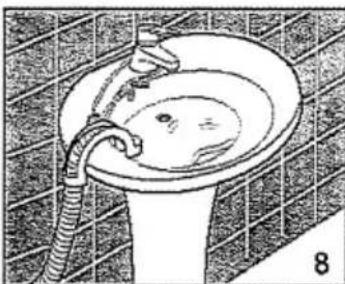
Remove all transport bolts, level the machine using the adjustable feet, connect the inlet hose to a water tap and the drain hose to a standpipe or sink.
User questions about CMLF107EV Calex
0 question about this device. Answer the ones you know or ask your own.
Ask a new question about this device
No questions yet. Be the first to ask one.
Download the instructions for your Washing machine in PDF format for free! Find your manual CMLF107EV - Calex and take your electronic device back in hand. On this page are published all the documents necessary for the use of your device. CMLF107EV by Calex.
USER MANUAL CMLF107EV Calex
natural_image
Cartoon illustration of a distressed computer with smoke and flames, no text or symbols presentnatural_image
Cartoon illustration of a smiling computer monitor with a character and a magnifying glass (no text or symbols)natural_image
Illustration of a person working at a desk with steam rising (no text or symbols)natural_image
Cartoon illustration of a person shouting with arms raised, surrounded by smoke and debris (no text or symbols)natural_image
Cartoon illustration of a car with a large speedometer and a clock, no text or symbols presentnatural_image
Cartoon illustration of a smiling car with a person standing nearby (no text or symbols)natural_image
Illustration of a person in a suit with a large object, possibly a device or machine, surrounded by abstract patterns (no text or symbols)natural_image
Cartoon illustration of a car with a large snake and a smiling face, no text or symbols presentnatural_image
Diagram of a mechanical assembly with arrows indicating movement or force, no text or symbols presentnatural_image
Diagram of a hand inserting a component into an electrical cabinet (no text or symbols visible)natural_image
Simple line drawing of a hand holding a small object near a window (no text or symbols)natural_image
Hand holding a tool near a window with a curved arrow indicating direction (no text or symbols)natural_image
Illustration of a hand using a tool to adjust or install a pipe, with no visible text or symbols.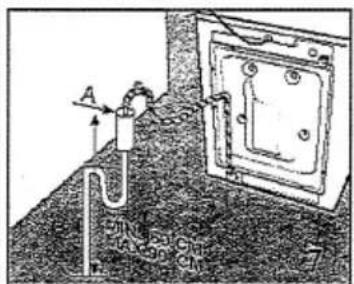
natural_image
Illustration of a bathroom sink with a hand holding a tool, no text or symbols presentFR
INSTALLATION DE LA MACHINE
BRANCHEMENT ÉLECTRIQUE
natural_image
Hand holding a tool interacting with a circular object, showing motion arrows (no text or symbols)EMPLOI DE LA MACHINE À LAVER LE LINGE
UTILISATION DES DÉTERGENTS
natural_image
Technical line drawing of a mechanical device with no visible text or symbolsFR
EMPLOI DE LA MACHINE À LAVER LE LINGE
COMMENT ÉLIMINER CERTAINES TACHES
natural_image
Line drawing of a mechanical assembly with gears and a handle, no text or symbols presentnatural_image
Illustration of a hand washing a tooth on a circular surface, no text or symbols presentnatural_image
Line drawing of hands assembling a mechanical component with a tool, labeled 'A' (no text or symbols on the diagram itself)natural_image
Line drawing of a mechanical device with a magnified inset showing internal components (no text or symbols)
Table of contents
Click a title to access it
Manual assistant
Powered by Anthropic
Waiting for your message
Product information
Brand : Calex
Model : CMLF107EV
Category : Washing machine