
PD-637 - Pedometer TANITA - Free user manual and instructions
Find the device manual for free PD-637 TANITA in PDF.


| Product Type | Pedometer |
| Brand | Tanita |
| Model | PD-637 |
| Dimensions | 71 x 46 x 17 mm |
| Weight | Approximately 40 g |
| Power Source | 1 x CR2032 battery |
| Clock | 12-hour AM/PM |
| Stride Length Range | 30 cm to 180 cm |
| Weight Range | 25 kg to 150 kg |
| Step Counter Range | 0 to 90,990 steps |
| Distance Measurement Range | 0 to 999.99 km |
| Calorie Consumption Range | 0 to 9,999.94 kcal |
| Stopwatch Range | 0 to 9 hr 59 min 55 sec |
| Pacer Range | 50 to 200 beats per minute |
| Main Functions | Step counting, distance measurement, calorie estimation, stopwatch, pacer |
| Care Instructions | Keep away from direct sunlight, severe shock, and liquids. Clean with a soft cloth only. Do not open inner casing. |
| Safety Warnings | Keep battery and screws away from children. Consult physician before exercise. |
| Battery Replacement | Replace with CR2032 when display is dim. Open cover, slide battery cover, insert with (+) side up, press reset. |
| Spare Parts Availability | Battery (CR2032) is replaceable; no other spare parts listed. |
| Manufacturer | Tanita UK Ltd., The Barn, Philipots Close, Yiewsley, Middlesex UB7 7RY, UK |
Frequently Asked Questions - PD-637 TANITA
User questions about PD-637 TANITA
0 question about this device. Answer the ones you know or ask your own.
Ask a new question about this device
Download the instructions for your Pedometer in PDF format for free! Find your manual PD-637 - TANITA and take your electronic device back in hand. On this page are published all the documents necessary for the use of your device. PD-637 by TANITA.
USER MANUAL PD-637 TANITA
Before you use your pedometer
Cautions
- Avoid leaving pedometer in direct sunlight.
- Do not subject pedometer to severe shock or put pressure on the LCD.
- Do not use liquid to clean, use only a soft cloth.
- Do not open inner casing.
Choke hazard
- Keep battery and screws away from children.
- Consult your physician before starting any new exercise routine.
Get to know your pedometer

Glossany
| CLOCK | It refers to the 12 hour (AM/PM) clock function. |
| STEPS TAKEN | This is the number of steps you have taken. Each time you bring your right or left foot forward, a step is recorded. |
| STRIDE LENGTH | The average length of one step. One step is the length between the heel of your back foot to the heel of your front foot when you walk. |
| TRAVELING DISTANCE | This is the number of kilometer (km) that you have walked. It is calculated by multiplying the STEPS TAKEN by the STRIDE LENGTH. |
| BODY WEIGHT | I refers to your current body weight in kilogram (kg). |
| CALORIE COXSUMPTION WHILE MOVING | This is the amount of Calories that you have used. It is affected by your speed, duration of your work-out, and your current body weight. |
| STOPWATCH | It refers to the stopwatch function. |
| PACER | It refers to the pacer function. |
How to set up your pedometer
- Before setting your pedometer, you must first determine your stride. The key to accurate distance measurement is a correct stride. To calculate the average stride accurately, walk ten steps and divide the total distance by 10.
The result is your average stride. For higher accuracy, you are recommended to repeat this measurement several times.


- Go to STEP COUNTING mode by pressing the MODE button until the word 'step' displays in the LCD. Press and hold the START/STOP/SET button for 3 seconds. The CLOCK will flash slowly.
- Set the clock by pressing UP or DOWN button. Holding the respective button for more than 1 sec triggers the fast setting function. Releasing the button will unlock the fast setting function.
- After setting the clock, press the "set" button to go to the stride length mode.
- Adjust your stride length by pressing the UP or DOWN button. Each time you press the UP button, the displayed number will increase by 1 cm until it reaches 180 cm. After that it will cycle back to 30 cm. Pressing the DOWN button will decrease the displayed number correspondingly.
- When you have selected your stride length, please proceed to weight setting by pressing the START/STOP/SET button.
- Please input your body weight into your pedometer by using the UP and DOWN buttons. Your pedometer accepts any number between 25 kg and 150 kg.
- After you have completed the setting, please press the START/STOP/SET button. If you do not press any button in 60 seconds, the pedometer will leave the setup mode automatically.
- Your pedometer will prompt you to adjust the setting after battery replacement.
The MODE button
Pressing the MODE button changes the pedometer function according to the following sequence.
Step counting (step) > Traveling distance measurement (km) > Calorie consumption estimation (kcal) > Stopwatch ☺ > Pacer
Step counting
- Your pedometer records the number of steps automatically.
- To reset your readings back to 0, press and hold the UP/RESET button for 2 seconds. This will clear all the readings in Distance measurement and Calorie consumption functions simultaneously.
Traveling distance measurement
- It refers to the total distance (in km) that you have traveled.
- A correct value of stride length is important in traveling distance
measurement. Please follow the procedures in the SETUP section if you want to adjust the stride length value. - To reset your readings back to 0, press and hold the UP/RESET button for 2 seconds. This will clear all the readings in Step counting and Calorie consumption functions simultaneously.
Calorie consumption estimation
- This is the amount of calories that you have consumed in jogging. Your walking speed, work-out duration, and your body weight are important in the calorie consumption calculation.
- Please input your current body weight (in kg) into your pedometer by following the procedures in the SETUP section.

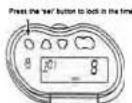


- To reset your readings back to 0, press and hold the UP/RESET button for 2 seconds. This will clear all the readings in Step counting and Traveling distance measurement functions simultaneously.
Stopwatch
- You could time your work-out duration by using this function.
- The LCD will display a five digit number. From left to right, the first digit represents the hours, the second two digits represent minutes, and the fourth and fifth digits represent seconds.
- Pressing the START/STOP/SET button will start the stopwatch. Pressing the same button again will pause this function. To continue the counting, press the START/STOP/SET button one more time.
- Pressing the UP/RESET button for 2 seconds will reset the stopwatch.
- The stopwatch will continue to time your work-out duration even if you have changed to another function.
Pacer
- The pacer function helps you to adjust your jogging rhythm.
- It accepts any jogging rhythm from 50 beats to 200 beats per minute.
- Please adjust the value by using the UP and DOWN buttons.
- Pressing the START/STOP/SET button will turn on this function. The pedometer will give off beeping tones in accordance to the setting value.
- Pressing the START/STOP/SET button again will turn off this function.
- The pacer will continue to work even if you have changed to another function.
- Please remember to turn off the pacer function after your work-out. Otherwise, your pedometer will be running out of battery power in a short period of time.
How do I wear my pedometer
- Securely attach the pedometer to your belt by using the pedometer belt clip.
- Please make sure the pedometer is not tilted.
- Do not place your pedometer in your pocket. It will not provide accurate results if you do so.
Replacing the battery
- Your pedometer will automatically prompt you to enter your personal data. Please follow the procedures in the SET UP section.
Your pedometer uses one CR2032 battery.
Please replace a new battery when the display is blank or difficult to read.
1. Open the Cover as per the illustration diagram.
2. Slide off the battery cover to the right.
3. Insert a new battery CR2032 with its (+) side facing upwards.
4. Press the reset key to reset the display.
5. Close the battery cover.
Specifications
| Model | PD-637 |
| Clock | 12 hour (AM/PM) |
| Stride Range | 30 cm ~ 180 cm |
| Weight Range | 25 kg ~ 150 kg |
| Step countier | 0 ~ 90.990 |
| Distance measurement | 0 ~ 999.99 kilometer (km) |
| Calorie consumption | 0 ~ 9,999.94cal |
| Stopwatch | 0 ~ 9hr.59mm.95sec |
| Pacer | 50~200 bpm (beats per minute) |
| Dimensione | 71 x 46 x 17 mm |
| Weight | Approximately 40g |
Tanita Uk Ltd.
The Barn, Philipots Close, Yiewaley
Middlesex UB77RY.
Tel:+44(0)1895438577
Fax:+44(0)189543851
Email:info@tanita.co.uk http://www.tanita.co.uk
Informazioni Clienti:0800 731 6994


Brand : TANITA
Model : PD-637
Category : Pedometer