
ZOB35712XK - Oven ZANUSSI - Free user manual and instructions
Find the device manual for free ZOB35712XK ZANUSSI in PDF.


| Product Type | Built-in Electric Oven |
| Brand | Zanussi |
| Model | ZOB35712XK |
| Energy Efficiency Class | A |
| Oven Capacity | 70 Liters |
| Dimensions (HxWxD) | 59.5 x 59.5 x 56.8 cm |
| Net Weight | 35 kg |
| Power Supply | 220-240 V, 50 Hz, 13 A |
| Heating Methods | Conventional, Fan Forced, Grill, Lower Heat, Fan Grill |
| Temperature Range | 50°C - 250°C |
| Cleaning Type | Pyrolytic Self-Cleaning |
| Number of Oven Shelves | 2 |
| Interior Light | Yes |
| Cooling Fan | Yes |
| Child Lock | Yes |
| Display Type | LED Digital |
| Timer Function | Yes, with End Cooking Time |
| Door Type | Cool Door, Triple Glazed |
| Energy Consumption (Conventional) | 0.99 kWh per cycle |
| Energy Consumption (Fan Forced) | 0.79 kWh per cycle |
| Spare Parts Availability | Yes, via authorized service centers |
| Repairability Index | 8.0 / 10 |
Frequently Asked Questions - ZOB35712XK ZANUSSI
User questions about ZOB35712XK ZANUSSI
0 question about this device. Answer the ones you know or ask your own.
Ask a new question about this device
Download the instructions for your Oven in PDF format for free! Find your manual ZOB35712XK - ZANUSSI and take your electronic device back in hand. On this page are published all the documents necessary for the use of your device. ZOB35712XK by ZANUSSI.
USER MANUAL ZOB35712XK ZANUSSI
Safety information 2
Safety instructions 3 ____
Product description 5____
Before first use 5 ____
Daily use 6
Clock functions 7
Using the accessories. 8
Additional functions 9
Hints and tips_10____
Care and cleaning 16 ____
Troubleshooting 18____
Installation 19
Technical information____20
Energy efficiency____20
Subject to change without notice.
⚠ Safety information
Before the installation and use of the appliance, carefully read the supplied instructions. The manufacturer is not responsible if an incorrect installation and use causes injuries and damages.
Always keep the instructions with the appliance for future reference.
Children and vulnerable people safety
- This appliance can be used by children aged from 8 years and above and persons with reduced physical, sensory or mental capabilities or lack of experience and knowledge if they have been given supervision or instruction concerning use of the appliance in a safe way and understand the hazards involved.
- Do not let children play with the appliance.
- Keep all packaging away from children.
- Keep children and pets away from the appliance when it operates or when it cools down. Accessible parts are hot.
- If the appliance has a child safety device, we recommend you activate it.
- Cleaning and user maintenance shall not be made by children without supervision.
- Children of less than 3 years should be kept away unless continuously supervised.
General Safety
- Only a qualified person must install this appliance and replace the cable.
- Internally the appliance becomes hot when in operation. Do not touch the heating elements that are in the appliance. Always use oven gloves to remove or put in accessories or ovenware.
- Before maintenance cut the power supply.
- Ensure that the appliance is switched off before replacing the lamp to avoid the possibility of electric shock.
- Do not use a steam cleaner to clean the appliance.
- Do not use harsh abrasive cleaners or sharp metal scrapers to clean the glass door since they can scratch the surface, which may result in shattering of the glass.
- If the supply cord is damaged, it must be replaced by the manufacturer, its Authorised Service Centre or similarly qualified persons in order to avoid a hazard.
- To remove the shelf supports first pull the front of the shelf support and then the rear end away from the side walls. Install the shelf supports in the opposite sequence.
Safety instructions
Installation

WARNING!
Only a qualified person must install this appliance.
- Remove all the packaging.
- Do not install or use a damaged appliance.
- Obey the installation instruction supplied with the appliance.
■ Always be careful when you move the appliance because it is heavy. Always wear safety gloves. - Do not pull the appliance by the handle.
- Keep the minimum distance from the other appliances and units.
- Make sure that the appliance is installed below and adjacent safe structures.
- The sides of the appliance must stay adjacent to appliances or to units with the same height.
Electrical connection

WARNING!
Risk of fire and electrical shock.
- All electrical connections should be made by a qualified electrician.
-
The appliance must be earthed.
-
Make sure that the electrical information on the rating plate agrees with the power supply. If not, contact an electrician.
- Always use a correctly installed shockproof socket.
- Do not use multi-plug adapters and extension cables.
- Make sure not to cause damage to the mains plug and to the mains cable. Should the mains cable need to be replaced, this must be carried out by our Authorised Service Centre.
- Do not let mains cables touch or come near the appliance door, especially when the door is hot.
- The shock protection of live and insulated parts must be fastened in such a way that it cannot be removed without tools.
- Connect the mains plug to the mains socket only at the end of the installation. Make sure that there is access to the mains plug after the installation.
- If the mains socket is loose, do not connect the mains plug.
- Do not pull the mains cable to disconnect the appliance. Always pull the mains plug.
- Use only correct isolation devices: line protecting cut-outs, fuses (screw type fuses
removed from the holder), earth leakage trips and contactors.
- The electrical installation must have an isolation device which lets you disconnect the appliance from the mains at all poles. The isolation device must have a contact opening width of minimum 3 mm.
- This appliance complies with the E.E.C. Directives.
Use

WARNING!
Risk of injury, burns and electrical shock or explosion.
- Use this appliance in a household only.
- Do not change the specification of this appliance.
- Make sure that the ventilation openings are not blocked.
- Do not let the appliance stay unattended during operation.
- Deactivate the appliance after each use.
- Be careful when you open the appliance door while the appliance is in operation. Hot air can release.
- Do not operate the appliance with wet hands or when it has contact with water.
- Do not apply pressure on the open door.
- Do not use the appliance as a work surface or as a storage surface.
- Open the appliance door carefully. The use of ingredients with alcohol can cause a mixture of alcohol and air.
- Do not let sparks or open flames to come in contact with the appliance when you open the door.
- Do not put flammable products or items that are wet with flammable products in, near or on the appliance.

WARNING!
Risk of damage to the appliance.
- To prevent damage or discoloration to the enamel:
- do not put ovenware or other objects in the appliance directly on the bottom.
- do not put aluminium foil directly on the bottom of the appliance.
– do not put water directly into the hot appliance.
– do not keep moist dishes and food in the appliance after you finish the cooking. -
be careful when you remove or install the accessories.
-
Discoloration of the enamel has no effect on the performance of the appliance. It is not a defect in the sense of the warranty law.
- Use a deep pan for moist cakes. Fruit juices cause stains that can be permanent.
- This appliance is for cooking purposes only. It must not be used for other purposes, for example room heating.
- Always cook with the oven door closed.
Care and cleaning

WARNING!
Risk of injury, fire, or damage to the appliance.
- Before maintenance, deactivate the appliance and disconnect the mains plug from the mains socket.
- Make sure the appliance is cold. There is the risk that the glass panels can break.
- Replace immediately the door glass panels when they are damaged. Contact the Service.
- Be careful when you remove the door from the appliance. The door is heavy!
- Clean regularly the appliance to prevent the deterioration of the surface material.
- Remaining fat or food in the appliance can cause fire.
- Clean the appliance with a moist soft cloth. Only use neutral detergents. Do not use abrasive products, abrasive cleaning pads, solvents or metal objects.
- If you use an oven spray, obey the safety instructions on the packaging.
- Do not clean the catalytic enamel (if applicable) with any kind of detergent.
Internal light
- The type of light bulb or halogen lamp used for this appliance is only for household appliances. Do not use it for house lighting.

WARNING!
Risk of electrical shock.
- Before replacing the lamp, disconnect the appliance from the power supply.
- Only use lamps with the same specifications.
Disposal

WARNING!
Risk of injury or suffocation.
- Disconnect the appliance from the mains supply.
- Cut off the mains cable and discard it.
- Remove the door catch to prevent children and pets to get closed in the appliance.
Product description
General overview

Accessories
- Wire shelf
For cookware, cake tins, roasts. - Aluminium baking tray
For cakes and biscuits.
Before first use

WARNING!
Refer to Safety chapters.
Initial Cleaning
Remove all accessories and removable shelf supports from the appliance.

Refer to "Care and cleaning" chapter.
Clean the appliance before first use. Put the accessories and the removable shelf supports back to their initial position.
Setting the time
You must set the time before you operate the oven.
1 Control panel
2 Knob for the oven functions
3 Power lamp / symbol / indicator
4 Electronic programmer
5 Knob for the temperature
6 Temperature lamp / symbol / indicator
7 Heating element
8 Lamp
9 Fan
10 Turnspit hole
11 Aqua cleaning container
12 Shelf support, removable
13 Shelf positions
- Grill- / Roasting pan
To bake and roast or as pan to collect fat.
- Turnspit
For roasting larger joints of meat and poultry.
The indicator for the Time of day function flashes when you connect the appliance to the electrical supply, when there was a power cut or when the timer is not set.
Press the + or button to set the correct time.
After approximately five seconds, the flashing stops and the display shows the time of day you set.
Changing the time

You cannot change the time of day if the Duration |→| End function operates.
Press again and again until the indicator for the Time of Day function flashes. To set a new time, refer to "Setting the time".
Preheating
Preheat the empty appliance to burn off the remaining grease.
- Set the function temperature.
and the maximum
-
Let the appliance operate for 1 hour.
-
Set the function temperature.
and the maximum
Daily use
-
Let the appliance operate for 15 minutes.
-
Set the function temperature.

the maximum
- Let the appliance operate for 15 minutes. Accessories can become hotter than usual. The appliance can emit an odour and smoke. This is normal. Make sure that the airflow in the room is sufficient.

WARNING!
Refer to Safety chapters.
Retractable knobs
To use the appliance, press the control knob. The control knob comes out.
Activating and deactivating the appliance

It depends on the model if your appliance has knob symbols, indicators or lamps:
- The indicator comes on when the oven heats up.
- The lamp comes on when the appliance operates.
-
The symbol shows whether the knob controls the oven functions or the temperature.
-
Turn the knob for the oven functions to select an oven function.
- Turn the knob for the temperature to select a temperature.
- To deactivate the appliance turn the knobs for the oven functions and temperature to the off position.
Oven functions
| Oven function Application | |
| 0 | Off position The appliance is off. |
 | Light To activate the lamp without a cooking function. |
 | Conventional Cooking / Aqua Cleaning To bake and roast food on 1 shelf position.For more information about Aqua Cleaning, refer to the chapter "Care and cleaning". |
 | Bottom Heat To bake cakes with crispy bottom and to preserve food. |
 | Grilling To grill flat food and to toast bread. |
 | Grilling + Turnspit To grill meat, including kebabs and smaller pieces of meat. |
 | Pizza Setting To bake food on 1 shelf position for a more intensive browning and a crispy bottom. Set the temperature 20 - 40 °C lower than for Conventional Cooking. |
 | True Fan Cooking To bake on up to 3 shelf positions at the same time and to dry food. Set the temperature 20 - 40 °C lower than for Conventional Cooking. |
 | Defrost To defrost frozen food. |
Display
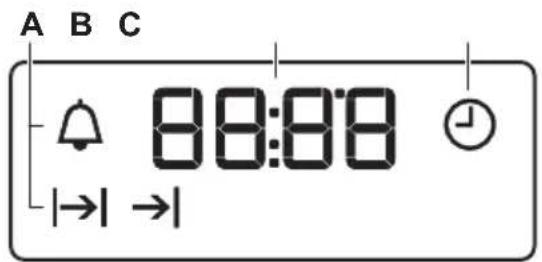
A) Function indicators
B) Time display
C) Function indicator
Buttons
| Button Function Description | |
 | MINUS To set the time. |
 | CLOCK To set a clock function. |
 | PLUS To set the time. |
Clock functions
Clock functions table
| Clock function Application | |
 | Time of day To set, change or check the time of day.Minute Minder To set countdown time. This function has no effect on the operation of the appliance. |
| |→| | Duration To set the cooking time of the oven. |
| →| | End To set the time of day when the oven should deactivate. |

You can use the functions Duration |→| and End →| at the same time to set the time for how long the appliance should operate and when the appliance should deactivate. This lets you activate the appliance with a delay in time. First set the Duration |→| and then the End . →|
Setting the clock functions
For Duration and End, set an oven function and temperature of cooking. This is not necessary for the Minute Minder.
- Press again and again until the indicator for the necessary clock function starts to flash.
- Press or to set the time for the necessary clock function.
The clock function operates. The display shows the indicator for the clock function you set.
Using the accessories
For the Minute Minder function the display shows the time left.
- When the time ends the indicator of the clock function flashes and an acoustic signal sounds. Press a button to stop the signal.
- Turn the knob for the oven functions and the knob for the temperature to the off position.
With the Duration and End functions, the appliance deactivates automatically.
Cancelling the clock functions
- Press the ① again and again until the necessary function indicator flashes.
- Press and hold. The clock function goes out after some seconds.

WARNING!
Refer to Safety chapters.
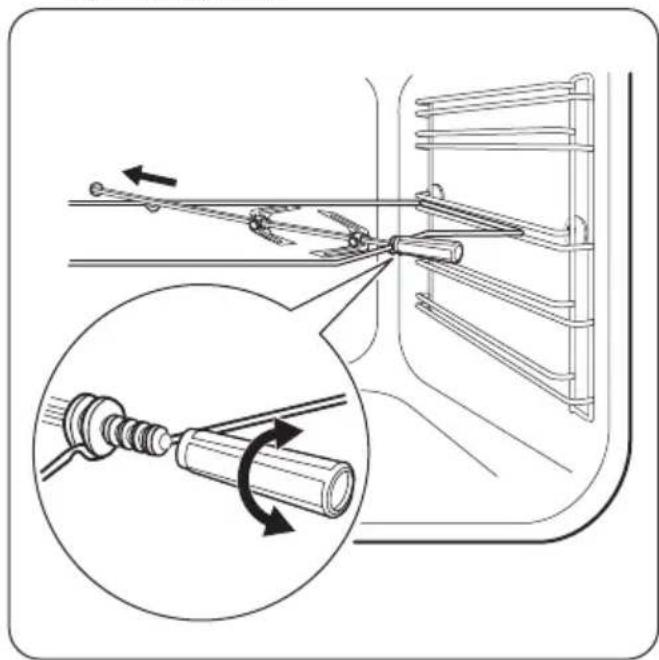
Using the turnspit

WARNING!
Be careful when you use the turnspit. The forks and the spit are sharp. There is a risk of injury.

WARNING!
Use oven gloves when you remove the turnspit. The turnspit and the grill are hot. There is a risk of burns.

- Put the turnspit handle into the spit.
-
Put the deep pan on the lowest shelf position.
-
Put the spit frame on the third shelf position from the bottom.
natural_image
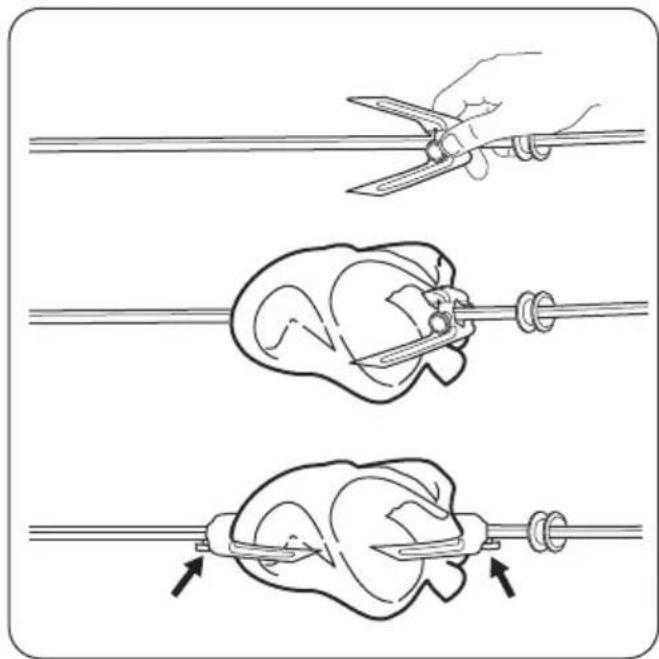
Technical diagram showing mechanical assembly with a magnified inset illustrating rotational motion (no text or symbols)- Install the first fork on the spit, then put the meat on the turnspit and install the second fork.
natural_image
Illustration of three steps to tie a pan using scissors, showing mechanical components and motion (no text or symbols)Additional functions
Cooling fan
When the appliance operates, the cooling fan activates automatically to keep the surfaces of the appliance cool. If you deactivate the appliance, the cooling fan can continue to operate until the appliance cools down.
-
Use the screws to tighten the forks.
-
Put the tip of the spit into the turnspit hole.
-
Lay the back side of the spit on the turnspit frame. Refer to "Product description" chapter.
-
Remove the turnspit handle.
-
Select a function with the turnspit position. The turnspit rotates.
-
Set the necessary temperature. Refer to the cooking tables.

If a clock function (Duration or End) ends and you do not deactivate the appliance, the turnspit continues to operate for the next 10 minutes.
Safety thermostat
Incorrect operation of the appliance or defective components can cause dangerous overheating. To prevent this, the oven has a safety thermostat which interrupts the power supply. The oven activates again automatically when the temperature drops.

WARNING!
Refer to Safety chapters.

The temperature and baking times in the tables are guidelines only. They depend on the recipes and the quality and quantity of the ingredients used.
General information
- The appliance has five shelf positions. Count the shelf positions from the bottom of the appliance floor.
- The appliance has a special system which circulates the air and constantly recycles the steam. With this system you can cook in a steamy environment and keep the food soft inside and crusty outside. It decreases the cooking time and energy consumption to a minimum.
- Moisture can condense in the appliance or on the door glass panels. This is normal. Always stand back from the appliance when you open the appliance door while cooking. To decrease the condensation, operate the appliance for 10 minutes before cooking.
- Clean the moisture after each use of the appliance.
- Do not put the objects directly on the appliance floor and do not put aluminium foil
on the components when you cook. This can change the baking results and cause damage to the enamel.
Baking cakes
- Do not open the oven door before 3/4 of the set cooking time is up.
- If you use two baking trays at the same time, keep one empty level between them.
Cooking meat and fish
- Use a deep pan for very fatty food to prevent the oven from stains that can be permanent.
- Leave the meat for approximately 15 minutes before carving so that the juice does not seep out.
- To prevent too much smoke in the oven during roasting, add some water into the deep pan. To prevent the smoke condensation, add water each time after it dries up.
Cooking times
Cooking times depend on the type of food, its consistency, and volume.
Initially, monitor the performance when you cook. Find the best settings (heat setting, cooking time, etc.) for your cookware, recipes and quantities when you use this appliance.
Baking and roasting table
Cakes
| Food Conventional Cooking True Fan Cooking Time | (min) | Comments | ||||
| Tempera-ture (°C) | Shelf po-sition | Tempera-ture (°C) | Shelf po-sition | |||
| Whisked recipes | 170 2 160 3 (2 and 4) 45 - 60 In a cake | mould | ||||
| Shortbread dough | 170 2 160 3 (2 and 4) 20 - 30 In a cake | mould | ||||
| Buttermilk cheesecake | 170 1 165 2 60 - 80 In a 26 cm | cake mould | ||||
| Apple cake (Apple pie) 1) | 170 2 160 2 (left and | right) | 80 - 100 In two | 20 cmcake mouldson a wireshelf | ||
| Strudel 175 3 | 150 2 60 - 80 In a baking | tray | ||||
| Jam-tart 170 2 | 165 2 (left and | right) | 30 - 40 In a 26 | cmcake mould | ||
| Sponge cake | 170 2 160 2 50 - 60 In a 26 cm | cake mould | ||||
| Christmas cake / Rich fruit cake 1) | 160 2 150 2 90 - 120 In a 20 cm | cake mould | ||||
| Plum cake 1) | 175 1 160 2 50 - 60 In a bread tin | |||||
| Small cakes - one level | 170 3 140 - 150 3 20 - 30 In a baking | tray | ||||
| Small cakes - two levels | -- 140 - 150 2 and 4 25 - 35 In a baking | tray | ||||
| Small cakes - three levels | -- 140 - 150 1, 3 and 5 30 - 45 In a baking | tray | ||||
| Biscuits / pastry stripes - one level | 140 3 140 - 150 3 30 - 35 In a baking | tray | ||||
| Biscuits / pastry stripes - two levels | -- 140 - 150 2 and 4 35 - 40 In a baking | tray | ||||
| Biscuits / pastry stripes - three levels | -- 140 - 150 1, 3 and 5 35 - 45 In a baking | tray | ||||
| Meringues - one level | 120 3 120 3 80 - 100 In a baking | tray | ||||
| Meringues-two levels 1) | -- 120 2 and 4 80 - 100 In a baking | tray | ||||
| Buns1) | 190 3 190 3 | 12 - 20 In a baking | tray | |||
| Eclairs - one level | 190 3 170 3 | 25 - 35 In a baking | tray | |||
| Eclairs - two levels | -- 170 2 and | 4 35 - 45 In a baking | tray | |||
| Plate tarts 180 | 2 170 2 45 - | 70 In a 20 cm | cake mould | |||
| Rich fruit cake | 160 1 150 2 | 110 - 120 In a | 24 cm | cake mould | ||
| Victoria sandwich | 170 1 160 2 (left and right) | 50 - 60 In a | 20 cmcake mould | |||
1) Preheat the oven for 10 minutes.
Bread and pizza
| Food Conventional Cooking True Fan Cooking Time | (min) | Comments | ||||
| Tempera-ture (°C) | Shelf po-sition | Tempera-ture (°C) | Shelf po-sition | |||
| White bread 1) | 190 1 190 1 | 60 - 70 1 - 2 pieces, | 500 gr per piece | |||
| Rye bread | 190 1 180 1 | 30 - 45 In a bread tin | ||||
| Bread rolls 1) | 190 2 180 2 | (2 and 4) | 25 - 40 6 - 8 rolls in | a baking tray | ||
| Pizza 1) | 230 - 250 | 1 230 - 250 | 1 10 - 20 In a baking | tray or a deep pan | ||
| Scones 1) | 200 3 190 3 | 10 - 20 In a baking | tray | |||
1) Preheat the oven for 10 minutes.
Flans
| Food Conventional Cooking True Fan Cooking Time | (min) | Comments | ||||
| Tempera-ture (°C) | Shelf po-sition | Tempera-ture (°C) | Shelf po-sition | |||
| Pasta flan 200 | 2 180 2 40 - 50 In a mould | |||||
| Vegetable flan | 200 2 175 2 45 - 60 In a mould | |||||
| Quiches 1) | 180 1 180 1 50 - 60 In a mould | |||||
| Lasagne 1) | 180 - 190 2 180 - 190 2 25 - 40 In a mould | |||||
| Cannelloni 1) | 180 - 190 2 180 - 190 2 25 - 40 In a mould | |||||
1) Preheat the oven for 10 minutes.
Meat
| Food Conventional Cooking True Fan Cooking Time | (min) | Comments | ||||
| Tempera-ture (°C) | Shelf po-sition | Tempera-ture (°C) | Shelf po-sition | |||
| Beef 200 2 190 2 50 - 70 On a wire | shelf | |||||
| Pork 180 2 180 2 90 - 120 On a wire | shelf | |||||
| Veal 190 2 175 2 90 - 120 On a wire | shelf | |||||
| English roast beef, rare | 210 2 200 2 50 - 60 On a wire | shelf | ||||
| English roast beef, medi-um | 210 2 200 2 60 - 70 On a wire | shelf | ||||
| English roast beef, well done | 210 2 200 2 70 - 75 On a wire | shelf | ||||
| Shoulder of pork | 180 2 170 2 120 - 150 With rind | |||||
| Shin of pork | 180 2 160 2 100 - 120 2 pieces | |||||
| Lamb 190 2 175 2 110 - 130 Leg | ||||||
| Chicken 220 2 200 2 70 - 85 Whole | ||||||
| Turkey 180 2 160 2 210 - 240 Whole | ||||||
| Duck 175 2 220 2 120 - 150 Whole | ||||||
| Goose 175 2 160 1 150 - 200 Whole | ||||||
| Rabbit 190 2 175 2 60 - 80 Cut in | pieces | |||||
| Hare 190 2 175 2 150 - 200 Cut in | pieces | |||||
| Pheasant 190 2 175 2 90 - 120 Whole | ||||||
Fish
| Food Conventional Cooking True Fan Cooking Time | (min) | Comments | ||||
| Tempera-ture (°C) | Shelf po-sition | Tempera-ture (°C) | Shelf po-sition | |||
| Trout / Sea bream | 190 2 175 2 | 40 - 55 3 - 4 fish | ||||
| Tuna fish / Salmon | 190 2 175 2 | 35 - 60 4 - 6 fillets | ||||
Grilling

Preheat the empty oven for 3 minutes before cooking.
| Food Quantity Tempera- | ture (°C) | Time (min) Shelf position | ||||
| Pieces | (g) | 1st side | 2nd side | |||
| Fillet steaks | 4 800 max. | 12 - 15 | 12 - 14 4 | |||
| Beef steaks | 4 600 max. | 10 - 12 | 6 - 8 | 4 | ||
| Sausages | 8 - | max. | 12 - 15 | 10 - 12 4 | ||
| Pork chops | 4 600 max. | 12 - 16 | 12 - 14 4 | |||
| Chicken (cut in 2) | 2 1000 | max. | 30 - 35 | 25 - 30 4 | ||
| Kebabs | 4 - | max. | 10 - 15 | 10 - 12 4 | ||
| Breast of chicken | 4 400 max. | 12 - 15 | 12 - 14 4 | |||
| Food Quantity Tempera- | ture (°C) | Time (min) Shelf position | |||
| Pieces (g) | 1st side 2nd side | ||||
| Hamburger 6 | 600 max. 20 - 30 - 4 | ||||
| Fish fillet 4 | 400 max. 12 - 14 | 10 - 12 4 | |||
| Toasted sandwiches | 4 - 6 - max. 5 | -7 - 4 | |||
| Toast 4 - 6 - max. 2 - 4 | 2 - 4 | 2 - 3 4 | |||
Turnspit

Preheat the empty oven for 10 minutes, before cooking.
| Food Quantity | Temperature(°C) | Time (min) | Shelf position | ||
| Poultry 1000 | 250 | 50 – 60 | 2 | ||
| Roasts | 800 | 250 | 50 – 60 | 2 | |
Defrost
| Food | Quantity (g) | Defrosting time (min) | Further defrost- ing time (min) | Comments |
| Chicken | 1000 | 100 - 140 | 20 - 30 | Place the chicken on an up- turned saucer placed on a large plate. Turn halfway through. |
| Meat | 1000 | 100 - 140 | 20 - 30 | Turn halfway through. |
| Meat | 500 | 90 - 120 | 20 - 30 | Turn halfway through. |
| Trout 150 | 25 - 35 | 10 - 15 | - | |
| Strawberries | 300 | 30 - 40 | 10 - 20 | - |
| Butter | 250 | 30 - 40 | 10 - 15 | - |
| Cream | 2 x 200 | 80 - 100 | 10 - 15 | Cream can also be whipped when still slightly frozen in places. |
| Gateau | 1400 | 60 | 60 | - |
Drying - True Fan Cooking
- Cover trays with grease proof paper or baking parchment.
- For a better result, stop the oven halfway through the drying time, open the door and
let it cool down for one night to complete the drying.
Vegetables
| Food Temperature(°C) | Time (h) Shelf position | |
| 1 position 2 positions | ||
| Beans 60 - 70 6 - 8 3 1 / 4 | ||
| Peppers 60 - 70 5 - 6 3 1 / 4 | ||
| Vegetables for sour 60 - 70 5 - 6 3 1 / 4 | ||
| Mushrooms 50 - 60 6 - 8 3 1 / 4 | ||
| Herbs 40 - 50 2 - 3 3 1 / 4 | ||
Fruit
| Food Temperature(°C) | Time (h) Shelf position | |
| 1 position 2 positions | ||
| Plums 60 - 70 8 - 10 3 1 / 4 | ||
| Apricots 60 - 70 8 - 10 3 1 / 4 | ||
| Apple slices 60 - 70 6 - 8 3 1 / 4 | ||
| Pears 60 - 70 6 - 9 3 1 / 4 | ||
Care and cleaning

WARNING!
Refer to Safety chapters.
Notes on cleaning
- Clean the front of the appliance with a soft cloth with warm water and a cleaning agent.
- To clean metal surfaces, use a usual cleaning agent.
- Clean the appliance interior after each use. Fat accumulation or other food remains may result in a fire. The risk is higher for the grill pan.
- Clean stubborn dirt with a special oven cleaner.
- Clean all accessories after each use and let them dry. Use a soft cloth with warm water and a cleaning agent.
- If you have nonstick accessories, do not clean them using aggressive agents, sharp-edged objects or a dishwasher. It can cause damage to the nonstick coating.
Stainless steel or aluminium appliances

Clean the oven door with a wet sponge only. Dry it with a soft cloth. Do not use steel wool, acids or abrasive materials as they can damage the oven surface. Clean the oven control panel with the same precautions.
Cleaning the door gasket
- Regularly do a check of the door gasket. The door gasket is around the frame of the oven cavity. Do not use the appliance if the door gasket is damaged. Contact an Authorised Service Centre.
- To clean the door gasket, refer to the general information about cleaning.
Removing the shelf supports
To clean the oven, remove the shelf supports.

natural_image
Hand inserting a spring into a door panel (no text or symbols visible)1 Pull the front of the shelf support away from the side wall.

2 Pull the rear end of the shelf support away from the side wall and remove it.
Install the shelf supports in the opposite sequence.
Aqua cleaning
The Aqua cleaning procedure uses steam to help remove remaining fat and food particles from the oven.
- Put 300 ml of water into the Aqua cleaning container at the bottom of the oven.
- Set the function .
- Set the temperature to 90 °C.
- Let the appliance operate for 30 minutes.
- Deactivate the appliance and let it cool down.
- When the appliance is cool, clean the inner surfaces of the oven with a cloth.

WARNING!
Make sure that the appliance is cool before you touch it. There is a risk of burns.
Cleaning the oven door
The oven door has two glass panels. You can remove the oven door and the internal glass panel to clean it.

The oven door can close if you try to remove the internal glass panel before you remove the oven door.

CAUTION!
Do not use the appliance without the internal glass panel.

1 Open the door fully and hold the two door hinges.

natural_image
Line drawing of a mechanical component with an arrow indicating rotation (no text or symbols)2 Lift and turn the levers on the two hinges.

natural_image
Illustration of a hand adjusting a car seatbelt with arrows indicating movement (no text or symbols)3 Close the oven door (halfway to the first opening position. Then pull forward and remove the door from its seat.
natural_image
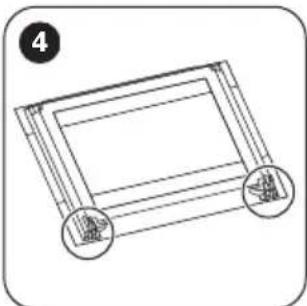
Simple line drawing of a rectangular frame with two circular ends, no text or symbols present.4 Put the door on a soft cloth on a stable surface.

natural_image
Illustration of a hand using a tool to adjust or install a component, with no visible text or symbols.5 Release the locking system to remove the internal glass panel.

6 Turn the two fasteners by 90° and remove them from their seats.
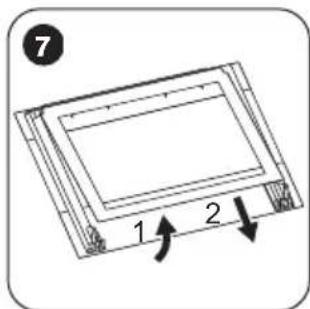
7 First lift carefully and then remove the glass panel.
Clean the glass panel with water and soap. Dry the glass panel carefully.
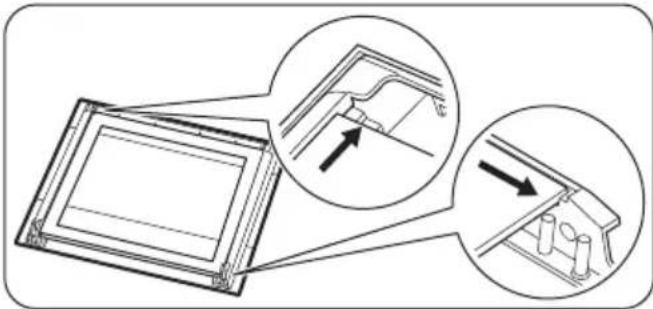
When the cleaning is completed, install the glass panel and the oven door. Do the above steps in the opposite sequence.
The screen-printing zone must face the inner side of the door. Make sure that after the installation the surface of the glass panel frame on the screen-printing zones is not rough when you touch it.
Make sure that you install the internal glass panel in the seats correctly.
natural_image
Diagram showing two views of a mechanical component with arrows indicating direction (no text or symbols present)Replacing the lamp
Put a cloth on the bottom of the interior of the appliance. It prevents damage to the lamp glass cover and the cavity.
Troubleshooting

WARNING!
Danger of electrocution! Disconnect the fuse before you replace the lamp.
The lamp and the lamp glass cover can be hot.

CAUTION!
Always hold the halogen lamp with a cloth to prevent grease residue from burning on the lamp.
- Deactivate the appliance.
- Remove the fuses from the fuse box or deactivate the circuit breaker.
The back lamp
- Turn the lamp glass cover counterclockwise to remove it.
- Clean the glass cover.
- Replace the lamp with a suitable 300irc C heat-resistant lamp.
- Install the glass cover.

WARNING!
Refer to Safety chapters.
What to do if...
| Problem Possible cause Remedy | ||
| The oven does not heat up. The oven is deactivated. Activate the oven. | ||
| The oven does not heat up. The clock is not set. Set the clock. | ||
| The oven does not heat up. The necessary settings are not set. | Make sure that the settings are correct. | |
| The oven does not heat up. The fuse is released. Make sure that the fuse is the cause of the malfunction. If the fuse releases again and again, contact a qualified electrician. | ||
| The lamp does not operate. The lamp is defective. Replace the lamp. | ||
| Steam and condensation settle on the food and in the cavity of the oven. | You left the dish in the oven for too long. | Do not leave the dishes in the oven for longer than 15 - 20 minutes after the cooking process ends. |
Problem Possible cause Remedy
The display shows "12.00". There was a power cut. Reset the clock.
Service data
If you cannot find a solution to the problem yourself, contact your dealer or an Authorised Service Centre.
The necessary data for the service centre is on the rating plate. The rating plate is on the front frame of the appliance cavity. Do not remove the rating plate from the appliance cavity.
We recommend that you write the data here:
Model (MOD.) ......
Product number (PNC) ....
Serial number (S.N.) ....
Installation

WARNING!
Refer to Safety chapters.
Building In


Securing the appliance to the cabinet

Electrical installation

The manufacturer is not responsible if you do not follow the safety precautions from the Safety chapters.
This appliance is supplied with a main plug and a main cable.
Technical information
Technical data
| Voltage 230 V | |
| Frequency 50 Hz |
Energy efficiency
Product Fiche and information according to EU 65-66/2014
| Supplier's name Zanussi | |
| Model identification ZOB35712BK | ZOB35712WKZOB35712XK |
| Energy Efficiency Index 103.5 | |
| Energy efficiency class A | |
| Energy consumption with a standard load, conventional mode 0.95 kWh/cycle | |
Cable
Cable types applicable for installation or replacement:
H07 RN-F, H05 RN-F, H05 RRF, H05 VV-F, H05 V2V2-F (T90), H05 BB-F
For the section of the cable refer to the total power on the rating plate and to the table:
| Total power (W) Section of the ca-ble (mm2) |
| maximum 1380 3 x 0.75 |
| maximum 2300 3 x 1 |
| maximum 3680 3 x 1.5 |
The earth cord (green / yellow cable) must be 2 cm longer than phase and neutral cables (blue and brown cables).

| Energy consumption with a standard load, fan-forced mode 0.88 kWh/cycle | ||
| Number of cavities 1 | ||
| Heat source Electricity | ||
| Volume 72 l | ||
| Type of oven Built-In Oven | ||
| Mass ZOB35712BK | ZOB35712WK | 31.6 kg |
| 31.8 kg | ||
| ZOB35712XK | 32.2 kg | |
EN 60350-1 - Household electric cooking appliances - Part 1: Ranges, ovens, steam ovens and grills - Methods for measuring performance.
Energy saving
The appliance contains features which help you save energy during everyday cooking.
- General hints
- Make sure that the oven door is closed properly when the appliance operates and keep it closed as much as possible during the cooking.
- Use metal dishes to improve the energy saving.
ENVIRONMENT CONCERNS
- When possible, put the food inside the oven without heating it up.
- When the cooking duration is longer than 30 minutes, reduce the oven temperature to minimum, 3 - 10 minutes before the end of the cooking time, depending on the duration of the cooking. The residual heat inside the oven will continue to cook.
-
Use the residual heat to warm up other foods.
-
Cooking with fan - when possible, use the cooking functions with fan to save energy.
- Keep food warm - if you want to use the residual heat to keep the meal warm, choose the lowest possible temperature setting.
Recycle the materials with the symbol Put the packaging in applicable containers to recycle it. Help protect the environment and human health and to recycle waste of electrical and electronic appliances. Do not dispose
appliances marked with the symbol ☒ with the household waste. Return the product to your local recycling facility or contact your municipal office.
Cuprins
natural_image
Technical diagram showing mechanical assembly with a magnified inset illustrating rotational motion (no text or symbols)natural_image
Three-step diagram showing a hand using scissors to cut a cylindrical object into a wire, with arrows indicating motion (no text or symbols)natural_image
Illustration of a hand inserting a component into a device panel (no text or symbols visible)natural_image
Line drawing of a mechanical clamp or bracket assembly with an arrow indicating motion (no text or symbols)natural_image
Illustration of a hand adjusting a car seatbelt with arrows indicating movement (no text or symbols)natural_image
Simple line drawing of a framed picture frame with two circular buttons, no text or symbols present.natural_image
Illustration of a hand holding a tool with an arrow indicating rotation (no text or symbols)natural_image
Diagram showing two views of a mechanical component with arrows indicating direction (no text or symbols present)Înlocuirea becului
ELECTROLUX APPLIANCES AB
BUSINESS SECTOR EMA-EMEA (SEE)
ST GÖRANSGATAN 143
SE-105 45 STOCKHOLM
SWEDEN
TEL: +46 (8) 738 60 00
FAX: +46 (8) 738 63 35
www.electrolux.com
natural_image
Technical diagram showing mechanical assembly with a magnified inset illustrating rotational motion (no text or symbols)natural_image
Illustration of three steps to tie a bird's seat using a tool, showing mechanical components and motion arrows (no text or symbols)Ek fonksiyonlar
Soğutma fanı
natural_image
Hand placing a component into a vehicle compartment (no text or symbols visible)natural_image
Line drawing of a sewing machine needle with a curved arrow indicating rotation (no text or symbols)natural_image
Illustration of a hand adjusting a car seatbelt with arrows indicating movement (no text or symbols)natural_image
Simple line drawing of a framed picture frame with two circular buttons at the bottom (no text or symbols)natural_image
Illustration of a hand holding a mechanical component with an arrow indicating rotation (no text or symbols)Elektrik tesisatı

www.zanussi.com/shop


CE
- ⚠ Safety information
- Children and vulnerable people safety
- General Safety
- Safety instructions
- Installation
- WARNING!
- Electrical connection
- Use
- Care and cleaning
- Internal light
- Disposal
- Product description
- Accessories
- Before first use
- Initial Cleaning
- Setting the time
- Changing the time
- Preheating
- Daily use
- Retractable knobs
- Activating and deactivating the appliance
- It depends on the model if your appliance has knob symbols, indicators or lamps:
- Oven functions
- Display
- Buttons
- Clock functions
- Clock functions table
- Setting the clock functions
- Using the accessories
- Cancelling the clock functions
- Using the turnspit
- Additional functions
- Cooling fan
- Safety thermostat
- General information
- Baking cakes
- Cooking meat and fish
- Cooking times
- Baking and roasting table
- Grilling
- Turnspit
- Drying - True Fan Cooking
- Notes on cleaning
- Stainless steel or aluminium appliances
- Cleaning the door gasket
- Removing the shelf supports
- Aqua cleaning
- Cleaning the oven door
- CAUTION!
- Replacing the lamp
- Troubleshooting
- The back lamp
- Problem Possible cause Remedy
- Service data
- We recommend that you write the data here:
- Electrical installation
- Technical information
- Energy efficiency
- Cable
- Energy saving
- - General hints
- ENVIRONMENT CONCERNS
- Cuprins
- Înlocuirea becului
- Ek fonksiyonlar
- Soğutma fanı
- Elektrik tesisatı
Brand : ZANUSSI
Model : ZOB35712XK
Category : Oven