ARP-904EC - Air Conditioning Royal Sovereign - Free user manual and instructions
Find the device manual for free ARP-904EC Royal Sovereign in PDF.


| Product Type | Portable Air Conditioner |
| Model | ARP-904EC |
| Brand | Royal Sovereign |
| Cooling Capacity | 9,000 BTU |
| Coverage Area | Up to 350 sq. ft. |
| Dimensions (W x D x H) | 15.7 x 13.4 x 28.3 inches |
| Weight | 63.9 lbs |
| Power Supply | 115 V / 60 Hz |
| Power Consumption (Cooling) | 900 W |
| Current | 7.8 A |
| Energy Efficiency Ratio (EER) | 10.0 |
| Refrigerant Type | R-410A |
| Modes | Cool, Fan, Dehumidify |
| Fan Speeds | 3 (Low, Medium, High) |
| Thermostat Control | Digital with remote |
| Timer | 24-hour programmable |
| Air Flow | Up to 250 CFM |
| Noise Level | 55 dB (approx.) |
| Filters | Washable foam filter |
| Condensate Removal | Self-evaporating (most conditions) |
| Exhaust Hose Length | 5 ft (1.5 m) |
| Window Kit Included | Yes |
| Cleaning | Clean filter every 2 weeks, wipe exterior with damp cloth |
| Safety Features | Overheat protection, auto shut-off |
| Spare Parts / Repairability | Contact Royal Sovereign support for parts; user-replaceable filters |
Frequently Asked Questions - ARP-904EC Royal Sovereign
User questions about ARP-904EC Royal Sovereign
0 question about this device. Answer the ones you know or ask your own.
Ask a new question about this device
Download the instructions for your Air Conditioning in PDF format for free! Find your manual ARP-904EC - Royal Sovereign and take your electronic device back in hand. On this page are published all the documents necessary for the use of your device. ARP-904EC by Royal Sovereign.
USER MANUAL ARP-904EC Royal Sovereign
Royal Centurian Inc.
natural_image
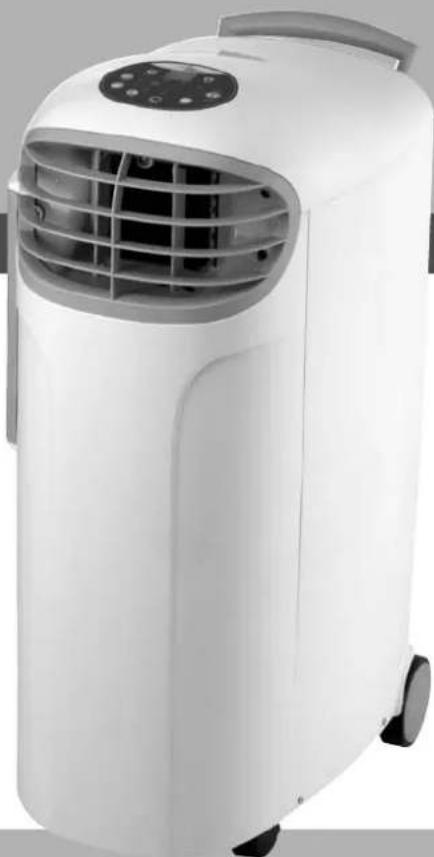
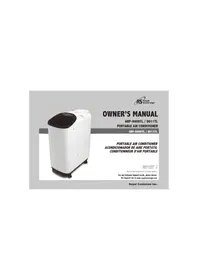
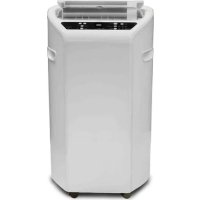
White modular air conditioner unit with ventilation grille and control panel (no visible text or symbols)PORTABLE AIR CONDITIONER
Model ARP-904€C
TABLE OF CONTENTS
Parts 3
Safety Precautions 4
Installation 5
Operation/Functions 6
Maintenance 9
Troubleshooting 10
Specifications 11
Warranty 12
PARTS
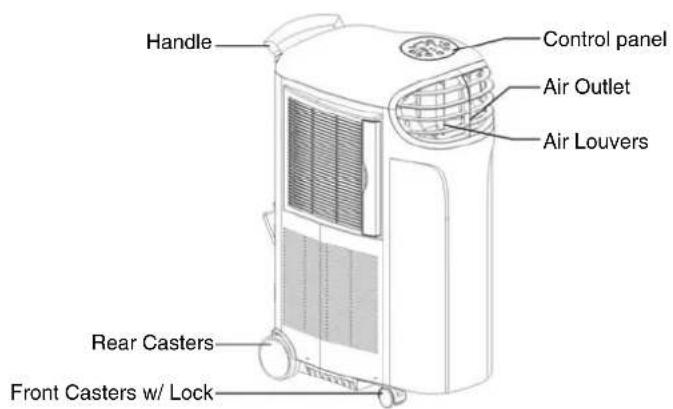
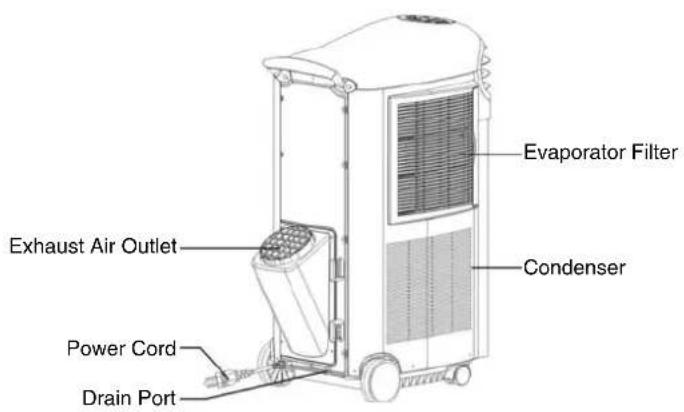
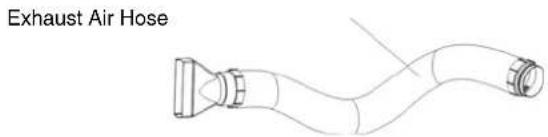
BEFORE USE
SAFETY PRECAUTIONS
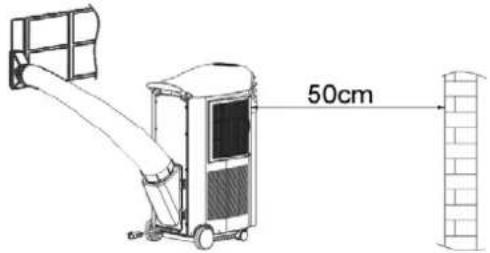
- Only use in the upright position on a flat, level surface at least 20"/50cm from any object.
- Do not place objects on top or in front of the unit.
- Closely supervise children and pets while unit is in use.
- For indoor use only.
- Turn off and unplug the unit when it is not in use.
- Do not use in wet environments.
- Do not pull the unit by the cord.
- If the power cord is damaged, it must be replaced by an electrician to avoid hazard or injury.
FOR MAXIMUM EFFICENCY
- Do not exceed the recommended room size of 300 sq. feet.
- Keep doors and windows closed.
- Keep curtains or blinds closed during the sunniest part of the day.
- Keep filters clean.
- Once room has reached the desired conditions, reduce the temperature
INSTALLATION
- Connect the hose to the exhaust air outlet.
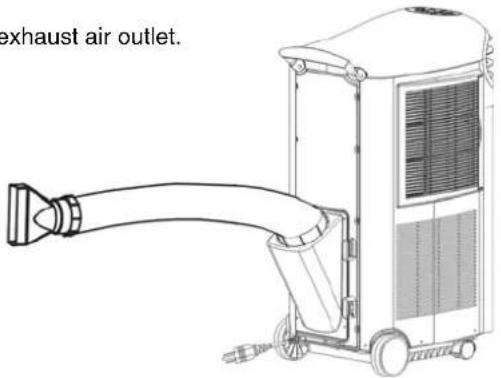
- Insert the exhaust hose into the window spacer.
NOTE: The hose may be extended from 1-5 ft/300-1500mm but for maximum efficiency use the shortest length possible. For best results do not let the exhaust hose exceed a 45^ angle.
OPERATION/FUNCTIONS
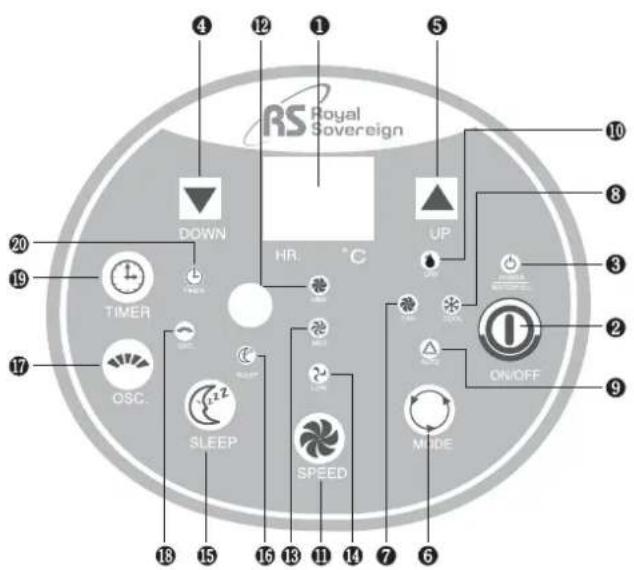
CONTROL PANEL
-
Temperature/Hour LED Display
-
Power button
-
Power/Water Full indicator light
-
Temperature DOWN button
-
Temperature UP button
-
Mode button (Fan, Cool, Auto, Dry)
-
Fan indicator light
-
Cool indicator light
-
Auto indicator light
-
Dry indicator light (Dehumidifier)
-
Speed button (High, Medium, Low)
-
High indicator light
-
Medium indicator light
-
Low indicator light
-
Sleep button
-
Sleep indicator light
-
Oscillating button
-
Oscillating indicator light
-
Timer button (1-12 hours)
-
Timer indicator light
ARP-904EC
ON/OFF
Press this button to start and stop the unit.
MODE
Press this button to select the Fan, Cool, Auto or Dry (Dehumidifier) mode.
The Fan mode will allow you to select a Speed of High, medium or Low.
The Cool mode will allow you to select a Speed of High, Medium or Low or a specific temperature by using the UP/DOWN buttons.
The Auto mode will automatically adjust the settings between Fan (High, Low and Medium) and Cool (High, Low and Medium) depending on the current temperature in the room. Press the Auto button and then use the UP/DOWN button to select your desired temperature. If the temperature in the room is at 73°F and above the COOL mode and SPEED will automatically be selected to keep the room at the desired temperature. If the temperature in the room is between 68°F - 73°F the FAN mode and SPEED will automatically be selected to keep the room at the desired temperature.
The Dry mode will allow you to dehumidify the room and remove excess moisture.
SPEED
Press the SPEED button to select a High, Medium or Low setting.
TIMER (1-12 Hours)
The timer button will allow you to turn the unit ON or OFF without even being in the room.
If the unit is off- Press the TIMER button (Timer indicator light will be lit). Continue pressing the TIMER button until you select the quantity of hours (1-12) you want the unit turned on in. Example- If you want the unit to turn on in 3 hours then Press the button until it shows 3, the unit will automatically turn on in 3 hours.
If the unit is on- Press the TIMER button (Timer indicator light will be lit). Continue pressing the TIMER button until you select the quantity of hours (1-12) you want the unit turned off in. Example- If you want the unit to turn off after 4 hours then press the button until it shows 4, the unit will automatically turn off in 4 hours.
SLEEP
By pressing the SLEEP button, the set temperature will increase 2^ F / 1^ C
in the first hour, another 2^ F / 1^ C in the second hour and then remains at that temperature.
WATER FULL
When the water tank is full the POWER/WATER FULL light will light up and you will hear a beeping noise. At this point you must empty it out by placing a container underneath the drain port, remove the rubber drain plug and then water will flow out until it is empty.
OSC (OSCILLATING) FEATURE
This feature allows the air to flow in all directions. Press the Oscillating button (OSC indicator will be lit). The air louvers will begin oscillating. Press the OSC button again to turn it off.
REMOTE CONTROL
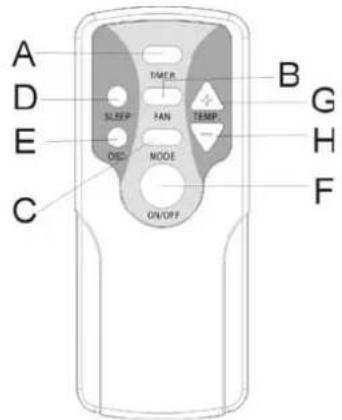
A - Timer button
B - Fan button
C - Mode button
D - Sleep button
E - Oscillating button
F - ON/OFF button
G - Temperature UP button
H - Temperature DOWN button
MAINTENANCE
Always unplug the air conditioner from the outlet before cleaning. To maximize the efficiency of the air conditioner, clean regularly.
Cleaning the Filter
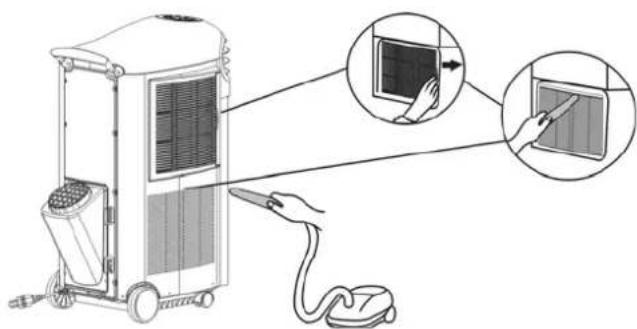
Remove the filter from the side of housing. Use a vacuum cleaner or gently tap the filter to remove loose dust and dirt, then rinse thoroughly under warm running water. Dry thoroughly before returning the filter to the correct position.
NOTE: Never operate the unit without a filter
Cleaning the Housing
Use a soft, damp cloth to wipe the body clean.
Never use chemicals, gasoline, detergents, chemically treated cloths or other cleansing solutions as this could possibly damage the housing.
Storage
- Drain any water from the unit by emptying the water through the drain port into the water tray (see the PARTS section).
- Clean the filter
- Unplug and wrap the power cord around the cord holders on the back of the unit.
- If possible, place back in its original carton or cover for storage.
• Always keep the unit in the upright position
TROUBLESHOOTING
| Problem Possible Cause/Solution | |
| The air conditioner does not run | Check to see if it is plugged in.Check to see the power is on. |
| The machine is not cooling very well | Is there direct sunlight. Close all curtains and blinds.Check to make sure there are no doors/windows open.Check to make sure nothing that produces heat is on. |
| The unit is vibrating | The unit may be on an uneven surface. Make sure it is on a flat surface. |
| Sudden noise | The compressor may have turned on. This is normal. |
NOTE: Never try to repair or dismantle the unit yourself.
SPECIFICATIONS
| Model ARP-904EC | |
| Cooling capacity 9000 BTU's | |
| Power supply 120V/60Hz | |
| Power/Ampere 1050 W / 9.5A | |
| Air volume 400M3 / Hr | |
| Noise level 54 dB(A) | |
| Moisture removal 30L/day | |
| Thermostat 64.4-89.6°F / 18-32° | |
| Refrigerant R22 | |
| Timer 1-12 hours | |
| Recommended room size 300 sq. ft | |
| Unit weight 70.6 (lbs) 32 (kg) | |
| Unit dimensions 31.5 x 15.0 x 24.9 (in) | 800 x 382 x 635 (mm) |
WARRANTY
FULL ONE YEAR WARRANTY
Royal Sovereign warrants each Portable Air Conditioner to be free from defects in material and workmanship. Our obligation under this warranty is limited to the repair or replacement, free of charge, when delivered to an authorized Royal Sovereign service center, of any defective part(s) thereof, other than parts damaged in transit. This warranty is in effect to the original purchaser, for a period of one year from the date of purchase and is not transferable. This warranty shall apply only if the air conditioner is used on Alternating Current (AC) circuit, in accordance with the factory provided instructions which accompany it.
LIMITED FIVE YEAR WARRANTY (COMPRESSOR)
For a period of five years from the date of purchase, when this Royal Sovereign Portable Air Conditioner is operated and maintained according to the instruction manual provided with the product, Royal Sovereign will supply a replacement compressor (part only), free of charge, if the original compressor is determined to be defective in workmanship or material. If repair becomes necessary, please contact our customer service center. You will be responsible for all freight, insurance, and any other transportation charges to get the unit to our factory or service center. If shipping is required, be sure to pack the unit properly to avoid shipping damages, as we will not be responsible for such damages.
THIS WARRANTY IS VALID THROUGHOUT THE UNITED STATES AND PUERTO RICO ONLY
EXCLUSIONS
This warranty excludes and does not cover defects, malfunctions or failures of your Royal Sovereign Portable Air Conditioner, caused by repairs by unauthorized persons or service centers, mishandling, improper installation, modification or unreasonable use including incorrect voltage, acts of god, or failure to provide reasonable and necessary maintenance. This warranty is in lieu of any and all expressed warranties. In no event shall Royal Sovereign be liable for consequential or incidental damages. Some states do not allow the exclusion or limitation of incidental or consequential damages, so the above limitation or exclusion may not apply to you. This warranty gives you specific legal rights and you may also have other rights which vary from state to state.
ROYAL SOVEREIGN INTERNATIONAL, INC.
Royal Centurian Inc.
2 Volvo Drive Rockleigh, NJ 07647 USA
TEL: +1) 201-750-1020, +1) 800-397-1025 FAX: +1) 201-750-1022
RS International Australia PTY. LTD. Royal Sovereign Canada
30 Prime Drive, Seven Hills, NSW 2147, AUSTRALIA 164 Oakdale Road, Toronto, Ontario M3N 2S5 CANADA
TEL : +61) 2-9674-2127 FAX : +61) 2-9674-2027 TEL: +1) 416-741-8400 FAX: +1) 416-741-8185
www.royalsovereign.com / info@royalsovereign.com
Spanish
OWNER'S MANUAL
MANUAL DEL PROPIETARIO
ARP-904EC
Royal Centurian Inc.
Royal Centurian Inc.
2 Volvo Drive
Rockleigh, NJ 07647 USA
TEL: +1) 201-750-1020, +1) 800-397-1025 FAX: +1) 201-750-1022
Royal Sovereign International Australia PTY. LTD. Royal Sovereign Canada
30 Prime Drive, Seven Hills, NSW 2147, AUSTRALIA 164 Oakdale Road, Toronto, Ontario M3N 2S5 CANADA
TEL : +61) 2-9674-2127 FAX : +61) 2-9674-2027 TEL: +1) 416-741-8400 FAX: +1) 416-741-8185
www.royalsovereign.com / info@royalsovereign.com
- PORTABLE AIR CONDITIONER
- Model ARP-904€C
- TABLE OF CONTENTS
- BEFORE USE
- SAFETY PRECAUTIONS
- FOR MAXIMUM EFFICENCY
- INSTALLATION
- OPERATION/FUNCTIONS
- ARP-904EC
- ON/OFF
- MODE
- SPEED
- TIMER (1-12 Hours)
- SLEEP
- WATER FULL
- OSC (OSCILLATING) FEATURE
- REMOTE CONTROL
- MAINTENANCE
- Cleaning the Filter
- Cleaning the Housing
- Storage
- WARRANTY
- FULL ONE YEAR WARRANTY
- LIMITED FIVE YEAR WARRANTY (COMPRESSOR)
- EXCLUSIONS
- OWNER'S MANUAL
Brand : Royal Sovereign
Model : ARP-904EC
Category : Air Conditioning