
Enteroc N56 - Server Rocstor - Free user manual and instructions
Find the device manual for free Enteroc N56 Rocstor in PDF.


| Product Type | NAS Server |
| Model | Enteroc N56 |
| Brand | Rocstor |
| CPU | Intel Celeron Quad Core 2.0 GHz |
| Memory | 8 GB DDR3 SDRAM |
| Drive Bays | 5 x 2.5"/3.5" hot-swappable SATA 6 Gb/s |
| RAID Levels | 0, 1, 5, 6, 10, Linear (JBOD) |
| Ethernet Ports | 2 x Gigabit Ethernet |
| USB Ports | 1 x USB 3.0, 2 x USB 2.0 |
| eSATA Port | 1 x eSATA 6 Gb/s |
| Video Output | HDMI, DVI-I (via adapter) |
| Serial Port | 1 x RS-232 |
| LCD Panel | Smart-functional LCD with menu |
| Power Supply | 300 W with PFC (80 PLUS) |
| Power Input | AC 100-240 V, 6.3 A, 50-60 Hz |
| Dimensions (HxWxD) | 261 x 180 x 390 mm (10.3 x 7.1 x 15.4 in) |
| Weight | Approximately 12 kg (26.5 lbs) |
| Operating Temperature | 10°C to 40°C (50°F to 104°F) |
| Relative Humidity | 10% to 85% non-condensing |
| Warranty | 3 years parts and labor |
| Key Features | Hot-swap drives, automatic rebuild, event notification alarm, environmental monitoring, hot spare support |
Frequently Asked Questions - Enteroc N56 Rocstor
User questions about Enteroc N56 Rocstor
0 question about this device. Answer the ones you know or ask your own.
Ask a new question about this device
Download the instructions for your Server in PDF format for free! Find your manual Enteroc N56 - Rocstor and take your electronic device back in hand. On this page are published all the documents necessary for the use of your device. Enteroc N56 by Rocstor.
USER MANUAL Enteroc N56 Rocstor
Packaging, Shipment and Delivery....4
Chapter 1 Introduction....5
1.1 Key Features....5
1.2 Technical Specifications....6
Chapter 2 Installation....7
2.1 Packaging, Shipment and Delivery....7
2.2 Unpacking the NAS System....7
2.3 Identifying Parts of the NAS System 8
2.3.1 Front View 8
2.3.2 HDD Status LEDs....9
2.3.3 Fan Fail LED....9
2.3.4 Lock Indicator....9
2.3.5 Front Panel....10
2.3.6 Rear View....11
2.3.7 LCD Menu Diagram....12
2.4 Getting Started with the NAS System....13
2.4.1 NAS Hardware Setup....13
2.4.2 Installing Hard Drives 13
2.4.2.1 Installing 3.5" Disk in a Disk Tray....13
2.4.2.2 Installing 2.5" Disk in a Disk Tray....15
Preface
About this manual
This manual provides information regarding the quick installation and hardware features of the NAS system. Information contained in the manual has been reviewed for accuracy, but not for product warranty because of the various environment/OS/settings. Information and specifications will be changed without further notice.
This manual uses section numbering for every topics being discussed for easy and convenient way of finding information in accordance with the user's needs. The following icons are being used for some details and information to be considered in going through with this manual:

NOTES:
These are notes that contain useful information and tips that the user must give attention to in going through with the subsystem operation.

IMPORTANT!
These are the important information that the user must remember.

WARNING!
These are the warnings that the user must follow to avoid unnecessary errors and bodily injury during hardware and software operation of the subsystem.

CAUTION:
These are the cautions that user must be aware to prevent damage to the equipment and its components.
Copyright
2019 Rocstor. No part of this publication may be reproduced, stored in a retrieval system, or transmitted in any form or by any means, electronic, mechanical, photocopying, recording or otherwise, without the prior written consent.
Trademarks
All products and trade names used in this document are trademarks of Rocstor or registered trademarks of their respective owners.
Changes
The material in this document is for information only and is subject to change without notice.
Before You Begin
Before going through with this manual, you should read and focus to the following safety guidelines. Notes about the subsystem product packaging and delivery are also included.
Safety Guidelines
To provide reasonable protection against any harm on the part of the user and to obtain maximum performance, user is advised to be aware of the following safety guidelines particularly in handling hardware components:
Upon receiving of the product:
Place the product in its proper location.
To avoid unnecessary dropping out, make sure that somebody is around for immediate assistance.
It should be handled with care to avoid dropping that may cause damage to the product. Always use the correct lifting procedures.
Upon installing of the product:
- Ambient temperature is very important for the installation site. It must not exceed 30°C. Due to seasonal climate changes; regulate the installation site temperature making it not to exceed the allowed ambient temperature.
Before plugging-in any power cords, cables and connectors, make sure that the power switches are turned off. Disconnect first any power connection if the power supply module is being removed from the enclosure. - Outlets must be accessible to the equipment.
All external connections should be made using shielded cables and as much as possible should not be performed by bare hand. Using anti-static hand gloves is recommended.
In installing components, secure all the mounting screws and locks. Make sure that all screws are fully tightened. Follow correctly all the listed procedures in this manual for reliable performance.
Packaging, Shipment and Delivery
Before removing the subsystem from the shipping carton, you should visually inspect the physical condition of the shipping carton.
✿ Unpack the subsystem and verify that the contents of the shipping carton are all there and in good condition.
- Exterior damage to the shipping carton may indicate that the contents of the carton are damaged.
If any damage is found, do not remove the components; contact the dealer where you purchased the subsystem for further instructions.
Chapter 1 Introduction
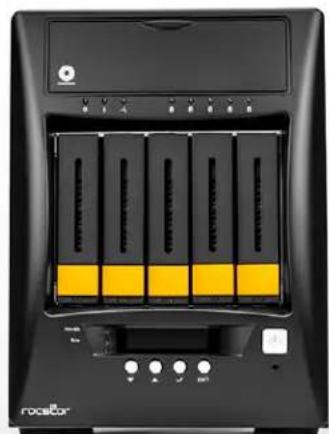
natural_image
Front view of a black rack-mounted electronic device with yellow and black panels, no visible text or symbols on the main body.Ent
NAS System
1.1 Key Features
- Supports up to five (5) hot-swappable 6Gb/s SATA hard drives
- Supports RAID levels 0, 1, 5, 6, 10 and Linear(JBOD)
- Support Smart-functional LCD panel
- Support drive hot spare and automatic hot rebuild
- Centralization of Data and Storage Management
- Real-time drive activity and status indicators
- Environmental monitoring unit
- Locally audible event notification alarm
1.2 Technical Specifications
| Hardware Platform |
| Intel Celeron Quad Core 2.0GHz CPU |
| Cache memory : 8GB DDR3 SDRAM |
| One USB3.0, one eSATA and two USB2.0 ports |
| Two Gigabit Ethernet ports |
| Up to Five(5) 2.5"/3.5" hot-swappable 6Gb/s SATA hard drives |
| Real-time drive activity and status indicators |
| Environmental monitoring unit |
| 300W power supply with PFC (80 plus) |
| Support drive hot spare and automatic hot rebuild |
| Locally audible event notification alarm |
| Power requirements |
| AC 100V ~ 240V Full range |
| 6.3A, 50~60Hz |
| Environmental |
| Relative humidity : 10%~85% Non-condensing |
| Operating temp : 10°C~40°C(50°F~104°F) |
| Physical Dimension |
| 261(H) x 180(W) x 390(D)mm |
Specifications are subject to change without notice.
Chapter 2 Installation
2.1 Packaging, Shipment and Delivery
Before removing the system from the shipping carton, you should visually inspect the physical condition of the shipping carton.
✿ Unpack the system and verify that the contents of the shipping carton are all there and in good condition.
- Exterior damage to the shipping carton may indicate that the contents of the carton are damaged.
If any damage is found, do not remove the components; contact the dealer where you purchased the system for further instructions.
2.2 Unpacking the NAS System
The package contains the following items:
 | N56 NAS System Unit |
 | One (1) power cord |
 | Two (2) Ethernet LAN cables |
 | One (1) DVI-I to VGA Adaptor |
 | User Manual |
If any of these items are missing or damaged, please contact your dealer or sales representative for assistance.
2.3 Identifying Parts of the NAS System
The illustrations below identify the various parts of the NAS system.
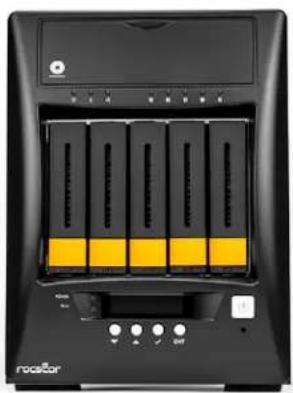
2.3.1 Front View
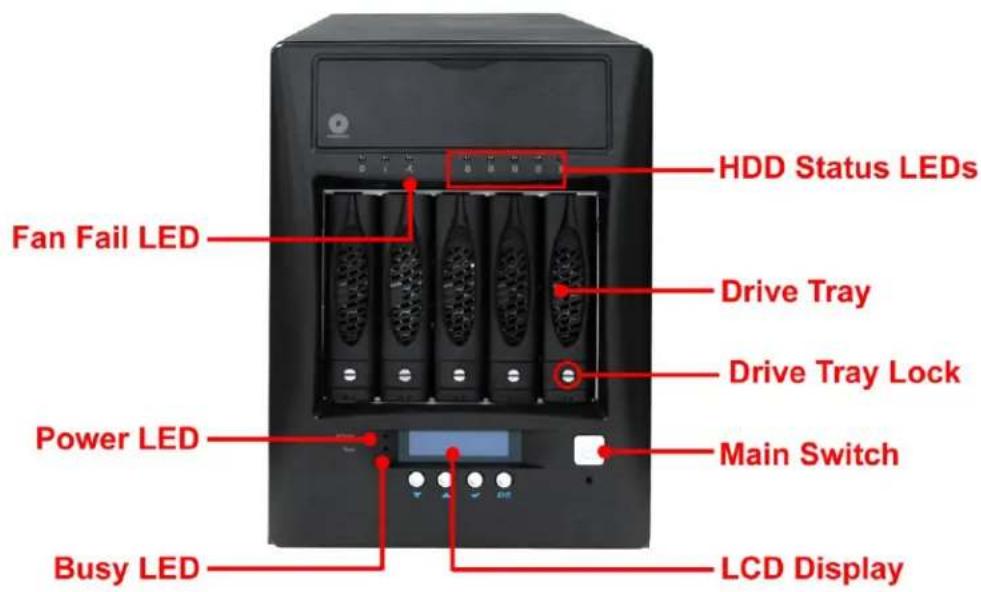
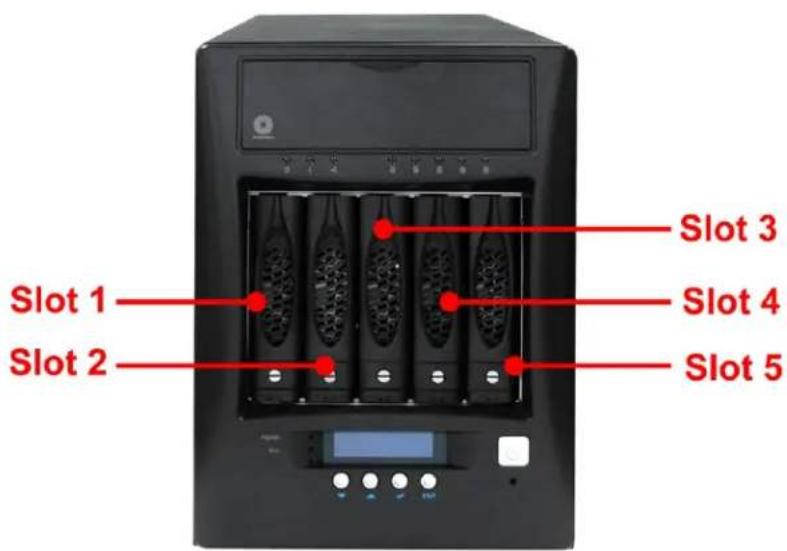
2.3.2 HDD Status LEDs
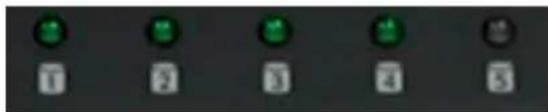
natural_image
Five identical circular icons with green and white buttons, arranged horizontally on a dark background (no text or symbols)Green LED indicates power is on and the hard disk drive status is good for this slot. Blinking Orange and Green LED indicates the hard disk drive is in rebuilding state.
2.3.3 Fan Fail LED

| Parts | Function |
| Fan Fail LED | When fan fails, this LED will turn red and an alarm will sound. |
2.3.4 Lock Indicator
Every Drive Carrier is lockable and is fitted with a lock indicator to indicate whether or not the carrier is locked into the chassis. Each carrier is also fitted with an ergonomic handle for easy carrier removal.
2.3.5 Front Panel
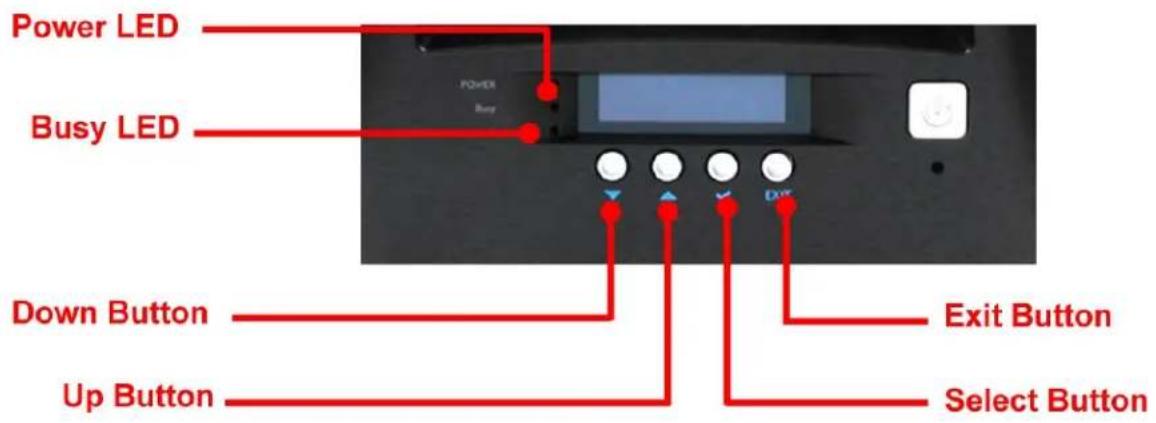
| PARTS | FUNCTION |
| Power LED | Green LED indicates power is on. |
| Busy LED | Orange blinking indicates system is busy or data is being accessed. |
| Up and DownArrow buttons[0000] | Use the Up or Down arrow keys to go through the information on the LCD screen. This is also used to move between each menu when you configure the subsystem. |
| Select button[0882] | This is used to enter the option you have selected. |
| Exit buttonEXIT | Press this button to return to the previous menu. |
2.3.6 Rear View
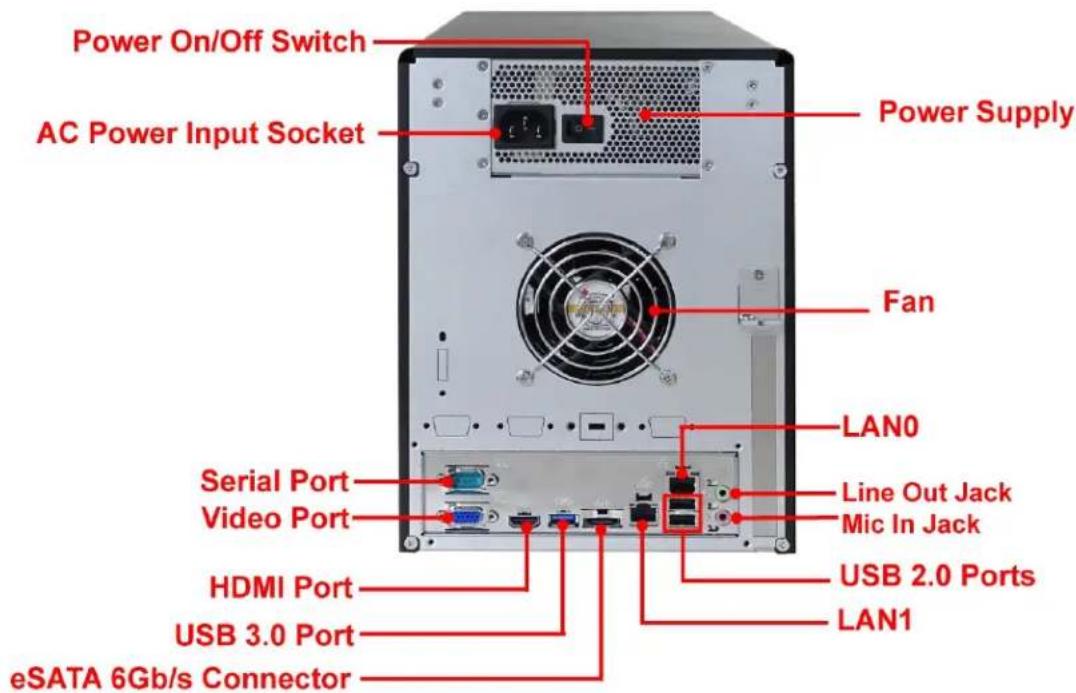
- Power On/Off Switch - Use this switch to power on the NAS System.
- AC Power Input Socket - Use this to connect the power cords connected from power source.
- Serial Port - Connects to serial-based mouse or data processing devices.
- Video Port - The video in port allows connect to video in, which can also apply to video loop thru function.
- HDMI Port - Two HDMI port is located at the rear of the system. HDMI (High-Definition Multimedia Interface) is an all-digital audio/video interface capable of transmitting uncompressed audio/video signals.
- USB 3.0 Port - The USB 3.0 port supports the USB 3.0 specification and is compatible to the USB 2.0/1.1 specification.
- eSATA 6Gb/s Connector - The subsystem has one external eSATA port for connecting to other eSATA device.
- Power Supply - The NAS System has one power supply.
- LAN0 and LAN1 Gigabit ports – The NAS System has two Gigabit data ports.
- USB 2.0 ports - Two USB 2.0 ports are located at the rear of the system.
2.3.7 LCD Menu Diagram
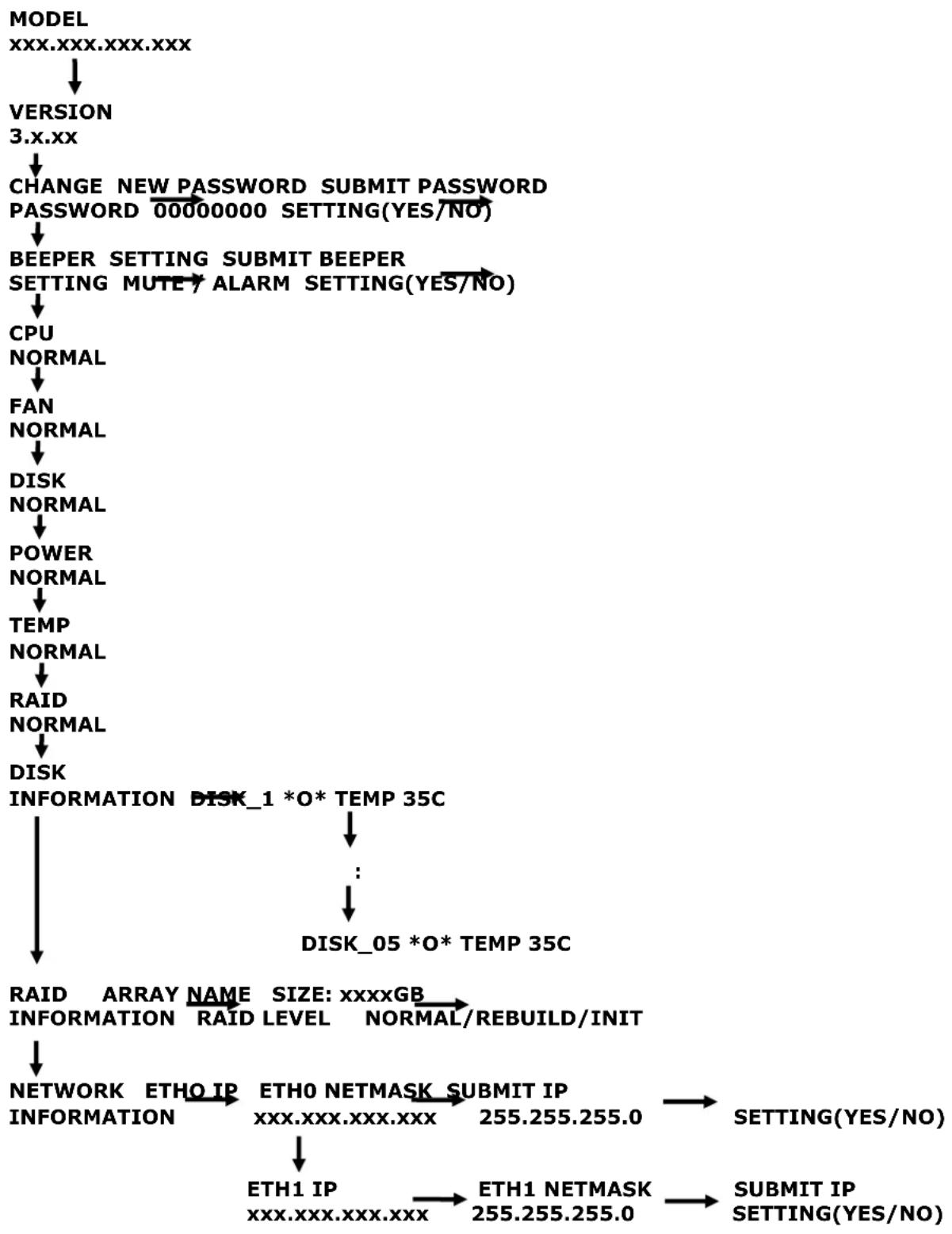
flowchart
graph TD
    A["MODEL<br>XXX.XXX.XXX.XXX"] --> B["VERSION<br>3.x.xx"]
    B --> C["CHANGE NEW PASSWORD<br>PASSWORD 00000000 SETTING(YES/NO)"]
    C --> D["BEEPER SETTING<br>SETTING MUTY ALARM SETTING(YES/NO)"]
    D --> E["CPU<br>NORMAL"]
    E --> F["FAN<br>NORMAL"]
    F --> G["DISK<br>NORMAL"]
    G --> H["POWER<br>NORMAL"]
    H --> I["TEMP<br>NORMAL"]
    I --> J["RAID<br>NORMAL"]
    J --> K["DISK<br>INFORMATION DISK_1 *O* TEMP 35C"]
    K --> L["..."]
    L --> M["DISK_05 *O* TEMP 35C"]
    M --> N["RAID ARRAY NAME SIZE: xxxxGB<br>INFORMATION RAID LEVEL NORMAL/REBUILD/INIT"]
    N --> O["NETWORK ETHO IP<br>INFORMATION"]
    O --> P["ETHO NETMASK SUBMIT IP<br>xxx.XXX.XXX.XXX"]
    P --> Q["ETH1 IP<br>xxx.XXX.XXX.XXX"]
    Q --> R["ETH1 NETMASK<br>255.255.255.0"]
    R --> S["SETTING(YES/NO)"]
    S --> T["SUBMIT IP<br>SETTING(YES/NO)"]
2.4 Getting Started with the NAS System
2.4.1 NAS Hardware Setup
-
Attach network cable to LAN0 Ethernet port. Connect the other end of network cable to your network hub or switch. You may also connect the other Ethernet ports if needed.
-
Plug in the power cord into the AC Power Input Socket located at the rear of the subsystem.
-
To turn on the NAS, press the Power On/Off Switch of power supply at the rear. Then turn on the main switch button in the front panel.
-
The Power LED on the front panel will turn green.
2.4.2 Installing Hard Drives
2.4.2.1 Installing 3.5" Disk in a Disk Tray
This section describes the location of the hard drives in the NAS system and gives instructions on installing a hard drive. The system supports hot-swapping allowing you to install or replace a hard drive while the system is running.
a. Make sure the lock indicator is in unlocked position. To pull out a disk tray, press the Lock Indicator Button. Pull the handle outwards to remove the disk tray from the enclosure.
natural_image
Front view of a black rack-mounted server with five yellow drive bays and control buttons (no visible text or symbols)b. Place the hard drive in the disk tray.
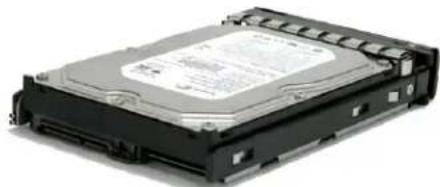
natural_image
Exterior view of a black hard drive chassis (no visible text or labels)c. Make sure the holes of the disk tray align with the holes of the hard drive. Install the mounting screws on the bottom part to secure the drive in the disk tray.
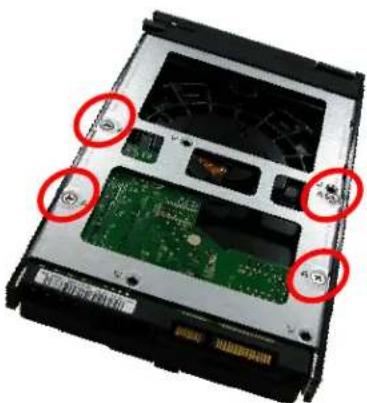
natural_image
Close-up of a computer hard drive chassis showing internal circuit board and memory components (no text or symbols visible)Tray Hole A
d. Slide the tray into a slot and push the Lock Indicator Button.
e. Press the handle until you hear the latch click into place. The HDD status LED will turn green if subsystem is on.
2.4.2.2 Installing 2.5" Disk in a Disk Tray
a. Make sure the lock indicator is in unlocked position. To pull out a disk tray, press the carrier open button.
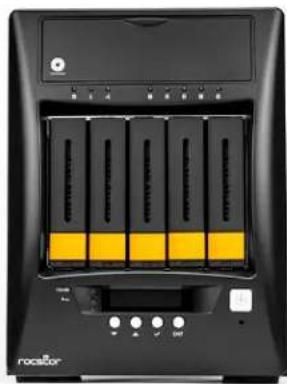
natural_image
Front view of a black rack-mounted server with yellow drive bays and control buttons (no visible text or symbols)b. Pull out an empty disk tray. Pull the lever handle outwards to remove the carrier from the enclosure.
c. Place the 2.5" hard drive in the disk tray.
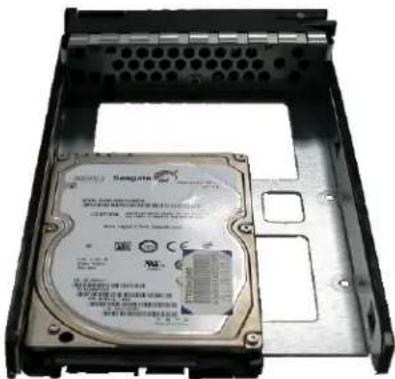
natural_image
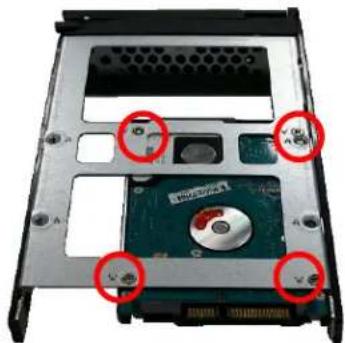
Internal view of a hard disk drive showing internal components and mounting holes (no readable text or symbols)d. Install the mounting screws on the bottom part to secure the drive in the disk tray.
natural_image
Internal view of a computer hard drive showing internal components and mounting holes (no text or symbols visible)Tray Hole W
e. Slide the tray into a slot.
f. Close the lever handle until you hear the latch click into place.
LIMITED WARRANTY
This Limited Warranty is provided by Rocstorage, Inc. (hereinaer: Rocstor) for all lines of products.
General Terms
EXCEPT AS EXPRESSLY SET FORTH IN THIS LIMITED WARRANTY, ROCSTOR MAKES NO OTHER WARRANTIES OR CONDITIONS, EXPRESS OR IMPLIED, INCLUDING ANY IMPLIED WARRANTIES OF MERCHANTABILITY AND FITNESS FOR A PARTICULAR PURPOSE. ROCSTOR EXPRESSLY DISCLAIMS ALL WARRANTIES AND CONDITIONS NOT STATED IN THIS LIMITED WARRANTY. ANY IMPLIED WARRANTIES THAT MAY BE IMPOSED BY LAW ARE LIMITED IN DURATION TO THE LIMITED WARRANTY PERIOD. SOME STATES OR COUNTRIES DO NOT ALLOW A LIMITATION ON HOW LONG AN IMPLIED WARRANTY LASTS OR THE EXCLUSION OR LIMITATION OF INCIDENTAL OR CONSEQUENTIAL DAMAGES FOR CONSUMER PRODUCTS. IN SUCH STATES OR COUNTRIES, SOME EXCLUSIONS OR LIMITATIONS OF THIS LIMITED WARRANTY MAY NOT APPLY TO YOU.
This Limited Warranty applies to the Rocstor branded hardware products sold by or leased from Rocstorage, Inc., its worldwide subsidiaries, aliates, authorized resellers, or country distributors (collevely referred to in this Limited Warranty as "Rocstor") with this Limited Warranty. This Limited Warranty is applicable in all countries and may be enforced in any country where Rocstor or its authorized service providers oer warranty service subject to the terms and condions set forth in this Limited Warranty. However, warranty service availability and response mes may vary from country to country and may also be subject to registraon requirements in the country of purchase.
Rocstor warrants that the Rocstor hardware product and all the internal components of the product that you have purchased or leased from Rocstor are free from defects in materials or workmanship under normal use during the Limited Warranty Period. The Limited Warranty Period starts on the date of purchase or lease from Rocstor. Your dated sales or delivery receipt, showing the date of purchase or lease of the product, is your proof of the purchase or lease date. You may be required to provide proof of purchase or lease as a condition of receiving warranty service. You are entitled to warranty service according to the terms and conditions of this document if a repair to your Rocstor branded hardware is required within the Limited Warranty Period. This Limited Warranty extends only to the original purchaser or lessee of this Rocstor branded product and is not transferable to anyone who obtains ownership of the Rocstor branded product from the original purchaser or lessee.
Rocstor products are manufactured using new materials or new and used materials equivalent to new in performance and reliability. Spare parts may be new or equivalent to new. Spare parts are warranted to be free from defects in material or workmanship for thirty (30) days or for the remainder of the Limited Warranty Period of the Rocstor hardware product in which they are installed, whichever is longer.
Rocstor's Obligaon under the Limited Warranty
During the Limited Warranty Period, Rocstor will repair or replace the defective component parts or the hardware product. All component parts or hardware products removed under this Limited Warranty become the property of Rocstor. The replacement part or product takes on either the Limited Warranty status of the removed part or product or the thirty (30) day limited warranty of the spare part. In the unlikely event that your Rocstor product has a recurring failure, Rocstor, at its discretion, may elect to provide you with a replacement unit of Rocstor's choosing that is at least equivalent to your Rocstor branded product in hardware performance. Rocstor reserves the right to elect, at its sole discretion, to give you a refund of your purchase price or lease payments (less interest) instead of a replacement. This is your exclusive remedy for defective products. The original Limited Warranty is not extended when the product, or a part of the product, is repaired or replaced during the Limited Warranty period. Rocstor shall not be responsible or liable for backing up any data that is on a drive being returned for service
YOU SHOULD MAKE PERIODIC BACKUP COPIES OF THE DATA STORED ON YOUR HARD DRIVE OR OTHER STORAGE DEVICES AS A PRECAUTION AGAINST POSSIBLE FAILURES, ALTERATION, OR LOSS OF THE DATA. BEFORE RETURNING ANY UNIT FOR SERVICE, BE SURE TO BACK UP DATA AND REMOVE ANY CONFIDENTIAL, PROPRIETARY, OR PERSONAL INFORMATION. ROCSTOR IS NOT RESPONSIBLE FOR DAMAGE TO OR LOSS OF ANY PROGRAMS, DATA, OR REMOVABLE STORAGE MEDIA. ROCSTOR IS NOT RESPONSIBLE FOR THE RESTORATION OR REINSTALLATION OF ANY PROGRAMS OR DATA OTHER THAN SOFTWARE INSTALLED BY ROCSTOR WHEN THE PRODUCT WAS MANUFACTURED.
Rocstor does not warrant that the operaon of this product will be uninterrupted or error-free. Rocstor is not responsible for damage that occurs as a result of your failure to follow the instrucons that came with the Rocstor branded product.
This Limited Warranty does not apply to expendable parts. This Limited Warranty does not extend to any product from which the serial number has been removed or that has been damaged or rendered defective (a) as a result of accident, misuse, abuse, or other external causes; (b) by operaon outside the usage parameters stated in the user documentaon that shipped with the product and/or posted on the Rocstor website; (c) by the use of parts not manufactured or sold by Rocstor; (d) as a result of normal wear; or (e) by modicaon or service by anyone other than (i) Rocstor, (ii) a Rocstor authorized service provider, or (iii) your own installaon of end-user replaceable Rocstor or Rocstor approved parts if available for your product in the servicing country.
These terms and condions constute the complete and exclusive limited warranty agreement between Rocstor and you regarding the Rocstor branded product you have purchased or leased. These terms and condions supersede any prior agreements or representaons including representaons made in Rocstor sales literature or advice given to you by Rocstor or an agent or employee of Rocstor-that may have been made in conneccon with your purchase or lease of the Rocstor branded product. No change to the condions of this Limited Warranty is valid unless it is made in wring and signed by an authorized representave of Rocstor.
Buyer's Obligaon under the Warranty
The person requesng coverage under this warranty shall prove that he or she is the original purchaser and declares that the product has not been sold, leased, bartered or otherwise changed possession. The purchaser shall frequently backup the Enteroc Storage hard drive and backup the data immediately prior to returning the drive for warranty service.
The buyer must noty Rocstor and show proof of nocaon, through any reasonable means of communicaon. See Full Street address email address and toll free phone numbers below or updated contact informaon are available on Rocstor.com website. The nocaon shall identify any defect, malfuncon, or nonconformity promptly upon discovery. Rocstor will acknowledge receipt of the communicaon and issue a Return Merchandise Authorizaon (RMA) code. The buyer is obligated to securely and safely package(s) the product, preferably in the original packing materials, WITH THE RMA number, and deliver it together with a copy of the original purchase receipt and a descripon of the problem to the Rocstor home oce. Buyer is responsible for the product until it is received by Rocstor. It is recommended that the product be insured during transportation by the sender. You must prepay any shipping charges, taxes, or dues associated with transportation of the product. In addition, you are responsible for insuring any product shipped or returned for service. You assume risk of loss during shipping.
Limitaon of damages (Liability)
IF YOUR ROCSTOR BRANDED HARDWARE PRODUCT FAILS TO WORK AS WARRANTED ABOVE, THE ORIGINAL PURCHASER'S SOLE AND EXCLUSIVE REMEDY SHALL BE REPAIR OR REPLACEMENT. ROCSTOR'S MAXIMUM LIABILITY UNDER THIS LIMITED WARRANTY IS EXPRESSLY LIMITED TO THE LESSER OF THE PRICE YOU HAVE PAID FOR THE PRODUCT OR THE COST OF REPAIR OR REPLACEMENT OF ANY ROCSTOR HARDWARE COMPONENTS THAT
MALFUNCTION IN CONDITIONS OF NORMAL USE. ROCSTOR IS NOT LIABILE FOR ANY DAMAGE TO ANY OTHER PRODUCT CONNECTED TO A ROCSTOR PRODUCT.
Limitaon on Consequenal Damages
ROCSTOR IS NOT LIABLE FOR ANY DAMAGES CAUSED BY THE PRODUCT OR THE FAILURE OF THE PRODUCT TO PERFORM, INCLUDING ANY LOST PROFITS OR SAVINGS OR SPECIAL, INCIDENTAL OR CONSEQUENTIAL DAMAGES. ROCSTOR IS NOT LIABLE FOR ANY CLAIM MADE BY A THIRD PARTY OR MADE BY YOU FOR A THIRD PARTY. THIS LIMITATION OF LIABILITY ALSO APPLIES WHETHER DAMAGES ARE SOUGHT OR A CLAIM IS MADE UNDER THIS LIMITED WARRANTY OR AS A TORT CLAIM (INCLUDING NEGLIGENCE AND STRICT PRODUCT LIABILITY), A CONTRACT CLAIM OR ANY OTHER CLAIM. THIS LIMITATION OF LIABILITY CANNOT BE WAIVED OR AMENDED BY ANY PERSON. THIS LIMITATION OF LIABILITY WILL BE EFFECTIVE EVEN IF YOU HAVE ADVISED ROCSTOR OR AN AUTHORIZED REPRESENTATIVE OF ROCSTOR OF THE POSSIBILITY OF ANY SUCH DAMAGES.
THIS LIMITED WARRANTY GIVES YOU SPECIFIC LEGAL RIGHTS. YOU MAY ALSO HAVE OTHER RIGHTS THAT MAY VARY FROM STATE TO STATE OR FROM COUNTRY TO COUNTRY. YOU ARE ADVISED TO CONSULT APPLICABLE STATE OR COUNTRY LAWS FOR A FULL DETERMINATION OF YOUR RIGHTS.
Disclaimer
We accept no liability for any loss of data, damages and the inability of Rocstor products to work with any third party equipment. Nor can Rocstor accept any liability or responsibility for soware or third party hardware products.
Limited Warranty Period
The limited warranty period for Enteroc Storage is Three (3) Years Parts and Labor. This Limited Warranty extends only to the original purchaser or lessee of this Rocstor branded product and is not transferable to anyone who obtains ownership of the Rocstor branded product from the original purchaser or lessee.
Types of Limited Warranty Service
Your Rocstor Limited Warranty consists of repair or replacement of defective parts, including hard drives idened by Rocstor Support Organizaon as “pre-failure.”
Carry-in Limited Warranty Service Available Monday - Friday
Under the terms of carry-in service, you may be required to deliver your Rocstor product to the Rocstor Service Center or an authorized service locaon for warranty repair. You must prepay any shipping charges, taxes or dues associated with transportaon of the product. In addition, you are responsible for insuring any product shipped or returned for service. You assume risk of loss during shipping.
YOU SHOULD MAKE PERIODIC BACKUP COPIES OF THE DATA STORED ON YOUR HARD DRIVE OR OTHER STORAGE DEVICES AS A PRECAUTION AGAINST POSSIBLE FAILURES, ALTERATION OR LOSS OF THE DATA. BEFORE RETURNING ANY UNIT FOR SERVICE, BE SURE TO BACK UP DATA AND REMOVE ANY CONFIDENTIAL, PROPRIETARY OR PERSONAL INFORMATION. ROCSTORAGE IS NOT RESPONSIBLE FOR DAMAGE TO OR LOSS OF ANY PROGRAMS, DATA OR REMOVABLE STORAGE MEDIA. ROCSTORAGE IS NOT RESPONSIBLE FOR THE RESTORATION OR REINSTALLATION OF ANY PROGRAMS OR DATA OTHER THAN SOFTWARE INSTALLED BY ROCSTORAGE WHEN THE PRODUCT WAS MANUFACTURED.
Rocstorage shall not be responsible or liable for backing up any data that is on a drive being returned for service. Expect that all data on the drive will be destroyed and not retrievable when returned for warranty service.
Rocstor Replaceable Parts Program
Where available, the Rocstor Replaceable Parts program ships approved replacement parts directly to you to full your warranty. This will save considerable repair me. Aer you call the Rocstor Technical Support Center at 818.727.7000 a replaceable part can be sent directly to you. Once the part arrives, call the Rocstor Technical Support Center. A technician will assist you over the phone to ensure that the installaon is quick and easy.
Service Upgrades
Rocstor oers extra coverage for your product. For informaon on service upgrades, visit www.rocstor.com. Service upgrades purchased in one country are not transferable to another country.
Capacity Disclaimer
Actual accessible hard drive capacity will indicate up to 10% lower than stated under dierent Operating Systems and formatting.
The storage volume is measured in total bytes before forming. References to round numbers of gigabytes or terabytes are an approximaon only. For example, a disk drive labeled as having 500GB (Gigabytes) has space for approximately 500,000,000 bytes before forming. After forming, the drive capacity is reduced by about 5% to 10% depending on the operating system and formatting used or "1GB = 1,000,000,000 bytes.
Opons and Soware
The Limited Warranty terms and condions for Rocstor opons are as indicated in the Limited Warranty applicable to Rocstor opons. ROCSTOR DOES NOT WARRANTY SOFTWARE PRODUCTS, INCLUDING ANY SOFTWARE PRODUCTS OR THE OPERATING SYSTEM PREINSTALLED BY ROCSTOR. Rocstor's only obligaons with respect to soware distributed by Rocstor under the Rocstor brand name are set forth in the applicable end-user license or program license agreement. Non-Rocstor hardware and soware products are provided "AS IS" and without any Warranty. However, non-Rocstor manufacturers, suppliers or publishers may provide their own warranes directly to you.
The data stored in Rocstor and Rocsecure storage product lines are not guaranteed by Rocstor (or the hard disk manufacturer.) We are not responsible for any loss of data. Always back up data regularly
TECHNICAL SUPPORT
Soware Technical Support
Soware technical support is dened as assistance with quesons and issues about the software that was either preinstalled by Rocstor on the Rocstor branded product or that was included with the Rocstor branded product at the time of your purchase or lease of the product. Technical support for soware is available for the rst ninety (90) days from date of product purchase or lease. Your dated sales or delivery receipt, showing the date of purchase or lease of the product, is your proof of the purchase or lease date. You may be required to provide proof of purchase or lease as a condion of receiving soware technical support. Aer the rst ninety (90) days, technical support for soware that was either preinstalled by Rocstor on the Rocstor branded product or included with the Rocstor branded product at the time of your purchase or lease of the product is available for a fee.
WARNING: The individual user should take care to determine prior to use whether this device is suitable, adequate or safe for the use intended. Since individual applicaons are subject to great variaon, the manufacturer
"Rocstor" makes no representation or warranty as to the suitability or tness of these devices for any specific applicaon.
Technical Support
All Rocstor hard drives are backed by free telephone technical support for three (3) years from the date of purchase. Please register your product with Rocstor. To register, II in the Limited Warranty Registraon form in the Support tab at www.rocstor.com.
Free telephone technical support is available weekdays from 9 AM until 6 PM Pacic Standard Time. Customers in the United States and Canada can call toll-free: (818) 727-7000; all others must call (818) 727-7000.
When calling for support, please have the product's serial number (printed on the label on the boom of the drive) and system hardware informaon available.
Trademarks Acknowledgements
© 2017, Rocstorage, Inc; acknowledges the following trademarks for company names or products menoned within the Rocstor site, portal pages and arcs/text/manuals:
Rocstor, Rocsecure and Rocpower are registered trademarks of Rocstorage, Inc. Amphibious, Rocport, Rocbit, Rocsafe, Enteroc are the trademarks of Rocstorage, Inc. "store your future", "secure your future" and "power your future" are the slogan marks of Rocstorage, Inc.
Apple, the Apple logo, Mac, Power Macintosh, FireWire, and Mac Pro, Leopard, Snow Leopard ... are trademarks of Apple Computer, Inc. in the United States and other countries.
Microsoft, MS-DOS, Windows CE, Windows NT, Windows 98, So Windows, Vista, Windows 7 ... are registered trademarks of Microsoft Corporaon in the United States and other countries.
Intel, Itanium, Penum XXX, Celeron, and Xeon MMX ... are registered U.S. trademarks of Intel Corporaon or its subsidiaries in the United States and other countries.
This product is (may also be) integrated with SATA hard drives from the following manufactures: Seagate, Samsung, Western Digital, Hitachi, Toshiba, Fujitsu ...
All other names are trademarks of their respective companies.
Rocstor wishes to acknowledge the use of tables, charts, graphs and texts from the Wikipedia website.
© 2000 - 2019
Copyrights
© 2019 Rocstorage, Inc. This Manual is protected by United States copyright law and may not be reproduced, distributed, transmied, displayed, published or broadcast without the prior written permission of Rocstorage, Inc. You may not alter or remove any trademark, copyright or other noce from copies of this Manual.

natural_image
National flag of the United States, featuring a blue star pattern on the left and white stars on the right (no text or symbols)Designed, integrated and assembled by Rocstor in the U.S.A. using domesc and/or foreign components.
Rocstor is a California Company; U.S.A.
Contact Informaon
Corporate Headquarters
12979 Arroyo Street, 2nd Floor
San Fernando, California 91340
U.S.A. Oce: +1 (818) 727-7000
Email: info@Rocstor.com
Technical Support / RMA
Tel: (818) 727-7000 (USA and Canada)
Tel: +1 (818) 727-7000 (Domesc and
Hours: 9:00 am - 5:00 pm PST
Mon - Fri (excluding holidays)
Email: support@Rocstor.com
Sales Info
Hours: 8:00 am - 5:00 pm PST
Mon - Fri (excluding holidays)
Email: sales@Rocstor.com
Corporate, Government and Academic Customers
Our Corporate Sales Team's goal is to help our U.S.A. and Canadian customers nd a storage soluon that best serves their needs. We will help you determine your best purchasing opons. For more informaon please contact the appropriate department below or call us at +1 (888) 877-7716
General sales informaon: sales@Rocstor.com
Corporate sales informaon: corporate_sales@Rocstor.com
Educaonal sales informaon: academic_sales@Rocstor.com
Federal, State & Local government sales informaon: government_sales@Rocstor.com
- Chapter 1 Introduction....5
- Chapter 2 Installation....7
- Preface
- About this manual
- NOTES:
- IMPORTANT!
- WARNING!
- CAUTION:
- Copyright
- Trademarks
- Changes
- Before You Begin
- Safety Guidelines
- Upon receiving of the product:
- Upon installing of the product:
- Packaging, Shipment and Delivery
- Chapter 1 Introduction
- Key Features
- Technical Specifications
- Chapter 2 Installation
- Packaging, Shipment and Delivery
- Unpacking the NAS System
- Identifying Parts of the NAS System
- Front View
- HDD Status LEDs
- Fan Fail LED
- Lock Indicator
- Front Panel
- Rear View
- LCD Menu Diagram
- Getting Started with the NAS System
- NAS Hardware Setup
- Installing Hard Drives
- Installing 3.5" Disk in a Disk Tray
- Installing 2.5" Disk in a Disk Tray
- LIMITED WARRANTY
- General Terms
- Rocstor's Obligaon under the Limited Warranty
- Buyer's Obligaon under the Warranty
- Limitaon of damages (Liability)
- Limitaon on Consequenal Damages
- Disclaimer
- Limited Warranty Period
- Types of Limited Warranty Service
- Carry-in Limited Warranty Service Available Monday - Friday
- Rocstor Replaceable Parts Program
- Service Upgrades
- Capacity Disclaimer
- Opons and Soware
- TECHNICAL SUPPORT
- Soware Technical Support
- Trademarks Acknowledgements
- Copyrights
- Contact Informaon
- Corporate Headquarters
- Technical Support / RMA
- Sales Info
- Corporate, Government and Academic Customers
Brand : Rocstor
Model : Enteroc N56
Category : Server