
Alpha Strike - Keyboard Ozone - Free user manual and instructions
Find the device manual for free Alpha Strike Ozone in PDF.


| Product Type | Gaming Keyboard |
| Model | Alpha Strike |
| Brand | Ozone |
| Connection Interface | USB 2.0 |
| Keyboard Layout | Full-size (104 keys) |
| Switch Type | Mechanical (Blue or Red switches) |
| Key Rollover | N-key rollover |
| Backlighting | RGB per-key LED |
| Dimensions (L x W x H) | 445 mm x 140 mm x 30 mm |
| Weight | 950 g |
| Power Source | USB bus-powered |
| Cable Length | 1.8 m braided cable |
| Wrist Rest | Removable padded wrist rest |
| Programmable Keys | Yes, via software |
| Onboard Memory | Yes, for profiles |
| Polling Rate | 1000 Hz |
| Operating System Compatibility | Windows 7/8/10/11 |
| Maintenance | Clean with soft dry cloth; avoid liquids |
| Safety | CE, FCC certified |
| Spare Parts Availability | Keycaps, switches (sold separately) |
| Repairability | Switches replaceable; PCB accessible |
Frequently Asked Questions - Alpha Strike Ozone
User questions about Alpha Strike Ozone
0 question about this device. Answer the ones you know or ask your own.
Ask a new question about this device
Download the instructions for your Keyboard in PDF format for free! Find your manual Alpha Strike - Ozone and take your electronic device back in hand. On this page are published all the documents necessary for the use of your device. Alpha Strike by Ozone.
USER MANUAL Alpha Strike Ozone
natural_image
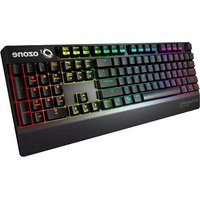
Front view of a modern black computer keyboard with glowing blue and green keys, no visible text or symbols on the keys themselves.QUICK GUIDE
#WithinTheGame
www.ozonegaming.com
ALPHASTRIKE
SYSTEM REQUIREMENTS
- Operating System
Windows, Mac, Linux or Android
- Free USB 2.0 port
INSTALLATION INSTRUCTIONS
- Plug AlphaStrike USB connector to a USB port of your PC
- Wait until your system detects, configures the plug and play device and finishes its installation
- Enjoy gaming with AlphaStrike!
ALPHASTRIKE KEY FUNCTIONS
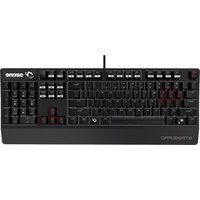
- Compact mechanical switched gaming keyboard with RGB back-lighting.

natural_image
Close-up of a mechanical component with textured surfaces and a red accent (no visible text or symbols)- Select the LED backlit mode with the wheel located in the left top corner of the keyboard. Up to 19 different LED modes
- Select between Windows/Android or Mac/IOS with the switch located next to the wheel
• Multimedia and other shortcut keys on keyboard
Press ③ + F1 to Pause Break keys for media playback and other functions*
* Mac/IOS function in red


Screen brightness decrease

Screen brightness increase

Mission control

Launchpad

Backlit brightness decrease

Backlit brighthness increase

Prev Track

Play/Pause

Next Track

Mute

Volume -


Screenshot

Voice control

Cortana Siri
• Main Backlit LED controls
Use the left top corner wheel to select the LED mode between 19 different modes.

• Sides and back Backlit LED controls

DIRECTIVES
CE STATEMENT OF COMPLIANCE WITH EUROPEAN UNION DIRECTIVES
Ozone declares that this product is in compliance with the essential requirements and other relevant provisions from the following Directive: 2014/30/EU, as applicable. The technical documentation required by the Conformity Evaluation process is in Ozone's possession and can be requested through info@ozonegaming.com

DISPOSAL OF BATTERIES AND ELECTRICAL OR ELECTRONIC EQUIPMENT WASTE
The existence of this symbol on the product, batteries or respective packaging, signifies that this product and the contained batteries can not be disposed as domestic waste. It is the user's responsibility to deliver this product at a battery, electrical or electronic recycling pick-up point. The pick-up and separate recycling contributes for the preservation of natural resources and suppresses potential negative consequences for the human health and the environment resultant of inadequate disposal of dangerous substances contained in batteries and electrical or electronic equipment. For additional informations regarding batteries, electrical or electronic recycling pick-up points, please contact your local municipal services.
WARRANTY
Who the warranty Protects:
This warranty is valid to the original purchaser only.
What the warranty protects:
For your warranty claims, please contact Ozone gaming overseas distribution partners in your country. Find the distribution partner list at www.ozonegaming.com
Warranty: 2 years from purchasing date. (Depending on the laws of each country)
URL: www.ozonegaming.com
E-mail: support@ozonegaming.com
What the warranty does not cover:
- Any product, on which the serial number has been defaced, modified or removed.
- Accident, misuse, neglect, fire, water, lightning, or other acts of nature, unauthorized product modification, or failure to follow instructions supplied with the product.
- Repair or attempted repair by anyone not authorized by Ozone gaming.
- Damage to or loss of any programs, data or removable storage media.
- Software or data loss occurring during repair or replacement.
- Any damage of the product due to shipment.
- Removal or installation of the product.
- External causes, such as electric power fluctuations or failure.
- Use of supplies or parts not meeting Ozone gaming's specifications.
- Normal wear and tear.
- Any other cause which does not relate to a product defect.
If you have any questions regarding technical problems please contact us via our website:
www.ozonegaming.com
Ozone reserves the right for any modifications in text and/or images.

ozone
www.ozonegaming.com

Brand : Ozone
Model : Alpha Strike
Category : Keyboard