
Back-UPS BC1100U-TW - Wechselrichter APC - Kostenlose Bedienungsanleitung
Finden Sie kostenlos die Bedienungsanleitung des Geräts Back-UPS BC1100U-TW APC als PDF.


| Produkttyp | USV (Unterbrechungsfreie Stromversorgung) / Back-UPS |
| Modell | Back-UPS BC1100U-TW |
| Marke | APC by Schneider Electric |
| Abmessungen (H x B x T) | 21,5 cm x 13 cm x 33,6 cm |
| Nettogewicht | 12 kg |
| Eingangsspannung | 115 V AC (nominal) |
| Eingangsfrequenz | 50/60 Hz (automatische Erkennung) |
| Eingangsstrom | 9,57 A |
| Ausgangsleistung | 1100 VA / 660 W |
| Ausgangsspannung (Batteriebetrieb) | 115 V AC (stufenweise angenäherte Sinuswelle) |
| Umschaltzeit | 4 ms (typisch) |
| Batterietyp | Wartungsfreie Blei-Säure-Batterie, 12 V, 7,2 Ah |
| Batterielebensdauer | 3–5 Jahre (abhängig von Umgebungsbedingungen) |
| Ladezeit | 8 Stunden |
| Überspannungsschutz | 378 Joule (dauerhaft) |
| Betriebstemperatur | 0°C bis 40°C |
| Lagertemperatur | -15°C bis 45°C |
| Relative Luftfeuchtigkeit (Betrieb) | 0–95 % (nicht kondensierend) |
| Anschlüsse | USB, Telefon/Netzwerk |
| Sicherung | Reset-Sicherung (am Gerät) |
| Besondere Funktionen | No-Load Shutdown, programmierbare Empfindlichkeit (Niedrig/Mittel/Hoch) |
| Batteriewechsel | Nicht durch Benutzer austauschbar; Kundendienst kontaktieren |
| Anwendungsbereich | Nur für Innenräume, nicht in direktem Sonnenlicht oder Feuchtigkeit |
| Garantie | Siehe Garantiebestimmungen auf www.apc.com |
Häufig gestellte Fragen - Back-UPS BC1100U-TW APC
Benutzerfragen zu Back-UPS BC1100U-TW APC
0 Frage zu diesem Gerät. Beantworten Sie die, die Sie kennen, oder stellen Sie Ihre eigene.
Eine neue Frage zu diesem Gerät stellen
Laden Sie die Anleitung für Ihr Wechselrichter kostenlos im PDF-Format! Finden Sie Ihr Handbuch Back-UPS BC1100U-TW - APC und nehmen Sie Ihr elektronisches Gerät wieder in die Hand. Auf dieser Seite sind alle Dokumente veröffentlicht, die für die Verwendung Ihres Geräts notwendig sind. Back-UPS BC1100U-TW von der Marke APC.
BEDIENUNGSANLEITUNG Back-UPS BC1100U-TW APC
by Schneider Electric
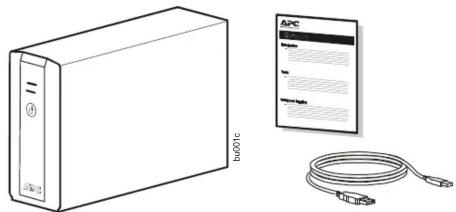
1 Inventory
natural_image
Illustration of a beige server unit with a connected cable and a separate APC device (no text or symbols on the device itself)3 Connect the Battery 1 Connect the battery by pulling the battery connected
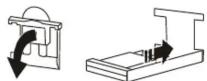
1 Connect the battery by pulling the battery connector handle down, and then pushing it into the unit.
2 Connect the Back-UPS BC1100U-TW power cable directly to a wall outlet. Do not use surge protectors or extension cords.
3 Press the ON/OFF button to turn on the unit. The green “Power On” indicator confirms that the Back-UPS is on and ready to provide protection.
The Back-UPS should charge for at least 10 hours to ensure sufficient runtime. The unit is being charged whenever it is connected to AC power, whether the unit is turned ON or OFF.
5 Status Indicators
| Status LED Indicator | Audible Indicator On | Audible Indicator Terminates | |
| Power OnThe Back-UPS is supplying AC power to connected equipment. | The On Line LED illuminates green. | None N/A | |
| On BatteryThe Back-UPS is supplying battery power to battery backup outlets. | The On Line LED illuminates green. The LED is not illuminated during the beeps. | Back-UPS beeps 4 times every 30 seconds. | The beeping stops when AC power is restored or the Back-UPS is turned off. |
| Low Battery warningThe Back-UPS is supplying battery power to the battery backup outlets and the battery is near a total discharge state. | The On Line LED flashes green. | The Back-UPS emits rapid beeping (once every second) | The beeping stops when AC power is restored or the Back-UPS is turned off. |
| Replace Battery• The battery is disconnected.• The battery needs to be charged or replaced. | • The Battery LED flashes red.•Batteryand On Line LEDs flash alternately. | Constant tone | The Back-UPS is turned off. |
| Overload ShutdownWhile operating on battery power an overload condition has occurred in one or more of the battery backup outlets. | None Constant | tone | The Back-UPS is turned off. |
| Sleep ModeWhile operating on battery power the battery is completely discharged.The Back-UPS will “awaken” once AC power is restored. | None The Back- | UPS beeps once every four seconds. | •AC power is restored• A C power is n or restored within 32 seconds• The Back-UPS is turned off |
| Overload AlarmThe equipment connected to the Back-UPS is drawing more power than the voltage rating allows. | The Battery LED illuminates red. | Constant tone | Alarm stops when nonessential equipment is disconnected from the Battery Backup outlets. |
Battery Replacement
The battery in the Back-UPS BC1100U-TW is not user-replaceable. Contact Schneider Electric IT (SEIT) Technical Support for a list of authorized service centers near you.
7 Specifications
| Input | Voltage | 115 Vac, nominal |
| Frequency | 50/60 Hz ± 3 Hz , auto-sensing | |
| Current | 9.57A | |
| Brownout Transfer | 92 Vac, typical | |
| Over-voltage Transfer | 139 Vac, typical | |
| Output | UPS Capacity (total) / Current | 1100VA / 660W / 9.57A |
| Voltage On Battery | 115 Vac (step-approximated sinewave) | |
| Frequency on Battery | 50/60 Hz ± 1 Hz | |
| Transfer Time | 4 ms typical | |
| Protection and Filtering | AC Surge Protection | Full time, 378 Joules |
| AC Input | Resettable circuit breaker | |
| Battery | Type (maintenance free, lead acid) | Each battery 12 V 7.2 Ahr |
| Average Life | 3 - 5 years depending on the number of discharge cycles and environmental temperature | |
| Typical Recharge Time | 8 Hours | |
| Physical | Net Weight | 12 kg |
| Dimensions (H x W x D) | 21.5 cm × 13 cm × 33.6 cm | |
| Operating Temperature | 0^ C to 40^ C (32 °F to 104 °F) | |
| Storage Temperature | - 15^ C to 45^ C (5 °F to 113 °F) | |
| Operating Relative Humidity | 0 to 95% non-condensing | |
| Operating Elevation | 0 to 3000 m (0 to 10,000 ft) | |
| EMC Compliance | This device complies with BSMI rules, and its Telephone port has the surge protection function. Telephone cable connected to this device must not exceed 3 meters in length. | |
Troubleshooting and Service
-
Consult the Troubleshooting from the APC by Schneider Electric Web site, www.apc.com.
-
If the problem persists, contact Schneider Electric IT (SEIT) Customer Support through the Schneider Electric Web site, www.apc.com.
a. Note the model number and serial number and the date of purchase. The model and serial numbers are located on the rear panel of the unit and are available through the LCD display on select models.
b. Call SEIT Customer Support and a technician will attempt to solve the problem over the phone. If this is not possible, the technician will issue a Returned Material Authorization Number (RMA#).
c. If the unit is under warranty, the repairs are free.
d. Service procedures and returns may vary internationally. Refer to the Schneider Electric Web site for country specific instructions.
- Prepare to troubleshoot the problem over the phone. If this is not successful, and the unit is still under warranty, the Technical Support Representative will provide all necessary information to return the unit for replacement
2 Safety and General Information
Inspect the package contents upon receipt. Notify the carrier and dealer if there is any damage. Read the Safety Guide supplied with this unit before installing the UPS.
- This UPS is intended for indoor use only.
- Do not operate this UPS in direct sunlight, in contact with fluids, or where there is excessive dust or humidity.
- Be sure the air vents on the UPS are not blocked. Allow adequate space for proper ventilation.
- The battery typically lasts for three to five years. Environmental factors impact battery life. Elevated ambient temperatures, poor quality AC power, and frequent short duration discharges will shorten battery life.
- Connect the UPS power cable directly to a wall outlet. Do not use surge protectors or extension cords.
4 Installation
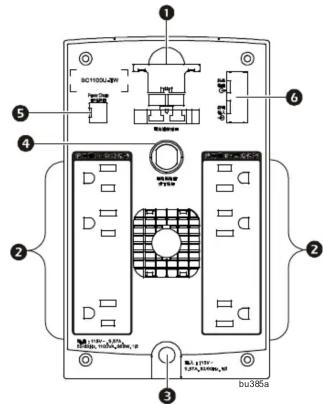
① Battery connector
② Battery Backup + Surge Protection outlets
3 AC Power Cable
4 Circuit breaker
⑤ USB port
6 Telephone/Network port
PowerChute™ Personal Edition Software
PowerChute Personal Edition Software allows you to use your computer to access additional power protection and management features of the Back-UPS.
Installation
Connect the Back-UPS to a computer using a USB cable. Plug one end into the USB Port on the rear panel of the Back-UPS and the other into a USB port on your computer.
To download the software and for detailed operation, go to www.apc.com
6 Transfer Voltage and Sensitivity Settings
No-load Shutdown
The UPS will shut down to conserve energy if while operating on battery power the UPS detects that connected equipment is using less than 15W of energy for more than 15 minutes.
No-load shutdown can be enabled or disabled through Program mode described below.
If the Back-UPS switches to battery power too frequently or too infrequently, adjust the transfer voltage and sensitivity settings:
- Verify that the Back-UPS battery is connected. Connect the Back-UPS to a wall outlet. The Back-UPS should be turned off.
- Press and hold the POWER ON/OFF button for 10 seconds. The LEDs will illuminate green and red alternately, to indicate that the Back-UPS is in Program mode.
- The LEDs will flash either green, red or green and red alternately to indicate the current sensitivity level. The Back-UPS will beep to indicate that No-load Shutdown is enabled. Refer to the table for an explanation of the transfer voltage sensitivity levels.
- To select LOW sensitivity, press the ON/OFF button until the On Line LED flashes green.
- To select MEDIUM sensitivity, press the ON/OFF button until the Battery LED flashes red.
- To select HIGH sensitivity, press the ON/OFF button until the On Line and Battery LEDs flash green and red alternately.
- To exit Program mode wait for five seconds and both LEDs will extinguish. Program mode is no longer active.
LED
Flashes
Audible Indicator
Voltage Sensitivity Setting
Input Voltage Range
No-load Shutdown
Reco
meno
d Use
| Green | None | Low | 88-142 | Disabled | Use this setting with equipment that is less sensitive to fluctuations in voltage or waveform distortions. |
| Green | 4 beeps per second | Low | 88-142 | Enabled | Use this setting with equipment that is less sensitive to fluctuations in voltage or waveform distortions. |
| Red | None | Medium | 92-139 | Disabled | Use this setting for normal operation conditions. |
| Red | 4 beeps per second | Medium (factory default) | 92-139 | Enabled | Use this setting for normal operation conditions. |
| Green and Red | None | High | 96-136 | Disabled | Use this setting when connected equipment is sensitive to voltage fluctuations or waveform distortions. |
| Green and Red | 4 beeps per second | High | 96-136 | Enabled | Use this setting when connected equipment is sensitive to voltage fluctuations or waveform distortions. |
APC by Schneider Electric IT Customer Support Worldwide
For country specific customer support, go to the APC by Schneider Electric Web site, www.apc.com.
Register your product on-line. http://warranty.apc.com

EN 990-5267A 03/2014
© 2014 APC by Schneider Electric. APC, the APC logo and APC, the APC logo, Back-UPS, and PowerChute are owned by Schneider Electric Industries S.A.S. or their affiliated companies. All other trademarks are property of their respective owners.
- Inventory
- Connect the Battery 1 Connect the battery by pulling the battery connected
- Status Indicators
- Battery Replacement
- Specifications
- Troubleshooting and Service
- Safety and General Information
- Installation
- PowerChute™ Personal Edition Software
- Installation
- Transfer Voltage and Sensitivity Settings
- No-load Shutdown
- APC by Schneider Electric IT Customer Support Worldwide
Marke : APC
Modell : Back-UPS BC1100U-TW
Kategorie : Wechselrichter