
SB-2130 - SSD-Laufwerk Sabrent - Kostenlose Bedienungsanleitung
Finden Sie kostenlos die Bedienungsanleitung des Geräts SB-2130 Sabrent als PDF.


| Produkttyp | USB-Hub |
| Modellnummer | SB-2130 |
| Abmessungen (B x T x H) | ca. 10 x 5 x 2 cm |
| Gewicht | ca. 100 g |
| Stromversorgung | Bus-powered (USB) oder externes Netzteil (optional) |
| Anzahl USB-Ports | 4 x USB 3.0 Typ-A |
| Datenübertragungsrate | bis zu 5 Gbit/s |
| Kompatible Betriebssysteme | Windows, macOS, Linux |
| Plug & Play | Ja, keine Treiberinstallation erforderlich |
| Gehäusematerial | Aluminiumlegierung |
| LED-Anzeige | Ja, Betriebsanzeige pro Port |
| Überspannungsschutz | Ja, integrierter Schutz gegen Stromspitzen |
| Reinigung und Pflege | Mit einem trockenen, fusselfreien Tuch abwischen. Keine Flüssigkeiten oder Reinigungsmittel verwenden. |
| Sicherheitshinweise | Nicht in der Nähe von Wasser oder Feuchtigkeit verwenden. Netzteil nur im Trockenen betreiben. |
| Ersatzteile | Ersatznetzteile über den Hersteller erhältlich |
| Reparatur | Reparaturen nur durch autorisiertes Fachpersonal |
| Herstellergarantie | 2 Jahre |
| Lieferumfang | SB-2130 Hub, USB-Kabel, Bedienungsanleitung |
Häufig gestellte Fragen - SB-2130 Sabrent
Benutzerfragen zu SB-2130 Sabrent
0 Frage zu diesem Gerät. Beantworten Sie die, die Sie kennen, oder stellen Sie Ihre eigene.
Eine neue Frage zu diesem Gerät stellen
Laden Sie die Anleitung für Ihr SSD-Laufwerk kostenlos im PDF-Format! Finden Sie Ihr Handbuch SB-2130 - Sabrent und nehmen Sie Ihr elektronisches Gerät wieder in die Hand. Auf dieser Seite sind alle Dokumente veröffentlicht, die für die Verwendung Ihres Geräts notwendig sind. SB-2130 von der Marke Sabrent.
BEDIENUNGSANLEITUNG SB-2130 Sabrent
SABRENT
Connecting Differently™
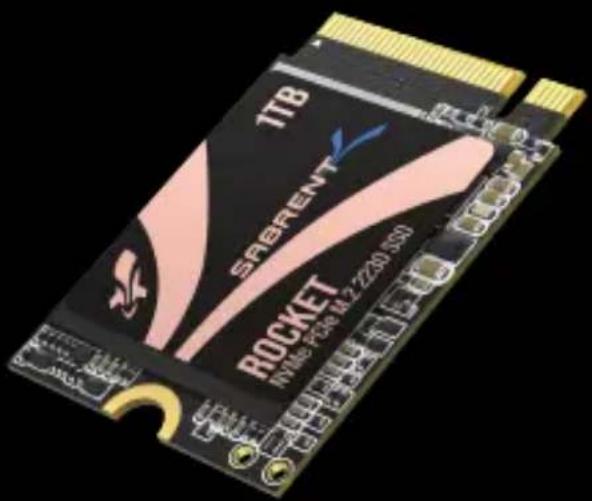
ROCKET 2230
HIGH PERFORMANCE PCIe 4.0 M.2 2230 SSD
ROCKET 2230 SERIES INSTALLATION GUIDE
SABRENT ROCKET 2230 M.2 NVMe SSD INSTALLATION GUIDE [PRIMARY DRIVE IN NEW SYSTEM]
Installation by a professional desktop computer technician is recommended. Before continuing with the installation process, it is your responsibility to review any warranty policy and instructions provided by your motherboard and computer manufacturer to ensure you follow proper procedures to install your storage device. Some manufacturers may void or limit your motherboard or computer warranty if you proceed with the installation of a new storage device. Accordingly, by proceeding with any installation, you agree to be solely responsible for any failure to follow any manufacturer's instructions.
REQUIRED TOOLS AND PARTS
- An appropriate screwdriver for an M.2 screw for installation and, if applicable, any tools required to open the destination device.
- One screw or fastener for securing the M.2 device to the motherboard.
Note: The necessary screw or hardware for fastening an M.2 device to the motherboard may have been included with your motherboard. If this has not been included, contact your motherboard manufacturer or computer system manufacturer for this information. Additionally, an M.2 standoff may be required and will typically be provided on or with the host device's motherboard.
Note: As an extra precaution, always back up your data to another storage device before beginning work on your PC or device.
- Power down your PC. For extra safety, unplug the PC or flip off the PSU switch. Confirm with your system or motherboard manufacturer for the best power-down process when connecting new hardware to the motherboard.
- Locate the M.2 slot on your motherboard. Please reference your motherboard user manual for detailed location and orientation of the M.2 slot.
- Insert the Sabrent Rocket 2230 M.2 NVMe SSD device pin-side first into the M.2 slot, as illustrated.
- Fasten the opposite end of the SSD to the motherboard with the necessary screw or hardware, as illustrated.


-
Insert the appropriate media required for your intended operation, for example, the bootable Microsoft Windows Installer for OS installation. Other options include bootable software for cloning or image restoration. This media may boot by default, or you may select it in the BIOS/UEFI boot list, or simply the boot menu. Refer to the screen or manual to determine the related keys for these options.
-
Power on your PC and access the motherboard BIOS/UEFI to configure your boot options. Accessing your motherboard BIOS/UEFI requires pressing a specific key on your computer system's keyboard during the preliminary stages of the boot process. The required key may be displayed briefly on the screen during this time. Otherwise, refer to your motherboard's or system's manual to determine the key.
-
Save the BIOS/UEFI settings, exit, and continue with your installation or system image restoration.
Note: Microsoft Windows® 8.1 or newer is recommended for proper NVMe boot support.
SABRENT ROCKET 2230 M.2 NVME SSD INSTALLATION GUIDE (SECONDARY DRIVE IN EXISTING SYSTEM)
- Install the Sabrent Rocket 2230 M.2 NVMe SSD as per steps 1-4 above and boot into Windows® from your existing OS drive.
- In Windows 8® and later, move the mouse to the lower left corner of your desktop and right-click on the Start Icon, then select "Disk Management."
-
When Disk Management opens, a pop-up should appear and prompt you to initialize the SSD.
-
Select MBR (Master Boot Record) or GPT (GUID partition table) and click OK. MBR is best for certain legacy software compatibility, while GPT is better for modern systems.
- Right-click in the area that says "Unallocated" and select "New Simple Volume..."
- The New Simple Volume Wizard will open, click Next.
- Leave the Specify Volume Size as the maximum (default value) and click Next.
- Select a Drive Letter and click Next.
- In the Format Partition screen, decide on a Volume label (the name you want to give the drive) and click Next and then Finish. The drive is now formatted and ready for use
LEGAL DISCLAIMER
SABRENT RESERVES THE RIGHT TO CHANGE PRODUCTS, INFORMATION AND SPECIFICATIONS WITHOUT NOTICE.
Products and specifications discussed are for reference purposes only. All information discussed herein may change without notice and is provided on an "AS IS" basis, without warranties of any kind. This document and all information discussed herein remain the sole and exclusive property of Sabrent. Sabrent products should not be used in critical care, life support, medical, safety equipment, or similar applications where product failure may result in loss of life or personal or physical harm, or any military or defense application, or any government procurement to which special terms may apply. For additional information about Sabrent products please visit Sabrent.com. All brand names, trademarks and registered trademarks belong to their respective owners.
Copyright 2022 Sabrent. All rights reserved.
BACKUP AND WARRANTY ON IMPORTANT DATA
Sabrent does not provide any warranty for data stored on any Sabrent product under any circumstances. Sabrent is not responsible for material or mental damages etc., from any loss or recovery of data stored.
SHOCK
Protect the device against any heavy shocks. This may cause the device to malfunction or could cause data loss.
DISASSEMBLY, DAMAGE, AND REMOVAL
Do not disassemble the product or damage or remove any stickers or labels attached to the product. Product warranty is void if the unit is disassembled, damaged, or if the labels or sticker are removed.
WARRANTY POLICY
SABRENT warrants to the purchaser of the Product in its original sealed packaging ("You") that the Product is free from defects in material and workmanship, subject to the conditions stated below, for THE LIMITED WARRANTY PERIOD, BEGINNING ON THE DATE THE PRODUCT WAS PURCHASED IN ITS ORIGINAL SEALED PACKAGING.
In the event that a valid proof of purchase is not available, the limited warranty period will be determined by the date of manufacture. In the event SABRENT determines, in its sole discretion, that the Product suffers from defects in material or workmanship and does not conform to the published specifications for normal use and wear, for as long as You own the Product and during the limited warranty period, and subject to the conditions and exceptions stated in this Agreement, SABRENT will, at its option, either: (1) refund the then current market value of the Product at the time the warranty claim is made to SABRENT if SABRENT is unable to repair or replace the Product; or (2) repair or replace the Product with new or refurbished Product of equal or greater capacity and functionality.
In the case of replacements, SABRENT may replace Your Product with one that was previously used, repaired and tested to meet SABRENT specifications. The warranty period for repaired and replaced products will be applied for the longer of the remainder of the original warranty period or ninety (90) days. The returned Product for replacement service will not be sent back to You. You should always back up any important data. This warranty is provided only to You and is not transferable.
EXTENT OF THE LIMITED WARRANTY
The warranty stated herein shall NOT apply if:
(i) the Product was not used in accordance with any accompanying instructions.
(ii) the Product was not used for its intended function and environment,
(iii) any failure or defect arose out of the presence of a third party product, software or component, whether authorized or not,
(iv) any failure or defect was a result of improper installation or testing, misuse, neglect, unauthorized repair, modification, accident, or other external causes. OR
(v) there exist any other circumstances which SABRENT determines is evidence of a breach of this Agreement by You.
You acknowledge and agree that the Product is not designed for and shall not be used in, including without limitation, life support systems, critical care, medical or safety equipment, or other applications where failure could result in loss of life or personal or physical harm, or any military or defense application, or any governmental procurement to which special terms or provisions may apply. Accordingly, SABRENT disclaims any and all liability in connection with, arising out of, or related to, any such use of the Product and you assume all risks arising from any such or similar application of the Product. SABRENT'S warranty does NOT cover any costs and expenses relating to SSDs' overhaul/assembly and data recovery for repairs or replacements. SABRENT's warranty also does NOT cover Products which, by way of example, have been received improperly packaged, altered, or physically damaged. Products will be inspected upon receipt.
You can refer to a non-exhaustive list of examples of the warranty exclusions below:
- Improperly packaged or shipped, including use of non-qualified shipping container;
• Any alterations, modifications, or physical damage of the Product, including but not limited to, deep scratches;
• Any alterations, modifications, or removal of any SABRENT labels or barcodes on the Product; - Opened SSD casing; or
• Tampered or missing tape seal or serial number.
This equipment has been tested and found to comply with part 15 of the FCC rules. For indoor use only, FCC Caution: Any changes or modifications not expressly approved by the party responsible for compliance could void the user's authority to operate this equipment.
State of California Proposition 65 Warning (US Only) WARNING: This product contains chemicals known to the State of California to cause cancer and birth defects or other reproductive harm.
Product Warranty Period
| Product Model Number | Capacity | Product Warranty Period |
| SB-2130-256 | 256GB | 1 Year Standard Warranty without product registration.5 Year Warranty with free product registration if registered within 90 days of purchase. |
| SB-2130-512 | 512GB | |
| SB-2130-1TB | 1000GB | |
To register your product please visit www.sabrent.com/product-registration/

Please contact our Technical Support Team for additional troubleshooting
WWW.SABRENT.COM


- SABRENT
- ROCKET 2230
- SABRENT ROCKET 2230 M.2 NVMe SSD INSTALLATION GUIDE [PRIMARY DRIVE IN NEW SYSTEM]
- REQUIRED TOOLS AND PARTS
- SABRENT ROCKET 2230 M.2 NVME SSD INSTALLATION GUIDE (SECONDARY DRIVE IN EXISTING SYSTEM)
- LEGAL DISCLAIMER
- BACKUP AND WARRANTY ON IMPORTANT DATA
- SHOCK
- DISASSEMBLY, DAMAGE, AND REMOVAL
- WARRANTY POLICY
- EXTENT OF THE LIMITED WARRANTY
Marke : Sabrent
Modell : SB-2130
Kategorie : SSD-Laufwerk