
AX-8PTC - USB-Ladegerät Sabrent - Kostenlose Bedienungsanleitung
Finden Sie kostenlos die Bedienungsanleitung des Geräts AX-8PTC Sabrent als PDF.


| Produkttyp | USB-Ladegerät |
| Marke | Sabrent |
| Modell | AX-8PTC |
| Gesamtleistung | 252 W |
| Eingangsspannung | 110–240 V AC |
| USB-C Ausgang (pro Port) | bis zu 100 W (5V/3A, 9V/3A, 12V/3A, 15V/3A, 20V/5A) |
| USB-A Ausgang (pro Port) | bis zu 18 W (5V/3A, 9V/2A, 12V/1,5A) |
| Anzahl USB-C Ports | 4 (2 Paare) |
| Anzahl USB-A Ports | 4 (2 Paare) |
| Display | Farb-LCD mit detaillierter Leistungsanzeige pro Port |
| Anzeigeinformationen | Spannung, Stromstärke, Temperatur, Ladezeit pro Port |
| PPS (Programmable Power Supply) | Ja (3,3–21 V über USB-C) |
| Überladeschutz | Ja |
| Sicherheitsschloss | Kensington-Sicherheitsschlitz |
| Maximale Leistung pro USB-C Paar | 125 W |
| Maximale Leistung pro USB-A Paar | 36 W |
| Lieferumfang | Ladegerät, Netzkabel (1,2 m), Montageset |
| Bildschirm aktivieren | Taste 2 Sekunden gedrückt halten |
| Automatische Abschaltung Display | Nach 10 Minuten Inaktivität (Logo-Dimmung) |
| Kompatible Geräte | Tablets, Smartphones, Laptops, Nintendo Switch, u.v.m. |
Häufig gestellte Fragen - AX-8PTC Sabrent
Benutzerfragen zu AX-8PTC Sabrent
0 Frage zu diesem Gerät. Beantworten Sie die, die Sie kennen, oder stellen Sie Ihre eigene.
Eine neue Frage zu diesem Gerät stellen
Laden Sie die Anleitung für Ihr USB-Ladegerät kostenlos im PDF-Format! Finden Sie Ihr Handbuch AX-8PTC - Sabrent und nehmen Sie Ihr elektronisches Gerät wieder in die Hand. Auf dieser Seite sind alle Dokumente veröffentlicht, die für die Verwendung Ihres Geräts notwendig sind. AX-8PTC von der Marke Sabrent.
BEDIENUNGSANLEITUNG AX-8PTC Sabrent
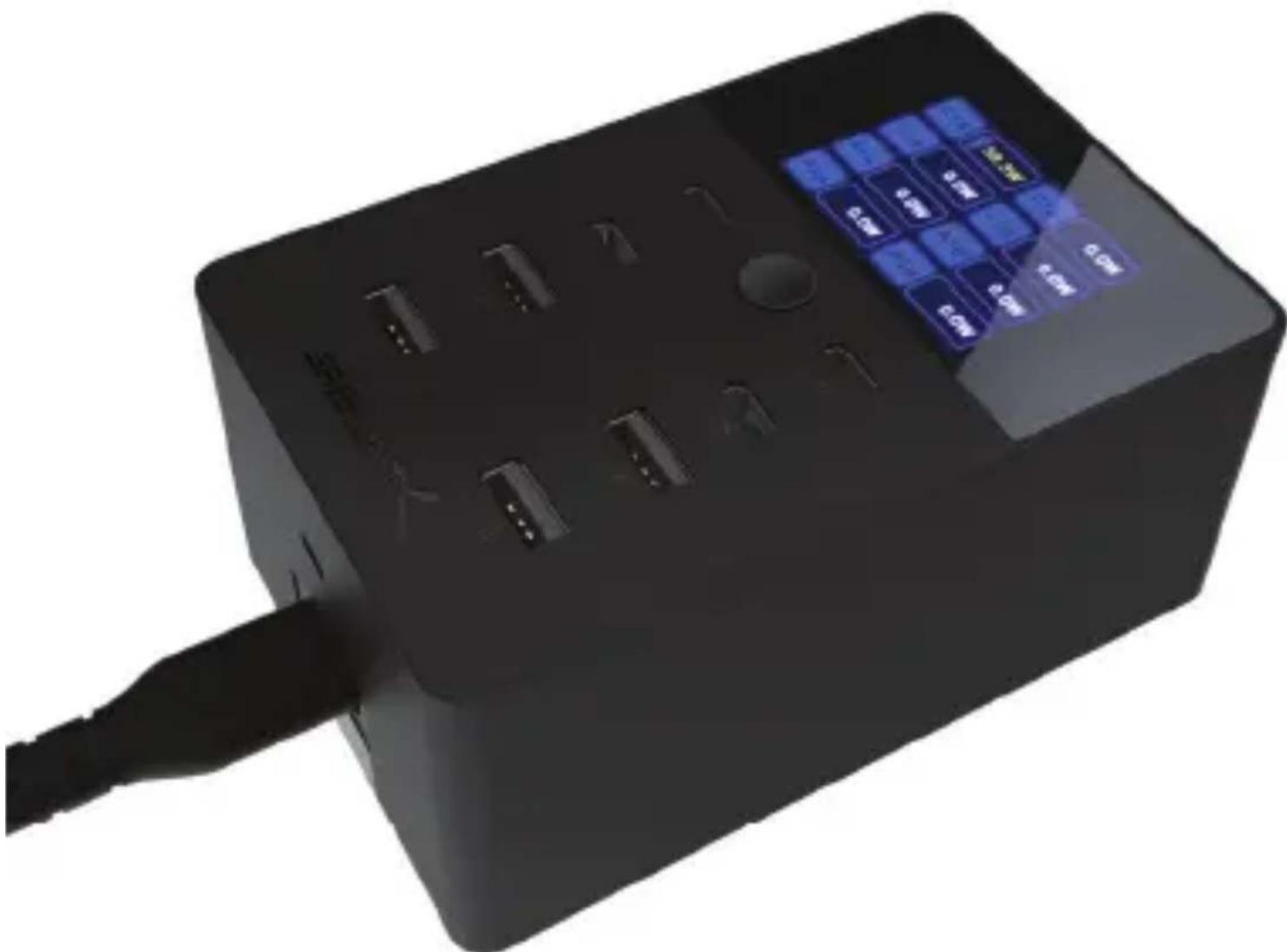
252W 8-PORT USB PD 3.0 CHARGER WITH COLOR LCD STATUS DISPLAY
natural_image
Black rectangular device with blue and white buttons, connected by a cable (no visible text or symbols)FEATURES
• Built-in color LCD screen capable of detailing per-port power draw
- Delivers a maximum of 252W across all eight ports
- Two pairs of USB-C charging ports, with a maximum 100W per port or 125W per pair
- Supported: 5V/3A, 9V/3A, 12V/3A, 15V/3A, or 20V/5A
- Two pairs of USB-A charging ports, with a maximum 18W per port or 36W per pair
- Supported: 5V/3A, 9V/2A, or 12V/1.5A
- Programmable Power Supply (PPS) allows for adjustable charging to accommodate different devices
-3.3\~5.9V, 3.3\~11V, 3.3\~21V over USB-C
• Overcharge protection to ensure safe charging and Kensington lock slot for additional peace of mind
PACKAGE CONTENTS
- USB PD Charger
• AC power cord (1.2m) - Mounting kit
PRODUCT OVERVIEW
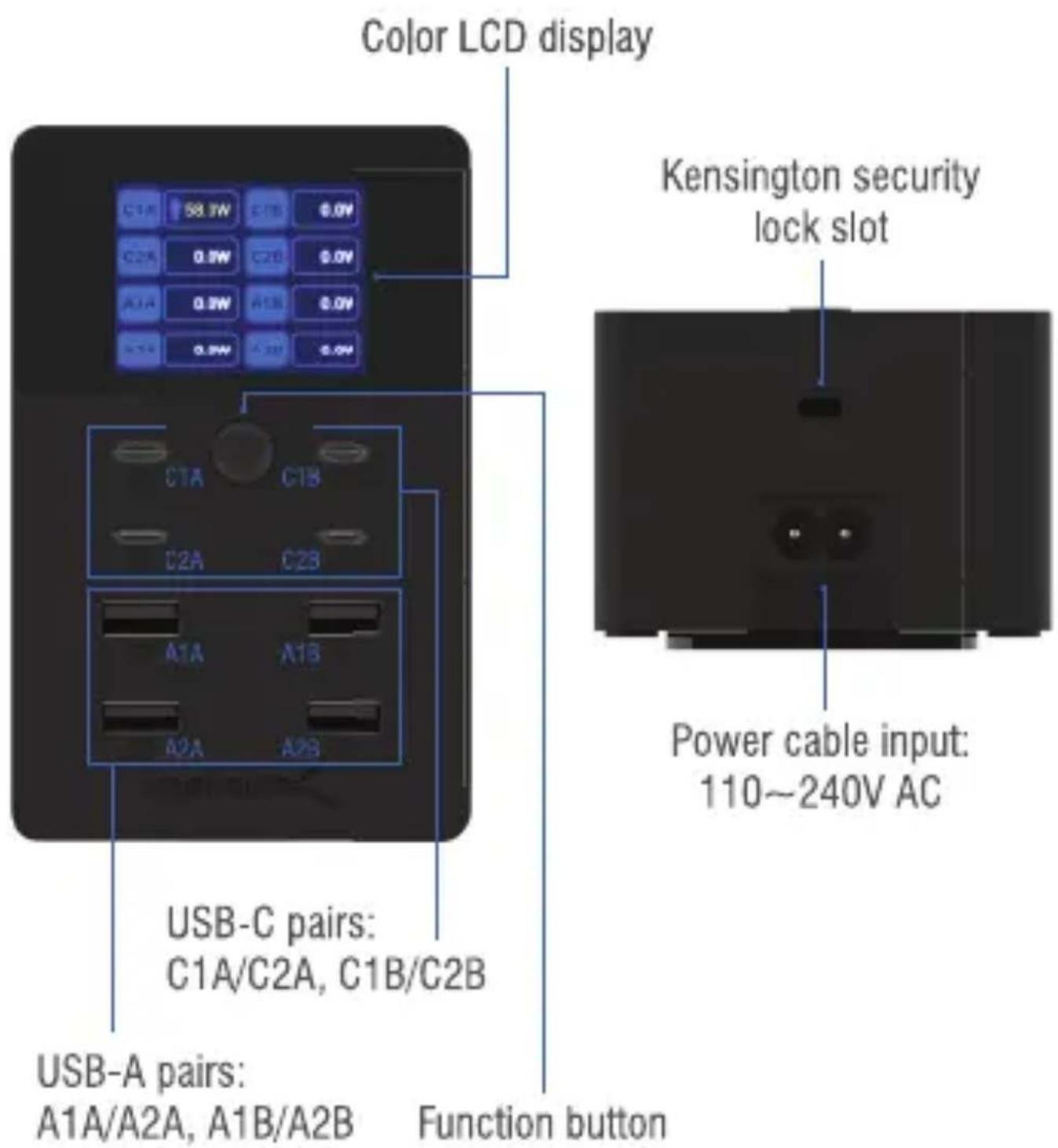
POWER DISTRIBUTION
| PD Power Distribution | 3.3-5.9V3.3-11V3.3-21V | Maximum(W) | Notes | ||||||
| Group A charging port(s) | VoltageCurrentPort | 5V | 9V | 12V | 15V | 20V | |||
| C1A | 3A | 3A | 3A | 3A | 5A | 3A/3A/3A | 100W | Single-port output | |
| C2A | 3A | 3A | 3A | 3A | 5A | 3A/3A/3A | 100W | ||
| A1A | 3A | 2A | 1.5A | / | / | / | 18W | ||
| A2A | 3A | 2A | 1.5A | / | / | / | 18W | ||
| C1A | 3A | 3A | 3A | 3A | 5A | 3A/3A/3A | 100W | Dual-port output+ Group B,250W | |
| C2A | 3A | 2.78A | 2.08A | 1.67A | 1.25A | 3A/2.75A/- | 25W | ||
| C1A or C2A | 3A | 3A | 3A | 3A | 5A | 3A/3A/3A | 100W | Dual-port output+ Group B,236W | |
| A1A or A2A | 3A | 2A | 1.5A | / | / | / | 18W | ||
| C1A | 3A | 3A | 3A | 3A | 3.25A | 3A/3A/3A | 65W | 3-port output+ Group B,216W | |
| C2A | 3A | 2.78A | 2.08A | 1.67A | 1.25A | 3A/2.75A/- | 25W | ||
| A1A or A2A | 3A | 2A | 1.5A | / | / | / | 18W | ||
| C1A or C2A | 3A | 3A | 3A | 3A | 3.25A | 3A/3A/3A | 65W | 3-port output+ Group B,202W | |
| A1A | 3A | 2A | 1.5A | / | / | / | 18W | ||
| A2A | 3A | 2A | 1.5A | / | / | / | 18W | ||
| C1A | 3A | 3A | 3A | 3A | 3.25A | 3A/3A/3A | 65W | 4-port output+ Group B,252W | |
| C2A | 3A | 2.78A | 2.08A | 1.67A | 1.25A | 3A/2.75A/- | 25W | ||
| A1A | 3A | 2A | 1.5A | / | / | / | 18W | ||
| A2A | 3A | 2A | 1.5A | / | / | / | 18W | ||
| PD Power Distribution | 3.3-5.9V3.3-11V3.3-21V | Maximum(W) | Notes | ||||||
| Group B charging port(s) | VoltageCurrentPort | 5V | 9V | 12V | 15V | 20V | |||
| C1B | 3A | 3A | 3A | 3A | 5A | 3A/3A/3A | 100W | Single-port output | |
| C2B | 3A | 3A | 3A | 3A | 5A | 3A/3A/3A | 100W | ||
| A1B | 3A | 2A | 1.5A | / | / | / | 18W | ||
| A2B | 3A | 2A | 1.5A | / | / | / | 18W | ||
| C1B | 3A | 3A | 3A | 3A | 5A | 3A/3A/3A | 100W | Dual-port output+Group A,250W | |
| C2B | 3A | 2.78A | 2.08A | 1.67A | 1.25A | 3A/2.75A/- | 25W | ||
| C1B or C2B | 3A | 3A | 3A | 3A | 5A | 3A/3A/3A | 100W | Dual-port output+Group B,236W | |
| A1B or A2B | 3A | 2A | 1.5A | / | / | / | 18W | ||
| C1B | 3A | 3A | 3A | 3A | 3.25A | 3A/3A/3A | 65W | 3-port output+Group A,216W | |
| C2B | 3A | 2.78A | 2.08A | 1.67A | 1.25A | 3A/2.75A/- | 25W | ||
| A1B or A2B | 3A | 2A | 1.5A | / | / | / | 18W | ||
| C1B or C2B | 3A | 3A | 3A | 3A | 3.25A | 3A/3A/3A | 65W | 3-port output+Group A,202W | |
| A1B | 3A | 2A | 1.5A | / | / | / | 18W | ||
| A2B | 3A | 2A | 1.5A | / | / | / | 18W | ||
| C1B | 3A | 3A | 3A | 3A | 3.25A | 3A/3A/3A | 65W | 4-port output+Group A,252W | |
| C2B | 3A | 2.78A | 2.08A | 1.67A | 1.25A | 3A/2.75A/- | 25W | ||
| A1B | 3A | 2A | 1.5A | / | / | / | 18W | ||
| A2B | 3A | 2A | 1.5A | / | / | / | 18W | ||
DISPLAY INFORMATION

natural_image
Blue downward-pointing triangle symbol on a dark background with diagonal lines (no text or symbols)To turn the screen on or off, press and hold the function button for 2 seconds.
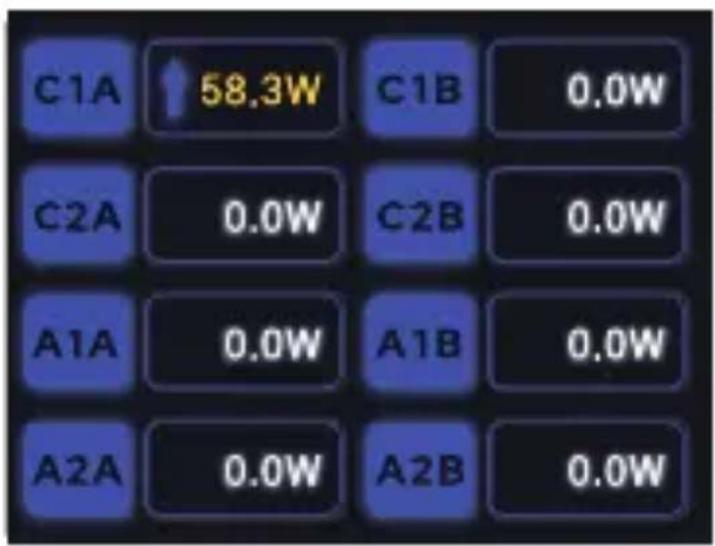
The default screen, after the Sabrent logo, shows the power draw of all eight ports.

A short press at this screen will begin per-press cycling for each of the eight ports, showing detailed information before finally returning to the main screen.

When viewing the single port charging status, the screen will revert to the primary status display after two minutes of inactivity. While in the primary status display, the screen will switch to the logo and dim after 10 minutes of inactivity to conserve power.
GETTING STARTED

natural_image
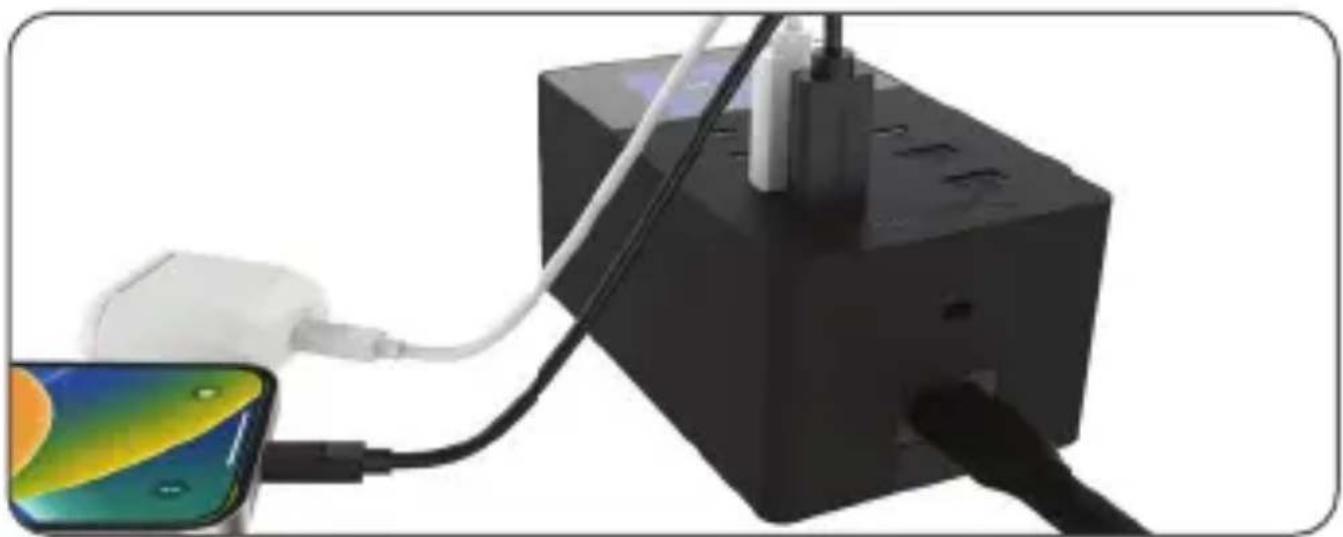
Diagram showing a device connected to a laptop via cable (no text or symbols present)- Connect the power cable first into the USB charger and then into the AC power outlet.
natural_image
Close-up of a black electronic device connected to a white cable with a close-up of its screen showing thermal imaging (no text or symbols visible)- Insert your desired devices while paying attention to individual port, pair, and total port power limits. (Check the PD power distribution tables on page 3 to verify possible output combinations for your devices, up to a maximum of 126W per side.)

- Activate the screen by pressing and holding down the function button for 2 full seconds. You may then review the power status of all 8 ports and cycle to see per-port details for voltage, amperage, temperature, and charge time.
Note: If the charging status is not activated properly, please try different ports and/or a different device attachment order. Check our power distribution table and the FAQ for additional assistance.
WARNING: To reduce the risk of fire or electric shock, do not expose the charger or its ports to rain and moisture. Do not remove the cover or back of this product - there are no user-serviceable parts inside. Refer servicing to qualified personnel.
CHARGING GUIDE
UP TO ONE PORT PER SIDE

Any 1 USB Type-C per side at up to 100W
Any 1 USB Type-A per side at up to 18W
UP TO TWO PORTS PER SIDE
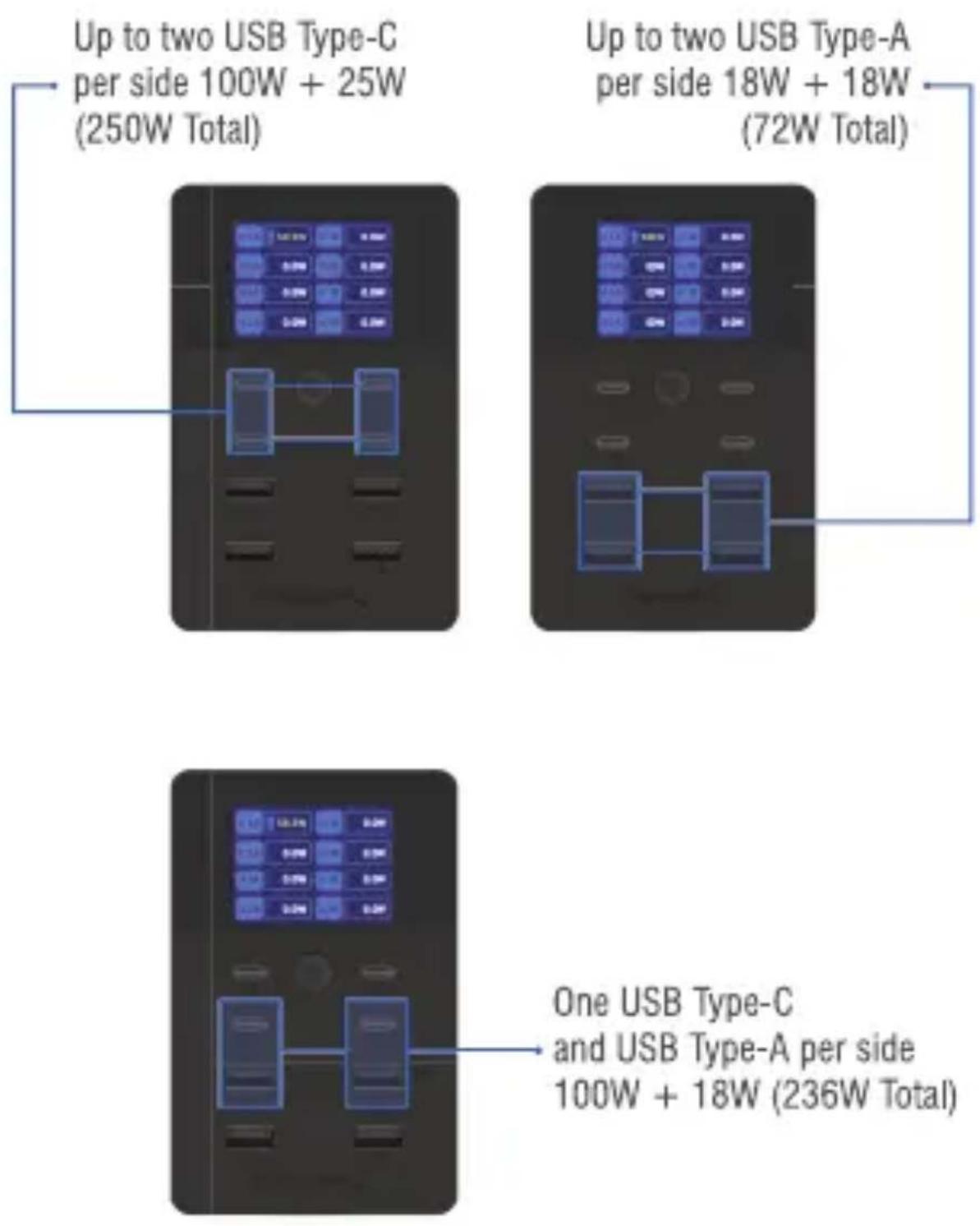
Up to two USB Type-C per side 100W + 25W (250W Total)
Up to two USB Type-A
per side 18W + 18W
(72W Total)
One USB Type-C
and USB Type-A per side
100W + 18W (236W Total)
UP TO THREE PORTS PER SIDE

FOUR PORTS PER SIDE

FREQUENTLY ASKED QUESTIONS:
Q. What is the input voltage range for this charger?
A. This charger can operate in the 110\~240V range. The native plug is Type A and an adapter may be required outside of North America, Central America, or Japan. Alternatively, you may provide the appropriate cable for your outlet. The charger is designed for an IEC C7 type cable.
Q. What's the absolute maximum power this device can provide? How does this work per-port, per-pair, and per-group?
A. 252W is the absolute maximum power draw allowed by all ports. USB-C ports can provide up to 100W each or 125W in a pair, and USB-A ports can provide up to 18W each or 36W in a pair. Please refer to our PD power distribution table for precise information on more complex port combinations.
Q. Does this charger comply with Power Delivery (PD) standards?
A. Yes, this charger conforms to the PD 3.0 standard which allows up to 100W of delivery over USB-C. The USB-C ports can deliver 5V/9V/12V/15V/20V while USB-A is restricted to 5V/9V/12V, per the standard. The charger is also PPS-compliant (programmable power
supply) from a maximum 3.3 to 21V. Please see the PD power distribution table for more information.
Q. What devices are compatible with the charger?
A. A wide range of devices are supported including tablets and iPads, e-readers, Android smartphones and iPhones, Samsung Galaxy phones and tablets, Google devices including Pixel, smartwatches, laptops, the Nintendo Switch, speakers, hubs, and much more. Devices may be charged by either USB-A or USB-C over a wide range of voltages for optimal power delivery and may also be charged simultaneously.
Q. When adding a second device to a USB-C pair, the second device is not charging. Why?
A. Some devices may require more than the base 25W provided in a USB-C pair when the first USB-C device is consuming its port maximum of 100W. Switching device connection order or changing a device to the second USB-C pair may overcome this limitation.
SABRENT
FOR HELP, COMMENTS, QUESTIONS OR CONCERNS PLEASE CONTACT OUR TECH SUPPORT TEAM VIA OUR WEBSITE WWW.SABRENT.COM


- 252W 8-PORT USB PD 3.0 CHARGER WITH COLOR LCD STATUS DISPLAY
- FEATURES
- PACKAGE CONTENTS
- PRODUCT OVERVIEW
- DISPLAY INFORMATION
- GETTING STARTED
- CHARGING GUIDE
- FREQUENTLY ASKED QUESTIONS:
- What devices are compatible with the charger?
- When adding a second device to a USB-C pair, the second device is not charging. Why?
- SABRENT
Marke : Sabrent
Modell : AX-8PTC
Kategorie : USB-Ladegerät