
CB-TDP - Drumcomputer ROLAND - Kostenlose Bedienungsanleitung
Finden Sie kostenlos die Bedienungsanleitung des Geräts CB-TDP ROLAND als PDF.


| Produkttyp | Drumcomputer |
| Marke | Roland |
| Modell | CB-TDP |
| Abmessungen (B x T x H) | ca. 300 x 200 x 60 mm |
| Gewicht | ca. 1,2 kg |
| Stromversorgung | Netzteil (9V DC, 500 mA) oder 6x AA-Batterien |
| Anzahl der Pads | 16 druckempfindliche Pads |
| Sounds | 128 integrierte Drum-Sounds |
| Patterns | 64 Preset-Patterns, 32 benutzerdefinierte Patterns |
| Sequencer | 16-Step-Sequencer mit Echtzeit- und Step-Eingabe |
| Anschlüsse | Kopfhörerausgang (3,5 mm), MIDI In/Out, USB |
| Effekte | Reverb, Delay, Kompressor |
| Display | LCD mit Hintergrundbeleuchtung |
| Stromverbrauch | ca. 3 W |
| Reinigung | Oberfläche mit weichem, trockenem Tuch abwischen. Keine aggressiven Reiniger. |
| Sicherheitshinweise | Nur mit empfohlenem Netzteil verwenden. Von Wasser fernhalten. |
| Ersatzteile | Netzteil und Batteriefachdeckel erhältlich über Roland-Kundendienst. |
| Reparierbarkeit | Nur durch autorisiertes Fachpersonal. Keine eigenständigen Reparaturen. |
| Garantie | 2 Jahre (abhängig vom Kaufland) |
Häufig gestellte Fragen - CB-TDP ROLAND
Benutzerfragen zu CB-TDP ROLAND
0 Frage zu diesem Gerät. Beantworten Sie die, die Sie kennen, oder stellen Sie Ihre eigene.
Eine neue Frage zu diesem Gerät stellen
Laden Sie die Anleitung für Ihr Drumcomputer kostenlos im PDF-Format! Finden Sie Ihr Handbuch CB-TDP - ROLAND und nehmen Sie Ihr elektronisches Gerät wieder in die Hand. Auf dieser Seite sind alle Dokumente veröffentlicht, die für die Verwendung Ihres Geräts notwendig sind. CB-TDP von der Marke ROLAND.
BEDIENUNGSANLEITUNG CB-TDP ROLAND
Roland
Carrying Case for V-Drums Portable CB-TDP Owner's Manual
Before using this unit, carefully read the sections entitled "USING THE UNIT SAFELY" and "IMPORTANT NOTES." These sections provide important information concerning the proper operation of the unit. Additionally, in order to feel assured that you have gained a good grasp of every feature of your new unit, read this manual should be read in its entirety. This manual should be saved and kept on hand as a convenient reference.
Contents
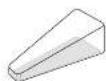
□ Carrying case Kick pedal pouch
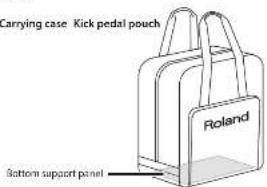
□ Cushion
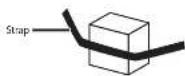

The kick pedal should be stored in this pouch.

□ HI-Hat control pedal pouch
The hi hat control pedal should be stored in this pouch.
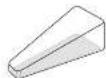
USING THE UNIT SAFELY
INSTRUCTIONS FOR THE PREVENTION OF FIRE, ELECTRIC SHOCK, OR INJURY TO PERSONS
| About ▲WARNING and ▲CAUTION Notices | |
| WARNING | About the instructions were issued to the right side of the system, which was not to be taken into the right side of the system. |
| CAUTION | Based on instructions to select the use of the system in your musical capacity should be used, but we would need to do something in the way of the system or other areas in which it is called with the system as well as the turn-up, as well as the mechanism and make it parts. |
ALWAYS OBSERVE THE FOLLOWING
WARNING
Adults must provide supervision in places where children are present
When using the unit in locations where children are present, be careful so no misholding of the unit may take place. An arm should always be an hand to provide supervision and guidance.
Do not drop or subject to strong impact Do not drop this most in subject it, to strong impact while your instrument is stored in it.
Copyright © 2012 ROLAND CORPORATION
All rights reserved. For part of this publication may be reproduced in any form without the written permission of BOLAND CORPORATION.
Roland and V. Drums are either registered trademarks or trademarks of Roland Corporation in the United States and/or other countries

CAUTION
Avoid climbing on top of the unit, or placing heavy objects on it
Never climb on top of, nor place heavy objects on this case while your instrument is slotted at 4.

Main Specifications
Roland CB-TDP: Carrying Case
| Main Material Property | |
| Dimensions | 580 (60 x 350 (D) x 680 (H) mm22.7/8 x 13.13/16 x 26.13/16 inches(Excluding procuding parts) |
| Weight 2.0 kg / kg | 4 Ins. / nr |
| Accessories | Kick press pouch, 15-Hat control panelpouch, Cushion, Bottom support panel,Owner's manual |
* In the interest of product improvement, the specifications and/or appearance of this unit are subject to change without prior notice.
Storage
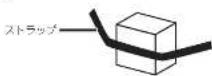
- Place the cushion between the legs of the stand for the V-Drums Portable, and use the strap to secure it. Grasp the frame of the V-Drums Portable, and place it in the carrying case.
* For details on how to fold up the V-Drums Portable, refer to the owner's manual for the V-Drums Portable. * Make sure that you have firmly tightened the screws of the V-Drums Portable.
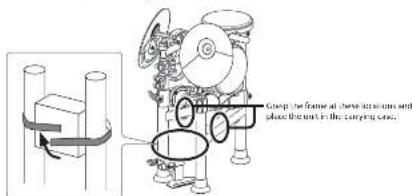
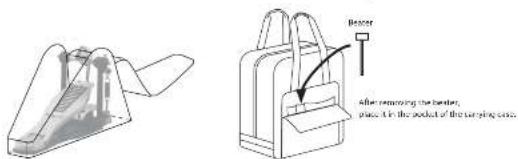
- Remove the beater from the kick pedal. Place the kick pedal in the kick pedal pouch, and close the fastener. * For details on how to remove the beater, refer to the owner's manual for the kick pedal.
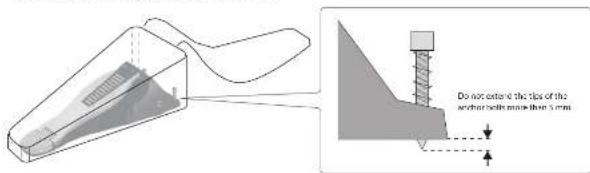
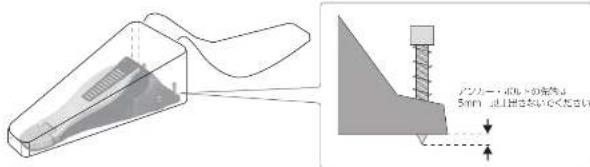
- Loosen the two anchor bolts of the hi-hat control pedal. Place the hi-hat control pedal in the hi-hat control pedal pouch, and close the fastener.
* The anchor bolts have sharp tips; handle them with caution.
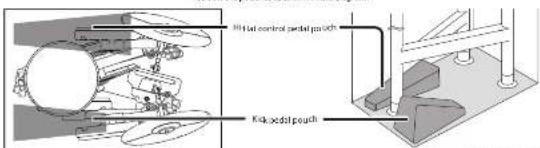
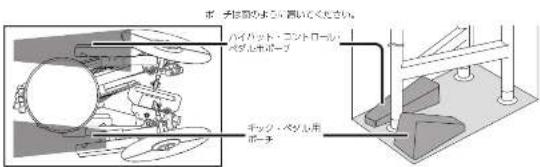
- Place the kick pedal pouch and the hi-hat control pedal pouch in the carrying case, and close the fastener of the carrying case.
Position the pouches as shown in the diagram
-For C.A. US (Proposition 65)
WARNING
This product contains chemicals known to cause cancer, birth defects and other reproductive harm, including lead.
Roland
V-Drums Portable キャリング・ケース CB-TDP 取扱説明書
本部門を正しくお使いいただくために、ご使用前に「取り」のご注引と「使用」のご注引」をよくお物分ください。また、本部門の得られた技能を一分と理解いただくためにも、取扱説明書をよくお飲みください。取扱説明書は必要ななどにすぐに見ることができるよう、手元に置いてください。
内容物
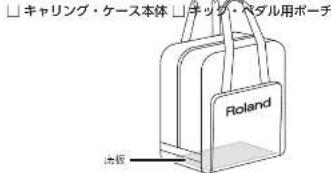
□クッション
チェック・ペダルを扱めするボーチです。

□ハイハット・コントロール・ペダル用ポーチ ハイハット・コントロール・ペダルを吸納するポーチです。
安全上のご注意
火災・感冒・傷害を防止するには
,
注意の意味について警告と
図記号の例

はり政治を重った集計。また75年死亡また、重要を含む可給圧が想定される内口を表しています。
△は、分類(発版、商品を含む)を含めてい。具体的な生の出料、△の中支給のしています。注意の場合は、設定内容は、警告、法院」を含めていです。

取り扱いを表示する責任に、利用した事項を会う状態が想定される場合および取引情報の内容を判定している内容を表いています。
① 2. 福工(してはい行なこと)を要しています。具体的な正内出料。② 中下道の仕に示す。立きの点は、「分徒止」を主してい示す。

目数の注意は、表紙(長さわる)を含むペットにきらの手術人発生を表しています。
● は、有語(ふずすること)を要しています。
以下の指示を必ず守ってください
警告
お子様の取り扱いに注意する
お一様の20番所で使用する場合、17子様
の取り扱いにたずるし両得めてください。必ず人人のかたび、希望/演講してあげてください。

上に承ったり、重いものを置いたりしない ※道を(就した状態でこの起义の上に承 ったり、重いものを置いたりしないとください。

落としたり、強い衝撃を与えたりしない
※富を軽した状態でこの図面を含いた
り、使い御室を与えないください。

16 2017 プーランド株式会社
木業の一年。当しくは十年を紛散で発電・行営することを届します。
Koland, V Drums, U. 日本国およびその他の国におけるローランド株式会計の背景を届または届開です。
使用上のご注意
この製品は、Richard V-Crares Portable 具布のキャリンプ・ケースです。
設置について
- 直射日光の当に有増や発展する機器の近く。心切った山内などに装置しないとください。形を行することがあります。
お手入れについて
- 過离の若干人は、美がい布で乾燥するか、 周くさった布で汚れを乾燥取ってください。汚れ が散しと書は、中性深歩を含んだ布で汚れを乾 して取り、寄らがい布で乾燥してくめてよい
- サイや変形の原因となる。ベンタン、シンナー、アルコール類は使用しないください。
- 丸亮いしなめてください。
主な仕様
ローランド CB-TDP:キャリング・ケース
在红转城(厦门)
外形寸法 550 (前) ×350 (平行直) ×680 (高) mm (尖锐拉伸除)
| 質量 20kg | |
| 付属図 | チェック・ペダル月ポーチ、ハイハット・コントロール・ペダル年ポーチ。クッション、更新、取扱改明書 |
※ 满足の仕様で例外は、当後の方針をなく変更することがあります。
収納のしかた
- V-Drums Portable のスタンドの習にクッションをはさみ、ストラップで固定します。V-Drums Portable のフレームを手に持ち、キャリング・ケース本体に入れます。
※ V-Drums Portable の折りたたみかたについては、V-Drums Portable の取扱説明書をご貯ください。 ※ V-Drums Portable のネジを配慮に紹めていることを配認してください。
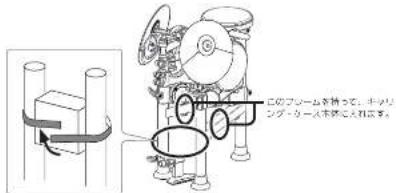
- キック・ペダルからビーターをはずします。キック・ペダルをキック・ペダル用ポーチに入れて、ファスナーを閉じます。※ ピーターのはずしかたについては、キック・ペダルの段変的書をご覧ください。
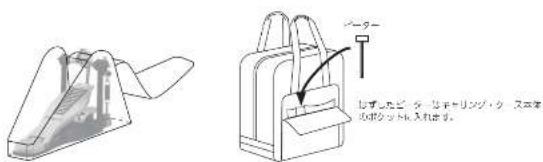
- ハイハット・コントロール・ベダルの 2 本のアンカー・ボルトを緩めます。ハイハット・コントロール・ベダルをハイハット・コントロール・ベダル用ポーチに入れて、ファスナーを閉じます。
※ アンカー・ボルトの記憶はとがっていますので、取り扱いに注意してください。
- キック・ベダル用ポーチとハイハット・コントロール・ベダル用ポーチをキャリング・ケース本体に入れて、キャリング・ケース本体のファスナーを閉じます。
Marke : ROLAND
Modell : CB-TDP
Kategorie : Drumcomputer