
YP-T6 - Mp3-player SAMSUNG - Kostenlose Bedienungsanleitung
Finden Sie kostenlos die Bedienungsanleitung des Geräts YP-T6 SAMSUNG als PDF.


| Produkttyp | MP3-Player |
| Marke | Samsung |
| Modell | YP-T6 |
| Speicherkapazität | 256 MB (integrierter Flash-Speicher) |
| Stromversorgung | 1 AAA-Batterie (nicht im Lieferumfang) |
| Display | Ja (Anzeige) |
| Kopfhöreranschluss | 3,5 mm Klinke |
| USB-Anschluss | Ja (USB 2.0, Mini-B) |
| Aufnahmefunktion | Ja (Mikrofon integriert) |
| Wiedergabeformate | MP3, WMA |
| Loop-Wiederholung | Ja |
| Hold-Schalter | Ja |
| Gewicht | ca. 30 g (ohne Batterie) |
| Abmessungen | ca. 30 x 80 x 15 mm |
| Bedienelemente | Menü/Navigation, Wiedergabe/Pause, Aufnahme, Lautstärke, Loop |
| Zubehör im Lieferumfang | USB-Kabel, Ohrhörer, Installations-CD, Kurzanleitung, USB-Adapter |
| Reinigung | Mit einem weichen, trockenen Tuch reinigen. Keine aggressiven Reinigungsmittel verwenden. |
| Sicherheitshinweise | Vor Feuchtigkeit und Stößen schützen. Nicht selbst öffnen. |
| Ersatzteile und Reparatur | Kundendienst von Samsung kontaktieren. |
Häufig gestellte Fragen - YP-T6 SAMSUNG
Benutzerfragen zu YP-T6 SAMSUNG
0 Frage zu diesem Gerät. Beantworten Sie die, die Sie kennen, oder stellen Sie Ihre eigene.
Eine neue Frage zu diesem Gerät stellen
Laden Sie die Anleitung für Ihr Mp3-player kostenlos im PDF-Format! Finden Sie Ihr Handbuch YP-T6 - SAMSUNG und nehmen Sie Ihr elektronisches Gerät wieder in die Hand. Auf dieser Seite sind alle Dokumente veröffentlicht, die für die Verwendung Ihres Geräts notwendig sind. YP-T6 von der Marke SAMSUNG.
BEDIENUNGSANLEITUNG YP-T6 SAMSUNG
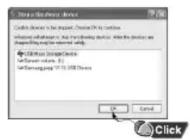
Disconnecting the USB cable
After completing the file transfer, you must disconnect the cable in the following way:
1 Double-click on the green arrow in the taskbar on the bottom right of the window.

2 When the [Stop a Hardware device] message appears, press the [OK] button and disconnect the USB cable.

4 AH68-00000A (Rev 0.0)
YP-T6 Quick Guide
Location of Controls

flowchart
graph TD
    A["Display"] --> B["Neck strap Hook"]
    B --> C["MENU, Navigation button/Move to Track/Speed Search/Volume Button"]
    C --> D["Loop Repeating Button"]
    D --> E["Play/Pause Button"]
    D --> F["Hold Switch"]
    E --> G["Recording Button"]
    F --> H["Microphone"]
    G --> I["USB Cable Connection Port"]
    G --> J["ENC Jack"]
    H --> K["Battery Cover"]
    H --> L["Earphone Jack"]
Turning Power On and Off
- Power On : Press the ▶ button to turn on the power. - Power Off : Press and hold the ▶ II button to turn off the power.
Pausing Music
Press the ▶II button to pause playback.
- If no buttons are pressed within 10 seconds(changes depending on settings), the yepp automatically powers off.
- While in Pause mode, briefly press ▶Iagain to resume playback.
Playing Music
Press the ▶ II button. - Playback starts.
Connecting the USB cable
Before connecting the player to PC, make sure to install USB driver. Insert the Installation CD into the CD-ROM drive and then click [Install USB Driver]. Complete the installation by the instructions in the order as they appear in the windows.
1 Connect the USB cable to the USB port on the computer.
2 Connect the other end of the USB cable to the USB cable connection port on the bottom of the player.
- If you disconnect the USB cable from your PC while implementing a command or initializing during USB driver installation, your PC may not function correctly.
3 The USB driver is installed with a message saying that it is searching for a new device. You may not see the display screen during installation. Go to the device manager to check that installation has been successfully completed.
4 Upon installation of the USB driver "Samsung yepp YP-T6 USB Device" will appear in the [System Properties] → [Device Manager].


Downloading/ Uploading files
1 Connect the player to your PC with the supplied USB cable.
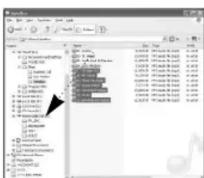
2 Open Windows Explorer on PC.
- Removable Disc is displayed in Windows Explorer.
3 Select the file to save and drag-and-drop it into the removable disk icon. (Files will appear In numerical, alphabetical order)
- If you change the name of music files in Windows Explorer like 001* * * , 002* * * ..., music files will be played in the order of number indicated.
Notice N
- The “WRITING/READING” message will appear during file download or upload. Disconnecting the USB cable while “WRITING/READING” is displayed may cause malfunction of the unit.
- Files will not necessarily play back in the order displayed in the Removable Disc in Windows Explorer.


Marke : SAMSUNG
Modell : YP-T6
Kategorie : Mp3-player