
Dynamic Wah AW-3 - Gitarrenverstärker BOSS - Kostenlose Bedienungsanleitung
Finden Sie kostenlos die Bedienungsanleitung des Geräts Dynamic Wah AW-3 BOSS als PDF.


| Produkttyp | Gitarren-Wah-Wah-Pedal |
| Marke | Boss |
| Modell | Dynamic Wah AW-3 |
| Abmessungen (B x T x H) | ca. 73 x 129 x 59 mm |
| Gewicht | ca. 450 g |
| Stromversorgung | 9-V-Batterie (6LR61) oder optionales Netzteil (PSA-Serie) |
| Stromaufnahme | ca. 20 mA (bei 9 V) |
| Eingänge | 1 x 6,3 mm Klinke (Instrumenteneingang) |
| Ausgänge | 1 x 6,3 mm Klinke (Verstärkerausgang) |
| Regler | Pedal, Modus-Wahlschalter, Parameter-Regler |
| Verfügbare Modi | Vintage, Modern, Dynamic, Bass |
| Besonderheiten | Dynamic-Modus passt Wah-Effekt dynamisch an die Spielstärke an |
| Gehäuse | Robustes Metallgehäuse |
| LED-Anzeige | Betriebsanzeige (leuchtet bei Aktivierung) |
| Zubehör im Lieferumfang | Bedienungsanleitung, Gummifüße, 9-V-Batterie |
| Reinigung | Mit einem trockenen, weichen Tuch abwischen; keine Lösungsmittel verwenden |
| Sicherheitshinweise | Nur empfohlene Netzteile verwenden; Gerät vor Feuchtigkeit schützen |
| Reparatur | Nur durch autorisiertes Fachpersonal |
| Garantie | Siehe Garantiekarte des Herstellers |
Häufig gestellte Fragen - Dynamic Wah AW-3 BOSS
Benutzerfragen zu Dynamic Wah AW-3 BOSS
0 Frage zu diesem Gerät. Beantworten Sie die, die Sie kennen, oder stellen Sie Ihre eigene.
Eine neue Frage zu diesem Gerät stellen
Laden Sie die Anleitung für Ihr Gitarrenverstärker kostenlos im PDF-Format! Finden Sie Ihr Handbuch Dynamic Wah AW-3 - BOSS und nehmen Sie Ihr elektronisches Gerät wieder in die Hand. Auf dieser Seite sind alle Dokumente veröffentlicht, die für die Verwendung Ihres Geräts notwendig sind. Dynamic Wah AW-3 von der Marke BOSS.
BEDIENUNGSANLEITUNG Dynamic Wah AW-3 BOSS
Before using this unit, carefully read the sections entitled: "USING THE UNIT SAFELY" and "IMPORTANT NOTES" (supplied on a separate sheet). After reading, keep the document(s) where it will be available for immediate reference.
Panel Descriptions
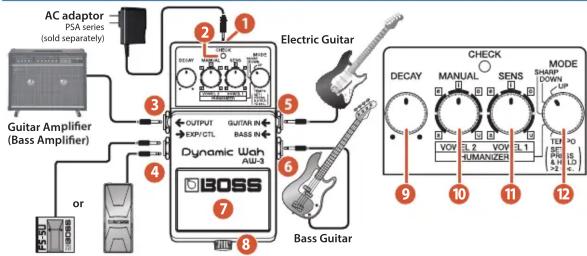
Footswitch Expression Pedal
(FS-5U; sold separately) (EV-30, FV-500H, FV-500L, and Roland EV-5; sold separately)
| Name | Explanation | |
| 1 | DC IN jack | Accepts connection of an AC Adaptor (PSA series; sold separately). By using an AC Adaptor, you can play without being concerned about how much battery power you have left.* As soon as you connect the AC adaptor, the unit is turned on.* We recommend that you keep batteries installed in the unit even though you'll be powering it with the AC adaptor. That way, you'll be able to continue a performance even if the cord of the AC adaptor gets accidentally disconnected from the unit.* Use only the specified AC adaptor (PSA-series).* If the AC adaptor is connected while power is on, the power supply is drawn from the AC adaptor. |
| 2 | CHECK indicator | Combination indicator that shows the effect's on/off status, tempo (in Tempo mode), and Battery Check function.The indicator lights when an effect is ON.AW-3* If this indicator goes dim or no longer lights while an effect is ON, the battery is near exhaustion and should be replaced immediately.→ "Changing the Battery" |
| 3 | OUTPUT jack This output jack is connected to an amplifier or other effects device. | |
| Name | Explanation | |
| 4 | EXP/CTL jack | This jack lets you connect an expression pedal made by BOSS/Roland, or a foot switch. This allows you to attain pedal wah and Humanizer effects. It also allows setting of the tempo (while in Tempo mode).→ "Description of Each Mode," "Using the EXP/CTL Jack" * Use only the specified expression pedal (EV-30, FV-500H, FV-500L, and Roland EV-5; sold separately). By connecting any other expression pedals, you risk causing malfunction and/or damage to the unit. |
| 5 | GUITAR IN jack | This jack accepts input signals coming from a guitar, some other musical instrument, or another effects unit. |
| 6 | BASS IN jack | This jack accepts input signal coming from a bass guitar.* BASS IN is disabled when the GUITAR IN jack is used. |
| * The GUITAR IN and BASS IN jacks double as power switches. Power to the unit is turned on when you plug into the GUITAR IN or BASS IN jack; the power is turned off when the cable is unplugged. Be sure to disconnect any cord plugged into the GUITAR IN or BASS IN jack when not using this effects device. | ||
| 7 | Pedal switch Used | for switching effects on/off, and for inputting the tempo (in Tempo mode). |
| 8 | Thumbscrew | When this screw is loosened, the pedal will open, allowing you to change the battery.→ "Changing the Battery" |
| 9 | [DECAY] knob | Adjusts the time over which the wah and humanizer effects make the changes. Turn the knob clockwise to increase the time that the effect plays. |
| 10 | [MANUAL] knob | Adjusts the frequency at which the wah effect begins.* The range setting may vary with the selected mode and when inputting through the BASS IN jack.When in HUMANIZER ModeSwitches to VOWEL 2, in which the second vowel is selected. |
| 11 | [SENS] knob | Adjusts the amount of wah effect that is applied in response to the input level. The further you turn this knob clockwise, the stronger the wah effect applied, even with lighter picking.MEMOTurn the SENS knob fully counterclockwise, then adjust the [MANUAL] knob to get a fixed wah (fixed filter) effect.When in HUMANIZER ModeSwitches to VOWEL 1, in which the first vowel is selected. |
| 12 | [MODE] switch | Switches the mode (UP, DOWN, SHARP, HUMANIZER, TEMPO).→ "Description of Each Mode" |
Description of Each Mode
UP, DOWN, SHARP
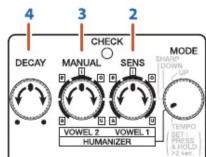
| UP | Provides a wah effect in which the filter shifts to higher frequencies. |
| DOWN | Provides a wah effect in which the filter shifts to lower frequencies. |
| SHARP | Provides a stronger wah effect with shifting of the filter to higher frequencies. |
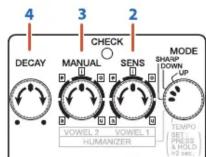
HUMANIZER
In this mode, the guitar sound is transformed into the sound of a human voice. The vowel changes as you pick.
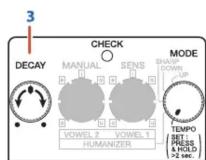
TEMPO
In this mode, you can specify the tempo of the auto wah in a range of 200 msec to 4 sec by using the AW-3's pedal switch or by using a footswitch made by BOSS.
Tempo Settings with the AW-3 Pedal
- When you have finished making the connections, press and hold down the AW-3's pedal switch for at least two seconds to enable setting of the tempo The CHECK indicator turns green, and the tempo flashes in red. The output sound also switches to Auto Wah at the same time.
Using the EXP/CTL Jack
With an expression pedal (expression pedal made by BOSS/Roland: sold separately) connected to the EXP/CTL jack, the wah and humanizer effects are then applied in response to the operation of the pedal.
* Set the minimum volume of the expression pedal made by BOSS/Roland to the minimum (0) setting. If this is not set to the minimum, the wah effect or humanizer effect might not be produced correctly.
In UP, DOWN, or TEMPO mode
Provides the pedal wah effect.
* The [DECAY], [MANUAL], and [SENS] knob functions are disabled.
- When you have finished making the connections, turn the effect on. The CHECK indicator turns red.
- Use the [SENS] knob to adjust the amount of effect that is applied in response to the input level.
- With the [MANUAL] knob, adjust the frequency at which the wah effect begins.
-
With the [DECAY] knob, adjust the length of time the wah effect is applied.
-
When you have finished making the connections, turn the effect on. The CHECK indicator turns red.
- Select the first vowel with the [VOWEL 1] knob.
- Select the second vowel with the [VOWEL 2] knob.
- Use the [DECAY] knob to adjust the length of time used to move from VOWEL 1 to VOWEL 2.
* When the power is turned on (before tempo settings), the tempo is at 500 msec.
* To allow switching without the normal stress of dealing with effect on/off hassles, when you go into the tempo setting mode with the effect on, the effect is switched off for two seconds, after which the AW-3 switches to the tempo setting mode.
2. Depress the pedal to get the tempo you want.
The speed changes to match the tempo entered by pressing the pedal, and the CHECK indicator will flash in sync with the tempo.
Available range for the tempo: 200 msec–4 sec
3. With the [DECAY] knob, adjust the wah effect time.
4. When you have finished setting the tempo, once again step on the pedal switch, and keep it down for two or more seconds. You exit the tempo setting mode, and the pedal switch reverts to its normal function of turning the effect on/off.
In SHARP mode
Provides a pedal wah effect, but featuring special tone characteristics.
* The [DECAY], [MANUAL], and [SENS] knob functions are disabled.
In HUMANIZER mode
The pedal action shifts between VOWEL 1 and VOWEL 2.
* The [DECAY] knob function is disabled.
* If VOWEL 1 and VOWEL 2 have the same settings, no change is obtained by moving the pedal.

MEMO
If an expression pedal made by Roland/BOSS is connected to the EXP/CTL jack, this unit operates as a pedal wah, and the SENS/MANUAL/DECAY knobs do not function.
→ "Using the EXP/CTL Jack"
MEMO
- If an expression pedal made by BOSS/Roland is connected to the EXP/CTL jack, this unit operates as a humanizer, letting you use the pedal to control the transition from VOWEL 1 to VOWEL 2.
The DECAY knobs is disabled.
→ "Using the EXP/CTL Jack" - Applying the same settings to VOWEL 1 and VOWEL 2 results in a fixed Humanizer (fixed filter) effect.
* Immediately after exiting the tempo setting mode, the effect stays on, with Auto Wah in effect.
MEMO
- If a foot switch made by BOSS is connected to the EXP/CTL jack, that foot switch is used to set the tempo, and the AW-3's pedal only switches the effect on/off.
While the tempo can be set as usual, the effect can also be switched on and off.
→ "Using the EXP/CTL Jack" - If an expression pedal made by BOSS/Roland is connected to the EXP/CTL jack, it operates as a pedal wah, and the [DECAY] knob does not function.
→ "Using the EXP/CTL Jack"
With a momentary-type footswitch (footswitch made by BOSS: sold separately) connected to the EXP/CTL jack, you can use the footswitch to set tempos in Tempo mode.
In this setup, the AW-3's pedal switch is only used to turn the effect on/off.
* Set the polarity switch of the connected foot switch as shown in the figure below.

* If you connect or disconnect the foot switch while making the tempo setting, the tempo might be disrupted. If this occurs, make the tempo setting once again.
Precautions When Connecting
- To prevent malfunction and equipment failure, always turn down the volume, and turn off all the units before making any connections.
- Once the connections have been completed, turn on power to your various devices in the order specified. By turning on devices in the wrong order, you risk causing malfunction and/or damage to speakers and other devices.
When powering up: Turn on the power to your guitar amp last.
When powering down: Turn off the power to your guitar amp first.
- Before turning the unit on/off, always be sure to turn the volume down. Even with the volume turned down, you might hear some sound when switching the unit on/off. However, this is normal and does not indicate a malfunction.
Changing the Battery
- Hold down the pedal and loosen the thumbscrew 📋 en open the pedal upward.
* The pedal can be opened without detaching the thumbscrew completely. - Remove the old battery from the battery housing 3, and remove the battery snap connected to it.
- Connect the battery snap to the new battery, and place the battery inside the battery housing.
* Be sure to carefully observe the battery's polarity (+ versus -). - Slip the coil spring 5 onto the spring base 6 the back of the pedal, and then close the pedal.
* Carefully avoid getting the battery snap cord 7 caught in the pedal, coil spring, and battery housing. - Insert the thumbscrew into the guide bush hole 8 and tighten it securely.
Main Specifications
| Nominal Input Level | -20 dBu |
| Input Impedance | 1 MΩ |
| Nominal Output Level | -20 dBu |
| Output Impedance | 1 kΩ |
| Recommended Load Impedance | 10 kΩ or greater |
| Power Supply | Alkaline battery (9 V, 6LR61)AC adaptor (PSA series: sold separately) |
| Current Draw | 50 mA* Expected battery life under continuous use: Alkaline: 8 hoursThese figures will vary depending on the actual conditions of use. |
| Dimensions | 73 (W) x 129 (D) x 59 (H) mm2-7/8 (W) x 5-1/8 (D) x 2-3/8 (H) inches |
| Weight | 430 g /1lb (including Battery) |
| Accessories | Leaflet (“USING THE UNIT SAFELY,” “IMPORTANT NOTES,” and “Information”)Alkaline battery (9 V, 6LR61) |
| Options (sold separately) | AC adaptor; PSA seriesExpression pedal: EV-30/FV-500H/FV-500L,Roland EV-5Footswitch (momentary-type): FS-5U/FS-6/FS-7 |
* 0 dBu = 0.775 Vrms
* This document explains the specifications of the product at the time that the document was issued. For the latest information, refer to the Roland website.
Use of Battery
- The battery that was supplied with the unit is for temporary use, intended primarily for testing the unit's operation. We suggest replacing this with an alkaline dry cell.
- If you handle batteries improperly, you risk explosion and fluid leakage. Make sure that you carefully observe all of the items related to batteries that are listed in "USING THE UNIT SAFELY" and "IMPORTANT NOTES" (supplied on a separate sheet).



Marke : BOSS
Modell : Dynamic Wah AW-3
Kategorie : Gitarrenverstärker