
OMK4-3 - Wandhalterung für Bildschirm IIYAMA - Kostenlose Bedienungsanleitung
Finden Sie kostenlos die Bedienungsanleitung des Geräts OMK4-3 IIYAMA als PDF.


| Produkttyp | Monitor |
| Modell | OMK4-3 |
| Marke | Iiyama |
| Bildschirmdiagonale | 24 Zoll (61 cm) |
| Auflösung | 1920 x 1080 (Full HD) |
| Bildwiederholfrequenz | 75 Hz |
| Panel-Technologie | IPS |
| Helligkeit | 250 cd/m² |
| Kontrastverhältnis | 1000:1 |
| Reaktionszeit | 4 ms (GTG) |
| Anschlüsse | HDMI, DisplayPort, VGA |
| Stromversorgung | 100-240 V, 50/60 Hz |
| Leistungsaufnahme (typisch) | 25 W |
| Abmessungen (mit Standfuß) | 540 x 415 x 200 mm |
| Gewicht (mit Standfuß) | 4,5 kg |
| VESA-Halterung | 100 x 100 mm |
| Besondere Merkmale | Flimmerfrei, Blaulichtfilter |
| Lieferumfang | Monitor, Standfuß, Netzkabel, HDMI-Kabel, Bedienungsanleitung |
| Reinigung | Mit einem weichen, trockenen Tuch abwischen |
| Sicherheitshinweis | Nicht in der Nähe von Wasser oder Wärmequellen aufstellen |
| Ersatzteile | Beim Hersteller oder autorisierten Händler erhältlich |
Häufig gestellte Fragen - OMK4-3 IIYAMA
Benutzerfragen zu OMK4-3 IIYAMA
0 Frage zu diesem Gerät. Beantworten Sie die, die Sie kennen, oder stellen Sie Ihre eigene.
Eine neue Frage zu diesem Gerät stellen
Laden Sie die Anleitung für Ihr Wandhalterung für Bildschirm kostenlos im PDF-Format! Finden Sie Ihr Handbuch OMK4-3 - IIYAMA und nehmen Sie Ihr elektronisches Gerät wieder in die Hand. Auf dieser Seite sind alle Dokumente veröffentlicht, die für die Verwendung Ihres Geräts notwendig sind. OMK4-3 von der Marke IIYAMA.
BEDIENUNGSANLEITUNG OMK4-3 IIYAMA
Mounting Kits OMK4-3 User manual
For ProLite TF4339MSC only
iiyama
CHECKING THE CONTENTS OF THE PACKAGE
The following parts are included in the package and make sure you have all of them. If anything is missing or damaged, please contact your local iiyama dealer or regional iiyama office.
| Mounting Kits Monitor L-Bracket (Q'ty) | M6 Screw(L=6mm) | User Manual(this document) | ||
| OMK4-3 ProLite TF4339MSC | OPT 200 (2pcs) | 24pcs 1pc | ||
| OPT 400 (2pcs) | ||||
SPECIAL NOTES
Specified L-Brackets and M6 Screws are necessary to mount an open frame monitor.
CAUTION
The L-Brackets are designed to be mounted to specific wall types and hardware, in accordance with the user manual supplied with the Mounting Kits.
■ Using L-brackets and screws other than those specified in the user manual may damage the monitor.
ATTACHING THE L-BRACKETS
Attach the L-Brackets to the monitor with the 24pcs of M6 Screw as shown below.
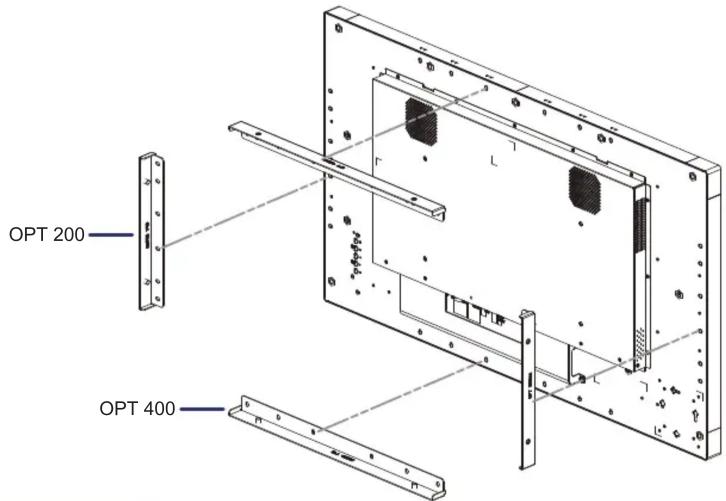
L-BRACKET DIMENSIONS (mm)
■OPT 200

NOTE
■ You will need a screwdriver to attach the L-Bracket.
■ L-Brackets and M6 Screws are necessary to mount an open frame monitor.
For details regarding temperature and humidity operating conditions of the open frame monitor, see the User Manual on iiyama website. http://www.iiyama.com.
■OPT 400

M099A11




Marke : IIYAMA
Modell : OMK4-3
Kategorie : Wandhalterung für Bildschirm