
DSIP-DOCK - Lautsprecher Hamilton - Kostenlose Bedienungsanleitung
Finden Sie kostenlos die Bedienungsanleitung des Geräts DSIP-DOCK Hamilton als PDF.


| Produkttyp | Dockingstation-Lautsprecher |
| Kompatible Geräte | iPod Classic, iPod nano, iPhone, iPod Touch |
| Lautsprecherleistung | 2 W RMS |
| Kopfhöreranschlüsse | 6 x 3,5 mm Klinke |
| Line-In-Anschluss | 3,5 mm Klinke |
| Stromversorgung | 9 V DC über Netzteil |
| Abmessungen (ca.) | 20 x 15 x 10 cm |
| Gewicht (ca.) | 500 g |
| Farbe | Schwarz/Blau |
| Lautstärkeregelung | Drehregler (Ein/Aus + Lautstärke) |
| Lautsprecher-/Kopfhörerumschaltung | Schalter auf der Vorderseite |
| Akku-Ladefunktion | Lädt angeschlossene iPods/ iPhones bei Netzbetrieb |
| Betriebsanzeige | LED (leuchtet bei eingeschaltetem Gerät) |
| Gehäusematerial | Kunststoff |
| Reinigung | Mit trockenem Tuch abwischen; keine Flüssigkeiten verwenden |
| Sicherheitshinweise | Nicht Regen oder Feuchtigkeit aussetzen; kein Öffnen des Gehäuses; nur qualifizierten Service |
| Reparierbarkeit | Keine vom Benutzer austauschbaren Teile; Service durch Fachpersonal |
| Lieferumfang | Dockingstation, Netzteil, Bedienungsanleitung |
| Garantie | Siehe separate Garantieunterlagen |
| Hersteller | Hamilton Electronics, 550 Huyler Street, South Hackensack NJ 07606, USA |
Häufig gestellte Fragen - DSIP-DOCK Hamilton
Benutzerfragen zu DSIP-DOCK Hamilton
0 Frage zu diesem Gerät. Beantworten Sie die, die Sie kennen, oder stellen Sie Ihre eigene.
Eine neue Frage zu diesem Gerät stellen
Laden Sie die Anleitung für Ihr Lautsprecher kostenlos im PDF-Format! Finden Sie Ihr Handbuch DSIP-DOCK - Hamilton und nehmen Sie Ihr elektronisches Gerät wieder in die Hand. Auf dieser Seite sind alle Dokumente veröffentlicht, die für die Verwendung Ihres Geräts notwendig sind. DSIP-DOCK von der Marke Hamilton.
BEDIENUNGSANLEITUNG DSIP-DOCK Hamilton
Troubleshooting
• My iPod or iPhone is not making a connection with the dock connector
- Remove any protective sleeve or cover from your iPod or iPhone
- For best fit, use the Apple Universal Dock Adapter included with your iPod or iPhone (Replacements are available from Apple).
- I am getting excessive noise or audio distortion
- Switch iPhone into Airplane Mode or turn off WiFi on iPod Touch to minimize RF interference
Turn down volume completely on iPhone and iPod Touch before connecting
When connecting a device through the AUX input, set your device's volume no higher than 80% of maximum to minimize distortion
More great products from

Deluxe
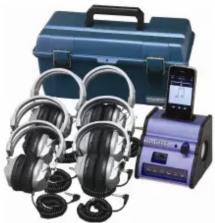
Docking Station
Listening Center
DSIP-SC7V
natural_image
Product photo of a medical or audio testing setup with headphones, a blue case, and a handheld device (no visible text or symbols)Sound Vision DVD Boom Box w/ Screen MV-8920
Headphone
SC7V

Personal Headphone HA2
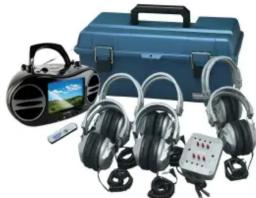
Sound Vision Video
Listening Center
LCP/MV8920/HA5
natural_image
Product photo of a blue audio workstation with multiple headphones, a handheld device, and a control box (no visible text or symbols)Val-U-Pack CD/Cassette Listening Center LCP/CD385/HA2

natural_image
Black portable electronic device with a digital display showing a blue abstract pattern (no visible text or symbols)

natural_image
Blue portable radio equipment with a compact case and two stacked electronic modules (no visible text or symbols)Hamilton Electronics – A Division of Vcom IMC 550 Huyler Street, South Hackensack NJ 07606 www.HamiltonElectronics.com

Hamilton Digital Audio Hub
Owner's Manual

natural_image
Blue and black electronic device labeled 'Hamilton' with a smartphone displaying a music note on top (no readable text or symbols on device body)Model: DSIP-DOCK
PLEASE READ BEFORE OPERATING THIS EQUIPMENT
For Technical Support visit www.HamiltonElectronics.com
Warnings and Precautions
TO PREVENT FIRE OR SHOCK HAZARDS, DO NOT EXPOSE
THIS UNIT TO RAIN OR MOISTURE. To reduce the risk of electric
shock, do not remove cover (or back). There are no user-serviceable parts inside. Please refer any servicing to qualified service personnel.
WARNING: Changes or modifications to this unit not expressly approved by the party responsible for compliance could void the user's authority to operate the equipment.
Operations
Listening and Charging Your iPod or iPhone (Devices not included)
- Insert DC cord into back of unit in the DC 9V jack. Plug cord into wall outlet.
- Remove protective cover from dock connector before docking
- To turn the unit on, turn the ON/ VOLUME knob to the right. The
POWER INDICATOR light will illuminate. - iPod and iPhone can be connected to docking connector with unit powered off or powered on.
To Listen with Headphones
- Switch the SPEAKER/EARPHONE SWITCH to the EARPHONE setting.
- Plug in up to six headphones into the HEADPHONE JACKS in the front of the unit. Note – headphones must have a 1/8" mini plug and must operate in stereo mode.
To Listen with Speakers
- Switch the SPEAKER/EARPHONE SWITCH to the SPEAKER setting.
Adjusting the Volume
- Adjust the volume by turning the ON/VOLUME knob on the unit.
- When finished listening, power off the unit by turning the ON/VOLUME
knob to the far left until you hear a click. Also the POWER INDICATOR light will turn off once the unit is powered off.
NOTE: If your MP3 player doesn't fit on the dock, connect it via the LINE IN JACK as noted in the LINE IN JACK section below.
- To recharge the iPod, insert the iPod onto the docking station. The iPod will recharge automatically as long as the unit is plugged in.
- You cannot listen to both the headphones and speakers simultaneously.
Line in Jack:
- Connect a 1/8" jack stereo connection cable (not included) to the LINE IN jack on the rear of unit to the Phones/Line out/ AUX out jack on the external device such as MP3 players, CD players, computers and more.
Features:

natural_image
Blue handheld device with labeled ports and a black handle (no readable text or symbols)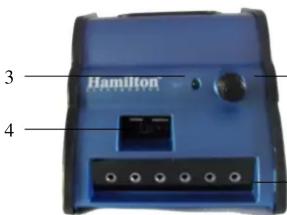
natural_image
Top-down view of a blue electronic device casing with mounting holes and a small black component, labeled with number 7 (no text or symbols on the device itself)
natural_image
Close-up of a black plastic mechanical component with a blue housing and circular hole, labeled with number 8 (no text or symbols on the object itself)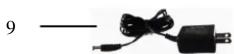
- DOCKING STATION – Compatible with Apple devices including iPod Classic, iPod nano, iPhone and iPod Touch.
- POWER/ VOLUME – Turn the knob to the right to turn the unit on; continue to the right to increase the volume level. Turn the knob to the left to decrease the volume. Turn knob all the way to the left to turn the unit off.
- POWER INDICATOR LIGHT – When illuminated indicates that your unit is powered on.
- SPEAKER/EARPHONE SWITCH – Flipping the switch will activate the sound either in the speakers or to the headphone jacks as indicated. You cannot have sound in both the headphone jacks and speakers at the same time. Please note headphones must be plugged into the unit in order to hear sound.
- HEADPHONE JACKS – Accepts 1/8" stereo headphones. Up to 6 headphones can be connected at one time.
- LINE IN – 1/8" stereo mini jack. Use the line in jack to connect any other audio source including other MP3 and MP4 players, computers or CD players. Line cable not included.
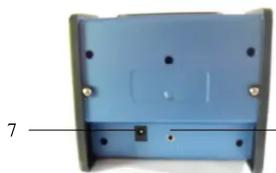
- DC Connector – Plug in the detachable DC cord here.
- SPEAKERS – 2W RMS Speakers
- DC Cord – The UL approved DC power supply must be attached in order to provide power

Marke : Hamilton
Modell : DSIP-DOCK
Kategorie : Lautsprecher