Quattro Wireless - Externe Batterie Satechi - Kostenlose Bedienungsanleitung
Finden Sie kostenlos die Bedienungsanleitung des Geräts Quattro Wireless Satechi als PDF.


| Produkttyp | Tragbare externe Batterie (Powerbank) mit kabelloser Ladefunktion |
| Marke | Satechi |
| Modell | Quattro Wireless |
| Abmessungen (ca.) | 150 x 80 x 20 mm |
| Gewicht (ca.) | 200 g |
| Akku-Kapazität | 10.000 mAh (nicht näher spezifiziert, typischer Wert für dieses Modell) |
| Eingang | USB-C (Power Delivery, max. 18 W) |
| Ausgang kabellos (Qi) | max. 5 W |
| Ausgang Apple Watch | max. 2,5 W |
| Ausgang USB-C PD | max. 18 W (Eingang/Ausgang) |
| Ausgang USB-A | max. 12 W |
| Anzahl gleichzeitig ladbarer Geräte | Bis zu 3 Geräte |
| Ladeanzeige | 4 LED-Leuchten (zeigen Ladezustand an) |
| Einschalten kabelloses Laden | Ein-/Ausschalten durch Doppel- bzw. Langdruck auf die Ein-/Aus-Taste |
| Kompatible Geräte | Qi-fähige Geräte (Smartphones, Kopfhörer) und Apple Watch |
| Mitgeliefertes Zubehör | USB-C-Ladekabel |
| Reinigung und Pflege | Nur mit trockenem Tuch reinigen, vor Feuchtigkeit schützen |
| Sicherheitshinweise | Nicht öffnen, vor extremen Temperaturen schützen, nur zertifizierte Kabel verwenden |
| Ersatzteile und Reparierbarkeit | Akku nicht austauschbar, keine Ersatzteile verfügbar |
| Allgemeine Informationen | Tragbare Powerbank mit integriertem Qi-Ladegerät und separatem Apple-Watch-Ladegerät |
Häufig gestellte Fragen - Quattro Wireless Satechi
Benutzerfragen zu Quattro Wireless Satechi
0 Frage zu diesem Gerät. Beantworten Sie die, die Sie kennen, oder stellen Sie Ihre eigene.
Eine neue Frage zu diesem Gerät stellen
Laden Sie die Anleitung für Ihr Externe Batterie kostenlos im PDF-Format! Finden Sie Ihr Handbuch Quattro Wireless - Satechi und nehmen Sie Ihr elektronisches Gerät wieder in die Hand. Auf dieser Seite sind alle Dokumente veröffentlicht, die für die Verwendung Ihres Geräts notwendig sind. Quattro Wireless von der Marke Satechi.
BEDIENUNGSANLEITUNG Quattro Wireless Satechi
INSTRUCTIONAL GUIDE
QUATRO WIRELESS POWER BANK
Before use, please fully charge the Quatro Power Bank via USB-C port using its included cable. Four LED lights will illuminate when fully charged
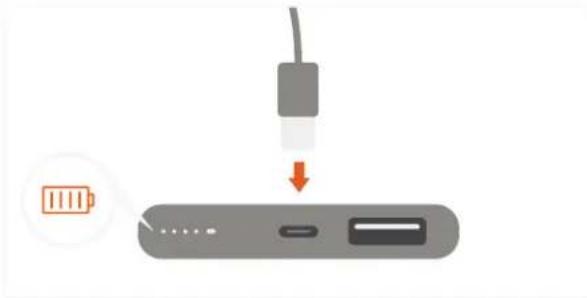
natural_image
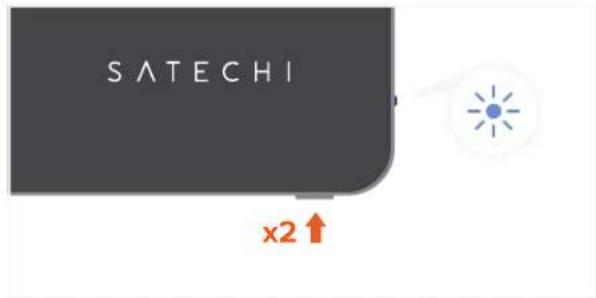
Diagram showing a battery connected to a device via a cable, with an orange battery icon and downward arrow indicating process (no text or symbols)2 Turn on the wireless charger by pressing the power button twice. Blue LED light will turn on
text_image
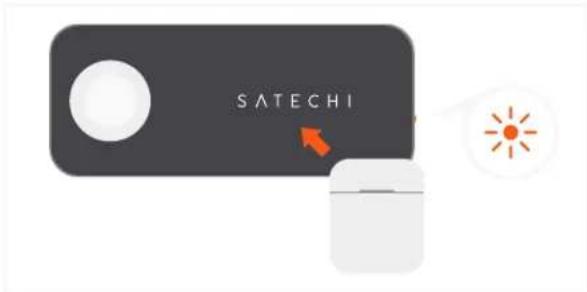
SATECHI x2↑3 Place a compatible Qi wireless device on the Satechi logo. LED light will turn orange when charging begins. Max output 5W
text_image
SATECHI4 Place an Apple Watch, display side up, on the module to begin charging. Max output 2.5W

text_image
SATECHI5 Use the USB-C PD port to quickly recharge the power bank, power Type-C tablets or fast charge compatible devices. Fast charging requires an USB-C to Lightning cable (sold separately). Max output 18W input/output

natural_image
Gray electronic device with a red downward arrow pointing to a small component (no text or symbols visible)
natural_image
Three circular icons showing battery, smartphone, and smartphone (no text or symbols)6 Use the USB-A port to charge an extra USB device – such as an iPhone or AirPods. Max output 12W

natural_image
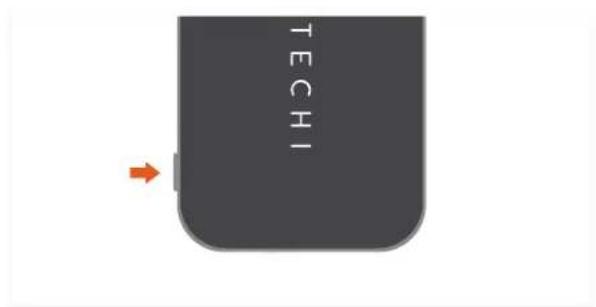
Gray electronic device with a black button and an orange downward arrow pointing to it (no text or symbols)7 After use, power off the device by press and holding the power button until LED lights turn off.
text_image
TECHIFOR BEST USE, WE RECOMMEND CHARGING UP TO THREE DEVICES AT A TIME.