Aloha Twin - Mikrofon K&K Sound - Kostenlose Bedienungsanleitung
Finden Sie kostenlos die Bedienungsanleitung des Geräts Aloha Twin K&K Sound als PDF.


Benutzerfragen zu Aloha Twin K&K Sound
0 Frage zu diesem Gerät. Beantworten Sie die, die Sie kennen, oder stellen Sie Ihre eigene.
Eine neue Frage zu diesem Gerät stellen
Laden Sie die Anleitung für Ihr Mikrofon kostenlos im PDF-Format! Finden Sie Ihr Handbuch Aloha Twin - K&K Sound und nehmen Sie Ihr elektronisches Gerät wieder in die Hand. Auf dieser Seite sind alle Dokumente veröffentlicht, die für die Verwendung Ihres Geräts notwendig sind. Aloha Twin von der Marke K&K Sound.
BEDIENUNGSANLEITUNG Aloha Twin K&K Sound
PRODUCT MANUAL
DUAL-CHANNEL PRO PREAMP
The Dual Channel Pro Preamp is an extremely powerful yet small dual-channel mixer in a belt clip box. It is designed for mixing a combination of transducers, pickups, or dynamic microphones (microphones that do not need power) on one instrument to achieve the best possible sound. It offers volume, gain, 3-band EQ for each channel.
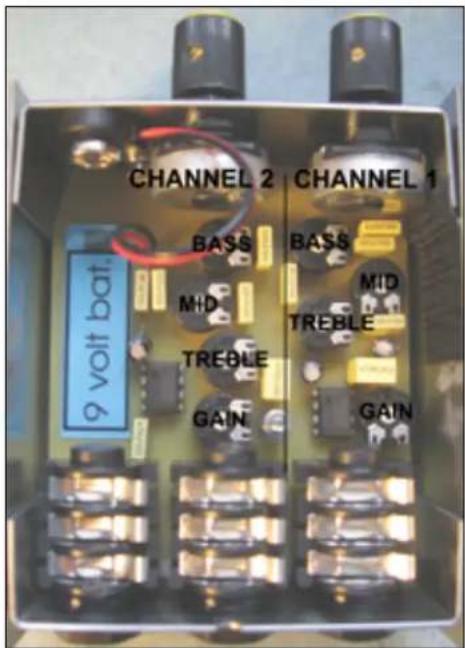
The tone controls feature an extended range of +/- 20 dB, which exceeds many mixers on the market today. To keep the box as small as possible, the gain and tone controls are trim pots inside the unit (small potentiometers for adjustment with a supplied screwdriver). During a performance, you can conveniently balance the two channels on the volume control knobs.
Before first use, please insert a 9-volt battery. To switch the battery off, always unplug the MAIN/MIX OUT jack.
This manual covers both the Dual Channel Pro and Dual Channel Pro ST Preamps.
Please see the next page for setting up the Dual Channel Pro ST Preamp.
SETTING UP THE DUAL CHANNEL PRO PREAMP (MONO)
-
Remove the snap-off lid. There is no need to undo any screws to remove the lid. Important: Please do not tamper with the screw on the bottom of the preamp!
-
Insert a 9-volt battery into the designated compartment.
-
On the inside of the lid is a diagram for the internal trim pot controls. In the box you will find a small screwdriver for the adjustment of the trim pots. It is attached with a Velcro fastener.
-
Connect your pickups to the two inputs and connect the output via a mono 14 " guitar cable to an amplifier or mixing board.
-
Set your amp to a flat setting first. Adjust the gain trim pots of each individual channel until both channels are at about the same volume. Adjust EQ trim pots to your preference. Close the lid and you are ready to go.
SETTING UP THE DUAL CHANNEL PRO ST PREAMP (STEREO)
-
Remove the snap-off lid. There is no need to undo any screws to remove the lid. Important: Please do not tamper with the screw on the bottom of the preamp!
-
Insert a 9-volt battery into the designated compartment.
-
There is a diagram for the internal trim pot controls on the inside of the lid. In the box you will also find a little screwdriver for the adjustment of the trim pots. It is attached with a Velcro fastener.
-
Connect your pickups to the stereo input via a shielded 14 " stereo cable (not supplied) and connect MONO/MIX OUT via a mono 14 " guitar cable into an amplifier.
-
If a second mono cable is inserted into CH. 2 OUT, the channels will be carried separately. In other words, CH. 2 OUT will carry only Ch. 2 and MAIN/MIX OUT will carry only Ch. 1.
-
A cable must be inserted in the MAIN/MIX OUT in order to switch on the battery power.
-
Set your amp to a flat setting first. Adjust the gain trim pots of each individual channel until both channels yield the same loudness. Adjust EQ trim pots to your preference. Close the lid and you are ready to go.
TECHNICAL DATA
Frequency response: 10 30,000 Hz
Inputs: 1 Mega Ohm
Output: 10 Kilo Ohm
Battery consumption: 3 Milli Amp, about 60 hours