7160-1450-01 - Tastatur Gamber-Johnson - Kostenlose Bedienungsanleitung
Finden Sie kostenlos die Bedienungsanleitung des Geräts 7160-1450-01 Gamber-Johnson als PDF.


Benutzerfragen zu 7160-1450-01 Gamber-Johnson
0 Frage zu diesem Gerät. Beantworten Sie die, die Sie kennen, oder stellen Sie Ihre eigene.
Eine neue Frage zu diesem Gerät stellen
Laden Sie die Anleitung für Ihr Tastatur kostenlos im PDF-Format! Finden Sie Ihr Handbuch 7160-1450-01 - Gamber-Johnson und nehmen Sie Ihr elektronisches Gerät wieder in die Hand. Auf dieser Seite sind alle Dokumente veröffentlicht, die für die Verwendung Ihres Geräts notwendig sind. 7160-1450-01 von der Marke Gamber-Johnson.
BEDIENUNGSANLEITUNG 7160-1450-01 Gamber-Johnson
A. FEATURES
- Top Latch Ridge
- Cover
- Hinge
- Pogo Pins
- Rubber Keys
- Touchpad
- Mouse Buttons
- Built-in Kickstand
- USB-C Power Port
- USB 2.0 Input Port
- Part Number Label
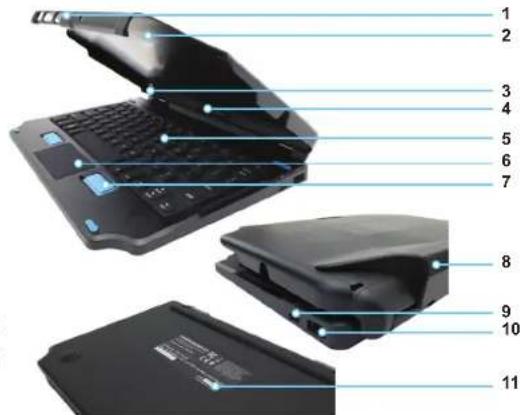
text_image
Laptop interior diagram with numbered labels pointing to key componentsB. IMPORTANT INFORMATION
-
Compatible with the Samsung Tab Active Pro only
• Temperature Range: -
Operating -20^ to 60^
- Storage -40°C to 85°C
• IP54, FCC, CE, RoHS, REACH, C-Tick compliant
• This product is NOT designed to be vehicle mounted.
- Connect power cable to USB-C Power Port (Feature 9)
- Connect a flash drive or other digital data device to the USB 2.0 port on the side of the keyboard (Feature 10)
• Reference the Part Number Label for product information regarding any service needs (Feature 11)
C. HOW TO DOCK & UNDOCK THE TABLET
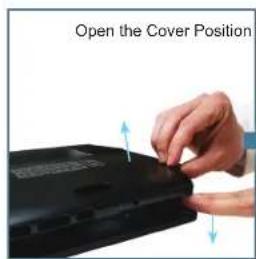
text_image
Open the Cover Position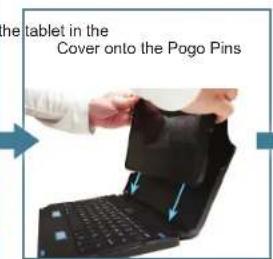
text_image
the tablet in the Cover onto the Pogo Pins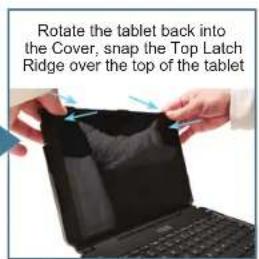
text_image
Rotate the tablet back into the Cover, snap the Top Latch Ridge over the top of the tablet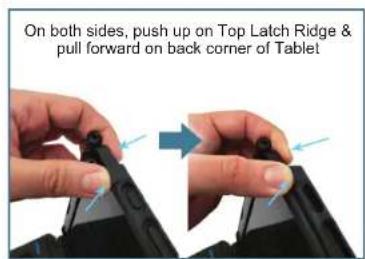
text_image
On both sides, push up on Top Latch Ridge & pull forward on back corner of TabletTO DOCK TO REMOVE
Thank you for choosing Gamber-Johnson for your keyboard needs. To learn more visit gamberjohnson.com and search part number 7160-1450.