
APBX700UI - Server APC - Kostenlose Bedienungsanleitung
Finden Sie kostenlos die Bedienungsanleitung des Geräts APBX700UI APC als PDF.


| Produkttyp | USV (Unterbrechungsfreie Stromversorgung) |
| Hersteller | APC |
| Modell | APBX700UI |
| Kapazität | 700 VA / 405 W |
| Anzahl der Ausgänge | 6 (mit Überspannungsschutz) |
| Eingangsspannung | 230 V AC |
| Batterietyp | Blei-Säure, wartungsfrei |
| Batterieladezeit | ca. 8 Stunden |
| Laufzeit bei halber Last | ca. 10 Minuten |
| Laufzeit bei voller Last | ca. 3 Minuten |
| Abmessungen (B x T x H) | 250 x 400 x 90 mm |
| Gewicht | ca. 12 kg |
| Betriebstemperatur | 0 - 40 °C |
| Schnittstellen | USB, RS-232 |
| Überspannungsschutz | Ja |
| Entstörfilter | Ja |
| Reinigung | Mit trockenem Tuch, keine Flüssigkeiten verwenden |
| Sicherheit | Nicht öffnen, nur Fachpersonal; keine Feuchtigkeit |
| Ersatzbatterie | Erhältlich, Modellabhängig |
| Garantie | 2 Jahre |
Häufig gestellte Fragen - APBX700UI APC
Benutzerfragen zu APBX700UI APC
0 Frage zu diesem Gerät. Beantworten Sie die, die Sie kennen, oder stellen Sie Ihre eigene.
Eine neue Frage zu diesem Gerät stellen
Laden Sie die Anleitung für Ihr Server kostenlos im PDF-Format! Finden Sie Ihr Handbuch APBX700UI - APC und nehmen Sie Ihr elektronisches Gerät wieder in die Hand. Auf dieser Seite sind alle Dokumente veröffentlicht, die für die Verwendung Ihres Geräts notwendig sind. APBX700UI von der Marke APC.
BEDIENUNGSANLEITUNG APBX700UI APC
by Schneider Electric
1 Safety and General Information

Inspect the package contents upon receipt. Notify the carrier and dealer if there is any damage.
Read the following reminders before installing the UPS.
• This UPS is intended for indoor use only.
- Connect the UPS power cable directly to a wall outlet. Do not use surge protectors or extension cords.
- When grounding cannot be verified, disconnect the equipment from the AC power outlet before
installing or connecting to other equipment. Reconnect the power cord after all connections are made.
• Servicing of batteries should be performed by Schneider Electric IT (SEIT) Customer Support only.
- When replacing battery the UPS must be OFF, and its AC inlet unplugged.
- Do not dispose of batteries in a fire. The batteries may explode.
- Do not open or mutilate batteries. They contain an electrolyte that is toxic and harmful to the skin
and eyes.
• To avoid harmful injury due to energy hazard, remove wrist watches and jewelry such as rings
when replacing the batteries. Use tools with insulated handles. - Replace batteries with the same number and type of batteries as originally installed in the
equipment.
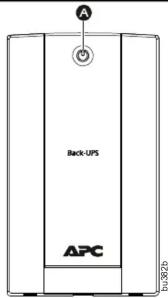
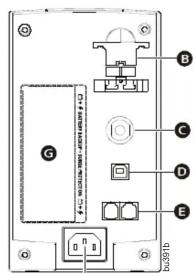
3 Features A Power button
A Power button
B Battery connector
Circuit breaker
D USB port
E Telephone/Network port (BX700UI/BX700U-AZ/BX700U-MS only)
F AC Power Inlet
G Battery Backup + Surge Protection outlets
See outlet type and quantity breakdown for each model on the graphic below.
| Model | Outlet Type and Quantity |
| BX700U-AZ | |
| BX700U-FR | |
| BX700U-GR | |
| BX700U-MS | |
| BX700UI |
F
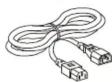
For BX700UI and BX700U-MS only:
IEC jumper cable for PC connection
5 Operational Features
Install PowerChute™ Software
To install PowerChute Personal Edition (PCPE) software, connect a USB cable to the data port on the UPS and the other end to a computer with access to the web.
On the computer, go to www.apc.com/tools/download. Select "Software Upgrades - PowerChute Personal Edition" in the "Filter by Software/Firmware" drop down menu. Select the appropriate operating system. Follow directions to download the software.
Automatic Voltage Regulation
Automatic Voltage Regulation boosts/trims the AC voltage when it drops/exceeds safe levels. This allows the equipment plugged into the unit to operate during low/high voltage conditions, conserving the battery power in the event of a power cut.
The Back-UPS will switch to battery power if the input voltage level becomes too low/high for the Automatic Voltage Regulation to compensate, or if the AC power is distorted.
If the Back-UPS switches to battery power too frequently or too infrequently, adjust the transfer voltage and sensitivity settings:
- Ensure the Back-UPS is off. Plug it into AC power.
- Press and hold the ON/OFF button until the LED repeatedly flashes. The unit is now in Program Mode.
- Release the button. The LED will indicate the current setting by flashing once, twice, or three times per second, and emitting audible beeps.
- If the button is not pressed within five seconds, the Back-UPS will exit the Program Mode.
No-load Shutdown
If the UPS is operating on battery power and detects that the connected equipment is using less than 15W of energy for more than 15 minutes, it will shut down to conserve energy.
When the UPS is reconnected to AC power, the UPS will automatically switch on.
LED
Flashing
A. 1911
Audible Indicator
Voltage
Sensitivity Setting
Input
No-load
Shutdown Description
| Once per second | None | Low | 140-300 | Disabled | The Back-UPS will switch to battery power less often. |
| Once per second | 4 beeps per second | Low | 140-300 | Enabled | The Back-UPS will switch to battery power less often. |
| Twice per second | None | Medium | 140-300 | Disabled | Use when the input AC power is normal, without any fluctuation in voltage levels. |
| Twice per second | 4 beeps per second | Medium (factory default) | 140-300 | Enabled | Use when the input AC power is normal, without any fluctuation in voltage levels. |
| Three times per second | None | High | 150-290 | Disabled | The Back-UPS will switch to battery power during any small fluctuation in voltage. |
| Three times per second | 4 beeps per second | High 150-290 | Enabled | The Back-UPS will switch to battery power during any small fluctuation in voltage |
Warranty
Register your product on-line. http://warranty.apc.com
The standard warranty is two (2) years from the date of purchase. SEIT standard procedure is to replace the original unit with a factory reconditioned unit. Customers who must have the original unit back due to the assignment of asset tags and set depreciation schedules must declare such a need at first contact with an SEIT Technical Support representative. SEIT will ship the replacement unit once the defective unit has been received by the repair department, or cross-ship upon the receipt of a valid credit card number. The customer pays for shipping the unit to SEIT. SEIT pays ground freight transportation costs to ship the replacement unit to the customer.
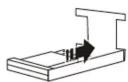
2 Connect the Battery 1. Connect the battery by pulling the battery connected
1 Connect the battery by pulling the battery connector handle down, and then pushing it into the unit.
2 Connect the Back-UPS BX700U-FR/GR/AZ models power cable directly to a wall outlet. Do not use surge protectors or extension cords.
For BX700UI and BX700U-MS, replace PC's input cord with the i.e. acceptable and on PC's input cord to connect UPS
with the jumper cable and use PC's input cord to connect UPS Note: BX700LI-MS comes with an extra power cord for connection to a wall outlet.
- Press the ON/OFF button to turn on the unit.
The green "Power On" indicator confirms that the Back-UPS is on and ready to provide protection.
The Back-UPS should charge for at least 10 hours to ensure sufficient runtime. The unit is being charged whenever it is connected to AC power, whether the unit is turned ON or OFF.

4 Status Indicators
LED Audible Alarm Condition
| On | Off | On-line - The Back-UPS is supplying AC power to the connected equipment |
| Constant Tone | On Line Overload - The power being used by the connected equipment has exceeded the capacity of the unit. Disconnect some equipment | |
| Constant beeping | Over-temperature Warning - The unit is overheating and will shut down if the temperature is not lowered. Disconnect some of the connected equipment. | |
| On(Off during 4 beeps) | 4 beeps repeated every 30 seconds | On-Battery - The Back-UPS is supplying battery power |
| Flashing | Rapid Beeping (every 1/2 second) | Low Battery Warning - The Back-UPS has 2 minutes of runtime remaining |
| Constant tone | Bad Battery Detected - The battery needs to be charged, or is at end of life. | |
| Chirp every 2 seconds | Charger Warning - The Back-UPS has experienced an internal problem, but is still providing power to the connected equipment. Contact Schneider Electric IT (SEIT) Technical Support | |
| Off | Short beep every 4 seconds | Low Battery Shutdown - During On Battery operation the battery power was almost completely exhausted, and the Back-UPS is waiting for AC power to return to normal |
| Constant Tone | On Battery Overload - The connected equipment requires more power than provided by the Back-UPS battery. Unplug devices one at a time to remove overload. If the problem is not corrected, contact SEIT Technical Support | |
| Constant Tone | Charger Fault - Back-UPS has an internal problem. The AC input is present but is no powering the load. Contact SEIT Technical Support | |
| Long beep every 4 seconds | Over-temperature Protected - The Back-UPS has overheated and has shut down. Unplug connected devices one at a time or wait a few hours for system to cool down. |
6 Specifications
Input Voltage
220 - 240 VAC
| Frequency | 50/60 Hz ± 3 Hz (Auto-sensing) | |
| Brownout Transfer / Over-voltage Transfer 14 | 40 VAC, typical / 300 VAC, typical | |
| Output | UPS Capacity (total) | 700 VA / 390 W |
| Voltage On Battery | 230 Vac rms | |
| Frequency - On Battery | 50/60 Hz ± 1 Hz | |
| Transfer Time | 4ms typical | |
| Protection | AC Input | Resettable circuit breaker |
| Battery | Type (maintenance-free, lead acid) | 12V, 7.2 AH |
| Average Life | The battery typically lasts for three to five years. Environmental factors impact battery life. Elevated temperatures, high humidity, poor quality mains power, and frequent, short duration discharges will shorten battery life.The battery in the Back-UPS BX700U Series is not user-replaceable. Contact SEIT Technical Support for a list of authorized service centers near you. | |
| Typical Recharge Time | 6 hours | |
| Physical | Net Weight | 6.0 kg |
| Dimensions (H x W x D) | 19.9 cm x 11.5 cm x 25.6 cm |
Troubleshooting and Service
- If the problem persists, contact Schneider Electric IT (SEIT) Customer Support through the Schneider Electric web site, www.apc.com.
a. Note the model number and serial number and the date of purchase. The model and serial numbers are located on the rear panel of the unit and are available through the LCD display on select models.
b. Call SEIT Customer Support and a technician will attempt to solve the problem over the phone. If this is not possible, the technician will issue a Returned Material Authorization Number (RMA#).
c. If the unit is under warranty, the repairs are free.
d. Service procedures and returns may vary internationally. Refer to the Schneider Electric web site for country specific instructions.
- Prepare to troubleshoot the problem over the phone. If this is not successful, and the unit is still under warranty, the Technical Support Representative will provide all necessary information to return the unit for replacement
APC by Schneider Electric IT Customer Support Worldwide
For country specific customer support, go to the APC by Schneider Electric web site, www.apc.com.
EN 990-5398A-002 12/2016
© 2016 APC by Schneider Electric. APC, the APC logo, Back-UPS, and PowerChute are owned by Schneider Electric Industries S.A.S. or their affiliated companies. All other trademarks are property of their respective owners.


- Safety and General Information
- Features A Power button
- Operational Features
- Automatic Voltage Regulation
- No-load Shutdown
- Warranty
- Register your product on-line. http://warranty.apc.com
- Connect the Battery 1. Connect the battery by pulling the battery connected
- Status Indicators
- Specifications
- Troubleshooting and Service
- APC by Schneider Electric IT Customer Support Worldwide
Marke : APC
Modell : APBX700UI
Kategorie : Server