
DVP 1600 - Tragbarer DVD-Player SALORA - Kostenlose Bedienungsanleitung
Finden Sie kostenlos die Bedienungsanleitung des Geräts DVP 1600 SALORA als PDF.


| Produkttyp | Tragbarer DVD-Player |
| Marke | Salora |
| Modell | DVP 1600 |
| Bildschirm | 15,6 Zoll LCD, um 180° drehbar |
| Abmessungen (B x T x H) | 363 x 248 x 45 mm |
| Gewicht | 1,3 kg |
| Stromversorgung | DC 9-12V, Netzadapter, Zigarettenanzünder |
| Akku | Lithium-Polymer, ca. 2 Stunden Betriebsdauer |
| Kompatible Medien | DVD, VCD, CD, MP3, MPEG4, JPEG |
| Signalformat | PAL / NTSC |
| Anschlüsse | USB 1.1, SD/MMC-Steckplatz, AV-Eingang/-Ausgang, Kopfhörer |
| Fernbedienung | Ja, mit CR2025-Knopfzelle |
| Lautsprecher | Eingebaute Stereo-Lautsprecher |
| Besondere Funktionen | Zoom, Wiederholung, Kindersicherung, Bildschirmschoner |
| Betriebstemperatur | 0 °C bis 40 °C |
| Leistungsaufnahme | 15 W |
| Zubehör im Lieferumfang | Netzadapter, Zigarettenanzünder, Fernbedienung, Ohrhörer, Bedienungsanleitung |
Häufig gestellte Fragen - DVP 1600 SALORA
Benutzerfragen zu DVP 1600 SALORA
0 Frage zu diesem Gerät. Beantworten Sie die, die Sie kennen, oder stellen Sie Ihre eigene.
Eine neue Frage zu diesem Gerät stellen
Laden Sie die Anleitung für Ihr Tragbarer DVD-Player kostenlos im PDF-Format! Finden Sie Ihr Handbuch DVP 1600 - SALORA und nehmen Sie Ihr elektronisches Gerät wieder in die Hand. Auf dieser Seite sind alle Dokumente veröffentlicht, die für die Verwendung Ihres Geräts notwendig sind. DVP 1600 von der Marke SALORA.
BEDIENUNGSANLEITUNG DVP 1600 SALORA
Table Of Contents
Safety Precaution
Package
Main Features
Main Unit Controls
System Connection
The Remote Control
Basic operation
System Setup
Specification
Troubleshooting
1
2
2
3
4
7
9
14
18
14
18
14
18
19
14
18
14
18
19
19
19
19
5
5
5
5
operation to operate the device.
operation to operate the device.
operation to operate the device.
operation to operate the device.
operation to operate the device.
operation to operate the device.
operation to operate the device.
operation to operate the device.
operation to operate the device.
operation to operate the device.
operation to operate the device.
operation to operate the device.
operation to operate the device.

You can swallow the LCD screen of this player clockwise a maximum of 180° for use.
Swelling LCD screen
Zoom in/out function
● Support Multi-language OSD, speed forward/backward, repeat function
● Support PAL or NTSC system
● Built-in rechargeable Lithium Polymer battery
Built-in stereo speaker
● Comparable with disc of DVD, VCD, MP3, MP64, CD, JPEG, etc.
● High brightness color 15.6" LCD screen
Main Features
| DVD Player | 1 |
| Remote Control with battery | 1 |
| AC/DC Power Adapter | 1 |
| Cigarette Lighter Adapter | 1 |
| User Manual | 1 |
| Earpone | 1 |
- Volume+ button
- Volume - button
8.USB/CARD button - OK button
(M) M (M) g - MUTE button
4 PL AV/PAUSE - STOBPHYCH
I. SELECT YOUR - Rating label position
17.USBJack
16.SD/MMC slot
15.Earphone Jack
14.AVOU - Power ON/OFF switch
12.DCING-12A
11.OPEN knob


natural_image
Line drawing of a device casing with control buttons and a handle (no text or symbols)using USB Upon using an USB, insert it into the USB slot directly.

natural_image
Line drawing of a device with control panel and indicator lights (no text or symbols)Upon using an SD or MVC card, insert it into the corresponding slot layout with the label side upward until you hear a click.
using SD/MMC card
operable.
negative grounding. 3. The mains plug is used as the disconnect device, the disconnect device should remain readily
- Car cigarette lighter adapter can't be used to recharge the battery.
- Car cigarette lighter adapter is available to use only when the carp
Notice:

natural_image
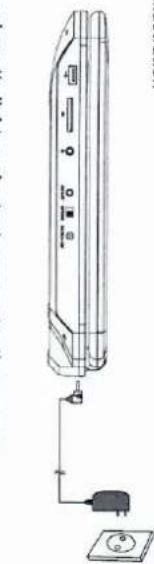
Line drawing of a remote control device with ports and cable (no text or symbols)If using car cigarette lighter adaptor to connect to the power: Plug one and of the cigarette lighter adaptor into the DC IN-9-12V jack on the unit, plug the other end into the car cigarette lighter socket. See illustration below. The other end into the car cigarette lighter socket. See illustration below.
natural_image
Line drawing of a remote control unit with power outlet, socket, and indicator lights (no text or symbols)Playing one end of the AC/DC power adapter into the DC 1N-9-12V jack on the right of the machine, then plug the other end into the AC power receptacle. Please refer to the following illustration
Powering and installation
System Connection

Please use AV cable to connect the machine and the TV. Make sure it is connected correctly.
Connecting to TV
You can also connect the unit to a TV to enjoy high quality picture and stereo sounds. Please refer to the following illustration:
- MODE(To select the source)
button twice to stop playback completely)
point where you stopped; press stop
■ STOP(presses once to stop playback, then press) to resume playback from the
-
11 PLAY/PAUSE
-
OSD(To display disinformation during playing such as elapsed and remaining time)
-
Fast forward/backward button (To scan forward/backward at 2,4,8,16,or 32 times)
-
↔ Previous/Next button (To go to previous/next chapter or scene during playing)
-
SETUP(To go toor exit setup menu)
-
TITLE (To display title information)
-
AUDIO (To select audio language)
-
Number button

-
ENTER(TO CONFIRM)
-
VOL +/- (TO adjust the volume)
-
MUTE(To turn to mute)
-
RETURN(To return to the main menu)
-
REPEAT (To repeat playing title, chapter or track)
-
A-B(Repeats specific portion from point A to B, pressit again to cancel repeat playing)
-
ANGLE(To change viewing angle when playing discwith multi-angle)
-
SUBSTITUTE (to select subdile language when playing DVD disc)
-
MENU(To enter or e x it root menu)
-
ZOOM(To zoom in/out the image during the playback)

The unit can be connected with external speaker. Please see the following illustration
Connecting with external Speaker
The Remote Control

case of wrong operations.
-
For some DVD disc with Title or Chapter menu, press "MENU" button to enter menu page, and use → → → → select. Presss ENTER to confirm. Note: Please do not disconnect USB devices or plug out SD/MMG cards while they are working with the unit. Functional failure may occur in
-
During playback, press will to pause; press it again to resume playback.
-
When the playing is finished, please turn off the power by sliding ON/OFF switch to OFF.
-
Press ■ once to stop playback; then press ■ to resume playback from the point where you stopped; press ■ twice to stop playback completely.
-
Close the disc door. The unit will load the disc and start playing.
-
After connecting power to the unit, turn on the unit by sliding the ON/OFF switch to ON, Press mode to enter USB or SD/MMC. When selecting "MODE", ensure to insert USB or SD/MMC card property.
- Open the disc door and insert a disc into the door with the label side facing up.
Playing disc of DVD, MPEG4, SVCD, VCD, CD, MP3 ,
Basic Operation
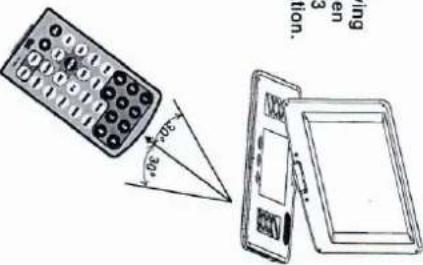
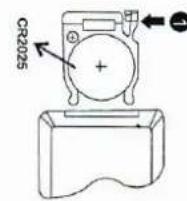
The Use of Remote Control Please put the battery into the remote control as per below illustration


Press number buttons to select the angle you desire To return to normal playing, please press "Angle." The unit will play the disc in the default angle.
During playing DVD disc with multi-angle, press "Angle" button, the followings will be displayed on screen:
When playing disc of DVD, MPEG4, SVCD, VCD, CD, the unit can search forward or backward. 1. Presses →, the unit will search forward. Presses it repeatedly, the unit will play at 2, 4, 8, 16. 32 times of speed.
00 000 000 000 00
Fast forward and fast backward

When the image is enlarged, user can press to move the image.
During playback, press "Zoom" button, the image will be enlarged; press it fourth time, the image will zoom out, press it repeatedly and the image will return to normal status.
When playing dise of DVD, MPEG4, SVD, VCD, user can zoom in or zoom out the image. DVD MPEG4 SVD, VCD

Zoom in/out
Playing JPG file
Note: Media cards formatted in ex-AT file system not supported.

- Place MP3 disc into the disc door or insert USB disc, SD card to USB port or SD card slot. Press "A/A" and "ENTER" button to choose a MP3 file; Press "All" or "ENTER" button to play the file selected.
Playing MP3 files
- Place a JPG disc into the tray, the unit will start reading and play.
- Presses "JPG files" to browse JPG files.
- Presses ▲▲ to select a JPG file and press "ENTER " button to confirm.
- Review the file selected
- During viewing files, " may appear when pressing Angle or Substitute or Audio" or "A-B or "Tile" etc. in this situation these options unavailable to operate.
- When viewing JPG files, press ■, pictures will be displayed in thumball mode, press ▲▲◀▶ or "ENTER " button to select one picture to view.
Playing JPG file
| Screen SaverEnter this option to set whether to activate the screen saver function.The default is ON. | LAST MEMORY:Enter this option to select LAST MEMORYthe default:OFF | DUAL MONO:Enter this option to select DUAL MONO.the default:STREEO | DYNAMIC:Enter this option to select DYNAMIC.the default:FULL | Enter this option, user can adjust picture quality of video output. There are terms available to be adjusted: Bigniness, contrast, Hue and Saturation For all these terms the default is 00 | Video Setup Page | General Audio Video Performance | Video Setup Page |
| CAPTIONS:in the option user can set CAPTIONSThe default OFF | GENERAL AUTO VIDEO PERSPECTS/DES |
Video Setup Page
| DYNAMIC: Enter this option to select DYNAMIC. The default FULL | SALORCLO FULL |
| DUAL MONO:Enter this option to select DUAL MONO. The default STEREO |
Audio Setup Page
| SET LAST MEMORY STATE | |
| LAST MEMORY.Enter this option to select LAST MEMORYThe default: OFF | GENERAL:AudioVideoPerformance |
| Screen Seven Enter this option to set whether to activate the screen saver function. | The default is 0N. |
system setup
| Parental Enter this option to set the parentel control level to some unsuitable disc scans being watched by the children. Optional parentel control levels: Kid Safe, G, PG, PG 13. PCR-R, Not 7, Adult.T. The default of this option is Adult.T. | General A010 W050 P85 SEENE |
| Programs New Language | |||
| English | P | P | P |
| Chinese | P | P | P |
| English | P | P | P |
| English | P | P | P |
| English | P | P | P |
| English | P | P | P |
| English | P | P | P |
| English | P | P | P |
| English | P | P | P |
| English | P | P | P |
| English | P | P | P |
| English | P | P | P |
| 英文 | P | P | P |
| English | P | P | P |
| English | P | P | P |
| English | P | P | P |
| English | P | P | P |
| English | P | P | P |
| English | P | P | P |
| English | P | P | P |
| English | P | P | P |
| English | P | P | P |
| English | P | P | P |
| English | P | P | P |
| English | P | P | P |
| English | P | P | P |
| English | P | P | P |
| English | P | P | P |
| English | P | P | P |
| English | P | P | P |
| English | P | P | P |
| English | P | P | P |
| EN | P | P | P |
| English | P | P | P |
| English | P | P | P |
| English | P | P | P |
| English | P | P | P |
| English | P | P | P |
| English | P | P | P |
| English | P | P | P |
| English | P | P | P |
| English | P | P | P |
| 中文 | P | P | P |
| English | P | P | P |
| English | P | P | P |
| English | P | P | P |
| English | P | P | P |
| English | P | P | P |
| English | P | P | P |
| English | P | P | P |
| English | P | P | P |
| English | P | P | P |
| Chinese | P | P | P |
| English | P | P | P |
| English | P | P | P |
| English | P | P | P |
| English | P | P | P |
| English | P | P | P |
| English | P | P | P |
| English | P | P | P |
| English | P | P | |
| Subdte: Select your preferred language to show the subtitles on the screen. The details English. The details English the student languages depend on the information available on each disc. You can also change the subtype language during playback by press the SUBMILE button. |
| Audio: Enter this option,user can select preferred audio language for DVDs. The default is English. Note x the audio languqagedend on the material on each disc. x your user can discharge the audio language during 8 playback pressing the Audio button. |
| TV Type:Enter this optonosited TV type(RALNTSC)The default ISNTSC. | SET TV Standard | |||||||||
| 12/07/2017 | ||||||||||
| 12/08/2018 | ||||||||||
| 12/09/2019 | ||||||||||
| 12/10/2020 | ||||||||||
| 12/11/2021 | ||||||||||
| 12/12/2022 | ||||||||||
| 12/13/2023 | ||||||||||
| 12/14/2024 | ||||||||||
| 12/15/2025 | ||||||||||
| 12/16/2026 | ||||||||||
| 12/17/2027 | ||||||||||
| 12/18/2028 | ||||||||||
| 12/19/2029 | ||||||||||
| 12/20/2030 | ||||||||||
| 12/21/2031 | ||||||||||
| 12/22/2032 | ||||||||||
| 12/23/2033 | ||||||||||
| 12/24/2034 | ||||||||||
| 12/25/2035 | ||||||||||
| 12/26/2036 | ||||||||||
| 12/27/2037 | ||||||||||
| 12/28/2038 | ||||||||||
| 12/29/2039 | ||||||||||
| 12/30/2040 | ||||||||||
| 12/31/2041 | ||||||||||
| 12/32/2042 | ||||||||||
| 12/33/2043 | ||||||||||
| 12/34/2044 | ||||||||||
| 12/35/2045 | ||||||||||
| 12/36/2046 | ||||||||||
| 12/37/2047 | ||||||||||
| 12/38/2048 | ||||||||||
| 12/39/2049 | ||||||||||
| 12/40/2050 | ||||||||||
| 12/41/2051 | ||||||||||
| 12/42/2052 | ||||||||||
| 12/43/2053 | ||||||||||
| 12/44/2054 | ||||||||||
| 12/45/2055 | ||||||||||
| 12/46/2056 | ||||||||||
| 12/47/2057 | ||||||||||
| 12/48/2058 | ||||||||||
| 12/49/2059 | ||||||||||
| 12/50/2060 | ||||||||||
| 12/51/2061 | ||||||||||
| 12/52/2062 | ||||||||||
| 12/53/2063 | ||||||||||
| 12/54/2064 | ||||||||||
| 12/55/2065 | ||||||||||
| 12/56/2066 | ||||||||||
| 12/57/2067 | ||||||||||
| 12/58/2068 | ||||||||||
| 12/59/2069 | ||||||||||
| 12/60/2070 | ||||||||||
| 12/61/2071 | ||||||||||
| 12/62/2072 | ||||||||||
| 12/63/2073 | ||||||||||
| 12/64/2074 | ||||||||||
| 12/65/2075 | ||||||||||
| 12/66/2076 | ||||||||||
| 12/67/2077 | ||||||||||
| 12/68/2078 | ||||||||||
| 12/69/2079 | ||||||||||
| 12/70/2080 | ||||||||||
| 12/71/2081 | ||||||||||
| 12/72/2082 | ||||||||||
| 12/73/2083 | ||||||||||
| 12/74/2084 | ||||||||||
| 12/75/2085 | ||||||||||
| 12/76/2086 | ||||||||||
| 12/77/2087 | ||||||||||
| 12/78/2088 | ||||||||||
| 12/79/2089 | ||||||||||
| 12/80/2090 | ||||||||||
| 12/81/2091 | ||||||||||
| 12/82/2092 | ||||||||||
| 12/83/2093 | ||||||||||
| 12/84/2094 | ||||||||||
| 12/85/2095 | ||||||||||
| 12/86/2096 | ||||||||||
| 12/87/2097 | ||||||||||
| 12/88/2098 | ||||||||||
| 12/89/2099 | ||||||||||
| 12/90/2099 | ||||||||||
| 12/91/2099 | ||||||||||
| 12/92/2099 | ||||||||||
| 12/93/2099 | ||||||||||
| 12/94/2099 | ||||||||||
| 12/95/2099 | ||||||||||
| 12/96/2099 | ||||||||||
| 12/97/2099 | ||||||||||
| 12/98/2099 | ||||||||||
| 12/99/2099 | ||||||||||
| 12/100/2099 | ||||||||||
| 12/101/2099 | ||||||||||
| 12/102/2099 | ||||||||||
| 12/103/2099 | ||||||||||
| 12/104/2099 | ||||||||||
| 12/105/2099 | ||||||||||
| 12/106/2099 | ||||||||||
| 12/107/2099 | ||||||||||
| 12/108/2099 | ||||||||||
| 12/109/2099 | ||||||||||
| 12/110/2099 | ||||||||||
| 12/111/2099 | ||||||||||
| 12/112/2099 | ||||||||||
| 12/113/2099 | ||||||||||
| 12/114/2099 | ||||||||||
| 12/115/2099 | ||||||||||
| 12/116/2099 | ||||||||||
| 12/117/2099 | ||||||||||
| 12/118/2099 | ||||||||||
| 12/119/2099 | ||||||||||
| 12/120/2099 | ||||||||||
| 12/121/2099 | ||||||||||
| 12/122/2099 | ||||||||||
| 12/123/2099 | ||||||||||
| 12/124/2099 | ||||||||||
| 12/125/2099 | ||||||||||
| 12/126/2099 | ||||||||||
| 12/127/2099 | ||||||||||
| 12/128/2099 | ||||||||||
| 12/129/2099 | ||||||||||
| 12/130/2099 | ||||||||||
| 12/131/2099 | ||||||||||
| 12/132/2099 | ||||||||||
| 12/133/2099 | ||||||||||
| 12/134/2099 | ||||||||||
| 12/135/2099 | ||||||||||
| 12/136/2099 | ||||||||||
| 12/137/2099 | ||||||||||
| 12/138/2099 | ||||||||||
| 12/139/2099 | ||||||||||
| 12/140/2099 | ||||||||||
| 12/141/2099 | ||||||||||
| 12/142/2099 | ||||||||||
| 12/143/2099 | ||||||||||
| 12/144/2099 | ||||||||||
| 12/145/2099 | ||||||||||
| 12/146/2099 | ||||||||||
| 12/147/2099 | ||||||||||
| 12/148/2099 | ||||||||||
| 12/149/2099 | ||||||||||
| 12/150/2099 | ||||||||||
| 12/151/2099 | ||||||||||
| 12/152/2099 | ||||||||||
| 12/153/2099 | ||||||||||
| 12/154/2099 | ||||||||||
| 12/155/2099 | ||||||||||
| 12/156/2099 | ||||||||||
| 12/157/2099 | ||||||||||
| 12/158/2099 | ||||||||||
| 12/159/2099 | ||||||||||
| 12/160/2099 | ||||||||||
| 12/161/2099 | ||||||||||
| 12/162/2099 | ||||||||||
| 12/163/2099 | ||||||||||
| 12/164/2099 | ||||||||||
| 12/165/2099 | ||||||||||
| 12/166/2099 | ||||||||||
| 12/167/2099 | ||||||||||
| 12/168/2099 | ||||||||||
| 12/169/2099 | ||||||||||
| 12/170/2099 | ||||||||||
| 12/171/2099 | ||||||||||
| 12/172/2099 | ||||||||||
| 12/173/2099 | ||||||||||
| 12/174/2099 | ||||||||||
| 12/175/2099 | ||||||||||
| 12/176/2099 | ||||||||||
| 12/177/2099 | ||||||||||
| 12/178/2099 | ||||||||||
| 12/179/2099 | ||||||||||
| 12/180/2099 | ||||||||||
| 12/181/2099 | ||||||||||
| 12/182/2099 | ||||||||||
| 12/183/2099 | ||||||||||
| 12/184/2099 | ||||||||||
| 12/185/2099 | ||||||||||
| 12/186/2099 | ||||||||||
| 12/187/2099 | ||||||||||
Preference Page


Owing to continuous improvement, no prior notice will be given regarding changes on above feature and spec.
-
Avoid buying the unit cellulde with any objects, and place away from all possible heat sources or damp areas. Caulion: Danger of explosion if battery is incorrectly replaced. Replace only with the same or equivalent type.
-
The normal working temperature is: 0°C\~40°C;
- Always unipling AC/DC power supply for the unit when not in use;
- Heart will create during playing, its normal, while avoid long time playing and
Using and maintaining rechargeable battery
The battery can be only recovered when turning power to OFF state, and keep continuous power supply, the red light will be on, and the light will turn yellow when it's fully charged.
Preculations related to Battery Reccharge
The unit utilizes long-life Li polymer battery for portable power supply. The battery has received battery can last about 2 hours. It is fully or partially discharged. It's enough to recharge more longer than 5H each time, fully so much thus can be recarged safely regardless of whether the battery is fully or partially discharged. This can be recovered by the battery.
Rechargeable battery use
Laser: Semiconductor Laser, Wave Length: 650 nm/795 nm Power source: DC-9-12V Power consumption: 15W Operating temperature: 0-40°C Weight: 1.3 kg Dimensions (W x D x H): 363x248x45 mm Battery Type: Polymer
USB: support USB 1.1 Dynamic range: Better than 85 dB Audio output: 1.4Vrms/10KOHm Audio output: Vp-75 Ohm, unbalanced Video output: 1366.768 (RGB) Frequency response: 20 Hz to 20 kHz Picture resolution: 1366.768 (RGB) Panial size: 1.5 inch Signal system: PAL/NTSC Compatible data: DVD/WD/C/D/MP3/MEPEG4
Specification
| PROBLEM | SOLUTION |
| No sound ordistorted sounds | Make sure the machine is connected properly.the appropriate jacks. |
| Can't advancethrough a movie | You can't, advance through the opening creditsand warning information that appears at thebeginning of movies because this disc isprogrammed to prohibit that action. |
| The icon #appears onscreen | The feature or action cannot be completed atthis time because:1. The discs software restricts it.2. The discs software doesn't support thefeature (e.g., angives)that is out of range. |
| Picture is distorted | The disc might be damaged. Try another disc:It is normal for some distortion to appear duringforward or reverse scan. |
| No forward orreverse scan | Some discs have seconds that prohibit rapidscanning or chapter ski:If you try to skip through the warning informationwon't be able to. This part of the movie is oftenprogrammed to prohibit skipping through it. |
Troubleschooling

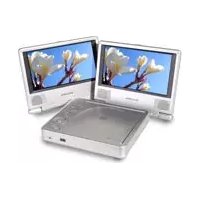
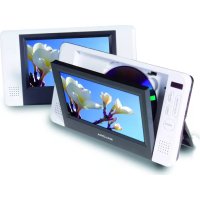
Marke : SALORA
Modell : DVP 1600
Kategorie : Tragbarer DVD-Player