
MF80 - Handy ZTE - Kostenlose Bedienungsanleitung
Finden Sie kostenlos die Bedienungsanleitung des Geräts MF80 ZTE als PDF.


| Produkttyp | Mobiler WLAN-Hotspot |
| Marke | ZTE |
| Modell | MF80 |
| Abmessungen (L×B×H) | 120 mm × 35 mm × 16,8 mm |
| Gewicht | ca. 120 g |
| Akkukapazität | 1000 mAh |
| Standby-Zeit | ca. 100 Stunden |
| Betriebszeit | ca. 4 Stunden |
| Netzwerkunterstützung | HSPA+, WCDMA, GSM/EDGE |
| WLAN-Standard | 802.11 b/g/n |
| WLAN-Sicherheit | WPA/WPA2 |
| SIM-Karten-Slot | Ja (Standard-SIM) |
| MicroSD-Karten-Slot | Ja (bis zu 32 GB) |
| USB-Anschluss | Micro-USB (USB 2.0) |
| Stromversorgung (Ladegerät) | 5 V / 1,5 A |
| Betriebssystem-Kompatibilität | Windows 7, Vista, XP; Mac OS X; Linux |
| Webbrowser-Kompatibilität | Internet Explorer 7+, Firefox 2+, Opera 1+, Safari 1+, Chrome 5+ |
| Betriebstemperatur | 0 °C bis 40 °C |
| Lagertemperatur | -20 °C bis 60 °C |
| Externer Antennenanschluss | Ja |
| WPS-Taste | Ja |
| LED-Anzeigen | Netzsignal, Akkustand, WLAN-Status, Verbindung |
Häufig gestellte Fragen - MF80 ZTE
Benutzerfragen zu MF80 ZTE
0 Frage zu diesem Gerät. Beantworten Sie die, die Sie kennen, oder stellen Sie Ihre eigene.
Eine neue Frage zu diesem Gerät stellen
Laden Sie die Anleitung für Ihr Handy kostenlos im PDF-Format! Finden Sie Ihr Handbuch MF80 - ZTE und nehmen Sie Ihr elektronisches Gerät wieder in die Hand. Auf dieser Seite sind alle Dokumente veröffentlicht, die für die Verwendung Ihres Geräts notwendig sind. MF80 von der Marke ZTE.
BEDIENUNGSANLEITUNG MF80 ZTE
ZTE MF80
Quick Guide
LEGAL INFORMATION Copyright © 2011 ZTE
All rights reserved. By out of this publication may be over
140 part of this publication may be understood, reproduced, transferred or copied in any form or by any means, electronics or mechanical, including photocopying and
microlims, without the prior written permission of ZTE Corporation. The manual is published by ZTE Corporation. We reserve the right to make
modifications on print errors or update specifications without prior notice. Version No. 1010
FTE CORPORATION
NO. SS, Hi-tech Road 5
Positode: 518067 Tel: +86765-20779008 URL: http://www.zde.com.cn E-mail: mobile@zde.com
1
| Introduction | |
| ZTE MP30 is a 3G/2 mobile hotspot device, working in GSM6P8R5-EDGE/SCM4A/SPADH4A. The network devices built within the 100% of the 100% of the 100% of the 100% of the 100% of the 100% of the 100% of the 100% of the 100% of the 100% of the 100% of the 100% of the 100% of the 100% of the 100% of the. | |
| Using a local provider for information on how to install and get started with the product. For information about connection of services, please confirm your service provider. | |
| Specification | |
| Data Service | HSFAP: DL 4L/MPS HDGPA: DL 5L/MPS HDGPA: 00x 90x 10x ULD WGSWPA: 10x 84x ULD |
| Interface USD & WFI | 100.000 |
| WiFi Security | 992.111g |
| WiFi Security | WEP/WHP/WP2A |
| USB Version | USB 2.3 HIGH SPEED |
| USB Interface Type | Micro USB |
| Weight | 1kg |
| Dimensions (X10 x 15) | 120mm*35mm*16.8mm |
| MicroSD card | Support to 100% microSD card |
| Power Adapter S/1.5A | |
| Battery | 100kVA |
| *Standby time | 100Kms |
| *Working time | A.Stours |
| Operating system | Windows 7, Windows Vista32bit or 6.0bit; Windows XP (52 bit/or later), MIA (1.6 or later) | ||
| Work Browser | SC 7.4 or later, Fresher (2.0 or later); Openus (1.0 or later), Safari (1.0 or later), Chrome (5.0 or later) | ||
| Operating temperature (°C) | +185°C | ||
| Storage temperature (°C) | +185°C | ||
| Charging temperature (°C) | +185°C | ||
| Autonomy (0-10%) | - | ||
| Notes: Standard IP address in the Trademark of SD Card Association | |||
| The device's standard and working time are only for your reference, and based on dial and read to the device. | |||
| Getting to Know Your Device | |||
| The following figure shows the appearance of the device, it is only for your reference. The actual device may be different. | |||
| Interface and Buttons | |
| 1. External Antenna Connector | Please be connected to the internal atoms to enhance signal strength. |
| 2. Power Hold the connection | Please be used to avoid the device. |
| 3. Connect | Please it be corrected to the Internet or disconnect from the Internet. |
| When the WAF Connection 3 seconds to switch the WAF Connection Mode between AWAYss on (or AWAYss on) or AWAYss on. | |
| 4. WiFi | The button is used to strip the WiFi Preferred Setup process and enable a double the WiFi function. |
| How to use more than 3 seconds to activate the WiFi function. | |
| Please it is enabled/mixed WiFi function. | |
| 5. LED Screen | Includes the signal type, signal strength, battery, WiFi, etc. |
| 6. Memory card and (microSD card) | Is where you insert the memory card (microSD card). |
| 7. Charges/USB port | Change your device. |
| Connect the client to your device via USB cable. | |
| Hold the WiFi and power buttons simultaneously and the LCD screen turns out when the system is connected to the device will interact automatically and restore to the facility default settings. | |
| When the device is powered on, the following curs are shown on the LED screen, with the corresponding indicators listed in the table below: | |
| Icon Indicatior | |
| Network signal strength. | |
| 20 | Network type, 2G or 3G icon will appear on the LED screen according to the network being connected. |
| Connect to the Internet automatically. | |
| Connect to the Internet manually. | |
| Roaming network indication. | |
| New message received. | |
| Wi-Fi Status and number of the connecting users. | |
| Battery power indication. | |
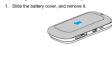
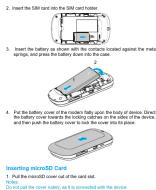
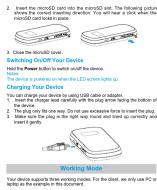
Inserting SIM Card and Batter
C€1588①
Marke : ZTE
Modell : MF80
Kategorie : Handy