
Blade V Smart - Handy ZTE - Kostenlose Bedienungsanleitung
Finden Sie kostenlos die Bedienungsanleitung des Geräts Blade V Smart ZTE als PDF.


| Produkttyp | Smartphone |
| Marke | ZTE |
| Modell | Blade V Smart |
| Abmessungen (H×B×T) | ca. 152 × 72 × 8 mm |
| Gewicht | ca. 150 g |
| Display | Touchscreen, Größe nicht spezifiziert |
| Akkutyp | Lithium-Polymer, fest verbaut |
| Akkukapazität | ca. 3000 mAh |
| Kamera (Rückseite) | Mehrere Kameras und Blitz |
| Kamera (Front) | Ja |
| Fingerabdrucksensor | Ja |
| FM-Radio | Ja |
| Schnellladefunktion | Ja (mit Original-Ladegerät und USB-C-Kabel) |
| Anschlüsse | USB Typ-C, Kopfhöreranschluss 3,5 mm |
| SIM-Karte | Nano-SIM (1×) |
| Speichererweiterung | microSDXC (separates Fach) |
| Betriebssystem | Android (Version nicht angegeben) |
| SAR-Wert (Kopf) | 0,56 W/kg |
| SAR-Wert (Körper) | 1,19 W/kg |
| Sicherheitsabstand | Mindestens 10 mm vom Körper |
| Lieferumfang | Smartphone, Ladegerät, USB-C-Kabel, Kurzanleitung |
Häufig gestellte Fragen - Blade V Smart ZTE
Benutzerfragen zu Blade V Smart ZTE
0 Frage zu diesem Gerät. Beantworten Sie die, die Sie kennen, oder stellen Sie Ihre eigene.
Eine neue Frage zu diesem Gerät stellen
Laden Sie die Anleitung für Ihr Handy kostenlos im PDF-Format! Finden Sie Ihr Handbuch Blade V Smart - ZTE und nehmen Sie Ihr elektronisches Gerät wieder in die Hand. Auf dieser Seite sind alle Dokumente veröffentlicht, die für die Verwendung Ihres Geräts notwendig sind. Blade V Smart von der Marke ZTE.
BEDIENUNGSANLEITUNG Blade V Smart ZTE
ZTE
ZTE 2050
Quick Start Guide
LEGAL INFORMATION
Copyright © 2019 ZTE CORPORATION.
All rights reserved.
No part of this publication may be quoted, reproduced, translated or used in any form or by any means, electronic or mechanical, including photocopying and microfilm, without the prior written permission of ZTE Corporation.
Notice
ZTE Corporation reserves the right to make modifications on print errors or update specifications in this guide without prior notice.
We offer self-service for our smart terminal device users. Please visit the ZTE official website (at www.ztedevices.mx) for more information on self-service and supported product models. Information on the website takes precedence.
Disclaimer
ZTE Corporation expressly disclaims any liability for faults and damages caused by unauthorized modifications of the software.
Images and screenshots used in this guide may differ from the actual product. Content in this guide may differ from the actual product or software.
Trademarks
ZTE and the ZTE logos are trademarks of ZTE Corporation. Android™ is a trademark of Google LLC.
The Bluetooth ^® word mark and logos are registered trademarks owned by the Bluetooth SIG, Inc. and any use of such marks by ZTE Corporation is under license.

microSDXC Logo is a trademark of SD-3C, LLC.

For DTS patents, see http://patents.dts.com. Manufactured under license from DTS Licensing Limited. DTS, the Symbol, & DTS and the Symbol together are registered trademarks or trademarks of DTS, Inc. in the United States and/or other countries. © DTS, Inc. All Rights Reserved.
Other trademarks and trade names are those of their respective owners.
Version No.: R1.0
Edition Time : August 2, 2019
Manual No.:
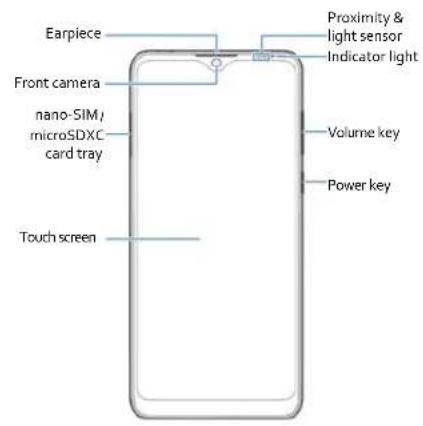
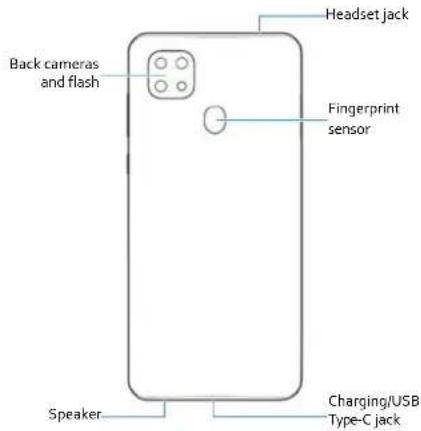
Getting to Know Your Phone
Setting Up Your Phone
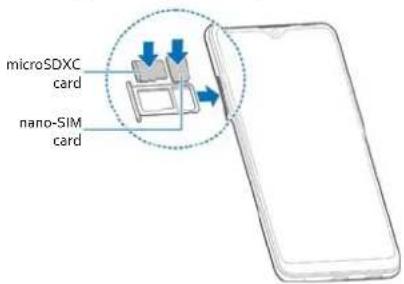
The nano-SIM card can be installed or removed while the phone is turned on.

WARNING!
To avoid damage to the phone, do not use any other kind of SIM cards, or any non-standard nano-SIM card cut from a SIM card. You can get a standard nano-SIM card from your service provider.
- Insert the tip of the tray eject tool into the hole on the card tray.
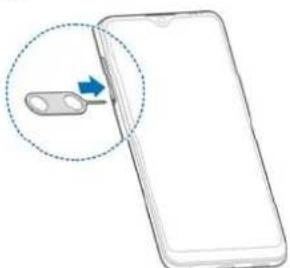
natural_image
Illustration of a smartphone with a switch handle and a blue arrow pointing to its left side (no text or symbols present)- Pull out the card tray and place the nano-SIM card and the microSDXC card (optional) on the tray, as shown. Carefully slide the tray back into place.
Charging the Phone
Your phone's battery should have enough power for the phone to turn on, find a signal, and make a few calls. You should fully charge the battery as soon as possible.
WARNING!
Use only ZTE-approved chargers and USB Type-C cables. The use of unapproved accessories could damage your phone or cause the battery to explode.
NOTE:
To achieve fast charging, you can use the original charger and USB Type-C cable when charging your phone.
WARNING!
Do not remove the back cover. The battery is not removable. Removal may cause fire or explosion.
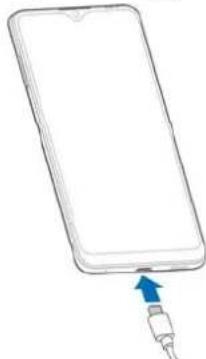
- Connect the adapter to the charging jack.
natural_image
Line drawing of a smartphone with a blue arrow pointing to its cable (no text or symbols)-
Connect the charger to a standard AC power outlet.
-
Disconnect the charger when the battery is fully charged.
NOTE:
If the battery is extremely low, you may be unable to power on the phone even when it is being charged. In this case, try again after charging the phone for at least 20 minutes.
Contact the customer service if you still cannot power on the phone after prolonged charging.
Powering On/Off Your Phone
Make sure the battery is charged before powering on.
• Press and hold the Power key to turn on your phone.
- To power off, press and hold the Power key to open the options menu, and touch ⏻> ⏻
NOTE:
If the screen freezes or takes too long to respond, try pressing and holding the Power key for about 10 seconds to restart the phone.
FM Radio
Scanning for Channels
- Plug in a wired headset, open the app list and touch FM Radio.
- Touch : > Scan. Your phone scans for all available channels and saves them to the All channels list.
Listening to FM Radio
- Open FM Radio while the headset is connected.
- Touch : > All channels and select a channel.
You can also drag the red line along the frequency panel or touch < or > to switch to other channels.
NOTES:
- Touch ♥ to add the channel to favourites.
- Touch 📋 to listen to the radio through the phone speaker.
- The FM radio feature does not require an Internet connection.
Product Safety Information
 | Don't make or receive phone calls while driving. Never text while driving. |
 | Keep your phone at least 10 mm away from your body while making calls. |
 | Small parts may cause choking. |
 | Your phone can produce a loud sound. |
 | To prevent possible hearing damage, do not listen at high volume levels for long periods. Exercise caution when holding your phone near your ear while the loudspeaker is in use. |
 | Avoid contact with anything magnetic. |
 | Keep away from pacemakers and other electronic medical devices. |
 | Turn off when asked to in hospitals and medical facilities. |
 | Turn off when told to on aircraft and at airports. |
 | Turn off when near explosive materials or liquids. |
 | Don't use at gas stations. |
 | Your phone may produce a bright or flashing light. |
 | Don't dispose of your phone in fire. |
 | Avoid extreme temperatures. |
 | Avoid contact with liquids. Keep your phone dry. |
 | Do not attempt to disassemble your phone. |
| Only use approved accessories. | |
| For pluggable equipment, the socket-outlet shall be installed near the equipment and shall be easily accessible. | |
| Don't rely on your phone as a primary device for emergency communications. |
FCC RF Exposure Information (SAR)
This phone is designed and manufactured not to exceed the emission limits for exposure to radio frequency (RF) energy set by the Federal Communications Commission of the United States.
During SAR testing, this device was set to transmit at its highest certified power level in all tested frequency bands, and placed in positions that simulate RF exposure in usage against the head with no separation, and near the body with the separation of 10 mm. Although the SAR is determined at the highest certified power level, the actual SAR level of the device while operating can be well below the maximum value. This is because the phone is designed to operate at multiple power levels so as to use only the power required to reach the network. In general, the closer you are to a wireless base station antenna, the lower the power output.
The exposure standard for wireless devices employing a unit of measurement is known as the Specific Absorption Rate, or SAR. The SAR limit set by the FCC is 1.6 W/kg.
This device is complied with SAR for general population/uncontrolled exposure limits in ANSI/IEEE C95.1-1992 and had been tested in accordance with the measurement methods and procedures specified in IEEE1528.
The FCC has granted an Equipment Authorization for this model phone with all reported SAR levels evaluated as in compliance with the FCC RF exposure guidelines. SAR information on this model phone is on file with the FCC and
can be found under the Display Grant section of www.fcc.gov/oet/ea/fccid after searching on FCC ID: SRQ-ZTE2050. The FCC ID also can be found on the device when you open Settings > System > About phone.
For this device, the highest reported SAR value for usage against the head is 0.56W/kg, and for usage near the body is 1.19W/kg.
While there may be differences between the SAR levels of various phones and at various positions, they all meet the government requirements.
SAR compliance for body-worn operation is based on a separation distance of 10 mm between the unit and the human body. Carry this device at least 10 mm away from your body to ensure RF exposure level compliant or lower to the reported level. To support body-worn operation, choose the belt clips or holsters, which do not contain metallic components, to maintain a separation of 10 mm between this device and your body.
RF exposure compliance with any body-worn accessory, which contains metal, was not tested and certified, and using such body-worn accessory should be avoided.
§ 15.19 Labeling requirements.
This device complies with part 15 of the FCC Rules. Operation is subject to the following two conditions: (1) This device may not cause harmful interference, and (2) this device must accept any interference received, including interference that may cause undesired operation.
§ 15.21 Information to user.
Any Changes or modifications not expressly approved by the party responsible for compliance could void the user's authority to operate the equipment.
§ 15.105 Information to the user.
Note: This equipment has been tested and found to comply with the limits for a Class B digital device, pursuant to part 15 of the FCC Rules. These limits are designed to provide reasonable protection against harmful interference in a residential installation. This equipment generates uses and can radiate radio frequency energy and, if not installed and used in accordance with the instructions, may cause harmful interference to radio communications. However, there is no guarantee that interference will not occur in a particular installation. If this equipment does cause harmful interference to radio or television reception, which can be determined by turning the equipment off and on, the user is encouraged to try to correct the interference by one or more of the following measures:
-Reorient or relocate the receiving antenna.
-Increase the separation between the equipment and receiver.
-Connect the equipment into an outlet on a circuit different from that to which the receiver is connected.
-Consult the dealer or an experienced radio/TV technician for help.
Marke : ZTE
Modell : Blade V Smart
Kategorie : Handy