
ER-150 - Kasse SAMSUNG - Kostenlose Bedienungsanleitung
Finden Sie kostenlos die Bedienungsanleitung des Geräts ER-150 SAMSUNG als PDF.
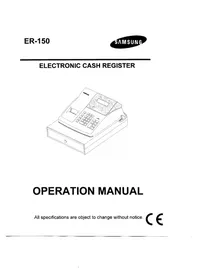


| Produkttyp | Kasse (Electronic Cash Register) |
| Marke | Samsung |
| Modell | ER-150 |
| Abmessungen (Kasse) | 325 mm × 420 mm × 225 mm |
| Gewicht (Kasse) | 5,0 kg |
| Abmessungen (Geldschublade) | 325 mm × 420 mm × 95 mm |
| Gewicht (Geldschublade) | 3,3 kg |
| Stromversorgung | AC (Netzspannung ±10%, 50/60 Hz) |
| Leistungsaufnahme | Standby: 2 W, max. 8 W |
| Speicher-Backup-Batterie | 2 × AAM 1,5 V |
| Display | Fluoreszierend, 9 Stellen, Symbole: E (Fehler), C (Wechselgeld), - (negativ), = (Total), S (Zwischensumme) |
| Tastatur | 26 Tasten, Gummikontakt, Tastaturpuffer 8 |
| Drucker | M-42V, 1 Station, Papierbreite 40 mm oder 57,5 mm, Druckgeschwindigkeit 2,2 Zeilen/s |
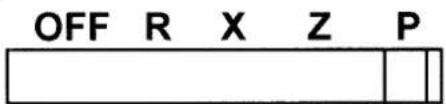
| Modusschalter | 5 Positionen: OFF, R (Registrieren), X (Lesen), Z (Lesen & Rücksetzen), P (Programmieren) |
| Steuerprogrammierung | Mehrwertsteuer (VAT/Add-on), Zuschlagssteuer, externe Direktsteuer, bis zu 2 Steuersätze |
| Prozentfunktion | Rabatt (-%) oder Aufschlag (+%) auf Artikel oder gesamten Verkauf |
| Funktionen | Mehrzweckabteilungen (2), Multiplikation, Rückgabe, Storno (letzter/vorheriger Artikel), Nachberechnung, Trinkgeld, Zahlungsarten (Bar, Karte, Split) |
| Berichte | Tagesbericht (X/Z), Perioden-Grand-Total, Kassenbestandsdeklaration |
| Sicherheit | Optionaler 4-stelliger Code-Schutz für Z- und P-Modus |
| Wartung | Staub und extreme Temperaturen vermeiden; kein Einsatz von Chemikalien; Tintenrolle ersetzen bei schwachem Druck |
| Lieferumfang | 1 Papierrolle, 1 Aufwickelspindel, 2 Batterien, 1 Batterieabdeckung |
Häufig gestellte Fragen - ER-150 SAMSUNG
Benutzerfragen zu ER-150 SAMSUNG
0 Frage zu diesem Gerät. Beantworten Sie die, die Sie kennen, oder stellen Sie Ihre eigene.
Eine neue Frage zu diesem Gerät stellen
Laden Sie die Anleitung für Ihr Kasse kostenlos im PDF-Format! Finden Sie Ihr Handbuch ER-150 - SAMSUNG und nehmen Sie Ihr elektronisches Gerät wieder in die Hand. Auf dieser Seite sind alle Dokumente veröffentlicht, die für die Verwendung Ihres Geräts notwendig sind. ER-150 von der Marke SAMSUNG.
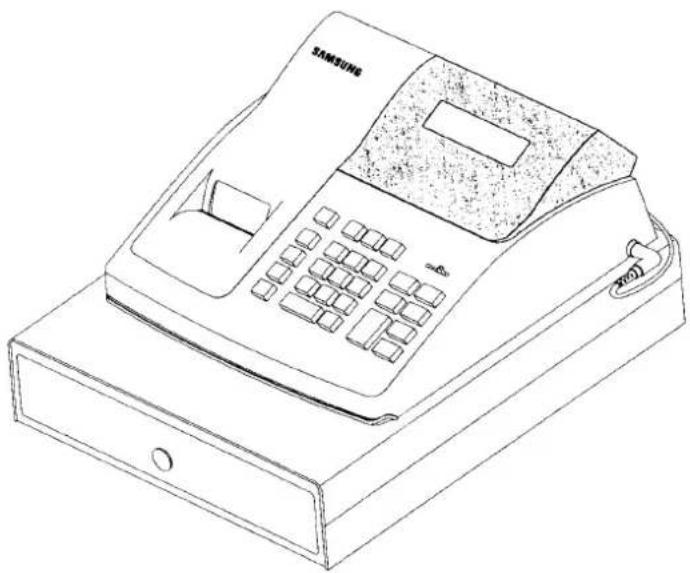
BEDIENUNGSANLEITUNG ER-150 SAMSUNG
ELECTRONIC CASH REGISTER
BEDIENUNGSANLEITUNG
Alle Spezifikationen können ohne vorherige Ankündigung geändert werden.
CE
SICHERHEITSHINWEIS
Die Steckdose muss in der Nähe des Geräts installiert und leicht zugänglich sein.
P/Z-MODUS-ANMELDUNG CODE-PROGRAMMIERUNG
Die ER-150 verfügt über die zusätzliche Funktion einer erweiterten Sicherheitsfunktion, um den Zugriff auf bestimmte Betriebsphasen zu beschränken.
Durch optionale Programmierung können Sie einen vierstelligen Code verlangen, bevor der Zugriff auf den Z- und Programmiermodus ermöglicht wird.
Wenn der Modusschalter auf einen geschützten Modus gestellt wird, ertönt der Summer, bis der Schalter auf einen ungeschützten Modus zurückgestellt wird. Wenn kein Modusschutz erforderlich ist, können Sie diesen Abschnitt ignorieren.
ZUM FESTLEGEN ODER ÄNDERN DES GEHEIMCODES
- Schalten Sie den Modusschalter auf die Position "X", drücken Sie die Taste "No Sale" (#/NS), geben Sie den vierstelligen Code ein,
- drücken Sie die RA-Taste für den Z-Modusschutz.
- Drücken Sie die Taste PO für den Schutz des P-Modus.
LEGT DEN CODE FÜR DEN Z-MODUS FEST
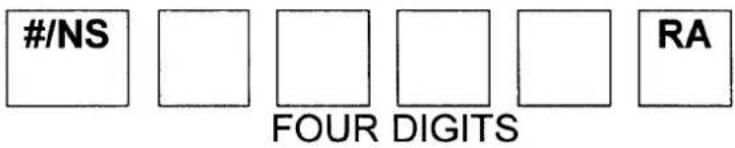
LEGT DEN CODE FÜR DEN P-MODUS FEST

HINWEIS: DER VIERSTELLIGE CODE-SCHUTZ KANN DEAKTIVIERT WERDEN, INDEM SIE VOR DER CODE-NUMMER NULLEN EINGEBEN, DABEI DIESELBE REIHENFOLGE WIE OBEN VERWENDEN.
- Um nach der Einrichtung des Schutzes in den Z- oder P-Modus zu gelangen, stellen Sie den Modusschalter auf "X" und drücken Sie die Minus-Taste (−), geben Sie Ihren vierstelligen Code ein und drücken Sie die Prozent-Rabatt-Taste.
INHALTSVERZEICHNIS
ERSTE EINRICHTUNGSANLEITUNG 1
REGISTRIERKASSE AUSPACKEN ....1
BATTERIEN EINLEGEN UND ERSETZEN ....1
ARBEITSSPEICHER (RAM) LÖSCHEN UND
REGISTRIERKASSE INITIALISIEREN 2
PAPIER EINLEGEN 2
SO ERSETZEN SIE DIE FARBROLLE 3
FUNKTIONEN 4
MODUSSCHALTER 4
ANZEIGE 4
TASTATUR 5
TASTENFUNKTIONEN 5
PROGRAMMIERUNG 7
STEUER-, DEZIMALPUNKT-INFORMATIONEN 7
ABTEILUNGSSTATUS 7
STEUERSATZ......8
EINSTELLUNG DER PROZENTTASTE (%) 8
EINSTELLUNG DER MASCHINENNUMMER 8
BONDRUCK / JOURNALDRUCK 9
RUNDUNGSOPTION 9
SYSTEMOPTIONEN 10
OPTION 1 10
OPTION 2 10
EINSTELLUNG DES DATUMS 11
REGISTRIERMODUS-BETRIEB 11
NULLVERKAUF-BETRIEB 12
NICHT-ADDITIONS-NUMMERNEINGABEN 12
ABTEILUNGSBETRIEB 13
MEHRFACH-ARTIKEL-ABTEILUNGSEINGABE ......13
EINZEL-ARTIKEL-ABTEILUNGSVERKÄUFE 13
MINUS (−) TASTENBETRIEB 14
MEHRFACH-MINUS-BETRIEB 14
MINUS-EINZELBETRIEB 14
PROZENTRABATT-BETRIEB 15
PROZENTRABATT AUF ARTIKEL 15
PROZENTRABATT AUF GESAMTVERKAUF ......15
WARENRÜCKGABE-BETRIEB 16
STORNO-BETRIEB 16
LETZTER ARTIKEL STORNO / FEHLERKORREKTUR ...... 16
VORHERIGER POSTEN UNGÜLTIG 17
KASSIERVORGANG 17
BARZAHLUNG 17
BAR EINGEZOGENER BETRAG 17
KARTENZAHLUNG 18
GEMISCHTE ZAHLUNG 18
ANZAHLUNG (RA) VORGANG ...... 18
AUSZAHLUNG (PO) VORGANG 18
VERWALTUNGSBERICHTE UND KASSENABGLEICH 19
KASSENBESTANDSMELDUNG 19
TAGESABSCHLUSSBERICHT 20
GESAMTSUMMENBERICHT (P-T-D) 20
SYSTEMABGLEICH 21
WARTUNG 21
TECHNISCHE DATEN 22
DIMENSIONS 22
SCHUBLADE 22
MODUS-TASTE 22
TASTATUR 22
DRUCKER 22
ANZEIGE 22
STROMVERSORGUNG 22
ERSTE EINRICHTUNG
Die folgenden Anweisungen beschreiben, wie Sie die Registrierkasse auspacken und in Betrieb nehmen.
REGISTRIERKASSE AUSPACKEN
- Registrierkasse auspacken und aus der Verpackung nehmen.
- Suchen Sie die folgenden Artikel in der Verpackung.
* 1 Papierrolle * 1 Aufwickelspindel (für Journalband) * 2 Batterien * 1 Batteriefachabdeckung
BATTERIEN EINLEGEN UND AUSTAUSCHEN
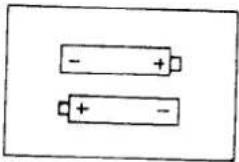
- Öffnen Sie die Druckerabdeckung und legen Sie die Batterien ein. Achten Sie darauf, dass die positiven und negativen Pole richtig ausgerichtet sind.
- Legen Sie ein Blatt der Batterieabdeckung auf.
HINWEIS: Diese Registrierkasse wird mit 2 "AAM"-Batterien geliefert, um bei einem Stromausfall die Speicherung zu gewährleisten. Um einen kontinuierlichen Batterie-Backup-Schutz zu gewährleisten, ist es wichtig, die Batterien einmal pro Jahr zu wechseln.
LÖSCHEN DES DIREKTZUGRIFFSSPEICHERS (RAM) UND INITIALISIEREN DER REGISTRIERKASSE
- Stellen Sie den Modusschalter auf Position P.
- Schließen Sie den Netzstecker an eine Steckdose an, während Sie die Tasten "C" und "00" drücken.
- Danach wird der RAM gelöscht und die Registrierkasse druckt das Symbol "......".
HINWEIS: Dies ist ein einmaliger Vorgang, der nach dem Einlegen der Batterie durchgeführt werden muss. LÖSCHEN SIE DEN RAM NICHT, NACHDEM DIE REGISTRIERKASSE PROGRAMMIERT IST. ANDERNFALLS GEHEN ALLE PROGRAMME UND SUMMEN VERLOREN.
PAPIER EINLEGEN
- Schneiden oder reißen Sie das Ende einer einzelnen Papierrolle gleichmäßig ab, um einen ordnungsgemäßen Einzug durch den Druckkopf zu gewährleisten.
- Legen Sie die Papierrolle in den Papierhalter und führen Sie das Papierende gerade in den Papiereinzug des Druckers ein.
- Drücken Sie die Taste "FEED", bis das Papier erfasst und durch den Drucker transportiert wird.
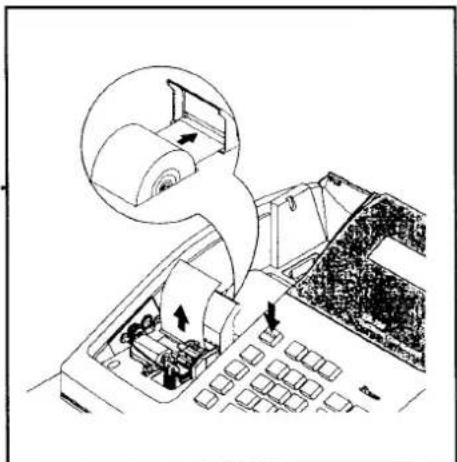
- Wenn das Papier nicht durch den Drucker läuft, stellen Sie sicher, dass das Papier richtig eingelegt wurde, und führen Sie das Ende der
Papierrolle ein.
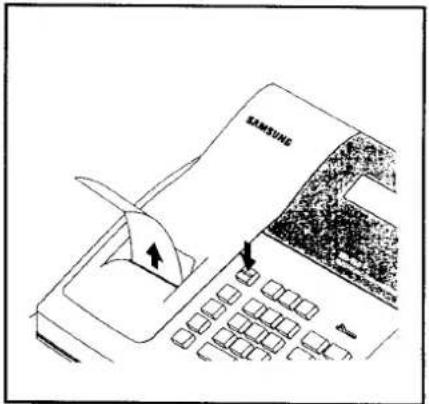
NUR FÜR BELEG...
- Führen Sie das Papier durch das Belegfenster der Druckerabdeckung. Setzen Sie die Abdeckung wieder auf das Druckerfach.
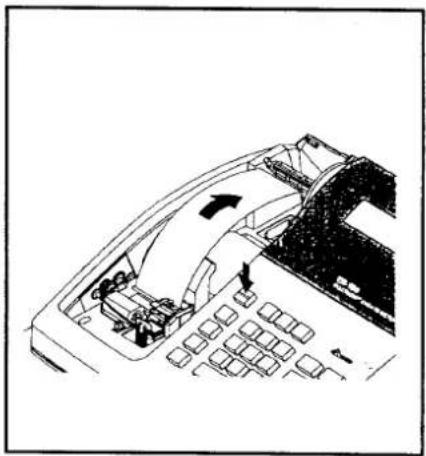
NUR FÜR JOURNAL...
- Führen Sie das Papier über die Papierführung und stecken Sie es in den Schlitz der Aufwickelspule.
- Drücken Sie die Taste "FEED", um das Papier sicher auf die Spindel zu wickeln.
- Setzen Sie die Druckerabdeckung wieder auf.
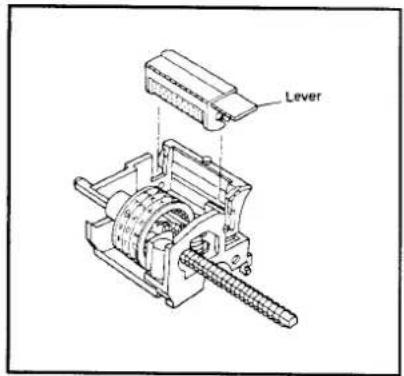
AUSTAUSCH DER FARBROLLE
Die Farbrolle ist ein Einwegartikel. Das Nachfüllen der Rolle kann den Drucker beschädigen und die Garantie aufheben. Nicht nachfüllen. Wenn der Druck blass wird, ersetzen Sie die Farbrolle wie folgt.
- Entfernen Sie die alte Rolle, indem Sie sie anheben.
- Setzen Sie die neue Farbwalze vollständig ein.
EIGENSCHAFTEN
MODUS-SCHALTER
AUS - Schaltet die Registrierkasse aus. Es kann keine Taste bedient werden.
R - Für die Erfassung von Transaktionen.
X - Zum Lesen des Finanzberichts und der C-I-D-Erklärung.
Z - Zum Lesen der Finanzberichte und zum Zurücksetzen der Summen auf Null.
P - Zum Programmieren.
ANZEIGE
Die Anzeige verfügt über fluoreszierende Ziffern, die dem Kunden Informationen über den Betrieb der Registrierkasse liefern. Während des Betriebs zeigt die Anzeige die folgenden Symbole. Alle diese Symbole erscheinen an Position 1 der Anzeige.
1234567.89
C : Zeigt an, dass der angezeigte Betrag das Rückgeld ist.
=: Zeigt an, dass der angezeigte Betrag eine Summe ist.
- : Zeigt an, dass der angezeigte Betrag negativ ist.
E : Zeigt einen Fehlerzustand an.
Drücken Sie die Taste "C", um den Fehlerzustand zu löschen.
S : Zeigt an, dass der angezeigte Betrag eine Zwischensumme ist.
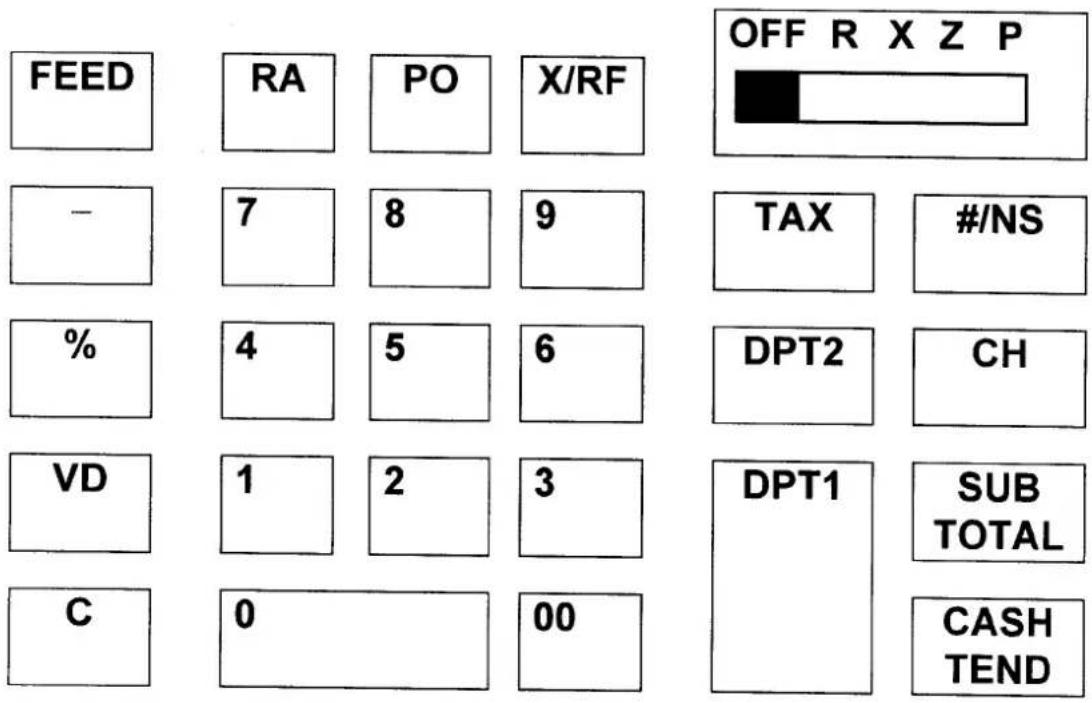
TASTATUR
TASTENFUNKTIONEN
VORSCHUB Dient zum Vorschieben des Druckerpapiers.
0 - 9, 00 Dient zur Eingabe der Zahl.
ABT1 Diese Tasten klassifizieren die verkauften Artikel und
ABT2 speichern die Mengen und Beträge in ihren eigenen Speichern.
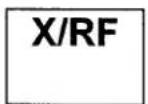
X/RF Wird für die Multiplikationseingabe verwendet. (X)
Ermöglicht die Rückgabe von Waren nach Abteilung. (RF)
PO Zur Registrierung von ausgezahltem Geld.
RA Zur Registrierung von erhaltenem Geld auf Konto.
- Zur Registrierung eines Minusbetrags oder Gutscheins.
Um einen prozentualen Rabatt (-%) oder Aufschlag (+%) auf einen Artikel oder auf einen Verkauf zu registrieren.
VD Um Eingaben zu korrigieren, bevor ein Verkauf abgeschlossen wird.
C Um falsche Eingaben auf den Zahlentasten zu löschen. Auch zum Löschen von Fehlerzuständen und zum Stummschalten des Fehlertons.
TAX Zum Programmieren des Steuersatzes im P-Modus. Auch zum Eingeben des Steuersatzes bei der externen direkten Steuermethode im R-Modus.
/NS Zum Drucken der Referenznummer oder zum Öffnen der Geldlade außerhalb eines Verkaufs.
CH Zum Abschließen der Transaktion bei Kreditverkäufen.
SUB TOTAL Zum Erhalten der Zwischensumme eines Verkaufs.
CASH Zum Abschließen von Barverkäufen und zur Berechnung des Wechselgelds. TEND
PROGRAMMIERUNG
Lesen Sie diesen gesamten Abschnitt sorgfältig durch, um die Maschine gemäß Ihrem Kassensystem auf die am besten geeignete Konfiguration zu programmieren.
* MODUS-SCHALTERPOSITION : P *
STEUER, DEZIMALPUNKT-INFORMATIONEN
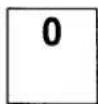
| N1 | N2 | X/RF |
| VALUE | |
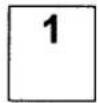
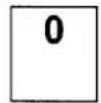
| N1 | 0 = 2 decimal1 = non decimal2 = 1 decimal3 = 3 decimal |
| N2 | 0 = VAT1 = add-on tax2 = external straight tax |
ABTEILUNGSSTATUS
| N1 | DPT1 | or | DPT2 |
| N1 | In case VAT, add-on tax | In case external straight tax |
| 0 | Non single, non tax | Non single |
| 1 | Non single, tax1 | Single |
| 2 | Non single, tax2 | |
| 3 | Single, non tax | |
| 4 | Single, tax1 | |
| 5 | Single, tax2 |
STEUERSATZ
| N1 | N2 | N3 | N4 | N5 | N6 | TAX |
| VALUE | COMMENTS | |
| N1-N5 | 0.000 - 99.999 | Tax rate |
| N6 | 0 | External straight tax |
| 1 | Tax1 (VAT or add-on) | |
| 2 | Tax2 (VAT or add-on) |
EINSTELLUNG DER PROZENTTASTE (%)
| N1 | N2 | N3 | N4 | N5 | N6 | % |
| VALUE | COMMENTS | |
| N1-N5 | 0.000 - 99.999 | Percent rate |
| N6 | 0 | -% |
| 1 | +% |
EINSTELLUNG DER MASCHINENNUMMER
| N1 | N2 | #/NS |
2 ZIFFERN
BONDRUCK / JOURNALDRUCK
| N1 | N2 | SUB TOTAL |
| VALUE | COMMENTS | |
| N1 | 0 | Taxable, tax amount print |
| 1 | Taxable, tax amount not print | |
| N2 | 0 | Receipt on |
| 1 | Receipt off |
RUNDUNGSOPTION
| N1 | - |
| N1 | COMMENTS |
| 0 | Not European, round up / down |
| 1 | Not European, round up |
| 2 | Not European, round down |
| 3 | European, round up / down |
| 4 | European, round up |
| 5 | European, round down |
SYSTEMOPTIONEN
OPTION 1
| N1 | N2 | N3 | N4 | N5 | RA |
| NO | OPTION | VALUE = 0 | VALUE = 1 |
| N1 | CASH DECLARATION | NOT COMPULSORY | COMPULSORY |
| N2 | ZERO SKIP IN REPORT | NOT SKIP | SKIP |
| N3 | Z REPORT REPEAT | NOT REPEAT | REPEAT |
| N4 | RF / VD / GROSS TOTAL PRINT IN REPORT | NOT PRINT | |
| N5 | SUBTOTAL PRINT | NOT PRINT |
OPTION 2
| N1 | N2 | N3 | N4 | N5 | PO |
| NO | OPTION | VALUE = 0 | VALUE = 1 |
| N1 | GRAND TOTAL TO PRINT | NOT PRINT | |
| N2 | GRAND TOTAL RESET AFTER Z REPORT | NOT RESET | RESET |
| N3 | Z COUNTER RESET AFTER Z REPORT | NOT RESET | RESET |
| N4 | CONSECUTIVE NUMBER AFTER Z REPORT | NOT RESET | RESET |
| N5 | DATE PRINT | NOT PRINT |
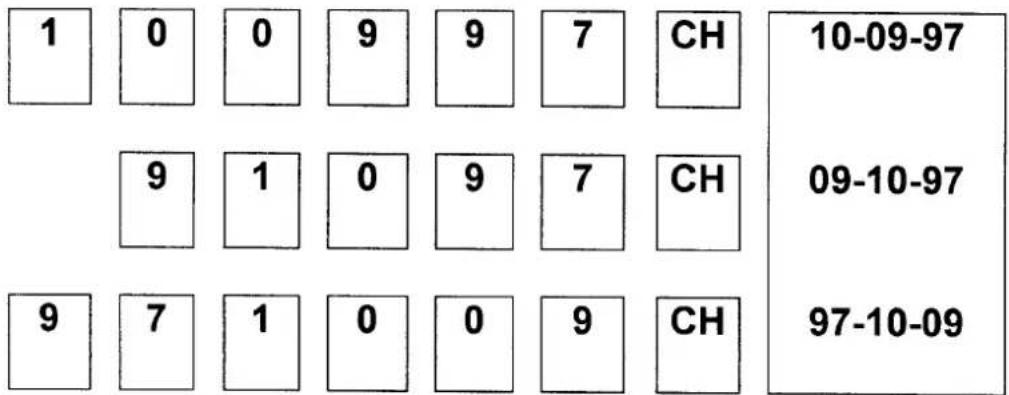
EINSTELLUNG DES DATUMS
- SETZEN SIE DEN MODUSSCHALTER AUF DIE POSITION "X".
Das Datum muss täglich programmiert werden und wird auf allen Transaktionsbelegen und auf den Summierungsausdrucken gedruckt. Um das Datum zu programmieren, drücken Sie die entsprechenden Zahlentasten und dann die Taste "CH". Jede einstellige Zahl muss mit einer Null davor eingegeben werden.

Bsp.) ZU PROGRAMMIERENDES DATUM IST DER 9. OKTOBER 1997
BEISPIELE FÜR DEN REGISTRIERMODUS
• MODUSSCHALTER AUF POSITION "R" GESETZT
Dieser Abschnitt enthält Beispiele für Übungen im Registriermodus. Wenn ein Fehler auftritt, erscheint das Symbol "E" auf dem Display, begleitet von einem Fehlerton. Beheben Sie diesen Fehlerzustand, indem Sie die Taste "C" drücken. Die Fehlermeldung kann darauf hinweisen, dass eine falsche Taste eingegeben wurde oder eine Pflichtfunktion ausgeführt wurde.
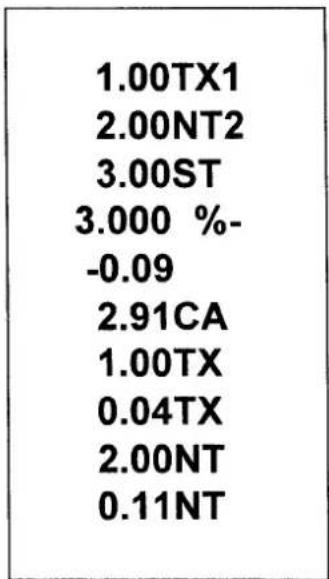
BEISPIELBON
| VAT version | Add - on tax version |
| 10-09-97 | 10-09-97 |
| 1.00TX1 | 1.00TX1 |
| 2.00NT2 | 2.00NT2 |
| 3.00CA | 1.00TX |
| 1.00TX | 0.05TX |
| 0.04TX | 2.00NT |
| 2.00NT | 0.12NT |
| 0.11NT | 3.00CA |
| 001-77 | 001-77 |
- Die folgenden Beispiele basieren auf der MwSt-Version.
KEIN VERKAUFSVORGANG
Ein Nicht-Verkaufsvorgang öffnet die Geldlade außerhalb eines Verkaufs. Der Finanzbericht erfasst den Zähler für Nicht-Verkaufsaktivitäten.
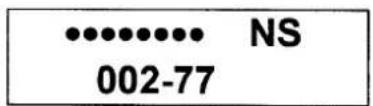
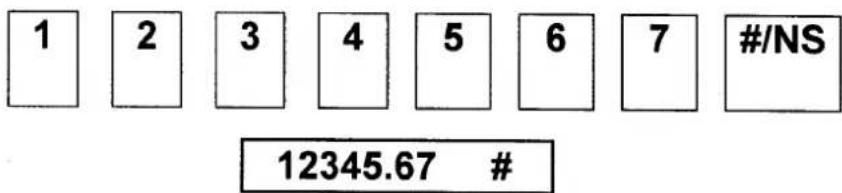
EINGABE VON NICHT-ADDITIONS-NUMMERN
Die Taste "#/NS" kann verwendet werden, um bis zu 7 Ziffern einzugeben. Die Eingabe kann vor jedem Vorgang im Registriermodus erfolgen. Diese numerische Eingabe wird nicht zu Aktivitätszählern oder Summen addiert.
ABTEILUNGSBETRIEB
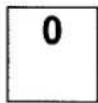
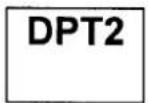
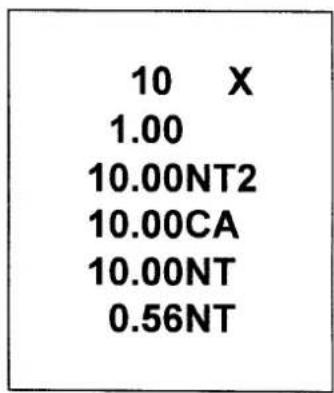
EINGABE MEHRERER ARTIKEL IN EINER ABTEILUNG
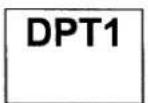
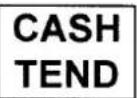
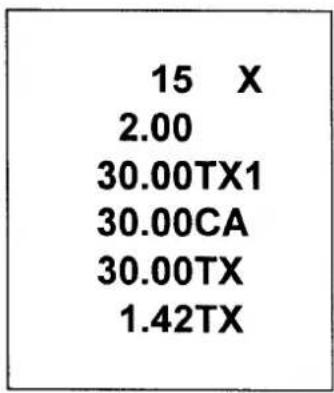
VERKAUF EINES EINZELNEN ARTIKELS IN EINER ABTEILUNG
HINWEIS: Auch wenn eine Abteilung als Einzelartikel programmiert ist, wird die Abteilung nicht als Einzelverkauf behandelt, wenn bereits eine andere Abteilung eingegeben wurde.
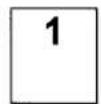
MINUS-TASTE (−) BETRIEB
MEHRFACHER MINUS-BETRIEB
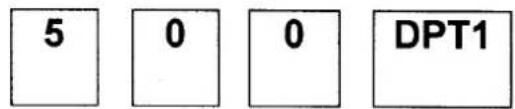
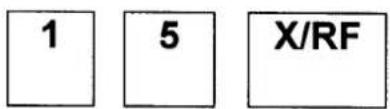
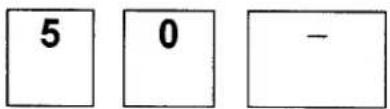
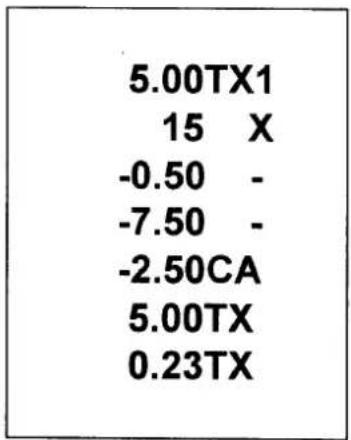

EINZELNER MINUS-BETRIEB
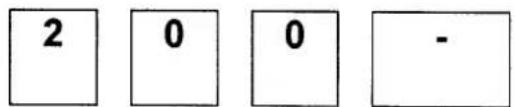

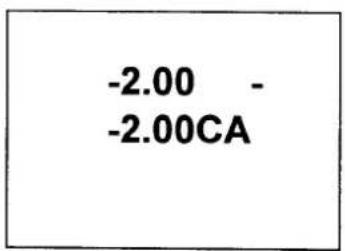
PROZENT-BETRIEB (%)
PROZENTRABATT AUF ARTIKEL
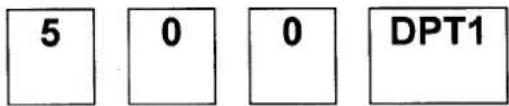
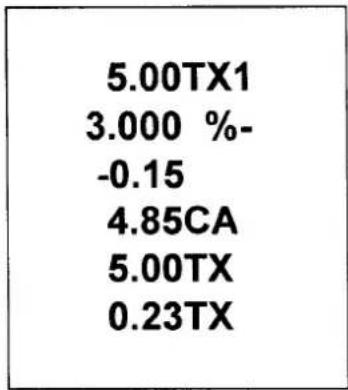
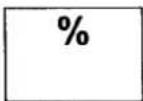
PROZENTRABATT AUF DEN GESAMTEN VERKAUF


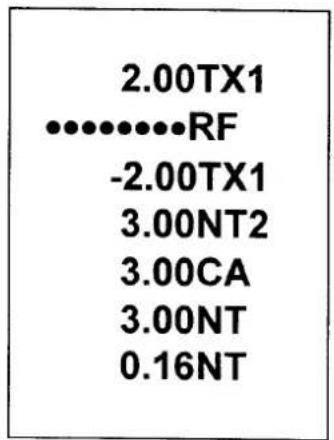
WARENRÜCKGABE-OPERATION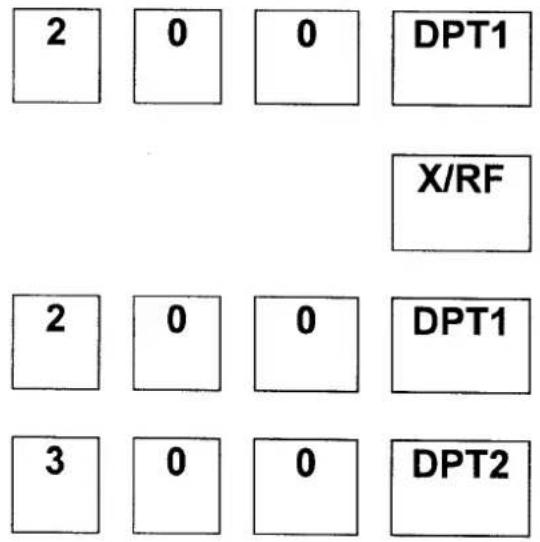
STORNIERUNG VON BUCHUNGEN (VD)
LETZTEN ARTIKEL STORNIEREN / FEHLERKORREKTUR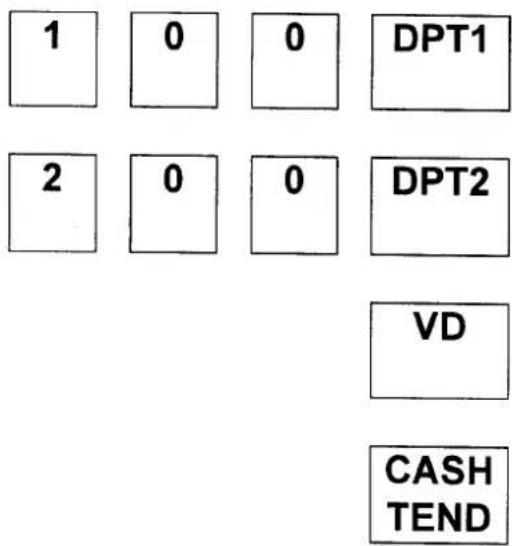
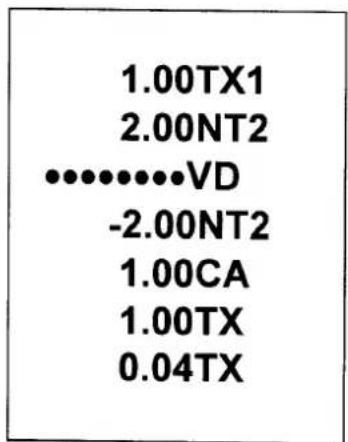
VORHERIGEN ARTIKEL STORNIEREN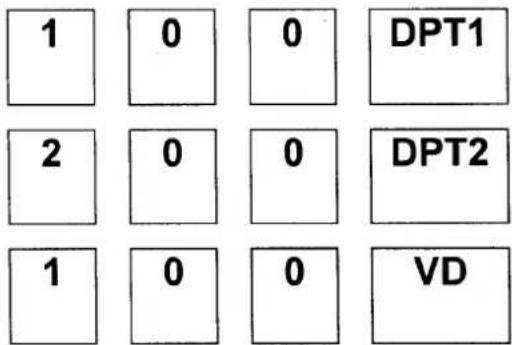
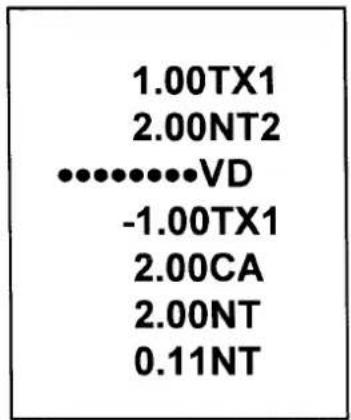
ZAHLUNGSVORGANG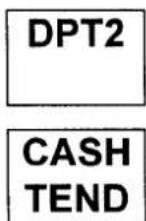
BARZAHLUNG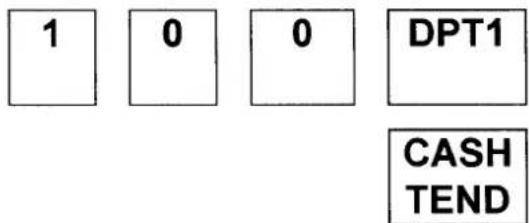
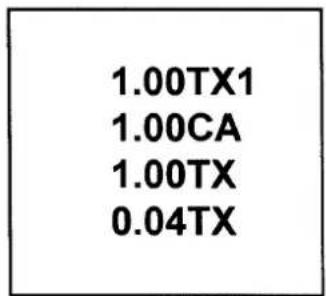
BAR EINGEGEBENER BETRAG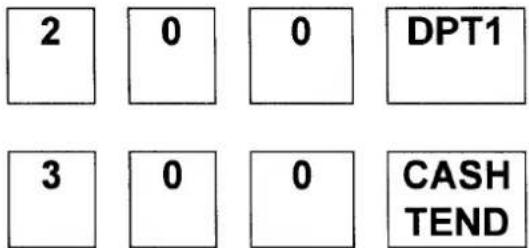
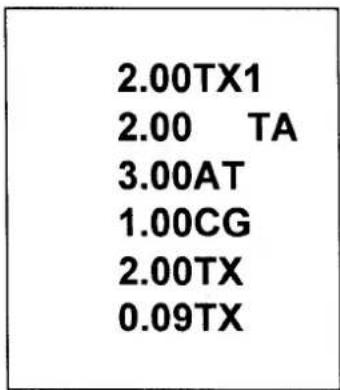
KARTENZAHLUNG
- Eine Betrags-Zahlung ist bei Kartenzahlung nicht möglich.
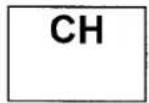
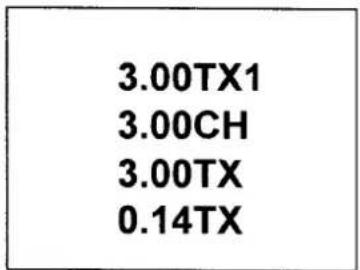
SPLIT-ZAHLUNG
Die Geldlade sollte sich bei Split-Zahlung nicht öffnen.
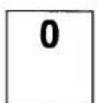

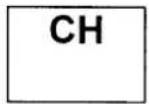
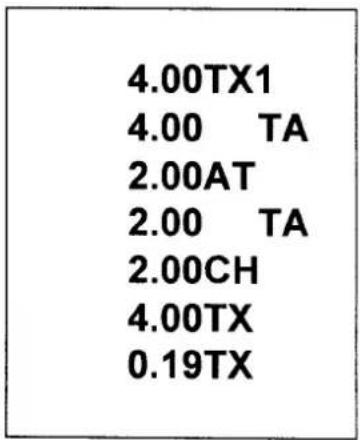
GELDEINGANG (RA) OPERATION
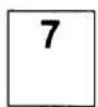
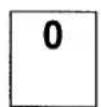
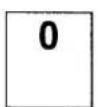
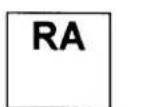
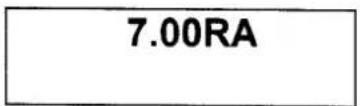
GELDAUSGANG (PO) OPERATION
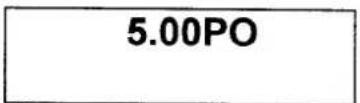
VERWALTUNGSBERICHTE UND KASSENABSCHLUSS
| MODE | REPORT | KEY | COMMENTS |
| X | CASH IN DRAWER DECLARATION | AMOUNT - SUBTOTAL | AMOUNT = NUMERIC |
| X | FINANCIAL DAILY REPORT | CASH TEND | READ |
| Z | READ & RESET | ||
| X | P-T-D GRAND TOTAL | CH | READ |
| Z | READ & RESET |
BARBESTAND IN DER LADE DEKLARIEREN
Bei Systemoption 1 Programmierung kann die Kassendeklaration als Pflicht programmiert werden. Die Kassendeklaration wird durchgeführt, indem der Gesamtbetrag jeder Mediensorte in der Schublade addiert und die Taste "ZWISCHENSUMME" gedrückt wird. Das Drücken der Taste "ZWISCHENSUMME"
mit einem numerischen Wert gibt die Information ein, dass die Kassendeklaration durchgeführt wurde, und Berichte in X-Position und Z-Position werden ermöglicht.
In diesem Fall wird die Differenz zwischen eingegebenem Betrag und Bargeld in der Schublade angezeigt.
Nach dieser Deklaration können Sie keine Registriervorgänge mehr durchführen, wenn Sie nicht in X- oder Z-Modus berichten.
| 10-09-97 |
| 70.00CA |
| 70.26AT |
| -0.26 |
| 021-77 |
GESAMTBETRAG DURCH TASTENEINGABE GESAMTBETRAG IN KASSENLADE DIFFERENZ
TÄGLICHER FINANZBERICHT
| 10-09-97 | DATE |
| 001 Z | Z COUNTER, MODE SWITCH POSITION |
| 024 @ | DEPARTMENT1 COUNTER |
| 53.00TX1 | DEPARTMENT1 TOTAL |
| 025 @ | DEPARTMENT2 COUNTER |
| 30.00 2 | DEPARTMENT2 TOTAL |
| 53.00TX | TAXABLE1 TOTAL |
| 2.47TX | TAX1 TOTAL |
| 30.00NT | TAXABLE2 TOTAL |
| 1.66NT | TAX2 TOTAL |
| -0.24 %- | PERCENT TOTAL |
| -9.50 - | (-) TOTAL |
| 73.26 * 1 | NET SALES TOTAL |
| -2.00RF | RETURN MERCHANDISE TOTAL |
| -3.00VD | VOID TOTAL |
| 85.00 * 2 | GROSS SALES TOTAL |
| 016 # | CUSTOMER COUNTER |
| 68.26CA | CASH TOTAL |
| 5.00CH | CHARGE TOTAL |
| 7.00RA | RECEIVED ON ACCOUNT |
| 5.00PO | PAID OUT |
| 70.26AT | CASH IN DRAWER |
| 001 NS | NO SALE COUNTER |
| ·········· | |
| 85.00 * 3 | GRAND TOTAL |
| 064-01 | RECEIPT NUMBER, MACHINE NUMBER |
P-T-D GESAMTBERICHT
| 001 *Z85.00 *4 | P-T-D GRAND TOTAL |
SYSTEMABGLEICH
NETTOUMSATZ GESAMT
= ABTEILUNGSSUMMEN
(positive addieren, negative subtrahieren)
+ STEUER GESAMT (Zusatzsteuer,
externe direkte Steuerversion
nur)
+ % GESAMT
+ (-) GESAMT
BRUTTOUMSATZ GESAMT
= NETTOUMSATZ GESAMT
- WARENRÜCKGABE
-(-) GESAMT
- % GESAMT
ENDSUMME GESAMT
= BRUTTOUMSATZ GESAMT
+ VORHERIGE SUMME
GESAMT
WARTUNG
- Vermeiden Sie übermäßigen Staub und extreme Temperaturen.
- Stellen Sie sicher, dass das Netzkabel fest in der Steckdose steckt und keine Stolpergefahr darstellt.
- Verwenden Sie keine Chemikalien oder Scheuermittel zum Reinigen des Gehäuses oder der Tastatur.
- Ziehen oder halten Sie kein Papier, während die Registrierkasse druckt.
SPECIFICATION
| DIMENSIONS | |
| REG. SIZE | 325 mmW × 420 mmL × 225 mmH |
| NET WEIGHT | 5.0 kg |
| DRAWER | |
| SIZE | 325 mmW × 420 mmL × 95 mmH |
| WEIGHT | 3.3 kg |
| MODE KEY | |
| LOCK SWITCH | SLIDE SWITCH |
| POSITIONS | 5 (OFF, R, X, Z, P) |
| RECEIPT ON / OFF | NONE (BY PROGRAM) |
| KEYBOARD | |
| TYPE | RUBBER CONTACT TYPE |
| NUMBER OF KEYS | 26 |
| KEYSTROKE BUFFER | 8 |
| PRINTER | |
| MODEL # | M-42V |
| STATIONS | 1 |
| PAPER | SINGLE PLY(57.5 mm OR 40 mm) |
| COPY | NONE |
| PRINT SPEED | 2.2 LINE / SECOND |
| DISPLAY | |
| CAPACITY | 9 DIGITS |
| SYMBOLS | 5 (E, C, -, =, S) |
| POWER | |
| INPUT | AC LOCAL VOLTAGE ±10%, 50 / 60 Hz |
| CONSUMPTION | STANDBY : 2W, MAX : 8W |
| MEMORY BACK-UP | 1 YEAR |
| BATTERY | AAM 1.5 Volt × 2, EQUIVALENT |
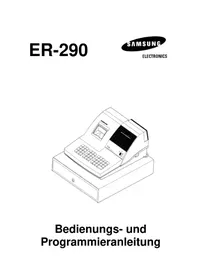
- ELECTRONIC CASH REGISTER
- BEDIENUNGSANLEITUNG
- SICHERHEITSHINWEIS
- P/Z-MODUS-ANMELDUNG CODE-PROGRAMMIERUNG
- ZUM FESTLEGEN ODER ÄNDERN DES GEHEIMCODES
- LEGT DEN CODE FÜR DEN Z-MODUS FEST
- LEGT DEN CODE FÜR DEN P-MODUS FEST
- INHALTSVERZEICHNIS
- ERSTE EINRICHTUNGSANLEITUNG
- FUNKTIONEN
- PROGRAMMIERUNG
- EINSTELLUNG DES DATUMS
- REGISTRIERMODUS-BETRIEB
- VERWALTUNGSBERICHTE UND KASSENABGLEICH
- WARTUNG
- TECHNISCHE DATEN
- ERSTE EINRICHTUNG
- REGISTRIERKASSE AUSPACKEN
- BATTERIEN EINLEGEN UND AUSTAUSCHEN
- LÖSCHEN DES DIREKTZUGRIFFSSPEICHERS (RAM) UND INITIALISIEREN DER REGISTRIERKASSE
- PAPIER EINLEGEN
- NUR FÜR BELEG
- NUR FÜR JOURNAL
- AUSTAUSCH DER FARBROLLE
- EIGENSCHAFTEN
- MODUS-SCHALTER
- ANZEIGE
- TASTATUR
- TASTENFUNKTIONEN
- NS ZUM DRUCKEN DER REFERENZNUMMER ODER ZUM ÖFFNEN DER GELDLADE AUSSERHALB EINES VERKAUFS
- STEUERSATZ
- EINSTELLUNG DER PROZENTTASTE (%)
- EINSTELLUNG DER MASCHINENNUMMER
- BONDRUCK / JOURNALDRUCK
- RUNDUNGSOPTION
- SYSTEMOPTIONEN
- BEISPIELE FÜR DEN REGISTRIERMODUS
- KEIN VERKAUFSVORGANG
- EINGABE VON NICHT-ADDITIONS-NUMMERN
- ABTEILUNGSBETRIEB
- EINGABE MEHRERER ARTIKEL IN EINER ABTEILUNG
- VERKAUF EINES EINZELNEN ARTIKELS IN EINER ABTEILUNG
- MINUS-TASTE (−) BETRIEB
- MEHRFACHER MINUS-BETRIEB
- EINZELNER MINUS-BETRIEB
- PROZENT-BETRIEB (%)
- PROZENTRABATT AUF ARTIKEL
- PROZENTRABATT AUF DEN GESAMTEN VERKAUF
- KARTENZAHLUNG
- SPLIT-ZAHLUNG
- GELDEINGANG (RA) OPERATION
- GELDAUSGANG (PO) OPERATION
- VERWALTUNGSBERICHTE UND KASSENABSCHLUSS
- BARBESTAND IN DER LADE DEKLARIEREN
- SYSTEMABGLEICH
Marke : SAMSUNG
Modell : ER-150
Kategorie : Kasse